A terminal UI for Windows Package Manager (winget) - search, install, upgrade, and manage packages
Rust
468
240 commits
updated Oct 19, 2026
New design and visual research by @niels9001.
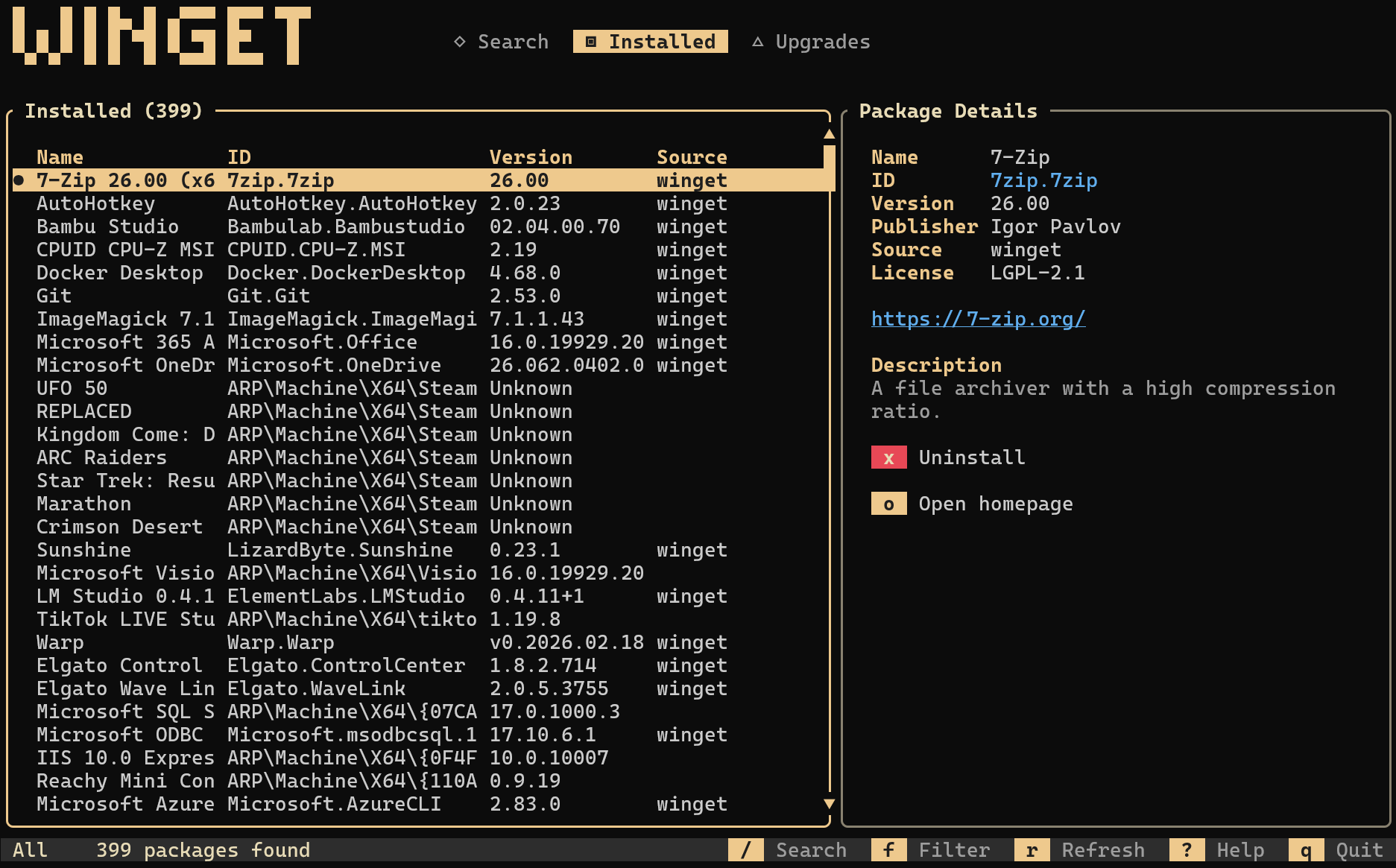
A terminal user interface for Windows Package Manager (winget). Search, install, uninstall, and upgrade Windows packages without leaving your terminal.


/ or sSIeconfig.tomlwinget-tui has been submitted to the Windows Package Manager community
repository as Hanselman.WingetTUI. Once the submission is merged, install it
with:
winget install Hanselman.WingetTUI
You do not need Rust to install or run winget-tui.
winget-tui-x64.exe for most Windows PCswinget-tui-arm64.exe for Windows on ARM.exe somewhere convenient, such as C:\Tools\winget-tui\..\winget-tui-x64.exe
Optionally rename the file to winget-tui.exe and add its folder to your PATH so you can run winget-tui from any terminal.
Building from source is only needed if you want to develop or test changes locally. It requires:
cargo, rustc)link.exe) and a Windows SDK (msvcrt.lib)If cargo is not already available, install Rust first:
winget install --id Rustlang.Rustup -e
If cargo run fails with linker 'link.exe' not found or cannot open file 'msvcrt.lib', install the C++ build tools:
winget install --id Microsoft.VisualStudio.2022.BuildTools -e
In the Visual Studio Build Tools installer, select Desktop development with C++ and make sure a Windows 10/11 SDK is selected in the optional components. Close and reopen your terminal, then run the app from the repo:
git clone https://github.com/shanselman/winget-tui.git
cd winget-tui
cargo run
For an optimized local build:
cargo build --release
.\target\release\winget-tui.exe
The binary will be at target\release\winget-tui.exe.
winget-tui
| Key | Action |
|---|---|
↑ / k | Move up |
↓ / j | Move down |
PgUp / PgDn | Jump one page |
Home / End | Jump to first / last |
← / → | Cycle views backward / forward |
Tab / Shift+Tab | Toggle focus between the package list and detail panel |
/ or s | Focus search in Search view, or local filter in Installed/Upgrades |
Enter | Submit search / show details |
f | Cycle source filter (All → winget → msstore) |
r | Refresh current view |
e | Export the current visible package list to CSV |
i | Install selected package |
I | Install a specific version of the selected package |
u | Upgrade selected package |
x | Uninstall selected package |
p | Pin / unpin the selected installed package (blocks upgrades) |
P | Cycle pin filter (All → Pinned only → Hide pinned) |
Space | Toggle selection for batch upgrade (Upgrades view) |
a | Select / deselect all packages (Upgrades view) |
U | Upgrade all selected packages (Upgrades view) |
o | Open package homepage in your browser |
c | Open release notes / changelog in your browser |
S | Cycle sort (Name↑ → Name↓ → ID↑ → ID↓ → Version↑ → Version↓ → off) |
? | Toggle help overlay |
q / Esc | Quit / close dialog |
Ctrl+C | Quit |
You can customize the startup view, source filter, sort order, and pinned-package filter with an optional config file:
%APPDATA%\winget-tui\config.toml$HOME/.config/winget-tui/config.tomlExample:
default_view = "upgrades"          # installed | search | upgrades
default_source = "winget"          # all | winget | msstore
default_sort = "name"              # name | name_desc | id | id_desc | version | version_desc | none
default_pin_filter = "hide_pinned" # all | pinned | hide_pinned
theme = "retro"                    # original | retro | nord | terminal
The terminal theme inherits the terminal profile's foreground and background
colors, preserving transparency, custom color schemes, and system contrast
settings. system is accepted as an alias.
winget-tui
├── src/
│   ├── main.rs          # Entry point, terminal setup/teardown
│   ├── app.rs           # App state, message passing, async coordination
│   ├── backend.rs       # WingetBackend trait (abstraction layer)
│   ├── cli_backend.rs   # CLI implementation (shells out to winget.exe)
│   ├── config.rs        # Config file parsing and startup defaults
│   ├── handler.rs       # Keyboard and mouse input handling
│   ├── models.rs        # Data types (Package, Source, Operation, etc.)
│   ├── theme.rs         # Semantic theme colors and shared styles
│   └── ui.rs            # Ratatui rendering (all UI components)
└── Cargo.toml
The backend is behind a trait (WingetBackend) to allow future implementations (e.g., COM API for better performance).
Licensed under the MIT License. Third-party dependencies and assets remain subject to their respective licenses.
1,406 followers · starred Jun 2026
932 followers · starred Jul 2026
54 followers · starred Feb 2026
220 followers · starred Feb 2026
A terminal UI for Windows Package Manager (winget) - search, install, upgrade, and manage packages
Rust
468
240 commits
updated Oct 19, 2026
New design and visual research by @niels9001.
A terminal user interface for Windows Package Manager (winget). Search, install, uninstall, and upgrade Windows packages without leaving your terminal.
/ or sSIeconfig.tomlwinget-tui has been submitted to the Windows Package Manager community
repository as Hanselman.WingetTUI. Once the submission is merged, install it
with:
winget install Hanselman.WingetTUI
You do not need Rust to install or run winget-tui.
winget-tui-x64.exe for most Windows PCswinget-tui-arm64.exe for Windows on ARM.exe somewhere convenient, such as C:\Tools\winget-tui\..\winget-tui-x64.exe
Optionally rename the file to winget-tui.exe and add its folder to your PATH so you can run winget-tui from any terminal.
Building from source is only needed if you want to develop or test changes locally. It requires:
cargo, rustc)link.exe) and a Windows SDK (msvcrt.lib)If cargo is not already available, install Rust first:
winget install --id Rustlang.Rustup -e
If cargo run fails with linker 'link.exe' not found or cannot open file 'msvcrt.lib', install the C++ build tools:
winget install --id Microsoft.VisualStudio.2022.BuildTools -e
In the Visual Studio Build Tools installer, select Desktop development with C++ and make sure a Windows 10/11 SDK is selected in the optional components. Close and reopen your terminal, then run the app from the repo:
git clone https://github.com/shanselman/winget-tui.git
cd winget-tui
cargo run
For an optimized local build:
cargo build --release
.\target\release\winget-tui.exe
The binary will be at target\release\winget-tui.exe.
winget-tui
| Key | Action |
|---|---|
↑ / k | Move up |
↓ / j | Move down |
PgUp / PgDn | Jump one page |
Home / End | Jump to first / last |
← / → | Cycle views backward / forward |
Tab / Shift+Tab | Toggle focus between the package list and detail panel |
/ or s | Focus search in Search view, or local filter in Installed/Upgrades |
Enter | Submit search / show details |
f | Cycle source filter (All → winget → msstore) |
r | Refresh current view |
e | Export the current visible package list to CSV |
i | Install selected package |
I | Install a specific version of the selected package |
u | Upgrade selected package |
x | Uninstall selected package |
p | Pin / unpin the selected installed package (blocks upgrades) |
P | Cycle pin filter (All → Pinned only → Hide pinned) |
Space | Toggle selection for batch upgrade (Upgrades view) |
a | Select / deselect all packages (Upgrades view) |
U | Upgrade all selected packages (Upgrades view) |
o | Open package homepage in your browser |
c | Open release notes / changelog in your browser |
S | Cycle sort (Name↑ → Name↓ → ID↑ → ID↓ → Version↑ → Version↓ → off) |
? | Toggle help overlay |
q / Esc | Quit / close dialog |
Ctrl+C | Quit |
You can customize the startup view, source filter, sort order, and pinned-package filter with an optional config file:
%APPDATA%\winget-tui\config.toml$HOME/.config/winget-tui/config.tomlExample:
default_view = "upgrades"          # installed | search | upgrades
default_source = "winget"          # all | winget | msstore
default_sort = "name"              # name | name_desc | id | id_desc | version | version_desc | none
default_pin_filter = "hide_pinned" # all | pinned | hide_pinned
theme = "retro"                    # original | retro | nord | terminal
The terminal theme inherits the terminal profile's foreground and background
colors, preserving transparency, custom color schemes, and system contrast
settings. system is accepted as an alias.
winget-tui
├── src/
│   ├── main.rs          # Entry point, terminal setup/teardown
│   ├── app.rs           # App state, message passing, async coordination
│   ├── backend.rs       # WingetBackend trait (abstraction layer)
│   ├── cli_backend.rs   # CLI implementation (shells out to winget.exe)
│   ├── config.rs        # Config file parsing and startup defaults
│   ├── handler.rs       # Keyboard and mouse input handling
│   ├── models.rs        # Data types (Package, Source, Operation, etc.)
│   ├── theme.rs         # Semantic theme colors and shared styles
│   └── ui.rs            # Ratatui rendering (all UI components)
└── Cargo.toml
The backend is behind a trait (WingetBackend) to allow future implementations (e.g., COM API for better performance).
Licensed under the MIT License. Third-party dependencies and assets remain subject to their respective licenses.
1,406 followers · starred Jun 2026
932 followers · starred Jul 2026
54 followers · starred Feb 2026
220 followers · starred Feb 2026






