Legacy full-app React on Rails tutorial repo and live demo. See reactonrails.com/examples for current maintained demos.
See the code

Control Plane offers a viable, cost-saving alternative to Heroku, especially when using the cpflow gem to deploy to Control Plane.
ShakaCode recently migrated HiChee.com to Control Plane, resulting in a two-thirds reduction in server hosting costs!
See ./.controlplane/readme.md for local cpflow setup plus the shared cpflow-* GitHub Actions flow for review apps, automatic staging deploys, and manual promotion to production.
The instructions leverage the cpflow CLI, with source code and many more tips on how to migrate from Heroku to Control Plane
in https://github.com/shakacode/heroku-to-control-plane.
React on Rails Pro provides Node server rendering and other performance enhancements for React on Rails.
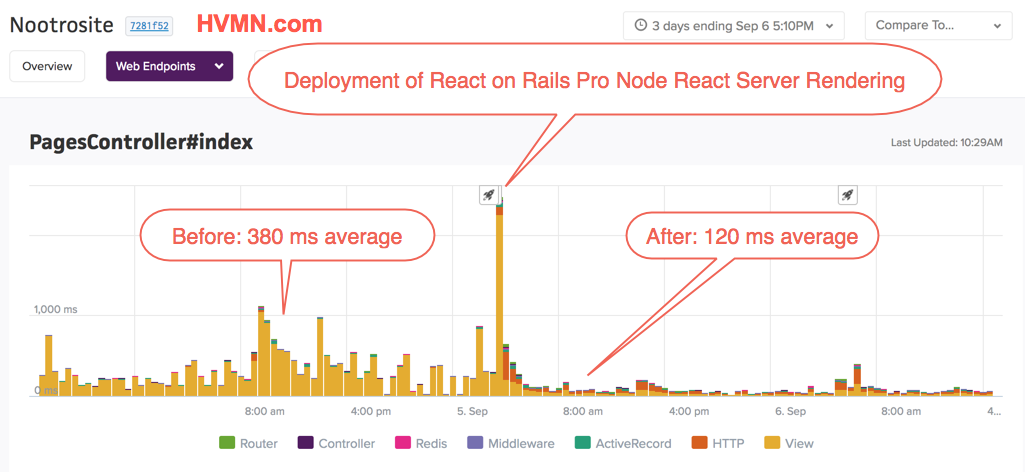
For more information, see the React on Rails Pro Docs.
ShakaCode can also help you with your custom software development needs. We specialize in marketplace and e-commerce applications that utilize both Rails and React. We can even leverage our code for HiChee.com for your app!
See the ShakaCode Client Engagement Model article to learn how we can work together.
From Joel Hooks, Co-Founder, Chief Nerd at egghead.io, January 30, 2017:

For more testimonials, see Live Projects and Kudos.
You can see this tutorial live here: http://reactrails.com/
/server-components page.'use client' directives splitting a tree between server-rendered and client-hydrated components (the "donut pattern").See package.json and Gemfile for versions
v22.3.0 or above. Be sure that you have Node installed! We suggest using nvm and running nvm list to check the active Node version. See this article Updating and using nvm.which redis-server. If missing and on MacOS, install with Homebrew (brew install redis)git clone git@github.com:shakacode/react-webpack-rails-tutorial.gitcd react-webpack-rails-tutorialbundle installyarnrake db:setuprails start
rakeyarn runforeman start -f Procfile.devforeman start -f Procfile.hotStart the full development stack with foreman start -f Procfile.dev, then open http://localhost:4000 to iterate on the JavaScript client with hot reloading.
We're now using Rspack for all Sass and JavaScript assets so we can do CSS Modules within Rails!
heroku buildpacks:set heroku/ruby --app your-app
heroku buildpacks:add --index 1 heroku/nodejs --app your-app
heroku buildpacks:set --index 3 https://github.com/sreid/heroku-buildpack-sourceversion.git --app your-app
See Yak Shaving Failing Integration Tests with React and Rails
Be sure to see Integration Test Notes for advice on running your integration tests.
Testing Mode: When running tests, it is useful to run foreman start -f Procfile.spec in order to have Rspack automatically recompile the static bundles. Rspec is configured to automatically check whether or not this process is running. If it is not, it will automatically rebuild the bundle to ensure you are not running tests on stale client code. This is achieved via the ReactOnRails::TestHelper.configure_rspec_to_compile_assets(config)
line in the rails_helper.rb file. If you are using this project as an example and are not using RSpec, you may want to implement similar logic in your own project.
This project is standardized on Rspack with Shakapacker.
Bundler selection is fixed in config/shakapacker.yml:
assets_bundler: rspack
react_on_rails_pro gem: 17.1.0react-on-rails-pro npm package: 17.1.0react-on-rails-pro-node-renderer npm package: 17.1.0react-on-rails-rsc npm package: 19.3.0shakapacker gem/npm package: 10.2.0@rspack/core and @rspack/cli: 2.0.4react, react-dom, and react-server-dom-webpack: 19.2.8 (exact RC validation pins)Currently on webpack, temporarily. The repo is built on webpack instead of rspack while shakacode/react_on_rails_rsc#29 ships rspack support for the RSC plugin. Tracked as a
TODOinconfig/shakapacker.yml; flips back once that lands.
All bundler configuration is in config/webpack/:
webpackConfig.js — Composer; produces all bundles (client + SSR + RSC)commonWebpackConfig.js — Shared base configurationclientWebpackConfig.js — Client bundle (browser, with HMR + RSC client-references)serverWebpackConfig.js — SSR bundle (runs in the Pro Node Renderer)rscWebpackConfig.js — React Server Components bundle (runs in the Pro Node Renderer with the react-server resolve condition)bundlerUtils.js — Bundler detection helper (webpack vs rspack)development.js, production.js, test.js — Environment-specific tweaksThis project demonstrates React Server Components running on top of the React on Rails Pro Node Renderer. With the dev stack running, visit /server-components to see the demo.
| Section | What it demonstrates |
|---|---|
| Server Environment | A server-only component reads Node's os module and lodash; neither library reaches the browser. |
| Interactive Client Component | A 'use client' component nested inside a server-component tree, hydrated normally — the "donut pattern". |
| Live Server Activity | Client-driven server-component re-fetching via useRSC().refetchComponent + RSCRoute, with react-error-boundary catching simulated errors and a Retry button. |
| Streamed Comments | An async server component receives comments as props from the controller and streams in via <Suspense> after the page shell. |
The app produces three bundles, all sharing the client/app/packs/server-bundle.js entry:
react-client-manifest.json for client-component resolution.react-server resolve condition and an extra loader that classifies 'use client' modules as client references.The three bundles are gated by env vars:
| Env var | Result |
|---|---|
(default for bin/shakapacker-dev-server) | Client bundle only |
SERVER_BUNDLE_ONLY=yes | SSR bundle only |
RSC_BUNDLE_ONLY=yes | RSC bundle only |
(none, default for bin/shakapacker) | All three |
Procfile.dev runs three watchers (wp-client, wp-server, wp-rsc), each gated by its own env var, alongside the Rails server and the Pro Node Renderer.
In addition to the Basic Demo Setup prerequisites:
REACT_ON_RAILS_PRO_LICENSE environment variable. Development and test environments don't require one (the Pro engine logs an info-level notice instead). Production deploys must set it to a JWT from pro.reactonrails.com.RENDERER_PASSWORD (shared between Rails and the Node Renderer for SSR auth). The dev/test default is provided in .env.example; production must override.RSC_SUSPENSE_DEMO_DELAY=true adds a small artificial server delay so Suspense fallbacks are visible during the demo. Off by default; enabled on the QA review-app.'use client' directive rulesCommentsFeed)This project uses Thruster, a zero-config HTTP/2 proxy from Basecamp, for optimized asset delivery and improved performance.
public/ directoryCompared to running Puma directly with --early-hints:
Thruster is already integrated into all Procfiles:
# Development with HMR
foreman start -f Procfile.dev

# Production
web: bundle exec thrust bin/rails server
The server automatically benefits from HTTP/2, caching, and compression without any additional configuration.
For detailed information, troubleshooting, and advanced configuration options, see docs/thruster.md.
This example project uses mainly Tailwind CSS for styling. Besides this, it also demonstrates Sass and CSS modules, particularly for some CSS transitions.
We're using Rspack to handle Sass assets so that we can use CSS modules. The best way to understand how we're handling assets is to closely follow this example. We'll be working on more docs soon. If you'd like to give us a hand, that's a great way to learn about this!
For example in client/app/bundles/comments/components/CommentBox/CommentBox.jsx, see how we use standard JavaScript import syntax to refer to class names that come from CSS modules:
import css from './CommentBox.module.scss';

export default class CommentBox extends React.Component {
  render() {
    const { actions, data } = this.props;
    const cssTransitionGroupClassNames = {
      enter: css.elementEnter,
      enterActive: css.elementEnterActive,
      exit: css.elementLeave,
      exitActive: css.elementLeaveActive,
    };
  }
}
The tutorial makes use of a custom font OpenSans-Light. We're doing this to show how to add assets for the CSS processing. The font files are located under client/app/assets/fonts and are loaded by both the Rails asset pipeline and the Rspack HMR server.
bundle exec foreman start -f <Procfile>
Procfile.dev: Starts the full development stack with Hot Reloading. Six processes:
rescript — ReScript watch moderails — Rails server via Thruster on port 3000wp-client — Shakapacker dev server with HMR (client bundle)wp-server — Shakapacker watcher for the SSR bundlewp-rsc — Shakapacker watcher for the React Server Components bundlenode-renderer — React on Rails Pro Node Renderer on port 3800Procfile.dev-static: Starts the Rails server and generates static assets that are used for tests.The Shaka Code team!, led by Justin Gordon, along with with many others. See contributors.md
Special thanks to JetBrains for their great tools: RubyMine and WebStorm. Some developers of this project use RubyMine at the top level, mostly for Ruby work, and we use WebStorm opened up to the client directory to focus on JSX and Sass files.
We're looking for great developers that want to work with Rails + React (and react-native!) with a remote-first, distributed, worldwide team, for our own products, client work, and open source. More info here.
Thank you for considering using React on Rails.
Aloha and best wishes from the ShakaCode team!
1,857 followers · starred Oct 2025
4,048 followers · starred May 2015
156 followers · starred Aug 2026
45 followers · starred Oct 2016
Legacy full-app React on Rails tutorial repo and live demo. See reactonrails.com/examples for current maintained demos.
See the code
Control Plane offers a viable, cost-saving alternative to Heroku, especially when using the cpflow gem to deploy to Control Plane.
ShakaCode recently migrated HiChee.com to Control Plane, resulting in a two-thirds reduction in server hosting costs!
See ./.controlplane/readme.md for local cpflow setup plus the shared cpflow-* GitHub Actions flow for review apps, automatic staging deploys, and manual promotion to production.
The instructions leverage the cpflow CLI, with source code and many more tips on how to migrate from Heroku to Control Plane
in https://github.com/shakacode/heroku-to-control-plane.
React on Rails Pro provides Node server rendering and other performance enhancements for React on Rails.
For more information, see the React on Rails Pro Docs.
ShakaCode can also help you with your custom software development needs. We specialize in marketplace and e-commerce applications that utilize both Rails and React. We can even leverage our code for HiChee.com for your app!
See the ShakaCode Client Engagement Model article to learn how we can work together.
From Joel Hooks, Co-Founder, Chief Nerd at egghead.io, January 30, 2017:
For more testimonials, see Live Projects and Kudos.
You can see this tutorial live here: http://reactrails.com/
/server-components page.'use client' directives splitting a tree between server-rendered and client-hydrated components (the "donut pattern").See package.json and Gemfile for versions
v22.3.0 or above. Be sure that you have Node installed! We suggest using nvm and running nvm list to check the active Node version. See this article Updating and using nvm.which redis-server. If missing and on MacOS, install with Homebrew (brew install redis)git clone git@github.com:shakacode/react-webpack-rails-tutorial.gitcd react-webpack-rails-tutorialbundle installyarnrake db:setuprails start
rakeyarn runforeman start -f Procfile.devforeman start -f Procfile.hotStart the full development stack with foreman start -f Procfile.dev, then open http://localhost:4000 to iterate on the JavaScript client with hot reloading.
We're now using Rspack for all Sass and JavaScript assets so we can do CSS Modules within Rails!
heroku buildpacks:set heroku/ruby --app your-app
heroku buildpacks:add --index 1 heroku/nodejs --app your-app
heroku buildpacks:set --index 3 https://github.com/sreid/heroku-buildpack-sourceversion.git --app your-app
See Yak Shaving Failing Integration Tests with React and Rails
Be sure to see Integration Test Notes for advice on running your integration tests.
Testing Mode: When running tests, it is useful to run foreman start -f Procfile.spec in order to have Rspack automatically recompile the static bundles. Rspec is configured to automatically check whether or not this process is running. If it is not, it will automatically rebuild the bundle to ensure you are not running tests on stale client code. This is achieved via the ReactOnRails::TestHelper.configure_rspec_to_compile_assets(config)
line in the rails_helper.rb file. If you are using this project as an example and are not using RSpec, you may want to implement similar logic in your own project.
This project is standardized on Rspack with Shakapacker.
Bundler selection is fixed in config/shakapacker.yml:
assets_bundler: rspack
react_on_rails_pro gem: 17.1.0react-on-rails-pro npm package: 17.1.0react-on-rails-pro-node-renderer npm package: 17.1.0react-on-rails-rsc npm package: 19.3.0shakapacker gem/npm package: 10.2.0@rspack/core and @rspack/cli: 2.0.4react, react-dom, and react-server-dom-webpack: 19.2.8 (exact RC validation pins)Currently on webpack, temporarily. The repo is built on webpack instead of rspack while shakacode/react_on_rails_rsc#29 ships rspack support for the RSC plugin. Tracked as a
TODOinconfig/shakapacker.yml; flips back once that lands.
All bundler configuration is in config/webpack/:
webpackConfig.js — Composer; produces all bundles (client + SSR + RSC)commonWebpackConfig.js — Shared base configurationclientWebpackConfig.js — Client bundle (browser, with HMR + RSC client-references)serverWebpackConfig.js — SSR bundle (runs in the Pro Node Renderer)rscWebpackConfig.js — React Server Components bundle (runs in the Pro Node Renderer with the react-server resolve condition)bundlerUtils.js — Bundler detection helper (webpack vs rspack)development.js, production.js, test.js — Environment-specific tweaksThis project demonstrates React Server Components running on top of the React on Rails Pro Node Renderer. With the dev stack running, visit /server-components to see the demo.
| Section | What it demonstrates |
|---|---|
| Server Environment | A server-only component reads Node's os module and lodash; neither library reaches the browser. |
| Interactive Client Component | A 'use client' component nested inside a server-component tree, hydrated normally — the "donut pattern". |
| Live Server Activity | Client-driven server-component re-fetching via useRSC().refetchComponent + RSCRoute, with react-error-boundary catching simulated errors and a Retry button. |
| Streamed Comments | An async server component receives comments as props from the controller and streams in via <Suspense> after the page shell. |
The app produces three bundles, all sharing the client/app/packs/server-bundle.js entry:
react-client-manifest.json for client-component resolution.react-server resolve condition and an extra loader that classifies 'use client' modules as client references.The three bundles are gated by env vars:
| Env var | Result |
|---|---|
(default for bin/shakapacker-dev-server) | Client bundle only |
SERVER_BUNDLE_ONLY=yes | SSR bundle only |
RSC_BUNDLE_ONLY=yes | RSC bundle only |
(none, default for bin/shakapacker) | All three |
Procfile.dev runs three watchers (wp-client, wp-server, wp-rsc), each gated by its own env var, alongside the Rails server and the Pro Node Renderer.
In addition to the Basic Demo Setup prerequisites:
REACT_ON_RAILS_PRO_LICENSE environment variable. Development and test environments don't require one (the Pro engine logs an info-level notice instead). Production deploys must set it to a JWT from pro.reactonrails.com.RENDERER_PASSWORD (shared between Rails and the Node Renderer for SSR auth). The dev/test default is provided in .env.example; production must override.RSC_SUSPENSE_DEMO_DELAY=true adds a small artificial server delay so Suspense fallbacks are visible during the demo. Off by default; enabled on the QA review-app.'use client' directive rulesCommentsFeed)This project uses Thruster, a zero-config HTTP/2 proxy from Basecamp, for optimized asset delivery and improved performance.
public/ directoryCompared to running Puma directly with --early-hints:
Thruster is already integrated into all Procfiles:
# Development with HMR
foreman start -f Procfile.dev

# Production
web: bundle exec thrust bin/rails server
The server automatically benefits from HTTP/2, caching, and compression without any additional configuration.
For detailed information, troubleshooting, and advanced configuration options, see docs/thruster.md.
This example project uses mainly Tailwind CSS for styling. Besides this, it also demonstrates Sass and CSS modules, particularly for some CSS transitions.
We're using Rspack to handle Sass assets so that we can use CSS modules. The best way to understand how we're handling assets is to closely follow this example. We'll be working on more docs soon. If you'd like to give us a hand, that's a great way to learn about this!
For example in client/app/bundles/comments/components/CommentBox/CommentBox.jsx, see how we use standard JavaScript import syntax to refer to class names that come from CSS modules:
import css from './CommentBox.module.scss';

export default class CommentBox extends React.Component {
  render() {
    const { actions, data } = this.props;
    const cssTransitionGroupClassNames = {
      enter: css.elementEnter,
      enterActive: css.elementEnterActive,
      exit: css.elementLeave,
      exitActive: css.elementLeaveActive,
    };
  }
}
The tutorial makes use of a custom font OpenSans-Light. We're doing this to show how to add assets for the CSS processing. The font files are located under client/app/assets/fonts and are loaded by both the Rails asset pipeline and the Rspack HMR server.
bundle exec foreman start -f <Procfile>
Procfile.dev: Starts the full development stack with Hot Reloading. Six processes:
rescript — ReScript watch moderails — Rails server via Thruster on port 3000wp-client — Shakapacker dev server with HMR (client bundle)wp-server — Shakapacker watcher for the SSR bundlewp-rsc — Shakapacker watcher for the React Server Components bundlenode-renderer — React on Rails Pro Node Renderer on port 3800Procfile.dev-static: Starts the Rails server and generates static assets that are used for tests.The Shaka Code team!, led by Justin Gordon, along with with many others. See contributors.md
Special thanks to JetBrains for their great tools: RubyMine and WebStorm. Some developers of this project use RubyMine at the top level, mostly for Ruby work, and we use WebStorm opened up to the client directory to focus on JSX and Sass files.
We're looking for great developers that want to work with Rails + React (and react-native!) with a remote-first, distributed, worldwide team, for our own products, client work, and open source. More info here.
Thank you for considering using React on Rails.
Aloha and best wishes from the ShakaCode team!
1,857 followers · starred Oct 2025
4,048 followers · starred May 2015
156 followers · starred Aug 2026
45 followers · starred Oct 2016