
grep for meaning: filter, score and classify lines with a plain-English question. Local CPU decision model (Laya, ONNX), single Rust binary.
Rust
1
3 commits
updated Sep 26, 2026
See what people are saying
README
gutcheck
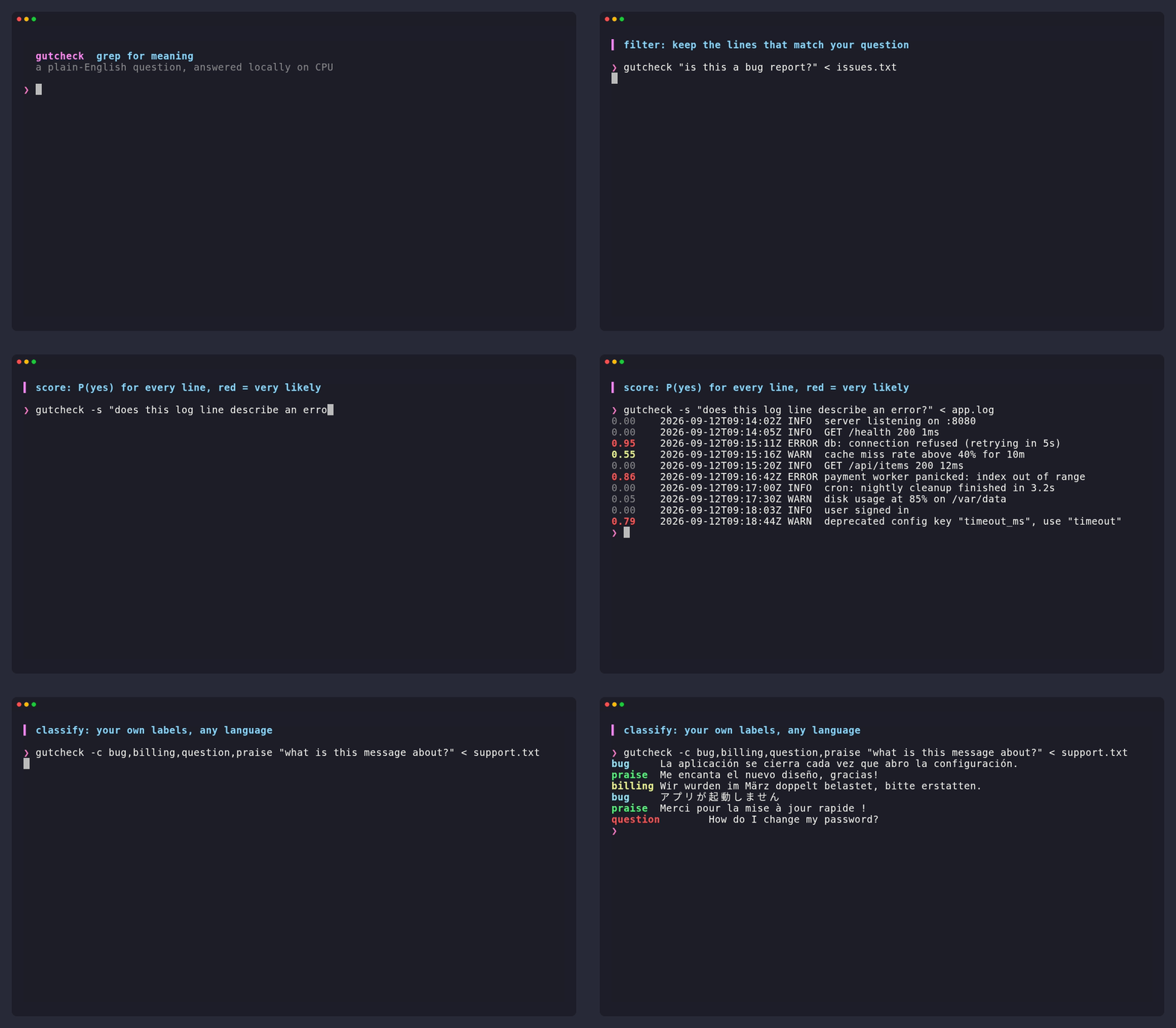
grep for meaning. Filter, score and classify lines with a plain-English question. One binary, runs locally on CPU. No API key, no Python, no server.
cargo install --git https://github.com/sfmqrb/gutcheck
Or download a binary (Linux x86_64, macOS arm64) from releases. The first run downloads a 1.3 GB model to $XDG_CACHE_HOME/gutcheck.
Use
# keep the lines that match
cat issues.txt | gutcheck "is this a bug report?"

# P(yes) for every line (colored on a terminal)
gutcheck -s "does this log line describe an error?" < app.log

# your own labels, any language
gutcheck -c bug,billing,question,praise "what is this message about?" < support.txt

# the opposite, with a stricter cut-off
tail -f app.log | gutcheck -v -t 0.7 "is this routine noise?"
One line in, one line out, streamed, so tail -f and | head work. Like grep, filter mode exits 1 when nothing matched. NO_COLOR=1 turns colors off; pipes are never colored.
Know before you use it
About 10 lines per second on a laptop CPU, and zero-shot accuracy is modest: check it on your data, and use -s to see scores instead of trusting the 0.5 cut-off. Details in docs/speed-and-limits.md.
More
How it works and credits · Speed and limits
gutcheck is independent and not affiliated with the Laya or Jev authors. MIT licensed; the Apache-2.0 model is downloaded at runtime.
Contributors

3 commits
Similar repos


Languages
Rust
100.0%
grep for meaning: filter, score and classify lines with a plain-English question. Local CPU decision model (Laya, ONNX), single Rust binary.
Rust
1
3 commits
updated Sep 26, 2026
See what people are saying
README
gutcheck
grep for meaning. Filter, score and classify lines with a plain-English question. One binary, runs locally on CPU. No API key, no Python, no server.
cargo install --git https://github.com/sfmqrb/gutcheck
Or download a binary (Linux x86_64, macOS arm64) from releases. The first run downloads a 1.3 GB model to $XDG_CACHE_HOME/gutcheck.
Use
# keep the lines that match
cat issues.txt | gutcheck "is this a bug report?"

# P(yes) for every line (colored on a terminal)
gutcheck -s "does this log line describe an error?" < app.log

# your own labels, any language
gutcheck -c bug,billing,question,praise "what is this message about?" < support.txt

# the opposite, with a stricter cut-off
tail -f app.log | gutcheck -v -t 0.7 "is this routine noise?"
One line in, one line out, streamed, so tail -f and | head work. Like grep, filter mode exits 1 when nothing matched. NO_COLOR=1 turns colors off; pipes are never colored.
Know before you use it
About 10 lines per second on a laptop CPU, and zero-shot accuracy is modest: check it on your data, and use -s to see scores instead of trusting the 0.5 cut-off. Details in docs/speed-and-limits.md.
More
How it works and credits · Speed and limits
gutcheck is independent and not affiliated with the Laya or Jev authors. MIT licensed; the Apache-2.0 model is downloaded at runtime.
Similar repos
Contributors
3 commits
Languages
Rust
100.0%