Serverless GraphQL Examples for AWS AppSync and Apollo
See the code📦 Archived - This repository is archived and preserved for reference only. No updates, issues, or pull requests will be accepted. If you have questions, please reach out to our support team.
Part 1: Running a scalable & reliable GraphQL endpoint with Serverless
Part 2: AppSync Backend: AWS Managed GraphQL Service
Part 3: AppSync Frontend: AWS Managed GraphQL Service
This starter kit is an opinionated set of tools combined to help you get started building a Serverless application with a GraphQL endpoint and deploy them to production in minutes.
This example uses the following technologies:
Frontend
Backend
Other Utilities and Integrations
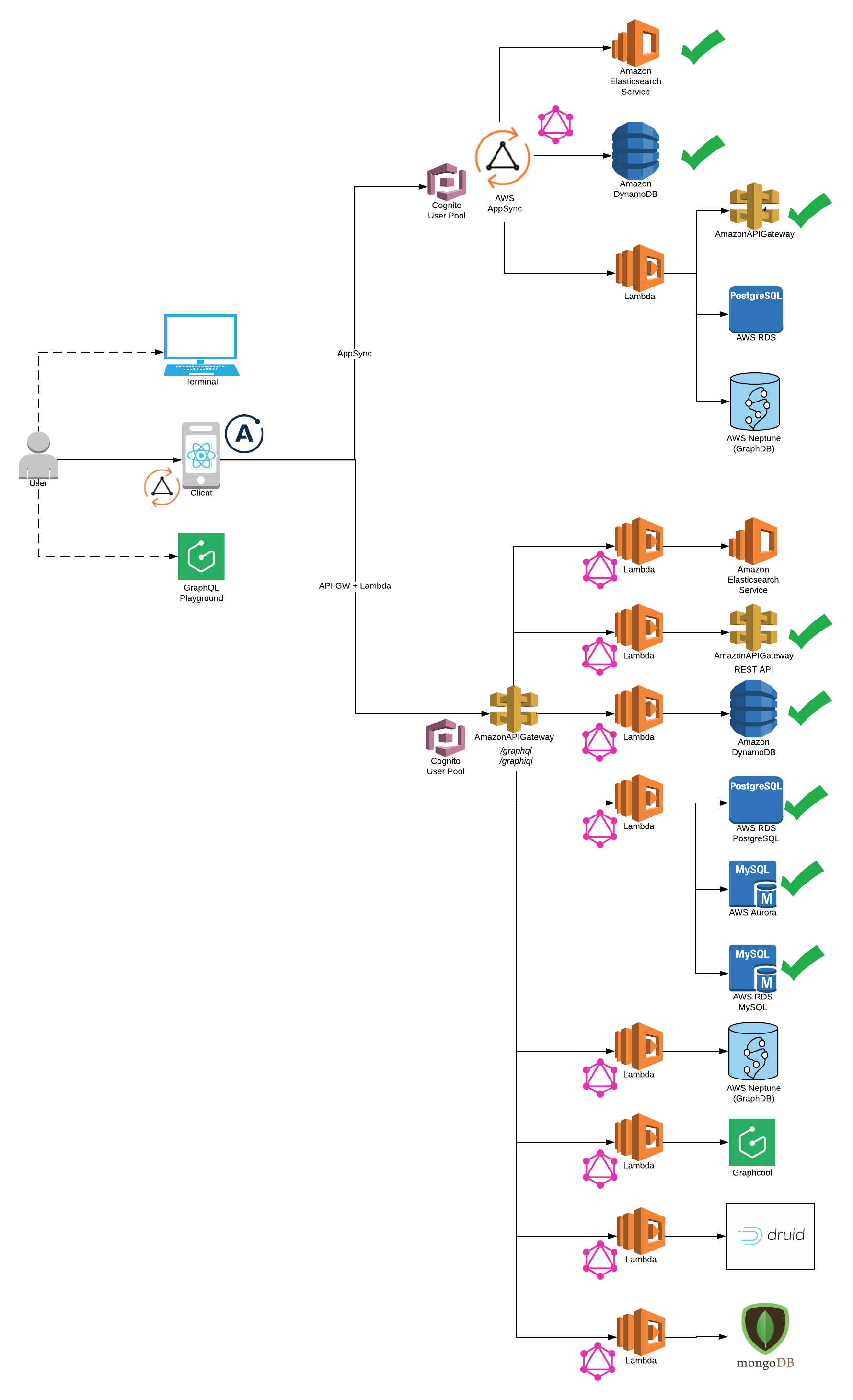
You need to have Node 6 or higher installed.
npm install -g serverless
npm install -g yarn
npm install -g netlify-cli
Install Dependencies.
yarn install

Please note: AWS CLI is required to be installed on your system
AWS Appsync (Serverless Offline does not support Appsync at this point)
Lambda Backend (Serverless Offline Supported)
cd app-backend/rest-api
yarn start
Generate your Consumer Key and Secret Key for a Twitter App and update config
DynamoDB
cd app-backend/dynamodb
yarn start
RDS
cd app-backend/rds
yarn start
For Appsync Backend please select Appsync Client Integration:
cd app-client/appsync-client/
yarn start
For Lambda Backend please select Apollo Client Integration:
cd app-client/apollo-client/
yarn start
Also, please make sure GraphQL endpoint is configured correctly in config/security.env.local to run client on local.
http://localhost:4000/graphiql
http://localhost:4000/playground
rest-api and dynamodb backends route GET and POST to the same /graphql endpoint handler
http://localhost:4000/graphql
{
  getUserInfo(handle: "Madalyn61") {
    name
    tweets {
      items {
        retweeted
        retweet_count
        favorited
        tweet
      }
    }
    topTweet {
      retweeted
      retweet_count
      favorited
    }
  }
}
If you've followed me this far, DynamoDB will now be available and running on your local machine at http://localhost:8000/shell:
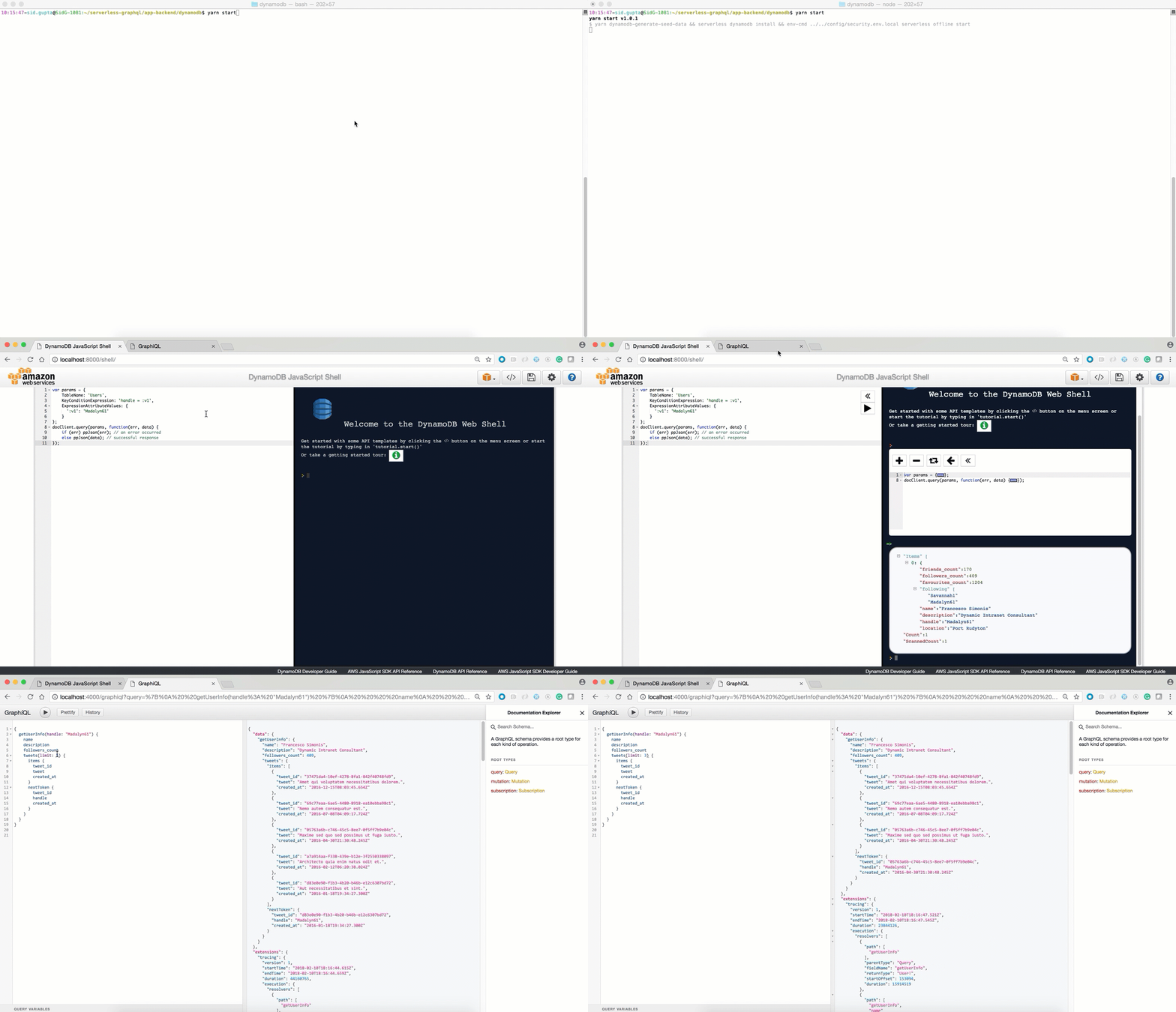
Configure your AWS keys. Here you can find a 2min walkthrough how to do retrieve the keys.
sls config credentials --provider aws --key <your_aws_access_key> --secret <your_aws_secret_key>

You need to make sure you have access to your deployed lambda functions.
Note Please make sure latest serverless package is installed npm install -g serverless@latest
To use aws appsync you will need to create cognito user pool to authenticate the API Reference
- AWS DynamoDB
    cd app-backend/appsync/dynamodb
    yarn deploy-prod
    yarn deploy-appsync

- AWS ElasticSearch

    cd app-backend/appsync/dynamo-elasticsearch-lambda
    yarn deploy-prod
    yarn deploy-appsync

- AWS Lambda

    cd app-backend/appsync/lambda
    yarn deploy-prod
    yarn deploy-appsync
Lambda Backend (Serverless Offline Supported)
Twitter Rest API
cd app-backend/rest-api
yarn deploy-prod
DynamoDB
cd app-backend/dynamodb
yarn deploy-prod
RDS
Create RDS Instance. For example - PostGres Tutorial
Please make sure connectivity to production RDS instance works (For example: test via razersql)
Edit the config/security.env.prod file and replace the DATABASE_URL variable with your amazon rds endpoint (eg: postgres://${username}:{password}@${endpoint):5432/${dbName}).
Run the deployment command
cd app-backend/rds
yarn deploy-prod

Note:
AWS S3
First you will need to choose custom s3 bucket name for client. For ex: s3-firstname-serverless-graphql. Please note that bucket name must be unique across all aws buckets.
Now, in app-client/<client-name>/serverless.yml edit the custom.client.bucketName property and replace it the bucket name above.
Now, in app-client/<client-name>/package.json edit the homepage property with https://${yourBucketName}.s3-website-us-east-1.amazonaws.com. For ex: https://s3-bucketname-serverless-graphql.s3-website-us-east-1.amazonaws.com
Run the deployment command
cd app-client/<client-name>/
yarn deploy-s3
# Your deployment url will be printed on the console
Your deployment url will be : https://s3.amazonaws.com/[bucket-name]/index.html
Netlify
First you will need to create a new account. Please see https://www.netlify.com/docs/cli/ for details.
Remove homepage property in app-client/<client-name>/package.json. This property is not required while deploying to netlify but is required for aws s3 deployment.
The first time you use the cli tool, you’ll be asked to authenticate through the browser. After you authenticate netlify will store an access token in a global ~/.netlify/config
Run deployment command
cd app-client/<client-name>/
yarn deploy-netlify
Your deployment url will be printed on the console
type Mutation {
	# Create a tweet for a user
	# consumer keys and tokens are not required for dynamo integration
	createTweet(
		tweet: String!,
		consumer_key: String,
		consumer_secret: String,
		access_token_key: String,
		access_token_secret: String,
		created_at: String!
	): Tweet!

	# Delete User Tweet
	deleteTweet(
	    tweet_id: String!,
	    consumer_key: String,
        consumer_secret: String,
        access_token_key: String,
        access_token_secret: String
    ): Tweet!

	# Retweet existing Tweet
	reTweet(
	    tweet_id: String!,
	    consumer_key: String,
        consumer_secret: String,
        access_token_key: String,
        access_token_secret: String
    ): Tweet!

	# Update existing Tweet
	updateTweet(tweet_id: String!, tweet: String!): Tweet!

    # Create user info is available in dynamo integration
	updateUserInfo(
		location: String!,
		description: String!,
		name: String!,
		followers_count: Int!,
		friends_count: Int!,
		favourites_count: Int!,
		followers: [String!]!
	): User!
}

type Query {
	meInfo(consumer_key: String, consumer_secret: String): User!
	getUserInfo(handle: String!, consumer_key: String, consumer_secret: String): User!

	# search functionality is available in elasticsearch integration
	searchAllTweetsByKeyword(keyword: String!): TweetConnection
}

type Subscription {
	addTweet: Tweet
		@aws_subscribe(mutations: ["createTweet"])
}

type Tweet {
	tweet_id: String!
	tweet: String!
	retweeted: Boolean
	retweet_count: Int
	favorited: Boolean
	created_at: String!
}

type TweetConnection {
	items: [Tweet!]!
	nextToken: String
}

type User {
	name: String!
	handle: String!
	location: String!
	description: String!
	followers_count: Int!
	friends_count: Int!
	favourites_count: Int!
	followers: [String!]!
	topTweet: Tweet
	tweets(limit: Int!, nextToken: String): TweetConnection

	# search functionality is available in elasticsearch integration
    searchTweetsByKeyword(keyword: String!): TweetConnection
}

schema {
	query: Query
	mutation: Mutation
	subscription: Subscription
}
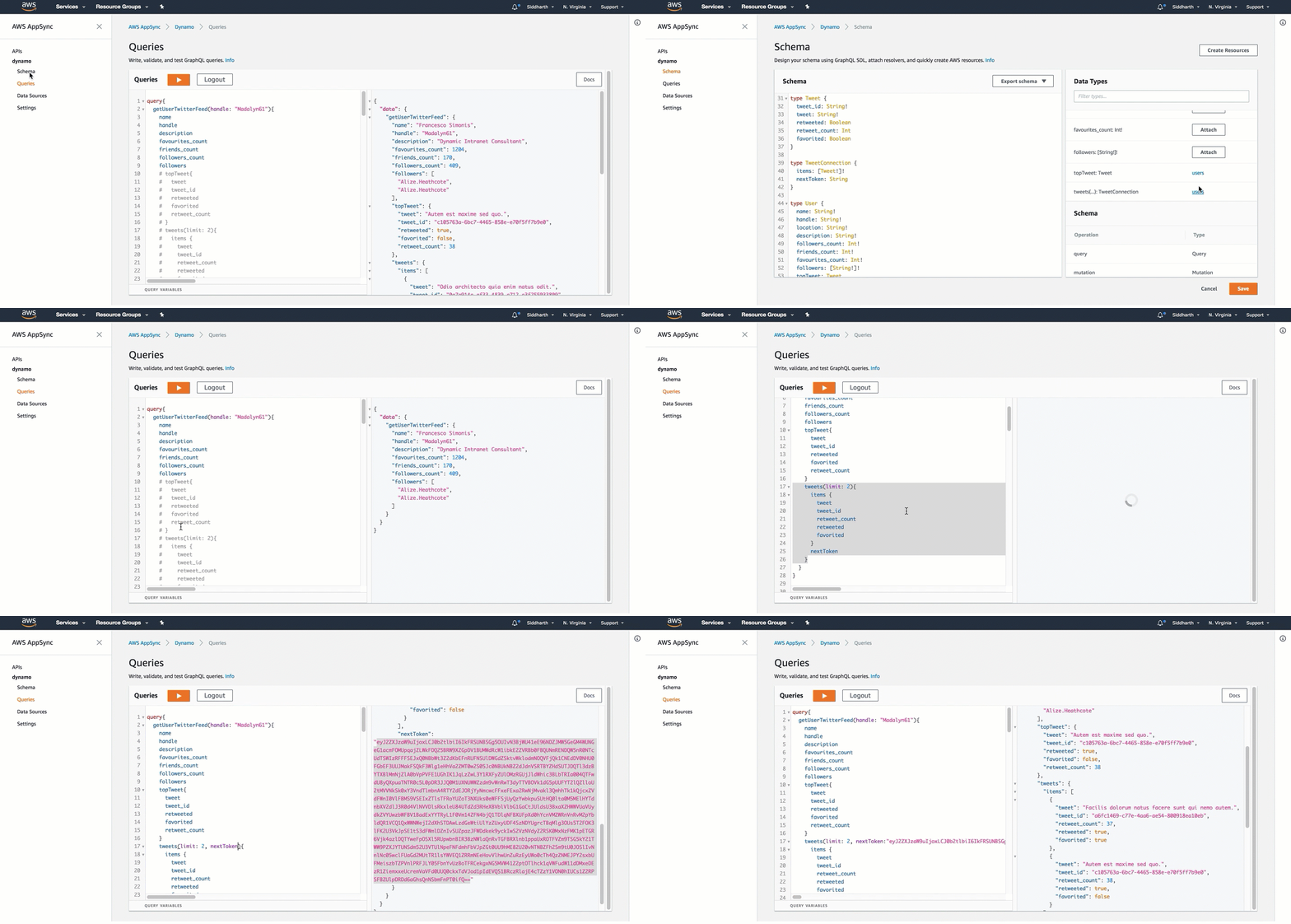
.
├── /app-client/                             # React JS Client Integrations
│   ├── /appsync-client                         # Appsync Client Itegrations
│   │   ├── /public/                            # front End Utils
│   │   │   ├── /index.html                     # main html file to render react app
│   │   │   ├── /...                            # front end metadata
│   │   ├── /src/                               # react app code logic
│   │   │   ├── /components/                    # react components
│   │   │   ├── /App.js                         # react application logic
│   │   │   ├── /index.js                       # react dom render
│   │   │   ├── /aws-exports.js                 # AWS Authentication
│   │   │   ├── /...                            # etc.
│   │   ├── /package.json                       # react app dependencies
│   │   ├── /serverless.yml                     # Serverless yaml for AWS deployment
│   ├── /apollo-client                       # Apollo Client Itegrations
│   │   ├── /public/                            # front End Utils
│   │   │   ├── /index.html                     # main html file to render react app
│   │   │   ├── /...                            # front end metadata
│   │   ├── /src/                               # react app code logic
│   │   │   ├── /components/                    # react components
│   │   │   ├── /App.js                         # react application logic
│   │   │   ├── /index.js                       # react dom render
│   │   │   ├── /...                            # etc.
│   │   ├── /package.json                       # react app dependencies
│   │   ├── /serverless.yml                     # Serverless yaml for AWS deployment
├── /app-backend/                            # Server Backend Integrations
├   ├── /appsync/                               # AWS Appsync Integrations
├   ├   ├── /dynamodb/*                         # AWS Appsync Dynamodb
├   ├   ├── /elasticsearch/*                    # AWS Appsync Elasticsearch
├   ├   ├── /lambda/                            # AWS Appsync Lambda
│   ├── /dynamodb                            # Integration with DynamodDB Backend
│   │   ├── /seed-data/                         # seed test data
│   │   │   ├── /create_seed_data.js            # Create Seed data to be inserted in dynamodb local and remote
│   │   │   ├── /insert_seed_data_prod.js       # Insert seed data in aws dynamodb (serverless)
│   │   │   ├── /sample-query.txt               # Test Query on DynamoDB Local Client http://localhost:8000
│   │   ├── /handler.js                         # AWS Lambda - Apollo Lambda Server
│   │   ├── /package.js                         # server side dependencies
│   │   ├── /resolvers.js                       # graphql resolvers
│   │   ├── /schema.js                          # graphql schema
│   │   ├── /serverless.yml                     # Serverless yaml for AWS deployment
│   │   ├── /webpack.config.js                  # Webpack server side code with ES6
│   ├── /rest-api                           # Integration with REST API Backend
│   │   ├── /handler.js                         # AWS Lambda - Apollo Lambda Server
│   │   ├── /package.js                         # server side dependencies
│   │   ├── /resolvers.js                       # graphql resolvers
│   │   ├── /schema.js                          # graphql schema
│   │   ├── /serverless.yml                     # Serverless yaml for AWS deployment
│   │   ├── /webpack.config.js                  # Webpack server side code with ES6
│   ├── /rds                                # Integrations for PostGres, MySQL and Aurora Backend
│   │   ├── /seed-data/                         # seed test data
│   │   │   ├── /create_seed_data.js            # Create Seed data to be inserted in dynamodb local and remote
│   │   │   ├── /seed_local.js                  # Insert seed data in aws dynamodb (serverless)
│   │   │   ├── /seed_prod.js                   # Test Query on DynamoDB Local Client http://localhost:8000
│   │   ├── /migrations/                        # Create DDL statements
│   │   ├── /knexfile.js                        # Database Configurations
│   │   ├── /handler.js                         # AWS Lambda - Apollo Lambda Server
│   │   ├── /package.js                         # server side dependencies
│   │   ├── /resolvers.js                       # graphql resolvers
│   │   ├── /schema.js                          # graphql schema
│   │   ├── /serverless.yml                     # Serverless yaml for AWS deployment
│   │   ├── /webpack.config.js                  # Webpack server side code with ES6
├── /config/                                # Configuration files
│   ├── /security.env.local                     # local config
│   ├── /security.env.prod                      # production config
As the Serverless GraphQL Apollo community grows, we'd like to keep track of who is using the platform. Please send a PR with your company name and @githubhandle if you may.
Currently officially using Serverless GraphQL Apollo :

Overall
Maintained
Code review
Latest release
Releases this year
111,745 followers · starred Jun 2016
39 followers · starred Jul 2021
49,480 followers · starred Dec 2018
31 followers · starred Oct 2018
Serverless GraphQL Examples for AWS AppSync and Apollo
See the code📦 Archived - This repository is archived and preserved for reference only. No updates, issues, or pull requests will be accepted. If you have questions, please reach out to our support team.
Part 1: Running a scalable & reliable GraphQL endpoint with Serverless
Part 2: AppSync Backend: AWS Managed GraphQL Service
Part 3: AppSync Frontend: AWS Managed GraphQL Service
This starter kit is an opinionated set of tools combined to help you get started building a Serverless application with a GraphQL endpoint and deploy them to production in minutes.
This example uses the following technologies:
Frontend
Backend
Other Utilities and Integrations
You need to have Node 6 or higher installed.
npm install -g serverless
npm install -g yarn
npm install -g netlify-cli
Install Dependencies.
yarn install
Please note: AWS CLI is required to be installed on your system
AWS Appsync (Serverless Offline does not support Appsync at this point)
Lambda Backend (Serverless Offline Supported)
cd app-backend/rest-api
yarn start
Generate your Consumer Key and Secret Key for a Twitter App and update config
DynamoDB
cd app-backend/dynamodb
yarn start
RDS
cd app-backend/rds
yarn start
For Appsync Backend please select Appsync Client Integration:
cd app-client/appsync-client/
yarn start
For Lambda Backend please select Apollo Client Integration:
cd app-client/apollo-client/
yarn start
Also, please make sure GraphQL endpoint is configured correctly in config/security.env.local to run client on local.
http://localhost:4000/graphiql
http://localhost:4000/playground
rest-api and dynamodb backends route GET and POST to the same /graphql endpoint handler
http://localhost:4000/graphql
{
  getUserInfo(handle: "Madalyn61") {
    name
    tweets {
      items {
        retweeted
        retweet_count
        favorited
        tweet
      }
    }
    topTweet {
      retweeted
      retweet_count
      favorited
    }
  }
}
If you've followed me this far, DynamoDB will now be available and running on your local machine at http://localhost:8000/shell:
Configure your AWS keys. Here you can find a 2min walkthrough how to do retrieve the keys.
sls config credentials --provider aws --key <your_aws_access_key> --secret <your_aws_secret_key>
You need to make sure you have access to your deployed lambda functions.
Note Please make sure latest serverless package is installed npm install -g serverless@latest
To use aws appsync you will need to create cognito user pool to authenticate the API Reference
- AWS DynamoDB
    cd app-backend/appsync/dynamodb
    yarn deploy-prod
    yarn deploy-appsync

- AWS ElasticSearch

    cd app-backend/appsync/dynamo-elasticsearch-lambda
    yarn deploy-prod
    yarn deploy-appsync

- AWS Lambda

    cd app-backend/appsync/lambda
    yarn deploy-prod
    yarn deploy-appsync
Lambda Backend (Serverless Offline Supported)
Twitter Rest API
cd app-backend/rest-api
yarn deploy-prod
DynamoDB
cd app-backend/dynamodb
yarn deploy-prod
RDS
Create RDS Instance. For example - PostGres Tutorial
Please make sure connectivity to production RDS instance works (For example: test via razersql)
Edit the config/security.env.prod file and replace the DATABASE_URL variable with your amazon rds endpoint (eg: postgres://${username}:{password}@${endpoint):5432/${dbName}).
Run the deployment command
cd app-backend/rds
yarn deploy-prod
Note:
AWS S3
First you will need to choose custom s3 bucket name for client. For ex: s3-firstname-serverless-graphql. Please note that bucket name must be unique across all aws buckets.
Now, in app-client/<client-name>/serverless.yml edit the custom.client.bucketName property and replace it the bucket name above.
Now, in app-client/<client-name>/package.json edit the homepage property with https://${yourBucketName}.s3-website-us-east-1.amazonaws.com. For ex: https://s3-bucketname-serverless-graphql.s3-website-us-east-1.amazonaws.com
Run the deployment command
cd app-client/<client-name>/
yarn deploy-s3
# Your deployment url will be printed on the console
Your deployment url will be : https://s3.amazonaws.com/[bucket-name]/index.html
Netlify
First you will need to create a new account. Please see https://www.netlify.com/docs/cli/ for details.
Remove homepage property in app-client/<client-name>/package.json. This property is not required while deploying to netlify but is required for aws s3 deployment.
The first time you use the cli tool, you’ll be asked to authenticate through the browser. After you authenticate netlify will store an access token in a global ~/.netlify/config
Run deployment command
cd app-client/<client-name>/
yarn deploy-netlify
Your deployment url will be printed on the console
type Mutation {
	# Create a tweet for a user
	# consumer keys and tokens are not required for dynamo integration
	createTweet(
		tweet: String!,
		consumer_key: String,
		consumer_secret: String,
		access_token_key: String,
		access_token_secret: String,
		created_at: String!
	): Tweet!

	# Delete User Tweet
	deleteTweet(
	    tweet_id: String!,
	    consumer_key: String,
        consumer_secret: String,
        access_token_key: String,
        access_token_secret: String
    ): Tweet!

	# Retweet existing Tweet
	reTweet(
	    tweet_id: String!,
	    consumer_key: String,
        consumer_secret: String,
        access_token_key: String,
        access_token_secret: String
    ): Tweet!

	# Update existing Tweet
	updateTweet(tweet_id: String!, tweet: String!): Tweet!

    # Create user info is available in dynamo integration
	updateUserInfo(
		location: String!,
		description: String!,
		name: String!,
		followers_count: Int!,
		friends_count: Int!,
		favourites_count: Int!,
		followers: [String!]!
	): User!
}

type Query {
	meInfo(consumer_key: String, consumer_secret: String): User!
	getUserInfo(handle: String!, consumer_key: String, consumer_secret: String): User!

	# search functionality is available in elasticsearch integration
	searchAllTweetsByKeyword(keyword: String!): TweetConnection
}

type Subscription {
	addTweet: Tweet
		@aws_subscribe(mutations: ["createTweet"])
}

type Tweet {
	tweet_id: String!
	tweet: String!
	retweeted: Boolean
	retweet_count: Int
	favorited: Boolean
	created_at: String!
}

type TweetConnection {
	items: [Tweet!]!
	nextToken: String
}

type User {
	name: String!
	handle: String!
	location: String!
	description: String!
	followers_count: Int!
	friends_count: Int!
	favourites_count: Int!
	followers: [String!]!
	topTweet: Tweet
	tweets(limit: Int!, nextToken: String): TweetConnection

	# search functionality is available in elasticsearch integration
    searchTweetsByKeyword(keyword: String!): TweetConnection
}

schema {
	query: Query
	mutation: Mutation
	subscription: Subscription
}
.
├── /app-client/                             # React JS Client Integrations
│   ├── /appsync-client                         # Appsync Client Itegrations
│   │   ├── /public/                            # front End Utils
│   │   │   ├── /index.html                     # main html file to render react app
│   │   │   ├── /...                            # front end metadata
│   │   ├── /src/                               # react app code logic
│   │   │   ├── /components/                    # react components
│   │   │   ├── /App.js                         # react application logic
│   │   │   ├── /index.js                       # react dom render
│   │   │   ├── /aws-exports.js                 # AWS Authentication
│   │   │   ├── /...                            # etc.
│   │   ├── /package.json                       # react app dependencies
│   │   ├── /serverless.yml                     # Serverless yaml for AWS deployment
│   ├── /apollo-client                       # Apollo Client Itegrations
│   │   ├── /public/                            # front End Utils
│   │   │   ├── /index.html                     # main html file to render react app
│   │   │   ├── /...                            # front end metadata
│   │   ├── /src/                               # react app code logic
│   │   │   ├── /components/                    # react components
│   │   │   ├── /App.js                         # react application logic
│   │   │   ├── /index.js                       # react dom render
│   │   │   ├── /...                            # etc.
│   │   ├── /package.json                       # react app dependencies
│   │   ├── /serverless.yml                     # Serverless yaml for AWS deployment
├── /app-backend/                            # Server Backend Integrations
├   ├── /appsync/                               # AWS Appsync Integrations
├   ├   ├── /dynamodb/*                         # AWS Appsync Dynamodb
├   ├   ├── /elasticsearch/*                    # AWS Appsync Elasticsearch
├   ├   ├── /lambda/                            # AWS Appsync Lambda
│   ├── /dynamodb                            # Integration with DynamodDB Backend
│   │   ├── /seed-data/                         # seed test data
│   │   │   ├── /create_seed_data.js            # Create Seed data to be inserted in dynamodb local and remote
│   │   │   ├── /insert_seed_data_prod.js       # Insert seed data in aws dynamodb (serverless)
│   │   │   ├── /sample-query.txt               # Test Query on DynamoDB Local Client http://localhost:8000
│   │   ├── /handler.js                         # AWS Lambda - Apollo Lambda Server
│   │   ├── /package.js                         # server side dependencies
│   │   ├── /resolvers.js                       # graphql resolvers
│   │   ├── /schema.js                          # graphql schema
│   │   ├── /serverless.yml                     # Serverless yaml for AWS deployment
│   │   ├── /webpack.config.js                  # Webpack server side code with ES6
│   ├── /rest-api                           # Integration with REST API Backend
│   │   ├── /handler.js                         # AWS Lambda - Apollo Lambda Server
│   │   ├── /package.js                         # server side dependencies
│   │   ├── /resolvers.js                       # graphql resolvers
│   │   ├── /schema.js                          # graphql schema
│   │   ├── /serverless.yml                     # Serverless yaml for AWS deployment
│   │   ├── /webpack.config.js                  # Webpack server side code with ES6
│   ├── /rds                                # Integrations for PostGres, MySQL and Aurora Backend
│   │   ├── /seed-data/                         # seed test data
│   │   │   ├── /create_seed_data.js            # Create Seed data to be inserted in dynamodb local and remote
│   │   │   ├── /seed_local.js                  # Insert seed data in aws dynamodb (serverless)
│   │   │   ├── /seed_prod.js                   # Test Query on DynamoDB Local Client http://localhost:8000
│   │   ├── /migrations/                        # Create DDL statements
│   │   ├── /knexfile.js                        # Database Configurations
│   │   ├── /handler.js                         # AWS Lambda - Apollo Lambda Server
│   │   ├── /package.js                         # server side dependencies
│   │   ├── /resolvers.js                       # graphql resolvers
│   │   ├── /schema.js                          # graphql schema
│   │   ├── /serverless.yml                     # Serverless yaml for AWS deployment
│   │   ├── /webpack.config.js                  # Webpack server side code with ES6
├── /config/                                # Configuration files
│   ├── /security.env.local                     # local config
│   ├── /security.env.prod                      # production config
As the Serverless GraphQL Apollo community grows, we'd like to keep track of who is using the platform. Please send a PR with your company name and @githubhandle if you may.
Currently officially using Serverless GraphQL Apollo :
Overall
Maintained
Code review
Latest release
Releases this year
111,745 followers · starred Jun 2016
39 followers · starred Jul 2021
49,480 followers · starred Dec 2018
31 followers · starred Oct 2018



