
README
Xrefcheck


Xrefcheck is a tool for verifying local and external references in a repository's documentation that is quick, easy to setup, and suitable to be run on a CI pipeline.
Motivation ↑
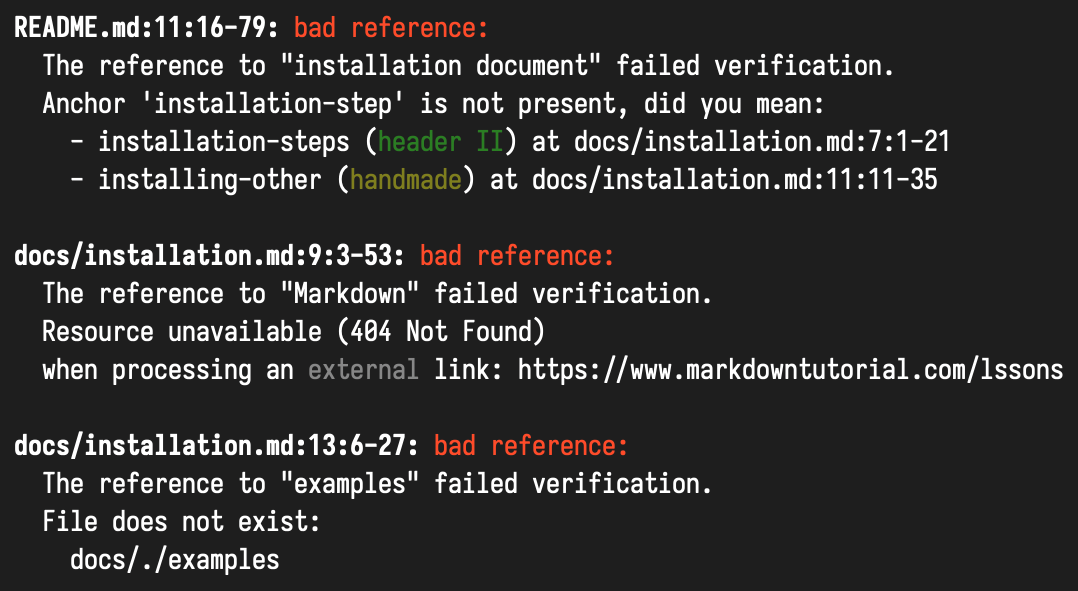
As a project evolves, links in markdown documentation have a tendency to become broken. This is usually because:
- A file has been moved;
- A markdown header has been renamed;
- An external site has ceased to exist.
This tool will help you to keep references in order.
You can run xrefcheck continuously in your CI pipeline,
and it will let you know when it finds a broken link.
Aims ↑
Comparing to alternative solutions, this tool tries to achieve the following points:
- Quickness
- References are verified in parallel.
- References with the same target URI are only verified once.
- It first attempts to verify external links with a
HEADrequest; only when that fails does it try aGETrequest.
- Resilience
- When you have many links to the same domain, the service is likely to start replying with "429 Too Many Requests".
When this happens,
xrefcheckwill wait the requested amount of seconds before retrying.
- When you have many links to the same domain, the service is likely to start replying with "429 Too Many Requests".
When this happens,
- Easy setup - no extra actions required, just run
xrefcheckin the repository root. - Conservative verifier allows using this tool in CI, no false positives (e.g. on sites which require authentication) should be reported.
Features ↑
- Supports both GitHub and GitLab flavored markdown.
- Supports Windows and Unix systems.
- Supports relative and absolute local links.
- Supports external links (
http,https,ftpandftps). - Detects broken and ambiguous anchors in local links.
- Integration with GitHub Actions.
Dependencies ↑
Xrefcheck requires you to have git version 2.18.0 or later in your PATH.
Usage ↑
We provide the following ways for you to use xrefcheck:
- GitHub Actions
- Statically linked binaries, e. g. on Linux:
mkdir -p bin/ wget --quiet -O bin/xrefcheck https://serokell.gateway.scarf.sh/xrefcheck/latest/xrefcheck-x86_64-linux chmod +x bin/xrefcheck bin/xrefcheck - Docker image
docker pull serokell.docker.scarf.sh/serokell/xrefcheck - Building from source
- Nix
nix shell -f https://github.com/serokell/xrefcheck/archive/master.tar.gz -c xrefcheck
If none of those are suitable for you, please open an issue!
To find all broken links in a repository, simply run xrefcheck from its root folder:
xrefcheck
To also display a list of all links and anchors:
xrefcheck --verbose
For description of other options:
xrefcheck --help
To configure xrefcheck, run:
xrefcheck dump-config --type GitHub
This will create a .xrefcheck.yaml file with all the configuration
options, here's an example.
This file should be committed to your repository.
Build instructions ↑
Run stack install to build everything and install the executable.
If you wish to use cabal, you need to run stack2cabal first!
Run on Windows ↑
On Windows, executable requires some dynamic libraries (DLLs).
They are shipped together with executable in releases page.
If you have built executable from source using stack install,
those DLLs are downloaded by stack to a location that is not on %PATH% by default.
There are several ways to fix this:
- Add
%LocalAppData%\Programs\stack\x86_64-windows\msys2-<...>\mingw64\binto your PATH - run
stack exec xrefcheck.exe -- <args>instead ofxrefcheck.exe <args> - add DLLs from archive from releases page to a folder containing
xrefcheck.exe
FAQ ↑
-
How do I ignore specific files?
- To ignore a specific file, you can either use the
--ignore <glob pattern>command-line option, or theignorelist in the config file. Links to those files will be reported as errors, links from those files will not be verified.
- To ignore a specific file, you can either use the
-
How do I ignore specific links?
- Add an entry to the
ignoreLocalRefsToorignoreExternalRefsTolists in the config file. - Alternatively, add a
<!-- xrefcheck: ignore link -->annotation before the link:<!-- xrefcheck: ignore link --> Link to some [invalid resource](https://fictitious.uri/).A [valid link](https://www.google.com) followed by an <!-- xrefcheck: ignore link --> [invalid link](https://fictitious.uri/). - You can also use a
<!-- xrefcheck: ignore paragraph -->annotation to ignore all links in a paragraph.
- Add an entry to the
-
How do I ignore all links from a specific markdown file?
- Add a glob pattern to the
ignoreRefsFromlist in the config file. - Or add a
<!-- xrefcheck: ignore all -->at the top of the file.
- Add a glob pattern to the
-
How do I ignore all external links?
- If you wish to ignore all http/ftp links, you can use
--mode local-only.
- If you wish to ignore all http/ftp links, you can use
-
How does
xrefcheckhandle links that require authentication?- It's common for projects to contain links to protected resources.
By default, when
xrefcheckattempts to verify a link and is faced with a403 Forbiddenor a401 Unauthorized, it assumes the link is valid. - This behavior can be disabled by setting
ignoreAuthFailures: falsein the config file.
- It's common for projects to contain links to protected resources.
By default, when
-
How does
xrefcheckhandle redirects?-
The rules from the default configuration are as follows:
- Permanent redirects (i.e. 301 and 308) are reported as errors.
- There are no rules for other redirects, except for a special GitLab case, so they are assumed to be valid.
-
Redirect rules can be specified with the
externalRefRedirectsparameter withinnetworking, which accepts an array of rules with keysfrom,to,onandoutcome. The rule applied is the first one that matches with thefrom,toandonfields, if any, wherefromis a regular expression, as inignoreExternalRefsTo, for the source link in a single redirection step. Its absence means that every link matches.tois a regular expression for the target link in a single redirection step. Its absence also means that every link matches.onacceptstemporary,permanentor a specific redirect HTTP code. Its absence also means that every response code matches.- The
outcomeparameter acceptsvalid,invalidorfollow. The last one follows the redirect by applying the same configuration rules.
For example, this configuration forbids 307 redirects to a specific domain and makes redirections from HTTP to HTTPS to be followed:
externalRefRedirects:
  - to: "https?://forbidden.com.*"
    on: 307
    outcome: invalid
  - from: "http://.*"
    to: "https://.*"
    outcome: follow
The first one applies if both of them match.
-
The number of redirects allowed in a single redirect chain is limited and can be configured with the
maxRedirectFollowsparameter, also withinnetworking. A number smaller than 0 disables the limit.
-
-
How does
xrefcheckhandle localhost links?- By default,
xrefcheckwill ignore links to localhost. - This behavior can be disabled by removing the corresponding entry from the
ignoreExternalRefsTolist in the config file.
- By default,
Further work ↑
- Support link detection in different languages, not only Markdown.
- Haskell Haddock is first in turn.
A comparison with other solutions ↑
- linky - a well-configurable verifier written in Rust, scans one specified file at a time and works well with system utilities like
find. This tool requires some configuring before it can be applied to a repository or added to CI. - awesome_bot - a solution written in Ruby that can be easily included in CI or integrated into GitHub. Its features include duplicated URLs detection, specifying allowed HTTP error codes and reporting generation. At the moment of writing, it scans only external references and checking anchors is not possible.
- remark-validate-links and remark-lint-no-dead-urls - highly configurable JavaScript solution for checking local and external links respectively. It is able to check multiple repositories at once if they are gathered in one folder. Doesn't handle "429 Too Many Requests", so false positives are likely when you have many links to the same domain.
- markdown-link-check - another checker written in JavaScript, scans one specific file at a time.
Supports
mailto:link resolution. - url-checker - GitHub Action which checks external links in specified files. Does not check local links.
- linkcheck - advanced site crawler, verifies links in
HTMLfiles. There are other solutions for this particular task which we don't mention here.
At the moment of writing, the listed solutions don't support ftp/ftps links.
Issue tracker ↑
We use GitHub issues as our issue tracker. You can login using your GitHub account to leave a comment or create a new issue.
For Contributors ↑
Please see CONTRIBUTING.md for more information.
About Serokell ↑
Xrefcheck is maintained and funded with ❤️ by Serokell. The names and logo for Serokell are trademark of Serokell OÜ.
We love open source software! See our other projects or hire us to design, develop and grow your idea!
Contributors


Similar repos


Languages
Haskell
82.6%
Shell
9.1%
Ruby
4.8%
Nix
2.2%
Makefile
1.3%
README
Xrefcheck
Xrefcheck is a tool for verifying local and external references in a repository's documentation that is quick, easy to setup, and suitable to be run on a CI pipeline.
Motivation ↑
As a project evolves, links in markdown documentation have a tendency to become broken. This is usually because:
- A file has been moved;
- A markdown header has been renamed;
- An external site has ceased to exist.
This tool will help you to keep references in order.
You can run xrefcheck continuously in your CI pipeline,
and it will let you know when it finds a broken link.
Aims ↑
Comparing to alternative solutions, this tool tries to achieve the following points:
- Quickness
- References are verified in parallel.
- References with the same target URI are only verified once.
- It first attempts to verify external links with a
HEADrequest; only when that fails does it try aGETrequest.
- Resilience
- When you have many links to the same domain, the service is likely to start replying with "429 Too Many Requests".
When this happens,
xrefcheckwill wait the requested amount of seconds before retrying.
- When you have many links to the same domain, the service is likely to start replying with "429 Too Many Requests".
When this happens,
- Easy setup - no extra actions required, just run
xrefcheckin the repository root. - Conservative verifier allows using this tool in CI, no false positives (e.g. on sites which require authentication) should be reported.
Features ↑
- Supports both GitHub and GitLab flavored markdown.
- Supports Windows and Unix systems.
- Supports relative and absolute local links.
- Supports external links (
http,https,ftpandftps). - Detects broken and ambiguous anchors in local links.
- Integration with GitHub Actions.
Dependencies ↑
Xrefcheck requires you to have git version 2.18.0 or later in your PATH.
Usage ↑
We provide the following ways for you to use xrefcheck:
- GitHub Actions
- Statically linked binaries, e. g. on Linux:
mkdir -p bin/ wget --quiet -O bin/xrefcheck https://serokell.gateway.scarf.sh/xrefcheck/latest/xrefcheck-x86_64-linux chmod +x bin/xrefcheck bin/xrefcheck - Docker image
docker pull serokell.docker.scarf.sh/serokell/xrefcheck - Building from source
- Nix
nix shell -f https://github.com/serokell/xrefcheck/archive/master.tar.gz -c xrefcheck
If none of those are suitable for you, please open an issue!
To find all broken links in a repository, simply run xrefcheck from its root folder:
xrefcheck
To also display a list of all links and anchors:
xrefcheck --verbose
For description of other options:
xrefcheck --help
To configure xrefcheck, run:
xrefcheck dump-config --type GitHub
This will create a .xrefcheck.yaml file with all the configuration
options, here's an example.
This file should be committed to your repository.
Build instructions ↑
Run stack install to build everything and install the executable.
If you wish to use cabal, you need to run stack2cabal first!
Run on Windows ↑
On Windows, executable requires some dynamic libraries (DLLs).
They are shipped together with executable in releases page.
If you have built executable from source using stack install,
those DLLs are downloaded by stack to a location that is not on %PATH% by default.
There are several ways to fix this:
- Add
%LocalAppData%\Programs\stack\x86_64-windows\msys2-<...>\mingw64\binto your PATH - run
stack exec xrefcheck.exe -- <args>instead ofxrefcheck.exe <args> - add DLLs from archive from releases page to a folder containing
xrefcheck.exe
FAQ ↑
-
How do I ignore specific files?
- To ignore a specific file, you can either use the
--ignore <glob pattern>command-line option, or theignorelist in the config file. Links to those files will be reported as errors, links from those files will not be verified.
- To ignore a specific file, you can either use the
-
How do I ignore specific links?
- Add an entry to the
ignoreLocalRefsToorignoreExternalRefsTolists in the config file. - Alternatively, add a
<!-- xrefcheck: ignore link -->annotation before the link:<!-- xrefcheck: ignore link --> Link to some [invalid resource](https://fictitious.uri/).A [valid link](https://www.google.com) followed by an <!-- xrefcheck: ignore link --> [invalid link](https://fictitious.uri/). - You can also use a
<!-- xrefcheck: ignore paragraph -->annotation to ignore all links in a paragraph.
- Add an entry to the
-
How do I ignore all links from a specific markdown file?
- Add a glob pattern to the
ignoreRefsFromlist in the config file. - Or add a
<!-- xrefcheck: ignore all -->at the top of the file.
- Add a glob pattern to the
-
How do I ignore all external links?
- If you wish to ignore all http/ftp links, you can use
--mode local-only.
- If you wish to ignore all http/ftp links, you can use
-
How does
xrefcheckhandle links that require authentication?- It's common for projects to contain links to protected resources.
By default, when
xrefcheckattempts to verify a link and is faced with a403 Forbiddenor a401 Unauthorized, it assumes the link is valid. - This behavior can be disabled by setting
ignoreAuthFailures: falsein the config file.
- It's common for projects to contain links to protected resources.
By default, when
-
How does
xrefcheckhandle redirects?-
The rules from the default configuration are as follows:
- Permanent redirects (i.e. 301 and 308) are reported as errors.
- There are no rules for other redirects, except for a special GitLab case, so they are assumed to be valid.
-
Redirect rules can be specified with the
externalRefRedirectsparameter withinnetworking, which accepts an array of rules with keysfrom,to,onandoutcome. The rule applied is the first one that matches with thefrom,toandonfields, if any, wherefromis a regular expression, as inignoreExternalRefsTo, for the source link in a single redirection step. Its absence means that every link matches.tois a regular expression for the target link in a single redirection step. Its absence also means that every link matches.onacceptstemporary,permanentor a specific redirect HTTP code. Its absence also means that every response code matches.- The
outcomeparameter acceptsvalid,invalidorfollow. The last one follows the redirect by applying the same configuration rules.
For example, this configuration forbids 307 redirects to a specific domain and makes redirections from HTTP to HTTPS to be followed:
externalRefRedirects:
  - to: "https?://forbidden.com.*"
    on: 307
    outcome: invalid
  - from: "http://.*"
    to: "https://.*"
    outcome: follow
The first one applies if both of them match.
-
The number of redirects allowed in a single redirect chain is limited and can be configured with the
maxRedirectFollowsparameter, also withinnetworking. A number smaller than 0 disables the limit.
-
-
How does
xrefcheckhandle localhost links?- By default,
xrefcheckwill ignore links to localhost. - This behavior can be disabled by removing the corresponding entry from the
ignoreExternalRefsTolist in the config file.
- By default,
Further work ↑
- Support link detection in different languages, not only Markdown.
- Haskell Haddock is first in turn.
A comparison with other solutions ↑
- linky - a well-configurable verifier written in Rust, scans one specified file at a time and works well with system utilities like
find. This tool requires some configuring before it can be applied to a repository or added to CI. - awesome_bot - a solution written in Ruby that can be easily included in CI or integrated into GitHub. Its features include duplicated URLs detection, specifying allowed HTTP error codes and reporting generation. At the moment of writing, it scans only external references and checking anchors is not possible.
- remark-validate-links and remark-lint-no-dead-urls - highly configurable JavaScript solution for checking local and external links respectively. It is able to check multiple repositories at once if they are gathered in one folder. Doesn't handle "429 Too Many Requests", so false positives are likely when you have many links to the same domain.
- markdown-link-check - another checker written in JavaScript, scans one specific file at a time.
Supports
mailto:link resolution. - url-checker - GitHub Action which checks external links in specified files. Does not check local links.
- linkcheck - advanced site crawler, verifies links in
HTMLfiles. There are other solutions for this particular task which we don't mention here.
At the moment of writing, the listed solutions don't support ftp/ftps links.
Issue tracker ↑
We use GitHub issues as our issue tracker. You can login using your GitHub account to leave a comment or create a new issue.
For Contributors ↑
Please see CONTRIBUTING.md for more information.
About Serokell ↑
Xrefcheck is maintained and funded with ❤️ by Serokell. The names and logo for Serokell are trademark of Serokell OÜ.
We love open source software! See our other projects or hire us to design, develop and grow your idea!
Similar repos
Contributors
Languages
Haskell
82.6%
Shell
9.1%
Ruby
4.8%
Nix
2.2%
Makefile
1.3%