Easy to use ListView with pinned sections for Android.
Java
2,566
13 commits
updated Feb 23, 2020
Easy to use ListView with pinned sections for Android 2.1 and higher. Pinned section is a header view which sticks to the top of the list until at least one item of that section is visible.
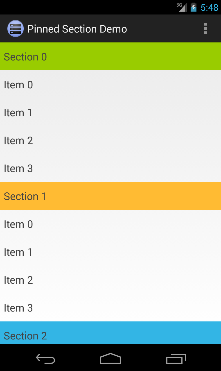
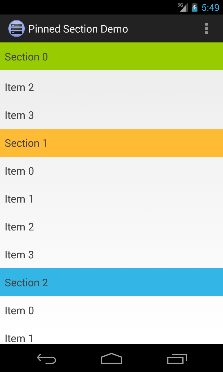
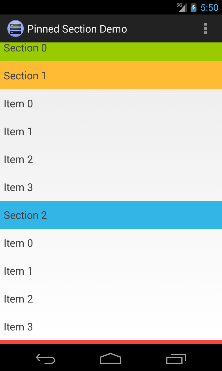
This list properly implements many features which are missing from other implementations. These are
Besides this it doesn't create any unnecessary views, layouts etc. It's really lean.
Watch this video to see PinnedSectionListView in action.
ListView with de.halfbit.pinnedsection.PinnedSectionListView in your layout.xml file. <de.halfbit.pinnedsection.PinnedSectionListView
android:id="@android:id/list"
android:layout_width="match_parent"
android:layout_height="wrap_content"
/>
ListAdapter in a way that it implements PinnedSectionListAdapter interface, in addition to
what it already implements. Basically you need to add a single isItemViewTypePinned(int viewType)
method. This method must return true for all view types which have to be pinned. // Our adapter class implements 'PinnedSectionListAdapter' interface
class MyPinnedSectionListAdapter extends BaseAdapter
implements PinnedSectionListAdapter {
...
// We implement this method to return 'true' for all view types we want to pin
@Override
public boolean isItemViewTypePinned(int viewType) {
return viewType == <type to be pinned>;
}
}
That's all. You are done! A working example can also be found in example folder.
Add this to your module-level build.gradle:
dependencies {
    compile "de.halfbit:pinned-section-listview:1.0.0"
}
Let us know if you use this library in your application and we will mention it here.
Copyright 2013-2016 Sergej Shafarenka, halfbit.de

Licensed under the Apache License, Version 2.0 (the "License");
you may not use this file except in compliance with the License.
You may obtain a copy of the License at

   http://www.apache.org/licenses/LICENSE-2.0

Unless required by applicable law or agreed to in writing, software
distributed under the License is distributed on an "AS IS" BASIS,
WITHOUT WARRANTIES OR CONDITIONS OF ANY KIND, either express or implied.
See the License for the specific language governing permissions and
limitations under the License.
63 followers · starred Dec 2013
27 followers · starred Mar 2014
258 followers · starred Feb 2014
345 followers · starred Nov 2013
Easy to use ListView with pinned sections for Android.
Java
2,566
13 commits
updated Feb 23, 2020
Easy to use ListView with pinned sections for Android 2.1 and higher. Pinned section is a header view which sticks to the top of the list until at least one item of that section is visible.
This list properly implements many features which are missing from other implementations. These are
Besides this it doesn't create any unnecessary views, layouts etc. It's really lean.
Watch this video to see PinnedSectionListView in action.
ListView with de.halfbit.pinnedsection.PinnedSectionListView in your layout.xml file. <de.halfbit.pinnedsection.PinnedSectionListView
android:id="@android:id/list"
android:layout_width="match_parent"
android:layout_height="wrap_content"
/>
ListAdapter in a way that it implements PinnedSectionListAdapter interface, in addition to
what it already implements. Basically you need to add a single isItemViewTypePinned(int viewType)
method. This method must return true for all view types which have to be pinned. // Our adapter class implements 'PinnedSectionListAdapter' interface
class MyPinnedSectionListAdapter extends BaseAdapter
implements PinnedSectionListAdapter {
...
// We implement this method to return 'true' for all view types we want to pin
@Override
public boolean isItemViewTypePinned(int viewType) {
return viewType == <type to be pinned>;
}
}
That's all. You are done! A working example can also be found in example folder.
Add this to your module-level build.gradle:
dependencies {
    compile "de.halfbit:pinned-section-listview:1.0.0"
}
Let us know if you use this library in your application and we will mention it here.
Copyright 2013-2016 Sergej Shafarenka, halfbit.de

Licensed under the Apache License, Version 2.0 (the "License");
you may not use this file except in compliance with the License.
You may obtain a copy of the License at

   http://www.apache.org/licenses/LICENSE-2.0

Unless required by applicable law or agreed to in writing, software
distributed under the License is distributed on an "AS IS" BASIS,
WITHOUT WARRANTIES OR CONDITIONS OF ANY KIND, either express or implied.
See the License for the specific language governing permissions and
limitations under the License.
63 followers · starred Dec 2013
27 followers · starred Mar 2014
258 followers · starred Feb 2014
345 followers · starred Nov 2013