
RetinaFace: Deep Face Detection Library for Python
Python
2,042
232 commits
updated Sep 26, 2026
README
RetinaFace



RetinaFace is a deep learning based cutting-edge facial detector for Python coming with facial landmarks. Its detection performance is amazing even in the crowd as shown in the following illustration.
RetinaFace is the face detection module of insightface project. The original implementation is mainly based on mxnet. Then, its tensorflow based re-implementation is published by Stanislas Bertrand. So, this repo is heavily inspired from the study of Stanislas Bertrand. Its source code is simplified and it is transformed to pip compatible but the main structure of the reference model and its pre-trained weights are same.

The Yellow Angels - Fenerbahce Women's Volleyball Team
Installation 
The easiest way to install retinaface is to download it from PyPI. RetinaFace runs either on TensorFlow or on PyTorch, so install it with the backend engine you want to use.
# to run retinaface on top of tensorflow
$ pip install retina-face[tensorflow]

# or to run retinaface on top of pytorch
# $ pip install retina-face[pytorch]
Alternatively, you can also install deepface from its source code. Source code may have new features not published in pip release yet.
$ git clone https://github.com/serengil/retinaface.git
$ cd retinaface
$ pip install -e .[tensorflow]  # or pip install -e .[pytorch]
Then, you will be able to import the library and use its functionalities.
from retinaface import RetinaFace
Face Detection - Demo
RetinaFace offers a face detection function. It expects an exact path of an image as input.
resp = RetinaFace.detect_faces("img1.jpg")
Then, it will return the facial area coordinates and some landmarks (eyes, nose and mouth) with a confidence score.
{
    "face_1": {
        "score": 0.9993440508842468,
        "facial_area": [155, 81, 434, 443],
        "landmarks": {
          "right_eye": [257.82974, 209.64787],
          "left_eye": [374.93427, 251.78687],
          "nose": [303.4773, 299.91144],
          "mouth_right": [228.37329, 338.73193],
          "mouth_left": [320.21982, 374.58798]
        }
  }
}
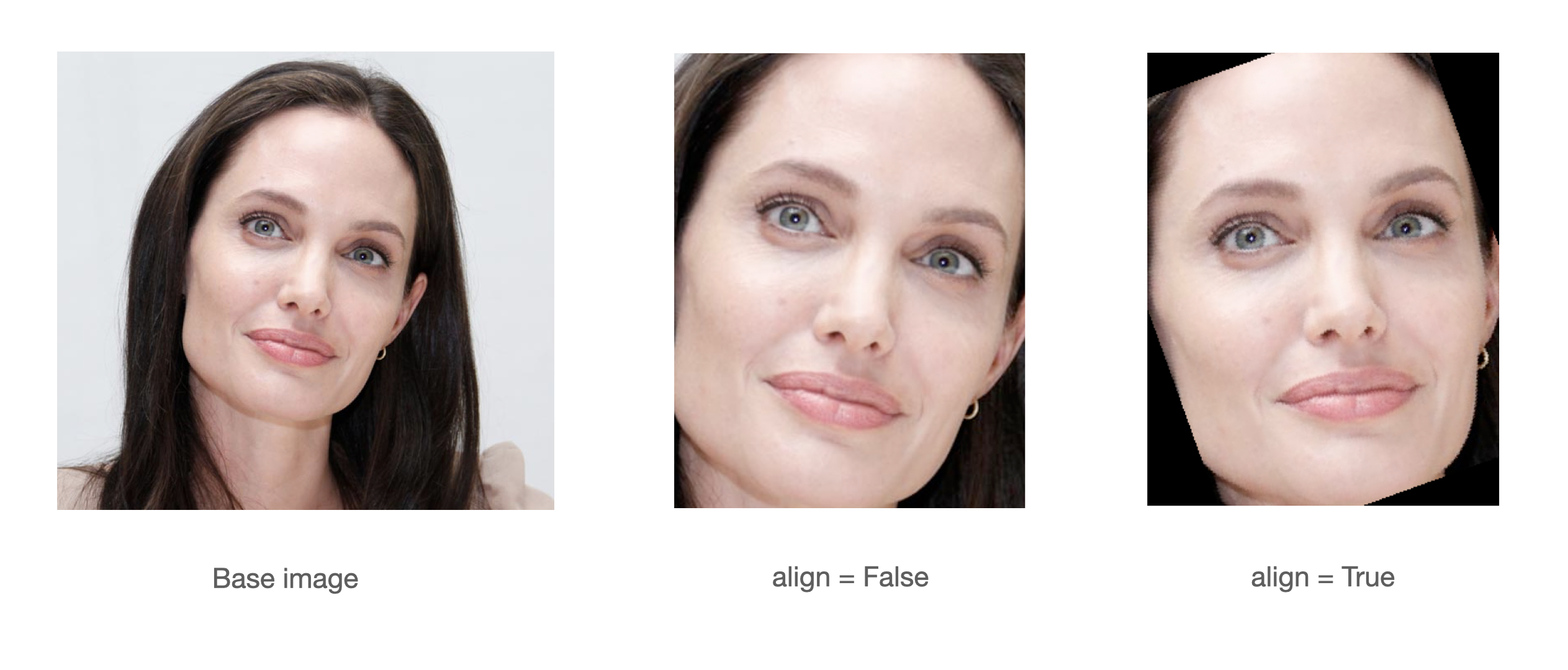
A modern face recognition pipeline consists of 4 common stages: detect, align, normalize, represent and verify. Experiments show that alignment increases the face recognition accuracy almost 7%. Here, retinaface can find the facial landmarks including eye coordinates. In this way, it can apply alignment to detected faces with its extracting faces function.
import matplotlib.pyplot as plt
faces = RetinaFace.extract_faces(img_path = "img.jpg", align = True)
for face in faces:
  plt.imshow(face)
  plt.show()
Face Recognition - Demo
Notice that face recognition module of insightface project is ArcFace, and face detection module is RetinaFace. ArcFace and RetinaFace pair is wrapped in deepface library for Python. Consider to use deepface if you need an end-to-end face recognition pipeline.
#!pip install deepface
from deepface import DeepFace
obj = DeepFace.verify("img1.jpg", "img2.jpg"
          , model_name = 'ArcFace', detector_backend = 'retinaface')
print(obj["verified"])
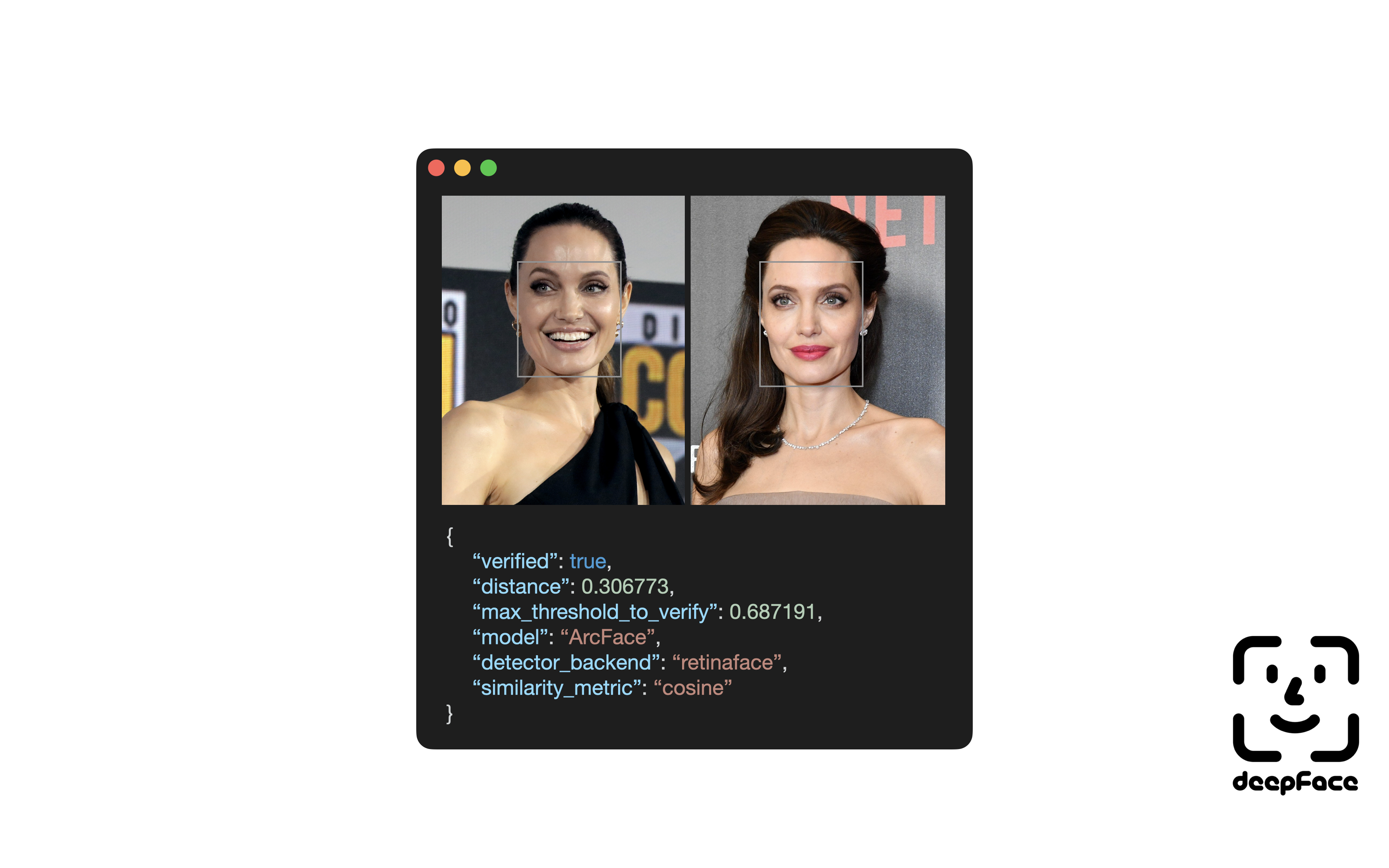
Notice that ArcFace got 99.40% accuracy on LFW data set whereas human beings just have 97.53% confidence.
Contribution 
Pull requests are more than welcome! You should run the unit tests and linting locally before creating a PR. Commands make test and make lint will help you to run it locally. Once a PR created, GitHub test workflow will be run automatically and unit test results will be available in GitHub actions before approval.
Support
There are many ways to support a project. Starring⭐️ the repo is just one 🙏
You can also support this work on Patreon, GitHub Sponsors, or Buy Me a Coffee.

Also, your company's logo will be shown on README on GitHub if you become sponsor in gold, silver or bronze tiers.
Acknowledgements
This work is mainly based on the insightface project and retinaface paper; and it is heavily inspired from the re-implementation of retinaface-tf2 by Stanislas Bertrand. Finally, Bertrand's implementation uses Fast R-CNN written by Ross Girshick in the background. All of those reference studies are licensed under MIT license.
Citation
If you are using RetinaFace in your research, please consider to cite its original research paper. Besides, if you are using this re-implementation of retinaface, please consider to cite the following research paper as well. Here is example of its BibTeX entry:
@article{deepface,
  title     =  {Boosted LightFace: A Hybrid DNN and GBM Model for Boosted Facial Recognition},
  author    =  {Serengil, Sefik Ilkin and Ozpinar, Alper},
  journal   =  {Gazi University Journal of Science},
  volume    =  {39},
  number    =  {1},
  pages     =  {452-466},
  year      =  {2026},
  doi       =  {10.35378/gujs.1794891},
  url       =  {https://dergipark.org.tr/en/pub/gujs/article/1794891},
  publisher =  {Gazi University}
}
Finally, if you use this RetinaFace re-implementation in your GitHub projects, please add retina-face dependency in the requirements.txt.
Licence
This project is licensed under the MIT License - see LICENSE for more details.
Significant stargazers

467 followers · starred Dec 2022

59 followers · starred Apr 2022

128 followers · starred Jun 2022

101 followers · starred Jun 2025
Similar repos


Languages
Python
99.6%
RetinaFace: Deep Face Detection Library for Python
Python
2,042
232 commits
updated Sep 26, 2026
README
RetinaFace
RetinaFace is a deep learning based cutting-edge facial detector for Python coming with facial landmarks. Its detection performance is amazing even in the crowd as shown in the following illustration.
RetinaFace is the face detection module of insightface project. The original implementation is mainly based on mxnet. Then, its tensorflow based re-implementation is published by Stanislas Bertrand. So, this repo is heavily inspired from the study of Stanislas Bertrand. Its source code is simplified and it is transformed to pip compatible but the main structure of the reference model and its pre-trained weights are same.
The Yellow Angels - Fenerbahce Women's Volleyball Team
Installation
The easiest way to install retinaface is to download it from PyPI. RetinaFace runs either on TensorFlow or on PyTorch, so install it with the backend engine you want to use.
# to run retinaface on top of tensorflow
$ pip install retina-face[tensorflow]

# or to run retinaface on top of pytorch
# $ pip install retina-face[pytorch]
Alternatively, you can also install deepface from its source code. Source code may have new features not published in pip release yet.
$ git clone https://github.com/serengil/retinaface.git
$ cd retinaface
$ pip install -e .[tensorflow]  # or pip install -e .[pytorch]
Then, you will be able to import the library and use its functionalities.
from retinaface import RetinaFace
Face Detection - Demo
RetinaFace offers a face detection function. It expects an exact path of an image as input.
resp = RetinaFace.detect_faces("img1.jpg")
Then, it will return the facial area coordinates and some landmarks (eyes, nose and mouth) with a confidence score.
{
    "face_1": {
        "score": 0.9993440508842468,
        "facial_area": [155, 81, 434, 443],
        "landmarks": {
          "right_eye": [257.82974, 209.64787],
          "left_eye": [374.93427, 251.78687],
          "nose": [303.4773, 299.91144],
          "mouth_right": [228.37329, 338.73193],
          "mouth_left": [320.21982, 374.58798]
        }
  }
}
A modern face recognition pipeline consists of 4 common stages: detect, align, normalize, represent and verify. Experiments show that alignment increases the face recognition accuracy almost 7%. Here, retinaface can find the facial landmarks including eye coordinates. In this way, it can apply alignment to detected faces with its extracting faces function.
import matplotlib.pyplot as plt
faces = RetinaFace.extract_faces(img_path = "img.jpg", align = True)
for face in faces:
  plt.imshow(face)
  plt.show()
Face Recognition - Demo
Notice that face recognition module of insightface project is ArcFace, and face detection module is RetinaFace. ArcFace and RetinaFace pair is wrapped in deepface library for Python. Consider to use deepface if you need an end-to-end face recognition pipeline.
#!pip install deepface
from deepface import DeepFace
obj = DeepFace.verify("img1.jpg", "img2.jpg"
          , model_name = 'ArcFace', detector_backend = 'retinaface')
print(obj["verified"])
Notice that ArcFace got 99.40% accuracy on LFW data set whereas human beings just have 97.53% confidence.
Contribution
Pull requests are more than welcome! You should run the unit tests and linting locally before creating a PR. Commands make test and make lint will help you to run it locally. Once a PR created, GitHub test workflow will be run automatically and unit test results will be available in GitHub actions before approval.
Support
There are many ways to support a project. Starring⭐️ the repo is just one 🙏
You can also support this work on Patreon, GitHub Sponsors, or Buy Me a Coffee.
Also, your company's logo will be shown on README on GitHub if you become sponsor in gold, silver or bronze tiers.
Acknowledgements
This work is mainly based on the insightface project and retinaface paper; and it is heavily inspired from the re-implementation of retinaface-tf2 by Stanislas Bertrand. Finally, Bertrand's implementation uses Fast R-CNN written by Ross Girshick in the background. All of those reference studies are licensed under MIT license.
Citation
If you are using RetinaFace in your research, please consider to cite its original research paper. Besides, if you are using this re-implementation of retinaface, please consider to cite the following research paper as well. Here is example of its BibTeX entry:
@article{deepface,
  title     =  {Boosted LightFace: A Hybrid DNN and GBM Model for Boosted Facial Recognition},
  author    =  {Serengil, Sefik Ilkin and Ozpinar, Alper},
  journal   =  {Gazi University Journal of Science},
  volume    =  {39},
  number    =  {1},
  pages     =  {452-466},
  year      =  {2026},
  doi       =  {10.35378/gujs.1794891},
  url       =  {https://dergipark.org.tr/en/pub/gujs/article/1794891},
  publisher =  {Gazi University}
}
Finally, if you use this RetinaFace re-implementation in your GitHub projects, please add retina-face dependency in the requirements.txt.
Licence
This project is licensed under the MIT License - see LICENSE for more details.
Similar repos
Significant stargazers
467 followers · starred Dec 2022
59 followers · starred Apr 2022
128 followers · starred Jun 2022
101 followers · starred Jun 2025
Languages
Python
99.6%