
See what people are saying
README
Quattro ZBD – Android Control App
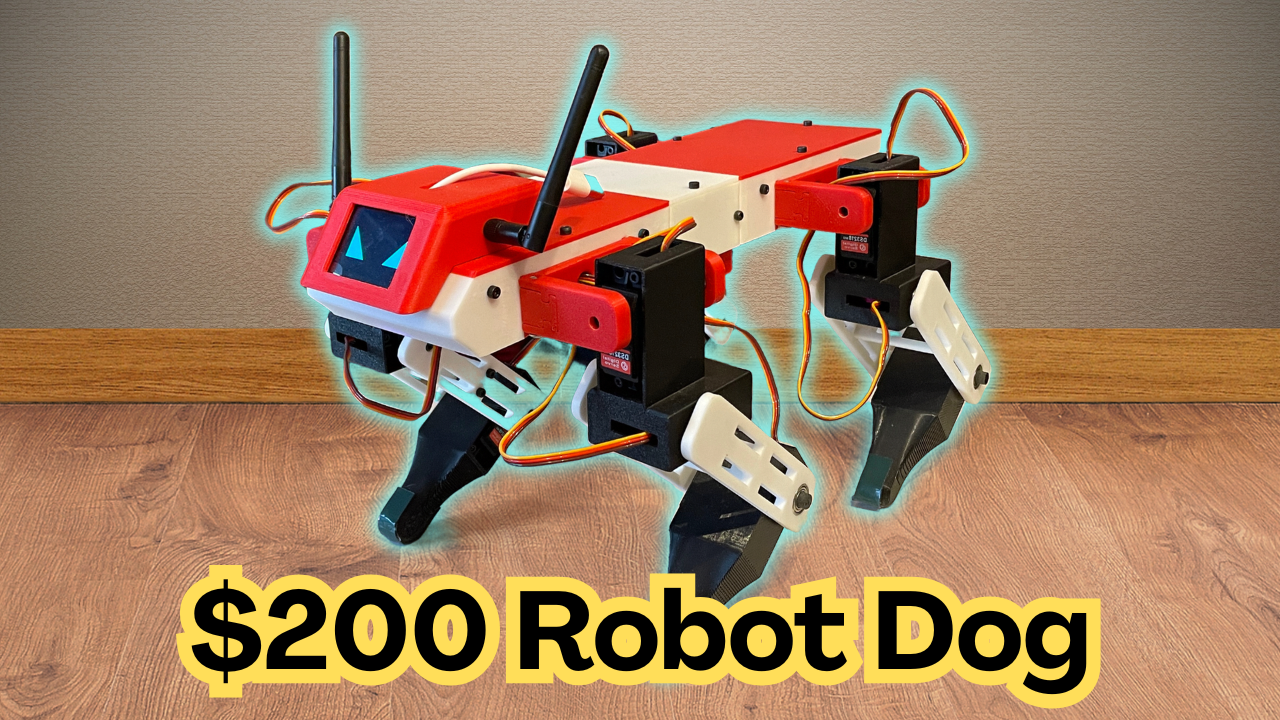
Android remote control for the Quattro ZBD quadruped robot. It talks to the robot's ESP32 over Wi-Fi (UDP): virtual joysticks and buttons go out, battery / IMU / mode telemetry comes back. It can also use a phone-as-puppet mode, where the robot mirrors the tilt of your phone.
Firmware repository: https://github.com/serdarselimys/QuattroZBD-AndroidControllerApp
Features
- Two virtual joysticks: Move (forward/back + strafe) and Spin (turn on the spot)
- On-screen L1 / R1 / L2 / R2 / A / B buttons, mapped like a gamepad
- Live telemetry: robot state, battery % and voltage, accelerometer, balance and gait (TROT / WALK)
- Emote mode screen: pick and play emotes (the robot owns the list; the app mirrors the robot's own menu buttons)
- Puppet mode: the robot copies your phone's roll, pitch and yaw rate; ZERO sets the way you are holding the phone as neutral
- Recall button to re-run the robot's IMU auto-calibration (standing only)
- Physical gamepad buttons plugged into / paired with the phone (A, B, L1, R1, L2, R2 and sticks) also work
- Screen stays on while the app is open; puppet mode switches off automatically if the app goes to the background
Connecting to the robot
-
Power the robot. The ESP32 creates its own Wi-Fi network:
Setting Value SSID QUADRUPED_ESP32Password 12345678(default, change it in the firmware)Robot IP 192.168.4.1UDP port 5000 -
On the phone go to Wi-Fi settings and join
QUADRUPED_ESP32manually. The app does not do this for you. -
If Android says the network has no internet and offers to switch to mobile data, stay on the robot's network.
-
Open the app. When telemetry appears (battery, state) the link is working.
Controls
| Control | Action |
|---|---|
| Move joystick | Walk forward/back and strafe |
| Spin joystick | Turn on the spot |
| L1 / R1 | Body height down / up (hold both for 2 s = stand / sit) |
| L2 / R2 | Pitch trim nose down / up |
| A | Body leveling on/off |
| B | Gait toggle: trot ↔ walk |
| EMOTE | Enter / leave emote mode |
| RECALL | Re-run IMU auto-calibration (standing only) |
| PUPPET | Phone-tilt control on/off (hold the phone upright, top = nose) |
| ZERO | In puppet mode, take the current phone attitude as neutral |
Emote mode screen: L1 / R1 move the selection on the robot, A plays, B exits. These are the same four buttons as the robot's own screen menu.
Menus on the robot's screen: while the robot is sitting, L1/R1 = up/down, L2/R2 = left/right, A = open/save, B = back/cancel.
Telemetry shown
| Item | Notes |
|---|---|
| State | SLEEP, ACTIVE, BODY LEVELING, PUPPET, CALIBRATION, EMOTE MODE |
| Accelerometer | X / Y / Z in m/s² |
| Balance / gait | Balance ON/OFF and TROT/WALK |
| Joint / offset | Used while editing servo offsets from the robot menu |
Protocol (for developers)
All values little-endian, over UDP to 192.168.4.1:5000, about every 8 ms.
App → robot (61 bytes)
| Bytes | Content |
|---|---|
| 0–3, 4–7, 8–11 | joystick forward, side, spin (float) |
| 12–15, 16–19 | left / right trigger values (float) |
| 20 | buttons 1: bit0 A, bit1 B, bit2 L1, bit3 R1, bit4 emote toggle, bit5 emote play, bit6 emote stop |
| 21 | selected emote index |
| 22 | buttons 2: bit0 manual IMU calibration, bit6 L2, bit7 R2 |
| 23–47 | reserved (0) |
| 48 | puppet flags: bit0 puppet on, bit1 re-zero |
| 49–60 | phone roll (deg), pitch (deg), gyro Z (deg/s) as floats |
Robot → app (28 bytes)
| Bytes | Content |
|---|---|
| 0–11 | accelerometer X, Y, Z (float) |
| 12–15 | battery voltage (float) |
| 16–19 | selected joint ID (int) |
| 20–23 | joint offset (float) |
| 24 | display state (1 active, 2 calibration, 3 emote, otherwise sleep) |
| 25 | balance on |
| 26 | walk gait on |
| 27 | playing emote index |
The emote list:
Curious Head Tilt, Cautious Object Tap, The Wiggle, Play Bow, Happy Dance into Sneak, Breathing into Foot Stomp, Matrix Gyro Roll, Push-Ups, Sit & Wave Hello.
Safety
The robot can fall and servos can pinch. Test on a stand first, keep the robot's emergency stop (SELECT/BACK on a gamepad) in mind, and keep the app in the foreground while driving. If no control packets arrive for about half a second, the firmware's stale-data failsafe takes over.
Licensing & Commercial Use
Licensed under Creative Commons Attribution–NonCommercial 4.0 International (CC BY-NC 4.0).
You are free to remix, adapt and build upon this design for non-commercial purposes, with appropriate credit. Commercial use of any kind is not permitted.
Similar repos




See what people are saying
README
Quattro ZBD – Android Control App
Android remote control for the Quattro ZBD quadruped robot. It talks to the robot's ESP32 over Wi-Fi (UDP): virtual joysticks and buttons go out, battery / IMU / mode telemetry comes back. It can also use a phone-as-puppet mode, where the robot mirrors the tilt of your phone.
Firmware repository: https://github.com/serdarselimys/QuattroZBD-AndroidControllerApp
Features
- Two virtual joysticks: Move (forward/back + strafe) and Spin (turn on the spot)
- On-screen L1 / R1 / L2 / R2 / A / B buttons, mapped like a gamepad
- Live telemetry: robot state, battery % and voltage, accelerometer, balance and gait (TROT / WALK)
- Emote mode screen: pick and play emotes (the robot owns the list; the app mirrors the robot's own menu buttons)
- Puppet mode: the robot copies your phone's roll, pitch and yaw rate; ZERO sets the way you are holding the phone as neutral
- Recall button to re-run the robot's IMU auto-calibration (standing only)
- Physical gamepad buttons plugged into / paired with the phone (A, B, L1, R1, L2, R2 and sticks) also work
- Screen stays on while the app is open; puppet mode switches off automatically if the app goes to the background
Connecting to the robot
-
Power the robot. The ESP32 creates its own Wi-Fi network:
Setting Value SSID QUADRUPED_ESP32Password 12345678(default, change it in the firmware)Robot IP 192.168.4.1UDP port 5000 -
On the phone go to Wi-Fi settings and join
QUADRUPED_ESP32manually. The app does not do this for you. -
If Android says the network has no internet and offers to switch to mobile data, stay on the robot's network.
-
Open the app. When telemetry appears (battery, state) the link is working.
Controls
| Control | Action |
|---|---|
| Move joystick | Walk forward/back and strafe |
| Spin joystick | Turn on the spot |
| L1 / R1 | Body height down / up (hold both for 2 s = stand / sit) |
| L2 / R2 | Pitch trim nose down / up |
| A | Body leveling on/off |
| B | Gait toggle: trot ↔ walk |
| EMOTE | Enter / leave emote mode |
| RECALL | Re-run IMU auto-calibration (standing only) |
| PUPPET | Phone-tilt control on/off (hold the phone upright, top = nose) |
| ZERO | In puppet mode, take the current phone attitude as neutral |
Emote mode screen: L1 / R1 move the selection on the robot, A plays, B exits. These are the same four buttons as the robot's own screen menu.
Menus on the robot's screen: while the robot is sitting, L1/R1 = up/down, L2/R2 = left/right, A = open/save, B = back/cancel.
Telemetry shown
| Item | Notes |
|---|---|
| State | SLEEP, ACTIVE, BODY LEVELING, PUPPET, CALIBRATION, EMOTE MODE |
| Accelerometer | X / Y / Z in m/s² |
| Balance / gait | Balance ON/OFF and TROT/WALK |
| Joint / offset | Used while editing servo offsets from the robot menu |
Protocol (for developers)
All values little-endian, over UDP to 192.168.4.1:5000, about every 8 ms.
App → robot (61 bytes)
| Bytes | Content |
|---|---|
| 0–3, 4–7, 8–11 | joystick forward, side, spin (float) |
| 12–15, 16–19 | left / right trigger values (float) |
| 20 | buttons 1: bit0 A, bit1 B, bit2 L1, bit3 R1, bit4 emote toggle, bit5 emote play, bit6 emote stop |
| 21 | selected emote index |
| 22 | buttons 2: bit0 manual IMU calibration, bit6 L2, bit7 R2 |
| 23–47 | reserved (0) |
| 48 | puppet flags: bit0 puppet on, bit1 re-zero |
| 49–60 | phone roll (deg), pitch (deg), gyro Z (deg/s) as floats |
Robot → app (28 bytes)
| Bytes | Content |
|---|---|
| 0–11 | accelerometer X, Y, Z (float) |
| 12–15 | battery voltage (float) |
| 16–19 | selected joint ID (int) |
| 20–23 | joint offset (float) |
| 24 | display state (1 active, 2 calibration, 3 emote, otherwise sleep) |
| 25 | balance on |
| 26 | walk gait on |
| 27 | playing emote index |
The emote list:
Curious Head Tilt, Cautious Object Tap, The Wiggle, Play Bow, Happy Dance into Sneak, Breathing into Foot Stomp, Matrix Gyro Roll, Push-Ups, Sit & Wave Hello.
Safety
The robot can fall and servos can pinch. Test on a stand first, keep the robot's emergency stop (SELECT/BACK on a gamepad) in mind, and keep the app in the foreground while driving. If no control packets arrive for about half a second, the firmware's stale-data failsafe takes over.
Licensing & Commercial Use
Licensed under Creative Commons Attribution–NonCommercial 4.0 International (CC BY-NC 4.0).
You are free to remix, adapt and build upon this design for non-commercial purposes, with appropriate credit. Commercial use of any kind is not permitted.