
The stealthiest, UNIX-iest, ethical Job Search Automator
Python
2
1 commits
updated Sep 28, 2026
See what people are saying
README
SHOBR - Simulate Human Occupational-Bureaucratic Rituals

The stealthiest, UNIX-iest, ethical Job Search Automator, with a Hacker-in-the-Loop approach.


https://github.com/user-attachments/assets/47336c4f-1ca8-40e4-869d-5496bf7fae53
Introduction
In 2026's job market, there are many job application automation tools, some of them FOSS. This one's mine, and relies on these tools:
beachpatrolfor browser automation of your own daily-driver browser, androffumefor resume files management.
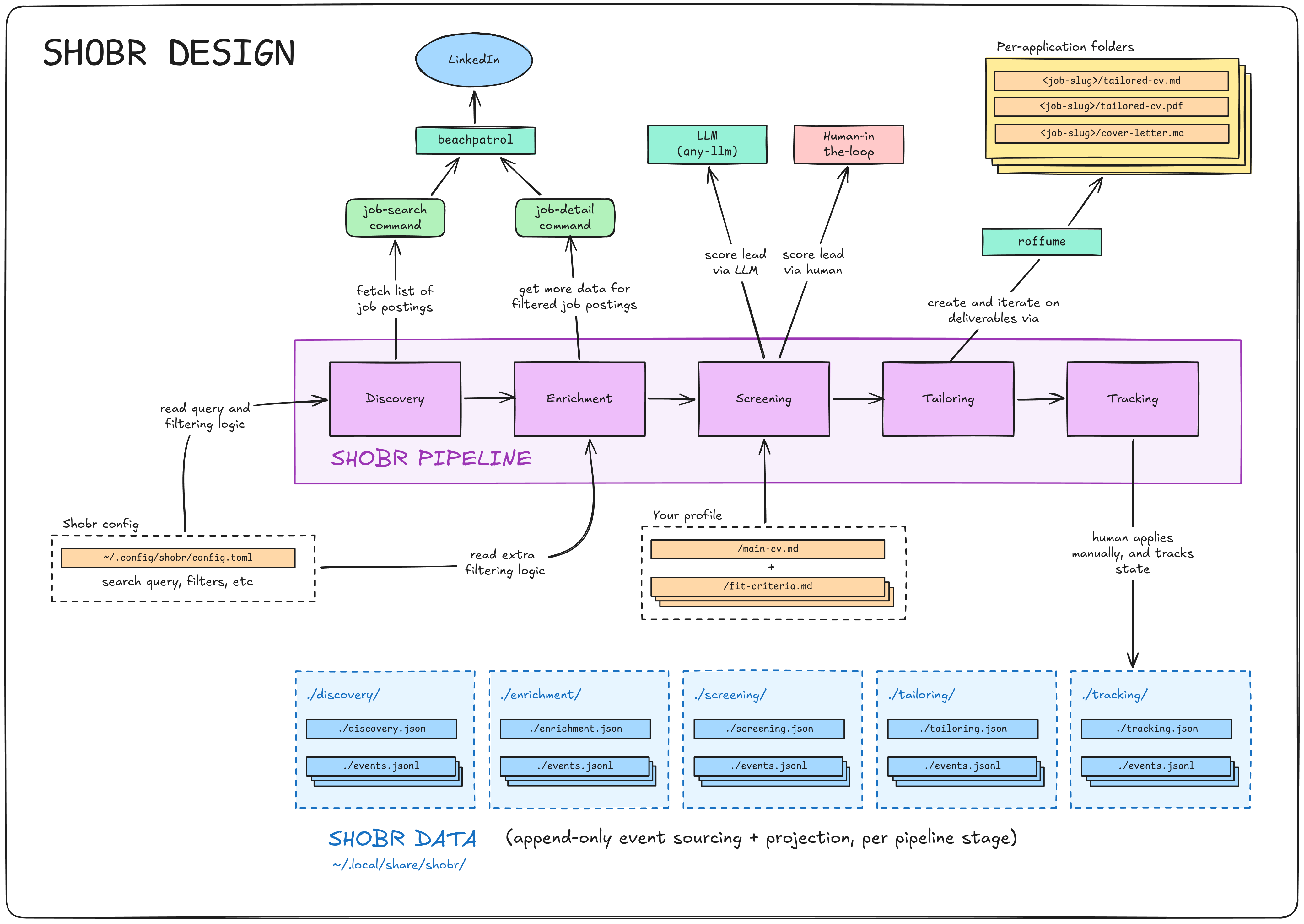
Design Philosophy & Features
- Daily-Driver Stealth: We don't use headless browsers. SHOBR uses
beachpatrolto drive your existing, authenticated browser. To LinkedIn, you are just a normal user clicking around. - Human-in-the-Loop: SHOBR prepares, proposes, and verifies. It writes the drafts and builds the PDFs, but the final application submit is always done by you. This is no "spray and pray", but you can still pray to any API-compatible deities.
- Provider-Agnostic AI: Uses one thin LLM abstraction. Run it on OpenAI,
Anthropic, a local model, or hijack a local LLM agent subscription via
faaah. - LLM-light By Design: Automated, high-quality tuning of resume to job requires some LLM, there's not much leeway around it. But this project uses as little LLM as possible, and doesn't demand an Agent driver (like other projects in this space). If you want more, it should be trivial to ask an LLM to write a SKILL or an MCP server on top of SHOBR.
- Event-Sourced Data: All data (discovered jobs, screenings, tracking) is saved in append-only JSONL event logs and projected into state files. You can interrupt the pipeline, or recompute lead approval with new rules, at any time without data loss.
- Markdown-Based CV Toolchain: Resumes are tailored in Markdown and compiled to ATS-readable PDFs (via Groff and Pandoc). All deliverables are put in per-application folders.
- Full E2E Red-Green TDD: Built with the stdlib's
unittest, no extra framework. - Not Vibecoded: 3500 LOC (including comments) at time of writing. Somewhat atypical in this space.
Installation
beachpatrol Requirement
The one hard requirement of this project is
beachpatrol. You can
think of it as a browser that you're meant to use as your daily driver, but
which is also fully automatable (via a clever "Playwright wrapper"
approach).
Why beachpatrol? Well, job search requires scraping. Ideally scraping done
using your actual authenticated credentials. So, what better way to avoid
detection than using your actual daily-driver browser to do the scraping?
(It should be virtually identical to regular use, provided you don't break any
ToS).
Other "job search automation tools" either use unauthenticated requests or
headless browsers, or ask you to extract / copy your authenticated credentials
into their automated browsers. Our beachpatrol approach aims to do them all
one better by using your actual daily-driver browser.
If you're interested, see beachpatrol's README.
Installation Instructions
With beachpatrol already setup, shobr requires Python >= 3.14 with
uv:
git clone https://github.com/sebastiancarlos/shobr
cd shobr
uv sync               # install the single runtime dependency, `any-llm-sdk[openai]`
uv tool install .     # Put the `shobr` CLI on `PATH`
shobr --help
Because SHOBR leverages roffume to compile Markdown resumes into PDFs, you
will need some standard Unix text-processing tools on your system: groff and
pandoc.
Then, in order:
- Run
shobr setupto scaffold the SHOBR config file under$XDG_CONFIG_HOME/shobr/config.toml, the profile templates, and to makeshobr's ownbeachpatrolcommands available tobeachpatrol(by symlinking them into the expected folder). Fill the config in. - Ensure you have one
beachpatrolprofile which is logged into LinkedIn. Put thatbeachpatrolprofile name inconfig.tomlon thebeachpatrol_profilekey. - For the parts of SHOBR requiring LLMs,
any-llm-sdkreads provider keys from env (OPENAI_API_KEY,SHOBR_AI_MODEL, andOPENAI_BASE_URL). Naturally, you can use any LLM API provider you want throughany-llm-sdk(or even hijack a locally available LLM agent subscription by usingfaaah). - For the parts of SHOBR requiring to read your main CV, you can refer
to it via the env
SHOBR_MAIN_CV_PATH(or see next step). - For the parts of SHOBR requiring authoring CVs and application
directories, you need to configure a CV toolchain.
- The first time you reach the
tailorstep,shobrwill offer to clone the latestroffumerelease into~/shobr-resumes(or pointcv_toolchain_dirinconfig.tomlat an existing checkout). This folder will keep track of all your resume variation inputs (markdown) and outputs (PDFs). - Then, the main CV defaults to
<cv_toolchain_dir>/resume.md(SHOBR_MAIN_CV_PATHoverrides).
- The first time you reach the
SHOBR Pipeline & CLI Commands
SHOBR breaks the job search process into 5 pipeline stages.
You can run:
shobr status- See details about every pipeline stage.
shobr next- Have SHOBR automatically prompt you for the next logical action across the entire pipeline (rather than running the manual, "plumbing" command directly).
Example shobr status output:
$ shobr status

- DISCOVERY
  - Total Leads Found:     59
  - Rejected by Filter:    10
  - Pending Enrichment:    3

- ENRICHMENT
  - Total Enriched:        48
  - Rejected by Filter:    2
  - Pending Screening:     24

- SCREENING
  - Total Screened:        45
  - Skipped:               6
  - Lacking LLM Review:    1
  - Pending Human Review:  23
  - LLM Scores:    Human Scores:
    5: 11          5: 2 (1 to tailor)
    4: 9           4: 6 (5 to tailor)
    3: 9           3: 4 (4 to tailor)
    2: 8           2: 4 (4 to tailor)
    1: 8           1: 6
  - Pending Tailoring:     14

- TAILORING
  - Packages Built:        2
  - Pending Review:        0

- TRACKING
  - Applied:               2
  - Interviewing:          0
  - Offer:                 0
  - Rejected:              0
  - Ghosted:               0
  - Withdrawn:             0
1. Discovery
Scrapes the LinkedIn job search results based on your config.toml keywords
and locations, running them through a basic regex pre-filter.
shobr discovered- Prints the stored leads summary without fetching.
shobr discover- Triggers
beachpatrolto search and scrape leads.
- Triggers
2. Enrichment
Visits individual job pages to extract full descriptions, salary ranges, and Easy Apply links. Done one at a time to pace requests and avoid rate-limits.
shobr enriched- Prints all enriched jobs.
shobr enrich-next- Fetches the detail page for the oldest non-enriched lead.
shobr enrich <posting_id>- Fetches a specific job.
3. Screening
Scores enriched jobs against your personal Markdown profile and deal-breakers.
shobr screen-llm-next- Asks the LLM to score the next lead (1-5) and write reasoning.
shobr screen-llm-all- Batch runs the LLM against all unscored leads.
shobr screen-next- Records your own verdict for the next lead (score 1-5 plus reason),
via
$EDITORor--score/--reason.
- Records your own verdict for the next lead (score 1-5 plus reason),
via
4. Tailoring
For jobs marked "Pursue", SHOBR uses the LLM to rewrite your base resume.md
to highlight relevant skills. It then uses the roffume (Groff/Pandoc)
toolchain to ensure the rewrite perfectly fits on one page, looping rewrites
if it overflows.
shobr tailor-next- Builds the application package (Resume + Cover Letter) for the next pursue-able job.
shobr tailored- Prints all generated packages.
5. Tracking
Local Kanban-style tracking for your applications.
shobr track <posting_id> <status> [--note TEXT]- Updates pipeline status (
applied,interviewing,offer,rejected, etc.).
- Updates pipeline status (
shobr tracked- Prints a high-level overview of your entire funnel.
Configuration
Everything SHOBR knows about you lives under
$XDG_CONFIG_HOME/shobr/ (default ~/.config/shobr): one config.toml plus
a profile/*.md folder. shobr setup scaffolds all of them with
instructional templates.
config.toml      # filter rules, geo map, toolchain + browser wiring
profile/
  user-detail.md fit-criteria.md deal-breakers.md   # screen-llm inputs
  resume-guide.md cover-guide.md                    # tailor-only inputs
config.toml
cv_toolchain_dir (required)
cv_toolchain_dir = "~/shobr-resumes"
Home of the CV toolchain (a roffume git checkout). The main resume
defaults to <cv_toolchain_dir>/resume.md. The CV toolchain directory will
ultimately contain all the generated CVs and other data, in its internal
"per-application" directories.
beachpatrol_profile (required)
beachpatrol_profile = "job-hunter"
beachpatrol browser profile holding the logged-in LinkedIn session.
beachpatrol_browser (default "chromium")
beachpatrol_browser = "chromium"
beachpatrol browser to drive.
titles (required, list of strings)
titles = ["Technical Lead", "Software Engineer", "Senior Software Engineer"]
Job titles fed to LinkedIn search as one ORed keyword query. Like "Software Engineer", "Fullstack Developer", etc.
workplace_types (optional, list of strings)
workplace_types = ["on-site", "hybrid", "remote"]
Appended to the same search OR query. Possible values are: on-site,
hybrid, remote.
geo (optional list of strings)
geo = ["new-york-city", "san-francisco-bay-area"]
Geo targets for the query, referred to BY NAME through the [geo_ids] map.
[geo_ids] (optional table, name = digits-only id)
[geo_ids]
new-york-city = "111111111"
san-francisco-bay-area = "222222222"
Maps each geo name to a LinkedIn geoId. The names are totally customizable,
but should represent the name of a real-world location. You have to obtain
the id directly from the LinkedIn Jobs URLs (geoId=), after performing a
search for a given location. Note that LinkedIn often has several ids per
place (city vs metro area).
reject_employment_type (optional list, can be empty)
reject_employment_type = ["Internship"]
Employment types rejected at enrichment. Possible values are: Full-time,
Part-time, Contract, Temporary, Internship.
presence_locations (optional list, can be empty)
presence_locations = ["New York"]
Places acceptable for presence-required work. Values are literal strings of names of locations (matched case-insensitive). Remote postings pass anywhere. "On-site" and "hybrid" postings must name a listed location.
[reject_title] (optional table, label = Python regex)
[reject_title]
golang = "\\bgolang\\b"
devops = "\\bdevops\\b"
Filters by pre-filter. Matched against job title. The leads are rejected with
reason title contains '<label>'.
profile/*.md and the Main CV
The LLM stages read your profile as plain markdown files. Initialize the
profile templates with shobr setup, and then fill the files yourself.
The main CV
Your main CV, used as a base to generate tailored CVs. Referred by either
SHOBR_MAIN_CV_PATH or <cv_toolchain_dir>/resume.md.
profile/user-detail.md
Work history and proficiencies in more detail than the CV.
profile/fit-criteria.md
What makes a lead worth pursuing, in your own words.
profile/deal-breakers.md
Veto rules (if found to match, it produces a score of 1, meaning that the
lead is discarded).
profile/resume-guide.md
Your own rules and suggestions on how to tailor your main CV to a particular application. It might include formatting rules.
profile/cover-guide.md
Guide about how to write the cover letter for a given application. Explain tone, length, etc.
The CV Toolchain
SHOBR relies on roffume, a
CV toolchain. The first tailor run offers to clone it (clones a pinned
release) into ~/shobr-resumes.
roffume isn't hardwired. SHOBR talks to it through a CV toolchain
interface (four methods: scaffold, build, page_check, finalize)
defined by the CvToolchain abstract class in cv_toolchain.py. Any tool
that implements that interface can be swapped in for roffume (via some soft
forking-and-hacking).
<cv_toolchain_dir>/        # default: ~/shobr-resumes
  resume.md                # main resume (unless pointed elsewhere by SHOBR_MAIN_CV_PATH)
  resume.pdf               # built main resume
  applications/<slug>/     # one per tailored posting
    resume.md              # tailored resume (rewritten until it fits one page)
    cover-letter.md        # generated cover letter
    notes.md               # source posting URL
    *.pdf                  # built outputs
SHOBR File Structure
shobr/
  pyproject.toml
  README.md
  test.py                   E2E test suite
  test-fixtures/            synthetic HTML fixtures (fake data) backing the E2E tests
  src/shobr/
    beachpatrol-commands/   beachpatrol commands (.js files)
    templates/              LLM prompts, profile scaffolds, config default
    core.py                 cross-functional core
    cli.py                  argument parsing + entry point
    browser.py              beachpatrol integration
    ai.py                   Minimal LLM-provider integration
    notification.py         notifications (unwired lead source, not a stage)
    discovery.py            discovery stage
    enrichment.py           enrichment stage
    screening.py            screening stage
    tailoring.py            tailoring stage (CV toolchain contract)
    tracking.py             tracking stage
    pipeline.py             next/dispatcher
    config.py               config.toml loading + validation
    color.py                terminal palette
Application Data ($XDG_DATA_HOME/shobr/)
SHOBR uses an Event Sourcing pattern. Every pipeline stage has an append-only
events.jsonl log, which is replayed to create a .json projection of
current state.
notifications/ events.jsonl -> notifications.json  # Notification queue
discovery/     events.jsonl -> discovery.json      # Discovery stage
enrichment/    events.jsonl -> enrichment.json     # Scraped job details
screening/     events.jsonl -> screening.json      # LLM and Human scores
tailoring/     events.jsonl -> tailoring.json      # CV generation status
tracking/      events.jsonl -> tracking.json       # Kanban funnel status
smoke/         linkedin-homepage.html              # smoke-test-browser dump
Known Limitations
- LinkedIn only.
- Unlike other tools in this space, this one's focused only on LinkedIn (hi LinkedIn legal team!). Having said that, it shouldn't be that hard to go full "Uncle Bob" on the codebase and abstract away some other providers as soon as popular demand (or the author's demand).
- LinkedIn DOM drift will eventually break.
- Extraction depends on LinkedIn's markup (
data-testid, card keys, pill icons). When it changes, commands fail loudly and write nothing, by design. Your humble servant here hopes to fix this as needed. After all, if LLMs can hack Hugging Face, they can easily help me figure out the new DOM structure in a matter of minutes.
- Extraction depends on LinkedIn's markup (
- Hard beachpatrol requirement.
- No unauthenticated or headless mode. You need
beachpatroldriving a real browser logged into LinkedIn (ideally your daily-driver browser, to naturally expand to all your automation requirements, and to provide the most human signals possible).
- No unauthenticated or headless mode. You need
- No database.
- State is flat JSON files, not a database. This is actually a good thing (at current scale)
- No scheduler.
- Pacing is manual (
nextand friends are one-per-invocation). You are free to automate it to your heart's content via cron jobs, systemd timers, or even your phone-controlled AI swarm mining crypto on Hetzner datacenters.
- Pacing is manual (
Security Considerations
- LinkedIn ToS is your risk to take.
- Automating a daily-driven browser with a logged-in account, however
native, may violate LinkedIn's terms. Pace yourself (Our commands like
shobr nextdo at most one scraping, exactly for this). Keep volumes human.
- Automating a daily-driven browser with a logged-in account, however
native, may violate LinkedIn's terms. Pace yourself (Our commands like
- Your CV (and
profiles/info) goes to third parties.screen-llmandtailorsend your resume, profile docs, and job postings to whichever LLM providerany-llm-sdkis pointed at. That is your name, work history, and location scoping on someone else's servers. Prefer less-evil providers, or use local models.
- No credential extraction.
- shobr never asks for your LinkedIn password or session tokens;
authentication lives entirely in your daily-driver browser via
beachpatrol.
- shobr never asks for your LinkedIn password or session tokens;
authentication lives entirely in your daily-driver browser via
Prior Art
- career-ops (~72k stars)
- Markdown/filesystem-based skill set loaded by a coding agent. Human-in-the-loop by design, with scoring, CV tailoring, and interview prep.
- Very similar to SHOBR. But SHOBR comes with its own browser automation setup, rather than relying on the agent doing it by itself. Also, SHOBR flow is CLI-based and limited in LLM usage; the orchestration is programmatic, rather than agent-driven.
- Morning Stack (commercial)
- Overnight batch job that scrapes boards, verifies listings are still live, fact-checks tailored resumes, and presents results by morning.
- SHOBR shares the "prepares, then human submits" pattern but runs interactively, uses the user's authenticated browser, and doesn't verify that listings are still live (we assume that LinkedIn is good at figuring this out and exposing it).
- Simplify (commercial)
- Browser extension that autofills application forms from a saved profile; human clicks submit.
- SHOBR doesn't autofill applications. The user (or the browser's autofill features) handle the full final application.
- AIHawk (~30k stars)
- LLM-driven apply-bot using a patched Playwright fork. Auto-submits applications at scale. Received some online backlash for clogging recruiter inboxes and a LinkedIn cease-and-desist (which forced a code dumbing down).
- SHOBR avoids automated submissions to avoid a cease-and-desist (although we would love that sort of free publicity!)
- JobSpy (~4k stars)
- HTTP-based job board scraper using TLS fingerprint impersonation (no browser). Very well documented schemas.
- SHOBR uses a real browser session for discovery.
- browser-use (~110k stars)
- General-purpose browser agent framework. Not job-specific.
- I guess
beachpatrolwould be the most direct comparison here.
License
MIT
Contributors

1 commits
Similar repos


Languages
Python
92.7%
HTML
4.5%
JavaScript
2.8%
The stealthiest, UNIX-iest, ethical Job Search Automator
Python
2
1 commits
updated Sep 28, 2026
See what people are saying
README
SHOBR - Simulate Human Occupational-Bureaucratic Rituals
The stealthiest, UNIX-iest, ethical Job Search Automator, with a Hacker-in-the-Loop approach.
https://github.com/user-attachments/assets/47336c4f-1ca8-40e4-869d-5496bf7fae53
Introduction
In 2026's job market, there are many job application automation tools, some of them FOSS. This one's mine, and relies on these tools:
beachpatrolfor browser automation of your own daily-driver browser, androffumefor resume files management.
Design Philosophy & Features
- Daily-Driver Stealth: We don't use headless browsers. SHOBR uses
beachpatrolto drive your existing, authenticated browser. To LinkedIn, you are just a normal user clicking around. - Human-in-the-Loop: SHOBR prepares, proposes, and verifies. It writes the drafts and builds the PDFs, but the final application submit is always done by you. This is no "spray and pray", but you can still pray to any API-compatible deities.
- Provider-Agnostic AI: Uses one thin LLM abstraction. Run it on OpenAI,
Anthropic, a local model, or hijack a local LLM agent subscription via
faaah. - LLM-light By Design: Automated, high-quality tuning of resume to job requires some LLM, there's not much leeway around it. But this project uses as little LLM as possible, and doesn't demand an Agent driver (like other projects in this space). If you want more, it should be trivial to ask an LLM to write a SKILL or an MCP server on top of SHOBR.
- Event-Sourced Data: All data (discovered jobs, screenings, tracking) is saved in append-only JSONL event logs and projected into state files. You can interrupt the pipeline, or recompute lead approval with new rules, at any time without data loss.
- Markdown-Based CV Toolchain: Resumes are tailored in Markdown and compiled to ATS-readable PDFs (via Groff and Pandoc). All deliverables are put in per-application folders.
- Full E2E Red-Green TDD: Built with the stdlib's
unittest, no extra framework. - Not Vibecoded: 3500 LOC (including comments) at time of writing. Somewhat atypical in this space.
Installation
beachpatrol Requirement
The one hard requirement of this project is
beachpatrol. You can
think of it as a browser that you're meant to use as your daily driver, but
which is also fully automatable (via a clever "Playwright wrapper"
approach).
Why beachpatrol? Well, job search requires scraping. Ideally scraping done
using your actual authenticated credentials. So, what better way to avoid
detection than using your actual daily-driver browser to do the scraping?
(It should be virtually identical to regular use, provided you don't break any
ToS).
Other "job search automation tools" either use unauthenticated requests or
headless browsers, or ask you to extract / copy your authenticated credentials
into their automated browsers. Our beachpatrol approach aims to do them all
one better by using your actual daily-driver browser.
If you're interested, see beachpatrol's README.
Installation Instructions
With beachpatrol already setup, shobr requires Python >= 3.14 with
uv:
git clone https://github.com/sebastiancarlos/shobr
cd shobr
uv sync               # install the single runtime dependency, `any-llm-sdk[openai]`
uv tool install .     # Put the `shobr` CLI on `PATH`
shobr --help
Because SHOBR leverages roffume to compile Markdown resumes into PDFs, you
will need some standard Unix text-processing tools on your system: groff and
pandoc.
Then, in order:
- Run
shobr setupto scaffold the SHOBR config file under$XDG_CONFIG_HOME/shobr/config.toml, the profile templates, and to makeshobr's ownbeachpatrolcommands available tobeachpatrol(by symlinking them into the expected folder). Fill the config in. - Ensure you have one
beachpatrolprofile which is logged into LinkedIn. Put thatbeachpatrolprofile name inconfig.tomlon thebeachpatrol_profilekey. - For the parts of SHOBR requiring LLMs,
any-llm-sdkreads provider keys from env (OPENAI_API_KEY,SHOBR_AI_MODEL, andOPENAI_BASE_URL). Naturally, you can use any LLM API provider you want throughany-llm-sdk(or even hijack a locally available LLM agent subscription by usingfaaah). - For the parts of SHOBR requiring to read your main CV, you can refer
to it via the env
SHOBR_MAIN_CV_PATH(or see next step). - For the parts of SHOBR requiring authoring CVs and application
directories, you need to configure a CV toolchain.
- The first time you reach the
tailorstep,shobrwill offer to clone the latestroffumerelease into~/shobr-resumes(or pointcv_toolchain_dirinconfig.tomlat an existing checkout). This folder will keep track of all your resume variation inputs (markdown) and outputs (PDFs). - Then, the main CV defaults to
<cv_toolchain_dir>/resume.md(SHOBR_MAIN_CV_PATHoverrides).
- The first time you reach the
SHOBR Pipeline & CLI Commands
SHOBR breaks the job search process into 5 pipeline stages.
You can run:
shobr status- See details about every pipeline stage.
shobr next- Have SHOBR automatically prompt you for the next logical action across the entire pipeline (rather than running the manual, "plumbing" command directly).
Example shobr status output:
$ shobr status

- DISCOVERY
  - Total Leads Found:     59
  - Rejected by Filter:    10
  - Pending Enrichment:    3

- ENRICHMENT
  - Total Enriched:        48
  - Rejected by Filter:    2
  - Pending Screening:     24

- SCREENING
  - Total Screened:        45
  - Skipped:               6
  - Lacking LLM Review:    1
  - Pending Human Review:  23
  - LLM Scores:    Human Scores:
    5: 11          5: 2 (1 to tailor)
    4: 9           4: 6 (5 to tailor)
    3: 9           3: 4 (4 to tailor)
    2: 8           2: 4 (4 to tailor)
    1: 8           1: 6
  - Pending Tailoring:     14

- TAILORING
  - Packages Built:        2
  - Pending Review:        0

- TRACKING
  - Applied:               2
  - Interviewing:          0
  - Offer:                 0
  - Rejected:              0
  - Ghosted:               0
  - Withdrawn:             0
1. Discovery
Scrapes the LinkedIn job search results based on your config.toml keywords
and locations, running them through a basic regex pre-filter.
shobr discovered- Prints the stored leads summary without fetching.
shobr discover- Triggers
beachpatrolto search and scrape leads.
- Triggers
2. Enrichment
Visits individual job pages to extract full descriptions, salary ranges, and Easy Apply links. Done one at a time to pace requests and avoid rate-limits.
shobr enriched- Prints all enriched jobs.
shobr enrich-next- Fetches the detail page for the oldest non-enriched lead.
shobr enrich <posting_id>- Fetches a specific job.
3. Screening
Scores enriched jobs against your personal Markdown profile and deal-breakers.
shobr screen-llm-next- Asks the LLM to score the next lead (1-5) and write reasoning.
shobr screen-llm-all- Batch runs the LLM against all unscored leads.
shobr screen-next- Records your own verdict for the next lead (score 1-5 plus reason),
via
$EDITORor--score/--reason.
- Records your own verdict for the next lead (score 1-5 plus reason),
via
4. Tailoring
For jobs marked "Pursue", SHOBR uses the LLM to rewrite your base resume.md
to highlight relevant skills. It then uses the roffume (Groff/Pandoc)
toolchain to ensure the rewrite perfectly fits on one page, looping rewrites
if it overflows.
shobr tailor-next- Builds the application package (Resume + Cover Letter) for the next pursue-able job.
shobr tailored- Prints all generated packages.
5. Tracking
Local Kanban-style tracking for your applications.
shobr track <posting_id> <status> [--note TEXT]- Updates pipeline status (
applied,interviewing,offer,rejected, etc.).
- Updates pipeline status (
shobr tracked- Prints a high-level overview of your entire funnel.
Configuration
Everything SHOBR knows about you lives under
$XDG_CONFIG_HOME/shobr/ (default ~/.config/shobr): one config.toml plus
a profile/*.md folder. shobr setup scaffolds all of them with
instructional templates.
config.toml      # filter rules, geo map, toolchain + browser wiring
profile/
  user-detail.md fit-criteria.md deal-breakers.md   # screen-llm inputs
  resume-guide.md cover-guide.md                    # tailor-only inputs
config.toml
cv_toolchain_dir (required)
cv_toolchain_dir = "~/shobr-resumes"
Home of the CV toolchain (a roffume git checkout). The main resume
defaults to <cv_toolchain_dir>/resume.md. The CV toolchain directory will
ultimately contain all the generated CVs and other data, in its internal
"per-application" directories.
beachpatrol_profile (required)
beachpatrol_profile = "job-hunter"
beachpatrol browser profile holding the logged-in LinkedIn session.
beachpatrol_browser (default "chromium")
beachpatrol_browser = "chromium"
beachpatrol browser to drive.
titles (required, list of strings)
titles = ["Technical Lead", "Software Engineer", "Senior Software Engineer"]
Job titles fed to LinkedIn search as one ORed keyword query. Like "Software Engineer", "Fullstack Developer", etc.
workplace_types (optional, list of strings)
workplace_types = ["on-site", "hybrid", "remote"]
Appended to the same search OR query. Possible values are: on-site,
hybrid, remote.
geo (optional list of strings)
geo = ["new-york-city", "san-francisco-bay-area"]
Geo targets for the query, referred to BY NAME through the [geo_ids] map.
[geo_ids] (optional table, name = digits-only id)
[geo_ids]
new-york-city = "111111111"
san-francisco-bay-area = "222222222"
Maps each geo name to a LinkedIn geoId. The names are totally customizable,
but should represent the name of a real-world location. You have to obtain
the id directly from the LinkedIn Jobs URLs (geoId=), after performing a
search for a given location. Note that LinkedIn often has several ids per
place (city vs metro area).
reject_employment_type (optional list, can be empty)
reject_employment_type = ["Internship"]
Employment types rejected at enrichment. Possible values are: Full-time,
Part-time, Contract, Temporary, Internship.
presence_locations (optional list, can be empty)
presence_locations = ["New York"]
Places acceptable for presence-required work. Values are literal strings of names of locations (matched case-insensitive). Remote postings pass anywhere. "On-site" and "hybrid" postings must name a listed location.
[reject_title] (optional table, label = Python regex)
[reject_title]
golang = "\\bgolang\\b"
devops = "\\bdevops\\b"
Filters by pre-filter. Matched against job title. The leads are rejected with
reason title contains '<label>'.
profile/*.md and the Main CV
The LLM stages read your profile as plain markdown files. Initialize the
profile templates with shobr setup, and then fill the files yourself.
The main CV
Your main CV, used as a base to generate tailored CVs. Referred by either
SHOBR_MAIN_CV_PATH or <cv_toolchain_dir>/resume.md.
profile/user-detail.md
Work history and proficiencies in more detail than the CV.
profile/fit-criteria.md
What makes a lead worth pursuing, in your own words.
profile/deal-breakers.md
Veto rules (if found to match, it produces a score of 1, meaning that the
lead is discarded).
profile/resume-guide.md
Your own rules and suggestions on how to tailor your main CV to a particular application. It might include formatting rules.
profile/cover-guide.md
Guide about how to write the cover letter for a given application. Explain tone, length, etc.
The CV Toolchain
SHOBR relies on roffume, a
CV toolchain. The first tailor run offers to clone it (clones a pinned
release) into ~/shobr-resumes.
roffume isn't hardwired. SHOBR talks to it through a CV toolchain
interface (four methods: scaffold, build, page_check, finalize)
defined by the CvToolchain abstract class in cv_toolchain.py. Any tool
that implements that interface can be swapped in for roffume (via some soft
forking-and-hacking).
<cv_toolchain_dir>/        # default: ~/shobr-resumes
  resume.md                # main resume (unless pointed elsewhere by SHOBR_MAIN_CV_PATH)
  resume.pdf               # built main resume
  applications/<slug>/     # one per tailored posting
    resume.md              # tailored resume (rewritten until it fits one page)
    cover-letter.md        # generated cover letter
    notes.md               # source posting URL
    *.pdf                  # built outputs
SHOBR File Structure
shobr/
  pyproject.toml
  README.md
  test.py                   E2E test suite
  test-fixtures/            synthetic HTML fixtures (fake data) backing the E2E tests
  src/shobr/
    beachpatrol-commands/   beachpatrol commands (.js files)
    templates/              LLM prompts, profile scaffolds, config default
    core.py                 cross-functional core
    cli.py                  argument parsing + entry point
    browser.py              beachpatrol integration
    ai.py                   Minimal LLM-provider integration
    notification.py         notifications (unwired lead source, not a stage)
    discovery.py            discovery stage
    enrichment.py           enrichment stage
    screening.py            screening stage
    tailoring.py            tailoring stage (CV toolchain contract)
    tracking.py             tracking stage
    pipeline.py             next/dispatcher
    config.py               config.toml loading + validation
    color.py                terminal palette
Application Data ($XDG_DATA_HOME/shobr/)
SHOBR uses an Event Sourcing pattern. Every pipeline stage has an append-only
events.jsonl log, which is replayed to create a .json projection of
current state.
notifications/ events.jsonl -> notifications.json  # Notification queue
discovery/     events.jsonl -> discovery.json      # Discovery stage
enrichment/    events.jsonl -> enrichment.json     # Scraped job details
screening/     events.jsonl -> screening.json      # LLM and Human scores
tailoring/     events.jsonl -> tailoring.json      # CV generation status
tracking/      events.jsonl -> tracking.json       # Kanban funnel status
smoke/         linkedin-homepage.html              # smoke-test-browser dump
Known Limitations
- LinkedIn only.
- Unlike other tools in this space, this one's focused only on LinkedIn (hi LinkedIn legal team!). Having said that, it shouldn't be that hard to go full "Uncle Bob" on the codebase and abstract away some other providers as soon as popular demand (or the author's demand).
- LinkedIn DOM drift will eventually break.
- Extraction depends on LinkedIn's markup (
data-testid, card keys, pill icons). When it changes, commands fail loudly and write nothing, by design. Your humble servant here hopes to fix this as needed. After all, if LLMs can hack Hugging Face, they can easily help me figure out the new DOM structure in a matter of minutes.
- Extraction depends on LinkedIn's markup (
- Hard beachpatrol requirement.
- No unauthenticated or headless mode. You need
beachpatroldriving a real browser logged into LinkedIn (ideally your daily-driver browser, to naturally expand to all your automation requirements, and to provide the most human signals possible).
- No unauthenticated or headless mode. You need
- No database.
- State is flat JSON files, not a database. This is actually a good thing (at current scale)
- No scheduler.
- Pacing is manual (
nextand friends are one-per-invocation). You are free to automate it to your heart's content via cron jobs, systemd timers, or even your phone-controlled AI swarm mining crypto on Hetzner datacenters.
- Pacing is manual (
Security Considerations
- LinkedIn ToS is your risk to take.
- Automating a daily-driven browser with a logged-in account, however
native, may violate LinkedIn's terms. Pace yourself (Our commands like
shobr nextdo at most one scraping, exactly for this). Keep volumes human.
- Automating a daily-driven browser with a logged-in account, however
native, may violate LinkedIn's terms. Pace yourself (Our commands like
- Your CV (and
profiles/info) goes to third parties.screen-llmandtailorsend your resume, profile docs, and job postings to whichever LLM providerany-llm-sdkis pointed at. That is your name, work history, and location scoping on someone else's servers. Prefer less-evil providers, or use local models.
- No credential extraction.
- shobr never asks for your LinkedIn password or session tokens;
authentication lives entirely in your daily-driver browser via
beachpatrol.
- shobr never asks for your LinkedIn password or session tokens;
authentication lives entirely in your daily-driver browser via
Prior Art
- career-ops (~72k stars)
- Markdown/filesystem-based skill set loaded by a coding agent. Human-in-the-loop by design, with scoring, CV tailoring, and interview prep.
- Very similar to SHOBR. But SHOBR comes with its own browser automation setup, rather than relying on the agent doing it by itself. Also, SHOBR flow is CLI-based and limited in LLM usage; the orchestration is programmatic, rather than agent-driven.
- Morning Stack (commercial)
- Overnight batch job that scrapes boards, verifies listings are still live, fact-checks tailored resumes, and presents results by morning.
- SHOBR shares the "prepares, then human submits" pattern but runs interactively, uses the user's authenticated browser, and doesn't verify that listings are still live (we assume that LinkedIn is good at figuring this out and exposing it).
- Simplify (commercial)
- Browser extension that autofills application forms from a saved profile; human clicks submit.
- SHOBR doesn't autofill applications. The user (or the browser's autofill features) handle the full final application.
- AIHawk (~30k stars)
- LLM-driven apply-bot using a patched Playwright fork. Auto-submits applications at scale. Received some online backlash for clogging recruiter inboxes and a LinkedIn cease-and-desist (which forced a code dumbing down).
- SHOBR avoids automated submissions to avoid a cease-and-desist (although we would love that sort of free publicity!)
- JobSpy (~4k stars)
- HTTP-based job board scraper using TLS fingerprint impersonation (no browser). Very well documented schemas.
- SHOBR uses a real browser session for discovery.
- browser-use (~110k stars)
- General-purpose browser agent framework. Not job-specific.
- I guess
beachpatrolwould be the most direct comparison here.
License
MIT
Similar repos
Contributors
1 commits
Languages
Python
92.7%
HTML
4.5%
JavaScript
2.8%