
Add fragrance to your resume with the early-UNIX energy of roff
Shell
0
0 commits
updated Sep 20, 2026
See what people are saying (1)
README
Roffumé (rah-foo-MEH)

Add fragrance to your resume with the early-UNIX energy of roff.


roffume is a text-based resume authoring system:
- CVs are authored in Markdown and compiled to one-page PDFs via a
Pandoc Lua filter plus a custom Groff
mstemplate. - Per-job customized copies living in
applications/<job>/. resume.mdis the canonical (English) source. Any extra language lives alongside it asresume_<language>.md(for exampleresume_spanish.md).
roffume ships with a placeholder resume.md at the root, representing your
main resume. Make it yours by editing.
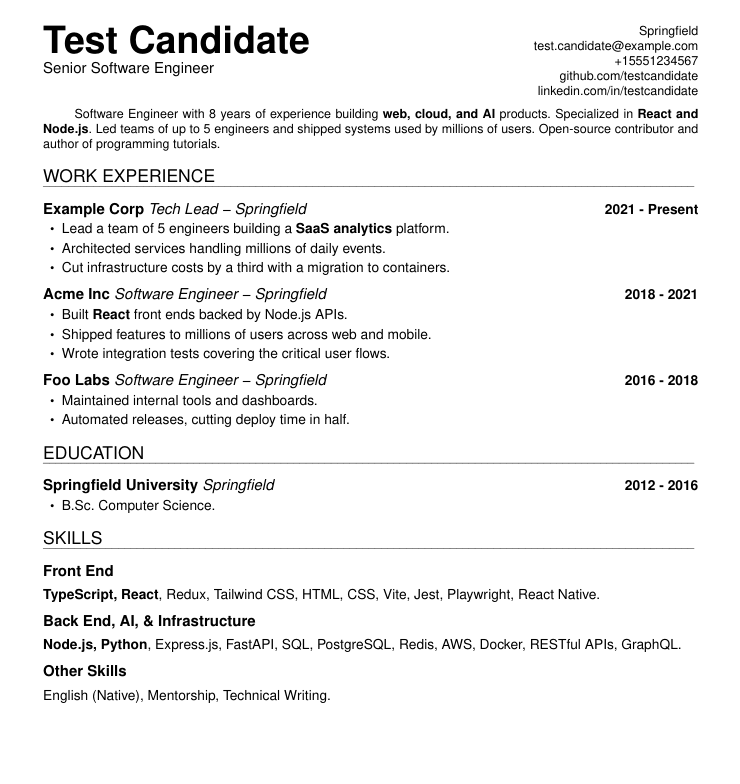
Here's what the source resume.md compiles to:
Test_Candidate.pdf.
Requirements
- Linux or macOS.
pandoc(>= 3.5),groff,poppler-utils(forpdfinfo).- A desktop PDF viewer (reached through
xdg-openoropen).
Quick Start
- Clone
roffume:git clone https://github.com/sebastiancarlos/roffume - Edit your resume content in
resume.md(plus anyresume_<language>.md) - Preview your PDF:
make preview - Once satisfied, build the PDF files:
make build - Check that your PDF fits on one-page:
./verify - Create job-specific version:
./new-application company-name - Customize your CV further for the given application at
./applications/company-name/- Note that
./new-applicationsymlinked the root executables to the application folder, to be used from there directly.
- Note that
- Generate final files, with your name on them:
./rename-pdfs - Send, get hired, be happy!
We recommend that you commit to your roffume folder, so that you can
keep track of the history of all your job applications. But naturally, don't
expose it as a public repo.
File Structure
.
├── applications/         # Per-job folders, each a self-contained package
├── assets/               # Shared assets (photo) symlinked into each app folder
├── filters/
│   └── resume.lua        # Pandoc filter: sections/jobs/skills/paragraphs -> .ms
├── templates/
│   └── resume.ms         # Pandoc ms template (document chrome + contact block)
├── resume.md             # CV Markdown source file (canonical, English)
├── resume_<language>.md  # Optional extra-language source (for example resume_spanish.md)
├── resume.ms             # CV roff source file (generated)
├── resume_<language>.ms  # Optional extra-language roff source (generated)
├── new-application*      # Create folder for new application
├── rename-pdfs*          # Rename the generated PDF files to include your name
├── verify*               # Check all resumes render to a single page
├── resume.tmac           # Custom macros used by the cv *.ms files
├── Makefile
└── README.md
Overview
Commands
make build
Compiles resume.md and each resume_<language>.md to the generated *.ms
files with pandoc (single Lua filter filters/resume.lua, template
templates/resume.ms), then generates resume.pdf and each
resume_<language>.pdf in the root folder via grog -U -b -ww -k.
make preview
Preview the PDF file (resume.pdf). It does it by rendering the PDF to
/tmp/roffume-preview.pdf and opening it in the platform's default viewer
(xdg-open on Linux, open on macOS).
./new-application
Usage: new-application NAME [SOURCE]
  - create a ./application/NAME folder
  - move source files and scripts to new directory for tuning
The optional SOURCE (for example the job listing URL) is recorded in a
notes.md created inside the folder.
It also symlinks the resume.tmac file and the commands so they can
be used as if one were in the project folder.
This is the core aspect of the system: By easily creating individual "applications" from a source CV, the system helps with the slightly soul-crushing need to keyword-optimize and reorder skills for each application.
In an application folder, work as usual: Edit the resume.md (and any
resume_<language>.md) copies, then run make build and ./rename-pdfs.
./verify
Usage: verify
  - check that resume.md and each resume_<language>.md render to a single page
  - uses a temporary build dir; the committed PDFs are left untouched
  - exits 1 if any PDF is more than one page
Runs the same pandoc + grog pipeline as make preview into a throwaway
directory (never touching the committed PDFs), prints each resume's page
count, and exits 1 if any run over one page. Symlinked into each application
folder by new-application.
./verify from an editor
verify can be driven from an editor to catch an overflowing resume while
editing. The Neovim code below runs it in the vim buffer's focus and write
events, and shows a statusline marker (RESUME >1 PAGE) when it exits
nonzero:
-- ~/.config/nvim/init.vim

-- resume neovim add-on START
--   If resume doesn't fit on one page on resume write, show message.

-- On write or focus, save 'resume_warn' local buffer.
local resume_ag = vim.api.nvim_create_augroup("ResumeCheck", { clear = true })
vim.api.nvim_create_autocmd({ "FocusGained", "FocusLost", "BufEnter", "BufWritePost" }, {
  group = resume_ag,
  callback = function(args)
    local buf = args.buf or vim.fn.bufnr("%")
    local path = vim.api.nvim_buf_get_name(buf)
    if not path:match("resume.*%.md$") then return end

    vim.system({ "./verify" }, { cwd = vim.fn.fnamemodify(path, ":h") }, function(res)
      vim.schedule(function()
        if vim.api.nvim_buf_is_valid(buf) then
          vim.api.nvim_buf_set_var(buf, "resume_warn", res.code ~= 0)
          vim.cmd.redrawstatus()
        end
      end)
    end)
  end,
})

-- The %{} expression re-evaluates on every draw and reads the buffer local.
vim.api.nvim_set_hl(0, "ResumeWarn", { fg = "pink", bold = true })
if not vim.o.statusline:find("ResumeWarn", 1, true) then
  vim.opt.statusline = "%#ResumeWarn#%{get(b:, 'resume_warn', 0) ? 'RESUME >1 PAGE ' : ''}%*" .. vim.o.statusline
end

-- resume neovim add-on END
./rename-pdfs (project folder executable)
Usage: rename-pdfs [-n|--no-canonical-suffix]
  Rename pdf files from resume.pdf and each resume_<language>.pdf to:
    - <my-name>_ENGLISH.pdf (canonical resume.md)
    - <my-name>_<LANGUAGE>.pdf (each extra language, endonym suffix)
Your name is derived from the name: field in resume.md front matter
(spaces become underscores). The toolchain assumes the canonical resume.md
is English, hence the _ENGLISH suffix; -n drops it on the canonical
resume (for jobs taking a single file). Extra languages always keep their
suffix.
Generates the final file to be sent to the employer (with any further change for later exploration without affecting the to-be-sent files).
Authoring Resumes
Markdown source (resume.md)
-
Personal information (name, title, location, email, phone, github, linkedin, plus optional page margins (
margin-top/margin-left/margin-right/margin-bottom) and an optional photo (show_photo: true+photo: <path>) lives in the YAML front matter; the template feeds it into the contact block. -
Photo should be square-ish: The layout is tuned for a ~1:1 photo.
- Photo hack note: In groff, a picture is glued to the text baseline and
you can't move it up. And a picture hangs lower than text of the same
line, because text "peaks" above its baseline but a photo does not. So to
make the photo sit level with the name, photo builds quietly shrink the
top margin by 0.3i (see
templates/resume.ms).- Yes, this is the sort of stuff why we don't use roff in 2026.
- Photo hack note: In groff, a picture is glued to the text baseline and
you can't move it up. And a picture hangs lower than text of the same
line, because text "peaks" above its baseline but a photo does not. So to
make the photo sit level with the name, photo builds quietly shrink the
top margin by 0.3i (see
-
A top-level
#heading becomes a.sectionand marks the section's layout (for example# WORK EXPERIENCE). -
In any non-skills section, each
##heading pairs a company and role with a pipe -## Example Corp | Role- followed by an indented two-line block with the place and dates, then the bullets. It becomes an.item "Company" "Role \- Place" "Dates"plus.listlines:## Example Corp | Software Engineer Hamburg, Germany 2019 - 2024 - Architected a hamburger delivery system... -
Skill categories are grouped under a
# SKILLS {#skills}section as## Categoryheadings each followed by one comma-separated paragraph. -
An empty
::: {.pagebreak}div inserts a page break (.bp). -
Bold/italic inside bullets, skills and the summary are passed through to groff font escapes by the filters.
Custom Resume Macros (resume.tmac)
Adapted from https://github.com/wlcsm/resume.
.title "Text for Title"
Sets the main title of your resume. Typically your name.
.subtitle "Text for Subtitle"
Sets a subtitle. Meant to be used right after the .title. Often your job
title.
.section "SECTION NAME"
Creates a major section, with an underline. (for example, "Experience")
.item "Company" "Role \\- Place" "Dates"
Creates a structured entry with three parts, produced from each ## Company | Role heading and the indented two-line block (place, then dates) under it:
- Company (bold)
- Role and place, joined with an em dash (italic)
- Date range (bold, right-aligned) (optional)
To omit arguments, just pass a space (" ")
.list "List item text"
Creates a bulleted list item. Meant to be placed within an .item.
F.A.Q.
Why roff? Why not LaTeX or typst?
No reason, I just wanted to flex. Also, I believe roff still in 2026
generates PDFs faster than any other markup system by a couple of
milliseconds. So one must respect the early UNIX gurus.
Is the generated PDF parseable by ATC?
You probably meant ATS (ATC means "Air Traffic Control"). But in both cases,
the answer is yes (and it can be verified by pdftotext).
Are you ok?
I believe I am, yes.
License
MIT
Similar repos


Languages
Shell
40.2%
Lua
23.3%
Roff
15.4%
Makefile
11.3%
Python
9.8%
Add fragrance to your resume with the early-UNIX energy of roff
Shell
0
0 commits
updated Sep 20, 2026
See what people are saying (1)
README
Roffumé (rah-foo-MEH)
Add fragrance to your resume with the early-UNIX energy of roff.
roffume is a text-based resume authoring system:
- CVs are authored in Markdown and compiled to one-page PDFs via a
Pandoc Lua filter plus a custom Groff
mstemplate. - Per-job customized copies living in
applications/<job>/. resume.mdis the canonical (English) source. Any extra language lives alongside it asresume_<language>.md(for exampleresume_spanish.md).
roffume ships with a placeholder resume.md at the root, representing your
main resume. Make it yours by editing.
Here's what the source resume.md compiles to:
Test_Candidate.pdf.
Requirements
- Linux or macOS.
pandoc(>= 3.5),groff,poppler-utils(forpdfinfo).- A desktop PDF viewer (reached through
xdg-openoropen).
Quick Start
- Clone
roffume:git clone https://github.com/sebastiancarlos/roffume - Edit your resume content in
resume.md(plus anyresume_<language>.md) - Preview your PDF:
make preview - Once satisfied, build the PDF files:
make build - Check that your PDF fits on one-page:
./verify - Create job-specific version:
./new-application company-name - Customize your CV further for the given application at
./applications/company-name/- Note that
./new-applicationsymlinked the root executables to the application folder, to be used from there directly.
- Note that
- Generate final files, with your name on them:
./rename-pdfs - Send, get hired, be happy!
We recommend that you commit to your roffume folder, so that you can
keep track of the history of all your job applications. But naturally, don't
expose it as a public repo.
File Structure
.
├── applications/         # Per-job folders, each a self-contained package
├── assets/               # Shared assets (photo) symlinked into each app folder
├── filters/
│   └── resume.lua        # Pandoc filter: sections/jobs/skills/paragraphs -> .ms
├── templates/
│   └── resume.ms         # Pandoc ms template (document chrome + contact block)
├── resume.md             # CV Markdown source file (canonical, English)
├── resume_<language>.md  # Optional extra-language source (for example resume_spanish.md)
├── resume.ms             # CV roff source file (generated)
├── resume_<language>.ms  # Optional extra-language roff source (generated)
├── new-application*      # Create folder for new application
├── rename-pdfs*          # Rename the generated PDF files to include your name
├── verify*               # Check all resumes render to a single page
├── resume.tmac           # Custom macros used by the cv *.ms files
├── Makefile
└── README.md
Overview
Commands
make build
Compiles resume.md and each resume_<language>.md to the generated *.ms
files with pandoc (single Lua filter filters/resume.lua, template
templates/resume.ms), then generates resume.pdf and each
resume_<language>.pdf in the root folder via grog -U -b -ww -k.
make preview
Preview the PDF file (resume.pdf). It does it by rendering the PDF to
/tmp/roffume-preview.pdf and opening it in the platform's default viewer
(xdg-open on Linux, open on macOS).
./new-application
Usage: new-application NAME [SOURCE]
  - create a ./application/NAME folder
  - move source files and scripts to new directory for tuning
The optional SOURCE (for example the job listing URL) is recorded in a
notes.md created inside the folder.
It also symlinks the resume.tmac file and the commands so they can
be used as if one were in the project folder.
This is the core aspect of the system: By easily creating individual "applications" from a source CV, the system helps with the slightly soul-crushing need to keyword-optimize and reorder skills for each application.
In an application folder, work as usual: Edit the resume.md (and any
resume_<language>.md) copies, then run make build and ./rename-pdfs.
./verify
Usage: verify
  - check that resume.md and each resume_<language>.md render to a single page
  - uses a temporary build dir; the committed PDFs are left untouched
  - exits 1 if any PDF is more than one page
Runs the same pandoc + grog pipeline as make preview into a throwaway
directory (never touching the committed PDFs), prints each resume's page
count, and exits 1 if any run over one page. Symlinked into each application
folder by new-application.
./verify from an editor
verify can be driven from an editor to catch an overflowing resume while
editing. The Neovim code below runs it in the vim buffer's focus and write
events, and shows a statusline marker (RESUME >1 PAGE) when it exits
nonzero:
-- ~/.config/nvim/init.vim

-- resume neovim add-on START
--   If resume doesn't fit on one page on resume write, show message.

-- On write or focus, save 'resume_warn' local buffer.
local resume_ag = vim.api.nvim_create_augroup("ResumeCheck", { clear = true })
vim.api.nvim_create_autocmd({ "FocusGained", "FocusLost", "BufEnter", "BufWritePost" }, {
  group = resume_ag,
  callback = function(args)
    local buf = args.buf or vim.fn.bufnr("%")
    local path = vim.api.nvim_buf_get_name(buf)
    if not path:match("resume.*%.md$") then return end

    vim.system({ "./verify" }, { cwd = vim.fn.fnamemodify(path, ":h") }, function(res)
      vim.schedule(function()
        if vim.api.nvim_buf_is_valid(buf) then
          vim.api.nvim_buf_set_var(buf, "resume_warn", res.code ~= 0)
          vim.cmd.redrawstatus()
        end
      end)
    end)
  end,
})

-- The %{} expression re-evaluates on every draw and reads the buffer local.
vim.api.nvim_set_hl(0, "ResumeWarn", { fg = "pink", bold = true })
if not vim.o.statusline:find("ResumeWarn", 1, true) then
  vim.opt.statusline = "%#ResumeWarn#%{get(b:, 'resume_warn', 0) ? 'RESUME >1 PAGE ' : ''}%*" .. vim.o.statusline
end

-- resume neovim add-on END
./rename-pdfs (project folder executable)
Usage: rename-pdfs [-n|--no-canonical-suffix]
  Rename pdf files from resume.pdf and each resume_<language>.pdf to:
    - <my-name>_ENGLISH.pdf (canonical resume.md)
    - <my-name>_<LANGUAGE>.pdf (each extra language, endonym suffix)
Your name is derived from the name: field in resume.md front matter
(spaces become underscores). The toolchain assumes the canonical resume.md
is English, hence the _ENGLISH suffix; -n drops it on the canonical
resume (for jobs taking a single file). Extra languages always keep their
suffix.
Generates the final file to be sent to the employer (with any further change for later exploration without affecting the to-be-sent files).
Authoring Resumes
Markdown source (resume.md)
-
Personal information (name, title, location, email, phone, github, linkedin, plus optional page margins (
margin-top/margin-left/margin-right/margin-bottom) and an optional photo (show_photo: true+photo: <path>) lives in the YAML front matter; the template feeds it into the contact block. -
Photo should be square-ish: The layout is tuned for a ~1:1 photo.
- Photo hack note: In groff, a picture is glued to the text baseline and
you can't move it up. And a picture hangs lower than text of the same
line, because text "peaks" above its baseline but a photo does not. So to
make the photo sit level with the name, photo builds quietly shrink the
top margin by 0.3i (see
templates/resume.ms).- Yes, this is the sort of stuff why we don't use roff in 2026.
- Photo hack note: In groff, a picture is glued to the text baseline and
you can't move it up. And a picture hangs lower than text of the same
line, because text "peaks" above its baseline but a photo does not. So to
make the photo sit level with the name, photo builds quietly shrink the
top margin by 0.3i (see
-
A top-level
#heading becomes a.sectionand marks the section's layout (for example# WORK EXPERIENCE). -
In any non-skills section, each
##heading pairs a company and role with a pipe -## Example Corp | Role- followed by an indented two-line block with the place and dates, then the bullets. It becomes an.item "Company" "Role \- Place" "Dates"plus.listlines:## Example Corp | Software Engineer Hamburg, Germany 2019 - 2024 - Architected a hamburger delivery system... -
Skill categories are grouped under a
# SKILLS {#skills}section as## Categoryheadings each followed by one comma-separated paragraph. -
An empty
::: {.pagebreak}div inserts a page break (.bp). -
Bold/italic inside bullets, skills and the summary are passed through to groff font escapes by the filters.
Custom Resume Macros (resume.tmac)
Adapted from https://github.com/wlcsm/resume.
.title "Text for Title"
Sets the main title of your resume. Typically your name.
.subtitle "Text for Subtitle"
Sets a subtitle. Meant to be used right after the .title. Often your job
title.
.section "SECTION NAME"
Creates a major section, with an underline. (for example, "Experience")
.item "Company" "Role \\- Place" "Dates"
Creates a structured entry with three parts, produced from each ## Company | Role heading and the indented two-line block (place, then dates) under it:
- Company (bold)
- Role and place, joined with an em dash (italic)
- Date range (bold, right-aligned) (optional)
To omit arguments, just pass a space (" ")
.list "List item text"
Creates a bulleted list item. Meant to be placed within an .item.
F.A.Q.
Why roff? Why not LaTeX or typst?
No reason, I just wanted to flex. Also, I believe roff still in 2026
generates PDFs faster than any other markup system by a couple of
milliseconds. So one must respect the early UNIX gurus.
Is the generated PDF parseable by ATC?
You probably meant ATS (ATC means "Air Traffic Control"). But in both cases,
the answer is yes (and it can be verified by pdftotext).
Are you ok?
I believe I am, yes.
License
MIT
Similar repos
Languages
Shell
40.2%
Lua
23.3%
Roff
15.4%
Makefile
11.3%
Python
9.8%