
A super quick, easy to setup logging tool for NodeJS/TypeScript.
TypeScript
18
80 commits
updated Sep 27, 2026
See what people are saying
README
✈️🪵 jet-logger
A super quick, easy to setup TypeScript first logging tool for NodeJS and browsers.




· · ·
👀 Preview
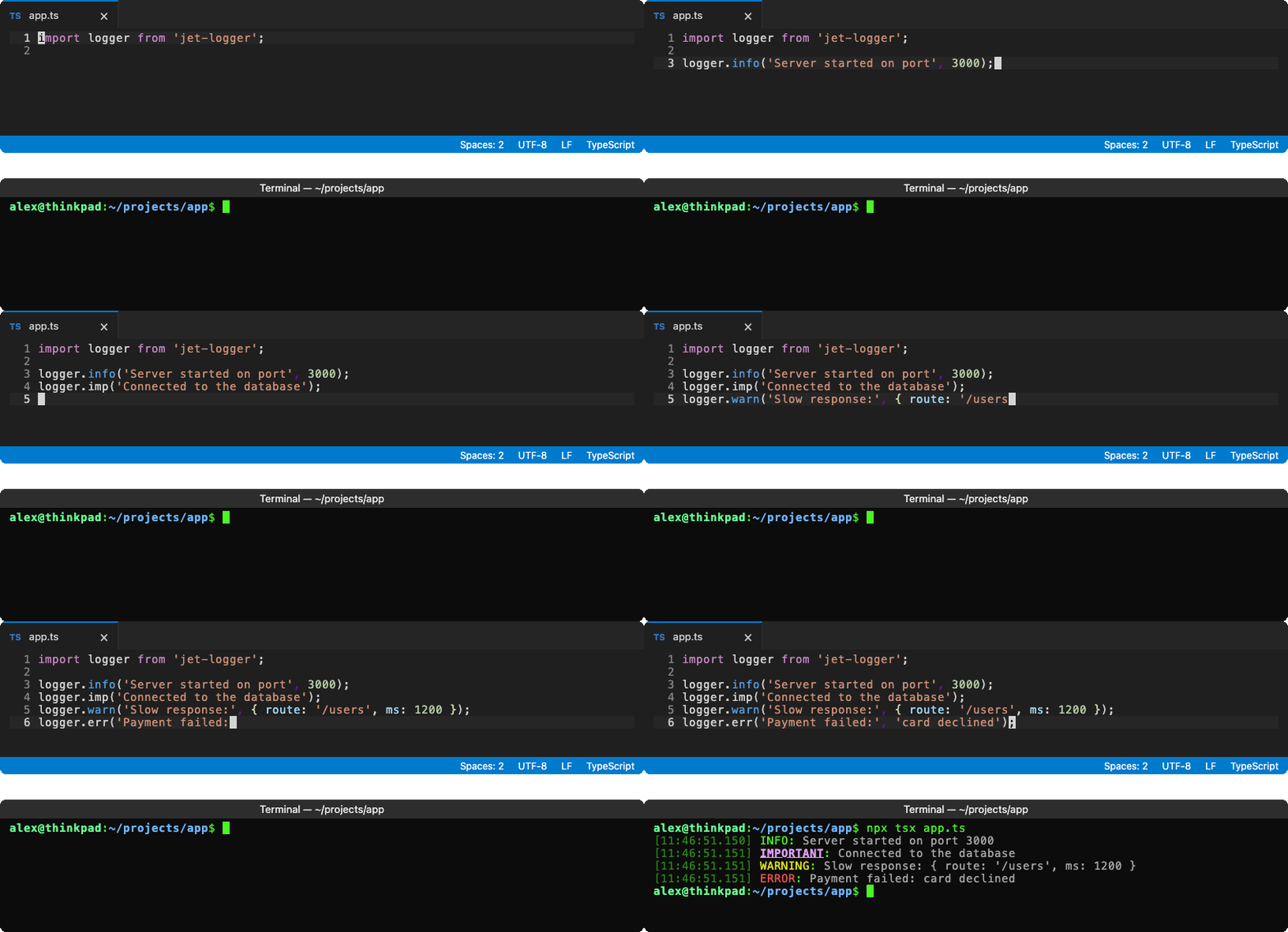
· · ·
Features ✨
- Works locally and in browsers
- Zero dependencies, written in TypeScript
- Configure programmatically or through environment variables
- Tiny: 4.7 kB minified + gzipped, with zero runtime dependencies.
- Logs can be sent to the console or a file
- Both plain-text
lineandjson(JSON Lines) formats supported - Color-coded
info,imp,warn, anderrlevels in terminals
· · ·
📦 Installation
npm install jet-logger
Requires Node.js 20.16+ or 22.3+. Jet-Logger is an ES module; CommonJS projects can
require()it on Node.js 20.19+ and 22.12+.
· · ·
⚡ Quick Start
import logger from 'jet-logger';

logger.info('Server started on port', 3000);
logger.imp('Connected to the database');
logger.warn('Slow response:', { route: '/users', ms: 1200 });
logger.err('Payment failed:', 'card declined');
With the default options, that prints (colors not shown):
[14:03:21.045] INFO: hello jet-logger
[14:03:21.046] IMPORTANT: hello jet-logger
[14:03:21.046] WARNING: hello jet-logger
[14:03:21.046] ERROR: hello jet-logger
The default export is a ready-made logger configured from environment variables. To create your own, call JetLogger():
import { JetLogger } from 'jet-logger';

const fileLogger = JetLogger({
  mode: JetLogger.Modes.FILE,
  filepath: './logs/app.log',
  format: JetLogger.Formats.JSON,
});

fileLogger.info('Written to disk');
· · ·
📘 Log Methods
| Method | Description |
|---|---|
info(...args) | Log at INFO level |
imp(...args) | Log at IMPORTANT level |
warn(...args) | Log at WARNING level (stderr in console mode) |
err(...args) | Log at ERROR level (stderr in console mode) |
out(...args) | Print the arguments as their own line, without a label or timestamp |
line() | Print an empty line |
catch(fn) | Call fn and log its error message if it throws or returns a rejected promise |
flush() | Returns a promise that resolves once everything logged so far has been written |
close() | Flush, then release the log file. Later calls on this logger are ignored |
Arguments are joined with a space. Objects are printed in full (util.inspect in Node, JSON in the browser).
· · ·
⚙️ Configuration
Every option can be passed to JetLogger() or set with an environment variable. Options passed in code take priority over environment variables, which take priority over the defaults.
| Option | Environment variable | Values | Default |
|---|---|---|---|
mode | JET_LOGGER_MODE | console, file, browser, custom, off | console |
format | JET_LOGGER_FORMAT | line, json | line |
filepath | JET_LOGGER_FILEPATH | Path of the log file (file mode) | jet-logger.log |
prependTimeToFilename | JET_LOGGER_PREPEND_TIME_TO_FILENAME | true, false | false |
showTime | JET_LOGGER_SHOW_TIME | true, false | true |
customTransport | — | Your function (required when mode is custom) | — |
JetLogger.ModesandJetLogger.Formatshold the mode and format values.- Environment variables are read when a logger is created. The default logger is created the first time you use it, so variables set after importing (e.g. by a
.envloader) still apply. - Environment values are case-insensitive (except
JET_LOGGER_FILEPATH); unrecognized values are ignored. - Options set to
undefineduse the default. Invalid or unknown options throw anInvalidOptionError, which is exported.
Output formats
line uses local time. The console shows just the time of day; files also include the date:
[14:03:21.045] WARNING: something happened               <- console
[2026-09-24 14:03:21.045] WARNING: something happened    <- file
Colors are used only when the output is a terminal. Set NO_COLOR to turn them off or FORCE_COLOR to force them on.
json writes one object per line with an ISO timestamp in time. Text is joined into msg, objects go into data (an array if there are several), and the first Error adds its message to msg and its stack frames to stack:
logger.warn('payment failed:', new Error('card declined'), { orderId: 42 });
{"time":"2026-09-25T01:04:01.247Z","level":"WARNING","msg":"payment failed: card declined","data":{"orderId":42},"stack":["at charge (/app/pay.js:10:11)"]}
line prints messages as-is, so text from users could add fake log lines or terminal escape codes. Use json for untrusted input; its values are escaped.
File mode
- Logs are appended to
filepath. Missing directories are created automatically. - Loggers writing to the same file share it, so their lines stay in order.
- Lines logged in the same tick are written together in one synchronous write at the end of the tick, or as soon as 64 KB are waiting, so memory use stays small even when logging in bursts.
- Anything not yet written is flushed when the process exits, crashes, or receives
SIGINTorSIGTERM. If your app handles those signals itself, jet-logger flushes and leaves exiting to your handler. await logger.flush()makes sure everything is on disk;await logger.close()also closes the file.prependTimeToFilenamestarts a new file each run:logs/app.log→logs/20260925T010401Z_app.log.- With the
jsonformat, the default file name becomesjet-logger.jsonl. - Files are created with your process's default permissions, which usually lets other users read them. Use a stricter
umaskor directory if your logs hold sensitive data.
Browser
In browsers and web workers, console and file modes switch to browser mode automatically, which prints styled logs with console.info, console.warn, and console.error.
· · ·
🚚 Custom Transports
Set mode to custom to send every log to your own function, e.g. to forward it to Datadog, Splunk, or an HTTP collector:
import { JetLogger, type CustomTransportFn } from 'jet-logger';

const sendToSplunk: CustomTransportFn = async ({ time, level, msg }) => {
  await splunkClient.emit({ time, level, msg });
};

const remoteLogger = JetLogger({
  mode: JetLogger.Modes.CUSTOM,
  customTransport: sendToSplunk,
});

remoteLogger.imp('Sent to Splunk');
await remoteLogger.flush(); // e.g. before exiting: waits for pending sends
The function can be async. If it throws or its promise rejects, the error is reported on stderr (console.error in browsers) instead of crashing your app.
It receives a CustomTransportContext:
interface CustomTransportContext {
  time: string; // ISO 8601
  level: 'INFO' | 'IMPORTANT' | 'WARNING' | 'ERROR' | null; // null for out() and line()
  msg: string; // all arguments joined into one string
}
· · ·
License
MIT © seanpmaxwell
Contributors

69 commits

11 commits
Similar repos


Languages
TypeScript
99.1%
A super quick, easy to setup logging tool for NodeJS/TypeScript.
TypeScript
18
80 commits
updated Sep 27, 2026
See what people are saying
README
✈️🪵 jet-logger
A super quick, easy to setup TypeScript first logging tool for NodeJS and browsers.
· · ·
👀 Preview
· · ·
Features ✨
- Works locally and in browsers
- Zero dependencies, written in TypeScript
- Configure programmatically or through environment variables
- Tiny: 4.7 kB minified + gzipped, with zero runtime dependencies.
- Logs can be sent to the console or a file
- Both plain-text
lineandjson(JSON Lines) formats supported - Color-coded
info,imp,warn, anderrlevels in terminals
· · ·
📦 Installation
npm install jet-logger
Requires Node.js 20.16+ or 22.3+. Jet-Logger is an ES module; CommonJS projects can
require()it on Node.js 20.19+ and 22.12+.
· · ·
⚡ Quick Start
import logger from 'jet-logger';

logger.info('Server started on port', 3000);
logger.imp('Connected to the database');
logger.warn('Slow response:', { route: '/users', ms: 1200 });
logger.err('Payment failed:', 'card declined');
With the default options, that prints (colors not shown):
[14:03:21.045] INFO: hello jet-logger
[14:03:21.046] IMPORTANT: hello jet-logger
[14:03:21.046] WARNING: hello jet-logger
[14:03:21.046] ERROR: hello jet-logger
The default export is a ready-made logger configured from environment variables. To create your own, call JetLogger():
import { JetLogger } from 'jet-logger';

const fileLogger = JetLogger({
  mode: JetLogger.Modes.FILE,
  filepath: './logs/app.log',
  format: JetLogger.Formats.JSON,
});

fileLogger.info('Written to disk');
· · ·
📘 Log Methods
| Method | Description |
|---|---|
info(...args) | Log at INFO level |
imp(...args) | Log at IMPORTANT level |
warn(...args) | Log at WARNING level (stderr in console mode) |
err(...args) | Log at ERROR level (stderr in console mode) |
out(...args) | Print the arguments as their own line, without a label or timestamp |
line() | Print an empty line |
catch(fn) | Call fn and log its error message if it throws or returns a rejected promise |
flush() | Returns a promise that resolves once everything logged so far has been written |
close() | Flush, then release the log file. Later calls on this logger are ignored |
Arguments are joined with a space. Objects are printed in full (util.inspect in Node, JSON in the browser).
· · ·
⚙️ Configuration
Every option can be passed to JetLogger() or set with an environment variable. Options passed in code take priority over environment variables, which take priority over the defaults.
| Option | Environment variable | Values | Default |
|---|---|---|---|
mode | JET_LOGGER_MODE | console, file, browser, custom, off | console |
format | JET_LOGGER_FORMAT | line, json | line |
filepath | JET_LOGGER_FILEPATH | Path of the log file (file mode) | jet-logger.log |
prependTimeToFilename | JET_LOGGER_PREPEND_TIME_TO_FILENAME | true, false | false |
showTime | JET_LOGGER_SHOW_TIME | true, false | true |
customTransport | — | Your function (required when mode is custom) | — |
JetLogger.ModesandJetLogger.Formatshold the mode and format values.- Environment variables are read when a logger is created. The default logger is created the first time you use it, so variables set after importing (e.g. by a
.envloader) still apply. - Environment values are case-insensitive (except
JET_LOGGER_FILEPATH); unrecognized values are ignored. - Options set to
undefineduse the default. Invalid or unknown options throw anInvalidOptionError, which is exported.
Output formats
line uses local time. The console shows just the time of day; files also include the date:
[14:03:21.045] WARNING: something happened               <- console
[2026-09-24 14:03:21.045] WARNING: something happened    <- file
Colors are used only when the output is a terminal. Set NO_COLOR to turn them off or FORCE_COLOR to force them on.
json writes one object per line with an ISO timestamp in time. Text is joined into msg, objects go into data (an array if there are several), and the first Error adds its message to msg and its stack frames to stack:
logger.warn('payment failed:', new Error('card declined'), { orderId: 42 });
{"time":"2026-09-25T01:04:01.247Z","level":"WARNING","msg":"payment failed: card declined","data":{"orderId":42},"stack":["at charge (/app/pay.js:10:11)"]}
line prints messages as-is, so text from users could add fake log lines or terminal escape codes. Use json for untrusted input; its values are escaped.
File mode
- Logs are appended to
filepath. Missing directories are created automatically. - Loggers writing to the same file share it, so their lines stay in order.
- Lines logged in the same tick are written together in one synchronous write at the end of the tick, or as soon as 64 KB are waiting, so memory use stays small even when logging in bursts.
- Anything not yet written is flushed when the process exits, crashes, or receives
SIGINTorSIGTERM. If your app handles those signals itself, jet-logger flushes and leaves exiting to your handler. await logger.flush()makes sure everything is on disk;await logger.close()also closes the file.prependTimeToFilenamestarts a new file each run:logs/app.log→logs/20260925T010401Z_app.log.- With the
jsonformat, the default file name becomesjet-logger.jsonl. - Files are created with your process's default permissions, which usually lets other users read them. Use a stricter
umaskor directory if your logs hold sensitive data.
Browser
In browsers and web workers, console and file modes switch to browser mode automatically, which prints styled logs with console.info, console.warn, and console.error.
· · ·
🚚 Custom Transports
Set mode to custom to send every log to your own function, e.g. to forward it to Datadog, Splunk, or an HTTP collector:
import { JetLogger, type CustomTransportFn } from 'jet-logger';

const sendToSplunk: CustomTransportFn = async ({ time, level, msg }) => {
  await splunkClient.emit({ time, level, msg });
};

const remoteLogger = JetLogger({
  mode: JetLogger.Modes.CUSTOM,
  customTransport: sendToSplunk,
});

remoteLogger.imp('Sent to Splunk');
await remoteLogger.flush(); // e.g. before exiting: waits for pending sends
The function can be async. If it throws or its promise rejects, the error is reported on stderr (console.error in browsers) instead of crashing your app.
It receives a CustomTransportContext:
interface CustomTransportContext {
  time: string; // ISO 8601
  level: 'INFO' | 'IMPORTANT' | 'WARNING' | 'ERROR' | null; // null for out() and line()
  msg: string; // all arguments joined into one string
}
· · ·
License
MIT © seanpmaxwell
Similar repos
Contributors
69 commits
11 commits
Languages
TypeScript
99.1%