
An easy-to-use Among Us cheat menu with a simple GUI and lots of useful modules
C#
408
665 commits
updated Sep 29, 2026
README



An easy-to-use Among Us cheat menu with a simple GUI and lots of useful modules.
😎 Table Of Contents
🎁 Releases
| Mod Version | Among Us - Version | Link |
|---|---|---|
| v3.3.0 | 18 ( 2026.8.18 ) | Download |
| v3.2.0 | 17.4 ( 2026.6.5 ) 17.3 ( 2026.3.31 ) | Download |
| v3.1.1 | 17.3 ( 2026.3.31 ) | Download |
| v3.1.0 | 17.3 ( 2026.3.31 ) | Download |
| v3.0.2 | 17.2.2 ( 2026.3.17 ) 17.2.1 ( 2026.2.24 ) | Download |
| v3.0.1 | 17.2.2 ( 2026.3.17 ) 17.2.1 ( 2026.2.24 ) | Download |
| v3.0.0 | 17.2.1 ( 2026.2.24 ) | Download |
| v2.4.2 | 2024.9.4 | Download |
| v2.4.1 | 2024.8.13 | Download |
| v2.4.0 | 2024.6.18 | Download |
| v2.3.1 | 2024.6.18 | Download |
| v2.3.0 | 2024.6.4 | Download |
| v2.2.0 | 2024.3.5 | Download |
| v2.1.0 | 2023.11.28 | Download |
| v2.0.0 | 2023.11.28 | Download |
| v1.2.1 | 2023.11.28 | Download |
| v1.2.0 | 2023.11.28 | Download |
| v1.1.2 | 2023.7.12 2023.7.11 | Download |
| v1.1.1 | 2023.7.12 2023.7.11 | Download |
| v1.1.0 | 2023.7.12 2023.7.11 | Download |
| v1.0.0 | 2023.7.12 2023.7.11 | Download |
⬇️ Installation
🪟 Windows
-
Download the latest MalumMenu zip pack from here.
- For Steam or Itch.io: Download
MalumMenu-VERSION-Steam-Itch.zip. - For Microsoft Store, Epic Games Store, or Xbox App: Download
MalumMenu-VERSION-MicrosoftStore-EpicGames-XboxApp.zip.
- For Steam or Itch.io: Download
-
Open the zip file you have just downloaded and copy all its contents.
-
Paste these files directly into your Among Us game folder:
- Steam: Right-click Among Us in your Library → Click
Manage→ ClickBrowse local files. - Epic Launcher: Right-click Among Us in your Library → Click
Manage→ Click the folder icon in theInstallationbox. - Itch.io: Open the Itch.io app → Right-click Among Us in your Library → Click
Manage→ ClickOpen folder in Explorer. - Microsoft Store: Open the folder where Windows apps are installed (typically
C:\Program Files\WindowsApps\) by following the tutorial here → In File Explorer, use the search bar to search forAmong Us.exe→ Right-click theAmong Us.exeresult → SelectOpen file location. - Xbox App: Right-click Among Us in your Library → Click
Manage→ Open theFILEStab → ClickBROWSE...→ Open theAmong Usfolder → Open theContentfolder.
- Steam: Right-click Among Us in your Library → Click
-
Launch Among Us as you normally would. You should see a console window appear, installing the mod's requirements.
-
Wait for the console window to finish the installation.
-
After installation, Among Us will automatically open with MalumMenu successfully installed.
- By default, you can toggle the cheat GUI on by pressing DELETE on your keyboard.
-
If the installation doesn't work, check out our FAQ.
🐧 Linux
-
Run Among Us under Proton (or Wine).
-
In Steam: Right-click Among Us in your Library → Click
Properties→ ClickCompatibility→ EnableForce the use of a specific Steam Play compatibility tool. -
Test different Proton versions if you're having issues launching the game.
-
-
Set up BepInEx (the framework MalumMenu is built upon).
-
Follow the official Proton / Wine setup guide found here.
-
If you are using Proton with Steam, specify the DLL override:
-
In Steam: Right-click Among Us in your Library → Click
Properties→ ClickGeneral→ ClickLaunch Options. -
Add this to your launch options:
WINEDLLOVERRIDES="winhttp.dll=n,b" %command%
-
-
After that, continue with the Windows installation steps found here.
-
-
Fix crashes or errors (like
Unable to execute IL2CPP chainloader).-
In Steam: Right-click Among Us in your Library → Click
Properties→ ClickGeneral→ ClickLaunch Options. -
Set your launch options to:
PROTON_NO_ESYNC=1 PROTON_USE_WINED3D=1 WINEDLLOVERRIDES="winhttp.dll=n,b" %command%
-
📋 Features
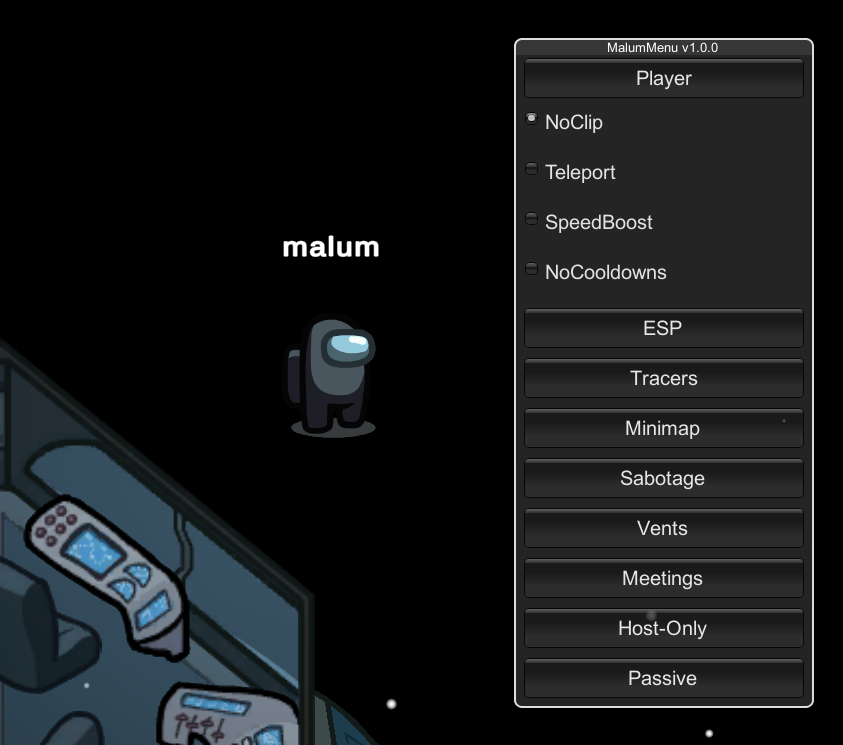
- An intuitive GUI with our latest, greatest Among Us cheats
- See ghosts & reveal the impostors
- Track every player's position using the minimap
- Teleport anywhere you want
- Change your role whenever you please
- Remove kill cooldown & spam-kill everyone
- Murder any distant player from across the map
- Unlock all of the game's cosmetics for FREE
- No more annoying disconnect penalties
For a complete list of all of MalumMenu's features, click here
❓ FAQ
Click to expand each topic
❗ I'm having issues installing MalumMenu
First of all, make sure you are running the most recent version of Among Us (18 / 2026.8.18) with the most recent version of MalumMenu (v3.3.0).
Also, check if your platform is officially supported:
- ✅ Steam
- ✅ Itch.io
- ✅ Epic Games Launcher
- ✅ Microsoft Store
- ✅ Xbox App
- ❔ Cracked (rarely works)
- ❌ iOS App Store & Google Play
- ❌ PS & Switch & Xbox Console
Now ensure that you have downloaded the correct zip file for your platform:
- For Steam or Itch.io: Download
MalumMenu-VERSION-Steam-Itch.zip - For Microsoft Store, Epic Games Store, or Xbox App: Download
MalumMenu-VERSION-MicrosoftStore-EpicGames-XboxApp.zip
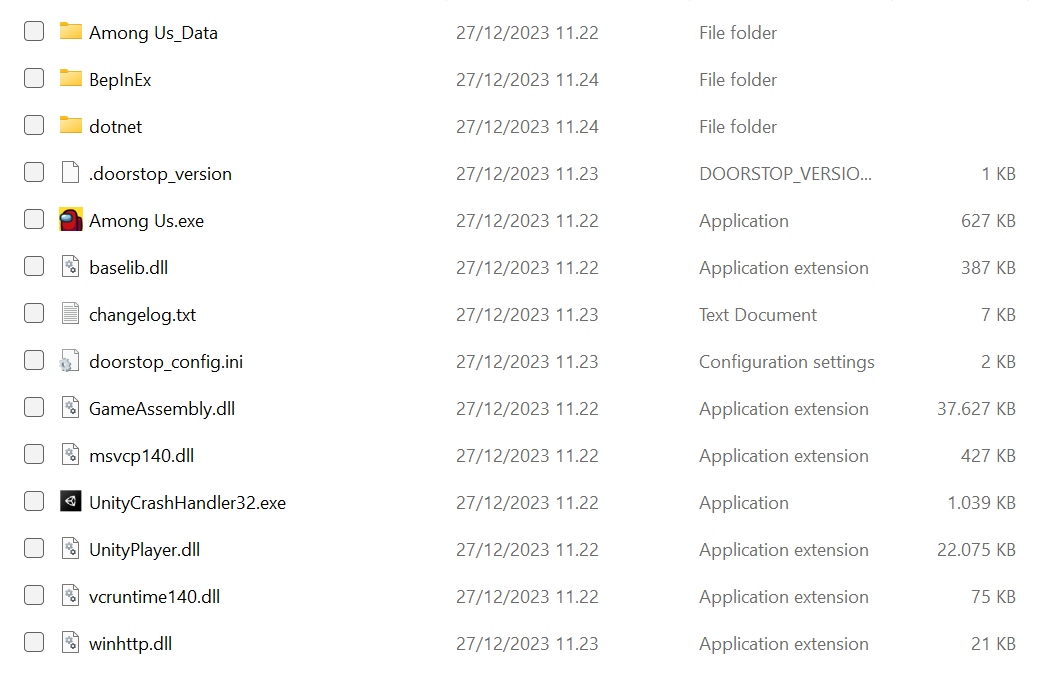
Make sure you followed the installation guide precisely. This is what your Among Us folder should look like after a successful installation:
Some antiviruses might cause issues when installing the mod, so consider temporarily deactivating your antivirus if the game isn't booting after installation.
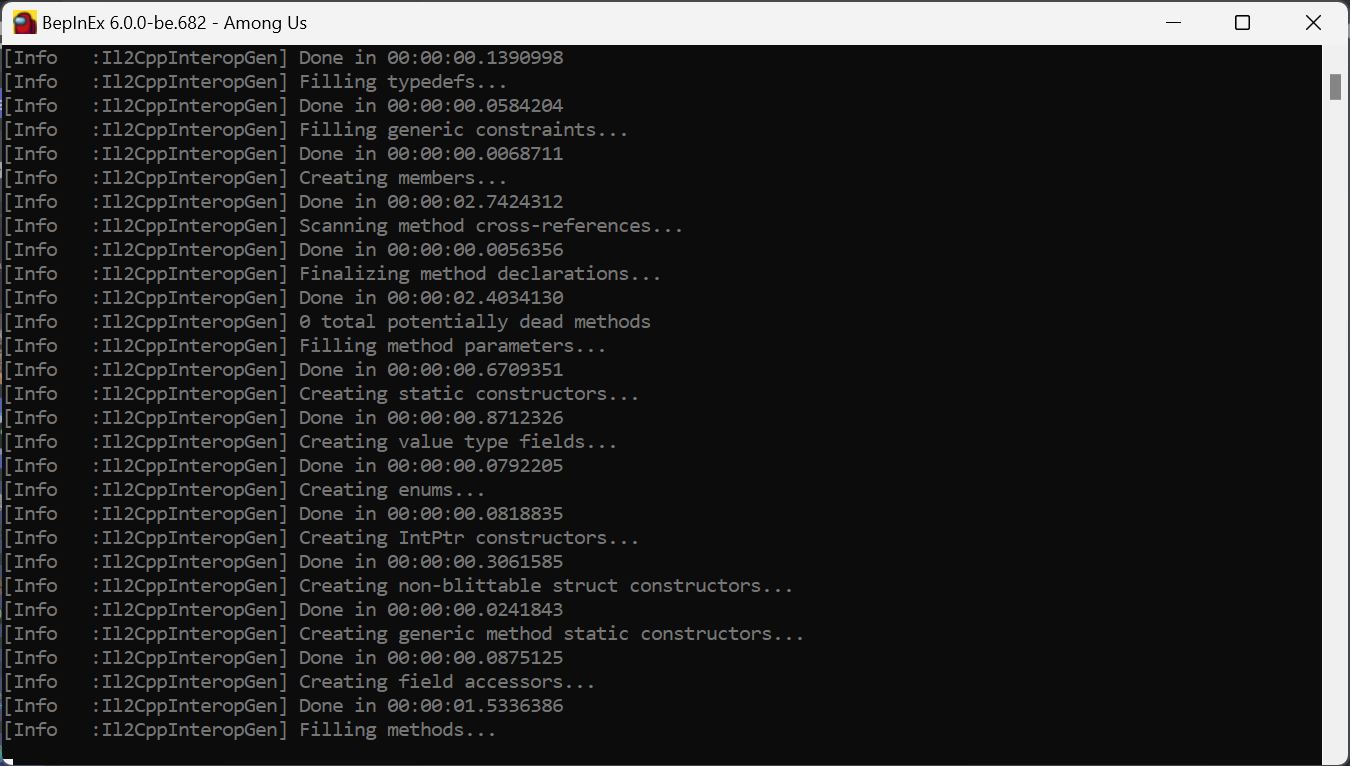
When installing MalumMenu for the first time, it will take MUCH longer than usual for the game to load. This is completely normal and expected behavior, so don't be alarmed if you have to wait a while. You can keep track of the installation progress through this useful BepInEx console window that pops up when you start the game:
If you are still having issues, feel free to open a new Github issue here, or you can ask for help in our Discord server: discord.gg/YYcYf88jAb
👾 I found a bug OR I would like to suggest a new feature
To let me know, you can open a new Github issue here, or you can discuss it on our Discord server: discord.gg/YYcYf88jAb
If you want, you can also contribute to the project and implement the change yourself by making a pull request. All contributions are welcome!
👨💻 I want to contribute to this project
To get started, I suggest you first learn about the basics of C# and Unity, since that's what Among Us is written in. There are plenty of tutorials out there to help you with that.
You should also learn about Github forking and pull requests, since you will need to use those to make any contributions to the project. Here is the official documentation on the topic.
Then, I suggest you learn about Among Us modding in general. In this project, I use BepInEx and Harmony to patch the game, so I suggest you take a look at this great guide to learn how to work with those.
Here are some other useful resources:
-
The Reactor discord server
- A great community of Among Us modders where you can ask questions and get help
- Here you can also find the most recent decompiled Among Us assemblies (the DLL files in
#resourceschannel). I suggest using dnSpy to go through these.
-
- Useful resource to learn more about the Among Us network protocol
- Keep in mind that it is slightly outdated
⚠️ Disclaimer
This mod is not affiliated with Among Us or Innersloth LLC, and the content contained therein is not endorsed or otherwise sponsored by Innersloth LLC. Portions of the materials contained herein are property of Innersloth LLC. © Innersloth LLC.
This mod is not intended to be used in any manner that interferes with Innersloth's services, Innersloth's operation of Among Us, the integrity or availability of the game, or the normal gameplay experience of other players. The creator does not endorse, encourage, or condone using this mod to disrupt games, negatively affect other users, bypass rules or protections, or gain an unfair advantage in any setting where such use is prohibited. Any misuse is solely the responsibility of the user.
Usage of this mod can violate the terms of service of Among Us, which may lead to punitive action including temporary or permanent bans from the game. The creator is not responsible for any consequences you may face due to usage. Use at your own risk.
Similar repos


Languages
C#
100.0%
An easy-to-use Among Us cheat menu with a simple GUI and lots of useful modules
C#
408
665 commits
updated Sep 29, 2026
README
An easy-to-use Among Us cheat menu with a simple GUI and lots of useful modules.
😎 Table Of Contents
🎁 Releases
| Mod Version | Among Us - Version | Link |
|---|---|---|
| v3.3.0 | 18 ( 2026.8.18 ) | Download |
| v3.2.0 | 17.4 ( 2026.6.5 ) 17.3 ( 2026.3.31 ) | Download |
| v3.1.1 | 17.3 ( 2026.3.31 ) | Download |
| v3.1.0 | 17.3 ( 2026.3.31 ) | Download |
| v3.0.2 | 17.2.2 ( 2026.3.17 ) 17.2.1 ( 2026.2.24 ) | Download |
| v3.0.1 | 17.2.2 ( 2026.3.17 ) 17.2.1 ( 2026.2.24 ) | Download |
| v3.0.0 | 17.2.1 ( 2026.2.24 ) | Download |
| v2.4.2 | 2024.9.4 | Download |
| v2.4.1 | 2024.8.13 | Download |
| v2.4.0 | 2024.6.18 | Download |
| v2.3.1 | 2024.6.18 | Download |
| v2.3.0 | 2024.6.4 | Download |
| v2.2.0 | 2024.3.5 | Download |
| v2.1.0 | 2023.11.28 | Download |
| v2.0.0 | 2023.11.28 | Download |
| v1.2.1 | 2023.11.28 | Download |
| v1.2.0 | 2023.11.28 | Download |
| v1.1.2 | 2023.7.12 2023.7.11 | Download |
| v1.1.1 | 2023.7.12 2023.7.11 | Download |
| v1.1.0 | 2023.7.12 2023.7.11 | Download |
| v1.0.0 | 2023.7.12 2023.7.11 | Download |
⬇️ Installation
🪟 Windows
-
Download the latest MalumMenu zip pack from here.
- For Steam or Itch.io: Download
MalumMenu-VERSION-Steam-Itch.zip. - For Microsoft Store, Epic Games Store, or Xbox App: Download
MalumMenu-VERSION-MicrosoftStore-EpicGames-XboxApp.zip.
- For Steam or Itch.io: Download
-
Open the zip file you have just downloaded and copy all its contents.
-
Paste these files directly into your Among Us game folder:
- Steam: Right-click Among Us in your Library → Click
Manage→ ClickBrowse local files. - Epic Launcher: Right-click Among Us in your Library → Click
Manage→ Click the folder icon in theInstallationbox. - Itch.io: Open the Itch.io app → Right-click Among Us in your Library → Click
Manage→ ClickOpen folder in Explorer. - Microsoft Store: Open the folder where Windows apps are installed (typically
C:\Program Files\WindowsApps\) by following the tutorial here → In File Explorer, use the search bar to search forAmong Us.exe→ Right-click theAmong Us.exeresult → SelectOpen file location. - Xbox App: Right-click Among Us in your Library → Click
Manage→ Open theFILEStab → ClickBROWSE...→ Open theAmong Usfolder → Open theContentfolder.
- Steam: Right-click Among Us in your Library → Click
-
Launch Among Us as you normally would. You should see a console window appear, installing the mod's requirements.
-
Wait for the console window to finish the installation.
-
After installation, Among Us will automatically open with MalumMenu successfully installed.
- By default, you can toggle the cheat GUI on by pressing DELETE on your keyboard.
-
If the installation doesn't work, check out our FAQ.
🐧 Linux
-
Run Among Us under Proton (or Wine).
-
In Steam: Right-click Among Us in your Library → Click
Properties→ ClickCompatibility→ EnableForce the use of a specific Steam Play compatibility tool. -
Test different Proton versions if you're having issues launching the game.
-
-
Set up BepInEx (the framework MalumMenu is built upon).
-
Follow the official Proton / Wine setup guide found here.
-
If you are using Proton with Steam, specify the DLL override:
-
In Steam: Right-click Among Us in your Library → Click
Properties→ ClickGeneral→ ClickLaunch Options. -
Add this to your launch options:
WINEDLLOVERRIDES="winhttp.dll=n,b" %command%
-
-
After that, continue with the Windows installation steps found here.
-
-
Fix crashes or errors (like
Unable to execute IL2CPP chainloader).-
In Steam: Right-click Among Us in your Library → Click
Properties→ ClickGeneral→ ClickLaunch Options. -
Set your launch options to:
PROTON_NO_ESYNC=1 PROTON_USE_WINED3D=1 WINEDLLOVERRIDES="winhttp.dll=n,b" %command%
-
📋 Features
- An intuitive GUI with our latest, greatest Among Us cheats
- See ghosts & reveal the impostors
- Track every player's position using the minimap
- Teleport anywhere you want
- Change your role whenever you please
- Remove kill cooldown & spam-kill everyone
- Murder any distant player from across the map
- Unlock all of the game's cosmetics for FREE
- No more annoying disconnect penalties
For a complete list of all of MalumMenu's features, click here
❓ FAQ
Click to expand each topic
❗ I'm having issues installing MalumMenu
First of all, make sure you are running the most recent version of Among Us (18 / 2026.8.18) with the most recent version of MalumMenu (v3.3.0).
Also, check if your platform is officially supported:
- ✅ Steam
- ✅ Itch.io
- ✅ Epic Games Launcher
- ✅ Microsoft Store
- ✅ Xbox App
- ❔ Cracked (rarely works)
- ❌ iOS App Store & Google Play
- ❌ PS & Switch & Xbox Console
Now ensure that you have downloaded the correct zip file for your platform:
- For Steam or Itch.io: Download
MalumMenu-VERSION-Steam-Itch.zip - For Microsoft Store, Epic Games Store, or Xbox App: Download
MalumMenu-VERSION-MicrosoftStore-EpicGames-XboxApp.zip
Make sure you followed the installation guide precisely. This is what your Among Us folder should look like after a successful installation:
Some antiviruses might cause issues when installing the mod, so consider temporarily deactivating your antivirus if the game isn't booting after installation.
When installing MalumMenu for the first time, it will take MUCH longer than usual for the game to load. This is completely normal and expected behavior, so don't be alarmed if you have to wait a while. You can keep track of the installation progress through this useful BepInEx console window that pops up when you start the game:
If you are still having issues, feel free to open a new Github issue here, or you can ask for help in our Discord server: discord.gg/YYcYf88jAb
👾 I found a bug OR I would like to suggest a new feature
To let me know, you can open a new Github issue here, or you can discuss it on our Discord server: discord.gg/YYcYf88jAb
If you want, you can also contribute to the project and implement the change yourself by making a pull request. All contributions are welcome!
👨💻 I want to contribute to this project
To get started, I suggest you first learn about the basics of C# and Unity, since that's what Among Us is written in. There are plenty of tutorials out there to help you with that.
You should also learn about Github forking and pull requests, since you will need to use those to make any contributions to the project. Here is the official documentation on the topic.
Then, I suggest you learn about Among Us modding in general. In this project, I use BepInEx and Harmony to patch the game, so I suggest you take a look at this great guide to learn how to work with those.
Here are some other useful resources:
-
The Reactor discord server
- A great community of Among Us modders where you can ask questions and get help
- Here you can also find the most recent decompiled Among Us assemblies (the DLL files in
#resourceschannel). I suggest using dnSpy to go through these.
-
- Useful resource to learn more about the Among Us network protocol
- Keep in mind that it is slightly outdated
⚠️ Disclaimer
This mod is not affiliated with Among Us or Innersloth LLC, and the content contained therein is not endorsed or otherwise sponsored by Innersloth LLC. Portions of the materials contained herein are property of Innersloth LLC. © Innersloth LLC.
This mod is not intended to be used in any manner that interferes with Innersloth's services, Innersloth's operation of Among Us, the integrity or availability of the game, or the normal gameplay experience of other players. The creator does not endorse, encourage, or condone using this mod to disrupt games, negatively affect other users, bypass rules or protections, or gain an unfair advantage in any setting where such use is prohibited. Any misuse is solely the responsibility of the user.
Usage of this mod can violate the terms of service of Among Us, which may lead to punitive action including temporary or permanent bans from the game. The creator is not responsible for any consequences you may face due to usage. Use at your own risk.
Similar repos
Languages
C#
100.0%