
A tool to create ambigram fonts from any true-type font, then render an image of your selected text as an ambigram.
Python
2
77 commits
updated Feb 6, 2026
See what people are saying
README
fambigen - Ambigram Generator (and font compositor)

A command-line tool originally created to procedurally generate ambigrams from character pairs sourced from any TTF or WOFF font, and compose them into words or phrases. (An ambigram is a word or design that can be read from more than one viewpoint, such as when flipped upside-down (180-degree rotational symmetry)).
Amidst the feature development process, the ability to use two different source fonts when creating ambigram images was added. Some time after this, tha ability to create wholly new (non-ambigram) fonts, using the same boolean operators (Union, Intersection, XOR) to create a new font - often not resembling either of the input source font paths or strokes, creating entirely new outlines by transforming the vector paths from the sources via these logical operations was added.
I had been referring to this new "font mashup" capability as a "copmpositor" or "merger", but have since learned that amongst the font community, these terms have well-understood definitions other than what fambigen does. Perhaps less ambiguous might be "Algorithmic Type Synthesizer", "Boolean Glyph Processor", "Font Hybrid Outline Generator" (this appeals to me because I could call it "Font HOG"), or "non-linear typeface interpolator". I think this wording might also have an effect that might reduce some of the initial reaction from the typography community that seemed to look asconce, insinuating that this tool was somehow encouraging "piracy". In my view, it's a creative tool that makes use of ombinatorial synthesis of path geometry, modulating paths of one font wioth "signal" from another.
The latest feature addition enables the output of an entirely new TTF/WOFF using this same process, in addition to retaining its original functionality of (optionally) outputting a single PNG of a single word made of these "mashups" of individual glyphs, in either an ambigram or as just newly formed letter shapes that read only right-side up.
I have not yet updated all uses of the term "compositor" in the documentation below; don't let that confuse you.
Font "mashing" mode (no ambigram rotation)
If your goal is NOT an ambigram, but "take glyphs from font1 and glyphs from font2 and merge them into a single composite shape", use --noambi.
In --noambi mode, fambigen does three things:
- Builds the required character pairs (e.g.,
A+Bfor each position in your two input words). - Generates a composite SVG for each unique pair using the selected strategy/alignment.
- Renders those per-pair SVGs to PNG and stitches them into one final image.
This is best thought of as a procedural compositor / renderer, not a tool that emits an installable ..ttf/.otf
(It now totally does output installable font files
given two source fonts as input arguments.) Keep reading for usage details on --emit-font mode.
In the meantime, here's an example of the first successfully generated font, installed and in use on a MacBook Air:
python fambigen.py "" \
  --emit-font AriTimes.ttf \
  --charset ascii \
  --font Arial \
  --font2 "Times New Roman"
And the example after installing it via MacOS Font Book:

New switches (related to generating FONT files, not Ambigram Images, though of course the tool still makes Ambigram PNGs as originally.)
--emit-font OUT.ttf|OUT.woff|OUT.woff2
Enables font output. Implies --noambi.
Refuses if --strategy is not compatible with font emission (currently only outline strategy is used).
--charset {input,ascii,latin1,custom}
input: only codepoints seen in word1 (and optionally word2, though word2 is irrelevant for compositing-font mode)
ascii: 0x20-0x7E
latin1: 0x20-0xFF (or a more curated set)
custom: load from a text file, eg --charset-file chars.txt
--width-mode {font1,max,auto}
font1: advance width from font1
max: max(font1,font2)
auto: compute from composite bounds + padding (display-font-y, but the results have been surprisingly satisfactory, especially in light of not addressing proper kerning, etc.)
--name "Family Name"(optional) and auto-generate style name
Important:
When using --emit-font, the positional word1 argument is ignored unless
you explicitly pass --charset input.
--charset input will emit a subset font containing only the glyphs that appear in word1
--charset ascii or --charset latin1 will emit a general-purpose font; word1 is just a placeholder
About fambigen
This script takes one or two input words (or phrases), generates the necessary rotationally symmetric glyphs for each character pair, and composes them into a single PNG image.
I had cobbled together something similar in perl using a static ambigram font that you could enter text via your 1990's web browser, submit the form, and get back an ambigram - even of two same length sentences. It was a lot like the dime a dozen copycat ambigram generator websites you see today, just it was CGI on Apache 1.x. :-) Anyway, I had read something recently about how creating ambigrams (or at least, an ambigram font) is something "nearly impossible" by computer alone, and that the exceptions to the dime-a-dozen sites/services out there still had a human-in-the-middle as part of their process.
I searched a bit online and was surprised to find that this seemed mostly true, aside from a couple of recent diffusion model projects and even those required what to me seemed an excess of human intervention. Seemed the choice was a human, or an ambigram in one of the two fonts every one of those website copies from one another. I had an idea, and it was surprisingly successful. Maybe I'll write a paper explaining my method. :-)
I've writtten a short paper about this method
Examples
deadbeef
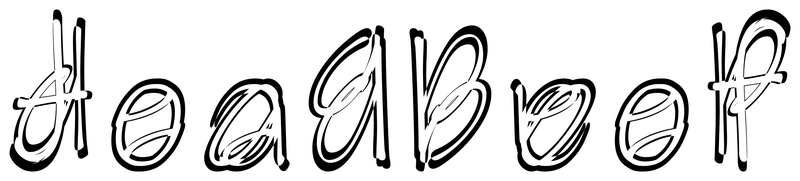
ycombinator-hackernews-ariblk

Features
- Multiple Generation Strategies: Implements distinct strategies for creating ambigram glyphs:
outline: A purely vector-based method that creates an outline/inline effect.centerline_trace: A complex method that generates a centerline skeleton for each character, aligns them, and applies a calligraphic stroke.
- Multiple Alignment Strategies:
centroid: A simple union based on aligning the geometric centers.iterative_registration: Shape overlap maximization.principal_axis: A more stable alignment based on the principal axis of the character shapes.
- Flexible Ambigram Creation:
- Create palindromic ambigrams from a single word (e.g., "level").
- Create a simple ambigram of a non-palidromic single word that will read the same "upside-down".
- Create symbiotic ambigrams from two different words of the same length (e.g., "kitten" / "bundle").
- Command-Line Interface: All options, including input words, font file, and strategy, can be controlled via command-line arguments for easy scripting and automation.
- Custom Fonts: Supports any TrueType Font (
.ttf), with Arial as a convenient default. - Mixed-Case Support: Correctly generates glyphs from pairs of uppercase and lowercase characters (e.g., 'M' and 'e').
- Dual Output: Generates both the individual SVG vector glyphs for each pair and a final composed PNG raster image for the full word.
- Font Compositor Modes: The original
--noambiwill forego the rotation and merging for the purpose of being legible upside-down and will instead just give you a composite of two fonts that you choose, and save an image rendered in that font.
A new --emit-font switch enables the creation of a full ASCII or latin1 glyphset font file created from the two input fonts specified.
New alignment strategy examples:
centroid
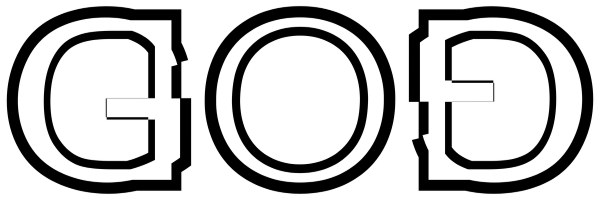
iterative_registration (shape overlap)

Installation
- Clone the repository:
git clone https://github.com/scottvr/fambigen cd fambigen - Install the required packages using the
requirements.txtfile:pip install -r requirements.txt
Usage
The script is controlled via command-line arguments.
python fambigen.py word1 [word2] [--font FONT_PATH] [--strategy STRATEGY_NAME]
Arguments
word1: (Required) The first word, which is read from left to right.word2: (Optional) The second word, which is read when the image is rotated 180 degrees. If omitted, the script will create a palindromic ambigram ofword1.-f, --font: (Optional) The full path to the.ttffont file you wish to use. Defaults to Arial. Note that I'm now using matplotlib's system font path searching, but absolute paths to individual font files is also supported.-f2, --font2: (Optional) The full path to a second.ttffont file you wish to use. Defaults tofont. (You can specify justfont2if you like andfontwill remain its default of arial unless otherwise specified.)-s, --strategy: (Optional) The generation strategy to use. Choices arecentroid,principal_axis,outline, andcenterline_trace. Defaults tooutline.--alignment: (Optional) The glyph alignment strategy to use. Choices arecentroidanditerative_registration (shape_overlap maximization). (-a c, or-a i` for short)--uniform-glyphs: (Optional) Scale fonts to the same size before merging them.
--width: final output PNG width in pixels (for ambigram mode).
--noambi: (Optional) Disables ambigrammitization, allowing for font compositing only.--emit-font: (Optional) The output file name for a composited font. Requires both font and font2 arguments define. Note that --emit-font currently supports --strategy outline (with --alignment ...). Other strategies remain available for SVG/PNG workflows.
Examples
1. Create a simple ambigram of the word "awesome":
python fambigen.py awesome
- This will generate a
awesome_ambigram.pngfile (using the default (Arial) font).
2. Create an ambigram from two different words:
python fambigen.py Mary LOVE
- This will generate the required mixed-case glyphs (
ML.svg,ao.svg,rv.svg,yE.svg) and compose them into aMary-LOVE_ambigram.pngfile.
3. Use a different font and strategy:
python fambigen.py ambigram --font "/path/to/your/font/coolfont.ttf" --strategy centerline_trace
4. Generate a new composite TTF
All examples use Arial and Times New Roman because they are present on most systems and clearly demonstrate serif/sans compositing.
# composite of Arial and Times New Roman - ASCII characters, centroid alignment
python fambigen.py "" \
  --emit-font AriTimes.ttf \
  --charset ascii \
  --strategy outline \
  --alignment centroid \
  --font Arial.ttf \
  --font2 "Times New Roman.ttf"
# composite of Arial and Times New Roman - LATIN1  characters, iterative registration alignment
python fambigen.py "" \
  --emit-font AriTimes.ttf \
  --charset latin1 \
  --strategy outline \
  --alignment i \
  --font Arial.ttf \
  --font2 "Times New Roman.ttf"
Important:
When using --emit-font, the positional word1 argument is ignored unless
you explicitly pass --charset input.
--charset input emit a subset font containing only the glyphs that appear in word1
--charset [ascii|latin1] emit a general-purpose font; word1 is just a placeholder
# Subset font: only glyphs appearing in the string "ARIAL&TIMES"
python fambigen.py "ARIAL&TIMES" \
  --emit-font AriTimes.ttf \
  --charset input \
  --strategy outline \
  --alignment centroid \
  --font Arial.ttf \
  --font2 "Times New Roman.ttf"
5. Get help and see all options:
python fambigen.py --help
How It Works
The script operates in two main stages:
-
Stage 1: Glyph Generation
- Based on the input word(s), it first determines the unique character pairs required (e.g., for "Mary" and "LOVE", the pairs are
ML,ao,rv,yE). - For each pair, it calls the
generate_ambigram_svgfunction using the chosen strategy (outlineby default). - This generates and saves an individual SVG file for each pair into a strategy-specific directory (e.g.,
generated_glyphs_outline/ML.svg).
- Based on the input word(s), it first determines the unique character pairs required (e.g., for "Mary" and "LOVE", the pairs are
-
Stage 2: Image Composition
- After the required SVGs are generated, the
create_ambigram_from_stringfunction is called. - It reads the necessary SVG files in the correct order.
- It uses the
cairosvglibrary to render each SVG into an in-memory PNG image. - Finally, it uses the
Pillowlibrary to stitch these individual glyph images together side-by-side into a single composite PNG file.
- After the required SVGs are generated, the
License
This project is licensed under the MIT License
Contributors

77 commits
Similar repos


Languages
Python
96.1%
Mermaid
3.9%
A tool to create ambigram fonts from any true-type font, then render an image of your selected text as an ambigram.
Python
2
77 commits
updated Feb 6, 2026
See what people are saying
README
fambigen - Ambigram Generator (and font compositor)
A command-line tool originally created to procedurally generate ambigrams from character pairs sourced from any TTF or WOFF font, and compose them into words or phrases. (An ambigram is a word or design that can be read from more than one viewpoint, such as when flipped upside-down (180-degree rotational symmetry)).
Amidst the feature development process, the ability to use two different source fonts when creating ambigram images was added. Some time after this, tha ability to create wholly new (non-ambigram) fonts, using the same boolean operators (Union, Intersection, XOR) to create a new font - often not resembling either of the input source font paths or strokes, creating entirely new outlines by transforming the vector paths from the sources via these logical operations was added.
I had been referring to this new "font mashup" capability as a "copmpositor" or "merger", but have since learned that amongst the font community, these terms have well-understood definitions other than what fambigen does. Perhaps less ambiguous might be "Algorithmic Type Synthesizer", "Boolean Glyph Processor", "Font Hybrid Outline Generator" (this appeals to me because I could call it "Font HOG"), or "non-linear typeface interpolator". I think this wording might also have an effect that might reduce some of the initial reaction from the typography community that seemed to look asconce, insinuating that this tool was somehow encouraging "piracy". In my view, it's a creative tool that makes use of ombinatorial synthesis of path geometry, modulating paths of one font wioth "signal" from another.
The latest feature addition enables the output of an entirely new TTF/WOFF using this same process, in addition to retaining its original functionality of (optionally) outputting a single PNG of a single word made of these "mashups" of individual glyphs, in either an ambigram or as just newly formed letter shapes that read only right-side up.
I have not yet updated all uses of the term "compositor" in the documentation below; don't let that confuse you.
Font "mashing" mode (no ambigram rotation)
If your goal is NOT an ambigram, but "take glyphs from font1 and glyphs from font2 and merge them into a single composite shape", use --noambi.
In --noambi mode, fambigen does three things:
- Builds the required character pairs (e.g.,
A+Bfor each position in your two input words). - Generates a composite SVG for each unique pair using the selected strategy/alignment.
- Renders those per-pair SVGs to PNG and stitches them into one final image.
This is best thought of as a procedural compositor / renderer, not a tool that emits an installable ..ttf/.otf
(It now totally does output installable font files
given two source fonts as input arguments.) Keep reading for usage details on --emit-font mode.
In the meantime, here's an example of the first successfully generated font, installed and in use on a MacBook Air:
python fambigen.py "" \
  --emit-font AriTimes.ttf \
  --charset ascii \
  --font Arial \
  --font2 "Times New Roman"
And the example after installing it via MacOS Font Book:
New switches (related to generating FONT files, not Ambigram Images, though of course the tool still makes Ambigram PNGs as originally.)
--emit-font OUT.ttf|OUT.woff|OUT.woff2
Enables font output. Implies --noambi.
Refuses if --strategy is not compatible with font emission (currently only outline strategy is used).
--charset {input,ascii,latin1,custom}
input: only codepoints seen in word1 (and optionally word2, though word2 is irrelevant for compositing-font mode)
ascii: 0x20-0x7E
latin1: 0x20-0xFF (or a more curated set)
custom: load from a text file, eg --charset-file chars.txt
--width-mode {font1,max,auto}
font1: advance width from font1
max: max(font1,font2)
auto: compute from composite bounds + padding (display-font-y, but the results have been surprisingly satisfactory, especially in light of not addressing proper kerning, etc.)
--name "Family Name"(optional) and auto-generate style name
Important:
When using --emit-font, the positional word1 argument is ignored unless
you explicitly pass --charset input.
--charset input will emit a subset font containing only the glyphs that appear in word1
--charset ascii or --charset latin1 will emit a general-purpose font; word1 is just a placeholder
About fambigen
This script takes one or two input words (or phrases), generates the necessary rotationally symmetric glyphs for each character pair, and composes them into a single PNG image.
I had cobbled together something similar in perl using a static ambigram font that you could enter text via your 1990's web browser, submit the form, and get back an ambigram - even of two same length sentences. It was a lot like the dime a dozen copycat ambigram generator websites you see today, just it was CGI on Apache 1.x. :-) Anyway, I had read something recently about how creating ambigrams (or at least, an ambigram font) is something "nearly impossible" by computer alone, and that the exceptions to the dime-a-dozen sites/services out there still had a human-in-the-middle as part of their process.
I searched a bit online and was surprised to find that this seemed mostly true, aside from a couple of recent diffusion model projects and even those required what to me seemed an excess of human intervention. Seemed the choice was a human, or an ambigram in one of the two fonts every one of those website copies from one another. I had an idea, and it was surprisingly successful. Maybe I'll write a paper explaining my method. :-)
I've writtten a short paper about this method
Examples
deadbeef
ycombinator-hackernews-ariblk
Features
- Multiple Generation Strategies: Implements distinct strategies for creating ambigram glyphs:
outline: A purely vector-based method that creates an outline/inline effect.centerline_trace: A complex method that generates a centerline skeleton for each character, aligns them, and applies a calligraphic stroke.
- Multiple Alignment Strategies:
centroid: A simple union based on aligning the geometric centers.iterative_registration: Shape overlap maximization.principal_axis: A more stable alignment based on the principal axis of the character shapes.
- Flexible Ambigram Creation:
- Create palindromic ambigrams from a single word (e.g., "level").
- Create a simple ambigram of a non-palidromic single word that will read the same "upside-down".
- Create symbiotic ambigrams from two different words of the same length (e.g., "kitten" / "bundle").
- Command-Line Interface: All options, including input words, font file, and strategy, can be controlled via command-line arguments for easy scripting and automation.
- Custom Fonts: Supports any TrueType Font (
.ttf), with Arial as a convenient default. - Mixed-Case Support: Correctly generates glyphs from pairs of uppercase and lowercase characters (e.g., 'M' and 'e').
- Dual Output: Generates both the individual SVG vector glyphs for each pair and a final composed PNG raster image for the full word.
- Font Compositor Modes: The original
--noambiwill forego the rotation and merging for the purpose of being legible upside-down and will instead just give you a composite of two fonts that you choose, and save an image rendered in that font.
A new --emit-font switch enables the creation of a full ASCII or latin1 glyphset font file created from the two input fonts specified.
New alignment strategy examples:
centroid
iterative_registration (shape overlap)
Installation
- Clone the repository:
git clone https://github.com/scottvr/fambigen cd fambigen - Install the required packages using the
requirements.txtfile:pip install -r requirements.txt
Usage
The script is controlled via command-line arguments.
python fambigen.py word1 [word2] [--font FONT_PATH] [--strategy STRATEGY_NAME]
Arguments
word1: (Required) The first word, which is read from left to right.word2: (Optional) The second word, which is read when the image is rotated 180 degrees. If omitted, the script will create a palindromic ambigram ofword1.-f, --font: (Optional) The full path to the.ttffont file you wish to use. Defaults to Arial. Note that I'm now using matplotlib's system font path searching, but absolute paths to individual font files is also supported.-f2, --font2: (Optional) The full path to a second.ttffont file you wish to use. Defaults tofont. (You can specify justfont2if you like andfontwill remain its default of arial unless otherwise specified.)-s, --strategy: (Optional) The generation strategy to use. Choices arecentroid,principal_axis,outline, andcenterline_trace. Defaults tooutline.--alignment: (Optional) The glyph alignment strategy to use. Choices arecentroidanditerative_registration (shape_overlap maximization). (-a c, or-a i` for short)--uniform-glyphs: (Optional) Scale fonts to the same size before merging them.
--width: final output PNG width in pixels (for ambigram mode).
--noambi: (Optional) Disables ambigrammitization, allowing for font compositing only.--emit-font: (Optional) The output file name for a composited font. Requires both font and font2 arguments define. Note that --emit-font currently supports --strategy outline (with --alignment ...). Other strategies remain available for SVG/PNG workflows.
Examples
1. Create a simple ambigram of the word "awesome":
python fambigen.py awesome
- This will generate a
awesome_ambigram.pngfile (using the default (Arial) font).
2. Create an ambigram from two different words:
python fambigen.py Mary LOVE
- This will generate the required mixed-case glyphs (
ML.svg,ao.svg,rv.svg,yE.svg) and compose them into aMary-LOVE_ambigram.pngfile.
3. Use a different font and strategy:
python fambigen.py ambigram --font "/path/to/your/font/coolfont.ttf" --strategy centerline_trace
4. Generate a new composite TTF
All examples use Arial and Times New Roman because they are present on most systems and clearly demonstrate serif/sans compositing.
# composite of Arial and Times New Roman - ASCII characters, centroid alignment
python fambigen.py "" \
  --emit-font AriTimes.ttf \
  --charset ascii \
  --strategy outline \
  --alignment centroid \
  --font Arial.ttf \
  --font2 "Times New Roman.ttf"
# composite of Arial and Times New Roman - LATIN1  characters, iterative registration alignment
python fambigen.py "" \
  --emit-font AriTimes.ttf \
  --charset latin1 \
  --strategy outline \
  --alignment i \
  --font Arial.ttf \
  --font2 "Times New Roman.ttf"
Important:
When using --emit-font, the positional word1 argument is ignored unless
you explicitly pass --charset input.
--charset input emit a subset font containing only the glyphs that appear in word1
--charset [ascii|latin1] emit a general-purpose font; word1 is just a placeholder
# Subset font: only glyphs appearing in the string "ARIAL&TIMES"
python fambigen.py "ARIAL&TIMES" \
  --emit-font AriTimes.ttf \
  --charset input \
  --strategy outline \
  --alignment centroid \
  --font Arial.ttf \
  --font2 "Times New Roman.ttf"
5. Get help and see all options:
python fambigen.py --help
How It Works
The script operates in two main stages:
-
Stage 1: Glyph Generation
- Based on the input word(s), it first determines the unique character pairs required (e.g., for "Mary" and "LOVE", the pairs are
ML,ao,rv,yE). - For each pair, it calls the
generate_ambigram_svgfunction using the chosen strategy (outlineby default). - This generates and saves an individual SVG file for each pair into a strategy-specific directory (e.g.,
generated_glyphs_outline/ML.svg).
- Based on the input word(s), it first determines the unique character pairs required (e.g., for "Mary" and "LOVE", the pairs are
-
Stage 2: Image Composition
- After the required SVGs are generated, the
create_ambigram_from_stringfunction is called. - It reads the necessary SVG files in the correct order.
- It uses the
cairosvglibrary to render each SVG into an in-memory PNG image. - Finally, it uses the
Pillowlibrary to stitch these individual glyph images together side-by-side into a single composite PNG file.
- After the required SVGs are generated, the
License
This project is licensed under the MIT License
Similar repos
Contributors
77 commits
Languages
Python
96.1%
Mermaid
3.9%