
README
Window Sweaters
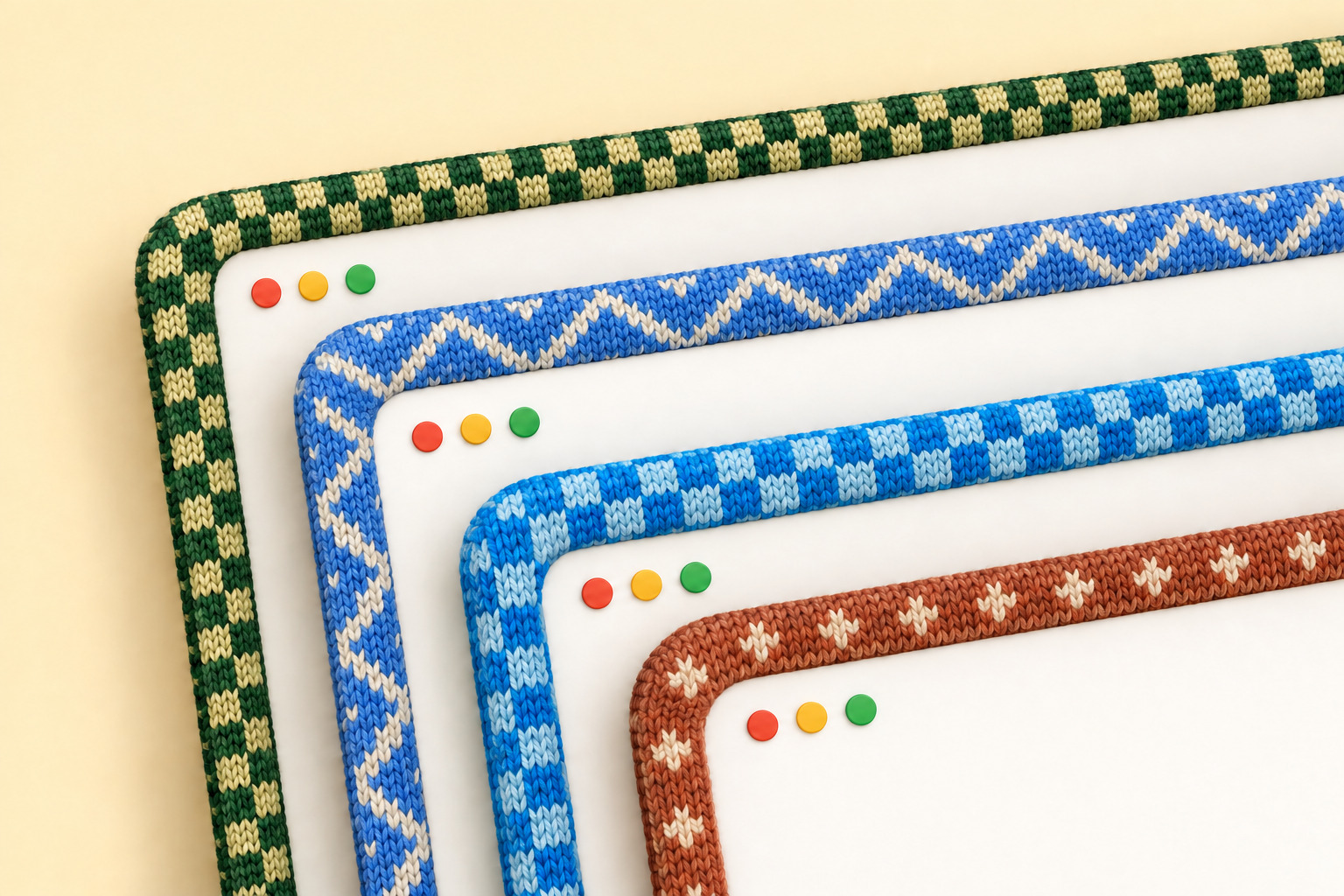
A little Mac app I made to give my windows sweaters. 🧶 Knitted borders, colours inspired by your favourite apps, and a cosier desktop.
Get it
You can just send this repo to your coding agent and ask it to install Window Sweaters for you:
Install Window Sweaters on my Mac: https://github.com/saragordic/window-sweaters
Or install it yourself with Homebrew:
brew trust saragordic/tap
brew install --cask saragordic/tap/window-sweaters
Then open Window Sweaters from your Applications folder.
You can also grab the latest ZIP from Releases, unzip it, and drag Window Sweaters.app into Applications.
If macOS blocks it, open System Settings → Privacy & Security → Open Anyway after trying to launch it. The app isn't notarized by Apple yet. Apple's instructions explain this step.
Make yourself cosy
Click the yarn icon in your menu bar to change the style, pattern, border width, and stitch size. You can also pause the sweaters or quit from there.
By App gives each app its own sweater. Zigzag gives them all a softer, matching pattern in their own colours. Try both and see what you like.
If macOS asks for Accessibility access, enable Window Sweaters in System Settings → Privacy & Security → Accessibility so it can follow which window is focused.
The sweaters
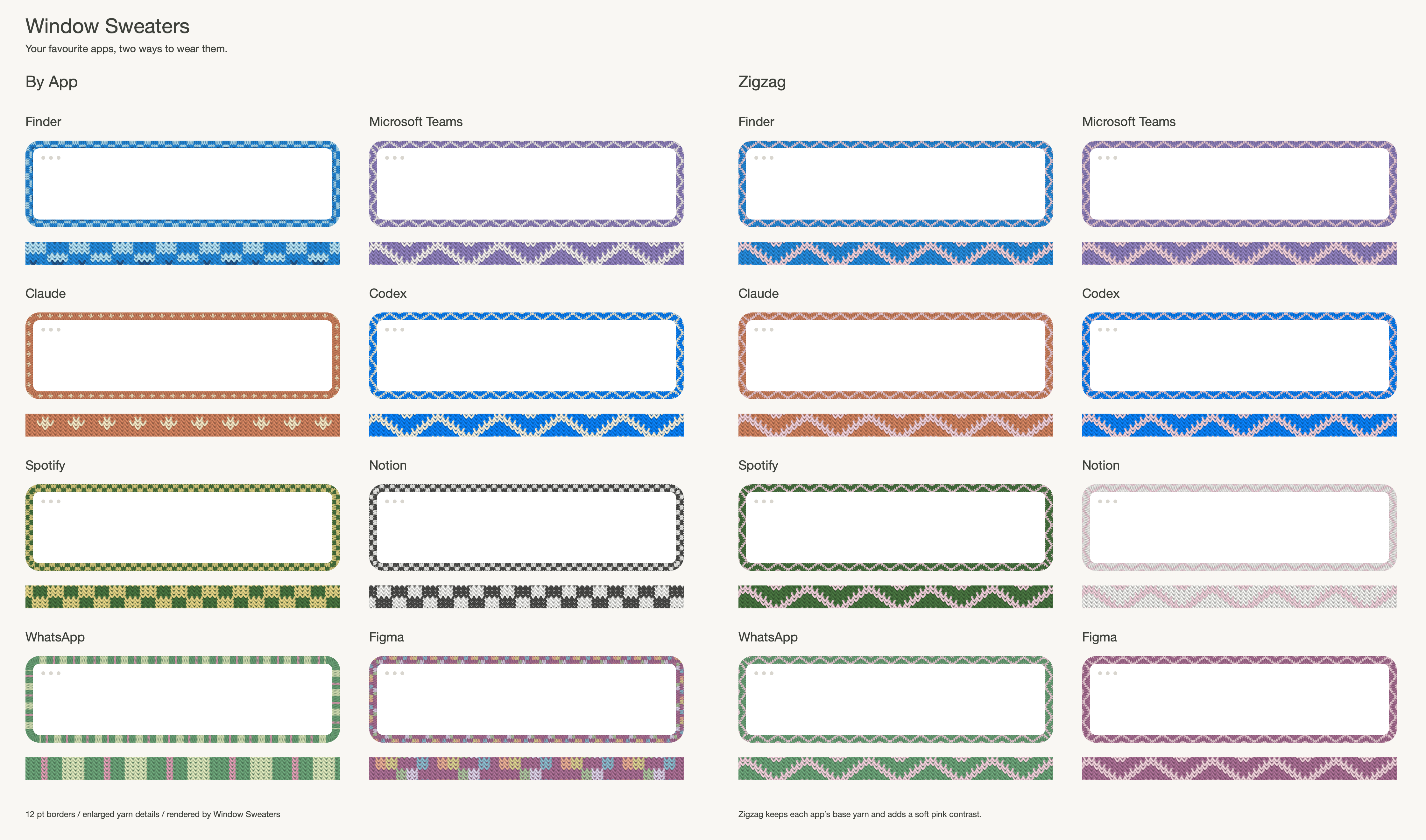
Some of my favourites, in By App and Zigzag. You can see the whole collection and close-up stitches in the catalogue, or download the By App PDF and Zigzag PDF.
The app colours are picked by hand, not read from your app icons. Apps without their own sweater still get a border in a colour chosen from their name, so it stays the same every time.
A little work in progress
I built this on my Mac and use it myself, but there are still rough edges. Borders hide while you resize a window and return when you're done.
The app is built for macOS 13 or later, on Apple Silicon and Intel. I've tested it on Apple Silicon with macOS 26; older macOS versions and Intel Macs haven't had the same hands-on testing. It uses private macOS window APIs, so system updates may affect how it works.
If something looks wrong, open an issue and tell me your macOS version, Mac model, and whether you're using another screen. Reproduction steps help a lot.
Build it yourself
You'll need Apple's Command Line Tools (xcode-select --install) and Python 3.
git clone https://github.com/saragordic/window-sweaters.git
cd window-sweaters
./scripts/build-app.sh
python3 scripts/install-local.py
This builds outputs/Window Sweaters.app, installs it in ~/Applications, and opens it. The installer backs up any previous local installation before replacing it.
Your own colourways
If you'd like to experiment, edit these files and restart the app:
~/Library/Application Support/Knit Borders/apps.conf
~/Library/Application Support/Knit Borders/charts/
The folder still uses the app's original name so existing settings keep working. For example, an app rule looks like this:
Claude = #D58561 atelier-claude
Names match app-name prefixes, ignoring capitalisation; the longest match wins. You can also put your own PNG charts in the charts folder to replace built-in patterns.
If you like setting things up from the command line, Window Sweaters also runs an optional shell script at startup, if you have one at ~/.config/window-sweaters/sweatersrc or ~/.sweatersrc.
Contributing
make test       # run the tests
make catalogue  # render the sweater collection
make bench     # benchmark the renderer
See CONTRIBUTING.md for more details.
Credits and license
Built on JankyBorders by Felix Kratz, with thanks. Released under GPL-3.0. See NOTICE.md for attribution.
Contributors

14 commits
See what people are saying
Hacker News (1)
Similar repos


Languages
C
75.0%
Objective-C
22.9%
README
Window Sweaters
A little Mac app I made to give my windows sweaters. 🧶 Knitted borders, colours inspired by your favourite apps, and a cosier desktop.
Get it
You can just send this repo to your coding agent and ask it to install Window Sweaters for you:
Install Window Sweaters on my Mac: https://github.com/saragordic/window-sweaters
Or install it yourself with Homebrew:
brew trust saragordic/tap
brew install --cask saragordic/tap/window-sweaters
Then open Window Sweaters from your Applications folder.
You can also grab the latest ZIP from Releases, unzip it, and drag Window Sweaters.app into Applications.
If macOS blocks it, open System Settings → Privacy & Security → Open Anyway after trying to launch it. The app isn't notarized by Apple yet. Apple's instructions explain this step.
Make yourself cosy
Click the yarn icon in your menu bar to change the style, pattern, border width, and stitch size. You can also pause the sweaters or quit from there.
By App gives each app its own sweater. Zigzag gives them all a softer, matching pattern in their own colours. Try both and see what you like.
If macOS asks for Accessibility access, enable Window Sweaters in System Settings → Privacy & Security → Accessibility so it can follow which window is focused.
The sweaters
Some of my favourites, in By App and Zigzag. You can see the whole collection and close-up stitches in the catalogue, or download the By App PDF and Zigzag PDF.
The app colours are picked by hand, not read from your app icons. Apps without their own sweater still get a border in a colour chosen from their name, so it stays the same every time.
A little work in progress
I built this on my Mac and use it myself, but there are still rough edges. Borders hide while you resize a window and return when you're done.
The app is built for macOS 13 or later, on Apple Silicon and Intel. I've tested it on Apple Silicon with macOS 26; older macOS versions and Intel Macs haven't had the same hands-on testing. It uses private macOS window APIs, so system updates may affect how it works.
If something looks wrong, open an issue and tell me your macOS version, Mac model, and whether you're using another screen. Reproduction steps help a lot.
Build it yourself
You'll need Apple's Command Line Tools (xcode-select --install) and Python 3.
git clone https://github.com/saragordic/window-sweaters.git
cd window-sweaters
./scripts/build-app.sh
python3 scripts/install-local.py
This builds outputs/Window Sweaters.app, installs it in ~/Applications, and opens it. The installer backs up any previous local installation before replacing it.
Your own colourways
If you'd like to experiment, edit these files and restart the app:
~/Library/Application Support/Knit Borders/apps.conf
~/Library/Application Support/Knit Borders/charts/
The folder still uses the app's original name so existing settings keep working. For example, an app rule looks like this:
Claude = #D58561 atelier-claude
Names match app-name prefixes, ignoring capitalisation; the longest match wins. You can also put your own PNG charts in the charts folder to replace built-in patterns.
If you like setting things up from the command line, Window Sweaters also runs an optional shell script at startup, if you have one at ~/.config/window-sweaters/sweatersrc or ~/.sweatersrc.
Contributing
make test       # run the tests
make catalogue  # render the sweater collection
make bench     # benchmark the renderer
See CONTRIBUTING.md for more details.
Credits and license
Built on JankyBorders by Felix Kratz, with thanks. Released under GPL-3.0. See NOTICE.md for attribution.
See what people are saying
Hacker News (1)
Similar repos
Contributors
14 commits
Languages
C
75.0%
Objective-C
22.9%