
README
X Dynamic Feed Filtering
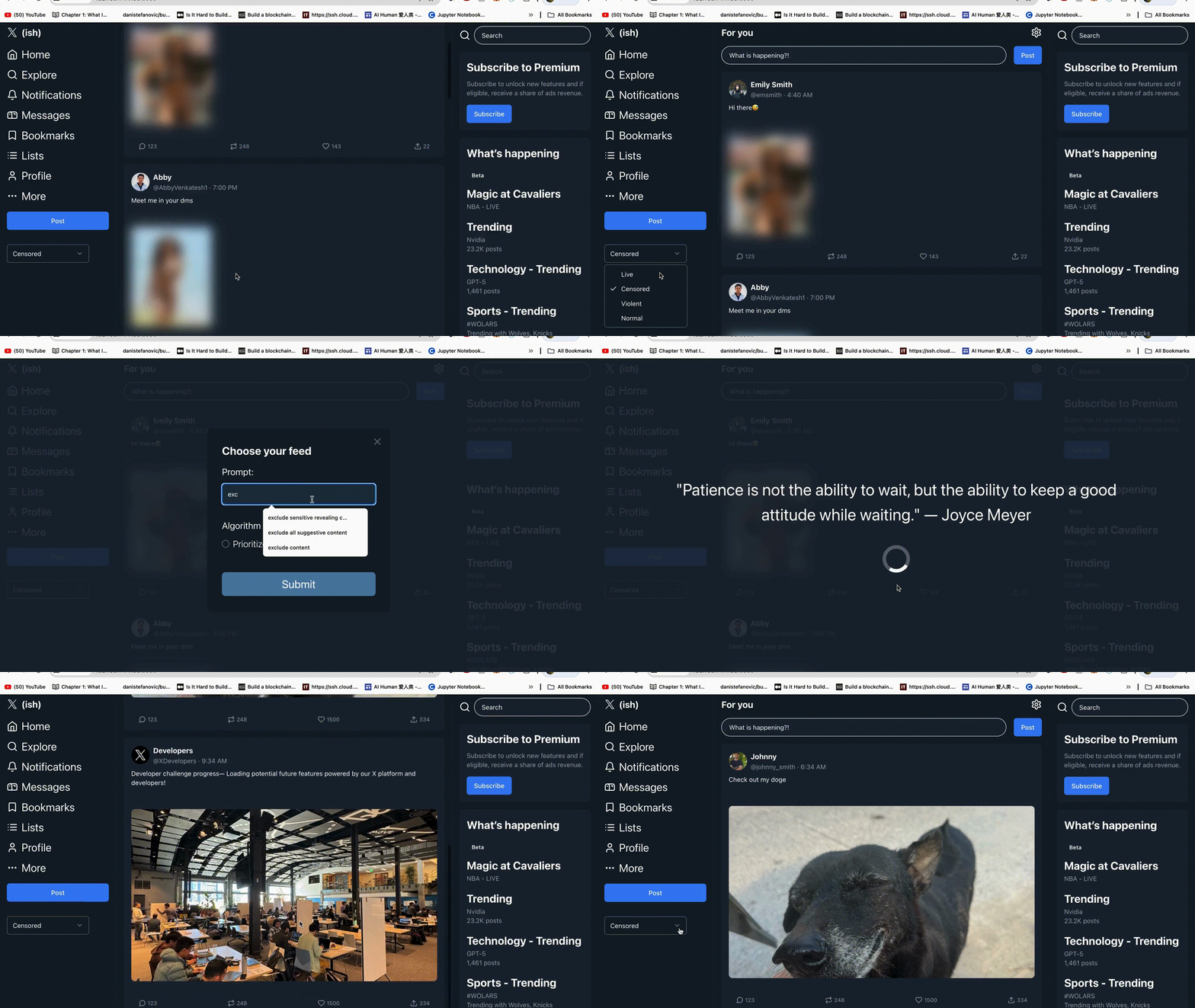
This is the repository for the Dynamic Feed Filtering X Developer Challenge project. This app spins up a mock X UI and calls a feed API to display a list of items.
The user can filter the feed clocking on the gear icon. This will open a modal where the user can use natural language to filter the feed. This filtering functionality provides two algorithms: "clean" and "prioritize". "Clean" removes any items that do not match the filter, while "prioritize" moves any items that do not match the filter to the bottom of the feed.
Example
The user can type in the filter input "exclude suggestive content" and select the "clean" algorithm. This will remove any items that are suggestive from the feed. If the user selects the "prioritize" algorithm, the items that are suggestive will be moved to the bottom of the feed.
Get Started
Run the client and server in separate terminals. By default, the client will be running on port 3000 and the server will be running on port 8000.
Start the client:
$ cd client
$ npm install
$ npm start
To start the server cd to the root directory and run:
$ uvicorn server.main:app --reload
The following environemnt variables are required to successfully run the demo:
XAI_API_KEY
CONSUMER_KEY
CONSUMER_SECRET
ACCESS_TOKEN
ACCESS_SECRET
Contributors

3 commits

1 commits
Similar repos


Languages
JavaScript
60.0%
Python
20.1%
Rust
15.1%
CSS
3.1%
HTML
1.7%
README
X Dynamic Feed Filtering
This is the repository for the Dynamic Feed Filtering X Developer Challenge project. This app spins up a mock X UI and calls a feed API to display a list of items.
The user can filter the feed clocking on the gear icon. This will open a modal where the user can use natural language to filter the feed. This filtering functionality provides two algorithms: "clean" and "prioritize". "Clean" removes any items that do not match the filter, while "prioritize" moves any items that do not match the filter to the bottom of the feed.
Example
The user can type in the filter input "exclude suggestive content" and select the "clean" algorithm. This will remove any items that are suggestive from the feed. If the user selects the "prioritize" algorithm, the items that are suggestive will be moved to the bottom of the feed.
Get Started
Run the client and server in separate terminals. By default, the client will be running on port 3000 and the server will be running on port 8000.
Start the client:
$ cd client
$ npm install
$ npm start
To start the server cd to the root directory and run:
$ uvicorn server.main:app --reload
The following environemnt variables are required to successfully run the demo:
XAI_API_KEY
CONSUMER_KEY
CONSUMER_SECRET
ACCESS_TOKEN
ACCESS_SECRET
Similar repos
Contributors
3 commits
1 commits
Languages
JavaScript
60.0%
Python
20.1%
Rust
15.1%
CSS
3.1%
HTML
1.7%