
SQLite-compatible database with a columnar format and JIT; 75× C SQLite, 200× Turso.
Go
3
1 commits
updated Oct 5, 2026
See what people are saying
README

musql
Pronounced "muscle."
SQLite-compatible SQL, accelerated by columnar storage and a JIT compiler.
musql pairs a new storage format optimized for columnar execution with just-in-time (JIT) compilation. The format stores columns contiguously; the JIT turns supported query paths into native machine code at runtime. Filters and aggregates work directly over those columns, reducing row decoding and interpreter overhead. In a 100,000-row read benchmark, a filtered count ran about 75× faster than C SQLite and over 200× faster than Turso. See performance for the full comparison and measurement scope.
Use it as an embedded database through database/sql, import existing SQLite
data, or replicate a database across nodes that need to work independently.
- A format built for fast queries. The
.musqsegment format gives compiled code direct access to column values, with an append-only delta for writes. - JIT-compiled execution. Supported query paths run as native machine code, with vectorized filter kernels on supported CPUs.
- Familiar SQL. Joins, window functions, triggers, JSON, full-text search, and R-tree indexes are part of the engine.
- SQLite import and export. Move databases between SQLite and musql's
.musqformat withmusql-convert. - Replication over your own network. Choose CRDT replication for independent writers, or leader mode with optional consensus integration.
Get started · Performance · SQLite compatibility · Replication · How it works · DOOM · Development
Get started
In a Go program
go get github.com/samyfodil/musql/driver
import (
    "database/sql"

    _ "github.com/samyfodil/musql/driver"
)

db, err := sql.Open("sqlite", "app.musq") // created if missing
// ...then use db exactly like any database/sql database.
Pure Go, no CGo; needs Go 1.27 or newer. The driver registers as sqlite
(and musql), so code written for another SQLite driver usually only
changes its import. Use one SQL statement per Exec or Query call.
As a server, no Go needed
Run musqld with Docker; the database lives in the musql volume:
docker run -p 8080:8080 -e MUSQLD_AUTH_TOKEN=secret -v musql:/data ghcr.io/samyfodil/musql
The image is built from the repository's Dockerfile, a 5 MB
scratch image; to build it yourself, run docker build -t musql . in the
repository root and use musql in place of the image name above.
Or download musqld for your platform from the
latest release and run
musqld -db app.musq (the file is created if missing).
It speaks Turso's protocol, so any libSQL client connects unchanged. In
TypeScript (npm install @libsql/client):
import { createClient } from "@libsql/client";

const db = createClient({ url: "http://localhost:8080", authToken: "secret" });

await db.execute("CREATE TABLE IF NOT EXISTS notes (id INTEGER PRIMARY KEY, body TEXT)");
await db.execute({ sql: "INSERT INTO notes (body) VALUES (?)", args: ["hello"] });
const { rows } = await db.execute("SELECT id, body FROM notes");
console.log(rows); // [ { id: 1, body: 'hello' } ]
More in Serve it to Turso and libSQL clients.
From an existing SQLite database
The release archive also has musql-convert:
./musql-convert import app.db app.musq   # SQLite -> musql
./musql-convert export app.musq app.db   # musql -> SQLite
Performance
Read workloads over 100,000 rows. Each workload is checked against C SQLite on 40 bind values before timing, then timed for about 200 ms. The figures are averaged over two machines, one arm64 and one amd64.
| Query | musql vs C SQLite | musql vs Turso |
|---|---|---|
| Filtered count, one predicate | 73× faster | 212× faster |
| Filtered count, two predicates | 77× faster | 226× faster |
| Rowid lookup | 1.3× slower | 1.3× faster |
| Secondary-index equality | 1.9× slower | 1.4× faster |
| Indexed equi-join | same | 1.9× faster |
| Sum over a filter | 8.0× faster | 25× faster |
| Grouped aggregate | 2.3× faster | 5.2× faster |
ORDER BY v DESC LIMIT 20 | 2.4× faster | 21× faster |
| Whole-table count | 1.7× faster | 5.8× faster |
Without the JIT, musql loses to C SQLite by a large multiple on these scans. Point lookups and joins do not use the JIT. Per-machine timings are in docs/benchmarks.md.
The current engine uses segment storage with a writable delta. Its
comparison harness measures both
musql's direct engine and database/sql paths, alongside C SQLite and Turso.
For a current comparison on your machine, run from the repository root
(requires CGo):
(cd compat-harness && go test -run '^TestBenchColumnarVsC$' -count=1 -v -timeout 4h .)
The full suite includes expensive workloads and can take hours. For read and
write comparisons through database/sql, use
TestBenchVsC:
(cd compat-harness && go test -run '^TestBenchVsC$' -count=1 -v -timeout 30m .)
SQLite compatibility
musql implements SQLite's SQL dialect through its own parser, planner, and execution engine. SQL compatibility and file compatibility are separate: the engine opens musql segment files. Existing SQLite files need conversion before you open them with the driver.
Import and export databases
Install the converter:
go install github.com/samyfodil/musql/cmd/musql-convert@latest
Then convert in either direction:
# Bring an existing SQLite database into musql.
musql-convert import app.db app.musq

# Export a musql database for SQLite tools or another application.
musql-convert export app.musq exported.db
Open the imported database with sql.Open("sqlite", "app.musq").
The converter package also exposes Import and Export
for use from Go.
What is tested
The differential harness runs SQL against both musql and C SQLite and compares
results. The whole SQL corpus mined from SQLite's own test suite (73,855
statements) runs with zero wrong results and zero panics. Its only declines
are 16 PRAGMA max_page_count statements. The rest either match C SQLite's output
exactly or are rejected by both engines. That is a measured result for the corpus,
not a claim that every SQLite behavior is identical. The
segment-format compatibility notes list
what the format declines and why.
Storage-specific behavior differs. For example, page counts describe musql's
storage, and PRAGMA max_page_count is declined. Use musql's
PRAGMA max_size = <bytes> to cap storage per connection. The compatibility
report explains the remaining declines and how import/export is tested.
Moving from another Go driver
Change the driver import, convert your database, and point the DSN at the
converted file. If you use mattn/go-sqlite3 and scan date, datetime, or
timestamp columns into time.Time, enable its declared-type conversion:
db, err := sql.Open("sqlite", "app.musq?_time_decltype=1&_loc=auto")
By default, musql returns stored values without that conversion. _loc=auto
uses time.Local; a named time zone can be supplied instead. The
driver compatibility notes
describe the conversion rules.
Serve it to Turso and libSQL clients
musqld serves a musql database over Hrana, the protocol libSQL and Turso
clients speak, so an app built on Turso can point at musql without code changes:
go run ./cmd/musqld -db app.musq -listen :8080 -auth-token "$TOKEN"
import { createClient } from "@libsql/client";
const db = createClient({ url: "http://localhost:8080", authToken: process.env.TOKEN });
await db.execute("SELECT 1");
http://, ws:// and libsql:// URLs all work. musqld implements Hrana 1–3
over HTTP and WebSocket, in JSON and Protobuf: pipelines, batches with
conditions, cursors, stored SQL, describe and interactive transactions. CI runs
Turso's own clients against it, @libsql/client for Node and libsql-client-go
(examples/turso).
To serve many databases, give musqld a directory. Like Turso, the first label of
the host name picks the database, so http://app.example.com:8080 serves
./dbs/app.musq:
go run ./cmd/musqld -dir ./dbs -create -listen :8080
Replicate a database
The replication package returns a regular *sql.DB and captures
row and schema changes as transactions commit. You supply the network through
replication.WithTransport; the base package has no networking dependency.
Choose the mode that fits your application:
| Mode | Behavior |
|---|---|
| CRDT | Every node can write, including while disconnected. Conflicts resolve per column using a hybrid logical clock, and nodes converge after reconnecting. |
| Leader | Only the node selected by your isWriter callback can commit. Changes reach followers asynchronously. |
| Leader with quorum | Commits go through your consensus log and return after quorum commitment and local application. |
CRDT merges can violate constraints that each local write satisfied, such as
foreign keys or a multi-column CHECK. Replicated databases also restrict
features such as triggers, virtual tables, and WITHOUT ROWID. Read the
replication guide for setup, conflict behavior, and
supported schemas, or start with the libp2p example.
How it works
Columnar segments put a column's values together in memory, so a filter can scan the values it needs without decoding every field of every row. The JIT compiles supported execution paths to native code, with vectorized filter kernels on supported CPUs. The planner also uses index seeks and specialized aggregate and top-N paths to avoid unnecessary work.
The driver connects database/sql to the parser, planner, and execution engine.
Committed changes go into an append-only delta; compaction folds them into the
segments. SQLite file handling lives in the converter. Replication captures
changes within the same transaction as the data it tracks.
| Package | Purpose |
|---|---|
| engine | SQL parsing, planning, execution, storage, triggers, full-text search, R-tree indexes, and JSON. |
| driver | The database/sql interface, connection handling, and transaction change capture. |
| convert/sqlite | Import and export between SQLite files and musql storage. |
| replication | Change logs, conflict resolution, synchronization, and leader/quorum integration. |
| examples/doom | DOOM compiled to VDBE bytecode, with windowed and headless runners. |
| examples/libp2p | A replication transport and end-to-end tests in a separate module. |
| compat-harness | Differential tests against C SQLite in a separate module that requires CGo. |
Yes, it runs DOOM
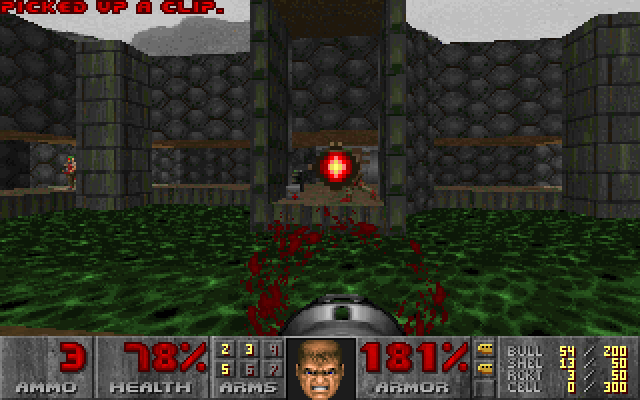
The same virtual machine that executes SQL can run DOOM. The
DOOM example takes unmodified doomgeneric through
C → LLVM IR → musql VDBE bytecode, then executes it with engine.ProgramStmt.
Each frame comes back as a result row; keyboard events go in as bound parameters.
Measured about 38 fps without JIT and 96 fps with JIT on an Intel i9. See the measurement details.
The program has 159,609 instructions and 40,561 registers. The idea comes from Turso's DOOM example.
The quickest way to play downloads the latest release for your machine and starts it (Doom's IR and the shareware WAD, about 20 MB, follow on first run).
macOS and Linux:
curl -fsSL https://raw.githubusercontent.com/samyfodil/musql/main/examples/doom/run.sh | sh
Windows (PowerShell):
irm https://raw.githubusercontent.com/samyfodil/musql/main/examples/doom/run.ps1 | iex
Or from source, in the repository root:
cd examples/doom
go run ./cmd/doom
Arrows move, Ctrl fires, and Space opens doors. Use ./cmd/doomhl instead of
./cmd/doom for a headless run that reports fps and saves the last frame as a
PNG. See the example README for controls and compiler tests.
Development
From a checkout of this repository:
make test               # Test the main module and the libp2p example.
make vet                # Vet both modules.
make harness            # Compare with C SQLite (requires CGo).
make build_all_targets  # Cross-compile the supported GOOS/GOARCH matrix.
The full SQL corpus can be replayed with scripts/sweep. See the
compatibility notes for what the format
declines and which storage numbers are excluded from SQL comparisons.
About the name
musql is muscle SQL: small, and stronger than it looks, like Mash Burnedead from Mashle. That is also why the logo is a cream puff, his favorite food, with data sliced inside.
Similar repos


SQLite-compatible database with a columnar format and JIT; 75× C SQLite, 200× Turso.
Go
3
1 commits
updated Oct 5, 2026
See what people are saying
README
musql
Pronounced "muscle."
SQLite-compatible SQL, accelerated by columnar storage and a JIT compiler.
musql pairs a new storage format optimized for columnar execution with just-in-time (JIT) compilation. The format stores columns contiguously; the JIT turns supported query paths into native machine code at runtime. Filters and aggregates work directly over those columns, reducing row decoding and interpreter overhead. In a 100,000-row read benchmark, a filtered count ran about 75× faster than C SQLite and over 200× faster than Turso. See performance for the full comparison and measurement scope.
Use it as an embedded database through database/sql, import existing SQLite
data, or replicate a database across nodes that need to work independently.
- A format built for fast queries. The
.musqsegment format gives compiled code direct access to column values, with an append-only delta for writes. - JIT-compiled execution. Supported query paths run as native machine code, with vectorized filter kernels on supported CPUs.
- Familiar SQL. Joins, window functions, triggers, JSON, full-text search, and R-tree indexes are part of the engine.
- SQLite import and export. Move databases between SQLite and musql's
.musqformat withmusql-convert. - Replication over your own network. Choose CRDT replication for independent writers, or leader mode with optional consensus integration.
Get started · Performance · SQLite compatibility · Replication · How it works · DOOM · Development
Get started
In a Go program
go get github.com/samyfodil/musql/driver
import (
    "database/sql"

    _ "github.com/samyfodil/musql/driver"
)

db, err := sql.Open("sqlite", "app.musq") // created if missing
// ...then use db exactly like any database/sql database.
Pure Go, no CGo; needs Go 1.27 or newer. The driver registers as sqlite
(and musql), so code written for another SQLite driver usually only
changes its import. Use one SQL statement per Exec or Query call.
As a server, no Go needed
Run musqld with Docker; the database lives in the musql volume:
docker run -p 8080:8080 -e MUSQLD_AUTH_TOKEN=secret -v musql:/data ghcr.io/samyfodil/musql
The image is built from the repository's Dockerfile, a 5 MB
scratch image; to build it yourself, run docker build -t musql . in the
repository root and use musql in place of the image name above.
Or download musqld for your platform from the
latest release and run
musqld -db app.musq (the file is created if missing).
It speaks Turso's protocol, so any libSQL client connects unchanged. In
TypeScript (npm install @libsql/client):
import { createClient } from "@libsql/client";

const db = createClient({ url: "http://localhost:8080", authToken: "secret" });

await db.execute("CREATE TABLE IF NOT EXISTS notes (id INTEGER PRIMARY KEY, body TEXT)");
await db.execute({ sql: "INSERT INTO notes (body) VALUES (?)", args: ["hello"] });
const { rows } = await db.execute("SELECT id, body FROM notes");
console.log(rows); // [ { id: 1, body: 'hello' } ]
More in Serve it to Turso and libSQL clients.
From an existing SQLite database
The release archive also has musql-convert:
./musql-convert import app.db app.musq   # SQLite -> musql
./musql-convert export app.musq app.db   # musql -> SQLite
Performance
Read workloads over 100,000 rows. Each workload is checked against C SQLite on 40 bind values before timing, then timed for about 200 ms. The figures are averaged over two machines, one arm64 and one amd64.
| Query | musql vs C SQLite | musql vs Turso |
|---|---|---|
| Filtered count, one predicate | 73× faster | 212× faster |
| Filtered count, two predicates | 77× faster | 226× faster |
| Rowid lookup | 1.3× slower | 1.3× faster |
| Secondary-index equality | 1.9× slower | 1.4× faster |
| Indexed equi-join | same | 1.9× faster |
| Sum over a filter | 8.0× faster | 25× faster |
| Grouped aggregate | 2.3× faster | 5.2× faster |
ORDER BY v DESC LIMIT 20 | 2.4× faster | 21× faster |
| Whole-table count | 1.7× faster | 5.8× faster |
Without the JIT, musql loses to C SQLite by a large multiple on these scans. Point lookups and joins do not use the JIT. Per-machine timings are in docs/benchmarks.md.
The current engine uses segment storage with a writable delta. Its
comparison harness measures both
musql's direct engine and database/sql paths, alongside C SQLite and Turso.
For a current comparison on your machine, run from the repository root
(requires CGo):
(cd compat-harness && go test -run '^TestBenchColumnarVsC$' -count=1 -v -timeout 4h .)
The full suite includes expensive workloads and can take hours. For read and
write comparisons through database/sql, use
TestBenchVsC:
(cd compat-harness && go test -run '^TestBenchVsC$' -count=1 -v -timeout 30m .)
SQLite compatibility
musql implements SQLite's SQL dialect through its own parser, planner, and execution engine. SQL compatibility and file compatibility are separate: the engine opens musql segment files. Existing SQLite files need conversion before you open them with the driver.
Import and export databases
Install the converter:
go install github.com/samyfodil/musql/cmd/musql-convert@latest
Then convert in either direction:
# Bring an existing SQLite database into musql.
musql-convert import app.db app.musq

# Export a musql database for SQLite tools or another application.
musql-convert export app.musq exported.db
Open the imported database with sql.Open("sqlite", "app.musq").
The converter package also exposes Import and Export
for use from Go.
What is tested
The differential harness runs SQL against both musql and C SQLite and compares
results. The whole SQL corpus mined from SQLite's own test suite (73,855
statements) runs with zero wrong results and zero panics. Its only declines
are 16 PRAGMA max_page_count statements. The rest either match C SQLite's output
exactly or are rejected by both engines. That is a measured result for the corpus,
not a claim that every SQLite behavior is identical. The
segment-format compatibility notes list
what the format declines and why.
Storage-specific behavior differs. For example, page counts describe musql's
storage, and PRAGMA max_page_count is declined. Use musql's
PRAGMA max_size = <bytes> to cap storage per connection. The compatibility
report explains the remaining declines and how import/export is tested.
Moving from another Go driver
Change the driver import, convert your database, and point the DSN at the
converted file. If you use mattn/go-sqlite3 and scan date, datetime, or
timestamp columns into time.Time, enable its declared-type conversion:
db, err := sql.Open("sqlite", "app.musq?_time_decltype=1&_loc=auto")
By default, musql returns stored values without that conversion. _loc=auto
uses time.Local; a named time zone can be supplied instead. The
driver compatibility notes
describe the conversion rules.
Serve it to Turso and libSQL clients
musqld serves a musql database over Hrana, the protocol libSQL and Turso
clients speak, so an app built on Turso can point at musql without code changes:
go run ./cmd/musqld -db app.musq -listen :8080 -auth-token "$TOKEN"
import { createClient } from "@libsql/client";
const db = createClient({ url: "http://localhost:8080", authToken: process.env.TOKEN });
await db.execute("SELECT 1");
http://, ws:// and libsql:// URLs all work. musqld implements Hrana 1–3
over HTTP and WebSocket, in JSON and Protobuf: pipelines, batches with
conditions, cursors, stored SQL, describe and interactive transactions. CI runs
Turso's own clients against it, @libsql/client for Node and libsql-client-go
(examples/turso).
To serve many databases, give musqld a directory. Like Turso, the first label of
the host name picks the database, so http://app.example.com:8080 serves
./dbs/app.musq:
go run ./cmd/musqld -dir ./dbs -create -listen :8080
Replicate a database
The replication package returns a regular *sql.DB and captures
row and schema changes as transactions commit. You supply the network through
replication.WithTransport; the base package has no networking dependency.
Choose the mode that fits your application:
| Mode | Behavior |
|---|---|
| CRDT | Every node can write, including while disconnected. Conflicts resolve per column using a hybrid logical clock, and nodes converge after reconnecting. |
| Leader | Only the node selected by your isWriter callback can commit. Changes reach followers asynchronously. |
| Leader with quorum | Commits go through your consensus log and return after quorum commitment and local application. |
CRDT merges can violate constraints that each local write satisfied, such as
foreign keys or a multi-column CHECK. Replicated databases also restrict
features such as triggers, virtual tables, and WITHOUT ROWID. Read the
replication guide for setup, conflict behavior, and
supported schemas, or start with the libp2p example.
How it works
Columnar segments put a column's values together in memory, so a filter can scan the values it needs without decoding every field of every row. The JIT compiles supported execution paths to native code, with vectorized filter kernels on supported CPUs. The planner also uses index seeks and specialized aggregate and top-N paths to avoid unnecessary work.
The driver connects database/sql to the parser, planner, and execution engine.
Committed changes go into an append-only delta; compaction folds them into the
segments. SQLite file handling lives in the converter. Replication captures
changes within the same transaction as the data it tracks.
| Package | Purpose |
|---|---|
| engine | SQL parsing, planning, execution, storage, triggers, full-text search, R-tree indexes, and JSON. |
| driver | The database/sql interface, connection handling, and transaction change capture. |
| convert/sqlite | Import and export between SQLite files and musql storage. |
| replication | Change logs, conflict resolution, synchronization, and leader/quorum integration. |
| examples/doom | DOOM compiled to VDBE bytecode, with windowed and headless runners. |
| examples/libp2p | A replication transport and end-to-end tests in a separate module. |
| compat-harness | Differential tests against C SQLite in a separate module that requires CGo. |
Yes, it runs DOOM
The same virtual machine that executes SQL can run DOOM. The
DOOM example takes unmodified doomgeneric through
C → LLVM IR → musql VDBE bytecode, then executes it with engine.ProgramStmt.
Each frame comes back as a result row; keyboard events go in as bound parameters.
Measured about 38 fps without JIT and 96 fps with JIT on an Intel i9. See the measurement details.
The program has 159,609 instructions and 40,561 registers. The idea comes from Turso's DOOM example.
The quickest way to play downloads the latest release for your machine and starts it (Doom's IR and the shareware WAD, about 20 MB, follow on first run).
macOS and Linux:
curl -fsSL https://raw.githubusercontent.com/samyfodil/musql/main/examples/doom/run.sh | sh
Windows (PowerShell):
irm https://raw.githubusercontent.com/samyfodil/musql/main/examples/doom/run.ps1 | iex
Or from source, in the repository root:
cd examples/doom
go run ./cmd/doom
Arrows move, Ctrl fires, and Space opens doors. Use ./cmd/doomhl instead of
./cmd/doom for a headless run that reports fps and saves the last frame as a
PNG. See the example README for controls and compiler tests.
Development
From a checkout of this repository:
make test               # Test the main module and the libp2p example.
make vet                # Vet both modules.
make harness            # Compare with C SQLite (requires CGo).
make build_all_targets  # Cross-compile the supported GOOS/GOARCH matrix.
The full SQL corpus can be replayed with scripts/sweep. See the
compatibility notes for what the format
declines and which storage numbers are excluded from SQL comparisons.
About the name
musql is muscle SQL: small, and stronger than it looks, like Mash Burnedead from Mashle. That is also why the logo is a cream puff, his favorite food, with data sliced inside.