




NetImgui is a library to remotely display and control Dear ImGui menus with an associated NetImgui Server application. Designed to painlessly integrate into existing codebase with few changes required. It allows any program using Dear ImGui to receives input from a remote PC and then forwards its UI rendering to it (textures, vertices, indices, draw commands).
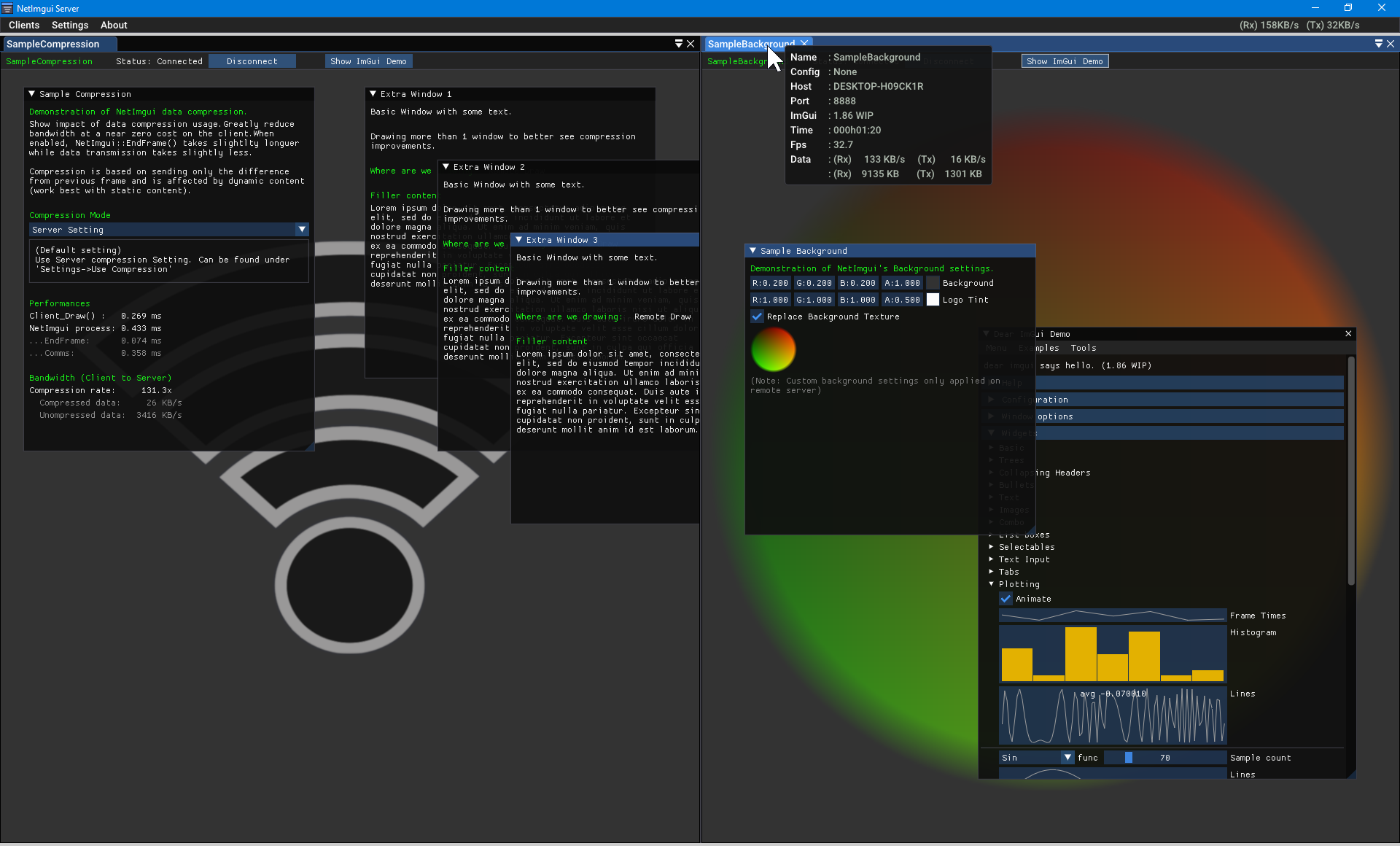
Initially created to assist game developers in debugging their game running on a game console or smartphone, from a PC. However, its use extends to wider applications. The only requirements are that a program is using Dear ImGui using C++ and available TCP/IP communications.
Some applications lack display and inputs access, preventing feedbacks and easy control. It could be a program running on a Raspberry Pie device, or Unreal 4 running in server mode, etc . . . Using NetImgui allows the display of a user interface with full control on your PC while the logic remains on the client application itself.
Note: SampleNoBackend demonstrate using Dear ImGui without any backend implementation. It is a simple console application connecting to the NetImguiServer to draw its Imgui content. There is no rendering/input backend that's usually require by Dear ImGui
While inputs might be available on a particular device (keyboard, gamepad, . . .), it might still not be convenient for certain aspect. For example, text input is still more comfortable on a physical keyboard than on a smartphone. Idem for gaming consoles with gamepads control or VR development.
Dear ImGui is often used to display relevant debug information during development, but UI elements can obscure the regular content. NetImgui sends the UI content to a remote window, leaving the original display clutter-free and with the freedom to use the entire screen for more elaborate content.
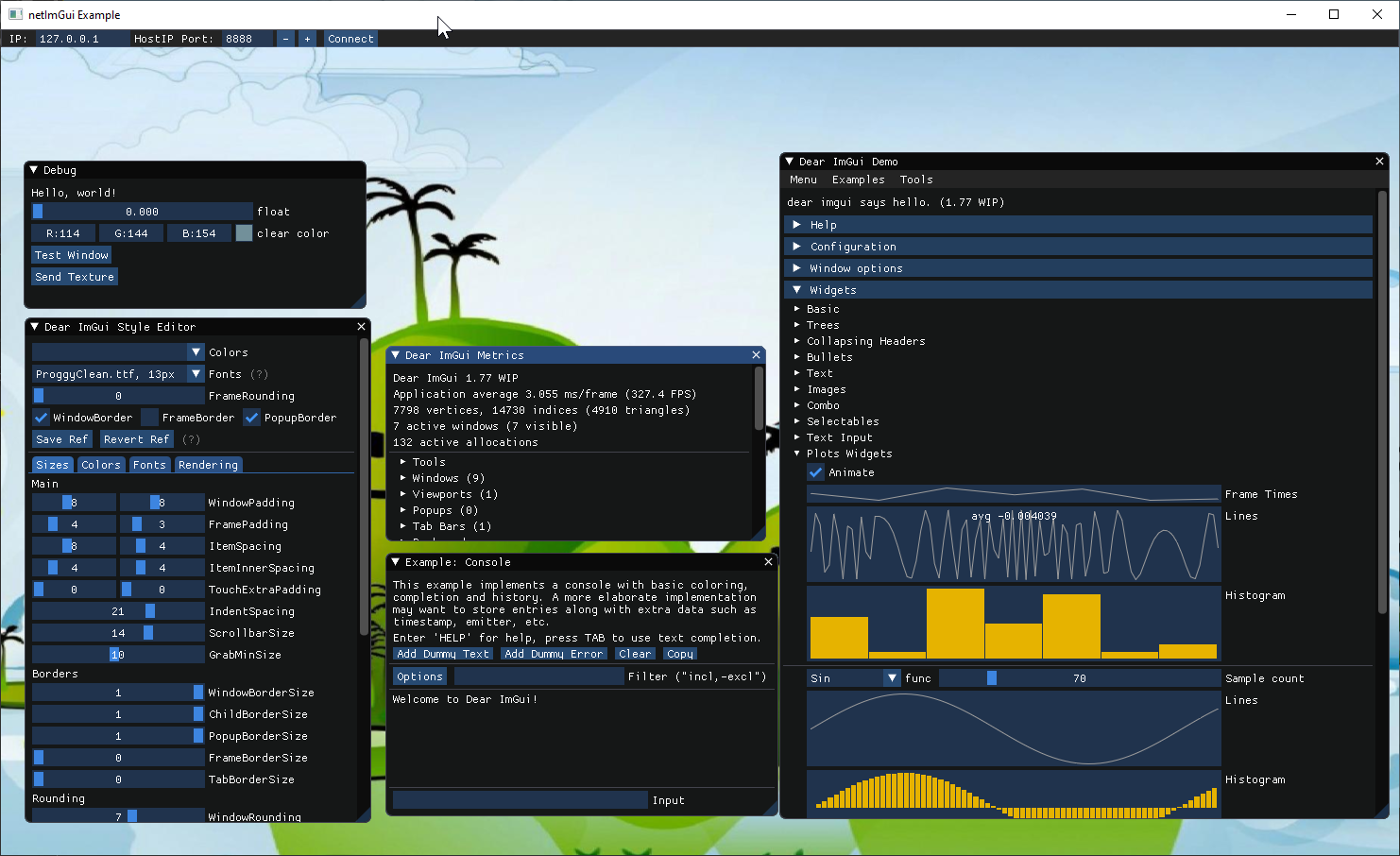
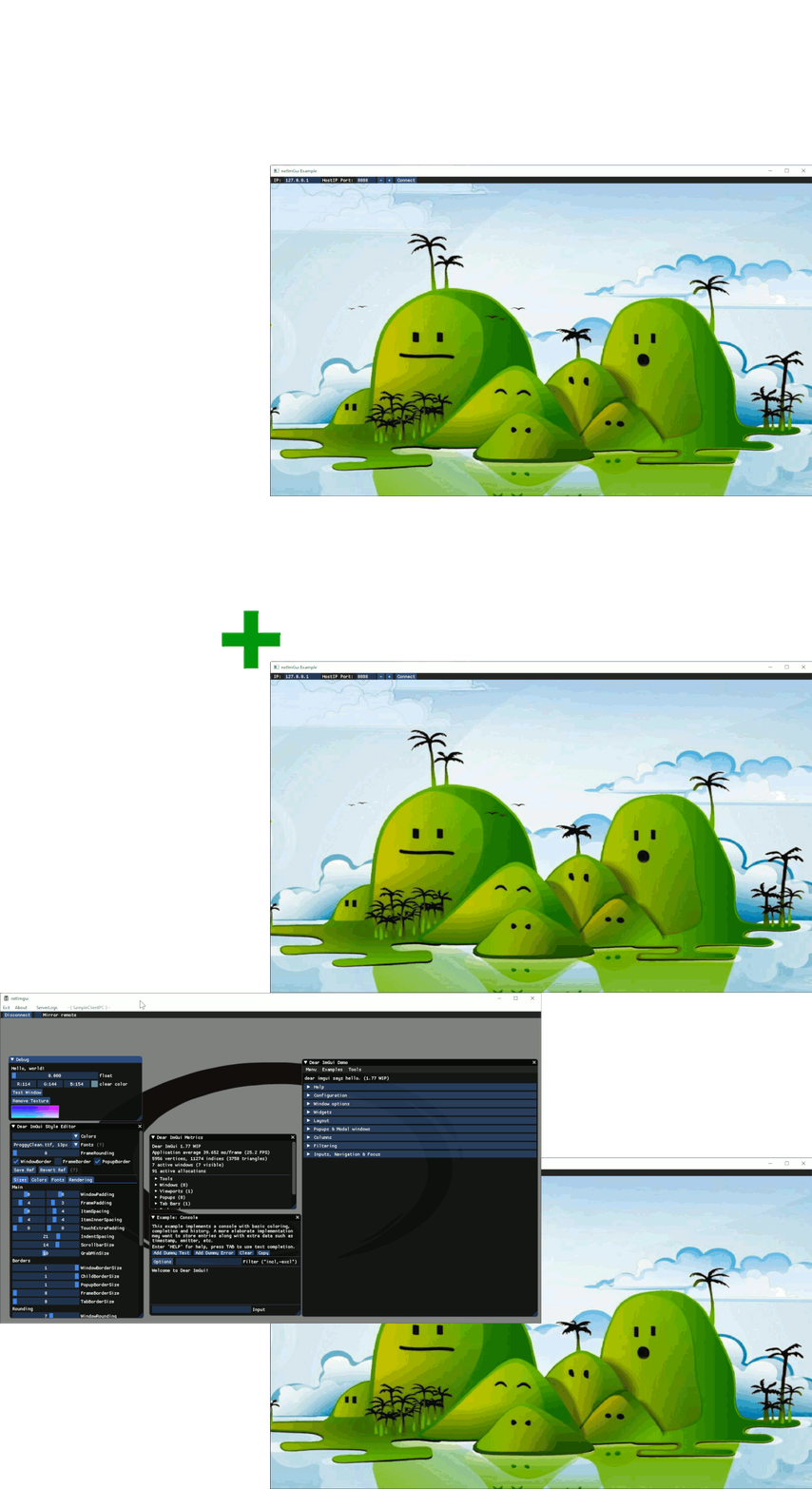
Here is a quick overview of the logic behind using the NetImgui Server and one (or more) program using the NetImgui Client code.
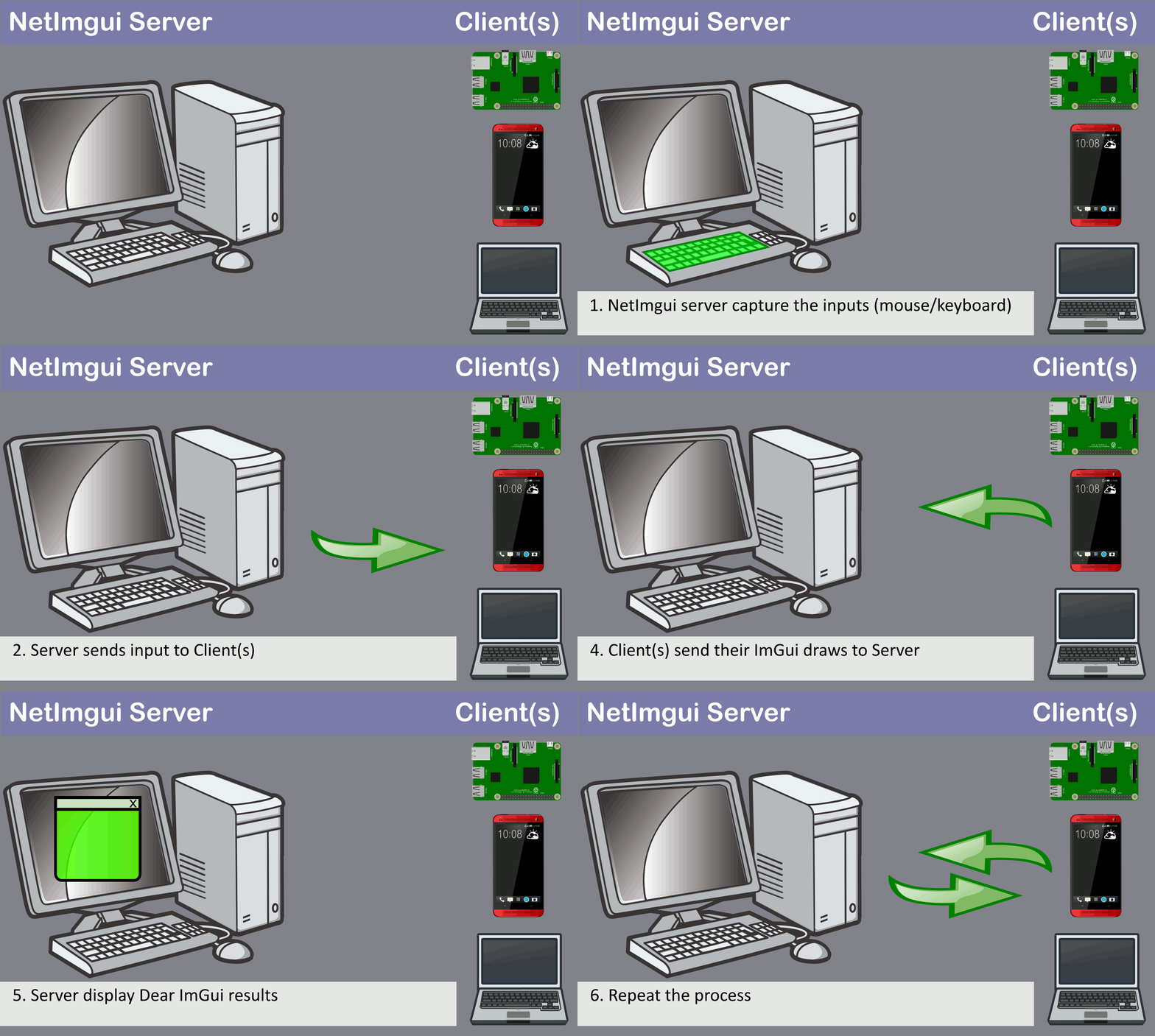
1. (NetImgui Server) Capture user's inputs with mouse/keyboard 2. (NetImgui Server) Send the Inputs to client and request a draw update 3. (NetImgui Client) Draw the Dear ImGui content normally (without need to display on client) 4. (NetImgui Client) Send the drawing results to server 5. (NetImgui Server) Receives the drawing result and display them 6. Go back to 1
The NetImgui Server application currently compiles under Windows and Mac, but few changes are required to properly have it running under other Operating Systems. To compile for Mac, modify NetImguiServer_App.h to enable the GLFW_GL3 rendering API.
NetImgui::Startup() (at program start).NetImgui::ConnectToApp() or NetImgui::ConnectFromApp().NetImgui::Shutdown() (at program exit).ImGui::NewFrame() with NetImgui::NewFrame().ImGui::Render() / ImGui::EndFrame() with NetImgui::EndFrame().Connection between NetImgui Server and a netImGui Client can be achieved in 4 different ways.
Server waits for connection and :
ConnectToApp() with the Server address.Client calls ConnectFromApp() then waits for connection and :
Advanced: Different Dear ImGui content can be displayed locally and remotely at the same time.
NetImgui::IsConnected() and NetImgui::IsDrawingRemote() can be used during Dear ImGui drawing, helping to make selective decisions on the debug ui content based on this.
Related projects making use of NetImgui.
(2026/01/05)
Sincere thanks to Omar Cornut for the incredible work on Dear ImGui. Support of image formats via stb_image.h by Sean Barrett (public domain). Support of Solutions generation via Sharpmake by Ubisoft (public domain). Support of Posix sockets thanks to Aaron Lieberman. Support of json save file via nlohmann json
130 followers · starred Aug 2023
3,149 followers · starred May 2021
4,254 followers · starred Jun 2020
120 followers · starred Jan 2021
NetImgui is a library to remotely display and control Dear ImGui menus with an associated NetImgui Server application. Designed to painlessly integrate into existing codebase with few changes required. It allows any program using Dear ImGui to receives input from a remote PC and then forwards its UI rendering to it (textures, vertices, indices, draw commands).
Initially created to assist game developers in debugging their game running on a game console or smartphone, from a PC. However, its use extends to wider applications. The only requirements are that a program is using Dear ImGui using C++ and available TCP/IP communications.
Some applications lack display and inputs access, preventing feedbacks and easy control. It could be a program running on a Raspberry Pie device, or Unreal 4 running in server mode, etc . . . Using NetImgui allows the display of a user interface with full control on your PC while the logic remains on the client application itself.
Note: SampleNoBackend demonstrate using Dear ImGui without any backend implementation. It is a simple console application connecting to the NetImguiServer to draw its Imgui content. There is no rendering/input backend that's usually require by Dear ImGui
While inputs might be available on a particular device (keyboard, gamepad, . . .), it might still not be convenient for certain aspect. For example, text input is still more comfortable on a physical keyboard than on a smartphone. Idem for gaming consoles with gamepads control or VR development.
Dear ImGui is often used to display relevant debug information during development, but UI elements can obscure the regular content. NetImgui sends the UI content to a remote window, leaving the original display clutter-free and with the freedom to use the entire screen for more elaborate content.
Here is a quick overview of the logic behind using the NetImgui Server and one (or more) program using the NetImgui Client code.
1. (NetImgui Server) Capture user's inputs with mouse/keyboard 2. (NetImgui Server) Send the Inputs to client and request a draw update 3. (NetImgui Client) Draw the Dear ImGui content normally (without need to display on client) 4. (NetImgui Client) Send the drawing results to server 5. (NetImgui Server) Receives the drawing result and display them 6. Go back to 1
The NetImgui Server application currently compiles under Windows and Mac, but few changes are required to properly have it running under other Operating Systems. To compile for Mac, modify NetImguiServer_App.h to enable the GLFW_GL3 rendering API.
NetImgui::Startup() (at program start).NetImgui::ConnectToApp() or NetImgui::ConnectFromApp().NetImgui::Shutdown() (at program exit).ImGui::NewFrame() with NetImgui::NewFrame().ImGui::Render() / ImGui::EndFrame() with NetImgui::EndFrame().Connection between NetImgui Server and a netImGui Client can be achieved in 4 different ways.
Server waits for connection and :
ConnectToApp() with the Server address.Client calls ConnectFromApp() then waits for connection and :
Advanced: Different Dear ImGui content can be displayed locally and remotely at the same time.
NetImgui::IsConnected() and NetImgui::IsDrawingRemote() can be used during Dear ImGui drawing, helping to make selective decisions on the debug ui content based on this.
Related projects making use of NetImgui.
(2026/01/05)
Sincere thanks to Omar Cornut for the incredible work on Dear ImGui. Support of image formats via stb_image.h by Sean Barrett (public domain). Support of Solutions generation via Sharpmake by Ubisoft (public domain). Support of Posix sockets thanks to Aaron Lieberman. Support of json save file via nlohmann json
130 followers · starred Aug 2023
3,149 followers · starred May 2021
4,254 followers · starred Jun 2020
120 followers · starred Jan 2021