
Workflows for the browser, type english and make it do the tasks for you in real time, applying for jobs, handling clients and answering to JIRA ticket etc.
See the codeSee what people are saying
README

Brovio.cc
Automate the web on a canvas, run it on real cloud browsers.
Drag nodes onto a canvas to open pages, act on them, observe them, and extract structured data. Connect them, press Run, and watch every step execute live — with a full session replay when it finishes.





Demo
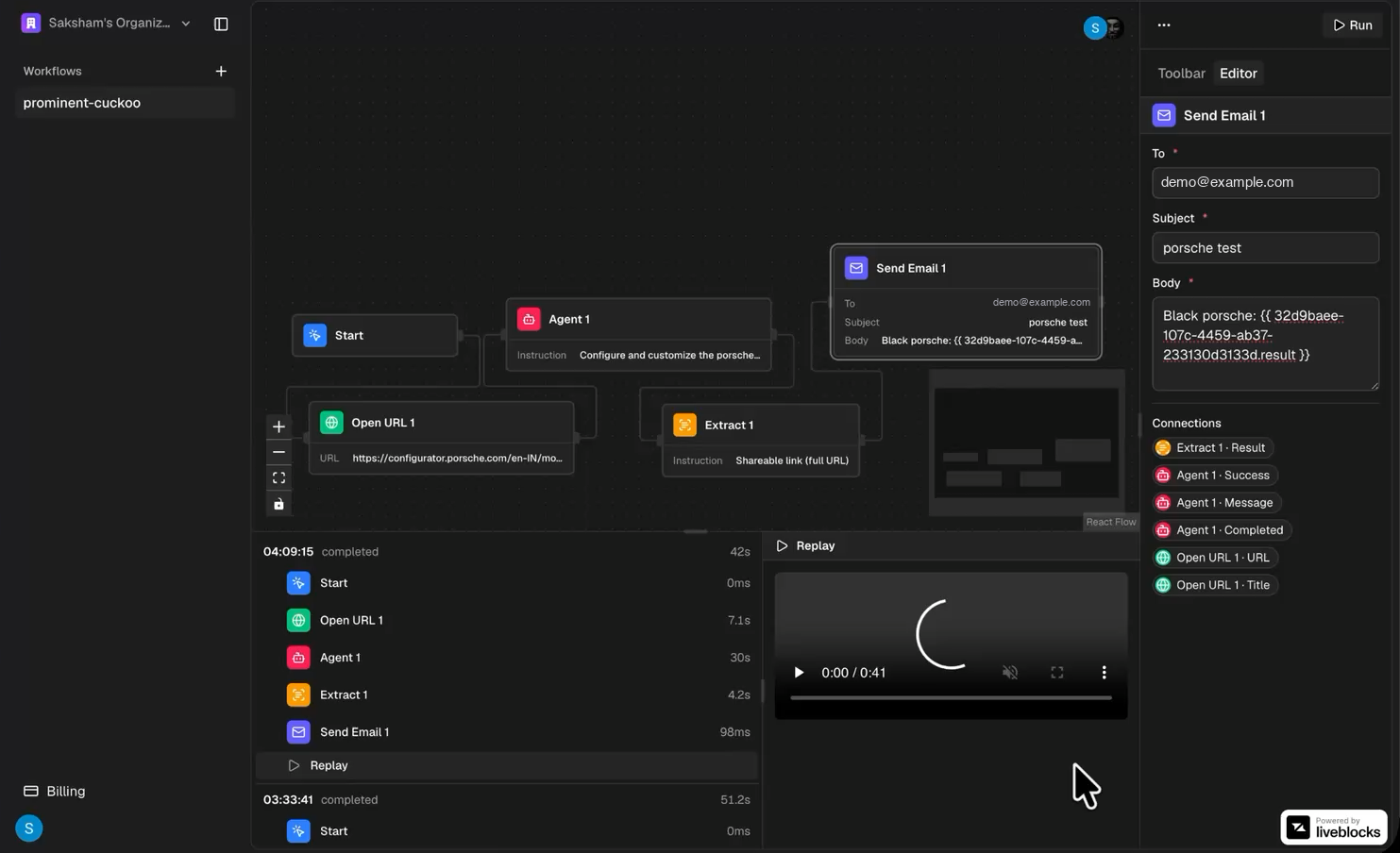
▶︎ Try it live — build a workflow and watch it run
The canvas
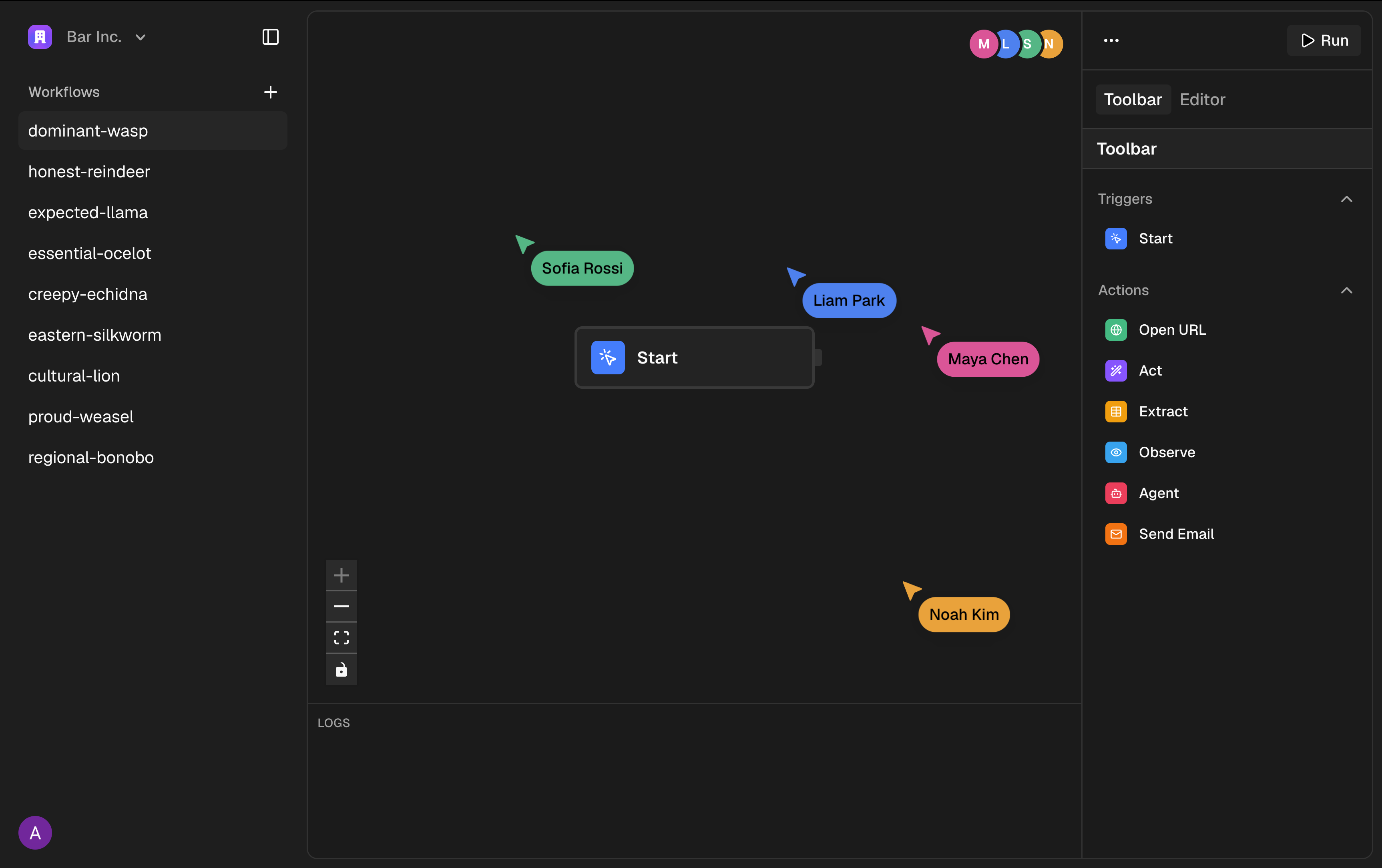
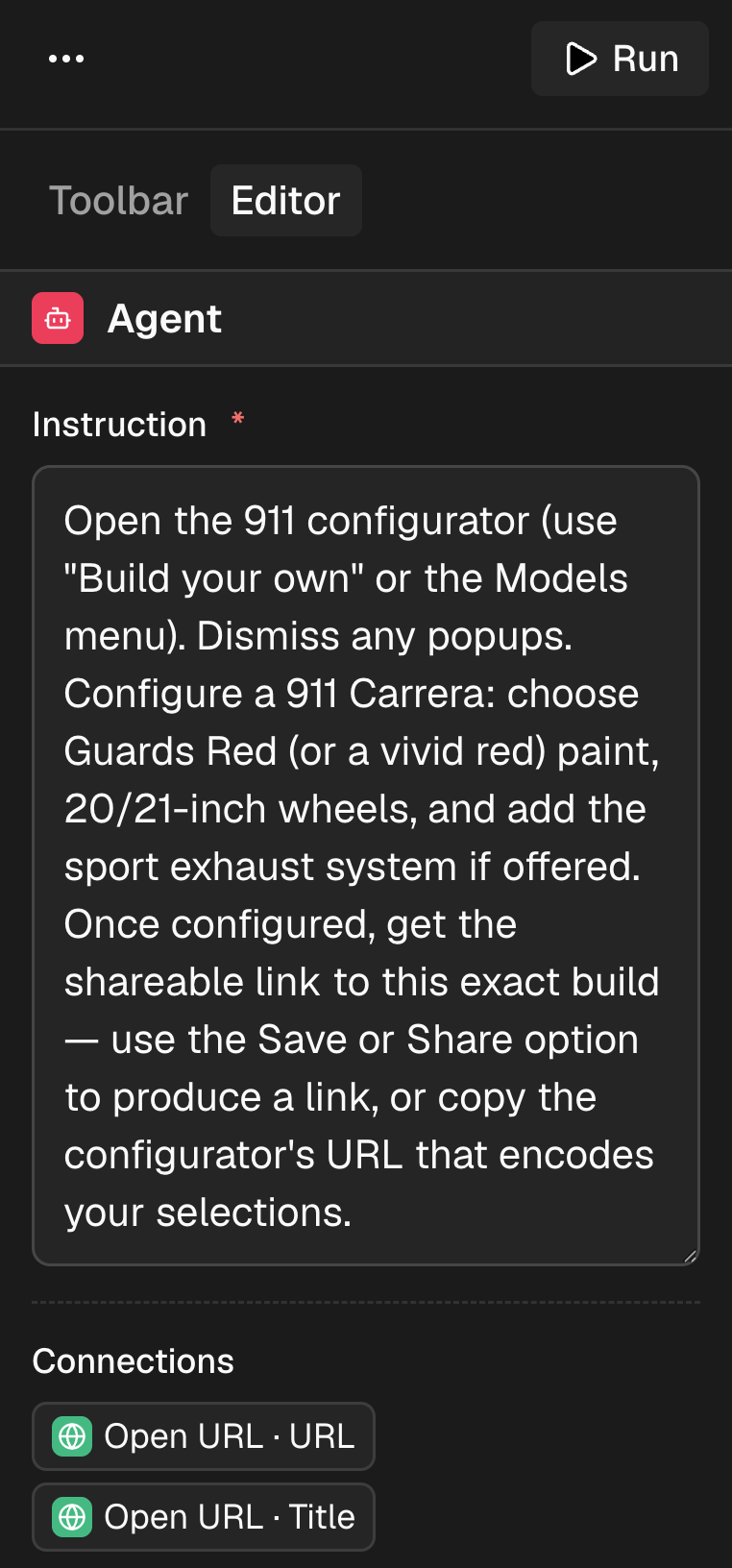 Configure a node — every field can read values from earlier steps. | 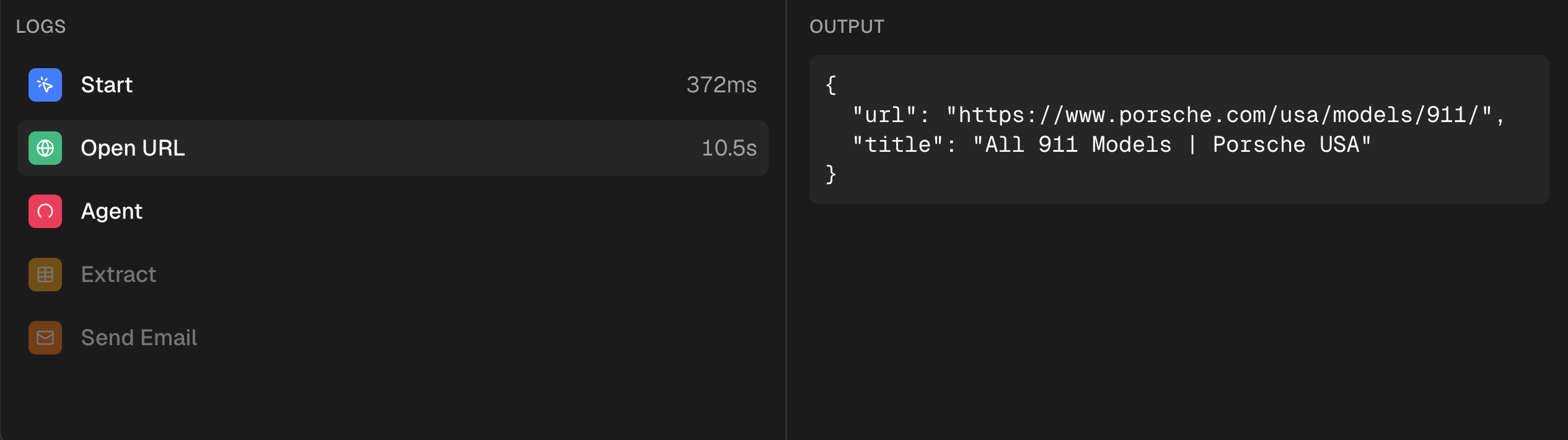 Read every step — logs and structured output under the canvas. |
Nodes
| Node | What it does | |
|---|---|---|
| 🔵 | Start | Kicks off the run. Every workflow begins here. |
| 🟢 | Open URL | Navigates the cloud browser to a page. |
| 🟣 | Act | Performs one atomic action — click, type, select. |
| 🟡 | Extract | Pulls structured data off the page against a schema. |
| 🔷 | Observe | Inspects what is on the page before acting on it. |
| 🔴 | Agent | Hands a goal to an AI agent and lets it drive. |
| 🟦 | Send Email | Delivers the result when the run finishes. |
Every node publishes named outputs. Write {{ nodeId.title }} in a later node's
field and the value flows straight through when the run reaches it.
Full reference: Nodes.
Two ways to run it
☁️ HostedSubscribe and we run it for you. Nothing to install, nothing to configure. |
🖥️ Self-hostedThe same application, run by you, free. No feature gates, no limits, no subscription. |
Quickstart (self-hosting)
You need Docker, and free accounts with Clerk, Liveblocks, Browserbase, and Trigger.dev. Postgres is included — no database provider needed.
git clone https://github.com/saksham-dev0/browser-automation.git
cd browser-automation
./scripts/setup.sh
The script tells you what is missing, creates your .env, builds and starts
everything, makes it survive reboots, and deploys the workflow tasks. Run it
again any time — after pulling new code, or just to check on things.
Full walkthrough from a bare machine, including installing Docker and where each key comes from: self-hosting guide.
[!IMPORTANT] One step is not just an environment variable: Trigger.dev needs your own project reference in
trigger.config.ts. Workflow runs fail without it. See Trigger.dev setup.
Upgrading:
git pull
./scripts/setup.sh
Services you need accounts for
Self-hosting is not dependency-free. Clerk, Liveblocks, and Browserbase cannot be self-hosted, though each has a free tier. Trigger.dev can be self-hosted or used via their cloud. Postgres runs in the Compose stack.
| Service | Used for | Self-hostable |
|---|---|---|
| Clerk | Auth and organizations | No — free tier |
| Liveblocks | Multiplayer canvas | No — free tier |
| Browserbase | Cloud browsers and replays | No — free tier |
| Trigger.dev | Background workflow runs | Yes, or cloud |
| Postgres | Workflows, runs, results | Yes — in Compose |
Full list with signup links: environment variables.
Built with
Next.js 16 (App Router) · React 19 · Drizzle ORM on Postgres · Clerk for auth and organizations · Trigger.dev for background runs · Liveblocks for the multiplayer canvas · React Flow for the canvas itself · Stagehand on Browserbase for the browser work.
📚 Documentation
| Guide | What is in it |
|---|---|
| Self-hosting | Bare machine to running app |
| Trigger.dev setup | The one step that is not an env var |
| Environment variables | Every key, and where to get it |
| Nodes | What each node does and outputs |
| Architecture | How a run actually executes |
Contributing
Issues and pull requests are welcome. See CONTRIBUTING.md.
License
AGPL-3.0. You may run, modify, and self-host this freely. If you offer it to others as a network service, you must publish your modifications. See LICENSE.
Built by @saksham-dev0
Contributors

54 commits
Similar repos


Languages
TypeScript
89.9%
Shell
8.2%
CSS
1.0%
Workflows for the browser, type english and make it do the tasks for you in real time, applying for jobs, handling clients and answering to JIRA ticket etc.
See the codeSee what people are saying
README
Brovio.cc
Automate the web on a canvas, run it on real cloud browsers.
Drag nodes onto a canvas to open pages, act on them, observe them, and extract structured data. Connect them, press Run, and watch every step execute live — with a full session replay when it finishes.
Demo
▶︎ Try it live — build a workflow and watch it run
The canvas
Configure a node — every field can read values from earlier steps. | Read every step — logs and structured output under the canvas. |
Nodes
| Node | What it does | |
|---|---|---|
| 🔵 | Start | Kicks off the run. Every workflow begins here. |
| 🟢 | Open URL | Navigates the cloud browser to a page. |
| 🟣 | Act | Performs one atomic action — click, type, select. |
| 🟡 | Extract | Pulls structured data off the page against a schema. |
| 🔷 | Observe | Inspects what is on the page before acting on it. |
| 🔴 | Agent | Hands a goal to an AI agent and lets it drive. |
| 🟦 | Send Email | Delivers the result when the run finishes. |
Every node publishes named outputs. Write {{ nodeId.title }} in a later node's
field and the value flows straight through when the run reaches it.
Full reference: Nodes.
Two ways to run it
☁️ HostedSubscribe and we run it for you. Nothing to install, nothing to configure. |
🖥️ Self-hostedThe same application, run by you, free. No feature gates, no limits, no subscription. |
Quickstart (self-hosting)
You need Docker, and free accounts with Clerk, Liveblocks, Browserbase, and Trigger.dev. Postgres is included — no database provider needed.
git clone https://github.com/saksham-dev0/browser-automation.git
cd browser-automation
./scripts/setup.sh
The script tells you what is missing, creates your .env, builds and starts
everything, makes it survive reboots, and deploys the workflow tasks. Run it
again any time — after pulling new code, or just to check on things.
Full walkthrough from a bare machine, including installing Docker and where each key comes from: self-hosting guide.
[!IMPORTANT] One step is not just an environment variable: Trigger.dev needs your own project reference in
trigger.config.ts. Workflow runs fail without it. See Trigger.dev setup.
Upgrading:
git pull
./scripts/setup.sh
Services you need accounts for
Self-hosting is not dependency-free. Clerk, Liveblocks, and Browserbase cannot be self-hosted, though each has a free tier. Trigger.dev can be self-hosted or used via their cloud. Postgres runs in the Compose stack.
| Service | Used for | Self-hostable |
|---|---|---|
| Clerk | Auth and organizations | No — free tier |
| Liveblocks | Multiplayer canvas | No — free tier |
| Browserbase | Cloud browsers and replays | No — free tier |
| Trigger.dev | Background workflow runs | Yes, or cloud |
| Postgres | Workflows, runs, results | Yes — in Compose |
Full list with signup links: environment variables.
Built with
Next.js 16 (App Router) · React 19 · Drizzle ORM on Postgres · Clerk for auth and organizations · Trigger.dev for background runs · Liveblocks for the multiplayer canvas · React Flow for the canvas itself · Stagehand on Browserbase for the browser work.
📚 Documentation
| Guide | What is in it |
|---|---|
| Self-hosting | Bare machine to running app |
| Trigger.dev setup | The one step that is not an env var |
| Environment variables | Every key, and where to get it |
| Nodes | What each node does and outputs |
| Architecture | How a run actually executes |
Contributing
Issues and pull requests are welcome. See CONTRIBUTING.md.
License
AGPL-3.0. You may run, modify, and self-host this freely. If you offer it to others as a network service, you must publish your modifications. See LICENSE.
Built by @saksham-dev0
Similar repos
Contributors
54 commits
Languages
TypeScript
89.9%
Shell
8.2%
CSS
1.0%