detecting age of a person from an image using huggingface transformers
Python
3
1 commits
updated Nov 26, 2025
An API that predicts age ranges from images using a pre-trained Vision Transformer (ViT) model from Hugging Face.
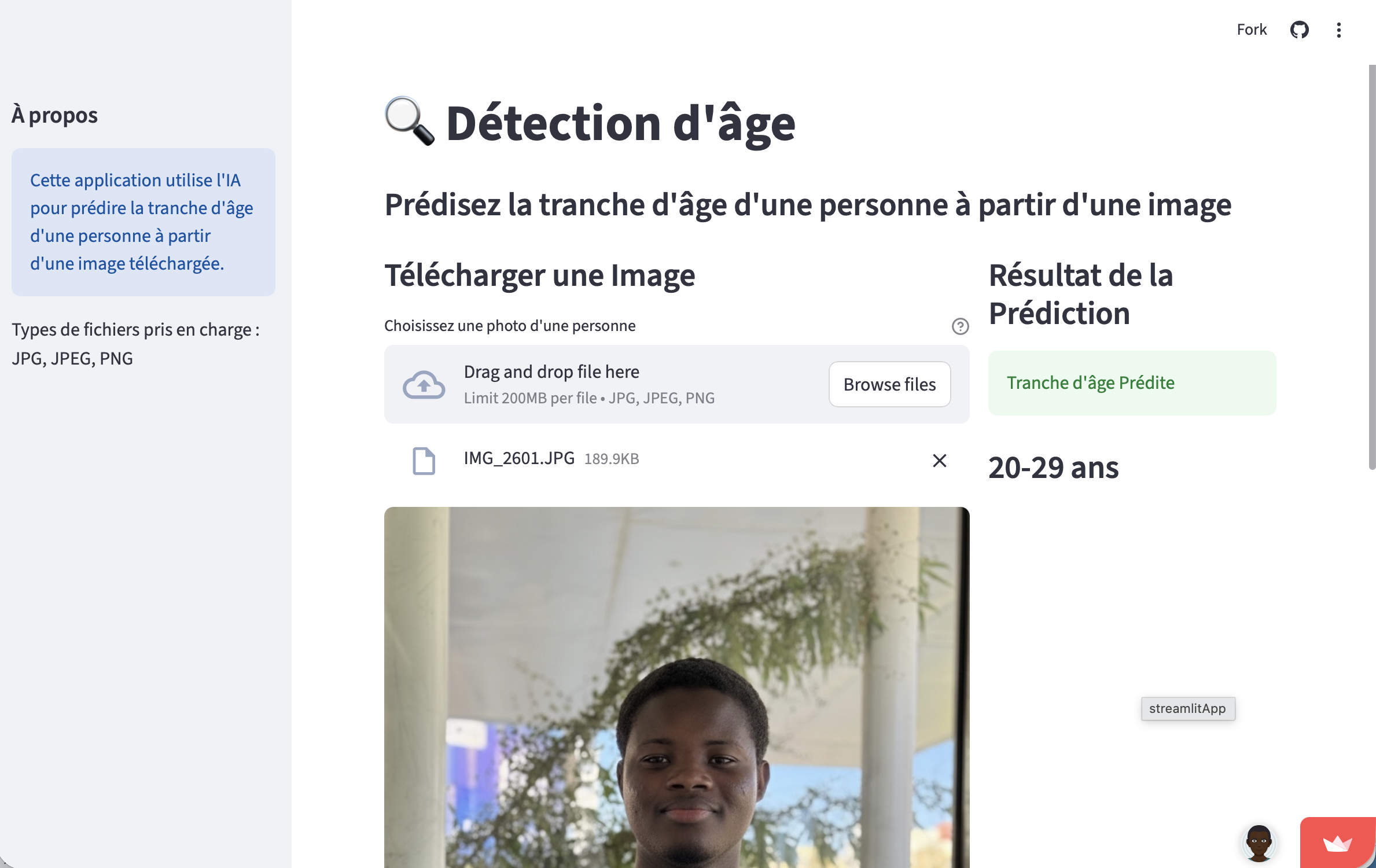
🌐 Live Demo: age-detection-app
uv, ruff, and pre-commitClone the repository
git clone https://github.com/sahi-mfg/age_detection_api.git
cd age_detection_api
Install dependencies
make install
Run the API
make run
The API will be available at http://localhost:8000
Run the Streamlit UI (in another terminal)
uv run streamlit run ui/streamlit_app.py
The UI will be available at http://localhost:8501
Build the Docker image
docker build -t age-detection-api .
Run the container
docker run -p 8000:8000 age-detection-api
http://localhost:8000https://age-detection-api.onrender.comOnce the API is running, visit:
http://localhost:8000/docs - Interactive API explorerhttp://localhost:8000/redoc - Alternative documentation formatGET /Basic health check endpoint to verify the API is running.
Response:
{
  "Message": "Age detection API from images"
}
Example:
curl -X GET "http://localhost:8000/"
Status Codes:
200 OK - API is running successfullyPOST /predictUpload an image and get the predicted age range using Vision Transformer model.
Request:
multipart/form-datafile (required) - Image file in supported formatsSupported Image Formats:
Response Model:
{
  "filename": "string",
  "content_type": "string",
  "predictions": "string"
}
Age Range Categories: The model predicts one of the following age ranges:
0-2 - Infants and toddlers3-9 - Children10-19 - Teenagers20-29 - Young adults30-39 - Adults40-49 - Middle-aged adults50-59 - Mature adults60-69 - Senior adults70-79 - Elderly80+ - Very elderlySuccess Response Example:
{
  "filename": "portrait.jpg",
  "content_type": "image/jpeg",
  "predictions": "25-35"
}
Error Response Examples:
Invalid file type:
{
  "detail": "File provided is not an image."
}
Missing file:
{
  "detail": [
    {
      "loc": ["body", "file"],
      "msg": "field required",
      "type": "value_error.missing"
    }
  ]
}
cURL Examples:
# Basic image upload
curl -X POST "http://localhost:8000/predict" \
     -H "accept: application/json" \
     -H "Content-Type: multipart/form-data" \
     -F "file=@path/to/your/image.jpg"

# With verbose output
curl -v -X POST "http://localhost:8000/predict" \
     -H "accept: application/json" \
     -H "Content-Type: multipart/form-data" \
     -F "[email protected]"
Python Examples:
import requests

# Using requests library
url = "http://localhost:8000/predict"
with open("image.jpg", "rb") as file:
    files = {"file": file}
    response = requests.post(url, files=files)
    result = response.json()
    print(f"Predicted age: {result['predictions']}")

# Using httpx (async)
import httpx
import asyncio

async def predict_age(image_path):
    async with httpx.AsyncClient() as client:
        with open(image_path, "rb") as file:
            files = {"file": file}
            response = await client.post(
                "http://localhost:8000/predict",
                files=files
            )
            return response.json()

# Usage
result = asyncio.run(predict_age("portrait.jpg"))
Status Codes:
200 OK - Successful prediction400 Bad Request - Invalid file type or missing file422 Unprocessable Entity - Invalid request format500 Internal Server Error - Model processing errorModel Details:
nateraw/vit-age-classifier)Performance Notes:
make install    # Install dependencies
make run        # Run development server with reload
make run-prod   # Run production server
make test       # Run tests
make lint       # Check code with ruff
make format     # Format code with ruff
This project uses:
Run quality checks:
make lint       # Check for issues
make format     # Auto-fix formatting
make test       # Run test suite
This project is optimized for deployment on Render:
docker build -t age-detection-api .docker run -p $PORT:8000 age-detection-apiFor production deployment, you may want to set:
PORT: Server port (default: 8000)HOST: Server host (default: 0.0.0.0)Run the test suite:
make test
Run with coverage:
uv run pytest --cov=app tests/
age_detection_api/
├── app/                    # Main application code
│   ├── __init__.py
│   ├── main.py            # FastAPI application
│   └── model.py           # ML model logic
├── ui/                    # Streamlit interface
│   └── streamlit_app.py
├── tests/                 # Test files
│   ├── test_predict.py
│   └── files/
├── Dockerfile             # Docker configuration
├── Makefile              # Development commands
├── pyproject.toml        # Project dependencies
├── uv.lock              # Locked dependencies
└── README.md            # This file
git checkout -b feature/amazing-feature)make lint format test)git commit -m 'Add amazing feature')git push origin feature/amazing-feature)detecting age of a person from an image using huggingface transformers
Python
3
1 commits
updated Nov 26, 2025
An API that predicts age ranges from images using a pre-trained Vision Transformer (ViT) model from Hugging Face.
🌐 Live Demo: age-detection-app
uv, ruff, and pre-commitClone the repository
git clone https://github.com/sahi-mfg/age_detection_api.git
cd age_detection_api
Install dependencies
make install
Run the API
make run
The API will be available at http://localhost:8000
Run the Streamlit UI (in another terminal)
uv run streamlit run ui/streamlit_app.py
The UI will be available at http://localhost:8501
Build the Docker image
docker build -t age-detection-api .
Run the container
docker run -p 8000:8000 age-detection-api
http://localhost:8000https://age-detection-api.onrender.comOnce the API is running, visit:
http://localhost:8000/docs - Interactive API explorerhttp://localhost:8000/redoc - Alternative documentation formatGET /Basic health check endpoint to verify the API is running.
Response:
{
  "Message": "Age detection API from images"
}
Example:
curl -X GET "http://localhost:8000/"
Status Codes:
200 OK - API is running successfullyPOST /predictUpload an image and get the predicted age range using Vision Transformer model.
Request:
multipart/form-datafile (required) - Image file in supported formatsSupported Image Formats:
Response Model:
{
  "filename": "string",
  "content_type": "string",
  "predictions": "string"
}
Age Range Categories: The model predicts one of the following age ranges:
0-2 - Infants and toddlers3-9 - Children10-19 - Teenagers20-29 - Young adults30-39 - Adults40-49 - Middle-aged adults50-59 - Mature adults60-69 - Senior adults70-79 - Elderly80+ - Very elderlySuccess Response Example:
{
  "filename": "portrait.jpg",
  "content_type": "image/jpeg",
  "predictions": "25-35"
}
Error Response Examples:
Invalid file type:
{
  "detail": "File provided is not an image."
}
Missing file:
{
  "detail": [
    {
      "loc": ["body", "file"],
      "msg": "field required",
      "type": "value_error.missing"
    }
  ]
}
cURL Examples:
# Basic image upload
curl -X POST "http://localhost:8000/predict" \
     -H "accept: application/json" \
     -H "Content-Type: multipart/form-data" \
     -F "file=@path/to/your/image.jpg"

# With verbose output
curl -v -X POST "http://localhost:8000/predict" \
     -H "accept: application/json" \
     -H "Content-Type: multipart/form-data" \
     -F "[email protected]"
Python Examples:
import requests

# Using requests library
url = "http://localhost:8000/predict"
with open("image.jpg", "rb") as file:
    files = {"file": file}
    response = requests.post(url, files=files)
    result = response.json()
    print(f"Predicted age: {result['predictions']}")

# Using httpx (async)
import httpx
import asyncio

async def predict_age(image_path):
    async with httpx.AsyncClient() as client:
        with open(image_path, "rb") as file:
            files = {"file": file}
            response = await client.post(
                "http://localhost:8000/predict",
                files=files
            )
            return response.json()

# Usage
result = asyncio.run(predict_age("portrait.jpg"))
Status Codes:
200 OK - Successful prediction400 Bad Request - Invalid file type or missing file422 Unprocessable Entity - Invalid request format500 Internal Server Error - Model processing errorModel Details:
nateraw/vit-age-classifier)Performance Notes:
make install    # Install dependencies
make run        # Run development server with reload
make run-prod   # Run production server
make test       # Run tests
make lint       # Check code with ruff
make format     # Format code with ruff
This project uses:
Run quality checks:
make lint       # Check for issues
make format     # Auto-fix formatting
make test       # Run test suite
This project is optimized for deployment on Render:
docker build -t age-detection-api .docker run -p $PORT:8000 age-detection-apiFor production deployment, you may want to set:
PORT: Server port (default: 8000)HOST: Server host (default: 0.0.0.0)Run the test suite:
make test
Run with coverage:
uv run pytest --cov=app tests/
age_detection_api/
├── app/                    # Main application code
│   ├── __init__.py
│   ├── main.py            # FastAPI application
│   └── model.py           # ML model logic
├── ui/                    # Streamlit interface
│   └── streamlit_app.py
├── tests/                 # Test files
│   ├── test_predict.py
│   └── files/
├── Dockerfile             # Docker configuration
├── Makefile              # Development commands
├── pyproject.toml        # Project dependencies
├── uv.lock              # Locked dependencies
└── README.md            # This file
git checkout -b feature/amazing-feature)make lint format test)git commit -m 'Add amazing feature')git push origin feature/amazing-feature)


