
See what people are saying
README
Jev Pages
Type a few lines about your product and a landing page designs itself as you write.
https://github.com/user-attachments/assets/4b662ea9-fbaa-4050-b938-84f207770b9a
Jev never writes text. It only picks between options: what your notes are about, what the page should say, and one choice for each layer of the design. Code builds the page from those picks.
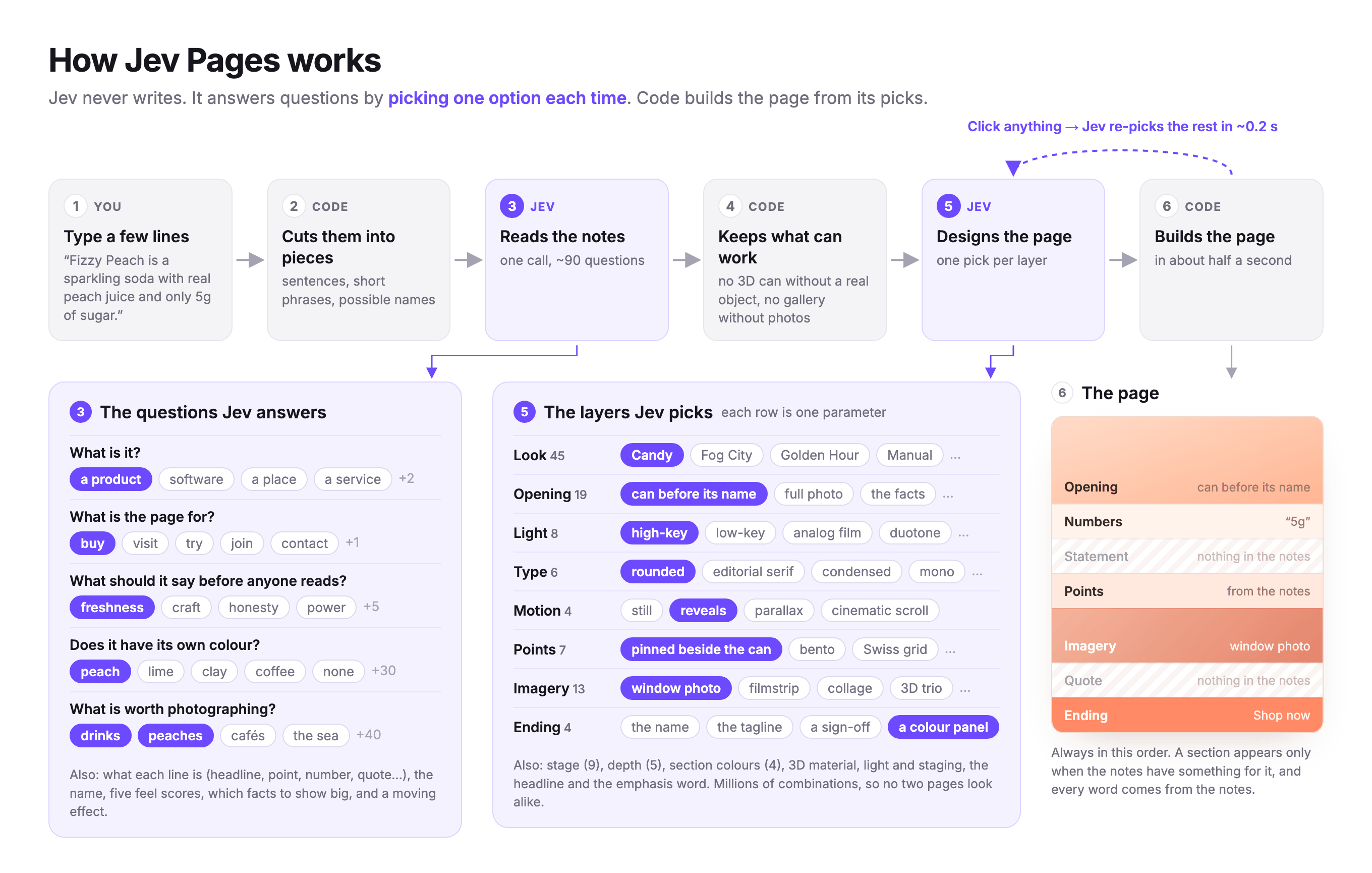
How Jev designs a page
Every question is a pick from fixed options or a yes/no, asked in this order:
- Read the notes. What is each line: a headline, a point, a fact? What's the name? What's being offered, what is the page for, and what should it say before anyone reads a word? What's worth photographing, does the product have a colour of its own, and which facts deserve to be set large?
- Design the page. Given that direction: the headline and subheadline, the look, what the opening stands on, the light, depth, type, motion and colour rhythm, the opening composition, how the points are laid out, the image band, the ending, and which photos to use.
- Finish. Which word of the headline gets the emphasis.
Code then builds the page from the answers. Click any choice and Jev re-answers step 2 around it, in about 0.2 s.
Run
python3 serve.py
This opens http://localhost:8787. Click add Jev key at the bottom left and paste your key. On a Mac you can also double-click Jev Pages.command.
You need only Python 3; there's nothing to install. Without a key the page still works, using a simple offline preview.
What's here
| File | What it is |
|---|---|
jev-pages.html | The app: layout, styles and logic |
data/photos.js | The photo library and the photo topics Jev picks from. Add a photo with one line. |
data/looks.js | The looks: fonts, palette and shapes for each style Jev can pick |
data/colours.js | Product colours (peach, matcha, coffee…) a page can take on |
data/examples.js | The example pages on the home screen |
serve.py | Local server; passes the page's calls to the Jev API |
Your key stays in your browser and only goes to the Jev API through serve.py.
Similar repos


Languages
HTML
92.1%
JavaScript
7.1%
See what people are saying
README
Jev Pages
Type a few lines about your product and a landing page designs itself as you write.
https://github.com/user-attachments/assets/4b662ea9-fbaa-4050-b938-84f207770b9a
Jev never writes text. It only picks between options: what your notes are about, what the page should say, and one choice for each layer of the design. Code builds the page from those picks.
How Jev designs a page
Every question is a pick from fixed options or a yes/no, asked in this order:
- Read the notes. What is each line: a headline, a point, a fact? What's the name? What's being offered, what is the page for, and what should it say before anyone reads a word? What's worth photographing, does the product have a colour of its own, and which facts deserve to be set large?
- Design the page. Given that direction: the headline and subheadline, the look, what the opening stands on, the light, depth, type, motion and colour rhythm, the opening composition, how the points are laid out, the image band, the ending, and which photos to use.
- Finish. Which word of the headline gets the emphasis.
Code then builds the page from the answers. Click any choice and Jev re-answers step 2 around it, in about 0.2 s.
Run
python3 serve.py
This opens http://localhost:8787. Click add Jev key at the bottom left and paste your key. On a Mac you can also double-click Jev Pages.command.
You need only Python 3; there's nothing to install. Without a key the page still works, using a simple offline preview.
What's here
| File | What it is |
|---|---|
jev-pages.html | The app: layout, styles and logic |
data/photos.js | The photo library and the photo topics Jev picks from. Add a photo with one line. |
data/looks.js | The looks: fonts, palette and shapes for each style Jev can pick |
data/colours.js | Product colours (peach, matcha, coffee…) a page can take on |
data/examples.js | The example pages on the home screen |
serve.py | Local server; passes the page's calls to the Jev API |
Your key stays in your browser and only goes to the Jev API through serve.py.
Similar repos
Languages
HTML
92.1%
JavaScript
7.1%