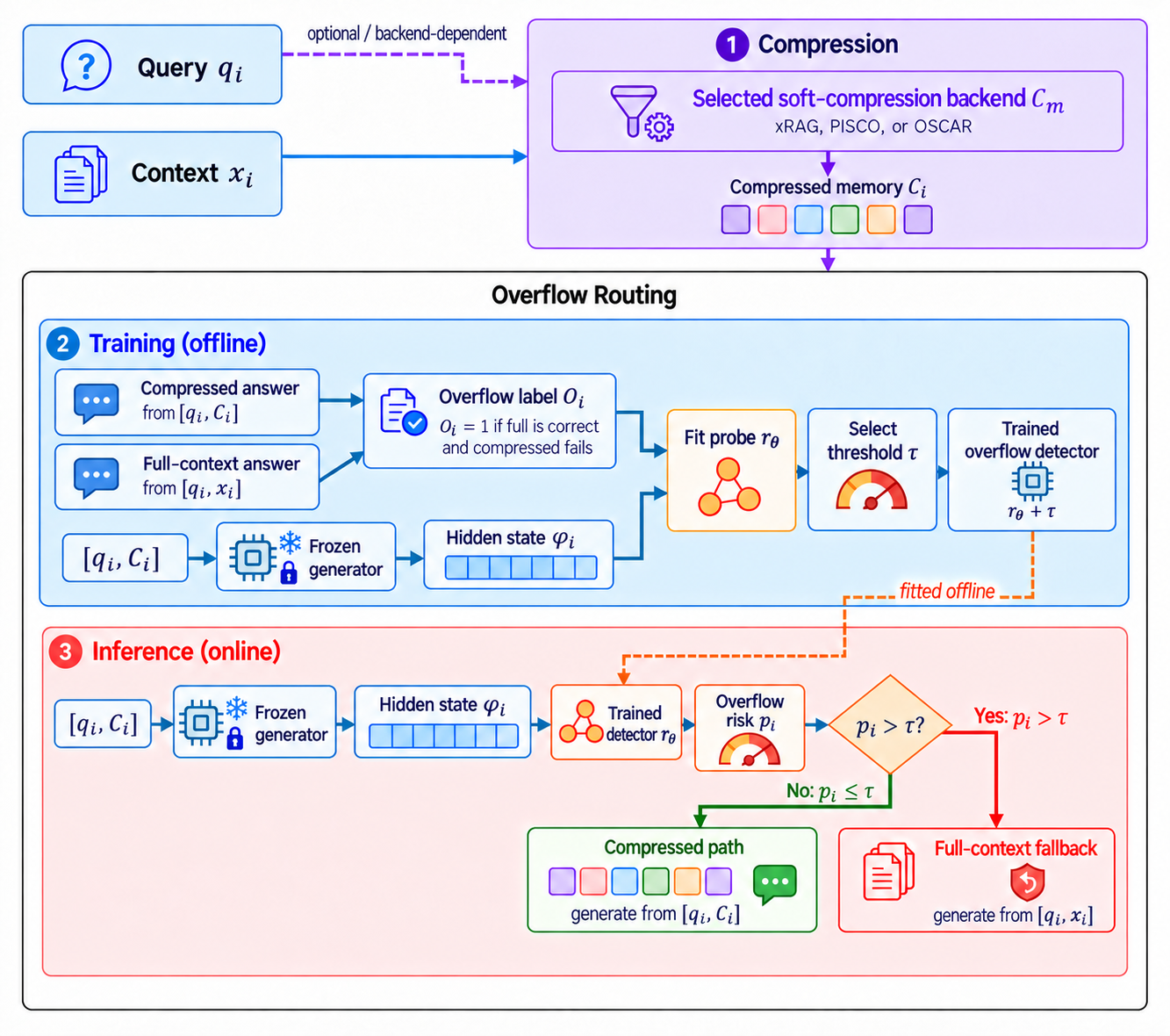
A framework for training lightweight routing classifiers on top of context-compression models. Given a compression model (PISCO, OSCAR, xRAG, or your own), overflowguard learns when compressed context is good enough and when to fall back to the full context — saving tokens without sacrificing accuracy.
A sample is labelled overflow when the compressed answer is wrong and the full answer is right — the only case routing to full context can fix. High classifier probability means likely overflow, so the router sends it to full context; everything at or below the threshold goes compressed.
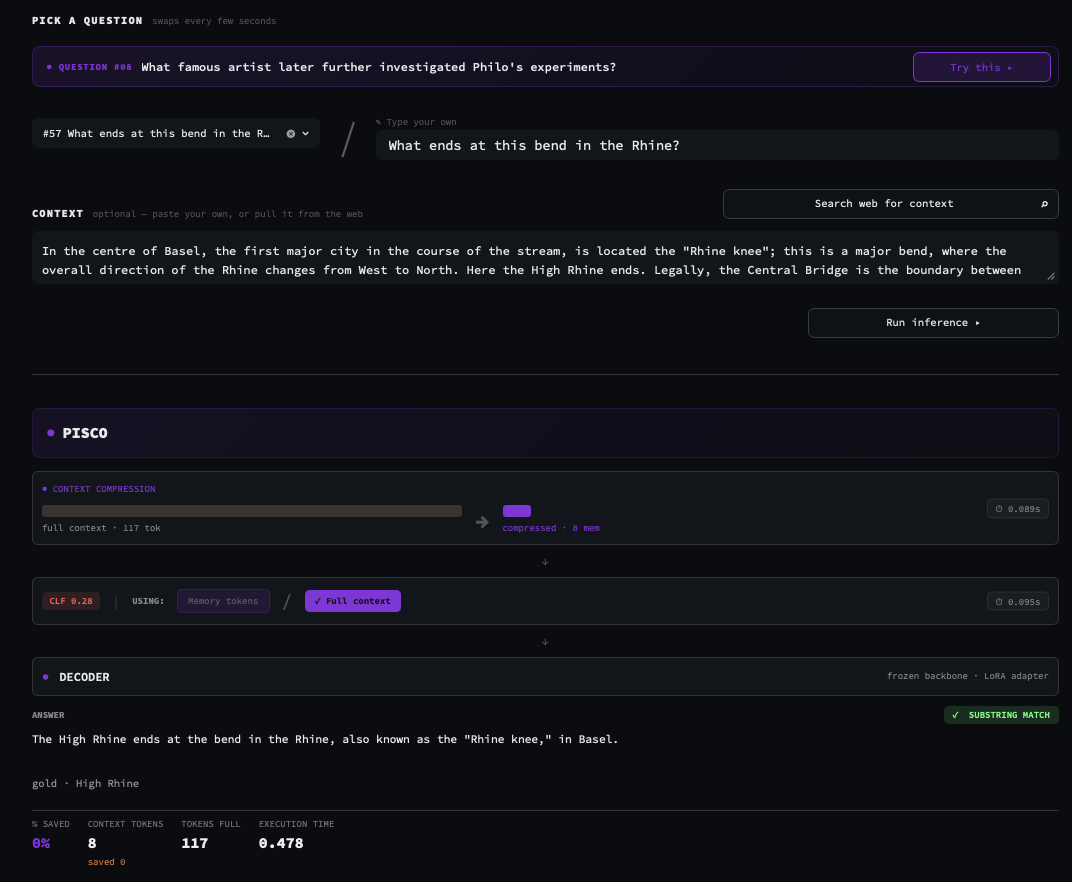
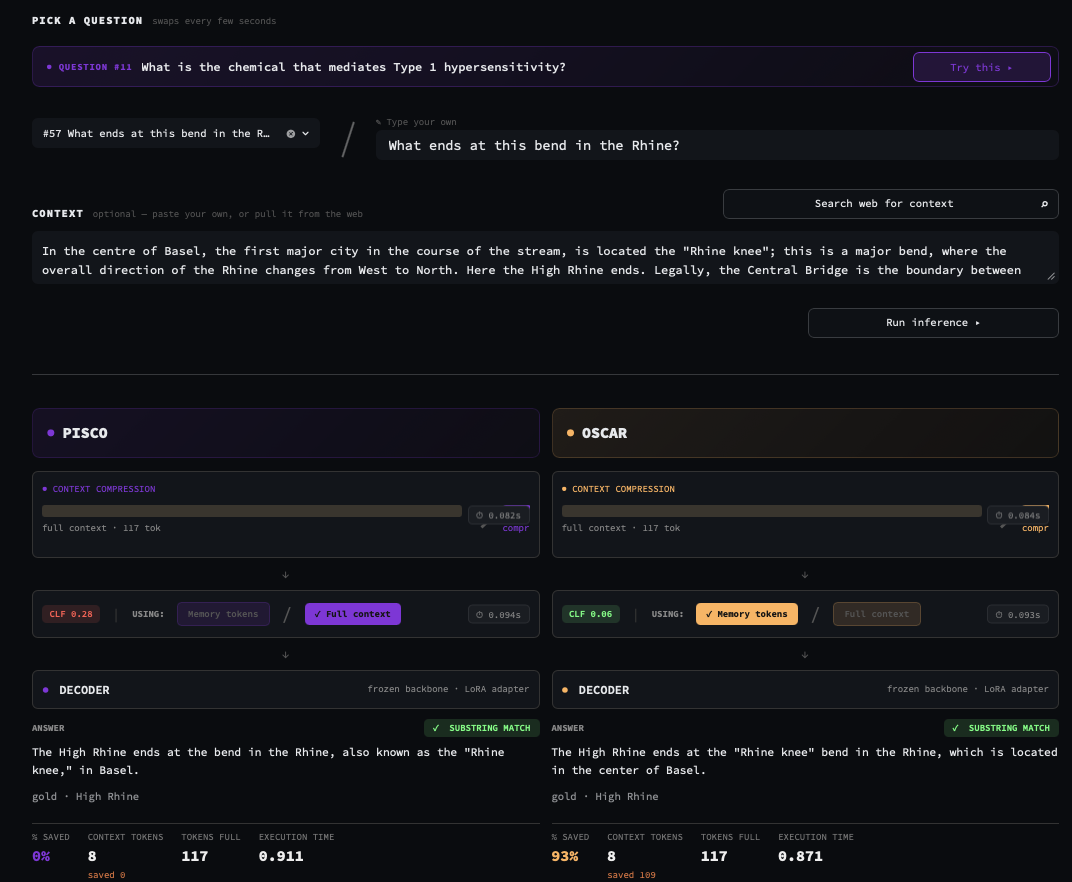
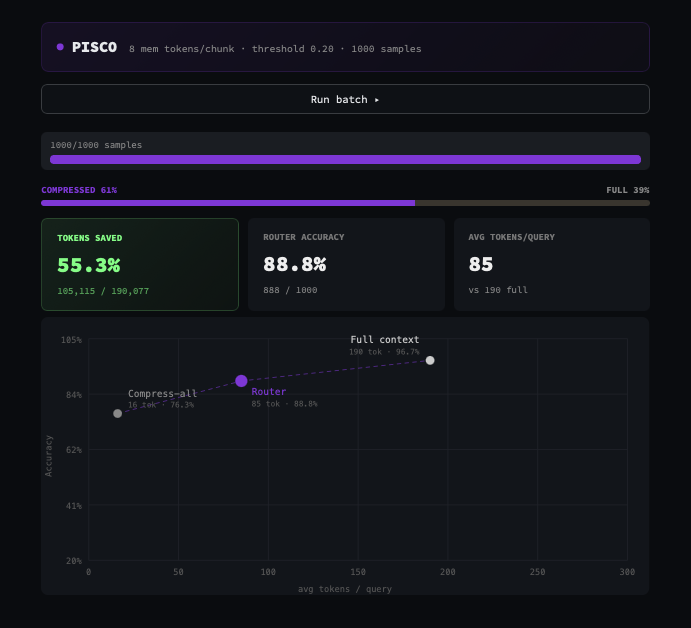
Interactive Streamlit app for exploring routing decisions across all three models. Three modes:
pip install -r requirements.txt
cd demo
streamlit run app.py
It runs on a mock model by default, so no GPU is needed. See demo/README.md for setup details.
git clone https://github.com/s-nlp/overflowguard
cd overflowguard
pip install -r requirements.txt
Run training scripts from the repo root (or add it to PYTHONPATH) so import overflowguard resolves.
Requires: torch, transformers, scikit-learn, rich, huggingface_hub, pyyaml
Optional: openai (LLM judge), plus streamlit, ddgs, beautifulsoup4, requests (demo)
OverflowRouterYou implement 4 methods that define how your compression model works. The framework handles everything else (data loading, evaluation, CV, CLF training, saving).
from overflowguard import OverflowRouter

class MyRouter(OverflowRouter):

    def compress(self, documents: list[str], query: str | None = None) -> torch.Tensor:
        """Compress document chunks into memory embeddings."""
        return self.model.compress(documents)

    def generate_compressed(self, compressed_embs: torch.Tensor, query: str, **kw) -> str:
        """Generate an answer using compressed context."""
        return self.model.generate(compressed_embs, query)

    def generate_full(self, context: str, query: str, **kw) -> str:
        """Generate an answer using the full uncompressed context."""
        return self.model.generate_full(context, query)

    def extract_clf_features(self, compressed_embs: torch.Tensor, query: str) -> torch.Tensor:
        """Return a 1-D feature vector for the routing classifier.

        Typically: register a forward hook on a decoder mid-layer,
        run a forward pass with the compressed embeddings, and return
        the last-token hidden state.
        """
        ...
These are the only methods you must implement — the base class is abstract, so a subclass that misses one fails at construction. See examples/ for full implementations on real models.
You can customize any part of the pipeline by overriding additional methods:
| Method | Default | Override when... |
|---|---|---|
_load_model(path, **kw) | AutoModel.from_pretrained | Your model needs custom loading (e.g. multiple sub-models, adapters) |
_chunk_text(text) | Tokenizer-based chunking | Your model has a specific chunking strategy |
park_gpu() / unpark_gpu() | Move entire model to/from GPU | You need partial GPU placement (e.g. xRAG swaps retriever and LLM) |
count_tokens_full(ctx, query) | len(tokenizer.encode(ctx)) | Token counting should include the prompt template |
count_tokens_compressed(embs, query) | embs.numel() // embs.shape[-1] | Compressed token count depends on your architecture |
on_stage_enter(stage) / on_stage_exit(stage) | No-op | You need stage-aware caching or GPU management |
*_batch variants | Per-sample loop | Collection should run in batches — see Batched collection |
from overflowguard import TrainConfig, train_router

router = MyRouter.from_pretrained("my-model")
router.park_gpu()

cfg = TrainConfig(
    dataset="train.jsonl",           # JSONL with {"context", "query", "gold"}
    eval_dataset="test.jsonl",
    output_dir="./my_router_ckpt",
    epochs=60,
    n_folds=5,
)

result = train_router(router, cfg)
Or from the command line, with the config in YAML:
python -m overflowguard \
    --config router_config.yaml \
    --model my_module:MyRouter \
    --model_path /models/my-model
Add --force to ignore a cached collection and recompute features.
Training writes router_config.json, routing_clf.pt and train_summary.json to output_dir.
router = MyRouter.from_pretrained("./my_router_ckpt")  # loads base model + CLF
router.park_gpu()

result = router.run_pipeline("long document text...", query="what is X?")
# {"prediction": "...", "mode": "compressed", "clf_prob": 0.32,
#  "tokens_full": 1024, "tokens_compressed": 48, "tokens_saved": 976,
#  "exec_time": 0.41}
from_pretrained accepts a local directory or a Hub repo id, and loads the base model named in router_config.json along with the classifier. Pointing it at a bare model (no router_config.json) loads just the model, which is how you start training.
Pass mode="compressed" or mode="full" to bypass the router; mode="auto" (the default) needs a classifier and raises a clear error without one. run_pipeline_with_progress yields the same run stage by stage (compression, router, generation, done) for live UIs.
JSONL with one object per line:
{"context": "The capital of France is Paris...", "query": "What is the capital of France?", "gold": "Paris"}
gold may also be a list of accepted answers. Column names are configurable via TrainConfig(column_map={...}).
Feature collection is the expensive part, so it's checkpointed to <output_dir>/collection.pt roughly every 256 samples and on interruption. Re-running the same config resumes from the last saved sample instead of regenerating. The cache keeps every row along with its answers and verdicts; skip_full_wrong filters rows in memory for one run, never on disk.
If verdicts are missing (an interrupted LLM judge, say), the next run scores only the rows that still need it. A judge call that fails after all retries leaves its verdict unset, so training refuses to run on partial labels and the next run retries those rows.
Set collect_batch_size above 1 to fan out collection. For each of the four steps the framework uses the batched method when your router defines one and falls back to the per-sample method otherwise:
| Per-sample | Batched |
|---|---|
generate_full | generate_full_batch(contexts, queries, max_new_tokens=…) |
compress | compress_batch(docs, queries=…) |
generate_compressed | generate_compressed_batch(embs, queries, max_new_tokens=…) |
extract_clf_features | extract_clf_features_batch(contexts, queries, compressed_embs=…) |
Routers that implement only the 4 required methods keep working unchanged.
With TrainConfig(sweep=True), extract_clf_features must return a stacked (n_layers, …) feature per sample. Training then repeats the whole pipeline per layer and writes a ranked sweep_results.json instead of fitting one router — useful for picking which decoder layer to hook. See examples/sweep_pisco.py.
Two built-in evaluators:
default_evaluate — EM or token-F1 >= 0.5 (fast, no API calls)llm_judge() — async LLM judge via DeepSeek (or any OpenAI-compatible API)from overflowguard import llm_judge
result = train_router(router, cfg, evaluator=llm_judge(concurrency=30, model="deepseek-chat"))
You can also pass any custom evaluator — it's just a callable that scores results in-place:
def my_evaluator(results: list[dict]) -> None:
    """Set 'full_correct' and 'comp_correct' (bool) on each result dict."""
    for r in results:
        r["full_correct"] = my_metric(r["full_answer"], r["gold"])
        r["comp_correct"] = my_metric(r["comp_answer"], r["gold"])

result = train_router(router, cfg, evaluator=my_evaluator)
Set DEEPSEEK_API_KEY env var for llm_judge, or pass api_key= directly. Any OpenAI-compatible endpoint works via base_url=. Each verdict is judged independently, so an evaluator only ever fills in what's missing and never overwrites verdicts already on disk.
The default classifier is a 2-layer MLP (d_input → 512 → 128 → 1). You can adjust it via TrainConfig:
cfg = TrainConfig(
    clf_hidden=512,       # hidden layer size
    clf_dropout=0.3,      # dropout rate
    epochs=60,            # max training epochs
    lr=1e-4,              # learning rate
    patience=12,          # early stopping patience
    warmup_epochs=5,      # cosine LR warmup
)
What ships in the checkpoint is a RouterEnsemble: the K cross-validation fold models averaged, with feature standardization baked in, so inference passes raw features straight through.
The collect_features loop runs both paths on every sample, then calls extract_clf_features to get the classifier input. The feature vector is entirely up to you — it doesn't have to be a hidden state. You could return:
The classifier trains on whatever your extract_clf_features returns.
Key TrainConfig fields:
| Field | Default | Description |
|---|---|---|
dataset | required | Path to training JSONL |
eval_dataset | None | Path to held-out eval JSONL |
max_samples | None | Cap on rows read from the dataset |
epochs | 60 | Max classifier training epochs |
n_folds | 5 | Stratified CV folds for threshold search |
patience | 12 | Early stopping patience |
skip_full_wrong | False | Exclude rows whose full answer is wrong from training (in memory, train split only) |
collect_batch_size | 1 | Samples per collection batch (see Batched collection) |
sweep | False | Per-layer sweep instead of fitting one router |
threshold_policy | "youden" | Threshold selection: Youden's J statistic, or pass a callable |
max_new_tokens | 64 | Generation length cap during collection |
seed | 42 | Seed for CV splits and per-fold init |
output_dir | "./router_checkpoint" | Where the collection and checkpoint are written |
push_to_hub | False | Push to HuggingFace after training |
hub_repo_id | None | HF repo ID for push (required when push_to_hub=True) |
TrainConfig.from_yaml("router_config.yaml") reads the same fields, either flat or grouped under data, clf, training and output.
router.save_pretrained("./my_router_ckpt")   # router_config.json + routing_clf.pt
router.push_to_hub("user/my-pisco-router")   # one commit, base model referenced not copied

# or into a subfolder, the layout used by the checkpoints repo
router.push_to_hub("user/my-checkpoints", hf_local_path="pisco/mistral-7b/squad")
The base model is never copied — router_config.json just records its path, so a router repo stays a few MB. Only those two files are uploaded, even when you push straight from a training run folder that also holds collection.pt. Both files go up in a single commit, so a failed upload can't leave a new threshold beside old weights.
Full training scripts for three compression models:
examples/train_pisco.py — PISCO (COCOM architecture)examples/train_oscar.py — OSCAR (COCOM with query-aware compression)examples/train_xrag.py — xRAG (dual-model: SFR retriever + Mistral LLM, with phased GPU management)Each example shows a complete OverflowRouter subclass with all 4 required methods, custom model loading, and training invocation.
The same folder holds the analysis and paper-figure utilities used on top of finished runs — layer sweeps (sweep_pisco.py, plot_sweep.py), re-scoring and re-training from a saved collection (train_from_collection.py, reset_labels.py), results tables (results_table.py, latex_results_table.py), efficiency benchmarks (benchmark_efficiency.py) and plots (plot_acc_savings.py, transfer_heatmap.py).
All released routers live in one Hub repo — wexumin/OverflowGuard-checkpoints — laid out as {compressor}/{model}/{dataset}/, each folder holding the usual router_config.json and routing_clf.pt.
| Compressor | Models | Datasets |
|---|---|---|
pisco | mistral-7b, solar-7b, llama-8b | squad, hotpotqa, triviaqa, combined |
oscar | mistral-7b, mistral-24b, qwen-7b | squad, hotpotqa, triviaqa, combined |
xrag | mistral-7b, mixtral-8x7b | squad, hotpotqa, triviaqa, combined |
Pick one with hf_local_path, which downloads only that folder's two files:
from train_pisco import PiscoRouter   # examples/train_pisco.py

router = PiscoRouter.from_pretrained(
    "wexumin/OverflowGuard-checkpoints",
    hf_local_path="pisco/mistral-7b/squad",
)
Use the router class that matches the compressor (PiscoRouter, OscarRouter, XragRouter). The base language model named in router_config.json — naver/pisco-mistral, naver/oscar-mistral-7B, Hannibal046/xrag-7b and so on — is downloaded separately by from_pretrained.
The repo's model card carries the full results tables (AUC, accuracy before and after routing, share of queries kept compressed, token savings) for every checkpoint.
overflowguard/            # the package
    base.py               # OverflowRouter base class
    classifier.py         # RouterClassifier MLP + RouterEnsemble
    config.py             # TrainConfig dataclass
    evaluate.py           # EM/F1 + LLM judge evaluators
    train.py              # training pipeline (collect → CV → threshold → save)
examples/
    train_pisco.py        # PISCO training script
    train_oscar.py        # OSCAR training script
    train_xrag.py         # xRAG training script
    ...                   # sweeps, tables, plots and other analysis utilities
demo/
    app.py                # Streamlit interactive demo
    routers.py            # OverflowRouter subclasses used by the demo
    mock_model.py         # mock model for UI testing without GPU
    new_presets.jsonl     # preset questions with saved per-model answers
    scale_data.json       # pre-computed batch results
pics/                     # screenshots for README
During training, the model progresses through stages accessible via model.stage:
idle → train_collect → train_evaluate → train_threshold_search → train_clf
     → eval_collect → eval_evaluate → eval_clf → save → idle
Subclasses can override on_stage_enter(stage) / on_stage_exit(stage) for custom GPU management or caching. See the xRAG example for a dual-model swap pattern where SFR embeddings are precomputed per stage, then the LLM stays on GPU for the rest of training.
Apache 2.0
A framework for training lightweight routing classifiers on top of context-compression models. Given a compression model (PISCO, OSCAR, xRAG, or your own), overflowguard learns when compressed context is good enough and when to fall back to the full context — saving tokens without sacrificing accuracy.
A sample is labelled overflow when the compressed answer is wrong and the full answer is right — the only case routing to full context can fix. High classifier probability means likely overflow, so the router sends it to full context; everything at or below the threshold goes compressed.
Interactive Streamlit app for exploring routing decisions across all three models. Three modes:
pip install -r requirements.txt
cd demo
streamlit run app.py
It runs on a mock model by default, so no GPU is needed. See demo/README.md for setup details.
git clone https://github.com/s-nlp/overflowguard
cd overflowguard
pip install -r requirements.txt
Run training scripts from the repo root (or add it to PYTHONPATH) so import overflowguard resolves.
Requires: torch, transformers, scikit-learn, rich, huggingface_hub, pyyaml
Optional: openai (LLM judge), plus streamlit, ddgs, beautifulsoup4, requests (demo)
OverflowRouterYou implement 4 methods that define how your compression model works. The framework handles everything else (data loading, evaluation, CV, CLF training, saving).
from overflowguard import OverflowRouter

class MyRouter(OverflowRouter):

    def compress(self, documents: list[str], query: str | None = None) -> torch.Tensor:
        """Compress document chunks into memory embeddings."""
        return self.model.compress(documents)

    def generate_compressed(self, compressed_embs: torch.Tensor, query: str, **kw) -> str:
        """Generate an answer using compressed context."""
        return self.model.generate(compressed_embs, query)

    def generate_full(self, context: str, query: str, **kw) -> str:
        """Generate an answer using the full uncompressed context."""
        return self.model.generate_full(context, query)

    def extract_clf_features(self, compressed_embs: torch.Tensor, query: str) -> torch.Tensor:
        """Return a 1-D feature vector for the routing classifier.

        Typically: register a forward hook on a decoder mid-layer,
        run a forward pass with the compressed embeddings, and return
        the last-token hidden state.
        """
        ...
These are the only methods you must implement — the base class is abstract, so a subclass that misses one fails at construction. See examples/ for full implementations on real models.
You can customize any part of the pipeline by overriding additional methods:
| Method | Default | Override when... |
|---|---|---|
_load_model(path, **kw) | AutoModel.from_pretrained | Your model needs custom loading (e.g. multiple sub-models, adapters) |
_chunk_text(text) | Tokenizer-based chunking | Your model has a specific chunking strategy |
park_gpu() / unpark_gpu() | Move entire model to/from GPU | You need partial GPU placement (e.g. xRAG swaps retriever and LLM) |
count_tokens_full(ctx, query) | len(tokenizer.encode(ctx)) | Token counting should include the prompt template |
count_tokens_compressed(embs, query) | embs.numel() // embs.shape[-1] | Compressed token count depends on your architecture |
on_stage_enter(stage) / on_stage_exit(stage) | No-op | You need stage-aware caching or GPU management |
*_batch variants | Per-sample loop | Collection should run in batches — see Batched collection |
from overflowguard import TrainConfig, train_router

router = MyRouter.from_pretrained("my-model")
router.park_gpu()

cfg = TrainConfig(
    dataset="train.jsonl",           # JSONL with {"context", "query", "gold"}
    eval_dataset="test.jsonl",
    output_dir="./my_router_ckpt",
    epochs=60,
    n_folds=5,
)

result = train_router(router, cfg)
Or from the command line, with the config in YAML:
python -m overflowguard \
    --config router_config.yaml \
    --model my_module:MyRouter \
    --model_path /models/my-model
Add --force to ignore a cached collection and recompute features.
Training writes router_config.json, routing_clf.pt and train_summary.json to output_dir.
router = MyRouter.from_pretrained("./my_router_ckpt")  # loads base model + CLF
router.park_gpu()

result = router.run_pipeline("long document text...", query="what is X?")
# {"prediction": "...", "mode": "compressed", "clf_prob": 0.32,
#  "tokens_full": 1024, "tokens_compressed": 48, "tokens_saved": 976,
#  "exec_time": 0.41}
from_pretrained accepts a local directory or a Hub repo id, and loads the base model named in router_config.json along with the classifier. Pointing it at a bare model (no router_config.json) loads just the model, which is how you start training.
Pass mode="compressed" or mode="full" to bypass the router; mode="auto" (the default) needs a classifier and raises a clear error without one. run_pipeline_with_progress yields the same run stage by stage (compression, router, generation, done) for live UIs.
JSONL with one object per line:
{"context": "The capital of France is Paris...", "query": "What is the capital of France?", "gold": "Paris"}
gold may also be a list of accepted answers. Column names are configurable via TrainConfig(column_map={...}).
Feature collection is the expensive part, so it's checkpointed to <output_dir>/collection.pt roughly every 256 samples and on interruption. Re-running the same config resumes from the last saved sample instead of regenerating. The cache keeps every row along with its answers and verdicts; skip_full_wrong filters rows in memory for one run, never on disk.
If verdicts are missing (an interrupted LLM judge, say), the next run scores only the rows that still need it. A judge call that fails after all retries leaves its verdict unset, so training refuses to run on partial labels and the next run retries those rows.
Set collect_batch_size above 1 to fan out collection. For each of the four steps the framework uses the batched method when your router defines one and falls back to the per-sample method otherwise:
| Per-sample | Batched |
|---|---|
generate_full | generate_full_batch(contexts, queries, max_new_tokens=…) |
compress | compress_batch(docs, queries=…) |
generate_compressed | generate_compressed_batch(embs, queries, max_new_tokens=…) |
extract_clf_features | extract_clf_features_batch(contexts, queries, compressed_embs=…) |
Routers that implement only the 4 required methods keep working unchanged.
With TrainConfig(sweep=True), extract_clf_features must return a stacked (n_layers, …) feature per sample. Training then repeats the whole pipeline per layer and writes a ranked sweep_results.json instead of fitting one router — useful for picking which decoder layer to hook. See examples/sweep_pisco.py.
Two built-in evaluators:
default_evaluate — EM or token-F1 >= 0.5 (fast, no API calls)llm_judge() — async LLM judge via DeepSeek (or any OpenAI-compatible API)from overflowguard import llm_judge
result = train_router(router, cfg, evaluator=llm_judge(concurrency=30, model="deepseek-chat"))
You can also pass any custom evaluator — it's just a callable that scores results in-place:
def my_evaluator(results: list[dict]) -> None:
    """Set 'full_correct' and 'comp_correct' (bool) on each result dict."""
    for r in results:
        r["full_correct"] = my_metric(r["full_answer"], r["gold"])
        r["comp_correct"] = my_metric(r["comp_answer"], r["gold"])

result = train_router(router, cfg, evaluator=my_evaluator)
Set DEEPSEEK_API_KEY env var for llm_judge, or pass api_key= directly. Any OpenAI-compatible endpoint works via base_url=. Each verdict is judged independently, so an evaluator only ever fills in what's missing and never overwrites verdicts already on disk.
The default classifier is a 2-layer MLP (d_input → 512 → 128 → 1). You can adjust it via TrainConfig:
cfg = TrainConfig(
    clf_hidden=512,       # hidden layer size
    clf_dropout=0.3,      # dropout rate
    epochs=60,            # max training epochs
    lr=1e-4,              # learning rate
    patience=12,          # early stopping patience
    warmup_epochs=5,      # cosine LR warmup
)
What ships in the checkpoint is a RouterEnsemble: the K cross-validation fold models averaged, with feature standardization baked in, so inference passes raw features straight through.
The collect_features loop runs both paths on every sample, then calls extract_clf_features to get the classifier input. The feature vector is entirely up to you — it doesn't have to be a hidden state. You could return:
The classifier trains on whatever your extract_clf_features returns.
Key TrainConfig fields:
| Field | Default | Description |
|---|---|---|
dataset | required | Path to training JSONL |
eval_dataset | None | Path to held-out eval JSONL |
max_samples | None | Cap on rows read from the dataset |
epochs | 60 | Max classifier training epochs |
n_folds | 5 | Stratified CV folds for threshold search |
patience | 12 | Early stopping patience |
skip_full_wrong | False | Exclude rows whose full answer is wrong from training (in memory, train split only) |
collect_batch_size | 1 | Samples per collection batch (see Batched collection) |
sweep | False | Per-layer sweep instead of fitting one router |
threshold_policy | "youden" | Threshold selection: Youden's J statistic, or pass a callable |
max_new_tokens | 64 | Generation length cap during collection |
seed | 42 | Seed for CV splits and per-fold init |
output_dir | "./router_checkpoint" | Where the collection and checkpoint are written |
push_to_hub | False | Push to HuggingFace after training |
hub_repo_id | None | HF repo ID for push (required when push_to_hub=True) |
TrainConfig.from_yaml("router_config.yaml") reads the same fields, either flat or grouped under data, clf, training and output.
router.save_pretrained("./my_router_ckpt")   # router_config.json + routing_clf.pt
router.push_to_hub("user/my-pisco-router")   # one commit, base model referenced not copied

# or into a subfolder, the layout used by the checkpoints repo
router.push_to_hub("user/my-checkpoints", hf_local_path="pisco/mistral-7b/squad")
The base model is never copied — router_config.json just records its path, so a router repo stays a few MB. Only those two files are uploaded, even when you push straight from a training run folder that also holds collection.pt. Both files go up in a single commit, so a failed upload can't leave a new threshold beside old weights.
Full training scripts for three compression models:
examples/train_pisco.py — PISCO (COCOM architecture)examples/train_oscar.py — OSCAR (COCOM with query-aware compression)examples/train_xrag.py — xRAG (dual-model: SFR retriever + Mistral LLM, with phased GPU management)Each example shows a complete OverflowRouter subclass with all 4 required methods, custom model loading, and training invocation.
The same folder holds the analysis and paper-figure utilities used on top of finished runs — layer sweeps (sweep_pisco.py, plot_sweep.py), re-scoring and re-training from a saved collection (train_from_collection.py, reset_labels.py), results tables (results_table.py, latex_results_table.py), efficiency benchmarks (benchmark_efficiency.py) and plots (plot_acc_savings.py, transfer_heatmap.py).
All released routers live in one Hub repo — wexumin/OverflowGuard-checkpoints — laid out as {compressor}/{model}/{dataset}/, each folder holding the usual router_config.json and routing_clf.pt.
| Compressor | Models | Datasets |
|---|---|---|
pisco | mistral-7b, solar-7b, llama-8b | squad, hotpotqa, triviaqa, combined |
oscar | mistral-7b, mistral-24b, qwen-7b | squad, hotpotqa, triviaqa, combined |
xrag | mistral-7b, mixtral-8x7b | squad, hotpotqa, triviaqa, combined |
Pick one with hf_local_path, which downloads only that folder's two files:
from train_pisco import PiscoRouter   # examples/train_pisco.py

router = PiscoRouter.from_pretrained(
    "wexumin/OverflowGuard-checkpoints",
    hf_local_path="pisco/mistral-7b/squad",
)
Use the router class that matches the compressor (PiscoRouter, OscarRouter, XragRouter). The base language model named in router_config.json — naver/pisco-mistral, naver/oscar-mistral-7B, Hannibal046/xrag-7b and so on — is downloaded separately by from_pretrained.
The repo's model card carries the full results tables (AUC, accuracy before and after routing, share of queries kept compressed, token savings) for every checkpoint.
overflowguard/            # the package
    base.py               # OverflowRouter base class
    classifier.py         # RouterClassifier MLP + RouterEnsemble
    config.py             # TrainConfig dataclass
    evaluate.py           # EM/F1 + LLM judge evaluators
    train.py              # training pipeline (collect → CV → threshold → save)
examples/
    train_pisco.py        # PISCO training script
    train_oscar.py        # OSCAR training script
    train_xrag.py         # xRAG training script
    ...                   # sweeps, tables, plots and other analysis utilities
demo/
    app.py                # Streamlit interactive demo
    routers.py            # OverflowRouter subclasses used by the demo
    mock_model.py         # mock model for UI testing without GPU
    new_presets.jsonl     # preset questions with saved per-model answers
    scale_data.json       # pre-computed batch results
pics/                     # screenshots for README
During training, the model progresses through stages accessible via model.stage:
idle → train_collect → train_evaluate → train_threshold_search → train_clf
     → eval_collect → eval_evaluate → eval_clf → save → idle
Subclasses can override on_stage_enter(stage) / on_stage_exit(stage) for custom GPU management or caching. See the xRAG example for a dual-model swap pattern where SFR embeddings are precomputed per stage, then the LLM stays on GPU for the rest of training.
Apache 2.0