
An experimental proof assistant based on a type theory for synthetic ∞-categories.
See the codeREADME
Rzk proof assistant



An experimental proof assistant for synthetic ∞-categories.
About this project
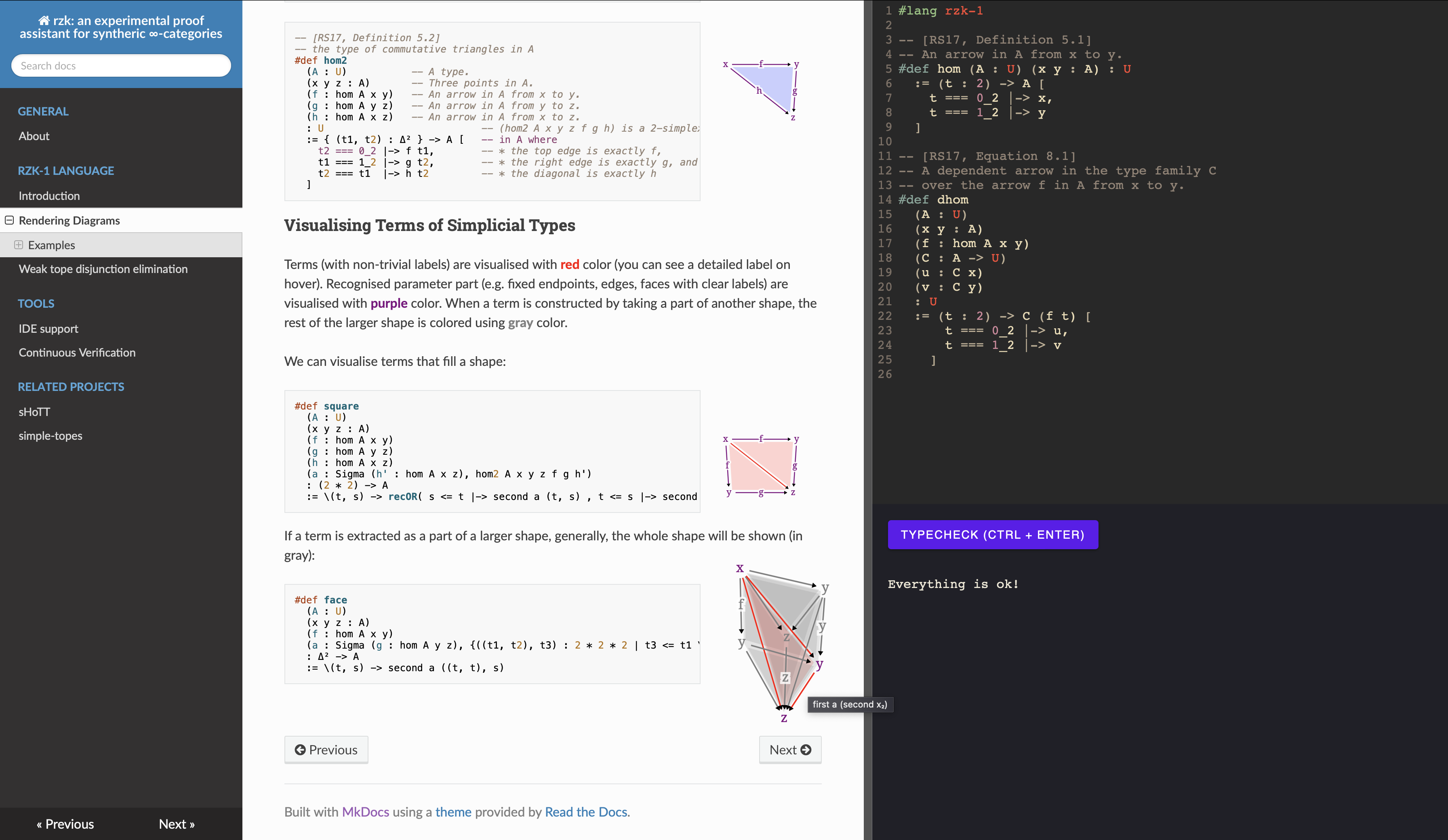
This project has started with the idea of bringing Riehl and Shulman's 2017 paper [1] to "life" by implementing a proof assistant based on their type theory with shapes. Currently an early prototype with an online playground is available. The current implementation is capable of checking various formalisations. Perhaps, the largest formalisations are available in two related projects: https://rzk-lang.github.io/sHoTT and https://github.com/emilyriehl/yoneda. sHoTT project (originally a fork of the yoneda project) aims to cover more formalisations in simplicial HoTT and ∞-categories, while yoneda project aims to compare different formalisations of the Yoneda lemma.
For a first encounter with the type theory, two interactive games are available in the browser, with no installation: the Rzk Warm-up Game assumes no prior Rzk and builds up from functions and pairs to a taste of directed types, and the ∞-Yoneda Game follows Riehl's geodesic to the Yoneda lemma. Both are played by filling holes in a term, and run the rzk typechecker in the browser. Authoring a game of your own needs no Haskell: see rzk-game and its template.
Internally, rzk uses a version of second-order abstract syntax allowing relatively straightforward handling of binders (such as lambda abstraction). In the future, rzk aims to support dependent type inference relying on E-unification for second-order abstract syntax [2].
Using such representation is motivated by automatic handling of binders and easily automated boilerplate code. The idea is that this should keep the implementation of rzk relatively small and less error-prone than some of the existing approaches to implementation of dependent type checkers.
An important part of rzk is a tope layer solver, which is essentially a theorem prover for a part of the type theory. A related project, dedicated just to that part is available at https://github.com/fizruk/simple-topes. simple-topes supports used-defined cubes, topes, and tope layer axioms. Once stable, simple-topes will be merged into rzk, expanding the proof assistant to the type theory with shapes, allowing formalisations for (variants of) cubical, globular, and other geometric versions of HoTT.
See the list of contributors at docs/docs/CONTRIBUTORS.md.
Discussing Rzk and getting help
A Zulip chat is available for all to join and chat about Rzk, including formalization projects, development of Rzk, and related projects: https://rzk-lang.zulipchat.com/register/
How to use rzk
For relatively small single-file formalisations, you can use the online playground at https://rzk-lang.github.io/rzk/develop/playground
However, for larger and multi-file formalisations you should install a version of rzk locally:
-
You can install the latest "stable" version of
rzkfrom Hackage:cabal update cabal install rzk -
You can install the latest "development" version of
rzkfrom thedevelopbranch of this repository:git clone https://github.com/rzk-lang/rzk.git cd rzk git checkout develop stack build && stack install
VS Code
There exists a VS Code extension for rzk available on the Marketplace. The extension supports basic syntax highlighting, but more features may come in the future.
Checking
To check a multi-file project, you need to call rzk typecheck specifying the files in correct order, e.g.:
rzk typecheck first.rzk second.rzk third.rzk
A proper support for inter-file dependencies will be implemented in the future. Until then, it is recommended to start names of files with a number, ensuring correct order when using a wildcard (*). For example:
.
├── 0-common.md
├── 1-paths.md
├── 2-contractible.md
├── 3-homotopies.md
├── 4-equivalences.md
├── 5-sigma.md
└── 6-trivial-fibrations.md

1 directory, 7 files
Inside of such directory, you can run rzk typecheck on all files using wildcards:
rzk typecheck *-*.md
Formatting
Formatting can be done by calling rzk format and specifying the files to be formatted, e.g.:
rzk format file1.rzk file2.rzk
This prints the formatted version of the file to stdout.
To overwrite the file content, you must use the --write flag as such:
rzk format --write examples/*.rzk related/*.rzk.md
Note that if no files are specified, rzk format will format all files listed in rzk.yaml.
The CLI also supports the --check flag, which will exit with a non-zero exit code if any of the files are not formatted correctly. This is useful in CI pipelines to ensure that all files are formatted correctly.
How to contribute to rzk
Building the Documentation Locally
First, you need to install MkDocs and mdx_math Markdown extension (to enable LaTeX):
pip install python-markdown-math
Now, you can build and serve the documentation locally by running
mkdocs serve --config-file docs/mkdocs.yml
The (locally built) documentation should be available at http://127.0.0.1:8000
The pages of the documentation are the *.md files in docs/docs directory and its subdirectories.
To add a new page, you can create a new *.md file and add it to the navigation by modifying docs/mkdocs.yml.
Development
The project is developed with both stack and nix.
Develop rzk with stack
For quick local development and testing it is recommended to work with a GHC version, using the stack tool. Clone this project and run stack build:
git clone https://github.com/rzk-lang/rzk.git
cd rzk
stack build
The build provides an executable rzk which can be used to typecheck files:
stack exec -- rzk typecheck FILE
Regenerating the parser
The lexer and parser are generated from the grammar rzk/grammar/Syntax.cf (the
source of truth) with BNFC,
alex, and
happy. The rzk package uses
build-type: Simple and ships the committed generated modules under
rzk/src/Language/Rzk/Syntax, so a normal build does not run these tools — this
keeps installs lightweight (Hackage included) and lets rzk build under the GHC
WebAssembly backend, where a custom Setup.hs cannot run.
The flip side is that regeneration is out of band. After editing the grammar, regenerate and commit the result:
make -C rzk regen-parser
Tool versions matter: BNFC and happy stamp their version into the generated
files, so a different version shows up as a spurious diff. Use the versions the
committed files were produced with — BNFC 2.9.6.3 and happy 2.2 (any recent
alex is fine) — for example:
cabal install BNFC-2.9.6.3 happy-2.2 alex
The Parser up-to-date CI workflow regenerates from the grammar and fails if the
committed files drift, so editing Syntax.cf without running make -C rzk regen-parser will be caught.
Develop with nix
-
Install
nix:sh <(curl -L https://nixos.org/nix/install) --no-daemon -
(Optionally) Permanently enable nix flakes to use faster and more convenient experimental (but quite stable) commands.
-
Use
cachixto avoid building multiple dependencies:- Without flakes:
nix-shell -p cachix --command 'cachix use miso-haskell' - With flakes:
nix shell nixpkgs#cachix -c cachix use miso-haskell
- Without flakes:
-
(Optionally) Install direnv to start the
devShellwhen you enter the repository directory.- The
nix-direnvrepo shows installation options.
- The
-
(Optionally) If you use VS Code, you can install
mkhl.direnvextension that loadsdirenvenvironments. -
Clone this repository and enter it
git clone git@github.com:rzk-lang/rzk.git cd rzk -
Run
direnv allowin the repository root. -
Use
cabalfor development.cabalperforms incremental builds meaning it will build only the parts that are changed. This is quite fast.nixwill rebuild the packageAwhen its dependencyBchanges. Moreover,nixwill rebuild all packages that are dependencies ofAand that depend onB. This is much slower than incremental builds.- So, use
nixfor setting up the environment with necessary tools that don't need rebuilds.
-
The following sections provide commands to build and run packages. They should be executed from the root directory of this repository.
-
The commands
nix-shell,nix shell, andnix developstart shells with necessary tools. Run subsequent commands from code blocks in these shells.
Permanently install rzk
without flakes
nix-env -iA default -f default.nix
rzk version
with flakes
nix profile install
rzk version
Also see nix profile remove.
Develop rzk
nix-shell and nix develop start shells with cabal, ghc with packages, hpack, haskell-language-server.
without flakes
cabal
nix-shell -A default
# (Optionally) build
cabal build rzk
cabal run rzk -- version
nix-build
nix-build -A default
./result/bin/rzk version
with flakes
cabal
nix develop
# (Optionally) build
cabal build rzk
cabal run rzk -- version
nix build
nix build
./result/bin/rzk version
nix run
nix run .# -- version
nix shell
nix shell
rzk version
Build rzk-js
rzk-js is a wrapper around rzk.
Building rzk-js via GHCJS produces a JavaScript script used in rzk-playground.
without flakes
cabal
nix-shell -A ghcjs
build-rzk-js
nix-build
rm -rf rzk-playground/public/rzk.js
nix-build -A rzk-js -o rzk-playground/public/rzk.js
with flakes
cabal
nix develop .#ghcjs
build-rzk-js
nix build
rm -rf rzk-playground/public/rzk.js
nix build .#rzk-js -o rzk-playground/public/rzk.js
rzk-playground
rzk-playground is a JavaScript application that combines an editor and basic rzk functionality.
Develop
-
Load
nodejs- without flakes:
nix-shell - with flakes:
nix develop
- without flakes:
-
Start a development server and open in a browser a link given by the server.
cd rzk-playground
npm run dev
Release
Build a static site to be hosted, e.g., on GitHub Pages.
The release-rzk-playground script will write files to the rzk-playground-release directory.
without flakes
nix-shell -A release
release-rzk-playground
with flakes
nix develop
nix develop .#release
release-rzk-playground
nix run
nix run .#release-rzk-playground
References
- Emily Riehl & Michael Shulman. A type theory for synthetic ∞-categories. Higher Structures 1(1), 147-224. 2017. https://arxiv.org/abs/1705.07442
- Nikolai Kudasov. E-unification for Second-Order Abstract Syntax. 2023. https://arxiv.org/abs/2302.05815


Similar repos


Languages
Haskell
92.4%
TypeScript
3.7%
Nix
1.7%
EBNF
1.4%
An experimental proof assistant based on a type theory for synthetic ∞-categories.
See the codeREADME
Rzk proof assistant
An experimental proof assistant for synthetic ∞-categories.
About this project
This project has started with the idea of bringing Riehl and Shulman's 2017 paper [1] to "life" by implementing a proof assistant based on their type theory with shapes. Currently an early prototype with an online playground is available. The current implementation is capable of checking various formalisations. Perhaps, the largest formalisations are available in two related projects: https://rzk-lang.github.io/sHoTT and https://github.com/emilyriehl/yoneda. sHoTT project (originally a fork of the yoneda project) aims to cover more formalisations in simplicial HoTT and ∞-categories, while yoneda project aims to compare different formalisations of the Yoneda lemma.
For a first encounter with the type theory, two interactive games are available in the browser, with no installation: the Rzk Warm-up Game assumes no prior Rzk and builds up from functions and pairs to a taste of directed types, and the ∞-Yoneda Game follows Riehl's geodesic to the Yoneda lemma. Both are played by filling holes in a term, and run the rzk typechecker in the browser. Authoring a game of your own needs no Haskell: see rzk-game and its template.
Internally, rzk uses a version of second-order abstract syntax allowing relatively straightforward handling of binders (such as lambda abstraction). In the future, rzk aims to support dependent type inference relying on E-unification for second-order abstract syntax [2].
Using such representation is motivated by automatic handling of binders and easily automated boilerplate code. The idea is that this should keep the implementation of rzk relatively small and less error-prone than some of the existing approaches to implementation of dependent type checkers.
An important part of rzk is a tope layer solver, which is essentially a theorem prover for a part of the type theory. A related project, dedicated just to that part is available at https://github.com/fizruk/simple-topes. simple-topes supports used-defined cubes, topes, and tope layer axioms. Once stable, simple-topes will be merged into rzk, expanding the proof assistant to the type theory with shapes, allowing formalisations for (variants of) cubical, globular, and other geometric versions of HoTT.
See the list of contributors at docs/docs/CONTRIBUTORS.md.
Discussing Rzk and getting help
A Zulip chat is available for all to join and chat about Rzk, including formalization projects, development of Rzk, and related projects: https://rzk-lang.zulipchat.com/register/
How to use rzk
For relatively small single-file formalisations, you can use the online playground at https://rzk-lang.github.io/rzk/develop/playground
However, for larger and multi-file formalisations you should install a version of rzk locally:
-
You can install the latest "stable" version of
rzkfrom Hackage:cabal update cabal install rzk -
You can install the latest "development" version of
rzkfrom thedevelopbranch of this repository:git clone https://github.com/rzk-lang/rzk.git cd rzk git checkout develop stack build && stack install
VS Code
There exists a VS Code extension for rzk available on the Marketplace. The extension supports basic syntax highlighting, but more features may come in the future.
Checking
To check a multi-file project, you need to call rzk typecheck specifying the files in correct order, e.g.:
rzk typecheck first.rzk second.rzk third.rzk
A proper support for inter-file dependencies will be implemented in the future. Until then, it is recommended to start names of files with a number, ensuring correct order when using a wildcard (*). For example:
.
├── 0-common.md
├── 1-paths.md
├── 2-contractible.md
├── 3-homotopies.md
├── 4-equivalences.md
├── 5-sigma.md
└── 6-trivial-fibrations.md

1 directory, 7 files
Inside of such directory, you can run rzk typecheck on all files using wildcards:
rzk typecheck *-*.md
Formatting
Formatting can be done by calling rzk format and specifying the files to be formatted, e.g.:
rzk format file1.rzk file2.rzk
This prints the formatted version of the file to stdout.
To overwrite the file content, you must use the --write flag as such:
rzk format --write examples/*.rzk related/*.rzk.md
Note that if no files are specified, rzk format will format all files listed in rzk.yaml.
The CLI also supports the --check flag, which will exit with a non-zero exit code if any of the files are not formatted correctly. This is useful in CI pipelines to ensure that all files are formatted correctly.
How to contribute to rzk
Building the Documentation Locally
First, you need to install MkDocs and mdx_math Markdown extension (to enable LaTeX):
pip install python-markdown-math
Now, you can build and serve the documentation locally by running
mkdocs serve --config-file docs/mkdocs.yml
The (locally built) documentation should be available at http://127.0.0.1:8000
The pages of the documentation are the *.md files in docs/docs directory and its subdirectories.
To add a new page, you can create a new *.md file and add it to the navigation by modifying docs/mkdocs.yml.
Development
The project is developed with both stack and nix.
Develop rzk with stack
For quick local development and testing it is recommended to work with a GHC version, using the stack tool. Clone this project and run stack build:
git clone https://github.com/rzk-lang/rzk.git
cd rzk
stack build
The build provides an executable rzk which can be used to typecheck files:
stack exec -- rzk typecheck FILE
Regenerating the parser
The lexer and parser are generated from the grammar rzk/grammar/Syntax.cf (the
source of truth) with BNFC,
alex, and
happy. The rzk package uses
build-type: Simple and ships the committed generated modules under
rzk/src/Language/Rzk/Syntax, so a normal build does not run these tools — this
keeps installs lightweight (Hackage included) and lets rzk build under the GHC
WebAssembly backend, where a custom Setup.hs cannot run.
The flip side is that regeneration is out of band. After editing the grammar, regenerate and commit the result:
make -C rzk regen-parser
Tool versions matter: BNFC and happy stamp their version into the generated
files, so a different version shows up as a spurious diff. Use the versions the
committed files were produced with — BNFC 2.9.6.3 and happy 2.2 (any recent
alex is fine) — for example:
cabal install BNFC-2.9.6.3 happy-2.2 alex
The Parser up-to-date CI workflow regenerates from the grammar and fails if the
committed files drift, so editing Syntax.cf without running make -C rzk regen-parser will be caught.
Develop with nix
-
Install
nix:sh <(curl -L https://nixos.org/nix/install) --no-daemon -
(Optionally) Permanently enable nix flakes to use faster and more convenient experimental (but quite stable) commands.
-
Use
cachixto avoid building multiple dependencies:- Without flakes:
nix-shell -p cachix --command 'cachix use miso-haskell' - With flakes:
nix shell nixpkgs#cachix -c cachix use miso-haskell
- Without flakes:
-
(Optionally) Install direnv to start the
devShellwhen you enter the repository directory.- The
nix-direnvrepo shows installation options.
- The
-
(Optionally) If you use VS Code, you can install
mkhl.direnvextension that loadsdirenvenvironments. -
Clone this repository and enter it
git clone git@github.com:rzk-lang/rzk.git cd rzk -
Run
direnv allowin the repository root. -
Use
cabalfor development.cabalperforms incremental builds meaning it will build only the parts that are changed. This is quite fast.nixwill rebuild the packageAwhen its dependencyBchanges. Moreover,nixwill rebuild all packages that are dependencies ofAand that depend onB. This is much slower than incremental builds.- So, use
nixfor setting up the environment with necessary tools that don't need rebuilds.
-
The following sections provide commands to build and run packages. They should be executed from the root directory of this repository.
-
The commands
nix-shell,nix shell, andnix developstart shells with necessary tools. Run subsequent commands from code blocks in these shells.
Permanently install rzk
without flakes
nix-env -iA default -f default.nix
rzk version
with flakes
nix profile install
rzk version
Also see nix profile remove.
Develop rzk
nix-shell and nix develop start shells with cabal, ghc with packages, hpack, haskell-language-server.
without flakes
cabal
nix-shell -A default
# (Optionally) build
cabal build rzk
cabal run rzk -- version
nix-build
nix-build -A default
./result/bin/rzk version
with flakes
cabal
nix develop
# (Optionally) build
cabal build rzk
cabal run rzk -- version
nix build
nix build
./result/bin/rzk version
nix run
nix run .# -- version
nix shell
nix shell
rzk version
Build rzk-js
rzk-js is a wrapper around rzk.
Building rzk-js via GHCJS produces a JavaScript script used in rzk-playground.
without flakes
cabal
nix-shell -A ghcjs
build-rzk-js
nix-build
rm -rf rzk-playground/public/rzk.js
nix-build -A rzk-js -o rzk-playground/public/rzk.js
with flakes
cabal
nix develop .#ghcjs
build-rzk-js
nix build
rm -rf rzk-playground/public/rzk.js
nix build .#rzk-js -o rzk-playground/public/rzk.js
rzk-playground
rzk-playground is a JavaScript application that combines an editor and basic rzk functionality.
Develop
-
Load
nodejs- without flakes:
nix-shell - with flakes:
nix develop
- without flakes:
-
Start a development server and open in a browser a link given by the server.
cd rzk-playground
npm run dev
Release
Build a static site to be hosted, e.g., on GitHub Pages.
The release-rzk-playground script will write files to the rzk-playground-release directory.
without flakes
nix-shell -A release
release-rzk-playground
with flakes
nix develop
nix develop .#release
release-rzk-playground
nix run
nix run .#release-rzk-playground
References
- Emily Riehl & Michael Shulman. A type theory for synthetic ∞-categories. Higher Structures 1(1), 147-224. 2017. https://arxiv.org/abs/1705.07442
- Nikolai Kudasov. E-unification for Second-Order Abstract Syntax. 2023. https://arxiv.org/abs/2302.05815
Similar repos
Languages
Haskell
92.4%
TypeScript
3.7%
Nix
1.7%
EBNF
1.4%