renv: Project environments for R.
See the code


The renv package1 helps you create reproducible environments for your R projects. Use renv to make your R projects more isolated, portable and reproducible.
Install the latest version of renv from CRAN with:
install.packages("renv")
Alternatively, install the development version from r-universe with:
install.packages("renv", repos = "https://rstudio.r-universe.dev")
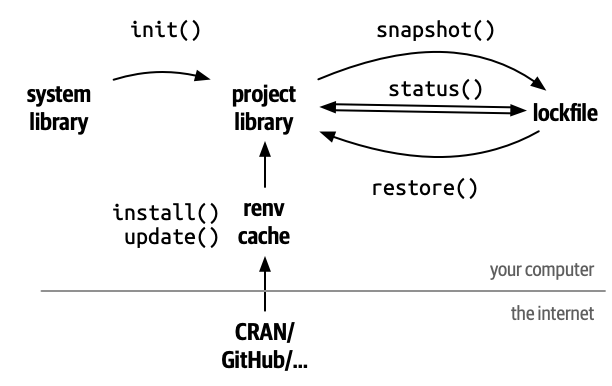
Use renv::init() to initialize renv in a new or existing project. This
will set up a project library, containing all the packages you’re
currently using. The packages (and all the metadata needed to reinstall
them) are recorded into a lockfile, renv.lock, and a .Rprofile
ensures that the library is used every time you open that project.
As you continue to work on your project, you will install and upgrade
packages, either using install.packages() and update.packages() or
renv::install() and renv::update(). After you’ve confirmed your code
works as expected, use renv::snapshot() to record the packages and
their sources in the lockfile.
Later, if you need to share your code with someone else or run your code
on new machine, your collaborator (or you) can call renv::restore() to
reinstall the specific package versions recorded in the lockfile.
If this is your first time using renv, we strongly recommend starting with the Introduction to renv vignette: this will help you understand the most important verbs and nouns of renv.
If you have a question about renv, please first check the FAQ to see whether your question has already been addressed. If it hasn’t, please feel free to ask on the Posit Forum.
If you believe you’ve found a bug in renv, please file a bug (and, if possible, a reproducible example) at https://github.com/rstudio/renv/issues.
Pronounced “R” “env” ↩
363 followers · starred Mar 2022
508 followers · starred Oct 2021
404 followers · starred Dec 2020
78 followers · starred Jul 2026
renv: Project environments for R.
See the code
The renv package1 helps you create reproducible environments for your R projects. Use renv to make your R projects more isolated, portable and reproducible.
Install the latest version of renv from CRAN with:
install.packages("renv")
Alternatively, install the development version from r-universe with:
install.packages("renv", repos = "https://rstudio.r-universe.dev")
Use renv::init() to initialize renv in a new or existing project. This
will set up a project library, containing all the packages you’re
currently using. The packages (and all the metadata needed to reinstall
them) are recorded into a lockfile, renv.lock, and a .Rprofile
ensures that the library is used every time you open that project.
As you continue to work on your project, you will install and upgrade
packages, either using install.packages() and update.packages() or
renv::install() and renv::update(). After you’ve confirmed your code
works as expected, use renv::snapshot() to record the packages and
their sources in the lockfile.
Later, if you need to share your code with someone else or run your code
on new machine, your collaborator (or you) can call renv::restore() to
reinstall the specific package versions recorded in the lockfile.
If this is your first time using renv, we strongly recommend starting with the Introduction to renv vignette: this will help you understand the most important verbs and nouns of renv.
If you have a question about renv, please first check the FAQ to see whether your question has already been addressed. If it hasn’t, please feel free to ask on the Posit Forum.
If you believe you’ve found a bug in renv, please file a bug (and, if possible, a reproducible example) at https://github.com/rstudio/renv/issues.
Pronounced “R” “env” ↩
363 followers · starred Mar 2022
508 followers · starred Oct 2021
404 followers · starred Dec 2020
78 followers · starred Jul 2026