
A game about sorting shapes by color or shape, played with the keyboard, the mouse, or both. Warning: this activity is an utter total waste of time that is not even remotely enjoyable. Like, seriously.
See the codeSee what people are saying
README
Shape Sorting
So, which input device offers better productivity, the keyboard or the mouse?
Let's find out.
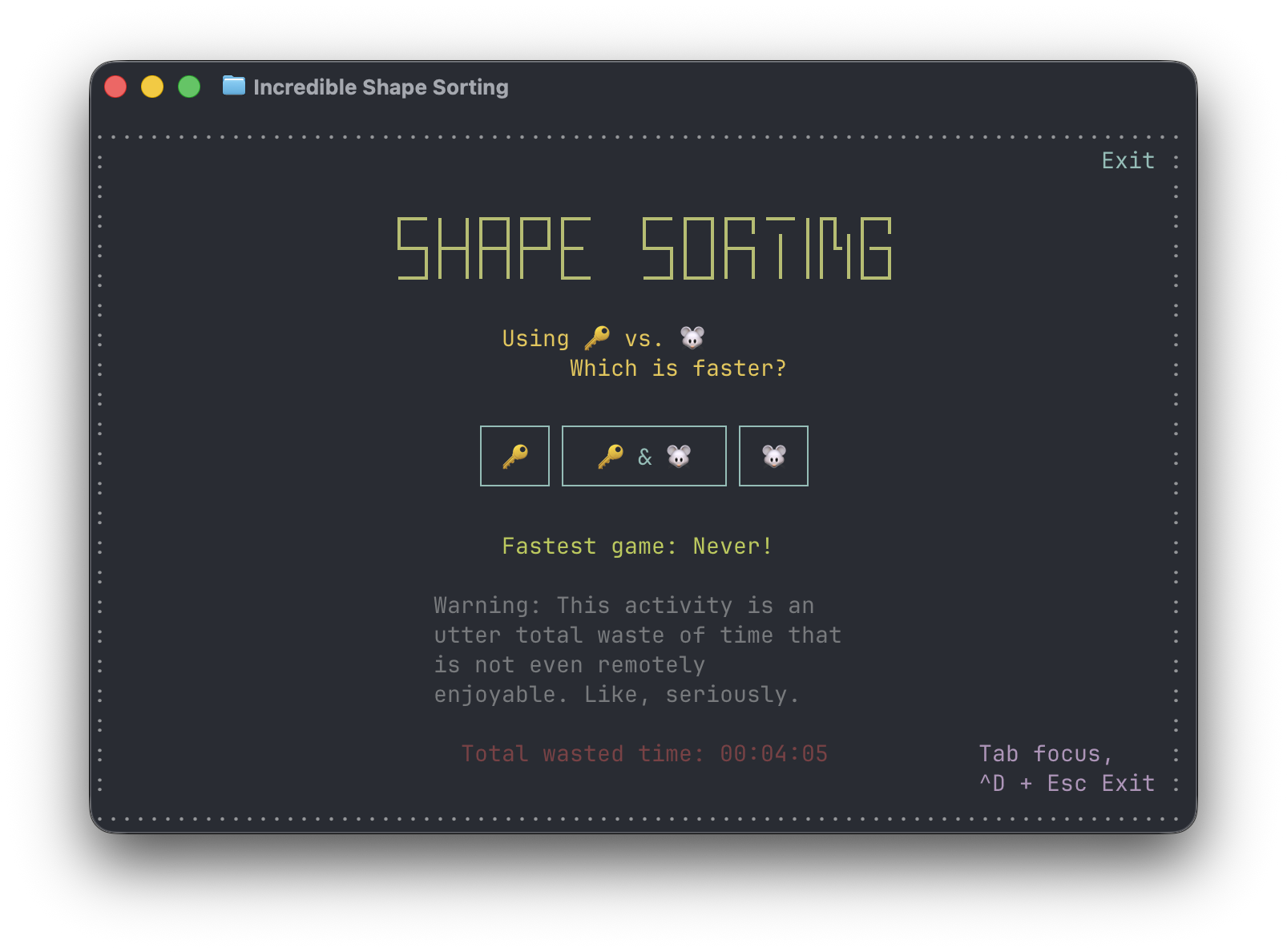
Shape Sorting is a game, or, ok maybe better, an activity, about sorting shapes by color or shape, played with the keyboard, the mouse, or both.
It's written in Rust using the Incredible TUI framework. It can be played, or, ok maybe better, it can be experienced, in the terminal, using native macOS and Windows app or right here in the browser.
⚠️ Warning This activity is an utter total waste of time that is not even remotely enjoyable. Like, seriously.
Install
Web
No install needed: https://ronilan.github.io/shape-sorting/
Native binaries
Prebuilt binaries are provided for each release.
Linux via Docker
To try the Linux terminal version, build and run:
docker build -t shape_sorting .
docker run --rm -it shape_sorting
Type shape_sorting in the container shell to launch.
TUI Install / Uninstall
Installs the latest release binary — /usr/local/bin (macOS/Linux) or C:\Program Files\shape_sorting (Windows).
curl --proto '=https' --tlsv1.2 -sSf https://raw.githubusercontent.com/ronilan/shape-sorting/main/install.sh | bash
irm https://raw.githubusercontent.com/ronilan/shape-sorting/main/install.ps1 | iex
Uninstall the same way with uninstall.sh / uninstall.ps1.
Play
- Splash screen: pick your input mode — keyboard (🔑), mouse (🐭), or both (🔑 & 🐭). Press Enter (or click) to start.
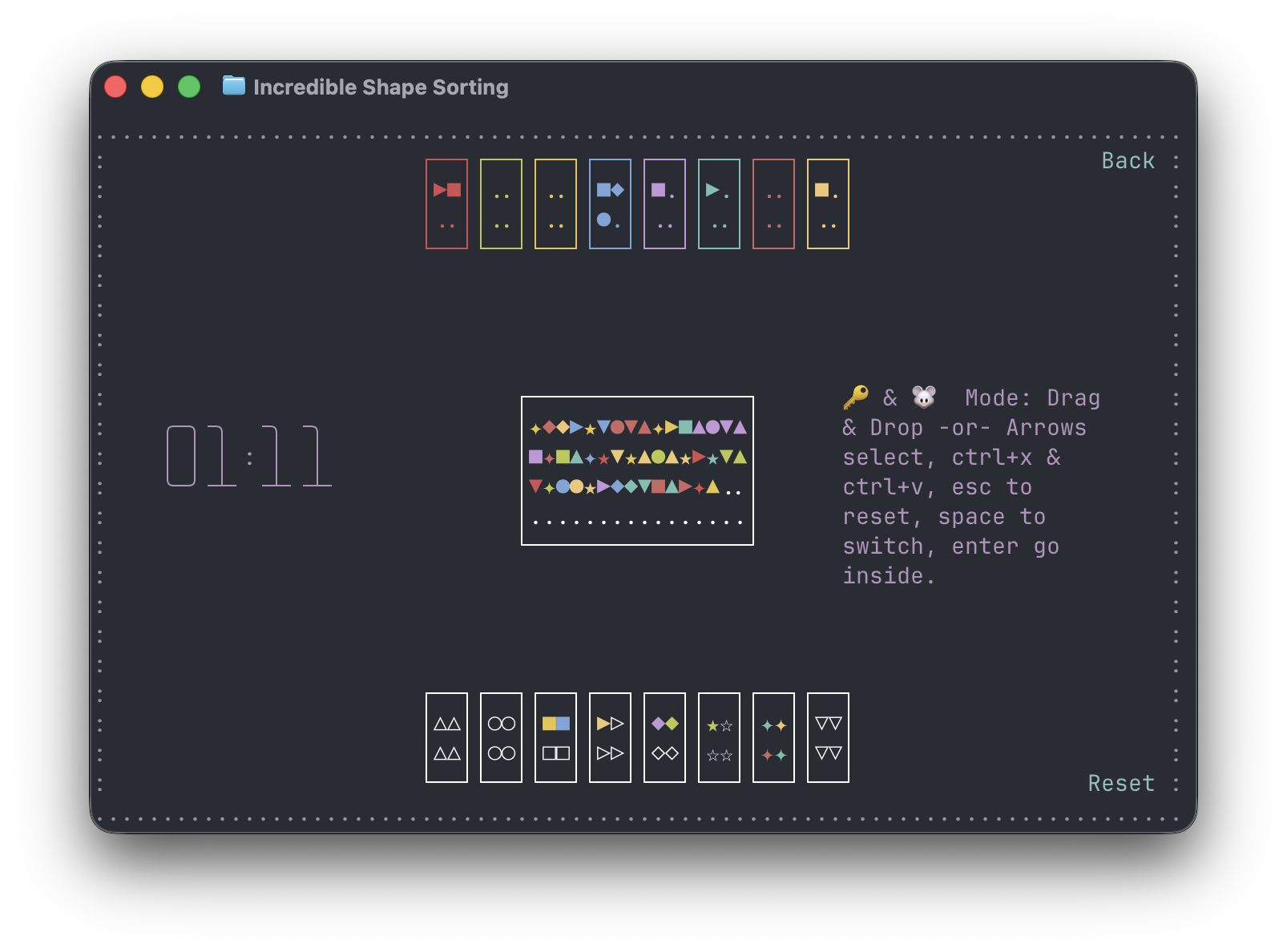
- Sort shapes from the shape box into the drop boxes, by shape or by color.
- When the shape box is emptied, your time is shown.
Keyboard controls (🔑)
- Arrow keys — select
- X — pick up a shape
- V — place the carried shape
- Esc — cancel the carried shape / reset
- Space — switch
- Enter — go inside
Mouse controls (🐭)
- Drag & drop — carry shapes from the shape box into the drop boxes
In the mixed mode (🔑 & 🐭) either set of controls works.
Files
Your fastest game and total time wasted are saved between runs in a per-user file:
- macOS:
~/Library/Application Support/shape_sorting/.shape_sorting - Linux:
~/.local/share/shape_sorting/.shape_sorting - Windows:
%APPDATA%\shape_sorting\.shape_sorting
The web version stores your stats in the browser's local storage. If the file can't be written (or the browser blocks storage), the game simply runs without saving — nothing crashes.
Other ways to install
Look before you run
If you prefer to inspect the installer scripts before running them, download first, then execute:
macOS / Linux:
curl --proto '=https' --tlsv1.2 -sSf https://raw.githubusercontent.com/ronilan/shape-sorting/main/install.sh -o install.sh
bash install.sh
Windows:
Invoke-WebRequest -Uri "https://raw.githubusercontent.com/ronilan/shape-sorting/main/install.ps1" -OutFile install.ps1
powershell -ExecutionPolicy Bypass -File install.ps1
Manual install
macOS / Linux — download the binary for your platform from the latest release, then move it to /usr/local/bin (a centralized folder on the default PATH) and give it execution permissions:
sudo mv shape_sorting /usr/local/bin/
sudo chmod +x /usr/local/bin/shape_sorting
Windows — download shape_sorting-terminal-windows.zip from the latest release, create a dedicated folder (e.g. C:\Program Files\shape_sorting\), place shape_sorting.exe inside it, then search Windows for "Environment Variables", edit the system variables, and append that folder to the system PATH.
Verify it works by opening a new terminal anywhere and typing shape_sorting. If the program responds, it is correctly placed.
Development
See Development and Development Environment Prerequisites
Fabriqué au Canada : Made in Canada 🇨🇦
Similar repos


Languages
Rust
82.3%
CSS
7.5%
PowerShell
3.7%
HTML
3.3%
Shell
2.2%
A game about sorting shapes by color or shape, played with the keyboard, the mouse, or both. Warning: this activity is an utter total waste of time that is not even remotely enjoyable. Like, seriously.
See the codeSee what people are saying
README
Shape Sorting
So, which input device offers better productivity, the keyboard or the mouse?
Let's find out.
Shape Sorting is a game, or, ok maybe better, an activity, about sorting shapes by color or shape, played with the keyboard, the mouse, or both.
It's written in Rust using the Incredible TUI framework. It can be played, or, ok maybe better, it can be experienced, in the terminal, using native macOS and Windows app or right here in the browser.
⚠️ Warning This activity is an utter total waste of time that is not even remotely enjoyable. Like, seriously.
Install
Web
No install needed: https://ronilan.github.io/shape-sorting/
Native binaries
Prebuilt binaries are provided for each release.
Linux via Docker
To try the Linux terminal version, build and run:
docker build -t shape_sorting .
docker run --rm -it shape_sorting
Type shape_sorting in the container shell to launch.
TUI Install / Uninstall
Installs the latest release binary — /usr/local/bin (macOS/Linux) or C:\Program Files\shape_sorting (Windows).
curl --proto '=https' --tlsv1.2 -sSf https://raw.githubusercontent.com/ronilan/shape-sorting/main/install.sh | bash
irm https://raw.githubusercontent.com/ronilan/shape-sorting/main/install.ps1 | iex
Uninstall the same way with uninstall.sh / uninstall.ps1.
Play
- Splash screen: pick your input mode — keyboard (🔑), mouse (🐭), or both (🔑 & 🐭). Press Enter (or click) to start.
- Sort shapes from the shape box into the drop boxes, by shape or by color.
- When the shape box is emptied, your time is shown.
Keyboard controls (🔑)
- Arrow keys — select
- X — pick up a shape
- V — place the carried shape
- Esc — cancel the carried shape / reset
- Space — switch
- Enter — go inside
Mouse controls (🐭)
- Drag & drop — carry shapes from the shape box into the drop boxes
In the mixed mode (🔑 & 🐭) either set of controls works.
Files
Your fastest game and total time wasted are saved between runs in a per-user file:
- macOS:
~/Library/Application Support/shape_sorting/.shape_sorting - Linux:
~/.local/share/shape_sorting/.shape_sorting - Windows:
%APPDATA%\shape_sorting\.shape_sorting
The web version stores your stats in the browser's local storage. If the file can't be written (or the browser blocks storage), the game simply runs without saving — nothing crashes.
Other ways to install
Look before you run
If you prefer to inspect the installer scripts before running them, download first, then execute:
macOS / Linux:
curl --proto '=https' --tlsv1.2 -sSf https://raw.githubusercontent.com/ronilan/shape-sorting/main/install.sh -o install.sh
bash install.sh
Windows:
Invoke-WebRequest -Uri "https://raw.githubusercontent.com/ronilan/shape-sorting/main/install.ps1" -OutFile install.ps1
powershell -ExecutionPolicy Bypass -File install.ps1
Manual install
macOS / Linux — download the binary for your platform from the latest release, then move it to /usr/local/bin (a centralized folder on the default PATH) and give it execution permissions:
sudo mv shape_sorting /usr/local/bin/
sudo chmod +x /usr/local/bin/shape_sorting
Windows — download shape_sorting-terminal-windows.zip from the latest release, create a dedicated folder (e.g. C:\Program Files\shape_sorting\), place shape_sorting.exe inside it, then search Windows for "Environment Variables", edit the system variables, and append that folder to the system PATH.
Verify it works by opening a new terminal anywhere and typing shape_sorting. If the program responds, it is correctly placed.
Development
See Development and Development Environment Prerequisites
Fabriqué au Canada : Made in Canada 🇨🇦
Similar repos
Languages
Rust
82.3%
CSS
7.5%
PowerShell
3.7%
HTML
3.3%
Shell
2.2%