
See what people are saying
README
3D Mockup Studio
Little AI vibe coding experiment for adding screenshots or screen casts to device mockups and generate images or animations.
Try here: https://roncz.github.io/3d-mockup/
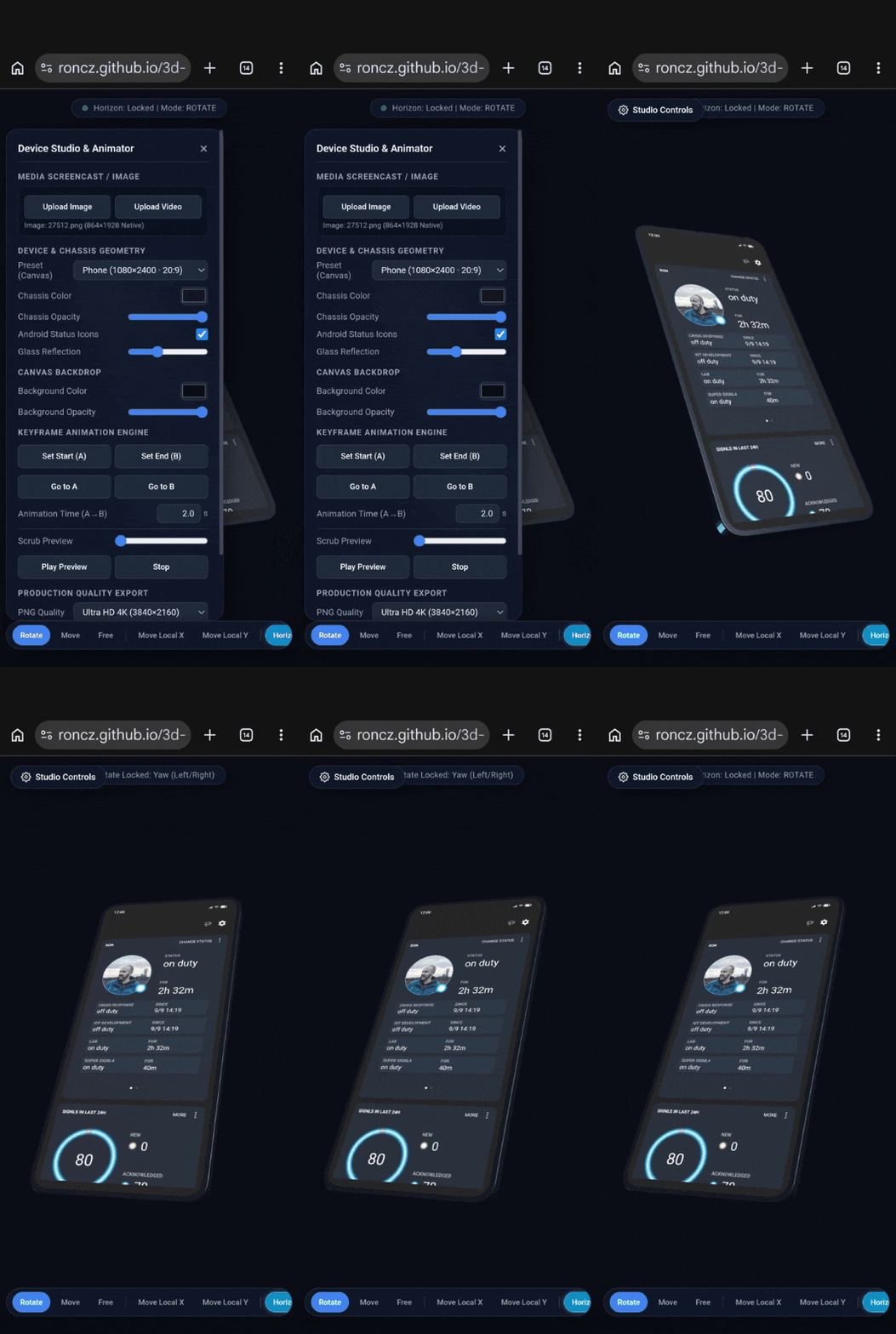
3D Device Mockup Studio & Animation Suite
A standalone, single-file HTML/WebGL application built with Three.js to compose, animate, and export high-resolution 3D device mockups directly in your browser.
Features
- Geometry Presets: Procedural chassis models for Modern Phones (20:9), Tablets (16:10 and 3:4), Laptops, and Frameless display panes.
- Media Screencasts: Direct GPU texture streaming for custom images and MP4/WebM videos with hardware-accelerated aspect mapping and audio pass-through.
- Dynamic Overlays: Vector-rendered Android status bar overlay (Clock, Cellular signal, Wi-Fi, Battery) that stays sharp at extreme resolutions.
- Material Controls: Adjustable chassis color, chassis opacity, glass glare/reflection intensity, and canvas background transparency.
- Keyframe Engine: Interpolate between two states (Keyframe A and Keyframe B) with independent motion duration, scrub preview, and easing.
- Flexible Space Controls: View-space rotation with Horizon Lock, 2D screen-plane translation, and local 3D chassis sliding.
- Ultra-HD Production Exports:
- PNG: Headless offline rendering up to 5K (5120×2880) with 8× MSAA.
- WebM: Hardware-accelerated 60 FPS recording at 40 Mbps with embedded original screencast audio and automated buffer-drain post-roll to eliminate clipped endings.
Quick Start
- Open
index.htmlin any modern web browser (desktop or mobile). - Click Upload Image or Upload Video to apply content to the screen.
- Use touch or mouse gestures to position the device.
- Set keyframes and click Export Image or Export Video.
Navigation & Controls
Bottom Toolbar (HUD)
| Button | Action |
|---|---|
| Rotate | 1-finger / left-click drag to rotate with automatic horizontal (yaw) or vertical (pitch) axis locking. |
| Move | 1-finger / left-click drag to translate across screen space with auto-axis locking. |
| Free | Unconstrained, diagonal view-space rotation. |
| Move Local X / Y | Drags the device along its own physical 3D chassis axes (ideal for slides when tilted). |
| Horizon Lock | Keeps the phone upright relative to the horizon plane, preventing unwanted roll. |
| Center X / Y / Center | Centers the optical 2D screen silhouette within the viewport. |
| Fit View | Automatically reframes camera distance so the device fills the canvas with a 5px safe margin. |
| Lying / Front / Iso / Reset | Quick-align view presets. |
Gestures
- 1 Finger / Left Mouse: Active HUD mode action (Rotate, Move, or Local Slide).
- 2 Fingers (Mobile) / Scroll Wheel (Desktop): Dedicated camera zoom.
- Middle / Right Mouse Button: Screen-space pan.
Exporting
- PNG Snapshots: Select your preferred target resolution (2K, 4K, or 5K) in the side panel and click Export Image (PNG).
- WebM Video:
- If a video screencast is loaded, the exported video duration automatically matches the source video runtime, while 3D keyframe motion follows the configured Animation Time.
- Includes original audio track.
- Encoded with high-bitrate VP9/Opus at 60 FPS.
Disclaimer
Note: This project is 100% AI vibe-coded to scratch my own itch. There are rough edges, quirks, and almost certainly bugs. Use it at your own risk.
Third-Party Libraries
- Three.js - Licensed under the MIT License
Contributors

8 commits
Similar repos


Languages
HTML
100.0%
See what people are saying
README
3D Mockup Studio
Little AI vibe coding experiment for adding screenshots or screen casts to device mockups and generate images or animations.
Try here: https://roncz.github.io/3d-mockup/
3D Device Mockup Studio & Animation Suite
A standalone, single-file HTML/WebGL application built with Three.js to compose, animate, and export high-resolution 3D device mockups directly in your browser.
Features
- Geometry Presets: Procedural chassis models for Modern Phones (20:9), Tablets (16:10 and 3:4), Laptops, and Frameless display panes.
- Media Screencasts: Direct GPU texture streaming for custom images and MP4/WebM videos with hardware-accelerated aspect mapping and audio pass-through.
- Dynamic Overlays: Vector-rendered Android status bar overlay (Clock, Cellular signal, Wi-Fi, Battery) that stays sharp at extreme resolutions.
- Material Controls: Adjustable chassis color, chassis opacity, glass glare/reflection intensity, and canvas background transparency.
- Keyframe Engine: Interpolate between two states (Keyframe A and Keyframe B) with independent motion duration, scrub preview, and easing.
- Flexible Space Controls: View-space rotation with Horizon Lock, 2D screen-plane translation, and local 3D chassis sliding.
- Ultra-HD Production Exports:
- PNG: Headless offline rendering up to 5K (5120×2880) with 8× MSAA.
- WebM: Hardware-accelerated 60 FPS recording at 40 Mbps with embedded original screencast audio and automated buffer-drain post-roll to eliminate clipped endings.
Quick Start
- Open
index.htmlin any modern web browser (desktop or mobile). - Click Upload Image or Upload Video to apply content to the screen.
- Use touch or mouse gestures to position the device.
- Set keyframes and click Export Image or Export Video.
Navigation & Controls
Bottom Toolbar (HUD)
| Button | Action |
|---|---|
| Rotate | 1-finger / left-click drag to rotate with automatic horizontal (yaw) or vertical (pitch) axis locking. |
| Move | 1-finger / left-click drag to translate across screen space with auto-axis locking. |
| Free | Unconstrained, diagonal view-space rotation. |
| Move Local X / Y | Drags the device along its own physical 3D chassis axes (ideal for slides when tilted). |
| Horizon Lock | Keeps the phone upright relative to the horizon plane, preventing unwanted roll. |
| Center X / Y / Center | Centers the optical 2D screen silhouette within the viewport. |
| Fit View | Automatically reframes camera distance so the device fills the canvas with a 5px safe margin. |
| Lying / Front / Iso / Reset | Quick-align view presets. |
Gestures
- 1 Finger / Left Mouse: Active HUD mode action (Rotate, Move, or Local Slide).
- 2 Fingers (Mobile) / Scroll Wheel (Desktop): Dedicated camera zoom.
- Middle / Right Mouse Button: Screen-space pan.
Exporting
- PNG Snapshots: Select your preferred target resolution (2K, 4K, or 5K) in the side panel and click Export Image (PNG).
- WebM Video:
- If a video screencast is loaded, the exported video duration automatically matches the source video runtime, while 3D keyframe motion follows the configured Animation Time.
- Includes original audio track.
- Encoded with high-bitrate VP9/Opus at 60 FPS.
Disclaimer
Note: This project is 100% AI vibe-coded to scratch my own itch. There are rough edges, quirks, and almost certainly bugs. Use it at your own risk.
Third-Party Libraries
- Three.js - Licensed under the MIT License
Similar repos
Contributors
8 commits
Languages
HTML
100.0%