ronaldo-avalos/Maya

πŸ–₯️ πŸ“± ▢️ Wrap your iPhone screen recordings in a beautiful device frame, add cinematic zoom moments, and export ready-to-share videos.

Swift

1,067

29 commits

updated Aug 23, 2026

See the code

README

Maya app icon

Maya

Wrap screen recordings in a beautiful device frame, adjust the pacing, add cinematic zoom and tap moments, and export ready-to-share videos.

A native macOS app for turning raw screen recordings into polished marketing clips, social-media posts, and in-app tutorial overlays.
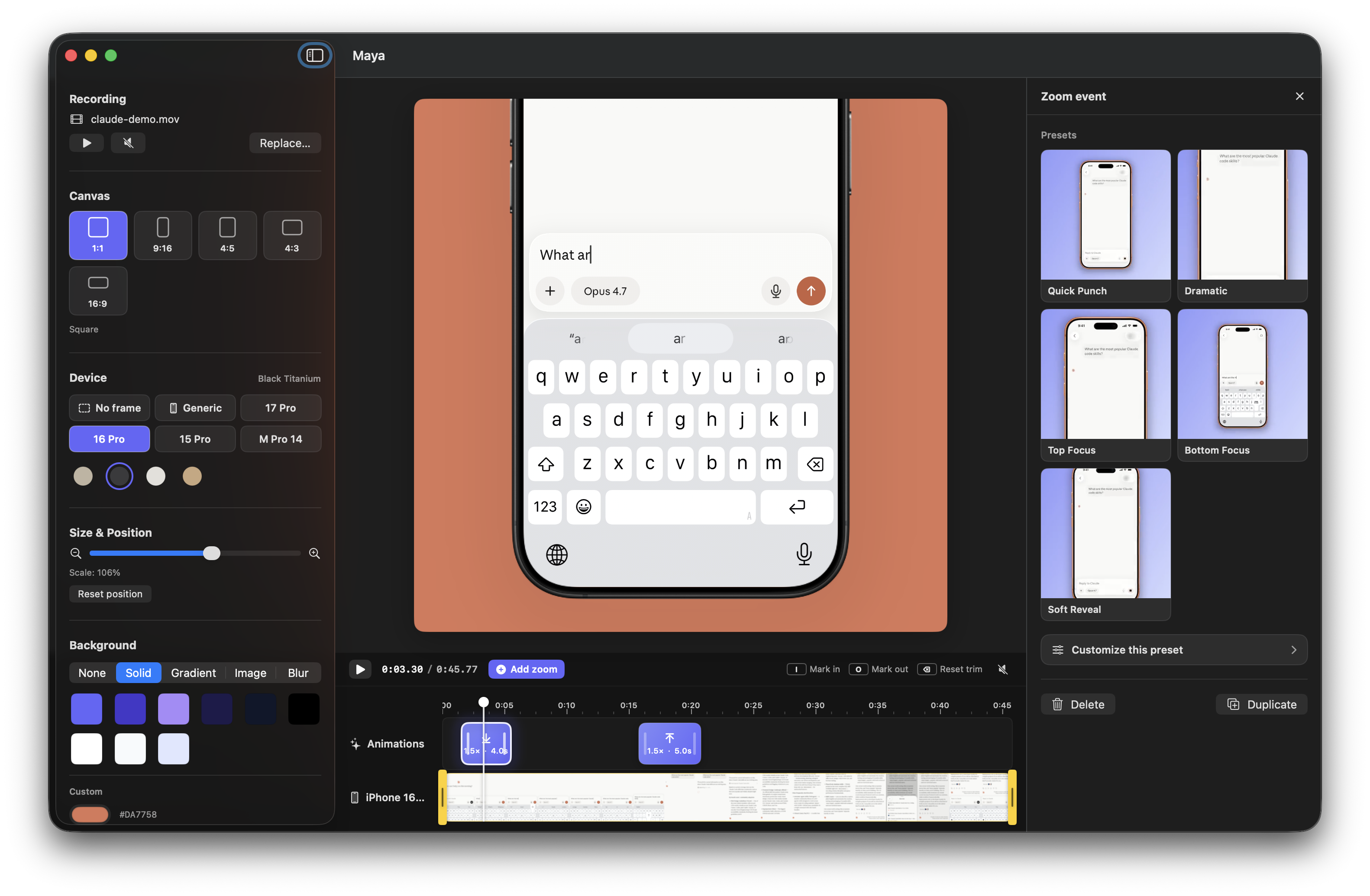
Maya screenshot


⬇️ Download

Download Maya for macOS Β· Website

Requires macOS 26.3 (Tahoe) or later. Maya is signed with a Developer ID and notarized by Apple β€” it opens with a normal double-click, no security workaround needed.

Want the latest unreleased changes? Build from source. Maintainers: see RELEASING.md.


πŸ†• What's new in 1.1

  • Visible tap feedback with Ripple, Pulse, and Ring styles so viewers can follow every press.
  • Direct tap placement on the device screen, with timing, color, and size controls in a dedicated timeline track and editor panel.
  • Smoother zoom editing with a continuous live preview while dragging and timeline snapping when the drag ends.
  • Editor reliability improvements, including a settings sidebar that remains fully accessible in compact windows.

✨ Features

🎬 Device framing

  • Drop a screen recording β€” Maya wraps it in a clean device mockup with the correct screen cutout and corner radius.
  • Multiple devices: iPhone 17 Pro, iPhone 16 Pro, iPhone 15 Pro, iPad Pro 11" (landscape), and MacBook Pro 14. The iPhones include their titanium color variants (Cosmic Orange, Deep Blue, Silver, Natural / Black / White / Desert Titanium…). Switch model and color from the sidebar in one click.
  • Generic mode: a brand-agnostic frame with user-defined bezel width and bezel color.
  • No frame mode: ship the bare screen recording with rounded corners only.
  • A corner radius slider appears in Generic / No-frame modes so you can dial from sharp to stadium.
  • The framed device lives inside a configurable canvas β€” 1:1, 9:16, 4:5, 4:3 landscape, 16:9 widescreen β€” so you can target Reels, Shorts, TikTok, YouTube, X, or in-app overlays from a single source.
  • Manually scale and reposition the device on the canvas via slider + drag.
  • Optional drop shadow under the device with controls for color, blur, X/Y offset, and opacity.

🎨 Backgrounds

A single picker, five modes:

  • None β€” Photoshop-style checkered preview, exports to .mov with HEVC + alpha.
  • Solid β€” brand-aligned palette + custom hex.
  • Gradient β€” eight curated brand presets, all derived from the app's official color (#6466FA).
  • Image β€” drop in any image, scale-to-fill.
  • Video Blur β€” Keynote-style blurred poster of your own video as the backdrop.

⏱ Timeline, speed, zoom & tap feedback

Like shots.so for Mac:

  • Bottom track: live video thumbnails strip.
  • Trim the recording with draggable in/out handles, or mark the range from the playhead with I and O.
  • Speed track: mark any part of the recording and play it from 0.25Γ— to 4Γ—, with presets for common slow-motion and fast-forward rates.
  • Speed segments have draggable edges, a dedicated right-side editor, rate-aware live playback, and synchronized audio/video export.
  • Zoom track: hover anywhere to drop a zoom event with a + affordance.
  • Each zoom event has a start, duration, scale, focus (Top / Center / Bottom), independent zoom-in / zoom-out timing, and a chosen animation curve.
  • Add a tap event at the playhead, click the device screen to position it, then choose Ripple, Pulse, or Ring and customize its timing, color, and size.
  • Tap events have their own draggable timeline track and render identically in the live canvas and exported video.
  • Drag a block to move it; drag the edges to resize. Zoom events preview continuously while moving and settle to 0.25 s intervals or the nearby playhead when the drag ends.
  • Live tooltips show timestamps while dragging.
  • The playhead is scrubbable.
  • Selecting a zoom or tap event opens an inline right-side editor panel so every change updates the canvas in real time β€” no modal, no lost context.

πŸŒ€ Six animation curves

CurveFeel
SpringSoft overshoot, lively (default)
BouncyMore overshoot, playful
SmoothClassic ease in/out
SnappyFast attack, slow settle
GentleSoft and organic
LinearConstant rate, mechanical

πŸš€ One-click presets

Five pre-baked combinations of scale + focus + duration + curve, each with a looping visual preview: Quick Punch, Dramatic, Top Focus, Bottom Focus, and Soft Reveal.

πŸ“€ Smart export

  • With background β†’ 1080Γ—1080 (or your aspect) .mp4, H.264. Drop straight into Reels / TikTok / Shorts.
  • Transparent (background set to None) β†’ .mov with HEVC + alpha channel. Composite the framed device over any UI inside another AVPlayer / AVKit consumer β€” perfect for in-app tutorials, Final Cut, Motion.
  • All speed changes, zooms, and tap animations bake into both exports.

⌨️ Keyboard shortcuts

KeyAction
SpacePlay / pause
MMute / unmute
← / β†’Scrub Β±0.25 s
⇧+← / ⇧+β†’Scrub Β±1 s
I / OMark trim in / out at the playhead
βŒ₯+⌫Reset trim
⌫Delete selected zoom, tap, or speed event
⌘+DDuplicate selected zoom, tap, or speed event

πŸ›  Tech stack

  • SwiftUI + AppKit (custom NSViewRepresentable for AVPlayerLayer)
  • AVFoundation: AVMutableComposition, per-range time scaling, custom AVVideoCompositing, AVAssetExportSession, manual AVAssetReader / AVAssetWriter pipeline for HEVC + alpha
  • Core Image + Metal for per-frame compositing
  • VideoToolbox for HEVC-with-alpha encoder properties
  • Swift Concurrency (@Observable, actors, async/await) β€” export runs on a dedicated actor so the UI never blocks
  • App Sandbox with file hard-link/copy adoption strategy (videos are brought into the sandbox container on load so AVFoundation reads work from any thread)

Requirements

  • macOS 26.3 (Tahoe) or later
  • Xcode 26.5 or later
  • A screen recording in .mp4 / .mov format

Build & run

git clone https://github.com/ronaldo-avalos/Maya.git
cd Maya
open Maya.xcodeproj
# In Xcode: ⌘R

🀝 Contributing β€” Maya is open source

This project is in active development and contributions are very welcome. Whether you're an iOS/macOS dev, a designer, or someone who just loves polished tools, there's a place for you.

High-impact contribution areas

πŸ“± More device frames

Maya currently ships iPhone 17 Pro, 16 Pro, 15 Pro (each with multiple color variants), iPad Pro 11" (landscape), and MacBook Pro 14, plus a configurable Generic frame and a No-frame mode. PRs that add more devices are very welcome:

  • iPhone 16 / 16 Plus, iPhone 15 / 15 Plus
  • iPhone SE
  • iPad mini, iPad Air, portrait iPad orientations
  • More MacBook sizes and desktop displays
  • Older models (iPhone 14, 13, 12 family)
  • Android devices (Pixel, Galaxy)

To add a frame:

  1. Drop transparent-screen PNG(s) into an appropriate group under Maya/Assets.xcassets/ β€” one imageset per color variant.
  2. Register the model in Maya/Models/DeviceFrame.swift (DeviceModel) with the frame aspect, normalized screen rect, corner radius, and a DeviceColor per variant. Append it to DeviceModel.all.
  3. Submit a PR with a screenshot of the result. That's it.

🎯 Feature ideas (good first issues)

  • Undo / Redo for canvas, animations, and background changes (⌘Z / βŒ˜β‡§Z).
  • Saved projects β€” persist a .mayaproj document on disk so users can come back to a layout.
  • Automatic tap detection β€” parse screen-recording metadata, when available, to create tap events without manual placement.
  • Tap presets β€” save and reuse a preferred style, color, size, and duration.
  • Caption / annotation overlays with their own timeline track.
  • Watermark toggle for users who want a "Made with Maya" footer.

🎨 Design / UX polish

  • A more refined empty state for the canvas before any video is loaded.
  • A welcome screen with recent projects.
  • Onboarding tooltips for first-launch.
  • An export history with thumbnail previews and quick access to recent renders.
  • A keyboard shortcuts cheat sheet accessible from a menu item.
  • More gradient and solid color presets that work for non-indigo brands.

πŸ› Engineering improvements

  • More iPhone screen orientations (currently the compositor assumes portrait recordings).
  • HDR pass-through for HDR screen recordings.
  • Audio waveform rendering on the timeline.
  • Apple Silicon performance profiling of the export pipeline.
  • Build and test checks on pull requests, alongside the existing release workflow.
  • Unit tests for AnimationSampler, DeviceFrame coordinate math, and BlurPosterCache.

How to contribute

  1. Fork the repo and create a feature branch: git checkout -b feature/iphone-16-pro
  2. Code the change. Try to match the existing style β€” small files, no unnecessary comments, single-responsibility views.
  3. Test locally (⌘R). Take a screenshot or short GIF showing the change.
  4. Open a PR with a clear title, a short description, and the screenshot/GIF.

For larger features, open an issue first so we can align on the approach before you spend hours on it.

Code map

Maya/
β”œβ”€β”€ MayaApp.swift                 App entry
β”œβ”€β”€ ContentView.swift             Root β†’ EditorView
β”œβ”€β”€ Models/                       State + value types
β”‚   β”œβ”€β”€ Project                   Root @Observable state (video, canvas, devices, shadow, animations…)
β”‚   β”œβ”€β”€ DeviceFrame               DeviceModel + DeviceColor catalog (iPhone, iPad, MacBook, Generic, None)
β”‚   β”œβ”€β”€ CanvasAspectRatio         1:1, 9:16, 4:5, 4:3, 16:9 β€” pixel sizes + chip metadata
β”‚   β”œβ”€β”€ PhoneShadow               Drop-shadow parameters (color, blur, offsets, opacity)
β”‚   β”œβ”€β”€ BackgroundOption          Solid / gradient / image / video-blur / transparent
β”‚   β”œβ”€β”€ ZoomSegment               Per-segment zoom animation spec
β”‚   β”œβ”€β”€ TapEvent                  Positioned press-feedback animation spec
β”‚   └── SpeedSegment              Source-anchored speed range + timeline mapping
β”œβ”€β”€ Services/                     AVFoundation + Core Image plumbing
β”‚   β”œβ”€β”€ DeviceFrameCompositor     Custom AVVideoCompositing (per-frame compositing)
β”‚   β”œβ”€β”€ ExportService             Actor that runs both .mp4 and .mov exports
β”‚   β”œβ”€β”€ AnimationSampler          Envelope math for zoom segments
β”‚   β”œβ”€β”€ BlurPosterCache           One-shot blurred-frame cache
β”‚   └── VideoThumbnailGenerator   Async timeline thumbnails
β”œβ”€β”€ Views/                        SwiftUI views
β”‚   β”œβ”€β”€ EditorView                Top-level layout (sidebar / canvas / timeline / editor panel)
β”‚   β”œβ”€β”€ CanvasView                Configurable-ratio canvas with framed device + background
β”‚   β”œβ”€β”€ FramedDeviceView          Composite of video + frame overlay + shadow
β”‚   β”œβ”€β”€ BackgroundPicker          Mode tabs + per-mode controls
β”‚   β”œβ”€β”€ SettingsSidebar           Left sidebar (recording, canvas, device, transform, background, shadow, export)
β”‚   β”œβ”€β”€ AnimationEditorSheet      Right panel for editing a selected zoom event (live preview)
β”‚   β”œβ”€β”€ TapEditorPanel            Right panel for editing a selected tap event
β”‚   β”œβ”€β”€ SpeedEditorPanel          Right panel for speed presets, rate, and source range
β”‚   └── Timeline/                 Ruler, video strip, zoom/tap/speed tracks, draggable playhead
└── Assets.xcassets/              iPhone/iPad/MacBook frame PNGs + app icon

πŸ“„ License

MIT β€” see LICENSE.

You can fork, use Maya in personal or commercial projects, and ship derived work. Attribution is appreciated but not required.


πŸ™ Acknowledgements

  • The app's brand color #6466FA borrows from the Tailwind/Indigo family.
  • iPhone 15 / 16 / 17 Pro, iPad Pro and MacBook Pro frame PNGs generated by the project owner.
  • Built with ❀️ on macOS Tahoe.

If Maya helps you ship a video, tag @ronaldo-avalos β€” we'd love to see it.

iphone-screen-recordings
macos-app
screen-recordings

ronaldo-avalos/Maya

πŸ–₯️ πŸ“± ▢️ Wrap your iPhone screen recordings in a beautiful device frame, add cinematic zoom moments, and export ready-to-share videos.

Swift

1,067

29 commits

updated Aug 23, 2026

See the code

README

Maya app icon

Maya

Wrap screen recordings in a beautiful device frame, adjust the pacing, add cinematic zoom and tap moments, and export ready-to-share videos.

A native macOS app for turning raw screen recordings into polished marketing clips, social-media posts, and in-app tutorial overlays.

Maya screenshot


⬇️ Download

Download Maya for macOS Β· Website

Requires macOS 26.3 (Tahoe) or later. Maya is signed with a Developer ID and notarized by Apple β€” it opens with a normal double-click, no security workaround needed.

Want the latest unreleased changes? Build from source. Maintainers: see RELEASING.md.


πŸ†• What's new in 1.1

  • Visible tap feedback with Ripple, Pulse, and Ring styles so viewers can follow every press.
  • Direct tap placement on the device screen, with timing, color, and size controls in a dedicated timeline track and editor panel.
  • Smoother zoom editing with a continuous live preview while dragging and timeline snapping when the drag ends.
  • Editor reliability improvements, including a settings sidebar that remains fully accessible in compact windows.

✨ Features

🎬 Device framing

  • Drop a screen recording β€” Maya wraps it in a clean device mockup with the correct screen cutout and corner radius.
  • Multiple devices: iPhone 17 Pro, iPhone 16 Pro, iPhone 15 Pro, iPad Pro 11" (landscape), and MacBook Pro 14. The iPhones include their titanium color variants (Cosmic Orange, Deep Blue, Silver, Natural / Black / White / Desert Titanium…). Switch model and color from the sidebar in one click.
  • Generic mode: a brand-agnostic frame with user-defined bezel width and bezel color.
  • No frame mode: ship the bare screen recording with rounded corners only.
  • A corner radius slider appears in Generic / No-frame modes so you can dial from sharp to stadium.
  • The framed device lives inside a configurable canvas β€” 1:1, 9:16, 4:5, 4:3 landscape, 16:9 widescreen β€” so you can target Reels, Shorts, TikTok, YouTube, X, or in-app overlays from a single source.
  • Manually scale and reposition the device on the canvas via slider + drag.
  • Optional drop shadow under the device with controls for color, blur, X/Y offset, and opacity.

🎨 Backgrounds

A single picker, five modes:

  • None β€” Photoshop-style checkered preview, exports to .mov with HEVC + alpha.
  • Solid β€” brand-aligned palette + custom hex.
  • Gradient β€” eight curated brand presets, all derived from the app's official color (#6466FA).
  • Image β€” drop in any image, scale-to-fill.
  • Video Blur β€” Keynote-style blurred poster of your own video as the backdrop.

⏱ Timeline, speed, zoom & tap feedback

Like shots.so for Mac:

  • Bottom track: live video thumbnails strip.
  • Trim the recording with draggable in/out handles, or mark the range from the playhead with I and O.
  • Speed track: mark any part of the recording and play it from 0.25Γ— to 4Γ—, with presets for common slow-motion and fast-forward rates.
  • Speed segments have draggable edges, a dedicated right-side editor, rate-aware live playback, and synchronized audio/video export.
  • Zoom track: hover anywhere to drop a zoom event with a + affordance.
  • Each zoom event has a start, duration, scale, focus (Top / Center / Bottom), independent zoom-in / zoom-out timing, and a chosen animation curve.
  • Add a tap event at the playhead, click the device screen to position it, then choose Ripple, Pulse, or Ring and customize its timing, color, and size.
  • Tap events have their own draggable timeline track and render identically in the live canvas and exported video.
  • Drag a block to move it; drag the edges to resize. Zoom events preview continuously while moving and settle to 0.25 s intervals or the nearby playhead when the drag ends.
  • Live tooltips show timestamps while dragging.
  • The playhead is scrubbable.
  • Selecting a zoom or tap event opens an inline right-side editor panel so every change updates the canvas in real time β€” no modal, no lost context.

πŸŒ€ Six animation curves

CurveFeel
SpringSoft overshoot, lively (default)
BouncyMore overshoot, playful
SmoothClassic ease in/out
SnappyFast attack, slow settle
GentleSoft and organic
LinearConstant rate, mechanical

πŸš€ One-click presets

Five pre-baked combinations of scale + focus + duration + curve, each with a looping visual preview: Quick Punch, Dramatic, Top Focus, Bottom Focus, and Soft Reveal.

πŸ“€ Smart export

  • With background β†’ 1080Γ—1080 (or your aspect) .mp4, H.264. Drop straight into Reels / TikTok / Shorts.
  • Transparent (background set to None) β†’ .mov with HEVC + alpha channel. Composite the framed device over any UI inside another AVPlayer / AVKit consumer β€” perfect for in-app tutorials, Final Cut, Motion.
  • All speed changes, zooms, and tap animations bake into both exports.

⌨️ Keyboard shortcuts

KeyAction
SpacePlay / pause
MMute / unmute
← / β†’Scrub Β±0.25 s
⇧+← / ⇧+β†’Scrub Β±1 s
I / OMark trim in / out at the playhead
βŒ₯+⌫Reset trim
⌫Delete selected zoom, tap, or speed event
⌘+DDuplicate selected zoom, tap, or speed event

πŸ›  Tech stack

  • SwiftUI + AppKit (custom NSViewRepresentable for AVPlayerLayer)
  • AVFoundation: AVMutableComposition, per-range time scaling, custom AVVideoCompositing, AVAssetExportSession, manual AVAssetReader / AVAssetWriter pipeline for HEVC + alpha
  • Core Image + Metal for per-frame compositing
  • VideoToolbox for HEVC-with-alpha encoder properties
  • Swift Concurrency (@Observable, actors, async/await) β€” export runs on a dedicated actor so the UI never blocks
  • App Sandbox with file hard-link/copy adoption strategy (videos are brought into the sandbox container on load so AVFoundation reads work from any thread)

Requirements

  • macOS 26.3 (Tahoe) or later
  • Xcode 26.5 or later
  • A screen recording in .mp4 / .mov format

Build & run

git clone https://github.com/ronaldo-avalos/Maya.git
cd Maya
open Maya.xcodeproj
# In Xcode: ⌘R

🀝 Contributing β€” Maya is open source

This project is in active development and contributions are very welcome. Whether you're an iOS/macOS dev, a designer, or someone who just loves polished tools, there's a place for you.

High-impact contribution areas

πŸ“± More device frames

Maya currently ships iPhone 17 Pro, 16 Pro, 15 Pro (each with multiple color variants), iPad Pro 11" (landscape), and MacBook Pro 14, plus a configurable Generic frame and a No-frame mode. PRs that add more devices are very welcome:

  • iPhone 16 / 16 Plus, iPhone 15 / 15 Plus
  • iPhone SE
  • iPad mini, iPad Air, portrait iPad orientations
  • More MacBook sizes and desktop displays
  • Older models (iPhone 14, 13, 12 family)
  • Android devices (Pixel, Galaxy)

To add a frame:

  1. Drop transparent-screen PNG(s) into an appropriate group under Maya/Assets.xcassets/ β€” one imageset per color variant.
  2. Register the model in Maya/Models/DeviceFrame.swift (DeviceModel) with the frame aspect, normalized screen rect, corner radius, and a DeviceColor per variant. Append it to DeviceModel.all.
  3. Submit a PR with a screenshot of the result. That's it.

🎯 Feature ideas (good first issues)

  • Undo / Redo for canvas, animations, and background changes (⌘Z / βŒ˜β‡§Z).
  • Saved projects β€” persist a .mayaproj document on disk so users can come back to a layout.
  • Automatic tap detection β€” parse screen-recording metadata, when available, to create tap events without manual placement.
  • Tap presets β€” save and reuse a preferred style, color, size, and duration.
  • Caption / annotation overlays with their own timeline track.
  • Watermark toggle for users who want a "Made with Maya" footer.

🎨 Design / UX polish

  • A more refined empty state for the canvas before any video is loaded.
  • A welcome screen with recent projects.
  • Onboarding tooltips for first-launch.
  • An export history with thumbnail previews and quick access to recent renders.
  • A keyboard shortcuts cheat sheet accessible from a menu item.
  • More gradient and solid color presets that work for non-indigo brands.

πŸ› Engineering improvements

  • More iPhone screen orientations (currently the compositor assumes portrait recordings).
  • HDR pass-through for HDR screen recordings.
  • Audio waveform rendering on the timeline.
  • Apple Silicon performance profiling of the export pipeline.
  • Build and test checks on pull requests, alongside the existing release workflow.
  • Unit tests for AnimationSampler, DeviceFrame coordinate math, and BlurPosterCache.

How to contribute

  1. Fork the repo and create a feature branch: git checkout -b feature/iphone-16-pro
  2. Code the change. Try to match the existing style β€” small files, no unnecessary comments, single-responsibility views.
  3. Test locally (⌘R). Take a screenshot or short GIF showing the change.
  4. Open a PR with a clear title, a short description, and the screenshot/GIF.

For larger features, open an issue first so we can align on the approach before you spend hours on it.

Code map

Maya/
β”œβ”€β”€ MayaApp.swift                 App entry
β”œβ”€β”€ ContentView.swift             Root β†’ EditorView
β”œβ”€β”€ Models/                       State + value types
β”‚   β”œβ”€β”€ Project                   Root @Observable state (video, canvas, devices, shadow, animations…)
β”‚   β”œβ”€β”€ DeviceFrame               DeviceModel + DeviceColor catalog (iPhone, iPad, MacBook, Generic, None)
β”‚   β”œβ”€β”€ CanvasAspectRatio         1:1, 9:16, 4:5, 4:3, 16:9 β€” pixel sizes + chip metadata
β”‚   β”œβ”€β”€ PhoneShadow               Drop-shadow parameters (color, blur, offsets, opacity)
β”‚   β”œβ”€β”€ BackgroundOption          Solid / gradient / image / video-blur / transparent
β”‚   β”œβ”€β”€ ZoomSegment               Per-segment zoom animation spec
β”‚   β”œβ”€β”€ TapEvent                  Positioned press-feedback animation spec
β”‚   └── SpeedSegment              Source-anchored speed range + timeline mapping
β”œβ”€β”€ Services/                     AVFoundation + Core Image plumbing
β”‚   β”œβ”€β”€ DeviceFrameCompositor     Custom AVVideoCompositing (per-frame compositing)
β”‚   β”œβ”€β”€ ExportService             Actor that runs both .mp4 and .mov exports
β”‚   β”œβ”€β”€ AnimationSampler          Envelope math for zoom segments
β”‚   β”œβ”€β”€ BlurPosterCache           One-shot blurred-frame cache
β”‚   └── VideoThumbnailGenerator   Async timeline thumbnails
β”œβ”€β”€ Views/                        SwiftUI views
β”‚   β”œβ”€β”€ EditorView                Top-level layout (sidebar / canvas / timeline / editor panel)
β”‚   β”œβ”€β”€ CanvasView                Configurable-ratio canvas with framed device + background
β”‚   β”œβ”€β”€ FramedDeviceView          Composite of video + frame overlay + shadow
β”‚   β”œβ”€β”€ BackgroundPicker          Mode tabs + per-mode controls
β”‚   β”œβ”€β”€ SettingsSidebar           Left sidebar (recording, canvas, device, transform, background, shadow, export)
β”‚   β”œβ”€β”€ AnimationEditorSheet      Right panel for editing a selected zoom event (live preview)
β”‚   β”œβ”€β”€ TapEditorPanel            Right panel for editing a selected tap event
β”‚   β”œβ”€β”€ SpeedEditorPanel          Right panel for speed presets, rate, and source range
β”‚   └── Timeline/                 Ruler, video strip, zoom/tap/speed tracks, draggable playhead
└── Assets.xcassets/              iPhone/iPad/MacBook frame PNGs + app icon

πŸ“„ License

MIT β€” see LICENSE.

You can fork, use Maya in personal or commercial projects, and ship derived work. Attribution is appreciated but not required.


πŸ™ Acknowledgements

  • The app's brand color #6466FA borrows from the Tailwind/Indigo family.
  • iPhone 15 / 16 / 17 Pro, iPad Pro and MacBook Pro frame PNGs generated by the project owner.
  • Built with ❀️ on macOS Tahoe.

If Maya helps you ship a video, tag @ronaldo-avalos β€” we'd love to see it.

iphone-screen-recordings
macos-app
screen-recordings

Significant stargazers

Tw93

13,415 followers Β· starred Aug 2026

ahonn

574 followers Β· starred Aug 2026

Syue Siang Su

1,056 followers Β· starred Sep 2026

Muhammed Mukhthar CM

82 followers Β· starred May 2026