
README
[!CAUTION] This repository doesn't work anymore after Todoist v9 API deprecation.
todoist.nvim
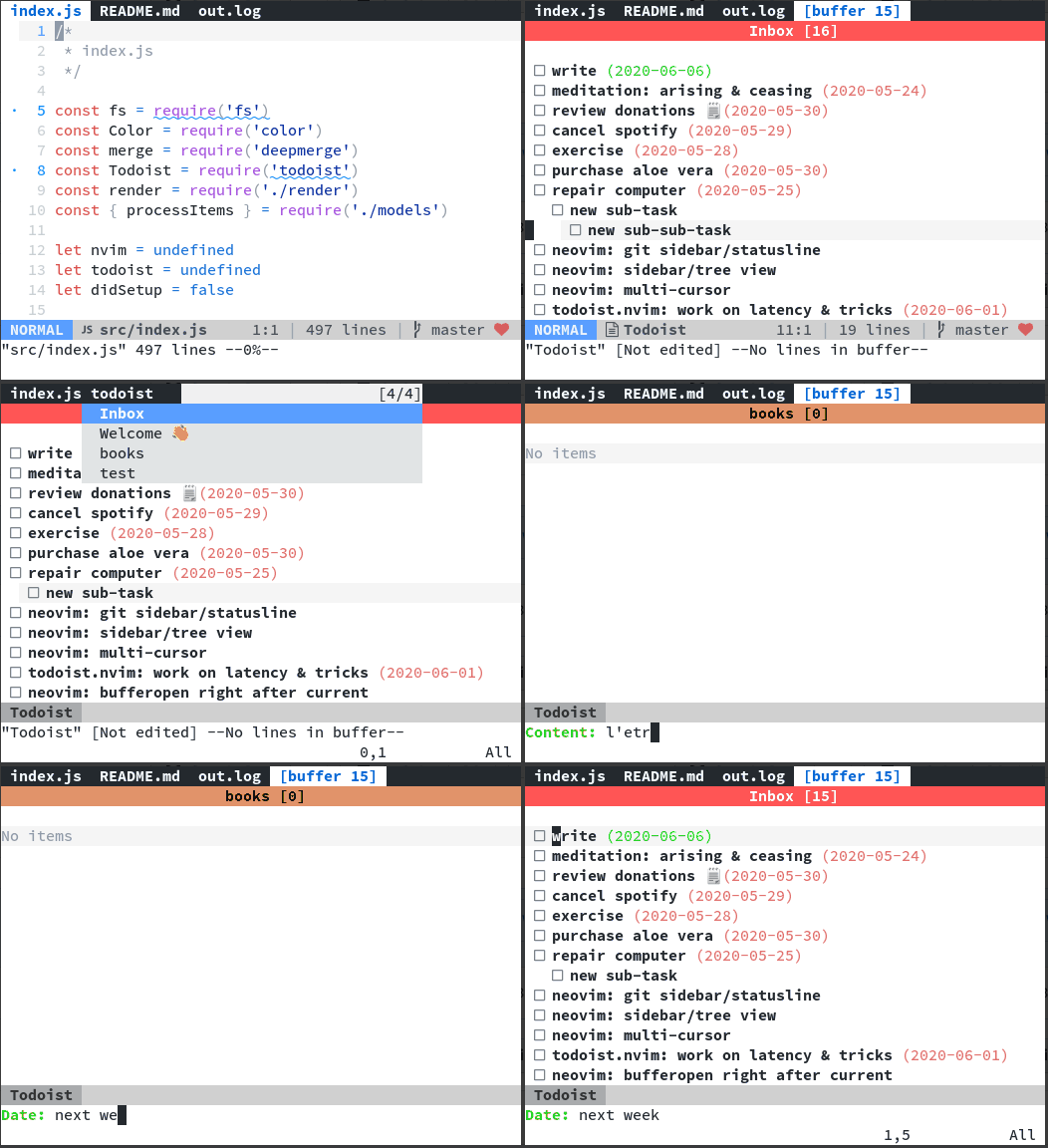
A hopefully usable todoist extension for neovim
For integration with vim-clap (fuzzy finder) see below.
Install
Find your API key here: https://todoist.com/prefs/integrations
For security reasons, it is recommended to use pass to store it:
$ pass insert Todoist/API
Enter password for Todoist/API: XXXXXXXXX
Export it in your ~/.config/environment.d/*.conf/~/.profile/~/.bashrc
export TODOIST_API_KEY="$(pass Todoist/API)"
Plug 'romgrk/todoist.nvim', { 'do': ':TodoistInstall' }
If you don't use vim-plug, run the TodoistInstall
command manually to complete the installation.
Requirements
- neovim 0.4.0
- nodejs 10.0.0
npm install -g neovim@latest(NOTE: needs to be at v4.9.0 at least!)
Make sure your nodejs provider works (:checkhealth to confirm).
Usage
:Todoist [project_name] (default: Inbox. Creates project if it doesn't exist)
Mappings
| Keys | Effect |
|---|---|
x | Toggle current task completion |
cc | Change current task text |
cd | Change current task date (date formats) |
p1 | Make task Priority 1 |
p2 | Make task Priority 2 |
p3 | Make task Priority 3 |
p4 | Make task Priority 4 |
DD | Delete current task |
O | Add new task before |
o | Add new task after |
< | Unindent |
> | Indent |
r | Refresh |
pcc | Change current project color |
pcn | Change current project name |
pdd | Archive current project premium users only :/ |
pDD | Delete current project |
Options
Below are the default options:
let todoist = {
\  'icons': {
\    'unchecked': ' [ ] ',
\    'checked':   ' [x] ',
\    'loading':   ' […] ',
\    'error':     ' [!] ',
\  },
\  'defaultProject': 'Inbox',
\  'useMarkdownSyntax': v:true,
\}
If you have a NerdFont installed, you can use the icons below, that will render like in the gif above.
let todoist = {
\ 'icons': {
\ 'unchecked': ' ',
\ 'checked': ' ',
\ 'loading': ' ',
\ 'error': ' ',
\ },
\}
Integration with Clap
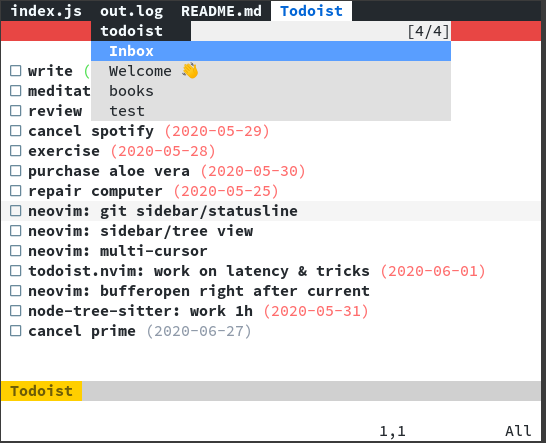
This plugin implements a vim-clap provider for selecting your projects.
Clap todoist
Contributors


Similar repos


Languages
JavaScript
81.3%
Vim Script
18.7%
README
[!CAUTION] This repository doesn't work anymore after Todoist v9 API deprecation.
todoist.nvim
A hopefully usable todoist extension for neovim
For integration with vim-clap (fuzzy finder) see below.
Install
Find your API key here: https://todoist.com/prefs/integrations
For security reasons, it is recommended to use pass to store it:
$ pass insert Todoist/API
Enter password for Todoist/API: XXXXXXXXX
Export it in your ~/.config/environment.d/*.conf/~/.profile/~/.bashrc
export TODOIST_API_KEY="$(pass Todoist/API)"
Plug 'romgrk/todoist.nvim', { 'do': ':TodoistInstall' }
If you don't use vim-plug, run the TodoistInstall
command manually to complete the installation.
Requirements
- neovim 0.4.0
- nodejs 10.0.0
npm install -g neovim@latest(NOTE: needs to be at v4.9.0 at least!)
Make sure your nodejs provider works (:checkhealth to confirm).
Usage
:Todoist [project_name] (default: Inbox. Creates project if it doesn't exist)
Mappings
| Keys | Effect |
|---|---|
x | Toggle current task completion |
cc | Change current task text |
cd | Change current task date (date formats) |
p1 | Make task Priority 1 |
p2 | Make task Priority 2 |
p3 | Make task Priority 3 |
p4 | Make task Priority 4 |
DD | Delete current task |
O | Add new task before |
o | Add new task after |
< | Unindent |
> | Indent |
r | Refresh |
pcc | Change current project color |
pcn | Change current project name |
pdd | Archive current project premium users only :/ |
pDD | Delete current project |
Options
Below are the default options:
let todoist = {
\  'icons': {
\    'unchecked': ' [ ] ',
\    'checked':   ' [x] ',
\    'loading':   ' […] ',
\    'error':     ' [!] ',
\  },
\  'defaultProject': 'Inbox',
\  'useMarkdownSyntax': v:true,
\}
If you have a NerdFont installed, you can use the icons below, that will render like in the gif above.
let todoist = {
\ 'icons': {
\ 'unchecked': ' ',
\ 'checked': ' ',
\ 'loading': ' ',
\ 'error': ' ',
\ },
\}
Integration with Clap
This plugin implements a vim-clap provider for selecting your projects.
Clap todoist
Similar repos
Contributors
Languages
JavaScript
81.3%
Vim Script
18.7%