
HypotheSAEs: hypothesizing interpretable relationships in text datasets using sparse autoencoders. https://arxiv.org/abs/2502.04382
See the codeREADME
HypotheSAEs: Sparse Autoencoders for Hypothesis Generation





HypotheSAEs is a method which produces interpretable relationships ("hypotheses") in text datasets explaining how input texts are related to a target variable. For example, we can use HypotheSAEs to hypothesize concepts that explain which news headlines receive engagement, or whether a congressional speech was given by a Republican or Democrat speaker. The method works by training Sparse Autoencoders (SAEs) on rich embeddings of input texts, and then interpreting predictive features learned by the SAE.
Preprint 📄: Sparse Autoencoders for Hypothesis Generation. Rajiv Movva*, Kenny Peng*, Nikhil Garg, Jon Kleinberg, and Emma Pierson.
Website 🌐: https://hypothesaes.org
Data 🤗: https://huggingface.co/datasets/rmovva/HypotheSAEs (to reproduce the experiments in the paper)
Questions? Please read the FAQ and README; if not addressed, open an issue or contact us at rmovva@berkeley.edu and kennypeng@cs.cornell.edu.
Table of Contents
FAQ
- What are the inputs and outputs of HypotheSAEs?
- Inputs: A dataset of texts (e.g., news headlines) with a target variable (e.g., clicks). The texts are embedded using SentenceTransformers or OpenAI.
- Outputs: A list of hypotheses. Each hypothesis is a natural language concept, which, when present in the text, is positively or negatively associated with the target variable.
- How should I handle very long documents?
Mechanically, text embeddings support up to 8192 tokens (OpenAI, ModernBERT, etc.). However, feature interpretation using long documents is difficult. For documents that are roughly >500 words, we recommend either:
- Chunking: Split the document into chunks of ~250-500 words. Each chunk inherits the same label as its parent.
- Summarization: Use an LLM to summarize the document into a shorter text.
-
Why am I not getting any statistically significant hypotheses?
HypotheSAEs identifies features in text embeddings that predict your target variable. If your text embeddings don't predict your target variable at all, it's unlikely HypotheSAEs will find anything. To check this, before running the method, fit a simple ridge regression to predict your target from the text embeddings. If you see any signal on a heldout set, even if it's weak, it's worth running HypotheSAEs. However, if you see no signal at all, the method will probably not work well. -
Which LLMs can I use?
You can use OpenAI models or any OpenAI-compatible API endpoint (including vLLM server mode). The default models are GPT-5.2 for interpretation and GPT-5-mini for annotation. If you run your own endpoint, setOPENAI_BASE_URLand pass the served model name. -
Do I need a GPU?
- If using OpenAI LLMs: no, since all LLM use is via API calls. Training the SAE will be faster on GPU, but it shouldn't be prohibitively slow even on a laptop.
- If using your own OpenAI-compatible endpoint (e.g. vLLM server): yes, you will need a reasonable GPU for that server.
-
What other resources will I need?
You'll need enough disk space to store your text embeddings, and enough RAM to load in the embeddings for SAE training. On an 8GB laptop, we started running out of RAM when trying to load in ~500K embeddings. It also should be possible to adapt the code to use a more efficient data loading strategy, so you don't need to fit everything in RAM. -
What types of prediction tasks does HypotheSAEs support?
The repo supports binary classification and regression tasks. For multiclass labels, we recommend using a one-vs-rest approach to convert the problem to binary classification.
You can also use HypotheSAEs to study pairwise tasks (regression or classification), e.g., whether a news headline is more likely to be clicked on than another. See the experiment reproduction notebook for an example of this on the Headlines dataset. -
If I use OpenAI models, how much does HypotheSAEs cost?
It's cheap (on the order of $1-10). See the Cost section for an example breakdown. -
I heard that SAEs actually aren't useful?
It depends what you're using them for; for hypothesis generation, our paper shows that SAEs outperform several strong baselines. See this thread or our position paper for more discussion. -
I'm getting errors about OpenAI rate limits.
You can reduce the number of parallel workers for interpretation and annotation so that you stay within rate limits. See the detailed usage notes for more details. -
Can I use private data with HypotheSAEs?
If you're using your own OpenAI-compatible endpoint on a local machine, everything happens on your machine, so only people with access to your machine can see your data.
If using OpenAI: as of now (08/2025), OpenAI doesn't train on data sent through the API. However, they retain data for 30 days for abuse monitoring, which may or may not comply with your DUA.
Note that text embeddings and annotations default to being cached to your disk (wherever your package is installed). If you are using a shared machine, set your file permissions appropriately on your HypotheSAEs directory.
Method
HypotheSAEs has five steps:
- Embeddings: Generate text embeddings with OpenAI API or your favorite
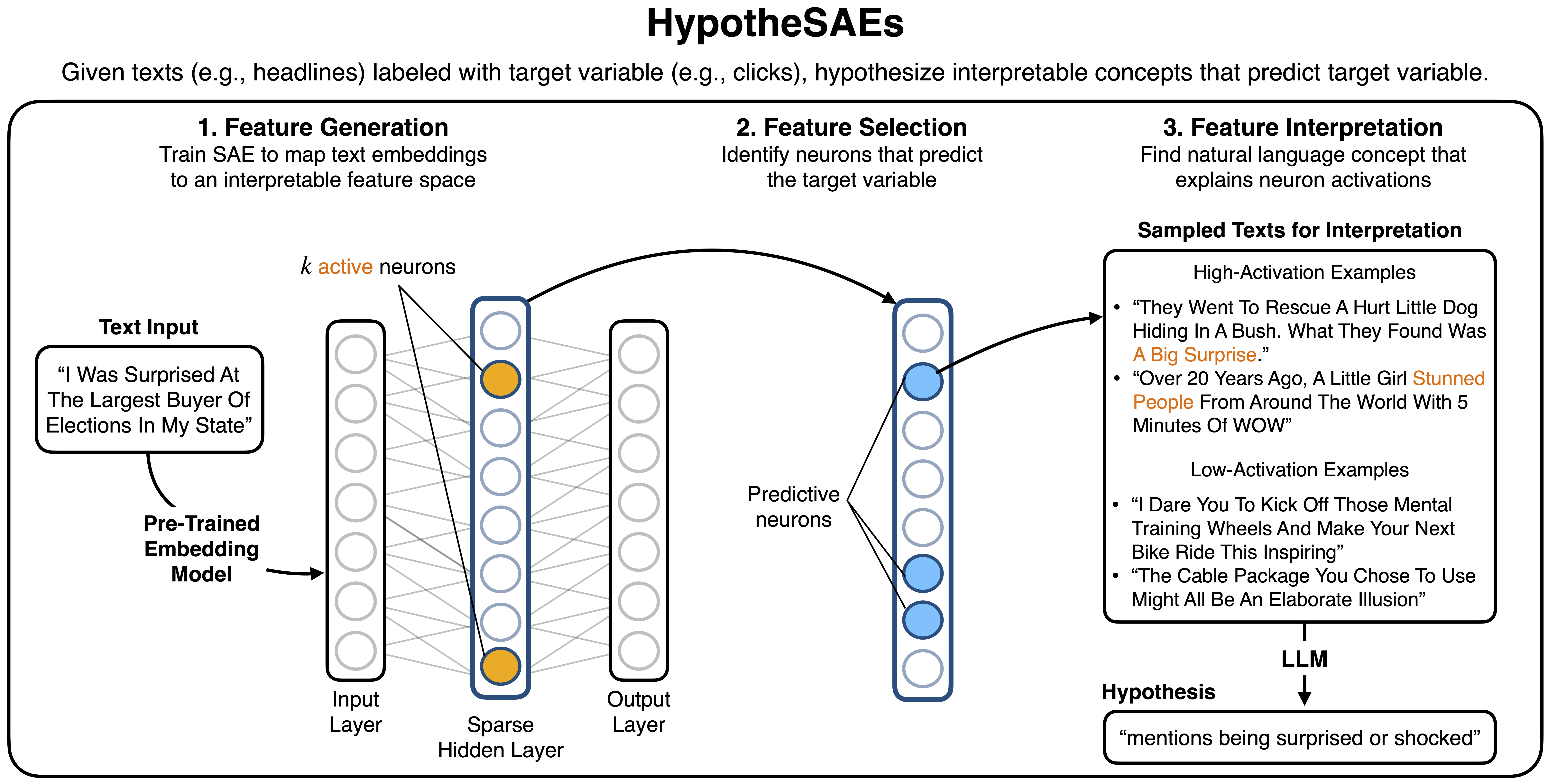
sentence-transformersmodel. - Feature Generation: Train a Sparse Autoencoder (SAE) on the text embeddings. This maps the embeddings from a blackbox space into an interpretable feature space.
- Feature Selection: Select the learned SAE features which are most predictive of your target variable (e.g., with Lasso).
- Feature Interpretation: Generate a natural language interpretation of each feature using an LLM. Each interpretation serves as a hypothesis about what predicts the target variable.
- Hypothesis Validation: Use an LLM annotator to test whether the hypotheses are predictive on a heldout set. Note that this step uses only the natural language descriptions of the hypotheses.
The figure below summarizes steps 2-4 (the core hypothesis generation procedure).
Usage
Setup
Option 1: Clone repo (recommended)
Clone the repo and install in editable mode. This will give you access to all of the example notebooks, which are helpful for getting started. You'll also be able to edit the code directly.
git clone https://github.com/rmovva/HypotheSAEs.git
cd HypotheSAEs
pip install -e .
This install is sufficient for the main workflows, including using a local OpenAI-compatible endpoint such as vllm serve.
HypotheSAEs no longer includes an in-process vllm inference path; local LLM usage is supported through OpenAI-compatible servers only.
Option 2: Install from PyPI
Alternatively, you can install the package directly from PyPI:
pip install hypothesaes
Note: If using this option, you'll need to separately download any example notebooks you want to use from the GitHub repository.
Set your OpenAI API key
Set your OpenAI API key as an environment variable:
export OPENAI_KEY_SAE="your-api-key-here"
Alternatively, you can set the key in Python (before importing any HypotheSAEs functions) with os.environ["OPENAI_KEY_SAE"] = "your-api-key".
To use a local OpenAI-compatible endpoint (e.g., vLLM server), also set:
export OPENAI_BASE_URL="http://0.0.0.0:8000/v1"
When OPENAI_BASE_URL points to a non-OpenAI endpoint (for example http://127.0.0.1:8000/v1 for vLLM), OPENAI_KEY_SAE is optional.
Quickstart
First, clone and install the repo (Setup) or install via pip. Then, use one of the notebooks to get started:
- See
notebooks/quickstart.ipynbfor a complete working example on using OpenAI models. This notebook uses a 20K example subset of the Yelp restaurant review dataset. The inputs are review texts and the target variable is 1-5 star rating. - See
notebooks/quickstart_local.ipynbfor a local quickstart reference. For the unified API path, run a local OpenAI-compatible endpoint (e.g., vLLM server) and setOPENAI_BASE_URL. - See
notebooks/experiment_reproduction.ipynbto reproduce the results in the paper.
For many use cases, adapting the quickstart notebook should be sufficient. The notebooks contain substantial documentation for each step.
If your use case is not covered by the quickstart notebooks, you can use the individual modules directly. See the detailed usage notes for more details.
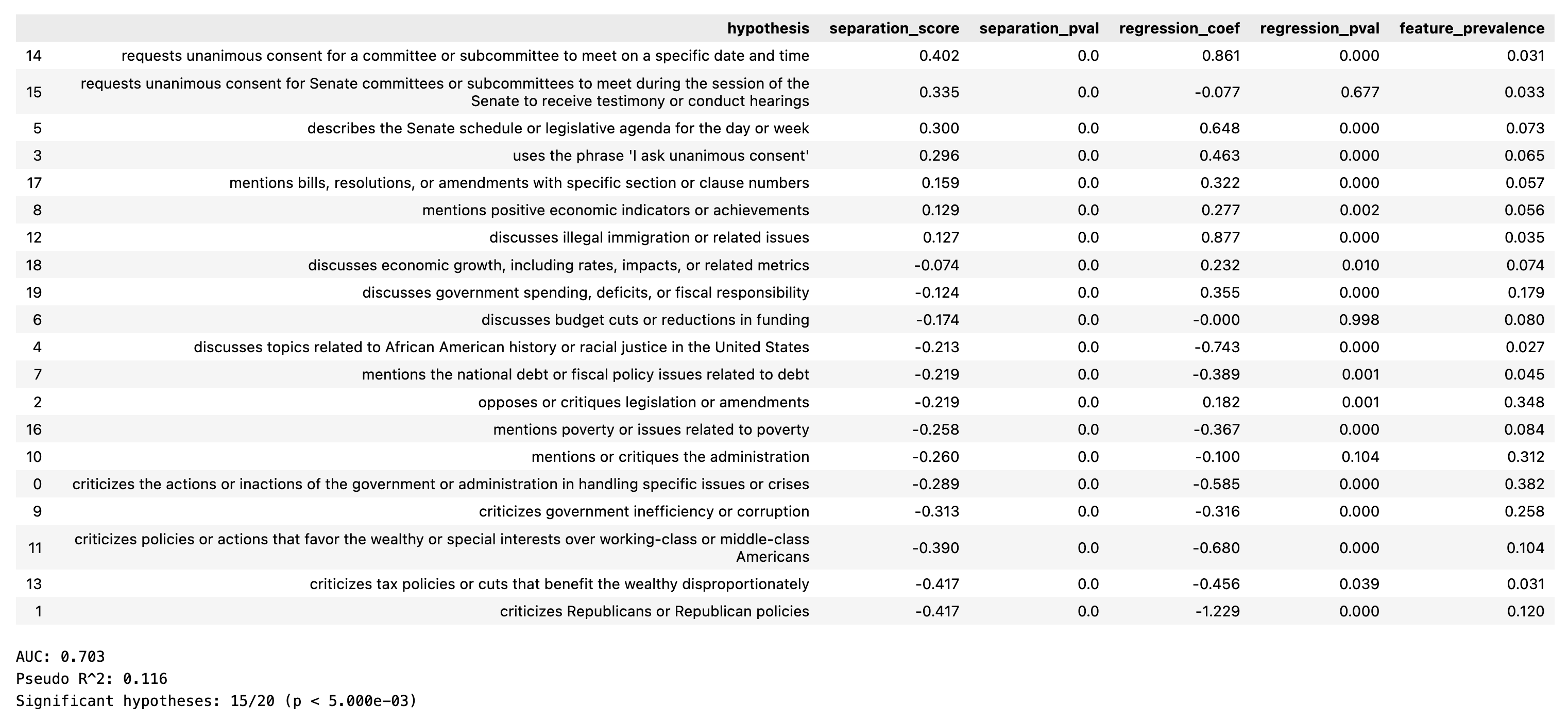
After running through the full method, the output is a table of hypotheses with various metrics summarizing how well they predict the target variable. For example, the below results are on the Congress dataset (and reproduced in the experiment reproduction notebook):
The dataframe contains the following columns:
hypothesis: The natural language hypothesis (which came from interpreting a predictive neuron in the SAE)separation_score: How much the target variable differs when the concept is present vs. absent (i.e., $E[Y\mid\text{concept} = 1] - E[Y\mid\text{concept} = 0]$).separation_pvalue: The t-test p-value of the null hypothesis that the separation score is 0 (i.e., the concept is not associated with the target variable).regression_coef: The coefficient of the concept in a multivariate linear regression of the target variable on all concepts.regression_pval: The p-value of the null hypothesis that the regression coefficient is 0.feature_prevalence: The fraction of examples that contain the concept.
Additionally, we output the evaluation metrics used in the paper:
- AUC or $R^2$: how well the hypotheses collectively predict the target variable in the multivariate regression.
- Significant hypotheses: the number of hypotheses that are significant in the multivariate regression at a specified significance level (default $0.1$) after Bonferroni correction.
Cost
Generating hypotheses using 20K Yelp reviews on the quickstart dataset takes ~2 minutes and costs ~$0.40:
- $0.05 for text embeddings (OpenAI text-embedding-3-small). This cost scales with dataset size.
- $0.15 to interpret neurons (GPT-5.2). This cost scales with the number of neurons you interpret (but not with dataset size).
- $0.19 to score interpretation fidelity (GPT-5-mini). This step isn't strictly necessary, and its cost also only scales with the number of neurons you interpret.
Evaluating hypothesis generalization for 20 hypotheses on a heldout set of 2K reviews requires 40K annotations. With GPT-5-mini, this costs $3.50 and takes ~10 minutes using 30 parallel workers (the default value, but this may need to be reduced depending on your token rate limits).
Tips for better results
tl;dr
-
SAE hyperparameters: The key hyperparameters are
MandK: these will substantially influence the granularity of the concepts learned by the SAE. See below for reasonable choices based on dataset size. -
Caching: The library saves and loads from caches to avoid redundant computation: we check for existing text embeddings, SAE model checkpoints, and LLM annotations at locations specified by
cache_name(for embeddings and annotations) andcheckpoint_dir(for SAE models). We therefore recommend passing incache_nametoget_openai_embeddings()andgenerate_hypotheses()andcheckpoint_dirtotrain_sae(). See below for further explanation. -
Feature selection method: By default, we select neurons using correlation with the target variable, since it is fast and easy to understand. You can also try selecting neurons using separation score or LASSO. We use LASSO in the paper; see below for pros and cons.
Less important:
-
Sampling texts for interpretation: By default, we interpret a neuron by prompting an LLM with the top-10 texts that activate the neuron most strongly (and 10 random texts that do not activate the neuron). This can produce overly specific labels. If you run into this issue, you can instead sample 10 texts from the top decile or quintile of positive activations instead of the absolute top-10. See
notebooks/experiment_reproduction.ipynbto see how we do this (we use this binned sampling strategy to produce the results in the paper). -
Scoring interpretation fidelity: Sometimes, the LLM interpretation of a neuron will not actually summarize the neuron's activation pattern. One strategy to mitigate this issue is to generate 3 candidate interpretations per neuron, score each one, and use the top-scoring one. You can do this by setting
n_candidate_interpretations=3ingenerate_hypotheses(). Scoring works by using a separate annotator LLM (defaultgpt-5-mini) to annotate several top-activating and zero-activating examples according to the interpretation, and then computing F1-score (you can also choose to select based on precision, recall, or correlation instead).
1. Choosing SAE hyperparameters (M, K, Matryoshka prefixes)
The SAE parameters M and K control the granularity of concepts learned by the model:
Mis the total number of concepts that can be learned across the datasetKis the number of concepts used to represent each example
Increasing either parameter yields more granular features. For example, with small values like (M=16, K=4), a neuron for Yelp reviews might learn to detect mentions of "price". With larger values like (M=32, K=4), separate neurons might learn to distinguish between "high prices" vs "low prices".
Vanilla Top-K SAEs
Rules of thumb for choosing (M, K) based on dataset size:
(M=64, K=4)for ~1,000 examples(M=256, K=8)for ~10,000 examples(M=1024, K=8)for ~100,000 examples
Larger datasets often warrant larger values of M. In contrast, K should scale with the size / complexity of the individual texts. Values of 1-32 typically work well for K; larger values may only be necessary for very long documents (which you should consider splitting into chunks, anyway).
Matryoshka Top-K SAEs
Alternatively, you can train a single SAE that simultaneously learns features at multiple granularities by specifying prefix lengths. In this case, the model is trained to reconstruct the input at multiple scales (using the first $M_1$ neurons, then $M_2 > M_1$ neurons, etc.). For example:
sae = train_sae(
    embeddings=embeddings,
    M=1024,
    K=8,
    matryoshka_prefix_lengths=[64, 256, 1024],
)
This will train an SAE where there are three loss terms which are averaged:
- Reconstruction loss using the first 64 neurons
- Reconstruction loss using the first 256 neurons
- Reconstruction loss using all 1024 neurons (note that the final value of matryoshka_prefix_lengths must be equal to M)
This approach helps avoid the common issue where larger SAEs end up splitting high-level features into several more granular features. See Bussmann et al. (2025) for more details about Matryoshka SAEs.
Note: The results presented in our paper used vanilla Top-K SAEs; we haven't thoroughly tested Matryoshka Top-K SAEs yet.
Batch Top-K sparsity
Another optional change to the SAE is to use Batch Top-K sparsity, as described in Bussmann et al. (2024). How it works:
- During training, the forward pass selects the global top $K\cdot B$ activations across a batch of size $B$. This means each example can have a different number of active features during training.
- The model learns an activation threshold during training and, at inference, keeps activations above this threshold, yielding approximately $K$ expected active features per example.
Empirically, Batch Top-K can produce richer, less redundant features, because e.g., very short examples can be allocated fewer than K active features, while more complex examples can be allocated more.
To enable:
model = train_sae(
    embeddings=train_embeddings,
    M=256,
    K=8,
    batch_topk=True,  # enable Batch Top-K
)
2. Caching embeddings, model checkpoints, and LLM annotations for reuse
By default, the library uses caching to avoid redundant computation:
-
Embeddings: Stored in
emb_cache/(or in any directory you specify withos.environ["EMB_CACHE_DIR"]), as chunks of up to 50K embeddings each. When you callget_openai_embeddings()orget_local_embeddings()with acache_name, embeddings are saved to disk and reused in future runs. Embeddings are loaded from the cache into a dictionary,text2embedding. Embeddings can quickly take up lots of space, so we recommend pointing the cache to a directory with plenty of storage. -
SAE Models: Saved in
checkpoints/{checkpoint_dir}/SAE_M={M}_K={K}.pt. Thequickstart.train_sae()function first checks if a model with the specified parameters exists and loads it instead of retraining. If you would like to overwrite the existing model, setoverwrite_checkpoint=True. -
Annotations: Stored in
annotation_cache/{cache_name}_interp-scoring.json(annotations for scoring interpretations) andannotation_cache/{cache_name}_heldout.json(annotations for heldout evaluation). When interpreting neurons or evaluating hypotheses, the LLM annotations of whether examples contain a concept are cached to avoid redundant API calls.
Note that if you re-generate neuron interpretations, you will likely get slightly different strings (because the interpreter LLM uses temperature 0.7), so these new interpretations will require new annotations. The annotation cache is therefore usually less important than the embedding cache and saving SAE checkpoints.
3. Selecting predictive neurons
Three methods for selecting predictive neurons, implemented in src/select_neurons.py. Each method scores neurons to decide which ones to interpret for hypothesis generation.
Correlation (default)
- Score: Pearson correlation between activations $a_i$ and target $y$.
- Keep the
n_selectneurons with largest correlation magnitudes. - Fast; balances effect size and prevalence.
LASSO (what we use in the paper)
- Score: coefficient $\beta_i$ from a LASSO fit on activations.
- Choose $\lambda$ so exactly
n_selectneurons have non-zero $\beta_i$. - Handles collinearity; slower (especially for classification). Using an MSE objective (
classification=False) speeds up large classification tasks.
Separation score
- Score: $E[y,|,a_i$ in top-N] − $E[y,|,a_i=0]$.
- Keep the
n_selectneurons with largest separation score magnitudes. - Fast; emphasizes effect size.
n_top_activatingsets N.
Detailed usage notes
We provide a notebook, notebooks/detailed_usage.ipynb, which demonstrates how to use the individual modules directly.
Other parameters to generate_hypotheses()
The generate_hypotheses function accepts the following parameters:
Required parameters:
texts: List of text examples to analyzelabels: Binary (0/1) or continuous labels for classification/regressionembeddings: Pre-computed embeddings for the input textssae: A trained SAE modelcache_name: String prefix for storing model checkpoints and caches
Optional parameters:
classification: Whether this is a classification task (auto-detected if not specified)selection_method: How to select predictive neurons ("separation_score", "correlation", "lasso"; default: "separation_score")n_selected_neurons: Number of neurons to interpret (default: 20)interpreter_model: LLM for generating interpretations (default: "gpt-5.2")annotator_model: LLM for scoring interpretations (default: "gpt-5-mini")n_examples_for_interpretation: Number of examples to use for interpretation (default: 20)max_words_per_example: Maximum words per example when prompting the interpreter LLM (default: 256)interpret_temperature: Temperature for interpretation generation (default: 0.7)max_interpretation_tokens: Maximum tokens for interpretation (default:None, i.e. no explicit cap)interpret_llm_kwargs: Extra Responses API kwargs for interpretation; default behavior uses no reasoning override (reasoning_effort=None)annotation_llm_kwargs: Extra Responses API kwargs for annotation/scoring (for example, setreasoning_effortat call time if desired)n_candidate_interpretations: Number of candidate interpretations per neuron (default: 1)n_scoring_examples: Number of examples for scoring interpretations (default: 100)scoring_metric: Metric for ranking interpretations ("f1", "precision", "recall", "correlation")n_workers_interpretation: Number of parallel workers for interpretation API calls (default: 10; note that if you are getting errors due to OpenAI rate limits, this parameter should be reduced)n_workers_annotation: Number of parallel workers for annotation API calls (default: 30; note that if you are getting errors due to OpenAI rate limits, this parameter should be reduced)task_specific_instructions: Optional task-specific instructions to include in the interpretation prompt
Using the individual modules directly
The quickstart functions should cover most use cases, but if you need more control, you can use the individual modules directly.
The notebook notebooks/detailed_usage.ipynb uses these code snippets to analyze a subset of the Yelp dataset, so working through that notebook may also be useful.
If you would like to run the method on a pairwise dataset, see how we generate results for the Headlines dataset in notebooks/experiment_reproduction.ipynb.
Step 1: Training SAE and getting activations (sae.py & quickstart.py)
Train Sparse Autoencoders given train text embeddings, M, K, and many other optional parameters (see below). We recommend using the train_sae function from quickstart.py, which exposes all key parameters.
M, K = 256, 8
prefix_lengths = [32, 256]
checkpoint_dir = f'./checkpoints/my_dataset'

model = train_sae(
    embeddings=train_embeddings,
    M=M,
    K=K,
    matryoshka_prefix_lengths=prefix_lengths,
    batch_topk=True,  # Optional: enable Batch Top-K sparsity
    checkpoint_dir=checkpoint_dir,
    val_embeddings=val_embeddings,
    n_epochs=100,
    # Optional parameters:
    # aux_k=None,  # Number of neurons for dead neuron revival (None=default)
    # multi_k=None,  # Number of neurons for secondary reconstruction
    # dead_neuron_threshold_steps=256,  # Number of non-firing steps after which a neuron is considered dead
    # batch_size=512,
    # learning_rate=5e-4,
    # aux_coef=1/32,  # Coefficient for auxiliary loss
    # multi_coef=0.0,  # Coefficient for multi-k loss
    # patience=3,     # Early stopping patience
    # clip_grad=1.0,  # Gradient clipping value
)

# Get activations from the model
train_activations = model.get_activations(train_embeddings)
print(f"Neuron activations shape: {train_activations.shape}")
Step 2: Selecting Predictive SAE Neurons (select_neurons.py)
Select neurons that are predictive of your target variable:
from hypothesaes.select_neurons import select_neurons

# Select neurons using different methods
selected_neurons, scores = select_neurons(
    activations=activations,
    target=labels,
    n_select=20,
    method="correlation",  # Options: "lasso", "correlation", "separation_score"
    # Method-specific parameters:
    # For lasso:
    # classification=False,  # Whether this is a classification task, which affects the loss function (BCE vs. MSE)
    # alpha=None,  # LASSO regularization strength (None = auto-search)
    # max_iter=1000,  # Maximum iterations for solver

    # For separation_score:
    # n_top_activating=100,  # Number of top-activating examples to consider
    # n_zero_activating=None,  # Number of zero-activating examples (None = same as top)
)
You can also implement your own selection method: the function should take in neuron activations and target labels, and return a list of selected neuron indices.
Step 3: Interpreting SAE Neurons (interpret_neurons.py)
Interpret what concepts the selected neurons represent:
from hypothesaes.interpret_neurons import NeuronInterpreter, InterpretConfig, SamplingConfig, LLMConfig

# Task-specific instructions help the LLM generate better interpretations
TASK_SPECIFIC_INSTRUCTIONS = """All of the texts are reviews of restaurants on Yelp.
Features should describe a specific aspect of the review. For example:
- "mentions long wait times to receive service"
- "praises how a dish was cooked, with phrases like 'perfect medium-rare'"""

# Initialize the interpreter
interpreter = NeuronInterpreter(
    interpreter_model="gpt-5.2",  # Model for generating interpretations
    annotator_model="gpt-5-mini",  # Model for scoring interpretations
    n_workers_interpretation=10,  # Parallel workers for interpretation
    n_workers_annotation=50,  # Parallel workers for annotation
    cache_name="my_dataset",  # Cache name for storing annotations
)

# Configure interpretation parameters
interpret_config = InterpretConfig(
    sampling=SamplingConfig(
        n_examples=20,  # Number of examples to show the LLM; half are top-activating, half are zero-activating
    ),
    llm=LLMConfig(
        temperature=0.7,  # Temperature for generation
        max_interpretation_tokens=75,  # Max tokens for interpretation
    ),
    n_candidates=3,  # Generate multiple interpretations per neuron
    task_specific_instructions=TASK_SPECIFIC_INSTRUCTIONS,
)

# Generate interpretations for selected neurons
interpretations = interpreter.interpret_neurons(
    texts=texts,
    activations=activations,
    neuron_indices=selected_neurons,
    config=interpret_config,
)

# Score the interpretations to find the best ones
scoring_config = ScoringConfig(
    n_examples=200,  # Number of examples to score each interpretation; half are top-activating, half are zero-activating
)

all_metrics = interpreter.score_interpretations(
    texts=texts,
    activations=activations,
    interpretations=interpretations,
    config=scoring_config,
)

# Use the scoring results to find the best interpretation (out of the n_candidates) for each neuron
best_interp_df = pd.DataFrame({
    'neuron_idx': selected_neurons,
    'correlation': scores,
    'best_interpretation': [
        max(all_metrics[neuron_idx].items(), key=lambda x: x[1]['f1'])[0]
        for neuron_idx in selected_neurons
    ],
    'best_f1': [
        max(all_metrics[neuron_idx].items(), key=lambda x: x[1]['f1'])[1]['f1']
        for neuron_idx in selected_neurons
    ],
})
Step 4: Evaluating Hypotheses (annotate.py, evaluation.py)
Annotate texts with concepts and evaluate how well they predict your target variable:
from hypothesaes.annotate import annotate_texts_with_concepts
from hypothesaes.evaluation import score_hypotheses

# Evaluate hypotheses on a holdout set
holdout_annotations = annotate_texts_with_concepts(
    texts=holdout_texts,
    concepts=best_interp_df['best_interpretation'].tolist(),
    cache_name="my_dataset",
    n_workers=50,
)

holdout_metrics, holdout_hypothesis_df = score_hypotheses(
    hypothesis_annotations=holdout_annotations,
    y_true=holdout_labels,
    classification=False,
    annotator_model="gpt-5-mini",
    n_workers_annotation=50,
)

print(f"Holdout Set Metrics:")
print(f"R² Score: {holdout_metrics['r2']:.3f}")
print(f"Significant hypotheses: {holdout_metrics['Significant'][0]}/{holdout_metrics['Significant'][1]} "
      f"(p < {holdout_metrics['Significant'][2]:.3e})")
This evaluation outputs a dataframe with the fields described above (see Quickstart).
Citation
If you use this code, please cite the paper:
Sparse Autoencoders for Hypothesis Generation. Rajiv Movva*, Kenny Peng*, Nikhil Garg, Jon Kleinberg, and Emma Pierson. arXiv:2502.04382.
@misc{movva_sparse_2025,
      title={Sparse Autoencoders for Hypothesis Generation},
      author={Rajiv Movva and Kenny Peng and Nikhil Garg and Jon Kleinberg and Emma Pierson},
      year={2025},
      eprint={2502.04382},
      archivePrefix={arXiv},
      primaryClass={cs.CL},
      url={https://arxiv.org/abs/2502.04382},
}
Copyright
Copyright (c) 2025 the authors. Licensed under Apache 2.0.
THIS SOFTWARE AND/OR DATA WAS DEPOSITED IN THE BAIR OPEN RESEARCH COMMONS REPOSITORY ON 2025-09-06.
Contributors


Similar repos



Languages
Jupyter Notebook
93.9%
Python
6.1%
HypotheSAEs: hypothesizing interpretable relationships in text datasets using sparse autoencoders. https://arxiv.org/abs/2502.04382
See the codeREADME
HypotheSAEs: Sparse Autoencoders for Hypothesis Generation
HypotheSAEs is a method which produces interpretable relationships ("hypotheses") in text datasets explaining how input texts are related to a target variable. For example, we can use HypotheSAEs to hypothesize concepts that explain which news headlines receive engagement, or whether a congressional speech was given by a Republican or Democrat speaker. The method works by training Sparse Autoencoders (SAEs) on rich embeddings of input texts, and then interpreting predictive features learned by the SAE.
Preprint 📄: Sparse Autoencoders for Hypothesis Generation. Rajiv Movva*, Kenny Peng*, Nikhil Garg, Jon Kleinberg, and Emma Pierson.
Website 🌐: https://hypothesaes.org
Data 🤗: https://huggingface.co/datasets/rmovva/HypotheSAEs (to reproduce the experiments in the paper)
Questions? Please read the FAQ and README; if not addressed, open an issue or contact us at rmovva@berkeley.edu and kennypeng@cs.cornell.edu.
Table of Contents
FAQ
- What are the inputs and outputs of HypotheSAEs?
- Inputs: A dataset of texts (e.g., news headlines) with a target variable (e.g., clicks). The texts are embedded using SentenceTransformers or OpenAI.
- Outputs: A list of hypotheses. Each hypothesis is a natural language concept, which, when present in the text, is positively or negatively associated with the target variable.
- How should I handle very long documents?
Mechanically, text embeddings support up to 8192 tokens (OpenAI, ModernBERT, etc.). However, feature interpretation using long documents is difficult. For documents that are roughly >500 words, we recommend either:
- Chunking: Split the document into chunks of ~250-500 words. Each chunk inherits the same label as its parent.
- Summarization: Use an LLM to summarize the document into a shorter text.
-
Why am I not getting any statistically significant hypotheses?
HypotheSAEs identifies features in text embeddings that predict your target variable. If your text embeddings don't predict your target variable at all, it's unlikely HypotheSAEs will find anything. To check this, before running the method, fit a simple ridge regression to predict your target from the text embeddings. If you see any signal on a heldout set, even if it's weak, it's worth running HypotheSAEs. However, if you see no signal at all, the method will probably not work well. -
Which LLMs can I use?
You can use OpenAI models or any OpenAI-compatible API endpoint (including vLLM server mode). The default models are GPT-5.2 for interpretation and GPT-5-mini for annotation. If you run your own endpoint, setOPENAI_BASE_URLand pass the served model name. -
Do I need a GPU?
- If using OpenAI LLMs: no, since all LLM use is via API calls. Training the SAE will be faster on GPU, but it shouldn't be prohibitively slow even on a laptop.
- If using your own OpenAI-compatible endpoint (e.g. vLLM server): yes, you will need a reasonable GPU for that server.
-
What other resources will I need?
You'll need enough disk space to store your text embeddings, and enough RAM to load in the embeddings for SAE training. On an 8GB laptop, we started running out of RAM when trying to load in ~500K embeddings. It also should be possible to adapt the code to use a more efficient data loading strategy, so you don't need to fit everything in RAM. -
What types of prediction tasks does HypotheSAEs support?
The repo supports binary classification and regression tasks. For multiclass labels, we recommend using a one-vs-rest approach to convert the problem to binary classification.
You can also use HypotheSAEs to study pairwise tasks (regression or classification), e.g., whether a news headline is more likely to be clicked on than another. See the experiment reproduction notebook for an example of this on the Headlines dataset. -
If I use OpenAI models, how much does HypotheSAEs cost?
It's cheap (on the order of $1-10). See the Cost section for an example breakdown. -
I heard that SAEs actually aren't useful?
It depends what you're using them for; for hypothesis generation, our paper shows that SAEs outperform several strong baselines. See this thread or our position paper for more discussion. -
I'm getting errors about OpenAI rate limits.
You can reduce the number of parallel workers for interpretation and annotation so that you stay within rate limits. See the detailed usage notes for more details. -
Can I use private data with HypotheSAEs?
If you're using your own OpenAI-compatible endpoint on a local machine, everything happens on your machine, so only people with access to your machine can see your data.
If using OpenAI: as of now (08/2025), OpenAI doesn't train on data sent through the API. However, they retain data for 30 days for abuse monitoring, which may or may not comply with your DUA.
Note that text embeddings and annotations default to being cached to your disk (wherever your package is installed). If you are using a shared machine, set your file permissions appropriately on your HypotheSAEs directory.
Method
HypotheSAEs has five steps:
- Embeddings: Generate text embeddings with OpenAI API or your favorite
sentence-transformersmodel. - Feature Generation: Train a Sparse Autoencoder (SAE) on the text embeddings. This maps the embeddings from a blackbox space into an interpretable feature space.
- Feature Selection: Select the learned SAE features which are most predictive of your target variable (e.g., with Lasso).
- Feature Interpretation: Generate a natural language interpretation of each feature using an LLM. Each interpretation serves as a hypothesis about what predicts the target variable.
- Hypothesis Validation: Use an LLM annotator to test whether the hypotheses are predictive on a heldout set. Note that this step uses only the natural language descriptions of the hypotheses.
The figure below summarizes steps 2-4 (the core hypothesis generation procedure).
Usage
Setup
Option 1: Clone repo (recommended)
Clone the repo and install in editable mode. This will give you access to all of the example notebooks, which are helpful for getting started. You'll also be able to edit the code directly.
git clone https://github.com/rmovva/HypotheSAEs.git
cd HypotheSAEs
pip install -e .
This install is sufficient for the main workflows, including using a local OpenAI-compatible endpoint such as vllm serve.
HypotheSAEs no longer includes an in-process vllm inference path; local LLM usage is supported through OpenAI-compatible servers only.
Option 2: Install from PyPI
Alternatively, you can install the package directly from PyPI:
pip install hypothesaes
Note: If using this option, you'll need to separately download any example notebooks you want to use from the GitHub repository.
Set your OpenAI API key
Set your OpenAI API key as an environment variable:
export OPENAI_KEY_SAE="your-api-key-here"
Alternatively, you can set the key in Python (before importing any HypotheSAEs functions) with os.environ["OPENAI_KEY_SAE"] = "your-api-key".
To use a local OpenAI-compatible endpoint (e.g., vLLM server), also set:
export OPENAI_BASE_URL="http://0.0.0.0:8000/v1"
When OPENAI_BASE_URL points to a non-OpenAI endpoint (for example http://127.0.0.1:8000/v1 for vLLM), OPENAI_KEY_SAE is optional.
Quickstart
First, clone and install the repo (Setup) or install via pip. Then, use one of the notebooks to get started:
- See
notebooks/quickstart.ipynbfor a complete working example on using OpenAI models. This notebook uses a 20K example subset of the Yelp restaurant review dataset. The inputs are review texts and the target variable is 1-5 star rating. - See
notebooks/quickstart_local.ipynbfor a local quickstart reference. For the unified API path, run a local OpenAI-compatible endpoint (e.g., vLLM server) and setOPENAI_BASE_URL. - See
notebooks/experiment_reproduction.ipynbto reproduce the results in the paper.
For many use cases, adapting the quickstart notebook should be sufficient. The notebooks contain substantial documentation for each step.
If your use case is not covered by the quickstart notebooks, you can use the individual modules directly. See the detailed usage notes for more details.
After running through the full method, the output is a table of hypotheses with various metrics summarizing how well they predict the target variable. For example, the below results are on the Congress dataset (and reproduced in the experiment reproduction notebook):
The dataframe contains the following columns:
hypothesis: The natural language hypothesis (which came from interpreting a predictive neuron in the SAE)separation_score: How much the target variable differs when the concept is present vs. absent (i.e., $E[Y\mid\text{concept} = 1] - E[Y\mid\text{concept} = 0]$).separation_pvalue: The t-test p-value of the null hypothesis that the separation score is 0 (i.e., the concept is not associated with the target variable).regression_coef: The coefficient of the concept in a multivariate linear regression of the target variable on all concepts.regression_pval: The p-value of the null hypothesis that the regression coefficient is 0.feature_prevalence: The fraction of examples that contain the concept.
Additionally, we output the evaluation metrics used in the paper:
- AUC or $R^2$: how well the hypotheses collectively predict the target variable in the multivariate regression.
- Significant hypotheses: the number of hypotheses that are significant in the multivariate regression at a specified significance level (default $0.1$) after Bonferroni correction.
Cost
Generating hypotheses using 20K Yelp reviews on the quickstart dataset takes ~2 minutes and costs ~$0.40:
- $0.05 for text embeddings (OpenAI text-embedding-3-small). This cost scales with dataset size.
- $0.15 to interpret neurons (GPT-5.2). This cost scales with the number of neurons you interpret (but not with dataset size).
- $0.19 to score interpretation fidelity (GPT-5-mini). This step isn't strictly necessary, and its cost also only scales with the number of neurons you interpret.
Evaluating hypothesis generalization for 20 hypotheses on a heldout set of 2K reviews requires 40K annotations. With GPT-5-mini, this costs $3.50 and takes ~10 minutes using 30 parallel workers (the default value, but this may need to be reduced depending on your token rate limits).
Tips for better results
tl;dr
-
SAE hyperparameters: The key hyperparameters are
MandK: these will substantially influence the granularity of the concepts learned by the SAE. See below for reasonable choices based on dataset size. -
Caching: The library saves and loads from caches to avoid redundant computation: we check for existing text embeddings, SAE model checkpoints, and LLM annotations at locations specified by
cache_name(for embeddings and annotations) andcheckpoint_dir(for SAE models). We therefore recommend passing incache_nametoget_openai_embeddings()andgenerate_hypotheses()andcheckpoint_dirtotrain_sae(). See below for further explanation. -
Feature selection method: By default, we select neurons using correlation with the target variable, since it is fast and easy to understand. You can also try selecting neurons using separation score or LASSO. We use LASSO in the paper; see below for pros and cons.
Less important:
-
Sampling texts for interpretation: By default, we interpret a neuron by prompting an LLM with the top-10 texts that activate the neuron most strongly (and 10 random texts that do not activate the neuron). This can produce overly specific labels. If you run into this issue, you can instead sample 10 texts from the top decile or quintile of positive activations instead of the absolute top-10. See
notebooks/experiment_reproduction.ipynbto see how we do this (we use this binned sampling strategy to produce the results in the paper). -
Scoring interpretation fidelity: Sometimes, the LLM interpretation of a neuron will not actually summarize the neuron's activation pattern. One strategy to mitigate this issue is to generate 3 candidate interpretations per neuron, score each one, and use the top-scoring one. You can do this by setting
n_candidate_interpretations=3ingenerate_hypotheses(). Scoring works by using a separate annotator LLM (defaultgpt-5-mini) to annotate several top-activating and zero-activating examples according to the interpretation, and then computing F1-score (you can also choose to select based on precision, recall, or correlation instead).
1. Choosing SAE hyperparameters (M, K, Matryoshka prefixes)
The SAE parameters M and K control the granularity of concepts learned by the model:
Mis the total number of concepts that can be learned across the datasetKis the number of concepts used to represent each example
Increasing either parameter yields more granular features. For example, with small values like (M=16, K=4), a neuron for Yelp reviews might learn to detect mentions of "price". With larger values like (M=32, K=4), separate neurons might learn to distinguish between "high prices" vs "low prices".
Vanilla Top-K SAEs
Rules of thumb for choosing (M, K) based on dataset size:
(M=64, K=4)for ~1,000 examples(M=256, K=8)for ~10,000 examples(M=1024, K=8)for ~100,000 examples
Larger datasets often warrant larger values of M. In contrast, K should scale with the size / complexity of the individual texts. Values of 1-32 typically work well for K; larger values may only be necessary for very long documents (which you should consider splitting into chunks, anyway).
Matryoshka Top-K SAEs
Alternatively, you can train a single SAE that simultaneously learns features at multiple granularities by specifying prefix lengths. In this case, the model is trained to reconstruct the input at multiple scales (using the first $M_1$ neurons, then $M_2 > M_1$ neurons, etc.). For example:
sae = train_sae(
    embeddings=embeddings,
    M=1024,
    K=8,
    matryoshka_prefix_lengths=[64, 256, 1024],
)
This will train an SAE where there are three loss terms which are averaged:
- Reconstruction loss using the first 64 neurons
- Reconstruction loss using the first 256 neurons
- Reconstruction loss using all 1024 neurons (note that the final value of matryoshka_prefix_lengths must be equal to M)
This approach helps avoid the common issue where larger SAEs end up splitting high-level features into several more granular features. See Bussmann et al. (2025) for more details about Matryoshka SAEs.
Note: The results presented in our paper used vanilla Top-K SAEs; we haven't thoroughly tested Matryoshka Top-K SAEs yet.
Batch Top-K sparsity
Another optional change to the SAE is to use Batch Top-K sparsity, as described in Bussmann et al. (2024). How it works:
- During training, the forward pass selects the global top $K\cdot B$ activations across a batch of size $B$. This means each example can have a different number of active features during training.
- The model learns an activation threshold during training and, at inference, keeps activations above this threshold, yielding approximately $K$ expected active features per example.
Empirically, Batch Top-K can produce richer, less redundant features, because e.g., very short examples can be allocated fewer than K active features, while more complex examples can be allocated more.
To enable:
model = train_sae(
    embeddings=train_embeddings,
    M=256,
    K=8,
    batch_topk=True,  # enable Batch Top-K
)
2. Caching embeddings, model checkpoints, and LLM annotations for reuse
By default, the library uses caching to avoid redundant computation:
-
Embeddings: Stored in
emb_cache/(or in any directory you specify withos.environ["EMB_CACHE_DIR"]), as chunks of up to 50K embeddings each. When you callget_openai_embeddings()orget_local_embeddings()with acache_name, embeddings are saved to disk and reused in future runs. Embeddings are loaded from the cache into a dictionary,text2embedding. Embeddings can quickly take up lots of space, so we recommend pointing the cache to a directory with plenty of storage. -
SAE Models: Saved in
checkpoints/{checkpoint_dir}/SAE_M={M}_K={K}.pt. Thequickstart.train_sae()function first checks if a model with the specified parameters exists and loads it instead of retraining. If you would like to overwrite the existing model, setoverwrite_checkpoint=True. -
Annotations: Stored in
annotation_cache/{cache_name}_interp-scoring.json(annotations for scoring interpretations) andannotation_cache/{cache_name}_heldout.json(annotations for heldout evaluation). When interpreting neurons or evaluating hypotheses, the LLM annotations of whether examples contain a concept are cached to avoid redundant API calls.
Note that if you re-generate neuron interpretations, you will likely get slightly different strings (because the interpreter LLM uses temperature 0.7), so these new interpretations will require new annotations. The annotation cache is therefore usually less important than the embedding cache and saving SAE checkpoints.
3. Selecting predictive neurons
Three methods for selecting predictive neurons, implemented in src/select_neurons.py. Each method scores neurons to decide which ones to interpret for hypothesis generation.
Correlation (default)
- Score: Pearson correlation between activations $a_i$ and target $y$.
- Keep the
n_selectneurons with largest correlation magnitudes. - Fast; balances effect size and prevalence.
LASSO (what we use in the paper)
- Score: coefficient $\beta_i$ from a LASSO fit on activations.
- Choose $\lambda$ so exactly
n_selectneurons have non-zero $\beta_i$. - Handles collinearity; slower (especially for classification). Using an MSE objective (
classification=False) speeds up large classification tasks.
Separation score
- Score: $E[y,|,a_i$ in top-N] − $E[y,|,a_i=0]$.
- Keep the
n_selectneurons with largest separation score magnitudes. - Fast; emphasizes effect size.
n_top_activatingsets N.
Detailed usage notes
We provide a notebook, notebooks/detailed_usage.ipynb, which demonstrates how to use the individual modules directly.
Other parameters to generate_hypotheses()
The generate_hypotheses function accepts the following parameters:
Required parameters:
texts: List of text examples to analyzelabels: Binary (0/1) or continuous labels for classification/regressionembeddings: Pre-computed embeddings for the input textssae: A trained SAE modelcache_name: String prefix for storing model checkpoints and caches
Optional parameters:
classification: Whether this is a classification task (auto-detected if not specified)selection_method: How to select predictive neurons ("separation_score", "correlation", "lasso"; default: "separation_score")n_selected_neurons: Number of neurons to interpret (default: 20)interpreter_model: LLM for generating interpretations (default: "gpt-5.2")annotator_model: LLM for scoring interpretations (default: "gpt-5-mini")n_examples_for_interpretation: Number of examples to use for interpretation (default: 20)max_words_per_example: Maximum words per example when prompting the interpreter LLM (default: 256)interpret_temperature: Temperature for interpretation generation (default: 0.7)max_interpretation_tokens: Maximum tokens for interpretation (default:None, i.e. no explicit cap)interpret_llm_kwargs: Extra Responses API kwargs for interpretation; default behavior uses no reasoning override (reasoning_effort=None)annotation_llm_kwargs: Extra Responses API kwargs for annotation/scoring (for example, setreasoning_effortat call time if desired)n_candidate_interpretations: Number of candidate interpretations per neuron (default: 1)n_scoring_examples: Number of examples for scoring interpretations (default: 100)scoring_metric: Metric for ranking interpretations ("f1", "precision", "recall", "correlation")n_workers_interpretation: Number of parallel workers for interpretation API calls (default: 10; note that if you are getting errors due to OpenAI rate limits, this parameter should be reduced)n_workers_annotation: Number of parallel workers for annotation API calls (default: 30; note that if you are getting errors due to OpenAI rate limits, this parameter should be reduced)task_specific_instructions: Optional task-specific instructions to include in the interpretation prompt
Using the individual modules directly
The quickstart functions should cover most use cases, but if you need more control, you can use the individual modules directly.
The notebook notebooks/detailed_usage.ipynb uses these code snippets to analyze a subset of the Yelp dataset, so working through that notebook may also be useful.
If you would like to run the method on a pairwise dataset, see how we generate results for the Headlines dataset in notebooks/experiment_reproduction.ipynb.
Step 1: Training SAE and getting activations (sae.py & quickstart.py)
Train Sparse Autoencoders given train text embeddings, M, K, and many other optional parameters (see below). We recommend using the train_sae function from quickstart.py, which exposes all key parameters.
M, K = 256, 8
prefix_lengths = [32, 256]
checkpoint_dir = f'./checkpoints/my_dataset'

model = train_sae(
    embeddings=train_embeddings,
    M=M,
    K=K,
    matryoshka_prefix_lengths=prefix_lengths,
    batch_topk=True,  # Optional: enable Batch Top-K sparsity
    checkpoint_dir=checkpoint_dir,
    val_embeddings=val_embeddings,
    n_epochs=100,
    # Optional parameters:
    # aux_k=None,  # Number of neurons for dead neuron revival (None=default)
    # multi_k=None,  # Number of neurons for secondary reconstruction
    # dead_neuron_threshold_steps=256,  # Number of non-firing steps after which a neuron is considered dead
    # batch_size=512,
    # learning_rate=5e-4,
    # aux_coef=1/32,  # Coefficient for auxiliary loss
    # multi_coef=0.0,  # Coefficient for multi-k loss
    # patience=3,     # Early stopping patience
    # clip_grad=1.0,  # Gradient clipping value
)

# Get activations from the model
train_activations = model.get_activations(train_embeddings)
print(f"Neuron activations shape: {train_activations.shape}")
Step 2: Selecting Predictive SAE Neurons (select_neurons.py)
Select neurons that are predictive of your target variable:
from hypothesaes.select_neurons import select_neurons

# Select neurons using different methods
selected_neurons, scores = select_neurons(
    activations=activations,
    target=labels,
    n_select=20,
    method="correlation",  # Options: "lasso", "correlation", "separation_score"
    # Method-specific parameters:
    # For lasso:
    # classification=False,  # Whether this is a classification task, which affects the loss function (BCE vs. MSE)
    # alpha=None,  # LASSO regularization strength (None = auto-search)
    # max_iter=1000,  # Maximum iterations for solver

    # For separation_score:
    # n_top_activating=100,  # Number of top-activating examples to consider
    # n_zero_activating=None,  # Number of zero-activating examples (None = same as top)
)
You can also implement your own selection method: the function should take in neuron activations and target labels, and return a list of selected neuron indices.
Step 3: Interpreting SAE Neurons (interpret_neurons.py)
Interpret what concepts the selected neurons represent:
from hypothesaes.interpret_neurons import NeuronInterpreter, InterpretConfig, SamplingConfig, LLMConfig

# Task-specific instructions help the LLM generate better interpretations
TASK_SPECIFIC_INSTRUCTIONS = """All of the texts are reviews of restaurants on Yelp.
Features should describe a specific aspect of the review. For example:
- "mentions long wait times to receive service"
- "praises how a dish was cooked, with phrases like 'perfect medium-rare'"""

# Initialize the interpreter
interpreter = NeuronInterpreter(
    interpreter_model="gpt-5.2",  # Model for generating interpretations
    annotator_model="gpt-5-mini",  # Model for scoring interpretations
    n_workers_interpretation=10,  # Parallel workers for interpretation
    n_workers_annotation=50,  # Parallel workers for annotation
    cache_name="my_dataset",  # Cache name for storing annotations
)

# Configure interpretation parameters
interpret_config = InterpretConfig(
    sampling=SamplingConfig(
        n_examples=20,  # Number of examples to show the LLM; half are top-activating, half are zero-activating
    ),
    llm=LLMConfig(
        temperature=0.7,  # Temperature for generation
        max_interpretation_tokens=75,  # Max tokens for interpretation
    ),
    n_candidates=3,  # Generate multiple interpretations per neuron
    task_specific_instructions=TASK_SPECIFIC_INSTRUCTIONS,
)

# Generate interpretations for selected neurons
interpretations = interpreter.interpret_neurons(
    texts=texts,
    activations=activations,
    neuron_indices=selected_neurons,
    config=interpret_config,
)

# Score the interpretations to find the best ones
scoring_config = ScoringConfig(
    n_examples=200,  # Number of examples to score each interpretation; half are top-activating, half are zero-activating
)

all_metrics = interpreter.score_interpretations(
    texts=texts,
    activations=activations,
    interpretations=interpretations,
    config=scoring_config,
)

# Use the scoring results to find the best interpretation (out of the n_candidates) for each neuron
best_interp_df = pd.DataFrame({
    'neuron_idx': selected_neurons,
    'correlation': scores,
    'best_interpretation': [
        max(all_metrics[neuron_idx].items(), key=lambda x: x[1]['f1'])[0]
        for neuron_idx in selected_neurons
    ],
    'best_f1': [
        max(all_metrics[neuron_idx].items(), key=lambda x: x[1]['f1'])[1]['f1']
        for neuron_idx in selected_neurons
    ],
})
Step 4: Evaluating Hypotheses (annotate.py, evaluation.py)
Annotate texts with concepts and evaluate how well they predict your target variable:
from hypothesaes.annotate import annotate_texts_with_concepts
from hypothesaes.evaluation import score_hypotheses

# Evaluate hypotheses on a holdout set
holdout_annotations = annotate_texts_with_concepts(
    texts=holdout_texts,
    concepts=best_interp_df['best_interpretation'].tolist(),
    cache_name="my_dataset",
    n_workers=50,
)

holdout_metrics, holdout_hypothesis_df = score_hypotheses(
    hypothesis_annotations=holdout_annotations,
    y_true=holdout_labels,
    classification=False,
    annotator_model="gpt-5-mini",
    n_workers_annotation=50,
)

print(f"Holdout Set Metrics:")
print(f"R² Score: {holdout_metrics['r2']:.3f}")
print(f"Significant hypotheses: {holdout_metrics['Significant'][0]}/{holdout_metrics['Significant'][1]} "
      f"(p < {holdout_metrics['Significant'][2]:.3e})")
This evaluation outputs a dataframe with the fields described above (see Quickstart).
Citation
If you use this code, please cite the paper:
Sparse Autoencoders for Hypothesis Generation. Rajiv Movva*, Kenny Peng*, Nikhil Garg, Jon Kleinberg, and Emma Pierson. arXiv:2502.04382.
@misc{movva_sparse_2025,
      title={Sparse Autoencoders for Hypothesis Generation},
      author={Rajiv Movva and Kenny Peng and Nikhil Garg and Jon Kleinberg and Emma Pierson},
      year={2025},
      eprint={2502.04382},
      archivePrefix={arXiv},
      primaryClass={cs.CL},
      url={https://arxiv.org/abs/2502.04382},
}
Copyright
Copyright (c) 2025 the authors. Licensed under Apache 2.0.
THIS SOFTWARE AND/OR DATA WAS DEPOSITED IN THE BAIR OPEN RESEARCH COMMONS REPOSITORY ON 2025-09-06.
Similar repos
Contributors
Languages
Jupyter Notebook
93.9%
Python
6.1%