
README
AuthProxy
AuthProxy is an open-source, embeddable connection platform for applications that call third-party APIs. It centralizes OAuth tokens and API keys, injects credentials at request time, refreshes OAuth tokens, and records what happened. Your application keeps using each provider's native API while AuthProxy manages the connection lifecycle.
What AuthProxy is and why use it
AuthProxy sits between your application and the APIs it integrates with:
flowchart LR
    User["Application user"] --> Host["Your application"]
    Host -->|"Request with connection ID"| AP["AuthProxy"]
    AP -->|"Inject credentials and forward"| Provider["Third-party API"]
    AP --- Store[("Encrypted credentials")]
    AP --- Audit[("Request events and telemetry")]
A connector describes how a provider authenticates and how a connection is set up. A connection is a namespace-scoped configured instance of that connector for a tenant, team, user, or service, including its encrypted credentials. Your application sends the connection ID with a request; it never needs to retrieve the credential.
AuthProxy is useful when you want to:
- Build instead of outsource your integration logic. Keep native provider APIs, SDKs, and data models rather than adopting a lossy unified API.
- Avoid rebuilding connection infrastructure. OAuth callbacks, refresh, API-key injection, setup forms, health probes, connector generation management, and connection UIs are shared across integrations.
- Keep control of the data plane. AuthProxy is open source and self-hosted, so credentials and request data can remain inside infrastructure you control.
- Embed integrations into your product. The Marketplace UI fits into the host application's sign-in flow; actors, namespaces, and scoped permissions map AuthProxy resources to the host's users and tenants.
- Give operators one control plane. The Admin UI, request-event store, rate limits, tasks, and OpenTelemetry signals make integration behavior inspectable without scattering secrets and logs through application code.
- Limit credential exposure. Sensitive fields use application-level encryption, namespace-scoped keys can isolate tenants, and external KMS or secret providers can retain control of wrapping material.
AuthProxy focuses on authentication, connection lifecycle, proxying, and governance. It is not a workflow builder or a replacement for the business logic in your application. See the core concepts and comparison with related projects for more detail.
Demos
Start at the AuthProxy demo. The sign-in page is a small stand-in for an application that embeds AuthProxy. Choose an example identity, then open either the Marketplace or Admin UI.
The demo shell signs a short-lived, one-time JWT for the selected actor and redirects the browser to AuthProxy. AuthProxy verifies the token and establishes the UI session. In a real integration, your application performs this handoff after authenticating its own user.
sequenceDiagram
    participant User
    participant Host as Host application
    participant UI as AuthProxy UI
    participant AP as AuthProxy

    User->>Host: Sign in and open integrations
    Host->>Host: Sign short-lived nonce JWT
    Host-->>UI: Redirect with authToken
    UI->>AP: Exchange token for session
    AP-->>UI: Session established
The demo is public and shared, so its contents may change or be reset. Do not enter real credentials or private data.
Connector Marketplace
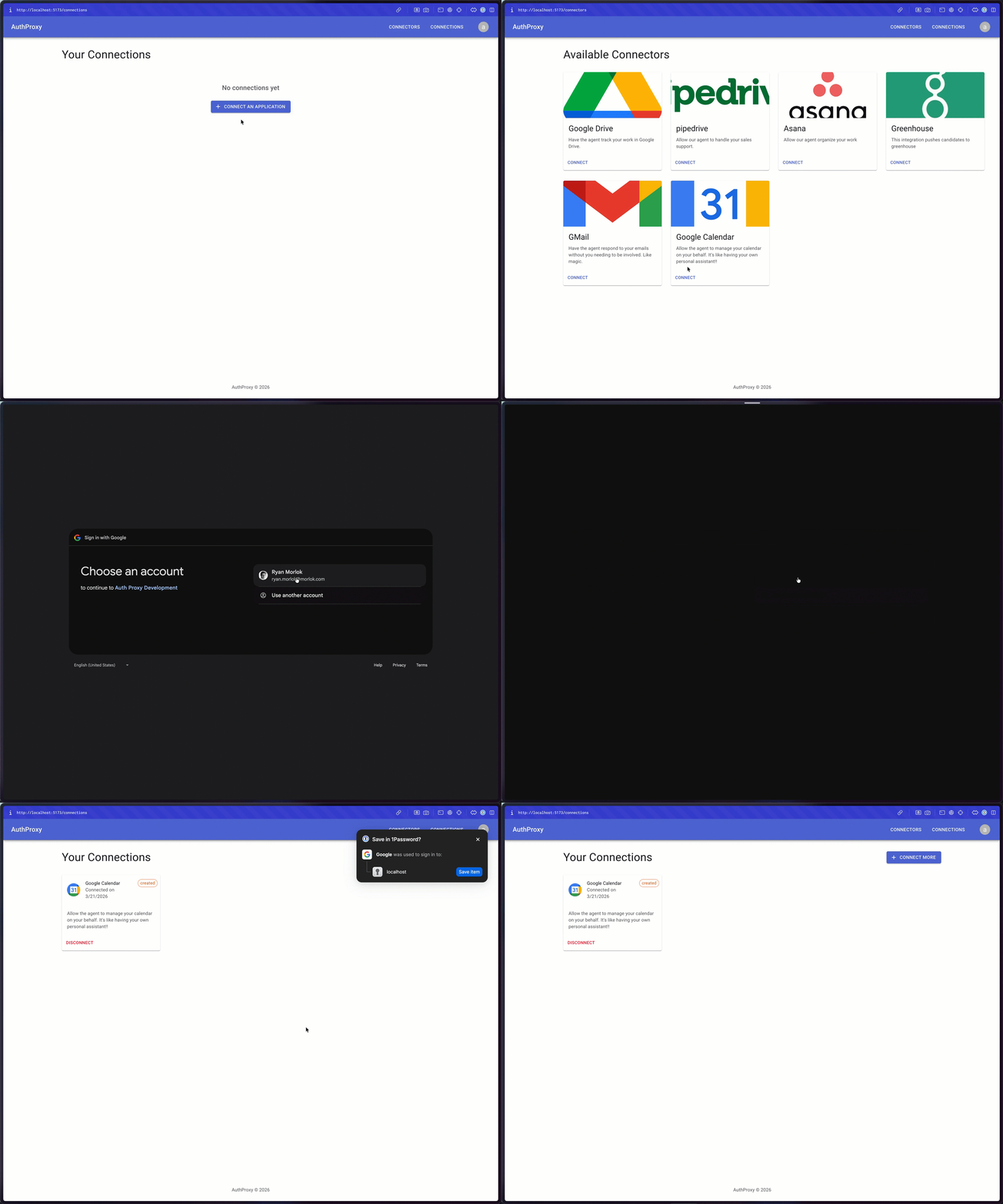
The Marketplace shows how users discover and manage integrations inside a host application. The demo catalog includes:
- a no-auth connector;
- an API-key connector that accepts the intentionally fake key
demo-api-key; - a basic OAuth authorization-code flow;
- OAuth with tenant selection before authorization; and
- OAuth followed by resource selection after authorization.
The OAuth examples use a dedicated go-oauth2-server test provider instead of
a real third party. Use the credentials shown in the connector description, or
select Register on the provider login page to create any fake account you
want. This lets you test the complete connection flow without giving the demo
access to a real Google, GitHub, or other provider account.
Administration and observability
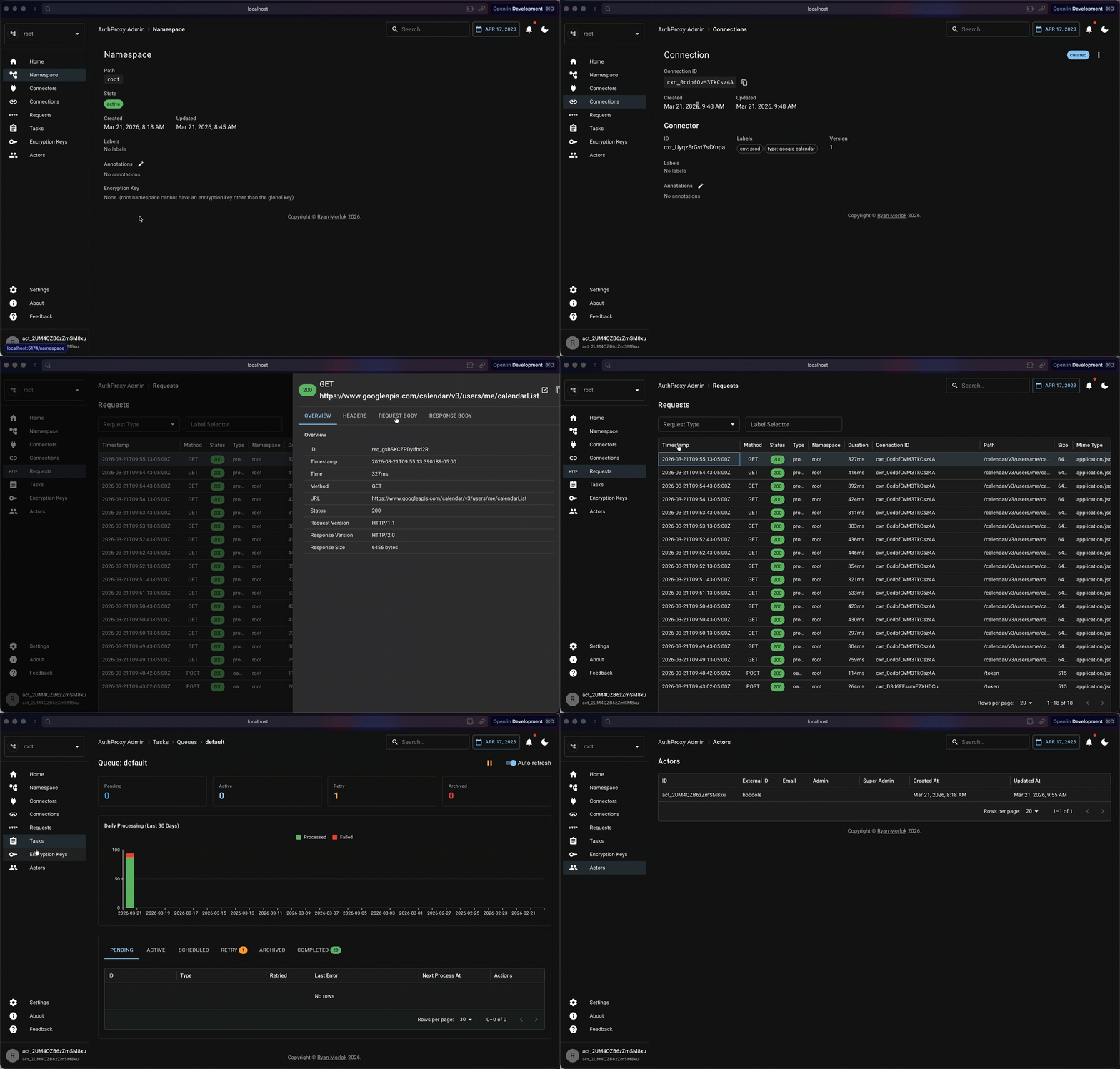
The Admin UI lets operators inspect namespaces, actors, connectors, connections, requests, tasks, encryption keys, and rate limits.
Grafana is available with anonymous viewer access. It includes an AuthProxy app-metrics dashboard and Explore, with AuthProxy, Prometheus, Tempo, and Loki data sources.
Developer quick start
You need Git and Docker Desktop.
git clone https://github.com/rmorlok/authproxy.git
cd authproxy
docker compose --profile server up --build -d
The first run builds AuthProxy and its embedded UIs, then starts Postgres, Redis, MinIO, ClickHouse, and all four AuthProxy services. Verify the API:
curl http://localhost:8081/ping
The public and Admin services use a self-signed development certificate at
https://localhost:8080 and https://localhost:8082; a browser will warn until
you trust it. Stop the stack with:
docker compose --profile server down
For local UI sign-in, source-mode development, alternate data stores, tests, and observability, continue with the development quick start.
License
This project is licensed under the MIT License - see the LICENSE file for details.
Built with ❤️ by Ryan Morlok
Contributors

1,073 commits
See what people are saying
Similar repos


Languages
Go
84.8%
TypeScript
13.4%
README
AuthProxy
AuthProxy is an open-source, embeddable connection platform for applications that call third-party APIs. It centralizes OAuth tokens and API keys, injects credentials at request time, refreshes OAuth tokens, and records what happened. Your application keeps using each provider's native API while AuthProxy manages the connection lifecycle.
What AuthProxy is and why use it
AuthProxy sits between your application and the APIs it integrates with:
flowchart LR
    User["Application user"] --> Host["Your application"]
    Host -->|"Request with connection ID"| AP["AuthProxy"]
    AP -->|"Inject credentials and forward"| Provider["Third-party API"]
    AP --- Store[("Encrypted credentials")]
    AP --- Audit[("Request events and telemetry")]
A connector describes how a provider authenticates and how a connection is set up. A connection is a namespace-scoped configured instance of that connector for a tenant, team, user, or service, including its encrypted credentials. Your application sends the connection ID with a request; it never needs to retrieve the credential.
AuthProxy is useful when you want to:
- Build instead of outsource your integration logic. Keep native provider APIs, SDKs, and data models rather than adopting a lossy unified API.
- Avoid rebuilding connection infrastructure. OAuth callbacks, refresh, API-key injection, setup forms, health probes, connector generation management, and connection UIs are shared across integrations.
- Keep control of the data plane. AuthProxy is open source and self-hosted, so credentials and request data can remain inside infrastructure you control.
- Embed integrations into your product. The Marketplace UI fits into the host application's sign-in flow; actors, namespaces, and scoped permissions map AuthProxy resources to the host's users and tenants.
- Give operators one control plane. The Admin UI, request-event store, rate limits, tasks, and OpenTelemetry signals make integration behavior inspectable without scattering secrets and logs through application code.
- Limit credential exposure. Sensitive fields use application-level encryption, namespace-scoped keys can isolate tenants, and external KMS or secret providers can retain control of wrapping material.
AuthProxy focuses on authentication, connection lifecycle, proxying, and governance. It is not a workflow builder or a replacement for the business logic in your application. See the core concepts and comparison with related projects for more detail.
Demos
Start at the AuthProxy demo. The sign-in page is a small stand-in for an application that embeds AuthProxy. Choose an example identity, then open either the Marketplace or Admin UI.
The demo shell signs a short-lived, one-time JWT for the selected actor and redirects the browser to AuthProxy. AuthProxy verifies the token and establishes the UI session. In a real integration, your application performs this handoff after authenticating its own user.
sequenceDiagram
    participant User
    participant Host as Host application
    participant UI as AuthProxy UI
    participant AP as AuthProxy

    User->>Host: Sign in and open integrations
    Host->>Host: Sign short-lived nonce JWT
    Host-->>UI: Redirect with authToken
    UI->>AP: Exchange token for session
    AP-->>UI: Session established
The demo is public and shared, so its contents may change or be reset. Do not enter real credentials or private data.
Connector Marketplace
The Marketplace shows how users discover and manage integrations inside a host application. The demo catalog includes:
- a no-auth connector;
- an API-key connector that accepts the intentionally fake key
demo-api-key; - a basic OAuth authorization-code flow;
- OAuth with tenant selection before authorization; and
- OAuth followed by resource selection after authorization.
The OAuth examples use a dedicated go-oauth2-server test provider instead of
a real third party. Use the credentials shown in the connector description, or
select Register on the provider login page to create any fake account you
want. This lets you test the complete connection flow without giving the demo
access to a real Google, GitHub, or other provider account.
Administration and observability
The Admin UI lets operators inspect namespaces, actors, connectors, connections, requests, tasks, encryption keys, and rate limits.
Grafana is available with anonymous viewer access. It includes an AuthProxy app-metrics dashboard and Explore, with AuthProxy, Prometheus, Tempo, and Loki data sources.
Developer quick start
You need Git and Docker Desktop.
git clone https://github.com/rmorlok/authproxy.git
cd authproxy
docker compose --profile server up --build -d
The first run builds AuthProxy and its embedded UIs, then starts Postgres, Redis, MinIO, ClickHouse, and all four AuthProxy services. Verify the API:
curl http://localhost:8081/ping
The public and Admin services use a self-signed development certificate at
https://localhost:8080 and https://localhost:8082; a browser will warn until
you trust it. Stop the stack with:
docker compose --profile server down
For local UI sign-in, source-mode development, alternate data stores, tests, and observability, continue with the development quick start.
License
This project is licensed under the MIT License - see the LICENSE file for details.
Built with ❤️ by Ryan Morlok
See what people are saying
Similar repos
Contributors
1,073 commits
Languages
Go
84.8%
TypeScript
13.4%