An iOS OCR Server Using Apple’s Vision Framework
See the codeTurn your iPhone into a powerful local OCR server using Apple's Vision Framework. No cloud dependencies, unlimited usage, complete privacy.
English | 日本語 | 繁體中文 | 简体中文 | 한국어 | Français
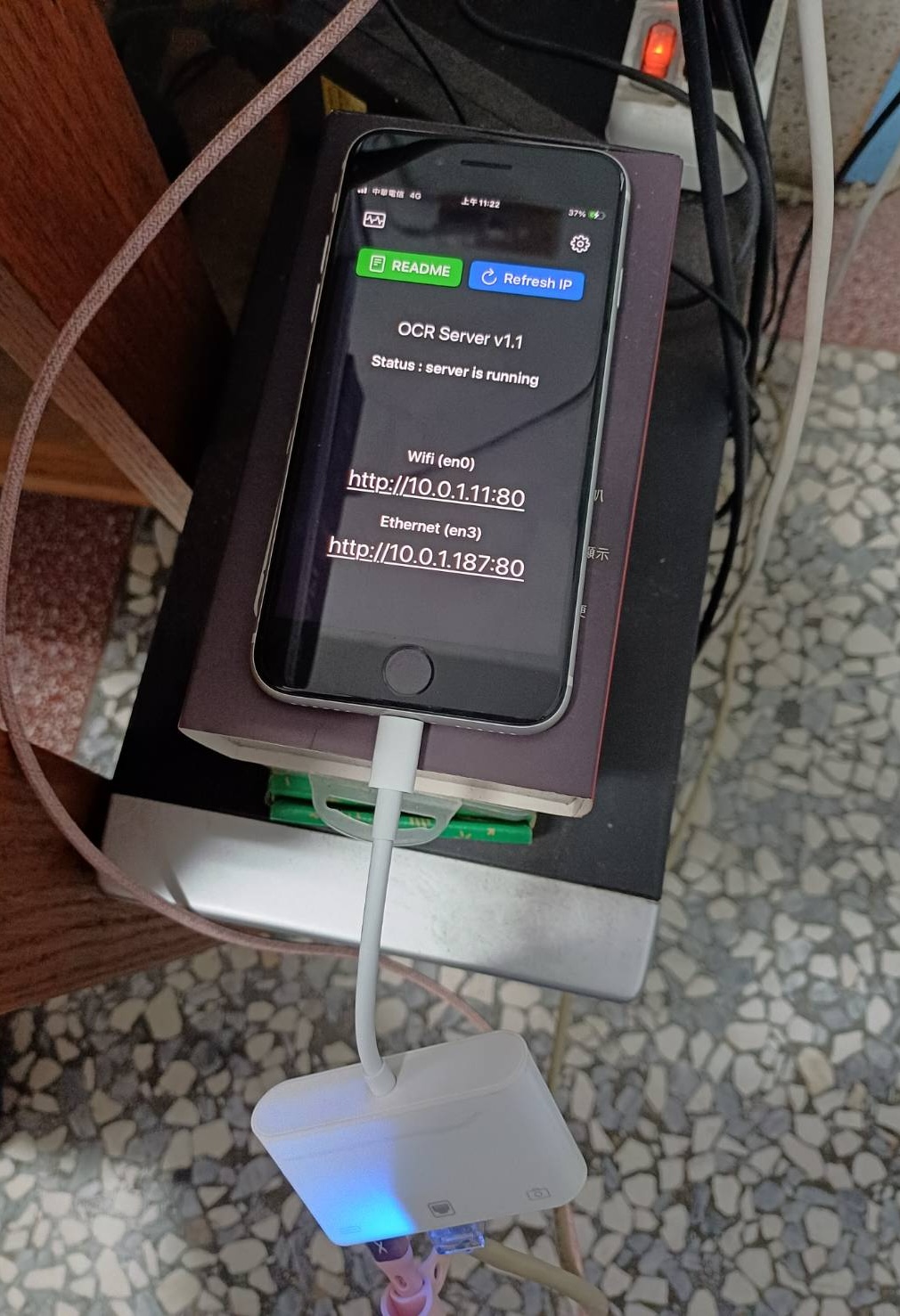
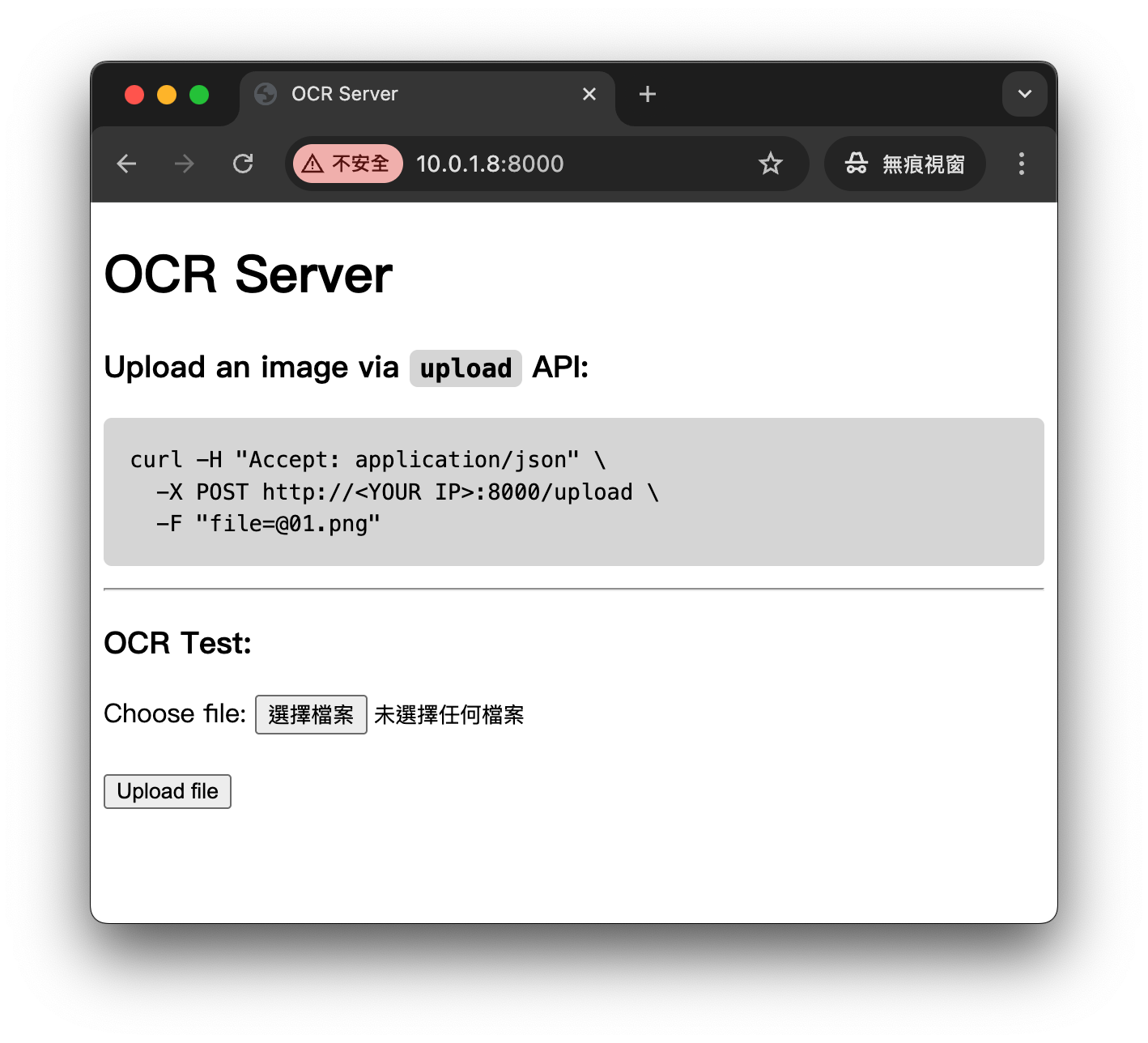
API Example - Upload an image via upload API:
curl -H "Accept: application/json" \
  -X POST http://<YOUR IP>:8000/upload \
  -F "[email protected]"
Python Upload Example:
import requests

url = "http://10.0.1.11:8000/upload"  # Replace with your IP address
file_path = "01.png"

with open(file_path, "rb") as f:
    files = {"file": f}
    headers = {"Accept": "application/json"}
    response = requests.post(url, files=files, headers=headers)

print("status code:", response.status_code)
print("response:", response.text)
The JSON response looks like this:
{
  "success": true,
  "message": "File uploaded successfully",
  "ocr_result": "Hello\nWorld",
  "image_height": 648,
  "image_width": 1247,
  "ocr_boxes": [
    {
      "text": "Hello",
      "x": 429.6554479416482,
      "y": 268.0000001076923,
      "w": 201.83814102564105,
      "h": 72,
      "rect": {
        "topLeft_x": 429.6554479416482,
        "topLeft_y": 268.0000001076923,
        "topRight_x": 631.4935889672893,
        "topRight_y": 268.0000001076923,
        "bottomRight_x": 631.4935889672893,
        "bottomRight_y": 340.0000001076923,
        "bottomLeft_x": 429.6554479416482,
        "bottomLeft_y": 340.0000001076923
      }
    },
    {
      "text": "World",
      "x": 421.6618595738782,
      "y": 417.99999971428576,
      "w": 251.79807692307696,
      "h": 80,
      "rect": {
        "topLeft_x": 421.6618595738782,
        "topLeft_y": 417.99999971428576,
        "topRight_x": 673.4599364969552,
        "topRight_y": 417.99999971428576,
        "bottomRight_x": 673.4599364969552,
        "bottomRight_y": 497.99999971428576,
        "bottomLeft_x": 421.6618595738782,
        "bottomLeft_y": 497.99999971428576
      }
    }
  ]
}
image_width and image_height represent the width and height of the image (in px),
x and y represent the top-left origin of the text bounding box (in px),
w and h represent the width and height of the text bounding box (in px),
rect provides the four corner coordinates of the detected text region, preserving its original orientation (non-axis-aligned).
Python Example – Drawing text bounding boxes using ocr_boxes information:
#
# pip3 install requests pillow opencv-python numpy
#

import os
import sys
import requests
from PIL import Image, ImageDraw, ImageFont, ImageOps
import numpy as np
import cv2

url = "http://10.0.1.11:8000/upload"  # Replace with your IP address
file_path = "01.png"

# ===== Select font (supports Chinese and English), font size auto-scales with box height =====
def pick_font(box_h_px: float):
    font_candidates = [
        # macOS
        "/System/Library/Fonts/PingFang.ttc",
        "/System/Library/Fonts/STHeiti Light.ttc",
        # Windows
        r"C:\Windows\Fonts\msyh.ttc",
        r"C:\Windows\Fonts\msjh.ttc",
        r"C:\Windows\Fonts\arialuni.ttf",
        # Noto
        "/usr/share/fonts/opentype/noto/NotoSansCJK-Regular.ttc",
        "/usr/share/fonts/truetype/noto/NotoSansCJK-Regular.ttc",
    ]
    size = max(10, int(box_h_px * 0.25))  # Small font size = 25% of box height (minimum 10pt)
    for path in font_candidates:
        if os.path.exists(path):
            try:
                return ImageFont.truetype(path, size=size)
            except Exception:
                pass
    return ImageFont.load_default()

# ===== Draw box and small text =====
def draw_boxes(img_pil: Image.Image, boxes, line_thickness: int = 5) -> Image.Image:
    draw = ImageDraw.Draw(img_pil)
    for b in boxes:
        try:
            x = float(b["x"]); y = float(b["y"])
            w = float(b["w"]); h = float(b["h"])
            text = str(b.get("text", ""))
        except Exception:
            continue

        # Red bounding box
        x2, y2 = x + w, y + h
        draw.rectangle([x, y, x2, y2], outline=(255, 0, 0), width=line_thickness)

        # Top-right label
        font = pick_font(h)
        # Text size
        # textbbox returns (l, t, r, b)
        l, t, r, b = draw.textbbox((0, 0), text, font=font)
        tw, th = (r - l), (b - t)
        pad = max(2, int(h * 0.06))

        # Align label to top-right, not exceeding box or image edge
        tx = int(max(0, min(x2 - tw - pad, img_pil.width - tw - pad)))
        ty = int(max(0, min(y + pad, img_pil.height - th - pad)))

        # White background
        draw.rectangle([tx - pad, ty - pad, tx + tw + pad, ty + th + pad], fill=(255, 255, 255))
        draw.text((tx, ty), text, font=font, fill=(20, 20, 20))
    return img_pil

def main():
    if not os.path.exists(file_path):
        print(f"[ERROR] Image not found: {file_path}", file=sys.stderr)
        sys.exit(1)

    # 1) Upload
    with open(file_path, "rb") as f:
        files = {"file": f}
        headers = {"Accept": "application/json"}
        try:
            response = requests.post(url, files=files, headers=headers, timeout=60)
        except requests.RequestException as e:
            print(f"[ERROR] Request failed: {e}", file=sys.stderr)
            sys.exit(2)

    print("status code:", response.status_code)

    # 2) Check HTTP and JSON
    if response.status_code != 200:
        print("response:", response.text[:500])
        sys.exit(3)

    try:
        data = response.json()
    except ValueError:
        print("[ERROR] Not JSON response")
        print("response:", response.text[:500])
        sys.exit(4)

    if not data.get("success", False):
        print("[ERROR] Server returned failure:", data)
        sys.exit(5)

    print("response ok")

    # 3) Load original image (using PIL)
    img_pil = Image.open(file_path)
    img_pil = ImageOps.exif_transpose(img_pil).convert("RGB")

    # If server returns different dimensions (should usually match), use server dimensions
    W = int(data.get("image_width", img_pil.width))
    H = int(data.get("image_height", img_pil.height))
    if (W, H) != (img_pil.width, img_pil.height):
        img_pil = img_pil.resize((W, H), Image.BICUBIC)

    boxes = data.get("ocr_boxes", [])
    img_pil = draw_boxes(img_pil, boxes)

    # 4) Display
    img_cv = cv2.cvtColor(np.array(img_pil), cv2.COLOR_RGB2BGR)
    cv2.imshow("OCR Preview", img_cv)
    print("Press any key on the image window to exit...")
    cv2.waitKey(0)
    cv2.destroyAllWindows()

if __name__ == "__main__":
    main()
Sample Output:
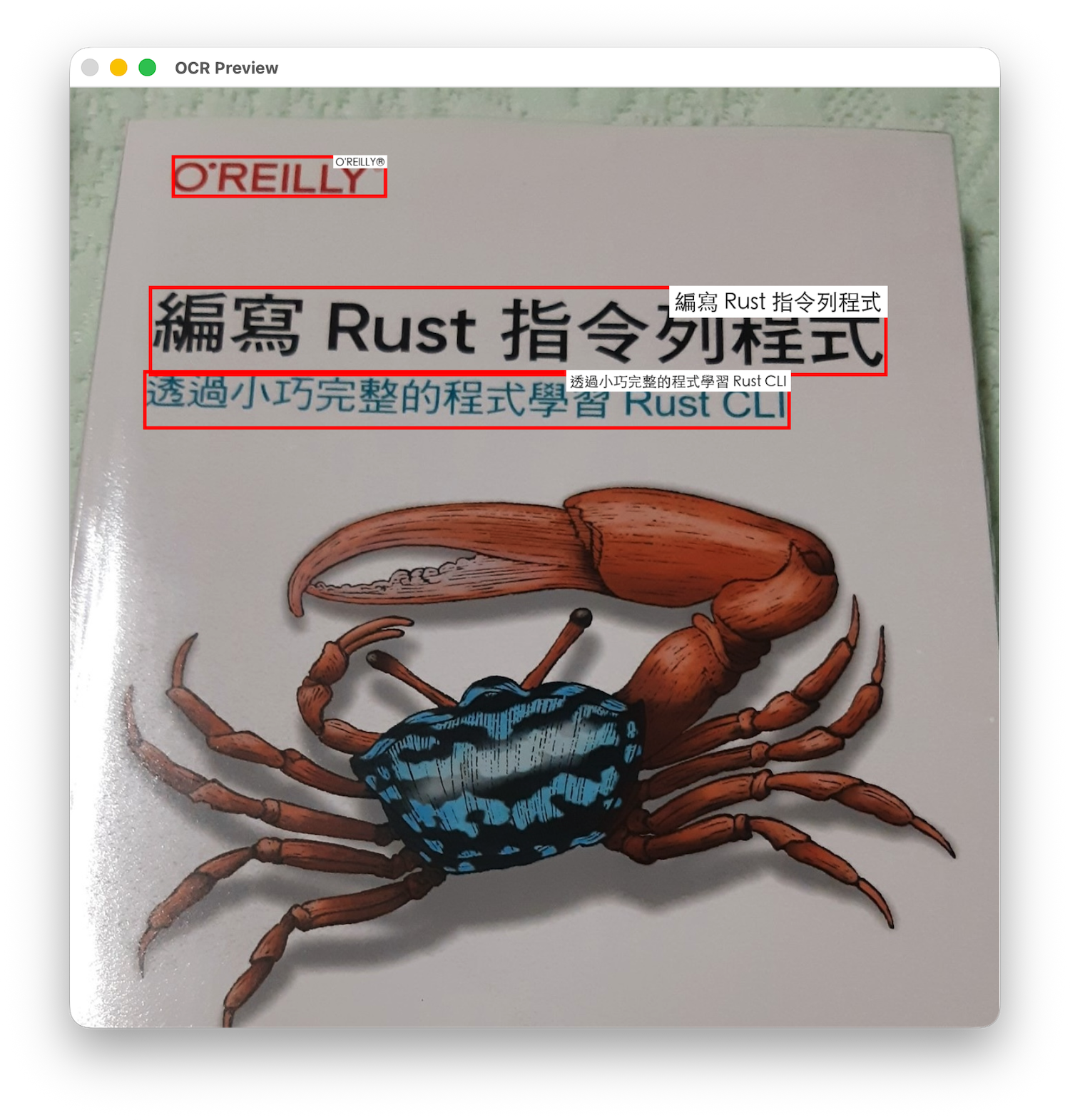
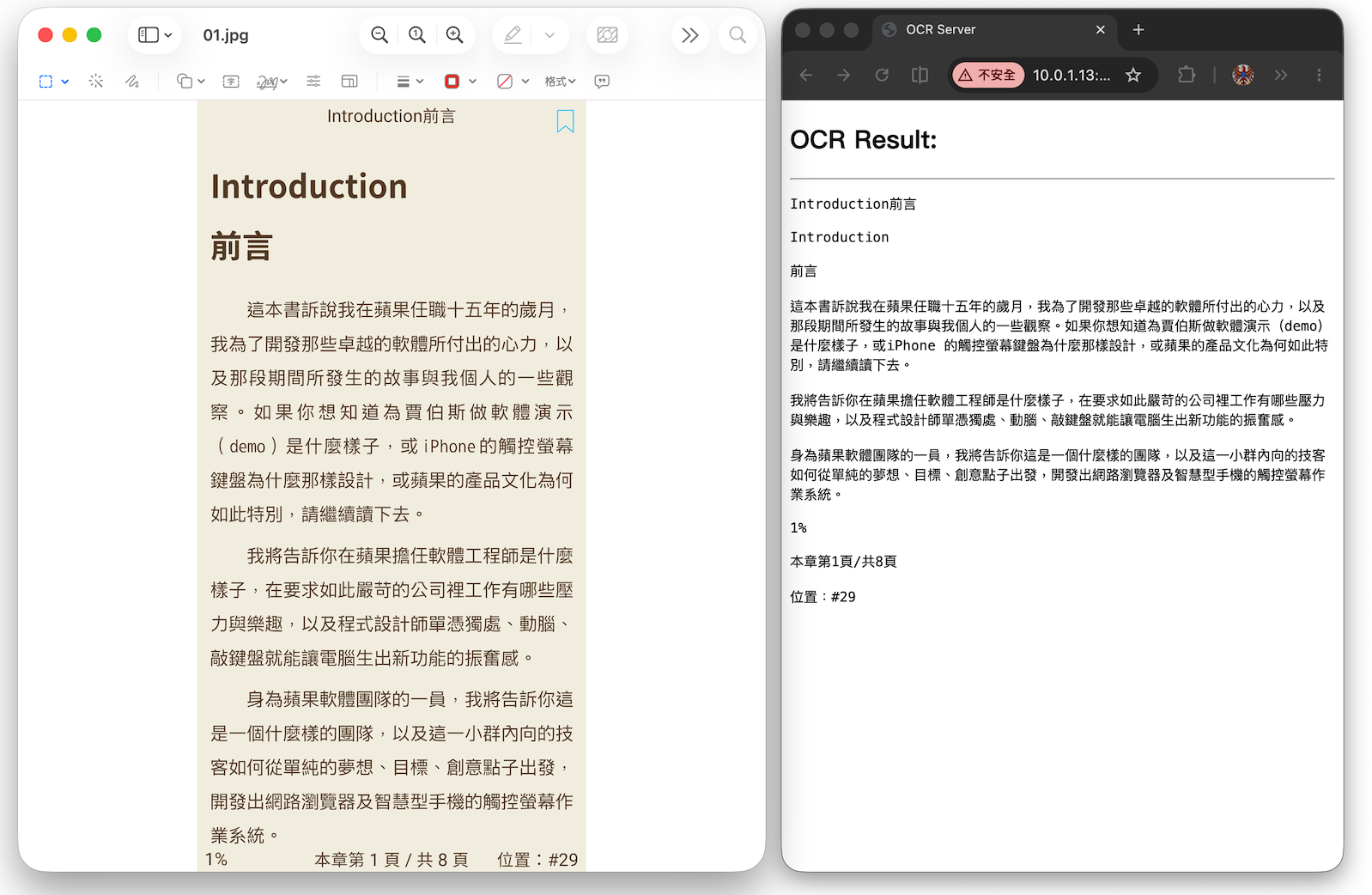
On the webpage, check Document Paragraph Detection:
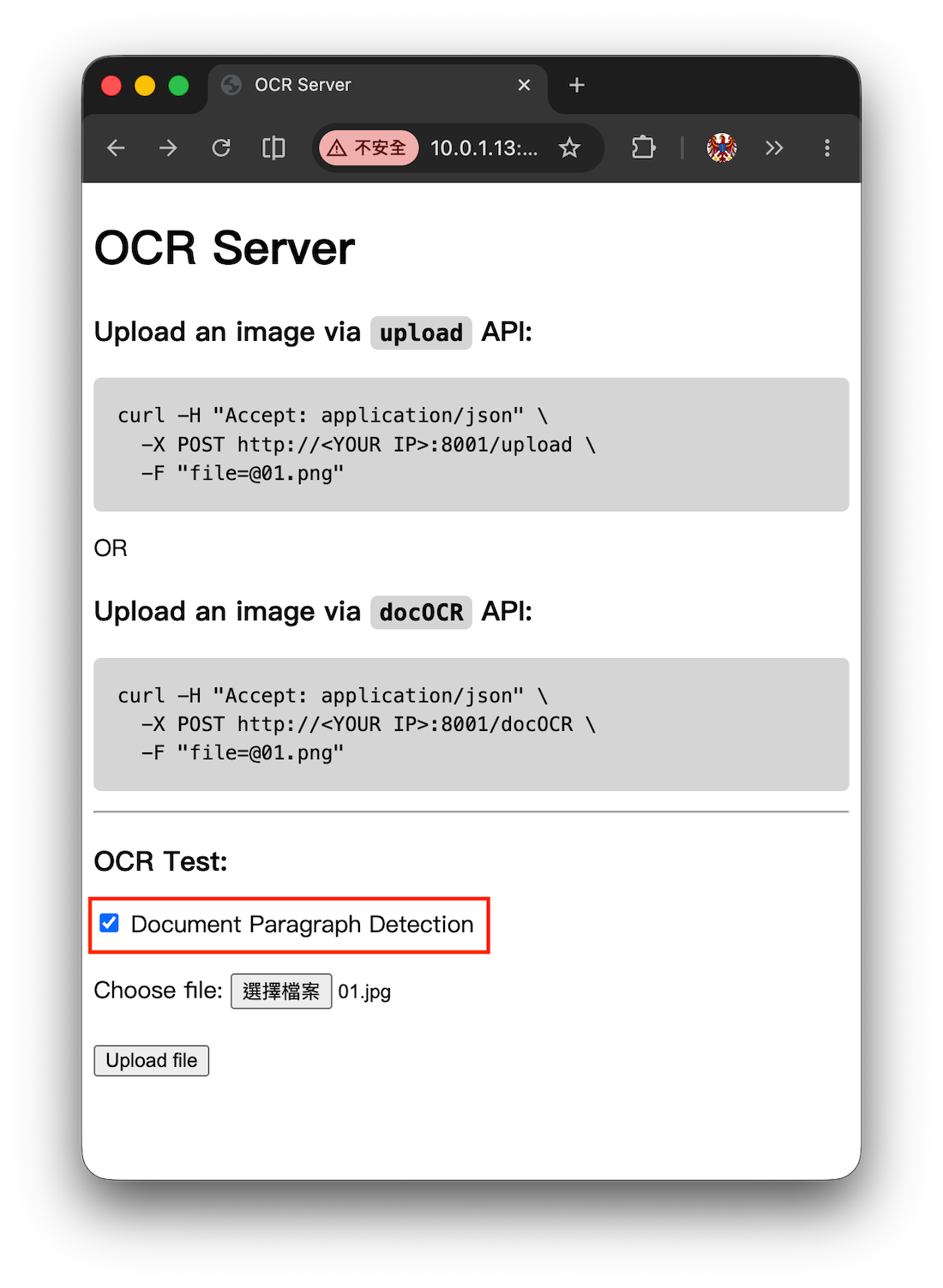
Paragraph recognition results:
Or recognize document paragraphs using the docOCR API:
curl -H "Accept: application/json" \
    -X POST http://<YOUR IP>:8000/docOCR \
    -F "[email protected]"
The JSON response looks like this:
{
    "success": true,
    "message": "OCR completed successfully",
    "ocr_text": "OCR text..."
}
2,218 followers · starred Aug 2025
490 followers · starred Sep 2025
269 followers · starred Jun 2026
412 followers · starred Sep 2025
An iOS OCR Server Using Apple’s Vision Framework
See the codeTurn your iPhone into a powerful local OCR server using Apple's Vision Framework. No cloud dependencies, unlimited usage, complete privacy.
English | 日本語 | 繁體中文 | 简体中文 | 한국어 | Français
API Example - Upload an image via upload API:
curl -H "Accept: application/json" \
  -X POST http://<YOUR IP>:8000/upload \
  -F "[email protected]"
Python Upload Example:
import requests

url = "http://10.0.1.11:8000/upload"  # Replace with your IP address
file_path = "01.png"

with open(file_path, "rb") as f:
    files = {"file": f}
    headers = {"Accept": "application/json"}
    response = requests.post(url, files=files, headers=headers)

print("status code:", response.status_code)
print("response:", response.text)
The JSON response looks like this:
{
  "success": true,
  "message": "File uploaded successfully",
  "ocr_result": "Hello\nWorld",
  "image_height": 648,
  "image_width": 1247,
  "ocr_boxes": [
    {
      "text": "Hello",
      "x": 429.6554479416482,
      "y": 268.0000001076923,
      "w": 201.83814102564105,
      "h": 72,
      "rect": {
        "topLeft_x": 429.6554479416482,
        "topLeft_y": 268.0000001076923,
        "topRight_x": 631.4935889672893,
        "topRight_y": 268.0000001076923,
        "bottomRight_x": 631.4935889672893,
        "bottomRight_y": 340.0000001076923,
        "bottomLeft_x": 429.6554479416482,
        "bottomLeft_y": 340.0000001076923
      }
    },
    {
      "text": "World",
      "x": 421.6618595738782,
      "y": 417.99999971428576,
      "w": 251.79807692307696,
      "h": 80,
      "rect": {
        "topLeft_x": 421.6618595738782,
        "topLeft_y": 417.99999971428576,
        "topRight_x": 673.4599364969552,
        "topRight_y": 417.99999971428576,
        "bottomRight_x": 673.4599364969552,
        "bottomRight_y": 497.99999971428576,
        "bottomLeft_x": 421.6618595738782,
        "bottomLeft_y": 497.99999971428576
      }
    }
  ]
}
image_width and image_height represent the width and height of the image (in px),
x and y represent the top-left origin of the text bounding box (in px),
w and h represent the width and height of the text bounding box (in px),
rect provides the four corner coordinates of the detected text region, preserving its original orientation (non-axis-aligned).
Python Example – Drawing text bounding boxes using ocr_boxes information:
#
# pip3 install requests pillow opencv-python numpy
#

import os
import sys
import requests
from PIL import Image, ImageDraw, ImageFont, ImageOps
import numpy as np
import cv2

url = "http://10.0.1.11:8000/upload"  # Replace with your IP address
file_path = "01.png"

# ===== Select font (supports Chinese and English), font size auto-scales with box height =====
def pick_font(box_h_px: float):
    font_candidates = [
        # macOS
        "/System/Library/Fonts/PingFang.ttc",
        "/System/Library/Fonts/STHeiti Light.ttc",
        # Windows
        r"C:\Windows\Fonts\msyh.ttc",
        r"C:\Windows\Fonts\msjh.ttc",
        r"C:\Windows\Fonts\arialuni.ttf",
        # Noto
        "/usr/share/fonts/opentype/noto/NotoSansCJK-Regular.ttc",
        "/usr/share/fonts/truetype/noto/NotoSansCJK-Regular.ttc",
    ]
    size = max(10, int(box_h_px * 0.25))  # Small font size = 25% of box height (minimum 10pt)
    for path in font_candidates:
        if os.path.exists(path):
            try:
                return ImageFont.truetype(path, size=size)
            except Exception:
                pass
    return ImageFont.load_default()

# ===== Draw box and small text =====
def draw_boxes(img_pil: Image.Image, boxes, line_thickness: int = 5) -> Image.Image:
    draw = ImageDraw.Draw(img_pil)
    for b in boxes:
        try:
            x = float(b["x"]); y = float(b["y"])
            w = float(b["w"]); h = float(b["h"])
            text = str(b.get("text", ""))
        except Exception:
            continue

        # Red bounding box
        x2, y2 = x + w, y + h
        draw.rectangle([x, y, x2, y2], outline=(255, 0, 0), width=line_thickness)

        # Top-right label
        font = pick_font(h)
        # Text size
        # textbbox returns (l, t, r, b)
        l, t, r, b = draw.textbbox((0, 0), text, font=font)
        tw, th = (r - l), (b - t)
        pad = max(2, int(h * 0.06))

        # Align label to top-right, not exceeding box or image edge
        tx = int(max(0, min(x2 - tw - pad, img_pil.width - tw - pad)))
        ty = int(max(0, min(y + pad, img_pil.height - th - pad)))

        # White background
        draw.rectangle([tx - pad, ty - pad, tx + tw + pad, ty + th + pad], fill=(255, 255, 255))
        draw.text((tx, ty), text, font=font, fill=(20, 20, 20))
    return img_pil

def main():
    if not os.path.exists(file_path):
        print(f"[ERROR] Image not found: {file_path}", file=sys.stderr)
        sys.exit(1)

    # 1) Upload
    with open(file_path, "rb") as f:
        files = {"file": f}
        headers = {"Accept": "application/json"}
        try:
            response = requests.post(url, files=files, headers=headers, timeout=60)
        except requests.RequestException as e:
            print(f"[ERROR] Request failed: {e}", file=sys.stderr)
            sys.exit(2)

    print("status code:", response.status_code)

    # 2) Check HTTP and JSON
    if response.status_code != 200:
        print("response:", response.text[:500])
        sys.exit(3)

    try:
        data = response.json()
    except ValueError:
        print("[ERROR] Not JSON response")
        print("response:", response.text[:500])
        sys.exit(4)

    if not data.get("success", False):
        print("[ERROR] Server returned failure:", data)
        sys.exit(5)

    print("response ok")

    # 3) Load original image (using PIL)
    img_pil = Image.open(file_path)
    img_pil = ImageOps.exif_transpose(img_pil).convert("RGB")

    # If server returns different dimensions (should usually match), use server dimensions
    W = int(data.get("image_width", img_pil.width))
    H = int(data.get("image_height", img_pil.height))
    if (W, H) != (img_pil.width, img_pil.height):
        img_pil = img_pil.resize((W, H), Image.BICUBIC)

    boxes = data.get("ocr_boxes", [])
    img_pil = draw_boxes(img_pil, boxes)

    # 4) Display
    img_cv = cv2.cvtColor(np.array(img_pil), cv2.COLOR_RGB2BGR)
    cv2.imshow("OCR Preview", img_cv)
    print("Press any key on the image window to exit...")
    cv2.waitKey(0)
    cv2.destroyAllWindows()

if __name__ == "__main__":
    main()
Sample Output:
On the webpage, check Document Paragraph Detection:
Paragraph recognition results:
Or recognize document paragraphs using the docOCR API:
curl -H "Accept: application/json" \
    -X POST http://<YOUR IP>:8000/docOCR \
    -F "[email protected]"
The JSON response looks like this:
{
    "success": true,
    "message": "OCR completed successfully",
    "ocr_text": "OCR text..."
}
2,218 followers · starred Aug 2025
490 followers · starred Sep 2025
269 followers · starred Jun 2026
412 followers · starred Sep 2025



