A dynamically customizable resume template in HTML and JS with automatic ATS support function
See the code _____ _ _ _______ __
| __ \(_) | | / ____\ \ / /
| |__) |_ ___| | _| | \ \ / /
| _ /| |/ __| |/ / | \ \/ /
| | \ \| | (__| <| |____ \ /
|_| \_\_|\___|_|\_\\_____| \/ [rɪk-si-vi]
A dynamic template for your resume and cover letter
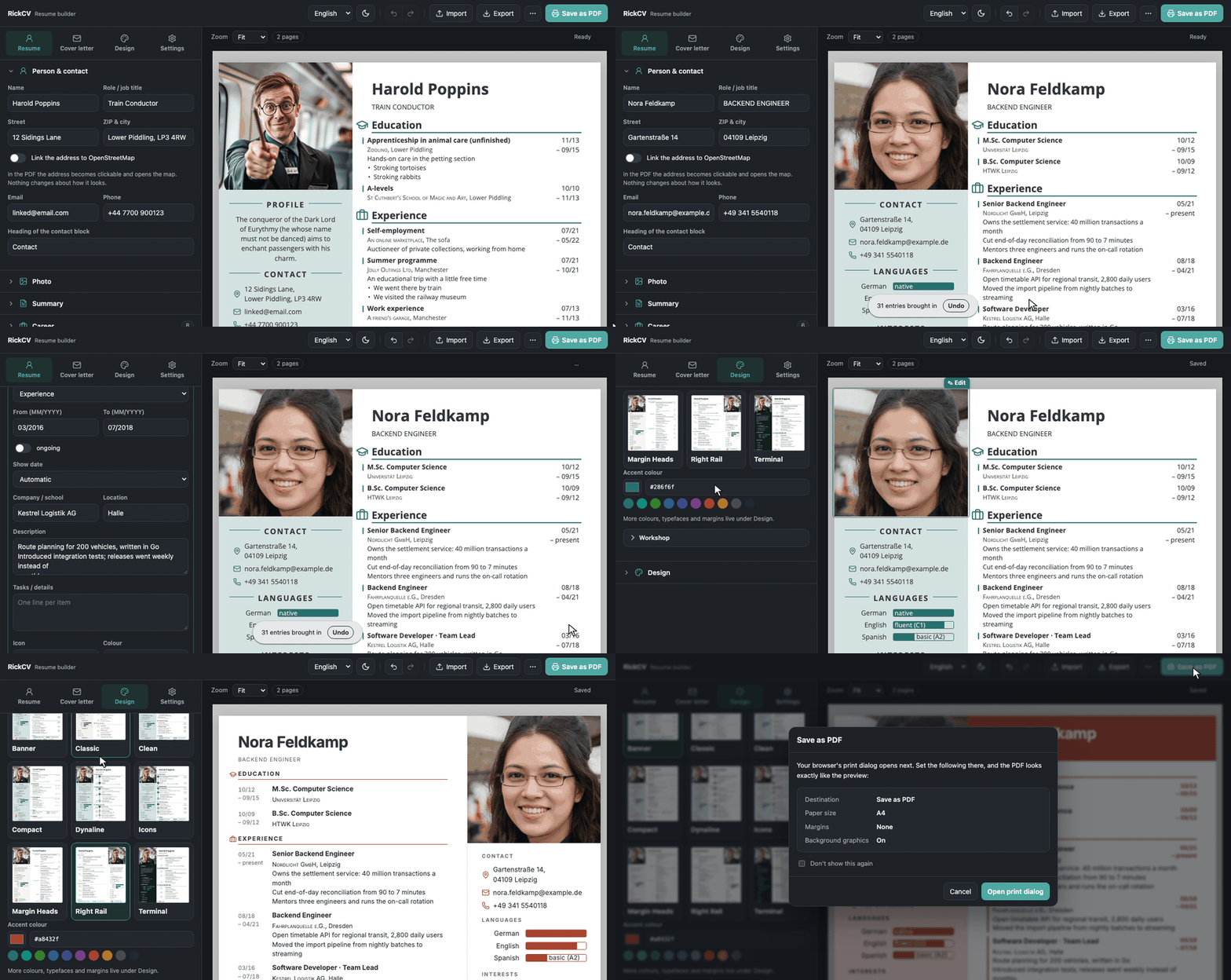
Resume and cover letter builder that runs entirely in your browser. No account, no upload, no server. Your data stays on your device.
Use it here: https://cv.rickinto.place/
.docx), LinkedIn export, JSON Resume, Reactive
Resume, a RickCV backup or plain text. Read locally without an AI model, and shown to you
before anything changes.resume.json (JSON Resume), a shareable link or raw JSON.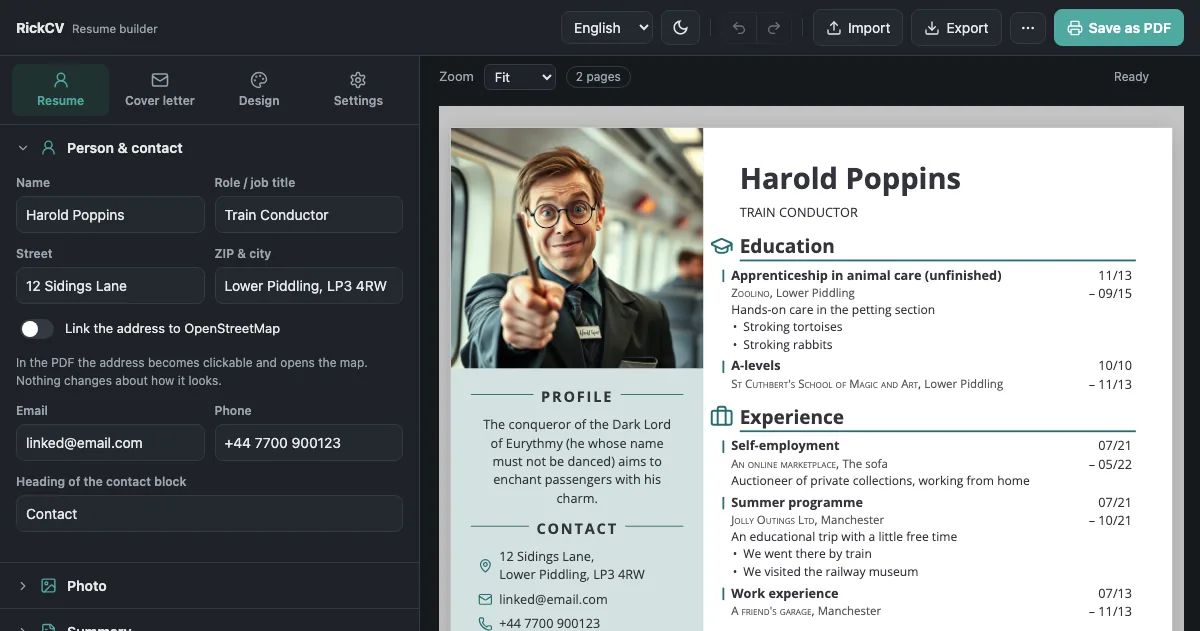
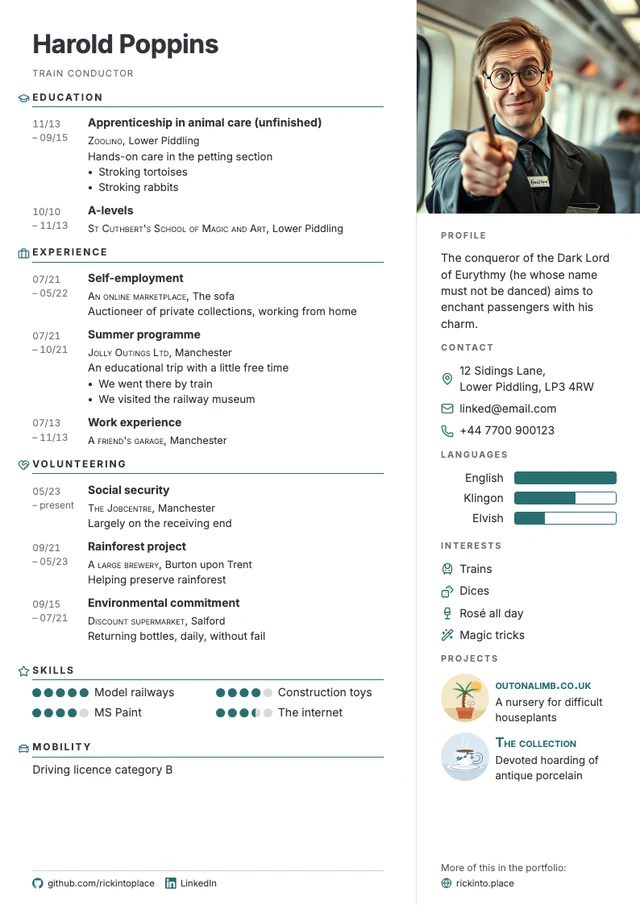
| Theme | |
|---|---|
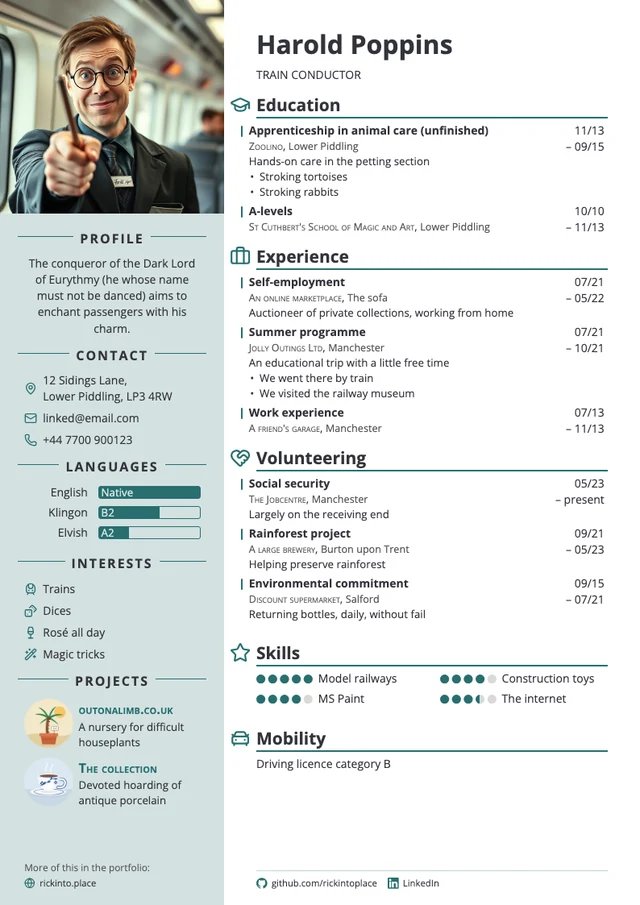
| Clean | the calm baseline: timeline at the edge, dates on the right |
| Dynaline | the timeline as an axis; how long something lasted sets the distance |
| Icons | symbols carry the layout, timeline down the middle |
| Classic | serifs, small caps and hairlines, hanging dates |
| Compact | the date sits on the title's line; two sheets elsewhere fit on one |
| Terminal | monospaced, square, dark sidebar |
| Right Rail | sidebar on the right without fill, career starts at the left edge |
| Margin Heads | section headings sit in the margin beside their section |
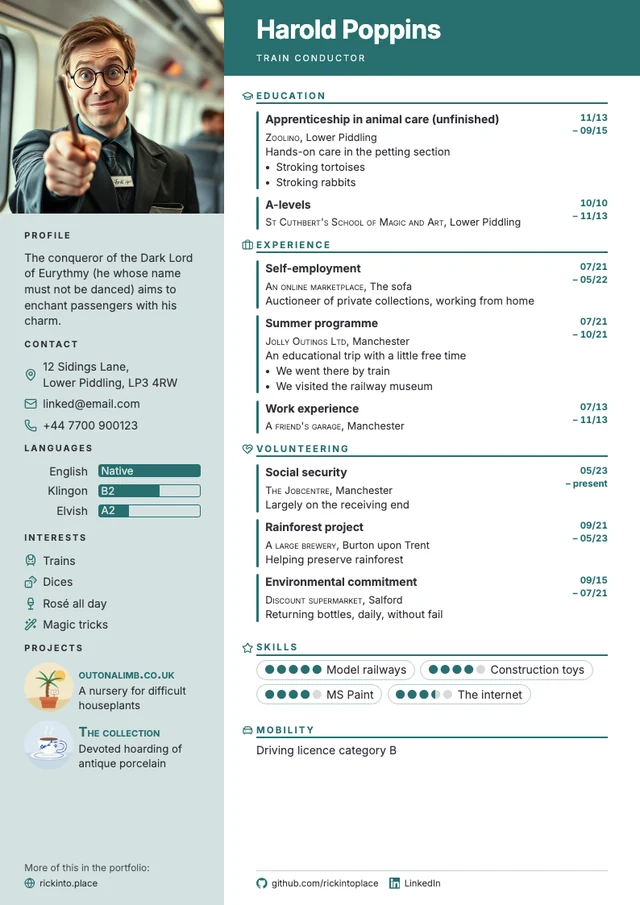
| Banner | a coloured band carries the name, skills sit in pills |
Any other .css file can be dropped onto the builder or picked under Themes.
Drop a file anywhere on the page or use Import:
| What you have | Notes |
|---|---|
RickCV backup (*.rickcv.json) | Everything comes back, styling included. |
| JSON Resume | All sections are mapped. |
| Reactive Resume export | Current format and v4, skill levels and hidden items kept. |
| LinkedIn data | Settings → Data privacy → Get a copy of your data, then drop the ZIP (or the CSV files). |
Word (.docx) | The best source for an old resume, text boxes and pictures included. Save .doc as .docx first. |
| Columns, headings, dates, pictures and a cover letter are recognised. Scanned PDFs contain no text and cannot be read. | |
| Anything else | Paste the text. |
The dialog first shows what it found and lets you replace the document (your styling stays) or add to it. Nothing changes until you confirm. Structured formats are exact; text and PDF imports are a draft and say so. Where little is recognised, the dialog shows the raw text so you can sort it in by hand.
The PDF import handles sidebars, letter-spaced headings, dates in any position, German
two-column lists (Go ●●●●○ becomes a skill rated four of five), photo and signature by
their position, icon fonts, bullets missing from the text layer, and a cover letter before or
after the resume.
Click Save as PDF. The first time, RickCV tells you what to set in the print dialog:
| Setting | Value |
|---|---|
| Destination | Save as PDF |
| Paper size | A4 (or Letter) |
| Margins | None |
| Background graphics | Enabled |
Every modern browser works. Chromium gives the most predictable margins, page breaks and colours; Firefox produces a usable PDF as well.
Your document is saved in the browser as you type, but only in that browser on that device. Use Export for a backup or to keep several versions.
RickCV no longer hides a copy of your data behind the layout by default. Detectors treat invisible text as manipulation, and in a study of 196,682 real resumes about 1 % carried it, mostly hidden skill lists.
What actually helps: a tagged PDF with a proper reading order, name and contact before the career, SVG icons that leave no stray words in the extracted text, and the document title as PDF title and filename. For very graphic layouts, Machine readability adds a visible plain-text page you can read and edit. The invisible mode still exists, clearly marked.
Generative Engine Optimization (GEO) has no proven, stable effect according to a 2026 survey of 45 studies, so RickCV does not do it.
Sources: Prompt injection in LLM-based resume screening · Optimizing Visibility in Generative Engines: A Critical Survey · PhantomLint · W3C: reading order in PDF
An agent can hand a person a finished application as a link:
https://cv.rickinto.place/#data=<base64url JSON>&print=1
The data travels inside the link (one to three kilobytes without a photo) and goes through the
same confirmation as any import. Format and rules are in AGENTS.md, also
available as llms.txt. The PDF itself is always printed in the person's browser.
Open Themes → Workshop, start from the current theme or an empty skeleton, and see every change in the document right away. A list of all hooks and variables inserts selectors at the cursor. Save as .css gives you the finished theme. Contribute opens a pull request with your file on GitHub.
The markup is a documented, versioned contract: themes/CONTRACT.md.
Themes live in their own cascade layer and win without !important. On load, @import,
remote url() and rules aimed at the plain-text layer (.ats-…) are removed, and the builder
says so.
python3 tools/build-themes.py          # themes/*.css → js/theme-data.js
python3 tools/make-theme-previews.py   # gallery images for themes/README.md
node tests/theme.test.mjs              # contract + every theme in themes/
RickCV is a static site with nothing to build or configure. Copy the folder to any host, or
just double-click index.html.
git clone https://github.com/rickintoplace/RickCV.git
A Content-Security-Policy in a <meta> tag allows scripts, fonts and images only from the site
itself, so an imported document or theme can neither load a tracking pixel nor run a script.
For the same reason images from web addresses are not shown; upload them instead. A host that
sends headers may add frame-ancestors 'self'.
| Path | Purpose |
|---|---|
index.html, builder.css | The builder |
cv.html, styles.css | The document, shown in the preview and printed |
js/model.js | Data model, example, migration, checks on foreign documents |
js/render.js | Data to resume and cover letter |
js/builder.js | State, saving, preview, printing |
js/sections.js, js/fields.js | Editor sections and form controls |
js/history.js | Undo and redo |
js/import.js, js/import-dialog.js | JSON Resume, LinkedIn, CSV, text, and the import dialog |
js/pdf-import.js, js/docx-import.js, js/layout.js | PDF and Word import |
js/ats.js | Plain-text version |
js/ai-help.js | Let your AI write it |
js/themes.js, js/theme-data.js | Theme handling and the bundled themes |
js/icons.js, js/icon-data.js, js/icon-picker.js, js/ui-icons.js | Icons |
js/i18n.js, js/focus.js | Texts in German and English, dialog focus |
themes/ | One CSS file per theme, CONTRACT.md, _starter.css |
fonts/, licenses/ | Typefaces and their licences |
vendor/pdfjs/ | Mozilla's pdf.js, loaded only for PDF imports |
tools/ | Font, icon, example image and demo generators |
Every file is a plain script, which is why index.html works by double-click. The
js/theme-data.js and js/icon-data.js bundles are committed for the same reason.
Typefaces ship as static 400 and 700 files and ligatures are switched off. Both keep every letter as real text in PDFs printed from Firefox.
Fork, change, open a pull request. There is nothing to install. The easiest contribution is a
theme, the second most useful is a resume RickCV reads badly, added as a fixture to
tests/fixtures/.
node tests/model.test.mjs       # migration, foreign documents, dates, undo
node tests/import.test.mjs      # import parsers
node tests/theme.test.mjs       # theme contract
node tests/app.test.mjs         # the builder in Chromium: CSP, preview, foreign senders
node tests/roundtrip.test.mjs   # prints every theme and reads the PDF back in
The browser tests look for Chromium or Chrome in CHROME, then PATH, then the default
install locations, and are skipped without one. With REQUIRE_BROWSER=1 (as in CI) a missing
browser fails the run.
AGPL-3.0-or-later. Use it, change it, host it, also commercially. Anyone who uses your version, including over a network, must be able to get its source code.
Third-party components keep their licences: Lucide icons (ISC), the
typefaces (SIL OFL) and Material Symbols (Apache-2.0) in licenses/, and
pdf.js (Apache-2.0) in vendor/.
A dynamically customizable resume template in HTML and JS with automatic ATS support function
See the code _____ _ _ _______ __
| __ \(_) | | / ____\ \ / /
| |__) |_ ___| | _| | \ \ / /
| _ /| |/ __| |/ / | \ \/ /
| | \ \| | (__| <| |____ \ /
|_| \_\_|\___|_|\_\\_____| \/ [rɪk-si-vi]
A dynamic template for your resume and cover letter
Resume and cover letter builder that runs entirely in your browser. No account, no upload, no server. Your data stays on your device.
Use it here: https://cv.rickinto.place/
.docx), LinkedIn export, JSON Resume, Reactive
Resume, a RickCV backup or plain text. Read locally without an AI model, and shown to you
before anything changes.resume.json (JSON Resume), a shareable link or raw JSON.
| Theme | |
|---|---|
| Clean | the calm baseline: timeline at the edge, dates on the right |
| Dynaline | the timeline as an axis; how long something lasted sets the distance |
| Icons | symbols carry the layout, timeline down the middle |
| Classic | serifs, small caps and hairlines, hanging dates |
| Compact | the date sits on the title's line; two sheets elsewhere fit on one |
| Terminal | monospaced, square, dark sidebar |
| Right Rail | sidebar on the right without fill, career starts at the left edge |
| Margin Heads | section headings sit in the margin beside their section |
| Banner | a coloured band carries the name, skills sit in pills |
Any other .css file can be dropped onto the builder or picked under Themes.
Drop a file anywhere on the page or use Import:
| What you have | Notes |
|---|---|
RickCV backup (*.rickcv.json) | Everything comes back, styling included. |
| JSON Resume | All sections are mapped. |
| Reactive Resume export | Current format and v4, skill levels and hidden items kept. |
| LinkedIn data | Settings → Data privacy → Get a copy of your data, then drop the ZIP (or the CSV files). |
Word (.docx) | The best source for an old resume, text boxes and pictures included. Save .doc as .docx first. |
| Columns, headings, dates, pictures and a cover letter are recognised. Scanned PDFs contain no text and cannot be read. | |
| Anything else | Paste the text. |
The dialog first shows what it found and lets you replace the document (your styling stays) or add to it. Nothing changes until you confirm. Structured formats are exact; text and PDF imports are a draft and say so. Where little is recognised, the dialog shows the raw text so you can sort it in by hand.
The PDF import handles sidebars, letter-spaced headings, dates in any position, German
two-column lists (Go ●●●●○ becomes a skill rated four of five), photo and signature by
their position, icon fonts, bullets missing from the text layer, and a cover letter before or
after the resume.
Click Save as PDF. The first time, RickCV tells you what to set in the print dialog:
| Setting | Value |
|---|---|
| Destination | Save as PDF |
| Paper size | A4 (or Letter) |
| Margins | None |
| Background graphics | Enabled |
Every modern browser works. Chromium gives the most predictable margins, page breaks and colours; Firefox produces a usable PDF as well.
Your document is saved in the browser as you type, but only in that browser on that device. Use Export for a backup or to keep several versions.
RickCV no longer hides a copy of your data behind the layout by default. Detectors treat invisible text as manipulation, and in a study of 196,682 real resumes about 1 % carried it, mostly hidden skill lists.
What actually helps: a tagged PDF with a proper reading order, name and contact before the career, SVG icons that leave no stray words in the extracted text, and the document title as PDF title and filename. For very graphic layouts, Machine readability adds a visible plain-text page you can read and edit. The invisible mode still exists, clearly marked.
Generative Engine Optimization (GEO) has no proven, stable effect according to a 2026 survey of 45 studies, so RickCV does not do it.
Sources: Prompt injection in LLM-based resume screening · Optimizing Visibility in Generative Engines: A Critical Survey · PhantomLint · W3C: reading order in PDF
An agent can hand a person a finished application as a link:
https://cv.rickinto.place/#data=<base64url JSON>&print=1
The data travels inside the link (one to three kilobytes without a photo) and goes through the
same confirmation as any import. Format and rules are in AGENTS.md, also
available as llms.txt. The PDF itself is always printed in the person's browser.
Open Themes → Workshop, start from the current theme or an empty skeleton, and see every change in the document right away. A list of all hooks and variables inserts selectors at the cursor. Save as .css gives you the finished theme. Contribute opens a pull request with your file on GitHub.
The markup is a documented, versioned contract: themes/CONTRACT.md.
Themes live in their own cascade layer and win without !important. On load, @import,
remote url() and rules aimed at the plain-text layer (.ats-…) are removed, and the builder
says so.
python3 tools/build-themes.py          # themes/*.css → js/theme-data.js
python3 tools/make-theme-previews.py   # gallery images for themes/README.md
node tests/theme.test.mjs              # contract + every theme in themes/
RickCV is a static site with nothing to build or configure. Copy the folder to any host, or
just double-click index.html.
git clone https://github.com/rickintoplace/RickCV.git
A Content-Security-Policy in a <meta> tag allows scripts, fonts and images only from the site
itself, so an imported document or theme can neither load a tracking pixel nor run a script.
For the same reason images from web addresses are not shown; upload them instead. A host that
sends headers may add frame-ancestors 'self'.
| Path | Purpose |
|---|---|
index.html, builder.css | The builder |
cv.html, styles.css | The document, shown in the preview and printed |
js/model.js | Data model, example, migration, checks on foreign documents |
js/render.js | Data to resume and cover letter |
js/builder.js | State, saving, preview, printing |
js/sections.js, js/fields.js | Editor sections and form controls |
js/history.js | Undo and redo |
js/import.js, js/import-dialog.js | JSON Resume, LinkedIn, CSV, text, and the import dialog |
js/pdf-import.js, js/docx-import.js, js/layout.js | PDF and Word import |
js/ats.js | Plain-text version |
js/ai-help.js | Let your AI write it |
js/themes.js, js/theme-data.js | Theme handling and the bundled themes |
js/icons.js, js/icon-data.js, js/icon-picker.js, js/ui-icons.js | Icons |
js/i18n.js, js/focus.js | Texts in German and English, dialog focus |
themes/ | One CSS file per theme, CONTRACT.md, _starter.css |
fonts/, licenses/ | Typefaces and their licences |
vendor/pdfjs/ | Mozilla's pdf.js, loaded only for PDF imports |
tools/ | Font, icon, example image and demo generators |
Every file is a plain script, which is why index.html works by double-click. The
js/theme-data.js and js/icon-data.js bundles are committed for the same reason.
Typefaces ship as static 400 and 700 files and ligatures are switched off. Both keep every letter as real text in PDFs printed from Firefox.
Fork, change, open a pull request. There is nothing to install. The easiest contribution is a
theme, the second most useful is a resume RickCV reads badly, added as a fixture to
tests/fixtures/.
node tests/model.test.mjs       # migration, foreign documents, dates, undo
node tests/import.test.mjs      # import parsers
node tests/theme.test.mjs       # theme contract
node tests/app.test.mjs         # the builder in Chromium: CSP, preview, foreign senders
node tests/roundtrip.test.mjs   # prints every theme and reads the PDF back in
The browser tests look for Chromium or Chrome in CHROME, then PATH, then the default
install locations, and are skipped without one. With REQUIRE_BROWSER=1 (as in CI) a missing
browser fails the run.
AGPL-3.0-or-later. Use it, change it, host it, also commercially. Anyone who uses your version, including over a network, must be able to get its source code.
Third-party components keep their licences: Lucide icons (ISC), the
typefaces (SIL OFL) and Material Symbols (Apache-2.0) in licenses/, and
pdf.js (Apache-2.0) in vendor/.



