
A range and area selectable diffthis to compare partially
See the codeREADME
spotdiff.vim
A range and area selectable :diffthis to compare partially
Vim provides a diff mode which is useful to see differences between windows. However, it always shows the differences for entire line. And it can not compare a sequence of words within a line, and sentences and paragraphs which are separated into several lines.
To compare partially everywhere in any window, this plugin provides two groups
of commands, which are alternative to vim original :diffthis, :diffoff,
and :diffupdate. One is for which allows to select a range of lines in diff
mode. Another is for which allows to select the Visual, motion, and text
object area in non-diff normal mode. Both work independently in a tab page.
Selecting a range of lines
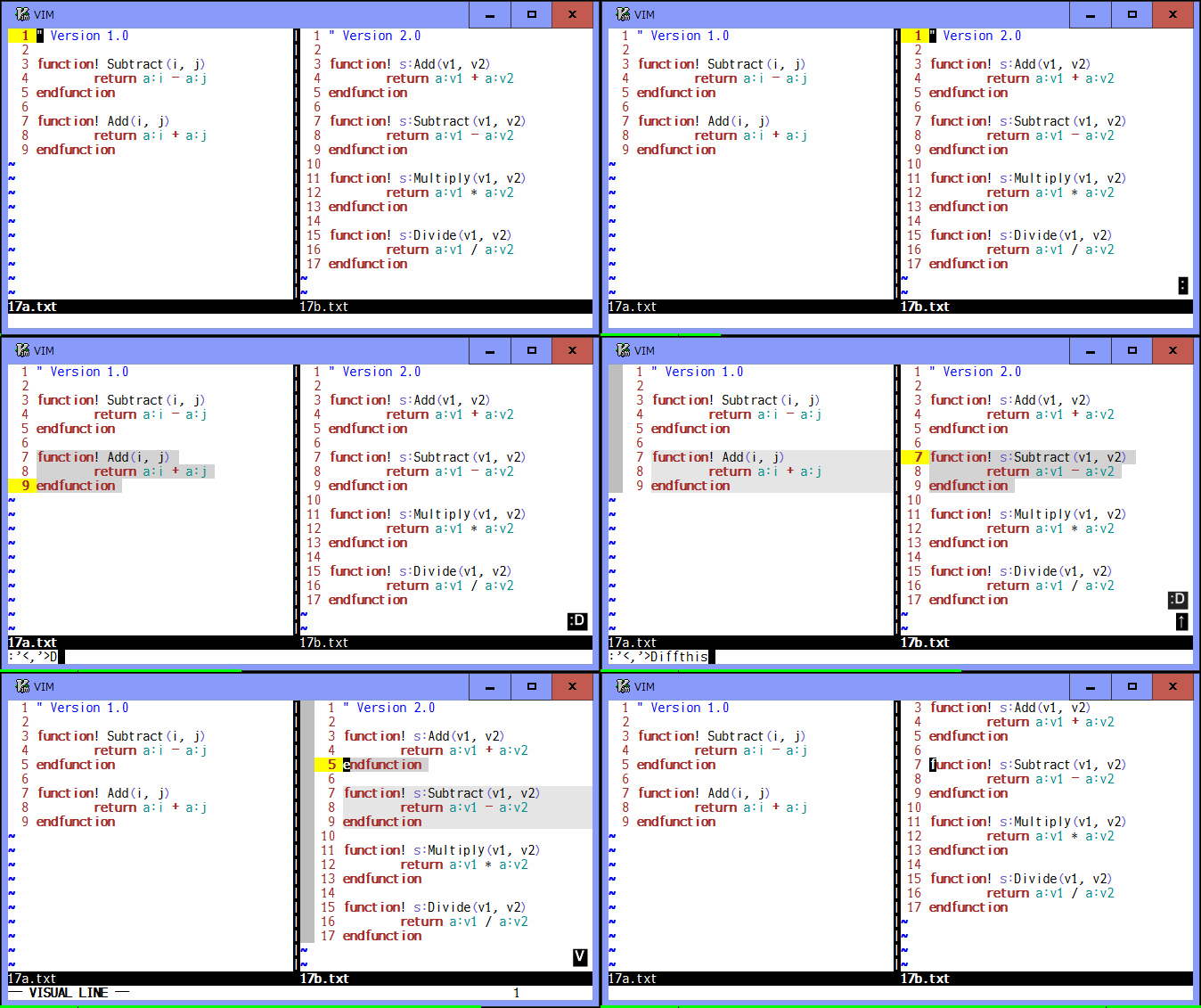
There are :Diffthis, :Diffoff, and :Diffupdate commands available.
You can use :Diffthis to specify a range of lines to be compared. And can
use :Diffoff to reset and :Diffupdate to update the differences.
Do not use vim original diff commands together with this plugin's ones. Try
:Diffoff! to reset all in a trouble.
If you have installed diffchar.vim plugin, you can see the exact differences and use their options and keymaps.
Commands
-
:[range]Diffthis- Select a range of lines with
[range](default: current line) and make the current window diff mode. The selected lines are highlighted inhl-CursorColumn. Shortly after the two separate windows become diff mode,:Diffthisshows the differences for selected lines in each window. It is also possible to select two ranges of lines in the same window. In that case,:Diffthisopens a temporary new window at above or below (or left or right if "vertical" is included in the 'diffopt' option) of the current one, copies selected lines to it, and shows the difference with source window.
- Select a range of lines with
-
:Diffoff[!]- Clear the selected range of lines and reset diff mode for the current
window. If
!flag is specified, clear and reset for all windows in the current tab page. The temporary window created by:Diffthiswill be closed.
- Clear the selected range of lines and reset diff mode for the current
window. If
-
:Diffupdate- Update the differences for the selected range of lines in the current tab page.
Demo
Selecting the Visual, motion, and text object area
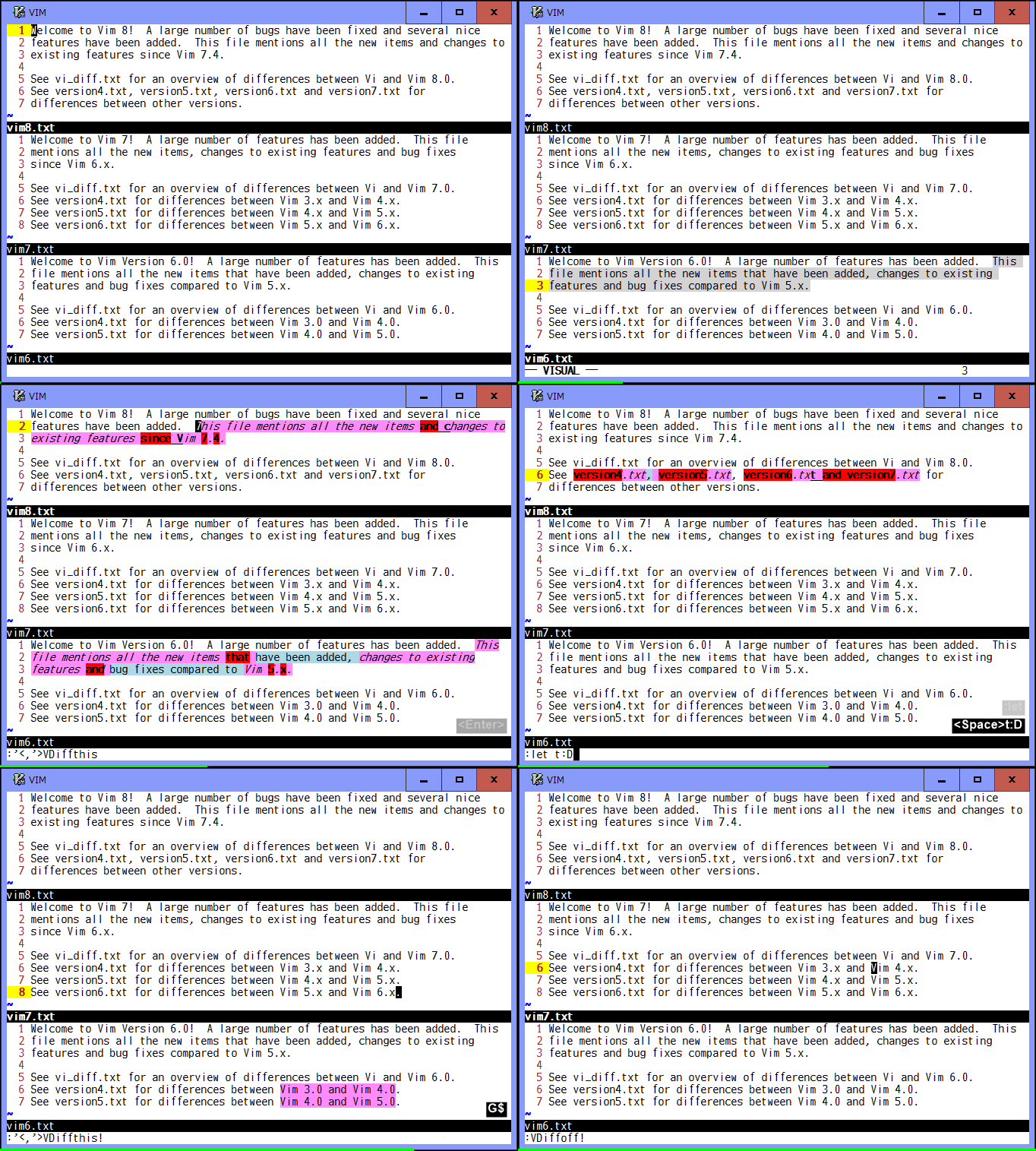
There are :VDiffthis, :VDiffoff, and :VDiffupdate commands available.
You can use :VDiffthis to specify the Visual area to be compared. And can
use :VDiffoff to reset and :VDiffupdate to update the differences. Note
that those commands work in non-diff normal mode.
While showing the exact differences, when the cursor is moved on a difference
unit, you can see its corresponding unit highlighted in hl-Cursor, according
to the g:DiffPairVisible option.
You can use ]b or ]e to jump cursor to start or end position of the next
difference unit, and [b or [e to the start or end position of the previous
unit.
This plugin provides the corresponding mappings to those commands, such as
<Plug>(VDiffthis) and <Plug>(VDiffoff). As a default, <Leader>t and <Leader>o
keys are mapped to them and, for example, v$<Leader>t selects the text from
the current cursor position to the end of line and 3vis<Leader>t selects the
next 3 sentences as the Visual area. And <Leader>o clears the selected area.
In addition to selecting the Visual area, you can use <Leader>t as a custom
operator followed by a motion or a text object command, which will set those
selected area as the Visual one and then call :VDiffthis. For example,
<Leader>t$ and <Leader>t3is work same as above examples.
Commands
-
:[range]VDiffthis[!]- Select the characterwise, linewise, or blockwise Visual area most recently
used in the current window. If
[range](default: current line) is not specified as'<,'>and different from the last Visual area, those specified lines are selected as linewise area instead. The selected area is highlighted inhl-DiffChangewith "italic", and then will be compared as a single combined line. Shortly after the two area are selected,:VDiffthiscompares them based on theg:DiffUnitoption and "icase", "iwhite", "iwhiteall" and "iwhiteeol" flags in the 'diffopt' option. In addition, when "indent-heuristic" is specified, positioning of the added/deleted diff units is adjusted to make them easier to read. Then their differences are shown using theg:DiffColorsoption. It is also possible to select two area in the same window. If!flag is specified, each line is separately compared, which would be useful particular for columns in a table on blockwise area. Redundant lines in the line-by-line comparison are shown with "strikethrough".
- Select the characterwise, linewise, or blockwise Visual area most recently
used in the current window. If
-
:VDiffoff[!]- Clear the selected area in the current window and reset the differences.
When there are two area selected in the same window, both area will be
cleared. But either one is cleared if the current cursor is located within
it. If
!flag is specified, clear and reset all area in the current tab page.
- Clear the selected area in the current window and reset the differences.
When there are two area selected in the same window, both area will be
cleared. But either one is cleared if the current cursor is located within
it. If
-
:VDiffupdate- Compare the selected area again and show their differences in the current
tab page, when you make changes to the selected area or you want to change
the
g:DiffUnitorg:DiffColorsoption or some flags in the 'diffopt' option.
- Compare the selected area again and show their differences in the current
tab page, when you make changes to the selected area or you want to change
the
Options
These options are same as those used in the diffchar.vim plugin.
-
g:DiffUnit,t:DiffUnit: A type of difference unitValue Description 'Char' any single character 'Word1' \w\+word and any\Wsingle character (default)'Word2' non-space and space words 'Word3' \<or\>character class boundaries (set byiskeywordoption)'word' see word'WORD' see WORD'[{del}]' one or more diff unit delimiters (e.g. "[,:\t<>]") '/{pat}/' a pattern to split into diff units (e.g. '/.{4}\zs/') -
g:DiffColors,t:DiffColors: Matching colors for changed units (hl-DiffAddfor added units)Value Description 0 hl-DiffText(default)1 hl-DiffText+ a few (3, 4, ...) highlight groups2 hl-DiffText+ several (7, 8, ...) highlight groups3 hl-DiffText+ many (11, 12, ...) highlight groups100 all available highlight groups in random order [{hlg}] a list of your favorite highlight groups -
g:DiffPairVisible,t:DiffPairVisible: Visibility of corresponding diff unitsValue Description 0 disable 1 highlight with hl-Cursor(default)
Keymaps
These keymaps are same as those used in the diffchar.vim plugin.
| Mapping | Default Key | Description |
|---|---|---|
<Plug>JumpDiffCharPrevStart | [b | Jump cursor to the start position of the previous diff unit |
<Plug>JumpDiffCharNextStart | ]b | Jump cursor to the start position of the next diff unit |
<Plug>JumpDiffCharPrevEnd | [e | Jump cursor to the end position of the previous diff unit |
<Plug>JumpDiffCharNextEnd | ]e | Jump cursor to the end position of the next diff unit |
These keymaps are used only in this plugin.
| Mapping | Default Key | Description |
|---|---|---|
<Plug>(VDiffthis) | <Leader>t | * Call :VDiffthis for the visually selected area* Set the selected motion and text object area as the Visual one and then call :VDiffthis |
<Plug>(VDiffthis!) | <Leader>T | * Call :VDiffthis! for the visually selected area* Set the selected motion and text object area as the Visual one and then call :VDiffthis! |
<Plug>(VDiffoff) | <Leader>o | Call :VDiffoff in the current window |
<Plug>(VDiffoff!) | <Leader>O | Call :VDiffoff! in the current tab page |
<Plug>(VDiffupdate) | <Leader>u | Call :VDiffupdate in the current tab page |
Demo
Contributors

24 commits
Similar repos


Languages
Vim Script
100.0%
A range and area selectable diffthis to compare partially
See the codeREADME
spotdiff.vim
A range and area selectable :diffthis to compare partially
Vim provides a diff mode which is useful to see differences between windows. However, it always shows the differences for entire line. And it can not compare a sequence of words within a line, and sentences and paragraphs which are separated into several lines.
To compare partially everywhere in any window, this plugin provides two groups
of commands, which are alternative to vim original :diffthis, :diffoff,
and :diffupdate. One is for which allows to select a range of lines in diff
mode. Another is for which allows to select the Visual, motion, and text
object area in non-diff normal mode. Both work independently in a tab page.
Selecting a range of lines
There are :Diffthis, :Diffoff, and :Diffupdate commands available.
You can use :Diffthis to specify a range of lines to be compared. And can
use :Diffoff to reset and :Diffupdate to update the differences.
Do not use vim original diff commands together with this plugin's ones. Try
:Diffoff! to reset all in a trouble.
If you have installed diffchar.vim plugin, you can see the exact differences and use their options and keymaps.
Commands
-
:[range]Diffthis- Select a range of lines with
[range](default: current line) and make the current window diff mode. The selected lines are highlighted inhl-CursorColumn. Shortly after the two separate windows become diff mode,:Diffthisshows the differences for selected lines in each window. It is also possible to select two ranges of lines in the same window. In that case,:Diffthisopens a temporary new window at above or below (or left or right if "vertical" is included in the 'diffopt' option) of the current one, copies selected lines to it, and shows the difference with source window.
- Select a range of lines with
-
:Diffoff[!]- Clear the selected range of lines and reset diff mode for the current
window. If
!flag is specified, clear and reset for all windows in the current tab page. The temporary window created by:Diffthiswill be closed.
- Clear the selected range of lines and reset diff mode for the current
window. If
-
:Diffupdate- Update the differences for the selected range of lines in the current tab page.
Demo
Selecting the Visual, motion, and text object area
There are :VDiffthis, :VDiffoff, and :VDiffupdate commands available.
You can use :VDiffthis to specify the Visual area to be compared. And can
use :VDiffoff to reset and :VDiffupdate to update the differences. Note
that those commands work in non-diff normal mode.
While showing the exact differences, when the cursor is moved on a difference
unit, you can see its corresponding unit highlighted in hl-Cursor, according
to the g:DiffPairVisible option.
You can use ]b or ]e to jump cursor to start or end position of the next
difference unit, and [b or [e to the start or end position of the previous
unit.
This plugin provides the corresponding mappings to those commands, such as
<Plug>(VDiffthis) and <Plug>(VDiffoff). As a default, <Leader>t and <Leader>o
keys are mapped to them and, for example, v$<Leader>t selects the text from
the current cursor position to the end of line and 3vis<Leader>t selects the
next 3 sentences as the Visual area. And <Leader>o clears the selected area.
In addition to selecting the Visual area, you can use <Leader>t as a custom
operator followed by a motion or a text object command, which will set those
selected area as the Visual one and then call :VDiffthis. For example,
<Leader>t$ and <Leader>t3is work same as above examples.
Commands
-
:[range]VDiffthis[!]- Select the characterwise, linewise, or blockwise Visual area most recently
used in the current window. If
[range](default: current line) is not specified as'<,'>and different from the last Visual area, those specified lines are selected as linewise area instead. The selected area is highlighted inhl-DiffChangewith "italic", and then will be compared as a single combined line. Shortly after the two area are selected,:VDiffthiscompares them based on theg:DiffUnitoption and "icase", "iwhite", "iwhiteall" and "iwhiteeol" flags in the 'diffopt' option. In addition, when "indent-heuristic" is specified, positioning of the added/deleted diff units is adjusted to make them easier to read. Then their differences are shown using theg:DiffColorsoption. It is also possible to select two area in the same window. If!flag is specified, each line is separately compared, which would be useful particular for columns in a table on blockwise area. Redundant lines in the line-by-line comparison are shown with "strikethrough".
- Select the characterwise, linewise, or blockwise Visual area most recently
used in the current window. If
-
:VDiffoff[!]- Clear the selected area in the current window and reset the differences.
When there are two area selected in the same window, both area will be
cleared. But either one is cleared if the current cursor is located within
it. If
!flag is specified, clear and reset all area in the current tab page.
- Clear the selected area in the current window and reset the differences.
When there are two area selected in the same window, both area will be
cleared. But either one is cleared if the current cursor is located within
it. If
-
:VDiffupdate- Compare the selected area again and show their differences in the current
tab page, when you make changes to the selected area or you want to change
the
g:DiffUnitorg:DiffColorsoption or some flags in the 'diffopt' option.
- Compare the selected area again and show their differences in the current
tab page, when you make changes to the selected area or you want to change
the
Options
These options are same as those used in the diffchar.vim plugin.
-
g:DiffUnit,t:DiffUnit: A type of difference unitValue Description 'Char' any single character 'Word1' \w\+word and any\Wsingle character (default)'Word2' non-space and space words 'Word3' \<or\>character class boundaries (set byiskeywordoption)'word' see word'WORD' see WORD'[{del}]' one or more diff unit delimiters (e.g. "[,:\t<>]") '/{pat}/' a pattern to split into diff units (e.g. '/.{4}\zs/') -
g:DiffColors,t:DiffColors: Matching colors for changed units (hl-DiffAddfor added units)Value Description 0 hl-DiffText(default)1 hl-DiffText+ a few (3, 4, ...) highlight groups2 hl-DiffText+ several (7, 8, ...) highlight groups3 hl-DiffText+ many (11, 12, ...) highlight groups100 all available highlight groups in random order [{hlg}] a list of your favorite highlight groups -
g:DiffPairVisible,t:DiffPairVisible: Visibility of corresponding diff unitsValue Description 0 disable 1 highlight with hl-Cursor(default)
Keymaps
These keymaps are same as those used in the diffchar.vim plugin.
| Mapping | Default Key | Description |
|---|---|---|
<Plug>JumpDiffCharPrevStart | [b | Jump cursor to the start position of the previous diff unit |
<Plug>JumpDiffCharNextStart | ]b | Jump cursor to the start position of the next diff unit |
<Plug>JumpDiffCharPrevEnd | [e | Jump cursor to the end position of the previous diff unit |
<Plug>JumpDiffCharNextEnd | ]e | Jump cursor to the end position of the next diff unit |
These keymaps are used only in this plugin.
| Mapping | Default Key | Description |
|---|---|---|
<Plug>(VDiffthis) | <Leader>t | * Call :VDiffthis for the visually selected area* Set the selected motion and text object area as the Visual one and then call :VDiffthis |
<Plug>(VDiffthis!) | <Leader>T | * Call :VDiffthis! for the visually selected area* Set the selected motion and text object area as the Visual one and then call :VDiffthis! |
<Plug>(VDiffoff) | <Leader>o | Call :VDiffoff in the current window |
<Plug>(VDiffoff!) | <Leader>O | Call :VDiffoff! in the current tab page |
<Plug>(VDiffupdate) | <Leader>u | Call :VDiffupdate in the current tab page |
Demo
Similar repos
Contributors
24 commits
Languages
Vim Script
100.0%