Android boilerplate app that showcases architecture and libraries used at ribot
See the codeThank you for your interest in ribot’s development work. Unfortunately there are no current plans to make any changes to this project in the near future, and it is not being maintained or updated. We hope you still find this a useful resource and you can check out the newest recommendations in Android Jetpack for more ideas!
Sample Android app that we use at ribot as a reference for new Android projects. It demonstrates the architecture, tools and guidelines that we use when developing for the Android platform (https://github.com/ribot/android-guidelines)
Libraries and tools included:
This project follows ribot's Android architecture guidelines that are based on MVP (Model View Presenter). Read more about them here.

Imagine you have to implement a sign in screen.
ui called signinActivitySignIn. You could also use a Fragment.SignInMvpView that extends MvpView. Add the methods that you think will be necessary, e.g. showSignInSuccessful()SignInPresenter class that extends BasePresenter<SignInMvpView>SignInPresenter that your Activity requires to perform the necessary actions, e.g. signIn(String email). Once the sign in action finishes you should call getMvpView().showSignInSuccessful().SignInPresenterTestand write unit tests for signIn(email). Remember to mock the SignInMvpView and also the DataManager.ActivitySignIn implement SignInMvpView and implement the required methods like showSignInSuccessful()SignInPresenter and call presenter.attachView(this) from onCreate and presenter.detachView() from onDestroy(). Also, set up a click listener in your button that calls presenter.signIn(email).This project integrates a combination of unit tests, functional test and code analysis tools.
To run unit tests on your machine:
./gradlew test
To run functional tests on connected devices:
./gradlew connectedAndroidTest
Note: For Android Studio to use syntax highlighting for Automated tests and Unit tests you must switch the Build Variant to the desired mode.
The following code analysis tools are set up on this project:
./gradlew pmd
./gradlew findbugs
./gradlew checkstyle
To ensure that your code is valid and stable use check:
./gradlew check
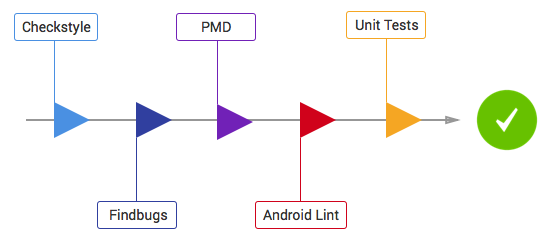
This will run all the code analysis tools and unit tests in the following order:
The project can be distributed using either Crashlytics or the Google Play Store.
We use the Gradle Play Publisher plugin. Once set up correctly, you will be able to push new builds to the Alpha, Beta or production channels like this
./gradlew publishApkRelease
Read plugin documentation for more info.
You can also use Fabric's Crashlytics for distributing beta releases. Remember to add your fabric
account details to app/src/fabric.properties.
To upload a release build to Crashlytics run:
./gradlew assembleRelease crashlyticsUploadDistributionRelease
To quickly start a new project from this boilerplate follow the next steps:
app/build.gradle file, packageName and testInstrumentationRunner.src/main/AndroidManifest.xml and src/debug/AndroidManifest.xml.app/build.gradle add the signing config to enable release versions.app/build.gradleproguard-rules.pro to keep models (see TODO in file) and add extra rules to file if needed. Copyright 2015 Ribot Ltd.
Licensed under the Apache License, Version 2.0 (the "License");
you may not use this file except in compliance with the License.
You may obtain a copy of the License at
http://www.apache.org/licenses/LICENSE-2.0
Unless required by applicable law or agreed to in writing, software
distributed under the License is distributed on an "AS IS" BASIS,
WITHOUT WARRANTIES OR CONDITIONS OF ANY KIND, either express or implied.
See the License for the specific language governing permissions and
limitations under the License.
352 followers · starred Nov 2016
261 followers · starred Jan 2016
34 followers · starred Mar 2017
82 followers · starred Mar 2019
Android boilerplate app that showcases architecture and libraries used at ribot
See the codeThank you for your interest in ribot’s development work. Unfortunately there are no current plans to make any changes to this project in the near future, and it is not being maintained or updated. We hope you still find this a useful resource and you can check out the newest recommendations in Android Jetpack for more ideas!
Sample Android app that we use at ribot as a reference for new Android projects. It demonstrates the architecture, tools and guidelines that we use when developing for the Android platform (https://github.com/ribot/android-guidelines)
Libraries and tools included:
This project follows ribot's Android architecture guidelines that are based on MVP (Model View Presenter). Read more about them here.
Imagine you have to implement a sign in screen.
ui called signinActivitySignIn. You could also use a Fragment.SignInMvpView that extends MvpView. Add the methods that you think will be necessary, e.g. showSignInSuccessful()SignInPresenter class that extends BasePresenter<SignInMvpView>SignInPresenter that your Activity requires to perform the necessary actions, e.g. signIn(String email). Once the sign in action finishes you should call getMvpView().showSignInSuccessful().SignInPresenterTestand write unit tests for signIn(email). Remember to mock the SignInMvpView and also the DataManager.ActivitySignIn implement SignInMvpView and implement the required methods like showSignInSuccessful()SignInPresenter and call presenter.attachView(this) from onCreate and presenter.detachView() from onDestroy(). Also, set up a click listener in your button that calls presenter.signIn(email).This project integrates a combination of unit tests, functional test and code analysis tools.
To run unit tests on your machine:
./gradlew test
To run functional tests on connected devices:
./gradlew connectedAndroidTest
Note: For Android Studio to use syntax highlighting for Automated tests and Unit tests you must switch the Build Variant to the desired mode.
The following code analysis tools are set up on this project:
./gradlew pmd
./gradlew findbugs
./gradlew checkstyle
To ensure that your code is valid and stable use check:
./gradlew check
This will run all the code analysis tools and unit tests in the following order:
The project can be distributed using either Crashlytics or the Google Play Store.
We use the Gradle Play Publisher plugin. Once set up correctly, you will be able to push new builds to the Alpha, Beta or production channels like this
./gradlew publishApkRelease
Read plugin documentation for more info.
You can also use Fabric's Crashlytics for distributing beta releases. Remember to add your fabric
account details to app/src/fabric.properties.
To upload a release build to Crashlytics run:
./gradlew assembleRelease crashlyticsUploadDistributionRelease
To quickly start a new project from this boilerplate follow the next steps:
app/build.gradle file, packageName and testInstrumentationRunner.src/main/AndroidManifest.xml and src/debug/AndroidManifest.xml.app/build.gradle add the signing config to enable release versions.app/build.gradleproguard-rules.pro to keep models (see TODO in file) and add extra rules to file if needed. Copyright 2015 Ribot Ltd.
Licensed under the Apache License, Version 2.0 (the "License");
you may not use this file except in compliance with the License.
You may obtain a copy of the License at
http://www.apache.org/licenses/LICENSE-2.0
Unless required by applicable law or agreed to in writing, software
distributed under the License is distributed on an "AS IS" BASIS,
WITHOUT WARRANTIES OR CONDITIONS OF ANY KIND, either express or implied.
See the License for the specific language governing permissions and
limitations under the License.
352 followers · starred Nov 2016
261 followers · starred Jan 2016
34 followers · starred Mar 2017
82 followers · starred Mar 2019