
See what people are saying
README
EdgeVolume
Visit the website · Download for Mac
Control your Mac's system volume by sliding one finger along the physical edge of its trackpad, wherever the cursor is on screen.
EdgeVolume is an experimental desktop utility built with Tauri 2, Rust, React, and TypeScript. A small floating indicator shows the current volume and whether it is increasing or decreasing.
Platform status: The macOS prototype is implemented and has been tested on an Apple Silicon Mac. Windows development has started: source builds include audio controls and read-only touchpad diagnostics. Windows physical edge gestures are not implemented or hardware-validated yet.
See how it works
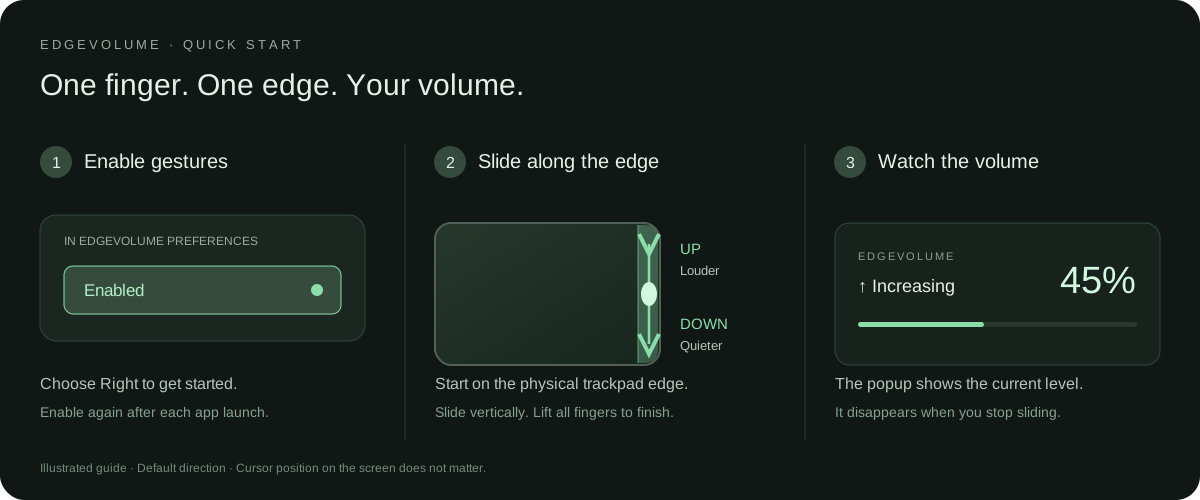
1. Enable gestures. Open EdgeVolume and click Enable gestures. Start with the default Right edge.
2. Slide on the trackpad itself. Place one finger inside the rightmost strip and slide up to increase volume or down to decrease it. Your cursor can be anywhere on the screen. Lift your finger when you are done. This guide shows the default direction; Reverse direction swaps up and down.
3. Watch the popup. It shows the actual volume percentage and whether volume is increasing or decreasing, then disappears after you stop. The guide above is an illustration; the image below is a screenshot of the real Mac app.
Choose your edge and sensitivity
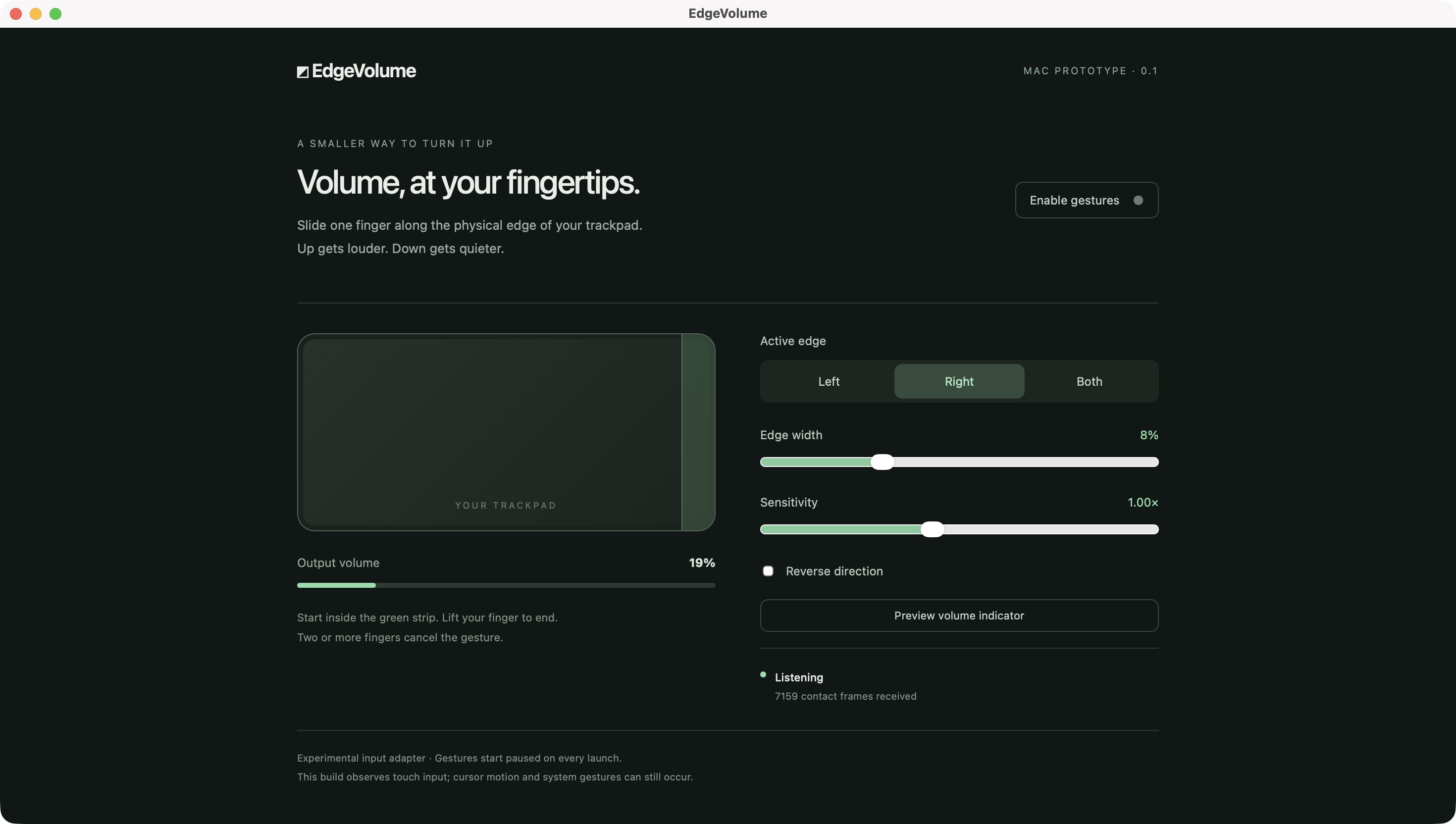
The green strip marks the active part of the physical trackpad. Choose Left, Right, or Both, adjust Edge width if the strip feels too narrow, and adjust Sensitivity to change how quickly volume moves. The screenshot shows gestures paused; click Enable gestures to start.
For laptop users: the easiest way to use it
MacBook users — no developer tools needed
- Open the Mac downloads.
- Check Apple menu → About This Mac. For an M-series chip, download
EdgeVolume-v0.1.0-apple-silicon.dmg. For an Intel processor, downloadEdgeVolume-v0.1.0-intel.dmg. - Open the downloaded disk image and drag EdgeVolume onto Applications.
- Open EdgeVolume from Applications and click Enable gestures.
- Slide one finger up or down along the far-right edge of the trackpad. The floating popup shows your volume percentage.
Rust, Node.js, npm, Xcode, and Terminal are not needed to use the downloaded app. Requires macOS 15 or newer. ZIP downloads containing the same app are also available.
This is an early-access release: the apps are ad-hoc signed, not Apple Developer ID signed or notarized. macOS may require your approval before the first launch. If you choose to run it, follow Apple's instructions for an app from an unidentified developer. Do not disable your Mac's security protections.
If macOS blocks the first launch
Only approve the app if you downloaded it from this repository's release page and trust it.
- Open the DMG and drag EdgeVolume into Applications.
- Open EdgeVolume from Applications. If macOS blocks it, click Done.
- Open System Settings → Privacy & Security.
- Scroll down and click Open Anyway beside the EdgeVolume message.
- Confirm with your password or Touch ID if prompted, then click Open.
This approves that app for future launches. The Open Anyway option appears after you have tried opening the blocked app. See Apple's official instructions. If the warning says the app is damaged or will harm your computer, stop and check the download rather than treating it as a normal first-launch approval.
You can close the settings window and keep using the gesture. Click the EdgeVolume menu bar icon to open preferences, pause gestures, or quit. After reopening the app, enable gestures again.
Apple Silicon hardware input was tested on macOS 27.0.1. Intel builds are compiled in GitHub Actions; Intel trackpad behavior and other macOS versions still need hands-on validation.
Want to change the code? The developer setup below is separate from installing the downloaded app.
Windows laptop users — development download
Download the Windows development ZIP · Verified build and artifacts
This is an experimental audio and touchpad diagnostic build. Physical trackpad edge gestures are not enabled yet. It includes system volume read/write, a volume indicator preview, explicit ±5 percentage point test buttons, and background touchpad report counts.
- Sign in to GitHub and open the Windows development ZIP link above. If needed, open the verified build page and download EdgeVolume-windows-development-x64 under Artifacts.
- Right-click the downloaded ZIP and choose Extract All.
- On a Windows 10/11 x64 laptop, open EdgeVolume_0.1.0_x64-setup.exe from the extracted folder and follow the installer.
- Open EdgeVolume from the Start menu. Click Preview volume indicator to check the popup without changing volume.
- Click Volume −5% or Volume +5% to test system audio. These buttons change volume by five percentage points, bounded to 0–100%.
- Move a finger on the trackpad and note HID reports received. Switch to Chrome, move your finger again, then return and check whether the count increased.
- Close Preferences to leave the app in the system tray. Use Quit EdgeVolume in its tray menu to exit.
You do not need Rust, Node.js, npm, or C++ developer tools. If WebView2 is missing, the installer uses Tauri's WebView2 bootstrapper, which may need an internet connection. The installer is unsigned, so Windows may show an unknown-publisher warning; only use a repository build you trust.
The linked development artifact expires on 21 October 2026 and GitHub requires sign-in to download it. After expiry, use a newer successful run in Windows development builds. These artifacts are for testing and are separate from supported public releases.
See the Windows read-only probe and tester checklist for reporting results. Increasing report counts do not yet prove physical finger coordinates or working edge gestures.
Features
- Choose the left edge, right edge, or both edges.
- Adjust the active strip width from 3% to 20% of the trackpad surface.
- Set gesture sensitivity and reverse the volume direction.
- See the actual output volume percentage in a floating, click-through indicator.
- Get Increasing, Decreasing, Maximum volume, Muted, or Volume unchanged feedback.
- Preview the indicator without changing volume.
- View live trackpad contact positions and input frame counts in preferences.
- Save edge and sensitivity settings between launches.
- Open preferences, pause gestures, or quit from the menu bar.
Developer setup on macOS
Requirements
- Node.js 20 or newer and npm.
- A stable Rust toolchain installed with rustup.
- Xcode Command Line Tools. Install them with
xcode-select --installif needed. - A supported Apple multitouch trackpad and an output device with adjustable system volume.
Release builds target macOS 15 or newer. Hardware input was validated on Apple Silicon, macOS 27.0.1; other hardware and OS versions still need validation. The original PRD's macOS 12+ target is deferred.
Install and run
git clone https://github.com/reveuse12/edge-volume.git
cd edge-volume
npm ci
npm run tauri dev
This launches the native desktop app and its development frontend. Running npm run dev alone opens the preferences frontend without access to native trackpad input or system volume.
Use the gesture
- Open preferences and choose an active edge. The default is the rightmost 8% of the trackpad.
- Click Enable gestures. Gestures start paused on each launch while the input adapter is experimental.
- Place one finger inside the highlighted strip and slide vertically. Up increases volume; down decreases it, unless direction is reversed.
- Lift your finger to finish. The volume indicator disappears 1.4 seconds after the last adjustment.
A normal edge swipe needs no keyboard key or stationary hold. Require Option key is an optional extra safeguard. Starting outside the strip, sideways movement, multiple fingers, releasing Option when required, interrupted active input, changing fingers, or a large coordinate jump cancels the gesture until all fingers lift. Volume changes are limited to 60 percentage points per second. Preferences show why a touch was rejected.
Closing preferences keeps EdgeVolume running in the menu bar. Choose Quit EdgeVolume from its menu to exit.
Volume indicator
The indicator appears near the lower-right corner of the display associated with its window. On macOS a native nonactivating panel draws the indicator directly, independently of the preferences WebView. It is configured to join desktop Spaces and other apps' fullscreen Spaces, stay visible when EdgeVolume is inactive, and display above ordinary app windows. It follows the display containing the cursor. It stays above ordinary windows, does not take keyboard focus, and ignores clicks. It reads volume back from the audio device after adjustments, so the percentage reflects the reported output level.
Click Preview volume indicator in preferences to show your current volume for five seconds without changing it.
Build and check
# TypeScript check and production frontend build
npm run build

# Gesture engine tests
cargo test --locked --manifest-path src-tauri/Cargo.toml

# Package the desktop application
npm run tauri build
The macOS app is generated at:
src-tauri/target/release/bundle/macos/EdgeVolume.app
For a development bundle, run npm run tauri build -- --debug. Its app is under src-tauri/target/debug/bundle/macos/. Builds use an ad-hoc signature. Developer ID signing and Apple notarization are not configured.
Read-only hardware probe
To check native trackpad input and audio access independently of the UI:
clang tools/mac-probe.c src-tauri/native/mac.c \
  -framework CoreFoundation -framework CoreAudio -framework CoreGraphics \
  -o /tmp/edgevolume-probe
/tmp/edgevolume-probe
Touch the trackpad during the five-second probe. It reports adapter startup, the audio read status, and aggregate frame counts. It does not change volume.
How it works
Physical trackpad contacts
    → macOS native input adapter
    → Rust edge gesture state machine
    → CoreAudio default output volume
    → React preferences and floating indicator
The macOS adapter dynamically loads Apple's private MultitouchSupport framework to receive normalized finger coordinates. Ordinary cursor or scroll events cannot identify the physical trackpad edge.
The Rust engine requires a single contact that begins inside an active edge, applies an activation deadzone, rejects invalid gestures, and clamps volume to 0–100%. CoreAudio reads and writes the current default output device. Unsupported audio outputs temporarily pause gestures; the enabled preference is kept so an adjustable output can resume automatically. Output changes cancel the current touch, and volume writes stay bound to the output where the gesture began.
Settings are stored in Tauri's application configuration directory as settings.json. Trackpad contact data is held in memory; the app does not send it over the network or write it to logs.
Project structure
| Path | Purpose |
|---|---|
src/main.tsx | Preferences and volume indicator UI |
src/style.css | UI styling |
src-tauri/src/gesture.rs | Gesture recognition and tests |
src-tauri/src/main.rs | Desktop lifecycle, settings, commands, tray, and indicator |
src-tauri/native/mac.c | macOS physical contact and CoreAudio adapters |
src-tauri/native/windows.cpp | Windows endpoint audio and background HID diagnostics |
src-tauri/native/overlay.m | macOS cross-app and fullscreen overlay behavior |
tools/windows-probe.cpp | Read-only Windows hardware diagnostic |
tools/mac-probe.c | Read-only hardware diagnostic |
PRD_ Cross-Platform Trackpad Edge Volume Control.md | Requirements and implementation clarifications |
Current limitations
- Private macOS API: OS updates can break the undocumented input ABI. Mac App Store compatibility is not claimed.
- System gestures remain active: The prototype observes touches; it does not suppress cursor motion or native trackpad gestures during volume adjustment.
- One trackpad per session: The adapter selects a trackpad at startup. Restart after connecting or reconnecting devices.
- Windows is pending: Windows audio and background HID diagnostics are implemented for development. Contact decoding and physical edge gestures remain pending hardware validation.
- Release features are pending: No launch at login, fullscreen/app exclusions, mute shortcut, or updater.
- Performance targets remain unverified: Memory, latency, installer size, older macOS versions, and Intel compatibility still need measurement and hardware testing.
- Fullscreen behavior is unverified: Cross-app and fullscreen window behavior is configured explicitly on macOS; coverage across fullscreen apps, Spaces, and multiple monitors still needs hands-on testing.
The observation-only input adapter does not currently request Accessibility or Input Monitoring permission. A future input suppression adapter will need its own permission handling and validation.
Validation to date
On 7 October 2026:
- Production frontend build and TypeScript checks passed.
- Sixteen Rust tests passed for gesture rejection, intentional activation, audio recovery, and the one-instance lock.
- The debug macOS app bundled and opened successfully.
- The hardware probe received real trackpad contacts and read system volume.
- Desktop preferences displayed live input and output volume.
- The native macOS indicator was visually verified with Preferences closed and Chrome taking focus. Fullscreen and multi-monitor behavior still need wider hardware testing.
- Windows x64 CI compiled the native adapter and passed the shared gesture tests and read-only adapter self-check.
- Windows CI built an NSIS development installer and verified that the app and probe do not import external MSVC runtime DLLs.
- The Windows development UI was checked with simulated status data; real Windows audio, background reports, and physical contact decoding still need laptop testing.
These checks establish a working Mac prototype, not cross-platform release readiness.
Next milestones
- Validate edge gestures, accidental activation, sleep/wake, reconnects, and audio device changes on more Macs.
- Add permission-gated suppression of pointer and scroll events during active volume gestures.
- Implement and validate Windows Precision Touchpad and audio adapters.
- Add launch at login, exclusions, and optional mute controls.
- Profile resource usage and prepare signed release packages.
Technical references
Publishing Mac downloads
The .github/workflows/release.yml workflow builds and tests separate Apple Silicon and Intel apps when a version tag is pushed. It verifies each app's signature and architecture, packages a DMG and ZIP, creates SHA-256 checksums, and publishes a GitHub prerelease only after both builds succeed.
To publish a new version, update the version in package.json, src-tauri/Cargo.toml, and src-tauri/tauri.conf.json, regenerate the lockfiles, update release notes and download links, then push the matching vX.Y.Z tag. No release signing secrets are required for the current ad-hoc builds. A smoother first-launch experience requires Apple Developer ID signing and notarization in a later release.
Duplicate app entries during local development
macOS app search can show more than one EdgeVolume entry when it finds multiple .app bundles. Developers may have a debug app, a release app, and a packaging test copy in src-tauri/target/, alongside the installed copy in /Applications.
These are separate files, not evidence that multiple app processes are running. For everyday use, open Finder → Applications → EdgeVolume. Build and test copies are not required by the installed app and can be moved to Trash when you no longer need them. Installing from the DMG alone does not create the debug or packaging test copies.
Accidental-swipe safeguards (latest source/local build)
These changes are in the development source; the original v0.1.0 macOS release DMG predates them.
- Start one finger on the selected edge and slide vertically. No hold or keyboard key is required by default. Enable Require Option key if you prefer extra protection. Lift all fingers after a rejected gesture.
- Use Pause in these apps to exclude games, drawing apps, or any open app where gestures are inconvenient. Refresh the list after opening another app.
- Sleep, session changes, app switches, and audio-output changes cancel an active gesture. Trackpad connections are watched and retried; Reconnect trackpad lets you retry manually. Hardware recovery still needs testing on more Macs.
- A second instance exits automatically. Launches still start paused.
- The indicator distinguishes actual mute from minimum volume. Unsupported audio outputs pause adjustment and recover when an adjustable output is available.
The app still observes input without suppressing pointer movement or macOS gestures. Avoid the feature in apps where those movements would be disruptive, or exclude them. The private macOS touch API and Windows contact decoding remain limitations.
Landing page
The website lives in landing/ and is hosted at edgevolume.vercel.app. Vercel uses landing as the project root and serves the static files without a build step. GitHub pushes to the production branch deploy the website.
To preview locally: python3 -m http.server 4173 --directory landing. The volume slider is an illustration and does not change system volume. Download links point to the existing early-access release; update them when a new release is published.
Similar repos


See what people are saying
README
EdgeVolume
Visit the website · Download for Mac
Control your Mac's system volume by sliding one finger along the physical edge of its trackpad, wherever the cursor is on screen.
EdgeVolume is an experimental desktop utility built with Tauri 2, Rust, React, and TypeScript. A small floating indicator shows the current volume and whether it is increasing or decreasing.
Platform status: The macOS prototype is implemented and has been tested on an Apple Silicon Mac. Windows development has started: source builds include audio controls and read-only touchpad diagnostics. Windows physical edge gestures are not implemented or hardware-validated yet.
See how it works
1. Enable gestures. Open EdgeVolume and click Enable gestures. Start with the default Right edge.
2. Slide on the trackpad itself. Place one finger inside the rightmost strip and slide up to increase volume or down to decrease it. Your cursor can be anywhere on the screen. Lift your finger when you are done. This guide shows the default direction; Reverse direction swaps up and down.
3. Watch the popup. It shows the actual volume percentage and whether volume is increasing or decreasing, then disappears after you stop. The guide above is an illustration; the image below is a screenshot of the real Mac app.
Choose your edge and sensitivity
The green strip marks the active part of the physical trackpad. Choose Left, Right, or Both, adjust Edge width if the strip feels too narrow, and adjust Sensitivity to change how quickly volume moves. The screenshot shows gestures paused; click Enable gestures to start.
For laptop users: the easiest way to use it
MacBook users — no developer tools needed
- Open the Mac downloads.
- Check Apple menu → About This Mac. For an M-series chip, download
EdgeVolume-v0.1.0-apple-silicon.dmg. For an Intel processor, downloadEdgeVolume-v0.1.0-intel.dmg. - Open the downloaded disk image and drag EdgeVolume onto Applications.
- Open EdgeVolume from Applications and click Enable gestures.
- Slide one finger up or down along the far-right edge of the trackpad. The floating popup shows your volume percentage.
Rust, Node.js, npm, Xcode, and Terminal are not needed to use the downloaded app. Requires macOS 15 or newer. ZIP downloads containing the same app are also available.
This is an early-access release: the apps are ad-hoc signed, not Apple Developer ID signed or notarized. macOS may require your approval before the first launch. If you choose to run it, follow Apple's instructions for an app from an unidentified developer. Do not disable your Mac's security protections.
If macOS blocks the first launch
Only approve the app if you downloaded it from this repository's release page and trust it.
- Open the DMG and drag EdgeVolume into Applications.
- Open EdgeVolume from Applications. If macOS blocks it, click Done.
- Open System Settings → Privacy & Security.
- Scroll down and click Open Anyway beside the EdgeVolume message.
- Confirm with your password or Touch ID if prompted, then click Open.
This approves that app for future launches. The Open Anyway option appears after you have tried opening the blocked app. See Apple's official instructions. If the warning says the app is damaged or will harm your computer, stop and check the download rather than treating it as a normal first-launch approval.
You can close the settings window and keep using the gesture. Click the EdgeVolume menu bar icon to open preferences, pause gestures, or quit. After reopening the app, enable gestures again.
Apple Silicon hardware input was tested on macOS 27.0.1. Intel builds are compiled in GitHub Actions; Intel trackpad behavior and other macOS versions still need hands-on validation.
Want to change the code? The developer setup below is separate from installing the downloaded app.
Windows laptop users — development download
Download the Windows development ZIP · Verified build and artifacts
This is an experimental audio and touchpad diagnostic build. Physical trackpad edge gestures are not enabled yet. It includes system volume read/write, a volume indicator preview, explicit ±5 percentage point test buttons, and background touchpad report counts.
- Sign in to GitHub and open the Windows development ZIP link above. If needed, open the verified build page and download EdgeVolume-windows-development-x64 under Artifacts.
- Right-click the downloaded ZIP and choose Extract All.
- On a Windows 10/11 x64 laptop, open EdgeVolume_0.1.0_x64-setup.exe from the extracted folder and follow the installer.
- Open EdgeVolume from the Start menu. Click Preview volume indicator to check the popup without changing volume.
- Click Volume −5% or Volume +5% to test system audio. These buttons change volume by five percentage points, bounded to 0–100%.
- Move a finger on the trackpad and note HID reports received. Switch to Chrome, move your finger again, then return and check whether the count increased.
- Close Preferences to leave the app in the system tray. Use Quit EdgeVolume in its tray menu to exit.
You do not need Rust, Node.js, npm, or C++ developer tools. If WebView2 is missing, the installer uses Tauri's WebView2 bootstrapper, which may need an internet connection. The installer is unsigned, so Windows may show an unknown-publisher warning; only use a repository build you trust.
The linked development artifact expires on 21 October 2026 and GitHub requires sign-in to download it. After expiry, use a newer successful run in Windows development builds. These artifacts are for testing and are separate from supported public releases.
See the Windows read-only probe and tester checklist for reporting results. Increasing report counts do not yet prove physical finger coordinates or working edge gestures.
Features
- Choose the left edge, right edge, or both edges.
- Adjust the active strip width from 3% to 20% of the trackpad surface.
- Set gesture sensitivity and reverse the volume direction.
- See the actual output volume percentage in a floating, click-through indicator.
- Get Increasing, Decreasing, Maximum volume, Muted, or Volume unchanged feedback.
- Preview the indicator without changing volume.
- View live trackpad contact positions and input frame counts in preferences.
- Save edge and sensitivity settings between launches.
- Open preferences, pause gestures, or quit from the menu bar.
Developer setup on macOS
Requirements
- Node.js 20 or newer and npm.
- A stable Rust toolchain installed with rustup.
- Xcode Command Line Tools. Install them with
xcode-select --installif needed. - A supported Apple multitouch trackpad and an output device with adjustable system volume.
Release builds target macOS 15 or newer. Hardware input was validated on Apple Silicon, macOS 27.0.1; other hardware and OS versions still need validation. The original PRD's macOS 12+ target is deferred.
Install and run
git clone https://github.com/reveuse12/edge-volume.git
cd edge-volume
npm ci
npm run tauri dev
This launches the native desktop app and its development frontend. Running npm run dev alone opens the preferences frontend without access to native trackpad input or system volume.
Use the gesture
- Open preferences and choose an active edge. The default is the rightmost 8% of the trackpad.
- Click Enable gestures. Gestures start paused on each launch while the input adapter is experimental.
- Place one finger inside the highlighted strip and slide vertically. Up increases volume; down decreases it, unless direction is reversed.
- Lift your finger to finish. The volume indicator disappears 1.4 seconds after the last adjustment.
A normal edge swipe needs no keyboard key or stationary hold. Require Option key is an optional extra safeguard. Starting outside the strip, sideways movement, multiple fingers, releasing Option when required, interrupted active input, changing fingers, or a large coordinate jump cancels the gesture until all fingers lift. Volume changes are limited to 60 percentage points per second. Preferences show why a touch was rejected.
Closing preferences keeps EdgeVolume running in the menu bar. Choose Quit EdgeVolume from its menu to exit.
Volume indicator
The indicator appears near the lower-right corner of the display associated with its window. On macOS a native nonactivating panel draws the indicator directly, independently of the preferences WebView. It is configured to join desktop Spaces and other apps' fullscreen Spaces, stay visible when EdgeVolume is inactive, and display above ordinary app windows. It follows the display containing the cursor. It stays above ordinary windows, does not take keyboard focus, and ignores clicks. It reads volume back from the audio device after adjustments, so the percentage reflects the reported output level.
Click Preview volume indicator in preferences to show your current volume for five seconds without changing it.
Build and check
# TypeScript check and production frontend build
npm run build

# Gesture engine tests
cargo test --locked --manifest-path src-tauri/Cargo.toml

# Package the desktop application
npm run tauri build
The macOS app is generated at:
src-tauri/target/release/bundle/macos/EdgeVolume.app
For a development bundle, run npm run tauri build -- --debug. Its app is under src-tauri/target/debug/bundle/macos/. Builds use an ad-hoc signature. Developer ID signing and Apple notarization are not configured.
Read-only hardware probe
To check native trackpad input and audio access independently of the UI:
clang tools/mac-probe.c src-tauri/native/mac.c \
  -framework CoreFoundation -framework CoreAudio -framework CoreGraphics \
  -o /tmp/edgevolume-probe
/tmp/edgevolume-probe
Touch the trackpad during the five-second probe. It reports adapter startup, the audio read status, and aggregate frame counts. It does not change volume.
How it works
Physical trackpad contacts
    → macOS native input adapter
    → Rust edge gesture state machine
    → CoreAudio default output volume
    → React preferences and floating indicator
The macOS adapter dynamically loads Apple's private MultitouchSupport framework to receive normalized finger coordinates. Ordinary cursor or scroll events cannot identify the physical trackpad edge.
The Rust engine requires a single contact that begins inside an active edge, applies an activation deadzone, rejects invalid gestures, and clamps volume to 0–100%. CoreAudio reads and writes the current default output device. Unsupported audio outputs temporarily pause gestures; the enabled preference is kept so an adjustable output can resume automatically. Output changes cancel the current touch, and volume writes stay bound to the output where the gesture began.
Settings are stored in Tauri's application configuration directory as settings.json. Trackpad contact data is held in memory; the app does not send it over the network or write it to logs.
Project structure
| Path | Purpose |
|---|---|
src/main.tsx | Preferences and volume indicator UI |
src/style.css | UI styling |
src-tauri/src/gesture.rs | Gesture recognition and tests |
src-tauri/src/main.rs | Desktop lifecycle, settings, commands, tray, and indicator |
src-tauri/native/mac.c | macOS physical contact and CoreAudio adapters |
src-tauri/native/windows.cpp | Windows endpoint audio and background HID diagnostics |
src-tauri/native/overlay.m | macOS cross-app and fullscreen overlay behavior |
tools/windows-probe.cpp | Read-only Windows hardware diagnostic |
tools/mac-probe.c | Read-only hardware diagnostic |
PRD_ Cross-Platform Trackpad Edge Volume Control.md | Requirements and implementation clarifications |
Current limitations
- Private macOS API: OS updates can break the undocumented input ABI. Mac App Store compatibility is not claimed.
- System gestures remain active: The prototype observes touches; it does not suppress cursor motion or native trackpad gestures during volume adjustment.
- One trackpad per session: The adapter selects a trackpad at startup. Restart after connecting or reconnecting devices.
- Windows is pending: Windows audio and background HID diagnostics are implemented for development. Contact decoding and physical edge gestures remain pending hardware validation.
- Release features are pending: No launch at login, fullscreen/app exclusions, mute shortcut, or updater.
- Performance targets remain unverified: Memory, latency, installer size, older macOS versions, and Intel compatibility still need measurement and hardware testing.
- Fullscreen behavior is unverified: Cross-app and fullscreen window behavior is configured explicitly on macOS; coverage across fullscreen apps, Spaces, and multiple monitors still needs hands-on testing.
The observation-only input adapter does not currently request Accessibility or Input Monitoring permission. A future input suppression adapter will need its own permission handling and validation.
Validation to date
On 7 October 2026:
- Production frontend build and TypeScript checks passed.
- Sixteen Rust tests passed for gesture rejection, intentional activation, audio recovery, and the one-instance lock.
- The debug macOS app bundled and opened successfully.
- The hardware probe received real trackpad contacts and read system volume.
- Desktop preferences displayed live input and output volume.
- The native macOS indicator was visually verified with Preferences closed and Chrome taking focus. Fullscreen and multi-monitor behavior still need wider hardware testing.
- Windows x64 CI compiled the native adapter and passed the shared gesture tests and read-only adapter self-check.
- Windows CI built an NSIS development installer and verified that the app and probe do not import external MSVC runtime DLLs.
- The Windows development UI was checked with simulated status data; real Windows audio, background reports, and physical contact decoding still need laptop testing.
These checks establish a working Mac prototype, not cross-platform release readiness.
Next milestones
- Validate edge gestures, accidental activation, sleep/wake, reconnects, and audio device changes on more Macs.
- Add permission-gated suppression of pointer and scroll events during active volume gestures.
- Implement and validate Windows Precision Touchpad and audio adapters.
- Add launch at login, exclusions, and optional mute controls.
- Profile resource usage and prepare signed release packages.
Technical references
Publishing Mac downloads
The .github/workflows/release.yml workflow builds and tests separate Apple Silicon and Intel apps when a version tag is pushed. It verifies each app's signature and architecture, packages a DMG and ZIP, creates SHA-256 checksums, and publishes a GitHub prerelease only after both builds succeed.
To publish a new version, update the version in package.json, src-tauri/Cargo.toml, and src-tauri/tauri.conf.json, regenerate the lockfiles, update release notes and download links, then push the matching vX.Y.Z tag. No release signing secrets are required for the current ad-hoc builds. A smoother first-launch experience requires Apple Developer ID signing and notarization in a later release.
Duplicate app entries during local development
macOS app search can show more than one EdgeVolume entry when it finds multiple .app bundles. Developers may have a debug app, a release app, and a packaging test copy in src-tauri/target/, alongside the installed copy in /Applications.
These are separate files, not evidence that multiple app processes are running. For everyday use, open Finder → Applications → EdgeVolume. Build and test copies are not required by the installed app and can be moved to Trash when you no longer need them. Installing from the DMG alone does not create the debug or packaging test copies.
Accidental-swipe safeguards (latest source/local build)
These changes are in the development source; the original v0.1.0 macOS release DMG predates them.
- Start one finger on the selected edge and slide vertically. No hold or keyboard key is required by default. Enable Require Option key if you prefer extra protection. Lift all fingers after a rejected gesture.
- Use Pause in these apps to exclude games, drawing apps, or any open app where gestures are inconvenient. Refresh the list after opening another app.
- Sleep, session changes, app switches, and audio-output changes cancel an active gesture. Trackpad connections are watched and retried; Reconnect trackpad lets you retry manually. Hardware recovery still needs testing on more Macs.
- A second instance exits automatically. Launches still start paused.
- The indicator distinguishes actual mute from minimum volume. Unsupported audio outputs pause adjustment and recover when an adjustable output is available.
The app still observes input without suppressing pointer movement or macOS gestures. Avoid the feature in apps where those movements would be disruptive, or exclude them. The private macOS touch API and Windows contact decoding remain limitations.
Landing page
The website lives in landing/ and is hosted at edgevolume.vercel.app. Vercel uses landing as the project root and serves the static files without a build step. GitHub pushes to the production branch deploy the website.
To preview locally: python3 -m http.server 4173 --directory landing. The volume slider is an illustration and does not change system volume. Download links point to the existing early-access release; update them when a new release is published.