
Review Claude's design docs and plans like a pull request: a Claude Code mod with block-level comments, side questions and one-shot reviews.
TypeScript
0
6 commits
updated Oct 4, 2026
See what people are saying
README
claude-doc-review
Review Claude's design docs and plans like a pull request, without leaving the terminal.
When Claude writes a spec or a plan and says "please review it", you usually scroll the file, then type a long reply that quotes the parts you mean. claude-doc-review opens the document in a pane beside the conversation instead. You step through it block by block, pin comments on single paragraphs, bullets or table rows, and ask side questions that never enter the main conversation. When you're done, every comment goes back to Claude as one review.
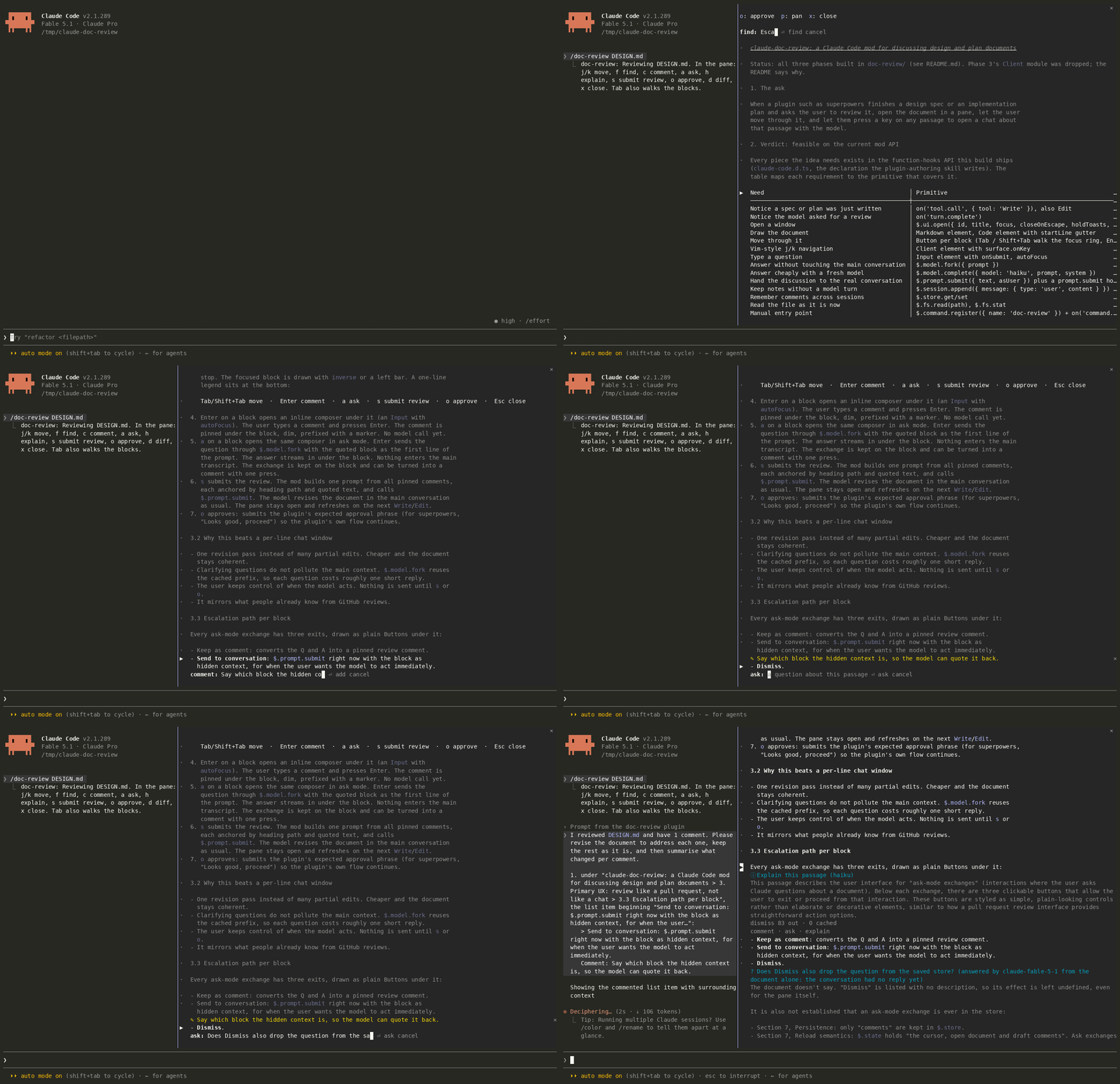
Recorded with asciinema in a real terminal, reviewing this repo's own
DESIGN.md. To replay it at full fidelity, run
asciinema play docs/demo.cast.
Why
- One review, one revision. All comments go back as a single prompt, each one anchored by heading path and quote. Claude revises the document once and keeps it coherent, instead of patching it piece by piece.
- Side questions stay on the side. "What does this paragraph mean?" doesn't belong in the main transcript. Asks are answered by a fork of the session, which reuses the cached prefix, so they're cheap and leave no trace in the conversation.
- Comments land exactly where you mean. Every heading, paragraph, list item, table and code fence is its own stop, and comments follow their passage when Claude edits the file.
Quick start
git clone https://github.com/revelationnow/claude-doc-review
claude --plugin-dir ./claude-doc-review/doc-review
Then, inside Claude Code:
/doc-review docs/superpowers/specs/2026-10-04-widgets-design.md
You can also skip the command. When a plugin such as superpowers writes a spec or plan and asks for a review, the pane opens by itself.
To load it in every session, add the absolute path of doc-review/ to
CLAUDE_CODE_PLUGIN_DIRS in the env block of ~/.claude/settings.json.
What it does
| Spots specs and plans | A Write or Edit to a path that matches the configured globs marks the file as a candidate. When Claude's turn ends with a review request or names the file, the pane opens. |
/doc-review [path] | Opens any markdown file, or the latest candidate when no path is given. |
| Blocks, not lines | Each heading, paragraph, list item (nested ones too), code fence, table and quote is a focus stop. |
| Tables and code never wrap | Tables are drawn as aligned grids and code as highlighted code, both cut at the pane's edge. A scrollbar under each wide block pans it sideways with the mouse, or use p. |
| Anchored comments | A comment remembers its heading path and opening text, so it survives revisions. If its passage is deleted, the comment is kept and marked orphaned. |
Side questions (a) | Answered by model.fork over the session's own transcript. Each answer shows its output and cached token counts. In a fresh session the question goes to the session model with the whole document attached. |
Explain (h) | A fresh small model (haiku by default) explains the passage in plain words. It sees only the passage and the document's title, so it costs a few hundred tokens. |
| Escalate | Under each answer: keep as comment, send to conversation (with the passage attached as hidden context), or dismiss. |
| Submit or approve | s sends every comment as one review. o sends your approval phrase and can fold unsent comments in as non-blocking notes. |
| Live refresh and diff | When Claude edits the open file, the pane re-reads it and re-anchors comments. Changed blocks get a + in the margin, n jumps between them, and d shows the diff against the version you reviewed. |
| Persistence | Comments, answered questions and the last-reviewed text are saved per document across sessions, for the twelve most recently touched documents. /doc-review forget [path] clears one. |
| Find and cycle | f finds text. m cycles through blocks that have comments. g and e jump to the top and end. |
Keys
Hotkeys work while the pane has the keyboard. It opens focused from
/doc-review; otherwise click it or press ctrl+x tab.
| Key | Action |
|---|---|
j / k | Next / previous block |
g / e | Top / end |
f | Find; press again for the next match |
m | Next block with a comment or question |
Tab / Shift+Tab | Walk the blocks and their actions |
c, or Enter on the current marker | Comment |
a | Ask a side question |
h | Explain on a small model |
p | Pan a wide table or code block sideways |
s | Submit all comments as one review |
o | Approve |
n / d / r | Next changed block / toggle diff / mark as reviewed (shown only after a revision) |
x / Esc | Close the pane (comments are kept) |
Mouse
The mouse works wherever the surface reports it: fullscreen terminal, the desktop app and VS Code.
- Click a block's marker (
·) to select it. Click the current marker (▶) to comment. - Hover a block to show
comment · ask · explainin the gap under it. Showing the row doesn't shift the layout. - Every key has a button, including the toolbar, the answer actions, the ✕ on a comment, and the approve dialog.
- The wheel scrolls the pane. Documents with more than 200 blocks are drawn as a window around the current block, and the wheel moves the window at its edges.
- Wide tables and code have a bar under them:
‹ ───━━━━━─── › 41–88/102. Click the track to jump there, or click‹and›to step a screen at a time.
Configuration
Set these in /config or under pluginConfigs.doc-review in settings.
| Option | Default | Meaning |
|---|---|---|
globs | superpowers specs and plans, docs/plans, docs/specs, *-design.md, *-plan.md, SPEC.md, PLAN.md | Comma-separated globs of documents that count |
offer | auto | auto opens the pane when a review is requested. toast only shows a toast and status line. off means /doc-review only. |
approvePhrase | Looks good, proceed. | What o sends as your words |
explainModel | haiku | The model alias or id behind h |
With auto, a pane that opens without a user action needs a terminal at
least 144 columns wide (110 once you've opened it yourself). On a narrower
terminal you get a toast pointing at /doc-review, which opens the pane at
any width.
Where it runs
| Surface | Support |
|---|---|
| Terminal, fullscreen | Docked pane, keys and mouse |
| Terminal, main screen | Inline pane above the prompt, keys only |
| Desktop app (Code tab) | Docked pane, mouse, and the app's own text field and Markdown |
| VS Code | Same as the desktop app |
| Mobile | Comment and ask through the question dialog |
The desktop app and VS Code start sessions themselves, so --plugin-dir
isn't available there. Load the mod in one of two ways:
- Put its path in
CLAUDE_CODE_PLUGIN_DIRSin~/.claude/settings.json. Add"CLAUDE_CODE_PLUGIN_DIR_WATCH": "1"if you want edits to hot-reload. - Add this repo as a folder marketplace (
claude plugin marketplace add <folder>), install the plugin from it, and run/reload-pluginsafter each edit.
Developing
claude plugin validate doc-review   # what the engine will load and refuse
claude plugin test doc-review       # 38 tests, no terminal needed
npx -p typescript@5 tsc -p doc-review
Type-checking needs the API declarations that the engine writes under
doc-review/.claude-plugin/types/ the first time the mod loads in a session.
The tests mount every view on the terminal, desktop and VS Code surfaces.
doc-review/
  .claude-plugin/plugin.json   manifest, userConfig, types contract
  hooks/hooks.json             names the hooks module
  hooks/register.tsx           the hooks: tool.call, turn.complete, command.run, ui.*
  hooks/blocks.ts              markdown to blocks; anchors and re-anchoring
  hooks/diff.ts                line diff, unified hunks, changed-block detection
  hooks/persist.ts             the shape of the per-document store record
  hooks/review-prompt.ts       the review, ask, escalation and approval texts
  types/index.d.ts             the state contract ($.state under 'doc-review')
  tests/review.test.ts         claude plugin test
docs/demo.gif, docs/demo.cast  the recording above
DESIGN.md                      the design and the reasoning behind it
Two engine rules matter when you edit the mod:
$is followed only into functions declared in the same file. A helper in another module can't take$, which is whypersist.tsholds only shapes and the store calls live inregister.tsx.- An atom's reference must be written as string literals at the call site.
Deliberately not built
- A vim-style
Clientmodule (phase 3 of the design). Button hotkeys already cover every key on every surface. AClientonly receives keys after a click gives it focus, and only on terminal and desktop. - A draggable scrollbar. It was built as a
Clientand removed. Clicking aClientgives it the keyboard, soj,kand Tab stopped reaching the pane. The bar is now a row of Buttons, which can't trap the keys. - Tests for hover. The test kit drops hover styling, so the hover reveal is type-checked and validated but not tested. The tests do press the hidden actions and check that each block has exactly one action row.
Similar repos


Languages
TypeScript
100.0%
Review Claude's design docs and plans like a pull request: a Claude Code mod with block-level comments, side questions and one-shot reviews.
TypeScript
0
6 commits
updated Oct 4, 2026
See what people are saying
README
claude-doc-review
Review Claude's design docs and plans like a pull request, without leaving the terminal.
When Claude writes a spec or a plan and says "please review it", you usually scroll the file, then type a long reply that quotes the parts you mean. claude-doc-review opens the document in a pane beside the conversation instead. You step through it block by block, pin comments on single paragraphs, bullets or table rows, and ask side questions that never enter the main conversation. When you're done, every comment goes back to Claude as one review.
Recorded with asciinema in a real terminal, reviewing this repo's own
DESIGN.md. To replay it at full fidelity, run
asciinema play docs/demo.cast.
Why
- One review, one revision. All comments go back as a single prompt, each one anchored by heading path and quote. Claude revises the document once and keeps it coherent, instead of patching it piece by piece.
- Side questions stay on the side. "What does this paragraph mean?" doesn't belong in the main transcript. Asks are answered by a fork of the session, which reuses the cached prefix, so they're cheap and leave no trace in the conversation.
- Comments land exactly where you mean. Every heading, paragraph, list item, table and code fence is its own stop, and comments follow their passage when Claude edits the file.
Quick start
git clone https://github.com/revelationnow/claude-doc-review
claude --plugin-dir ./claude-doc-review/doc-review
Then, inside Claude Code:
/doc-review docs/superpowers/specs/2026-10-04-widgets-design.md
You can also skip the command. When a plugin such as superpowers writes a spec or plan and asks for a review, the pane opens by itself.
To load it in every session, add the absolute path of doc-review/ to
CLAUDE_CODE_PLUGIN_DIRS in the env block of ~/.claude/settings.json.
What it does
| Spots specs and plans | A Write or Edit to a path that matches the configured globs marks the file as a candidate. When Claude's turn ends with a review request or names the file, the pane opens. |
/doc-review [path] | Opens any markdown file, or the latest candidate when no path is given. |
| Blocks, not lines | Each heading, paragraph, list item (nested ones too), code fence, table and quote is a focus stop. |
| Tables and code never wrap | Tables are drawn as aligned grids and code as highlighted code, both cut at the pane's edge. A scrollbar under each wide block pans it sideways with the mouse, or use p. |
| Anchored comments | A comment remembers its heading path and opening text, so it survives revisions. If its passage is deleted, the comment is kept and marked orphaned. |
Side questions (a) | Answered by model.fork over the session's own transcript. Each answer shows its output and cached token counts. In a fresh session the question goes to the session model with the whole document attached. |
Explain (h) | A fresh small model (haiku by default) explains the passage in plain words. It sees only the passage and the document's title, so it costs a few hundred tokens. |
| Escalate | Under each answer: keep as comment, send to conversation (with the passage attached as hidden context), or dismiss. |
| Submit or approve | s sends every comment as one review. o sends your approval phrase and can fold unsent comments in as non-blocking notes. |
| Live refresh and diff | When Claude edits the open file, the pane re-reads it and re-anchors comments. Changed blocks get a + in the margin, n jumps between them, and d shows the diff against the version you reviewed. |
| Persistence | Comments, answered questions and the last-reviewed text are saved per document across sessions, for the twelve most recently touched documents. /doc-review forget [path] clears one. |
| Find and cycle | f finds text. m cycles through blocks that have comments. g and e jump to the top and end. |
Keys
Hotkeys work while the pane has the keyboard. It opens focused from
/doc-review; otherwise click it or press ctrl+x tab.
| Key | Action |
|---|---|
j / k | Next / previous block |
g / e | Top / end |
f | Find; press again for the next match |
m | Next block with a comment or question |
Tab / Shift+Tab | Walk the blocks and their actions |
c, or Enter on the current marker | Comment |
a | Ask a side question |
h | Explain on a small model |
p | Pan a wide table or code block sideways |
s | Submit all comments as one review |
o | Approve |
n / d / r | Next changed block / toggle diff / mark as reviewed (shown only after a revision) |
x / Esc | Close the pane (comments are kept) |
Mouse
The mouse works wherever the surface reports it: fullscreen terminal, the desktop app and VS Code.
- Click a block's marker (
·) to select it. Click the current marker (▶) to comment. - Hover a block to show
comment · ask · explainin the gap under it. Showing the row doesn't shift the layout. - Every key has a button, including the toolbar, the answer actions, the ✕ on a comment, and the approve dialog.
- The wheel scrolls the pane. Documents with more than 200 blocks are drawn as a window around the current block, and the wheel moves the window at its edges.
- Wide tables and code have a bar under them:
‹ ───━━━━━─── › 41–88/102. Click the track to jump there, or click‹and›to step a screen at a time.
Configuration
Set these in /config or under pluginConfigs.doc-review in settings.
| Option | Default | Meaning |
|---|---|---|
globs | superpowers specs and plans, docs/plans, docs/specs, *-design.md, *-plan.md, SPEC.md, PLAN.md | Comma-separated globs of documents that count |
offer | auto | auto opens the pane when a review is requested. toast only shows a toast and status line. off means /doc-review only. |
approvePhrase | Looks good, proceed. | What o sends as your words |
explainModel | haiku | The model alias or id behind h |
With auto, a pane that opens without a user action needs a terminal at
least 144 columns wide (110 once you've opened it yourself). On a narrower
terminal you get a toast pointing at /doc-review, which opens the pane at
any width.
Where it runs
| Surface | Support |
|---|---|
| Terminal, fullscreen | Docked pane, keys and mouse |
| Terminal, main screen | Inline pane above the prompt, keys only |
| Desktop app (Code tab) | Docked pane, mouse, and the app's own text field and Markdown |
| VS Code | Same as the desktop app |
| Mobile | Comment and ask through the question dialog |
The desktop app and VS Code start sessions themselves, so --plugin-dir
isn't available there. Load the mod in one of two ways:
- Put its path in
CLAUDE_CODE_PLUGIN_DIRSin~/.claude/settings.json. Add"CLAUDE_CODE_PLUGIN_DIR_WATCH": "1"if you want edits to hot-reload. - Add this repo as a folder marketplace (
claude plugin marketplace add <folder>), install the plugin from it, and run/reload-pluginsafter each edit.
Developing
claude plugin validate doc-review   # what the engine will load and refuse
claude plugin test doc-review       # 38 tests, no terminal needed
npx -p typescript@5 tsc -p doc-review
Type-checking needs the API declarations that the engine writes under
doc-review/.claude-plugin/types/ the first time the mod loads in a session.
The tests mount every view on the terminal, desktop and VS Code surfaces.
doc-review/
  .claude-plugin/plugin.json   manifest, userConfig, types contract
  hooks/hooks.json             names the hooks module
  hooks/register.tsx           the hooks: tool.call, turn.complete, command.run, ui.*
  hooks/blocks.ts              markdown to blocks; anchors and re-anchoring
  hooks/diff.ts                line diff, unified hunks, changed-block detection
  hooks/persist.ts             the shape of the per-document store record
  hooks/review-prompt.ts       the review, ask, escalation and approval texts
  types/index.d.ts             the state contract ($.state under 'doc-review')
  tests/review.test.ts         claude plugin test
docs/demo.gif, docs/demo.cast  the recording above
DESIGN.md                      the design and the reasoning behind it
Two engine rules matter when you edit the mod:
$is followed only into functions declared in the same file. A helper in another module can't take$, which is whypersist.tsholds only shapes and the store calls live inregister.tsx.- An atom's reference must be written as string literals at the call site.
Deliberately not built
- A vim-style
Clientmodule (phase 3 of the design). Button hotkeys already cover every key on every surface. AClientonly receives keys after a click gives it focus, and only on terminal and desktop. - A draggable scrollbar. It was built as a
Clientand removed. Clicking aClientgives it the keyboard, soj,kand Tab stopped reaching the pane. The bar is now a row of Buttons, which can't trap the keys. - Tests for hover. The test kit drops hover styling, so the hover reveal is type-checked and validated but not tested. The tests do press the hidden actions and check that each block has exactly one action row.
Similar repos
Languages
TypeScript
100.0%