Self-hosted Agile retrospectives and team health checks. Real-time collaboration, English/French, Docker. Keep team feedback on your own infrastructure.
TypeScript
17
1,099 commits
updated Oct 14, 2026




Private-by-design, real-time Scrum retrospectives and team health checks for organizations that need to keep their data on their own infrastructure.
RetroGemini was created at the State of Geneva and is already used by around 30 internal teams. Because candid retrospective feedback can be sensitive, our public administration cannot send it to external cloud services. RetroGemini keeps the complete application and its data under the organization's control.
This makes it a strong fit for public-sector, healthcare, finance, regulated, privacy-conscious, and air-gapped environments — or simply for teams that prefer to own their tools and data.
No external service is required at runtime. SMTP and OpenAI-compatible AI features are optional and disabled unless you configure them.
If RetroGemini solves a problem for your organization, please star the repository so more self-hosting and Agile teams can find it.
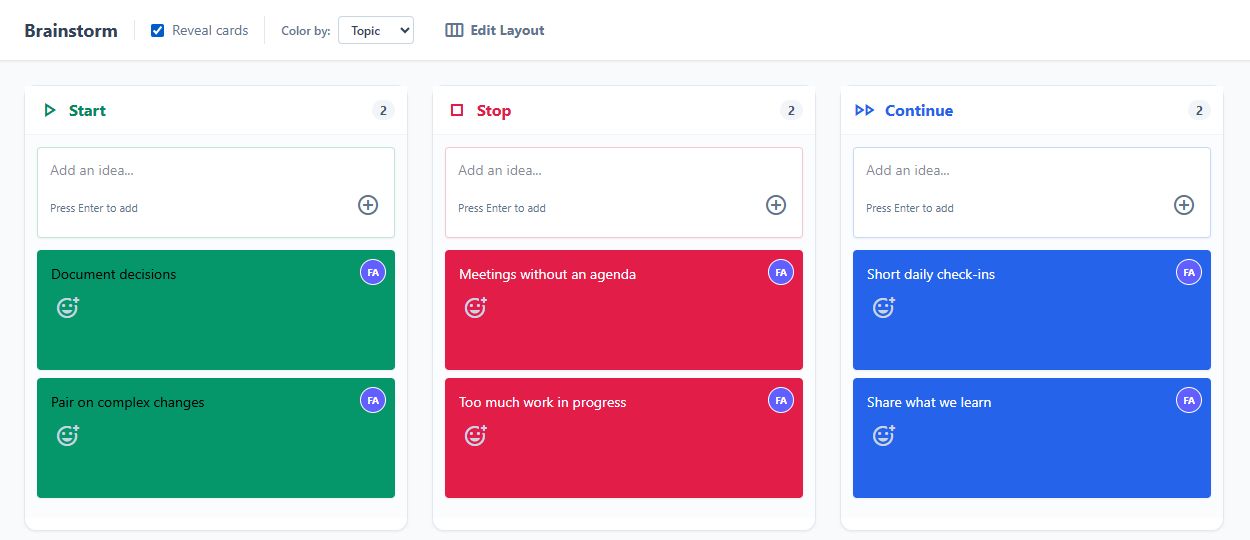
Demo board with fictional data.
You only need Docker:
docker run --pull=always -d \
  --name retrogemini \
  -p 8080:8080 \
  -v retro-data:/data \
  jpfroud/retrogemini:latest
Open http://localhost:8080, create a team, and start a retrospective.
The named Docker volume keeps your test data across container restarts. For a production deployment, also set a stable SESSION_TOKEN_SECRET, use HTTPS through your reverse proxy, and review the configuration below.
The Deploy to Render button above creates a free personal evaluation instance from the latest published Docker image.
Render's free web services sleep after 15 minutes without traffic and use an ephemeral filesystem. The demo's SQLite data is therefore cleared whenever the service sleeps, restarts, or redeploys. Use this path to explore the product, not for a real team deployment.
| Area | Capabilities |
|---|---|
| Retrospectives | Start/Stop/Continue, 4Ls, Mad/Sad/Glad, Sailboat, KALM, DAKI, Starfish, Rose/Thorn/Bud, Hot Air Balloon, Speed Car, Lean Coffee, Three Little Pigs, and custom templates — each available in English or French, chosen per retrospective |
| Languages | English and French interface for facilitators, guests and the administration console, detected from the browser and switchable at any time; "What's New" reads in your language and invitation emails follow the sender's language |
| Guided facilitation | Icebreaker, Brainstorm, Group, Vote, Discuss, Review, and Close phases, with contextual tips and timeboxes, and the same shared countdown timer in retrospectives and health checks |
| Live collaboration | Real-time WebSocket sync, participant presence, typing activity, anonymous brainstorming, comments, grouping, and voting |
| Continuous improvement | Action proposals, assignees, carry-over between sessions, ROTI follow-up, reports, and team health trends |
| Team administration | Password-protected workspaces, member management, invitations, favorites, search, feedback hub, backup, and restore |
| Optional AI | OpenAI-compatible ticket grouping, retrospective summaries, and cross-retrospective release analysis |
| Enterprise deployment | SQLite or PostgreSQL, multi-pod Socket.IO adapters, Redis support, rolling-update recovery, proxies, custom CAs, Kubernetes, and OpenShift |
| Privacy | Self-hosted assets, no CDN dependency, offline and air-gapped operation, non-root container, and organization-controlled storage |
git clone https://github.com/republique-et-canton-de-geneve/RetroGemini.git
cd RetroGemini
docker compose up -d app
The application is available at http://localhost:8080, with data persisted in the retro-data volume.
Generate and keep a stable secret in your secret manager, then run:
docker run --pull=always -d \
  --name retrogemini \
  --restart unless-stopped \
  -p 8080:8080 \
  -v /path/to/retrogemini-data:/data \
  -e SESSION_TOKEN_SECRET='replace-with-a-long-random-secret' \
  -e SUPER_ADMIN_PASSWORD='replace-with-a-strong-admin-password' \
  jpfroud/retrogemini:latest
Put RetroGemini behind an HTTPS reverse proxy before exposing it outside a trusted network.
Build the image yourself if you do not want to pull the published image:
docker build -t retrogemini .
docker run -d \
  --name retrogemini \
  -p 8080:8080 \
  -v /path/to/data:/data \
  retrogemini
See the Kubernetes and OpenShift guide. The container runs as a non-root user and exposes /health and /ready probes.
/data.Dockerfile and railway.toml.Without a persistent volume, SQLite data is ephemeral and will be lost during redeployments.
All configuration is provided through environment variables. See .env.example for the complete list.
| Variable | Description | Default |
|---|---|---|
PORT | Server port | 3000 (8080 in Docker) |
DATABASE_URL | PostgreSQL connection URL; PostgreSQL is used instead of SQLite when set | SQLite |
POSTGRES_HOST | PostgreSQL host — the discrete alternative to DATABASE_URL, used when it is unset (what the Kubernetes manifests supply from the PostgreSQL Secret) | None |
POSTGRES_PORT | PostgreSQL port | 5432 |
POSTGRES_USER | PostgreSQL user | None |
POSTGRES_PASSWORD | PostgreSQL password | None |
POSTGRES_DB | PostgreSQL database name | None |
DATA_STORE_PATH | SQLite database path | /data/data.sqlite |
REDIS_URL | Redis connection for the multi-pod Socket.IO adapter | Disabled |
REDIS_HOST / REDIS_PORT / REDIS_PASSWORD | Redis connection as discrete values, when REDIS_URL is not used | Disabled |
SMTP_HOST | SMTP server for invitations and notifications | Disabled |
SMTP_PORT | SMTP server port | 587 |
SMTP_SECURE | Use TLS for SMTP | false |
SMTP_USER | SMTP username | None |
SMTP_PASS | SMTP password | None |
FROM_EMAIL | Sender email address | SMTP_USER |
SUPER_ADMIN_PASSWORD | Enable the super-admin panel | Disabled |
SESSION_TOKEN_SECRET | Stable HMAC secret for sessions, invitation credentials and the WebSocket join handshake; use the same value on every pod (without it, a restart drops live participants out of their session) | Random per process |
BACKUP_ENABLED | Enable automatic server-side backups | true |
BACKUP_INTERVAL_HOURS | Hours between automatic backups | 24 |
BACKUP_MAX_COUNT | Maximum automatic backups to keep | 7 |
BACKUP_ON_STARTUP | Create a backup when the server starts | true |
RESTORE_MAX_BODY_MB | Maximum compressed restore upload size | 128 |
RESTORE_MAX_DECOMPRESSED_MB | Maximum decompressed restore size | 512 |
AUTH_RATE_LIMIT_MAX | Rejected team-create / restore-session credentials per IP per 15 minutes. Only 401 responses count, so a legitimate user is never blocked however often they reload. Counted per pod (no shared store, so a multi-pod deployment allows up to replicas × this value) | 5 |
PUBLIC_BASE_URL | Canonical public URL used to build mailed links. Required to send password-reset email — that mail carries a live token and its caller is anonymous, so without a configured origin the route answers 501 public_base_url_not_configured rather than trusting the request's Host. Invitations are authenticated and fall back to the request origin when it is unset. May include a sub-path | None (invitations fall back to the request origin) |
CORS_ORIGIN | Restrict Socket.IO CORS to specific origin(s) | * |
TRUST_PROXY | Express trust-proxy setting | 1 in production |
LOG_FORMAT | json writes one line of JSON per log record — timestamp, level, source, message and the request/socket correlation id — which a cluster log aggregator can query; text keeps the human-readable console output. Secrets are redacted in both | json in production, text otherwise |
WIFI_SSID | Wi-Fi name for an optional offline-network QR code | Disabled |
WIFI_PASSWORD | Wi-Fi password for the optional QR code | Disabled |
PG_POOL_MAX | PostgreSQL connections per pod; keep replicas × PG_POOL_MAX under the database's max_connections | 10 |
SESSION_CACHE_MAX | Live sessions cached in memory per pod (bounds memory only — session state is always recoverable from the database) | 500 |
SOCKET_MAX_BUFFER_SIZE | Maximum Socket.IO message size in bytes (caps one session update) | 1000000 |
SOCKET_UPDATE_RATE | Sustained session updates per second allowed per socket. Off by default and off in the shipped manifest — enable it only if the deployment is reachable beyond your internal network, or if a runaway client is actually observed. Start at 20 (timer sync is ~1/s per client). A throttled write is healed with the authoritative state and re-sent, never dropped | 0 (disabled) |
SOCKET_UPDATE_BURST | Short update burst allowed above the sustained rate | 2 × rate |
LAST_CONNECTION_DEBOUNCE_MS | Minimum interval between refreshes of a team's last-connection date on join (avoids a write storm when a whole session reconnects) | 300000 |
ROSTER_BROADCAST_DEBOUNCE_MS | Debounce window for coalescing roster rebroadcasts (avoids an O(N²) reconnect stampede); 0 broadcasts synchronously | 250 |
RetroGemini supports two database backends:
For SQLite, the server tries these locations in order:
DATA_STORE_PATH/data/data.sqlite/tmp/data.sqlite — ephemeral./data.sqliteA warning is logged when ephemeral storage is used.
For multiple pods, Socket.IO uses Redis when REDIS_URL or REDIS_HOST is configured. Otherwise it uses the PostgreSQL adapter when PostgreSQL is the data store.
export HTTP_PROXY=http://proxy.example.com:8080
export HTTPS_PROXY=http://proxy.example.com:8080
export NO_PROXY=localhost,127.0.0.1
export NODE_EXTRA_CA_CERTS=/path/to/corporate-ca.crt
The same variables can be configured in Docker Compose, Kubernetes, or OpenShift.
The application is designed to survive rolling updates: session state is persisted, WebSocket clients reconnect automatically, and participants rejoin their active session.
Every pull request runs linting, TypeScript checks, unit and integration tests, a production build, dependency review, CodeQL analysis, and container vulnerability scanning.
Useful local checks:
npm run lint
npm run type-check
npm test
npm run build
npm run test:e2e
See MAINTENANCE.md, HARDENING_STATUS.md, SECURITY.md, and ACCESSIBILITY.md for details.
Accessibility is gated on every pull request — an axe-core run over six screens and eslint-plugin-jsx-a11y inside the lint budget. Both are ratchets: the number they allow may fall, never rise. ACCESSIBILITY.md states what is tested, what was fixed, and what is still missing.
Requirements: Node.js 22+ and npm.
npm install
npm run start
In another terminal:
npm run dev
The backend runs on port 3000 and the Vite development server on port 5173.
RetroGemini was developed with extensive assistance from Gemini, Claude, and Codex. That describes the development process, not a runtime dependency: the application works without an internet connection or an AI service.
Administrators can optionally connect an OpenAI-compatible model for grouping suggestions and summaries. Those features remain off until explicitly configured.
Bug reports, feature requests, documentation improvements, translations, and code contributions are welcome. Read CONTRIBUTING.md before opening a pull request.
If you deploy RetroGemini, consider opening a discussion or issue to share your environment and feedback. Real-world deployment notes help other organizations adopt it.
RetroGemini is released into the public domain under The Unlicense. You may use, copy, modify, and distribute it for any purpose without conditions.
233 followers · starred Sep 2026
Self-hosted Agile retrospectives and team health checks. Real-time collaboration, English/French, Docker. Keep team feedback on your own infrastructure.
TypeScript
17
1,099 commits
updated Oct 14, 2026
Private-by-design, real-time Scrum retrospectives and team health checks for organizations that need to keep their data on their own infrastructure.
RetroGemini was created at the State of Geneva and is already used by around 30 internal teams. Because candid retrospective feedback can be sensitive, our public administration cannot send it to external cloud services. RetroGemini keeps the complete application and its data under the organization's control.
This makes it a strong fit for public-sector, healthcare, finance, regulated, privacy-conscious, and air-gapped environments — or simply for teams that prefer to own their tools and data.
No external service is required at runtime. SMTP and OpenAI-compatible AI features are optional and disabled unless you configure them.
If RetroGemini solves a problem for your organization, please star the repository so more self-hosting and Agile teams can find it.
Demo board with fictional data.
You only need Docker:
docker run --pull=always -d \
  --name retrogemini \
  -p 8080:8080 \
  -v retro-data:/data \
  jpfroud/retrogemini:latest
Open http://localhost:8080, create a team, and start a retrospective.
The named Docker volume keeps your test data across container restarts. For a production deployment, also set a stable SESSION_TOKEN_SECRET, use HTTPS through your reverse proxy, and review the configuration below.
The Deploy to Render button above creates a free personal evaluation instance from the latest published Docker image.
Render's free web services sleep after 15 minutes without traffic and use an ephemeral filesystem. The demo's SQLite data is therefore cleared whenever the service sleeps, restarts, or redeploys. Use this path to explore the product, not for a real team deployment.
| Area | Capabilities |
|---|---|
| Retrospectives | Start/Stop/Continue, 4Ls, Mad/Sad/Glad, Sailboat, KALM, DAKI, Starfish, Rose/Thorn/Bud, Hot Air Balloon, Speed Car, Lean Coffee, Three Little Pigs, and custom templates — each available in English or French, chosen per retrospective |
| Languages | English and French interface for facilitators, guests and the administration console, detected from the browser and switchable at any time; "What's New" reads in your language and invitation emails follow the sender's language |
| Guided facilitation | Icebreaker, Brainstorm, Group, Vote, Discuss, Review, and Close phases, with contextual tips and timeboxes, and the same shared countdown timer in retrospectives and health checks |
| Live collaboration | Real-time WebSocket sync, participant presence, typing activity, anonymous brainstorming, comments, grouping, and voting |
| Continuous improvement | Action proposals, assignees, carry-over between sessions, ROTI follow-up, reports, and team health trends |
| Team administration | Password-protected workspaces, member management, invitations, favorites, search, feedback hub, backup, and restore |
| Optional AI | OpenAI-compatible ticket grouping, retrospective summaries, and cross-retrospective release analysis |
| Enterprise deployment | SQLite or PostgreSQL, multi-pod Socket.IO adapters, Redis support, rolling-update recovery, proxies, custom CAs, Kubernetes, and OpenShift |
| Privacy | Self-hosted assets, no CDN dependency, offline and air-gapped operation, non-root container, and organization-controlled storage |
git clone https://github.com/republique-et-canton-de-geneve/RetroGemini.git
cd RetroGemini
docker compose up -d app
The application is available at http://localhost:8080, with data persisted in the retro-data volume.
Generate and keep a stable secret in your secret manager, then run:
docker run --pull=always -d \
  --name retrogemini \
  --restart unless-stopped \
  -p 8080:8080 \
  -v /path/to/retrogemini-data:/data \
  -e SESSION_TOKEN_SECRET='replace-with-a-long-random-secret' \
  -e SUPER_ADMIN_PASSWORD='replace-with-a-strong-admin-password' \
  jpfroud/retrogemini:latest
Put RetroGemini behind an HTTPS reverse proxy before exposing it outside a trusted network.
Build the image yourself if you do not want to pull the published image:
docker build -t retrogemini .
docker run -d \
  --name retrogemini \
  -p 8080:8080 \
  -v /path/to/data:/data \
  retrogemini
See the Kubernetes and OpenShift guide. The container runs as a non-root user and exposes /health and /ready probes.
/data.Dockerfile and railway.toml.Without a persistent volume, SQLite data is ephemeral and will be lost during redeployments.
All configuration is provided through environment variables. See .env.example for the complete list.
| Variable | Description | Default |
|---|---|---|
PORT | Server port | 3000 (8080 in Docker) |
DATABASE_URL | PostgreSQL connection URL; PostgreSQL is used instead of SQLite when set | SQLite |
POSTGRES_HOST | PostgreSQL host — the discrete alternative to DATABASE_URL, used when it is unset (what the Kubernetes manifests supply from the PostgreSQL Secret) | None |
POSTGRES_PORT | PostgreSQL port | 5432 |
POSTGRES_USER | PostgreSQL user | None |
POSTGRES_PASSWORD | PostgreSQL password | None |
POSTGRES_DB | PostgreSQL database name | None |
DATA_STORE_PATH | SQLite database path | /data/data.sqlite |
REDIS_URL | Redis connection for the multi-pod Socket.IO adapter | Disabled |
REDIS_HOST / REDIS_PORT / REDIS_PASSWORD | Redis connection as discrete values, when REDIS_URL is not used | Disabled |
SMTP_HOST | SMTP server for invitations and notifications | Disabled |
SMTP_PORT | SMTP server port | 587 |
SMTP_SECURE | Use TLS for SMTP | false |
SMTP_USER | SMTP username | None |
SMTP_PASS | SMTP password | None |
FROM_EMAIL | Sender email address | SMTP_USER |
SUPER_ADMIN_PASSWORD | Enable the super-admin panel | Disabled |
SESSION_TOKEN_SECRET | Stable HMAC secret for sessions, invitation credentials and the WebSocket join handshake; use the same value on every pod (without it, a restart drops live participants out of their session) | Random per process |
BACKUP_ENABLED | Enable automatic server-side backups | true |
BACKUP_INTERVAL_HOURS | Hours between automatic backups | 24 |
BACKUP_MAX_COUNT | Maximum automatic backups to keep | 7 |
BACKUP_ON_STARTUP | Create a backup when the server starts | true |
RESTORE_MAX_BODY_MB | Maximum compressed restore upload size | 128 |
RESTORE_MAX_DECOMPRESSED_MB | Maximum decompressed restore size | 512 |
AUTH_RATE_LIMIT_MAX | Rejected team-create / restore-session credentials per IP per 15 minutes. Only 401 responses count, so a legitimate user is never blocked however often they reload. Counted per pod (no shared store, so a multi-pod deployment allows up to replicas × this value) | 5 |
PUBLIC_BASE_URL | Canonical public URL used to build mailed links. Required to send password-reset email — that mail carries a live token and its caller is anonymous, so without a configured origin the route answers 501 public_base_url_not_configured rather than trusting the request's Host. Invitations are authenticated and fall back to the request origin when it is unset. May include a sub-path | None (invitations fall back to the request origin) |
CORS_ORIGIN | Restrict Socket.IO CORS to specific origin(s) | * |
TRUST_PROXY | Express trust-proxy setting | 1 in production |
LOG_FORMAT | json writes one line of JSON per log record — timestamp, level, source, message and the request/socket correlation id — which a cluster log aggregator can query; text keeps the human-readable console output. Secrets are redacted in both | json in production, text otherwise |
WIFI_SSID | Wi-Fi name for an optional offline-network QR code | Disabled |
WIFI_PASSWORD | Wi-Fi password for the optional QR code | Disabled |
PG_POOL_MAX | PostgreSQL connections per pod; keep replicas × PG_POOL_MAX under the database's max_connections | 10 |
SESSION_CACHE_MAX | Live sessions cached in memory per pod (bounds memory only — session state is always recoverable from the database) | 500 |
SOCKET_MAX_BUFFER_SIZE | Maximum Socket.IO message size in bytes (caps one session update) | 1000000 |
SOCKET_UPDATE_RATE | Sustained session updates per second allowed per socket. Off by default and off in the shipped manifest — enable it only if the deployment is reachable beyond your internal network, or if a runaway client is actually observed. Start at 20 (timer sync is ~1/s per client). A throttled write is healed with the authoritative state and re-sent, never dropped | 0 (disabled) |
SOCKET_UPDATE_BURST | Short update burst allowed above the sustained rate | 2 × rate |
LAST_CONNECTION_DEBOUNCE_MS | Minimum interval between refreshes of a team's last-connection date on join (avoids a write storm when a whole session reconnects) | 300000 |
ROSTER_BROADCAST_DEBOUNCE_MS | Debounce window for coalescing roster rebroadcasts (avoids an O(N²) reconnect stampede); 0 broadcasts synchronously | 250 |
RetroGemini supports two database backends:
For SQLite, the server tries these locations in order:
DATA_STORE_PATH/data/data.sqlite/tmp/data.sqlite — ephemeral./data.sqliteA warning is logged when ephemeral storage is used.
For multiple pods, Socket.IO uses Redis when REDIS_URL or REDIS_HOST is configured. Otherwise it uses the PostgreSQL adapter when PostgreSQL is the data store.
export HTTP_PROXY=http://proxy.example.com:8080
export HTTPS_PROXY=http://proxy.example.com:8080
export NO_PROXY=localhost,127.0.0.1
export NODE_EXTRA_CA_CERTS=/path/to/corporate-ca.crt
The same variables can be configured in Docker Compose, Kubernetes, or OpenShift.
The application is designed to survive rolling updates: session state is persisted, WebSocket clients reconnect automatically, and participants rejoin their active session.
Every pull request runs linting, TypeScript checks, unit and integration tests, a production build, dependency review, CodeQL analysis, and container vulnerability scanning.
Useful local checks:
npm run lint
npm run type-check
npm test
npm run build
npm run test:e2e
See MAINTENANCE.md, HARDENING_STATUS.md, SECURITY.md, and ACCESSIBILITY.md for details.
Accessibility is gated on every pull request — an axe-core run over six screens and eslint-plugin-jsx-a11y inside the lint budget. Both are ratchets: the number they allow may fall, never rise. ACCESSIBILITY.md states what is tested, what was fixed, and what is still missing.
Requirements: Node.js 22+ and npm.
npm install
npm run start
In another terminal:
npm run dev
The backend runs on port 3000 and the Vite development server on port 5173.
RetroGemini was developed with extensive assistance from Gemini, Claude, and Codex. That describes the development process, not a runtime dependency: the application works without an internet connection or an AI service.
Administrators can optionally connect an OpenAI-compatible model for grouping suggestions and summaries. Those features remain off until explicitly configured.
Bug reports, feature requests, documentation improvements, translations, and code contributions are welcome. Read CONTRIBUTING.md before opening a pull request.
If you deploy RetroGemini, consider opening a discussion or issue to share your environment and feedback. Real-world deployment notes help other organizations adopt it.
RetroGemini is released into the public domain under The Unlicense. You may use, copy, modify, and distribute it for any purpose without conditions.
233 followers · starred Sep 2026



