
A tiny pixel city, built one pull request at a time.
See the codeSee what people are saying
README
Forktown 🌱
A little town, built one pull request at a time. Design a home and a neighbor; contribute one JSON file. Every house hangs a lantern on the Lantern Fork.
Visit the town · Detailed contributor guide
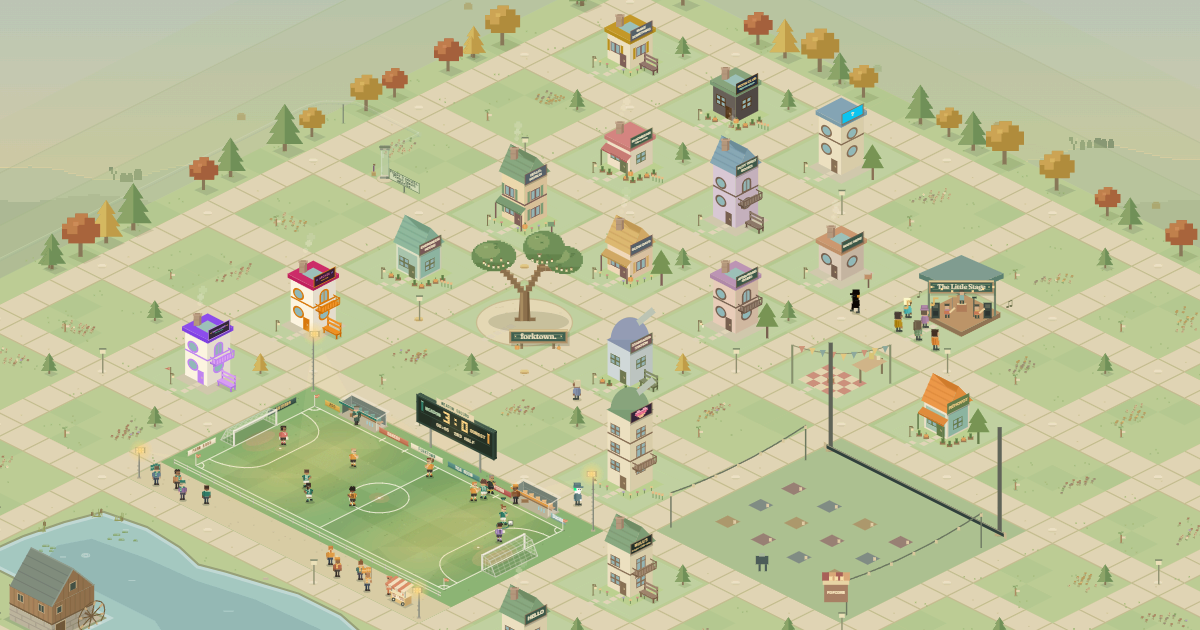
1. Start in the live town
Open the live site and click Find your way in. You’ll see Fork on GitHub:
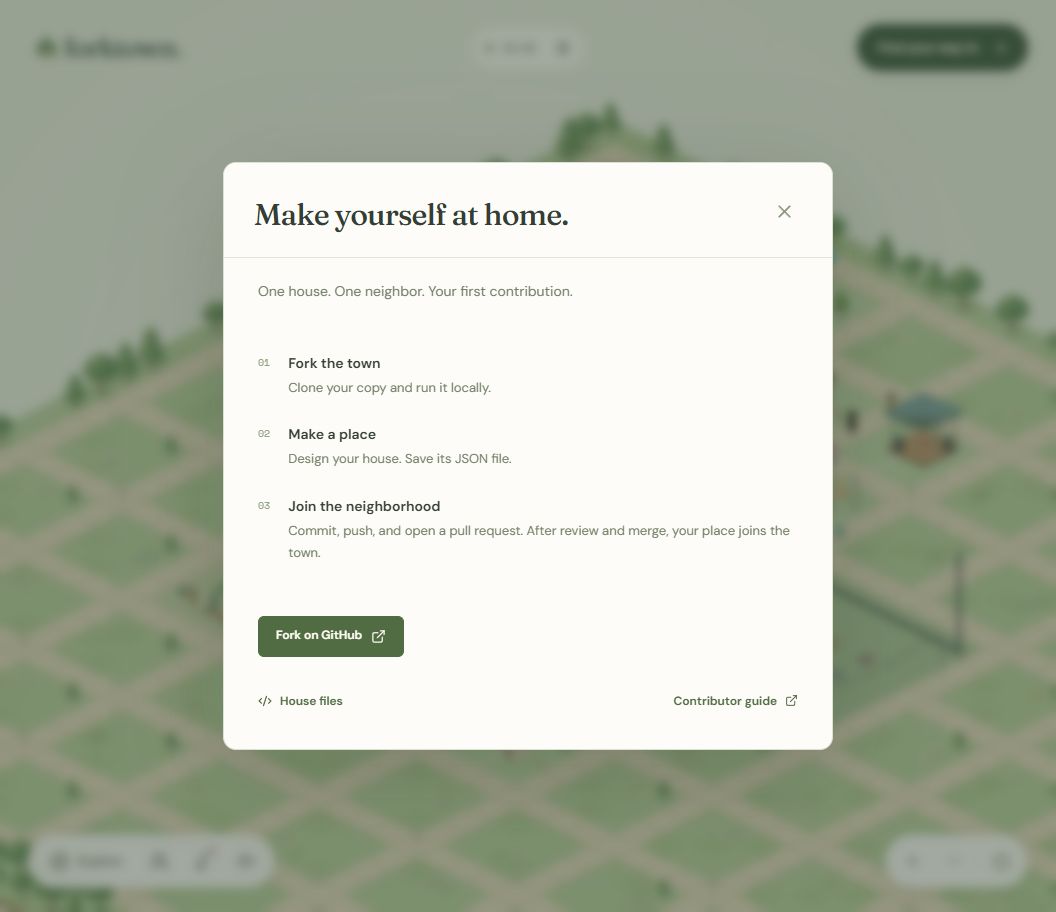
Why can’t I build here? The published town is read-only. It can show houses and their JSON, but cannot save files to your computer’s project. Building happens in your local copy; a reviewed pull request brings your house to the shared town.
2. Fork it and run it locally
You’ll need a GitHub account, Git, and Node.js 24 (22.12+ also works). No API keys or database setup.
Click Fork on GitHub, then Create fork. In a terminal, replace YOUR_USERNAME below with your GitHub username and paste:
git clone https://github.com/YOUR_USERNAME/forktown.git
cd forktown
git switch -c add-my-place
npm ci
npm run dev
Leave that terminal running. Open localhost:5173 and click Find your way in. Now the button says Build a place:
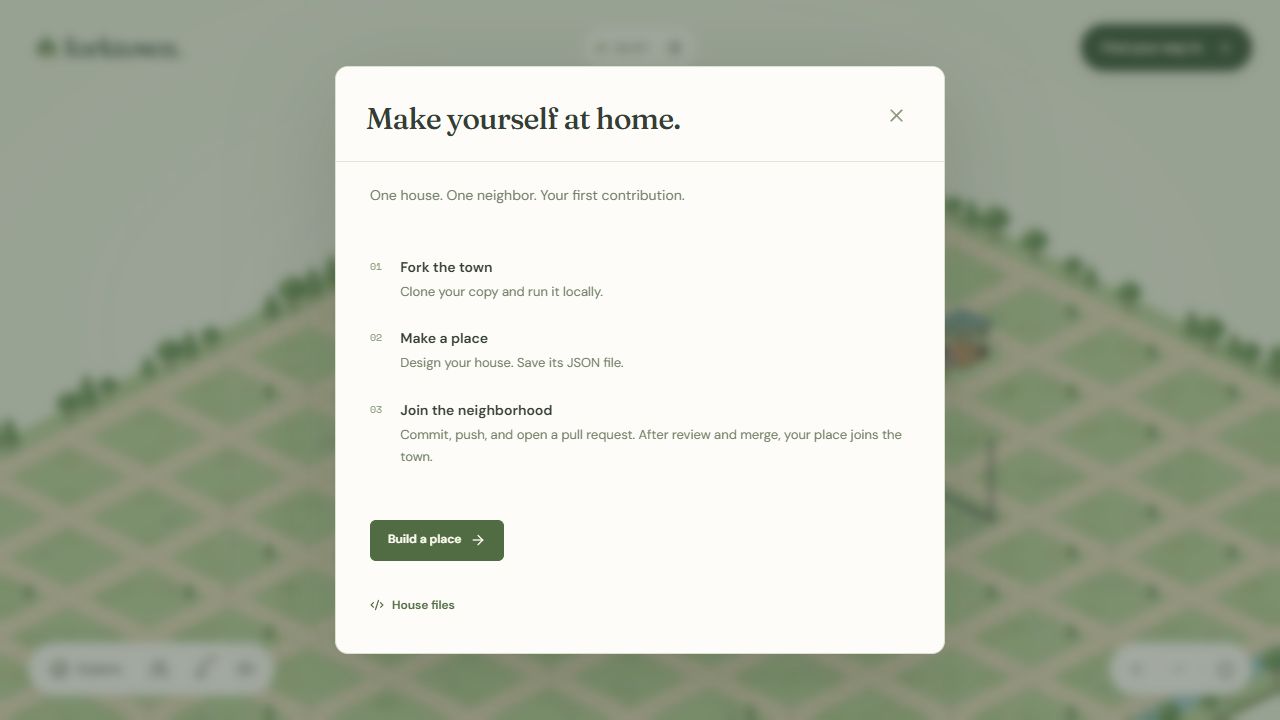
Still seeing Fork on GitHub? Check that you opened localhost and started
npm run dev. The live site andnpm run previewdo not enable the builder.
3. Make it yours
Click Build a place. Enter your real GitHub username, then customize Home, Neighbor, and Outdoor sign. Scroll down to choose an open plot, add a story, and check your File id.
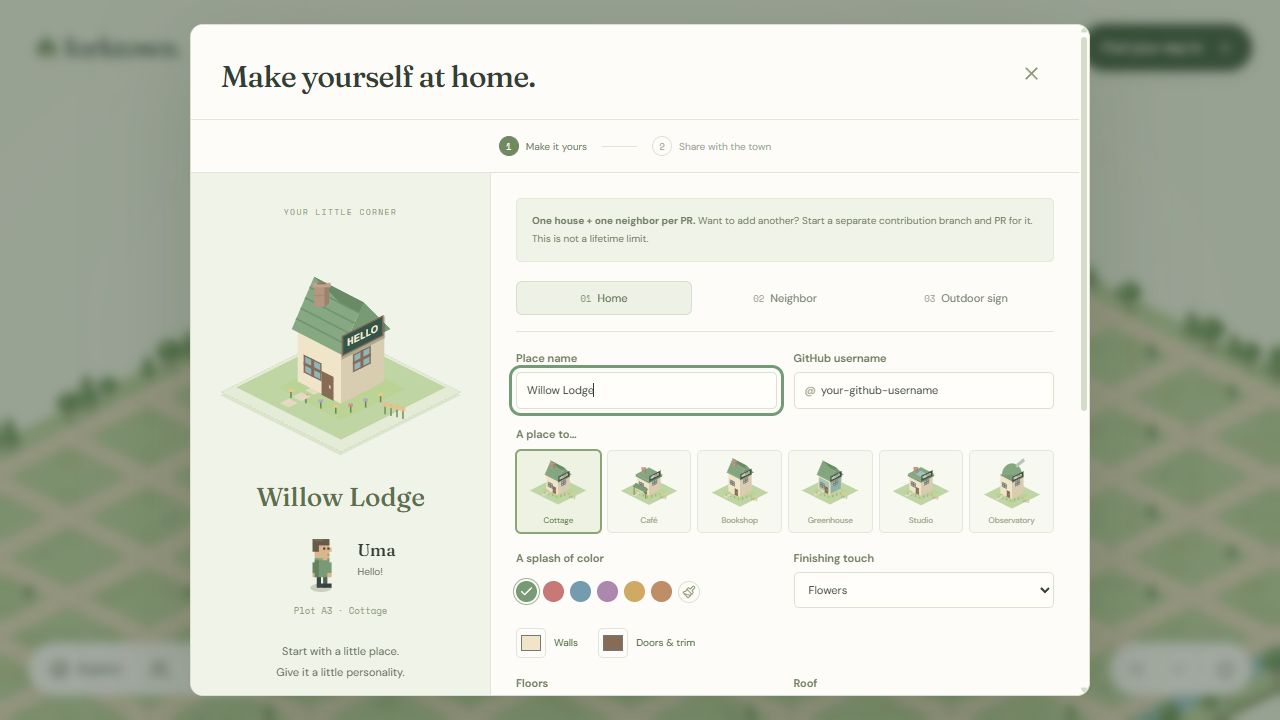
Names and plots in these screenshots are examples. One new house + one neighbor per pull request. Choosing a plot does not reserve it.
4. Save your house
Choose Continue to save, then Save to my project (scroll down if needed).
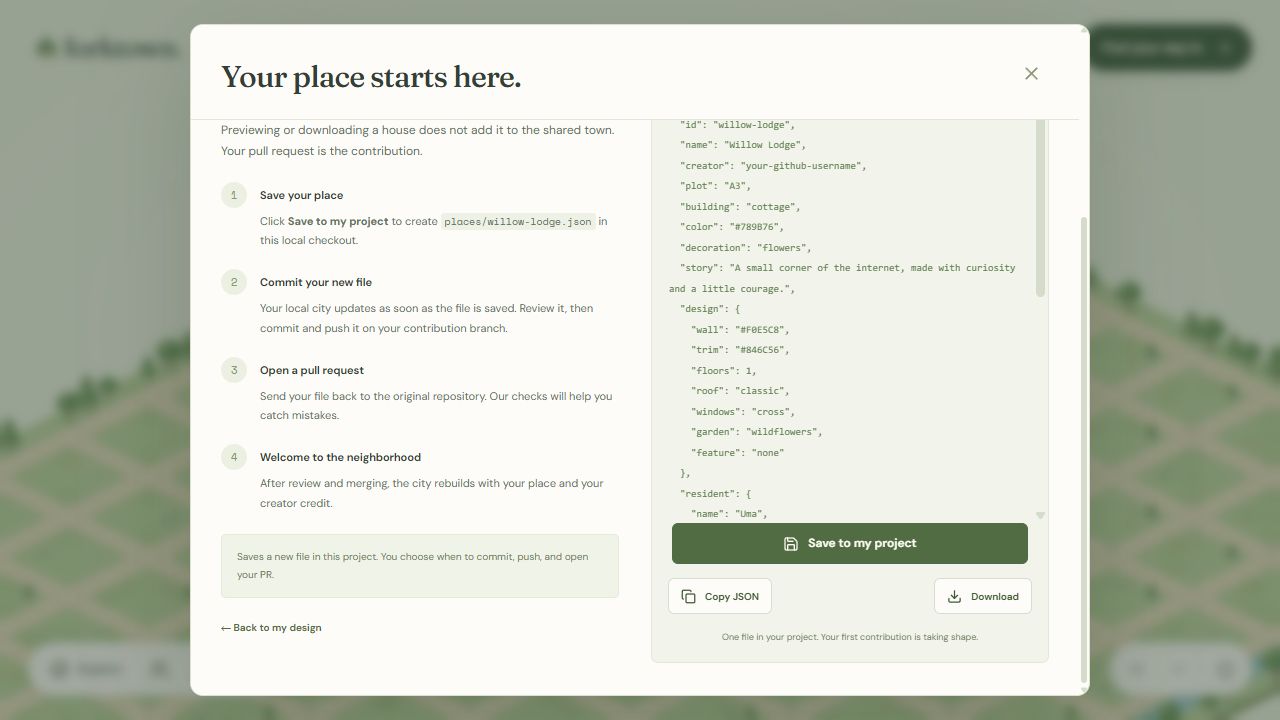
This creates places/YOUR_FILE_ID.json and adds the house to your local town. Click See my saved JSON to review it, or See my place in town to visit. Saving locally does not publish it.
5. Send your pull request
Open a second terminal in your forktown folder and check your work:
npm run check
Once it passes, replace YOUR_FILE_ID with the file id from the builder and run:
git add places/YOUR_FILE_ID.json
git --no-pager diff --cached
git commit -m "Add my place to Forktown"
git push -u origin add-my-place
On your GitHub fork, click Compare & pull request. Target renanbazinin/forktown → main, check that only your new house file is included, complete the checklist, and click Create pull request.
After checks, maintainer review, merge, and deployment, your house appears in the live town. If changes are requested, commit and push them on the same branch to update that pull request.
About Forktown
Forktown makes a first open-source contribution something you can visit. Each contributed house brings a neighbor, a story, and its creator’s credit into a shared pixel town.
The town has a life of its own: neighbors take walks, meet at concerts, watch films, and stop by football matches. A full day and night lasts 24 real minutes, and each season about 11 hours: blossom, fireflies, turning leaves, then snow. Explore at your own pace, follow a resident, or enjoy the live view.
Want to help beyond building a house? Improve the guides, report a bug, or contribute to the town itself. The project guide covers features, code structure, and development commands.
JSON fields & contribution rules · Features, project map & commands · Architecture · Publishing · Live view · Roadmap
Contributors


Similar repos


Languages
TypeScript
91.8%
HTML
4.8%
CSS
2.5%
A tiny pixel city, built one pull request at a time.
See the codeSee what people are saying
README
Forktown 🌱
A little town, built one pull request at a time. Design a home and a neighbor; contribute one JSON file. Every house hangs a lantern on the Lantern Fork.
Visit the town · Detailed contributor guide
1. Start in the live town
Open the live site and click Find your way in. You’ll see Fork on GitHub:
Why can’t I build here? The published town is read-only. It can show houses and their JSON, but cannot save files to your computer’s project. Building happens in your local copy; a reviewed pull request brings your house to the shared town.
2. Fork it and run it locally
You’ll need a GitHub account, Git, and Node.js 24 (22.12+ also works). No API keys or database setup.
Click Fork on GitHub, then Create fork. In a terminal, replace YOUR_USERNAME below with your GitHub username and paste:
git clone https://github.com/YOUR_USERNAME/forktown.git
cd forktown
git switch -c add-my-place
npm ci
npm run dev
Leave that terminal running. Open localhost:5173 and click Find your way in. Now the button says Build a place:
Still seeing Fork on GitHub? Check that you opened localhost and started
npm run dev. The live site andnpm run previewdo not enable the builder.
3. Make it yours
Click Build a place. Enter your real GitHub username, then customize Home, Neighbor, and Outdoor sign. Scroll down to choose an open plot, add a story, and check your File id.
Names and plots in these screenshots are examples. One new house + one neighbor per pull request. Choosing a plot does not reserve it.
4. Save your house
Choose Continue to save, then Save to my project (scroll down if needed).
This creates places/YOUR_FILE_ID.json and adds the house to your local town. Click See my saved JSON to review it, or See my place in town to visit. Saving locally does not publish it.
5. Send your pull request
Open a second terminal in your forktown folder and check your work:
npm run check
Once it passes, replace YOUR_FILE_ID with the file id from the builder and run:
git add places/YOUR_FILE_ID.json
git --no-pager diff --cached
git commit -m "Add my place to Forktown"
git push -u origin add-my-place
On your GitHub fork, click Compare & pull request. Target renanbazinin/forktown → main, check that only your new house file is included, complete the checklist, and click Create pull request.
After checks, maintainer review, merge, and deployment, your house appears in the live town. If changes are requested, commit and push them on the same branch to update that pull request.
About Forktown
Forktown makes a first open-source contribution something you can visit. Each contributed house brings a neighbor, a story, and its creator’s credit into a shared pixel town.
The town has a life of its own: neighbors take walks, meet at concerts, watch films, and stop by football matches. A full day and night lasts 24 real minutes, and each season about 11 hours: blossom, fireflies, turning leaves, then snow. Explore at your own pace, follow a resident, or enjoy the live view.
Want to help beyond building a house? Improve the guides, report a bug, or contribute to the town itself. The project guide covers features, code structure, and development commands.
JSON fields & contribution rules · Features, project map & commands · Architecture · Publishing · Live view · Roadmap
Similar repos
Contributors
Languages
TypeScript
91.8%
HTML
4.8%
CSS
2.5%