Project Page | Paper | Quick Start
Arda Öztüner • Ayberk Çelik • İbrahim Şamil Yalçıner • Server Calap
REM People
CVPR 2026 — Image Matching: Local Features & Beyond Workshop
This repository contains the official PyTorch implementation for the paper "RetailGlue: Semantic Product-Level Image Stitching for Retail Shelf Panoramas" that will presented at CVPR IMW 2026.
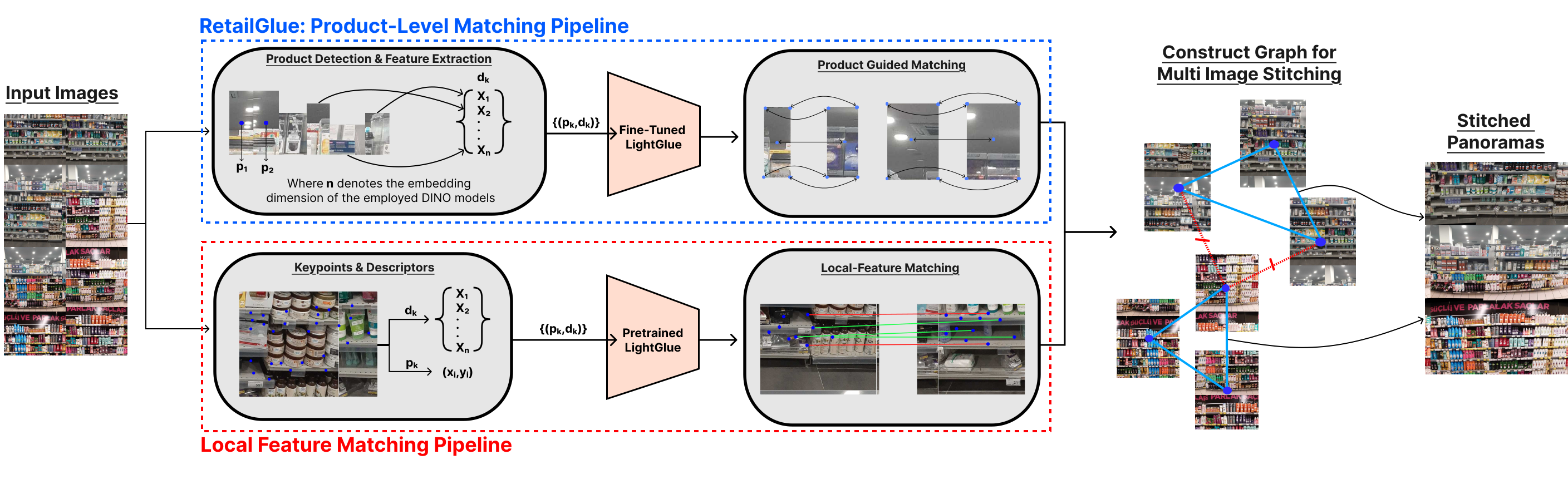
Figure 1. RetailGlue replaces ambiguous low-level feature matching with semantic product correspondences for robust retail shelf stitching.
Panoramic shelf images are fundamental to retail analytics, yet constructing them remains a persistent challenge due to repetitive product patterns that confound stitching methods based on local feature matches. We propose a product-level image stitching pipeline that replaces ambiguous low-level feature matching with semantic product correspondences.
RetailGlue is a semantic product-level image stitching pipeline for retail shelves. Instead of relying on local features (SIFT, ORB, SuperPoint), it leverages:
This approach achieves a 20x runtime speedup over dense matchers and 7x over sparse baselines while delivering higher F1 scores (88.4% with ViT-B/16).
retailglue/
├── entities.py              # Core data types (Point, Polygon, BoundingBox, Detection)
├── config.py                # YAML configuration loader
├── io.py                    # Image I/O utilities
├── detector.py              # SKU YOLO product detector
├── embeddings.py            # DINOv3 embedding extraction
├── visualization.py         # Drawing and visualization
├── matchers/
│   ├── __init__.py          # Matcher factory
│   ├── lightglue.py         # Product-level LightGlue (core contribution)
│   ├── lightgluestick.py    # LightGlueStick baseline
│   ├── gluestick.py         # GlueStick baseline
│   ├── roma.py              # RoMa v2 baseline
│   └── hf_model.py          # HuggingFace models (SuperGlue, SP+LG, DISK, ELoFTR, MINIMA)
├── stitching/
│   ├── stitcher.py          # Core stitching engine (graph-based multi-panorama)
│   ├── blender.py           # Adaptive distance-transform blending
│   └── transforms.py        # Homography-based detection transformation
├── training/
│   ├── __init__.py           # Training module
│   ├── dataset.py            # Product pairs dataset with train/val/test splits
│   ├── losses.py             # NLL loss with focal weighting
│   ├── metrics.py            # Matching recall, precision, AP
│   └── trainer.py            # Training loop with mixed precision & checkpointing
└── benchmark/
    ├── runner.py             # Benchmark orchestrator
    ├── evaluation.py         # IOU matching, Hungarian assignment
    ├── stats.py              # Precision, Recall, F1 computation
    └── drawer.py             # Result visualization
# Using uv
uv sync

# With all extras (RoMa, HuggingFace models, dev tools):
uv sync --all-extras
uv run python run_interface.py
Opens a Gradio web interface where you can upload shelf images and select stitching models.
# Run all model combinations
uv run python run_benchmark.py

# Run a specific model
uv run python run_benchmark.py --model lightglue_dinov3_vits --device cuda
| Model | Descriptor | Dim | Description |
|---|---|---|---|
lightglue_dinov3_vits | DINOv3 ViT-S/16 | 384 | Default, fastest |
lightglue_dinov3_vitb | DINOv3 ViT-B/16 | 768 | Best F1 (88.4%) |
lightglue_dinov3_vitl | DINOv3 ViT-L/16 | 1024 | Largest variant |
lightglue_dinov2_vits | DINOv2 ViT-S/14 | 384 | DINOv2 baseline |
| Model | Type |
|---|---|
lightgluestick | SuperPoint + LSD line segments |
gluestick | SuperPoint + line matching |
roma_v2 | Dense (RoMa v2) |
superglue | SuperPoint + SuperGlue (HF) |
lightglue_superpoint | SuperPoint + LightGlue (HF) |
lightglue_disk | DISK + LightGlue (HF) |
lightglue_minima | MINIMA + LightGlue (HF) |
eloftr | EfficientLoFTR (HF) |
SKU-YOLO and fine-tuned LightGlue weights are hosted on Hugging Face: RetailGlue Model Weights
# Download SKU-YOLO and LightGlue weights
git lfs install
git clone https://huggingface.co/arda92/retailglue-model-weights weights
DINO backbone weights are not included — place them in weights/dino/ manually.
Expected structure:
weights/
├── sku_yolo/
│   └── best_sku110k.pt              # YOLOv11l trained on SKU-110K
├── dino/
│   ├── dinov3_vits16_pretrain.pth   # DINOv3 ViT-S/16
│   ├── dinov3_vitb16_pretrain.pth   # DINOv3 ViT-B/16
│   ├── dinov3_vitl16_pretrain.pth   # DINOv3 ViT-L/16
│   └── dinov2_vits14_pretrain.pth   # DINOv2 ViT-S/14
└── lightglue/
    ├── lightglue_dinov3_vits.pth    # Fine-tuned for DINOv3 ViT-S
    ├── lightglue_dinov3_vitb.pth    # Fine-tuned for DINOv3 ViT-B
    ├── lightglue_dinov3_vitl.pth    # Fine-tuned for DINOv3 ViT-L
    └── lightglue_dinov2_vits.pth    # Fine-tuned for DINOv2 ViT-S
All paths are relative to the repository root and configured in config.yaml.
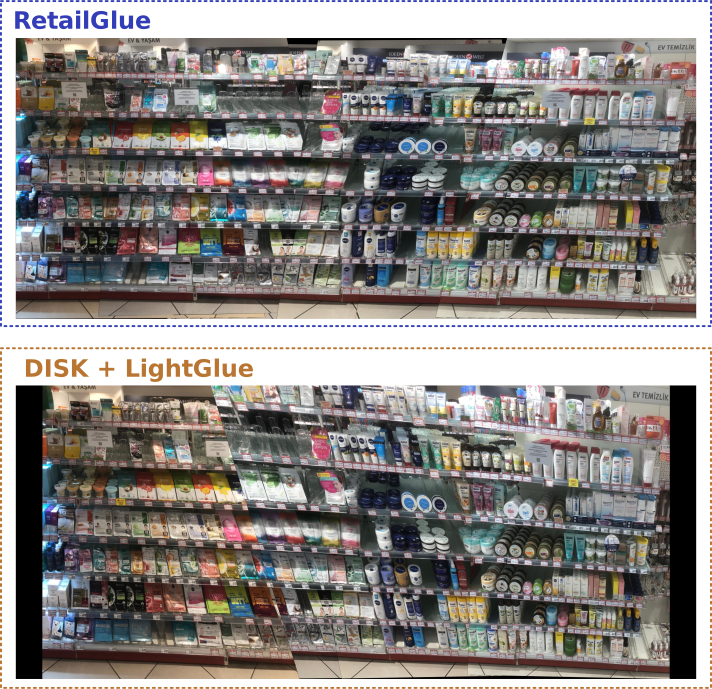
Figure 2. In a densely packed, highly repetitive scene, the local feature matcher (DISK + LightGlue) fails due to structural ambiguity, while RetailGlue successfully resolves identical products for a perfectly aligned panorama.
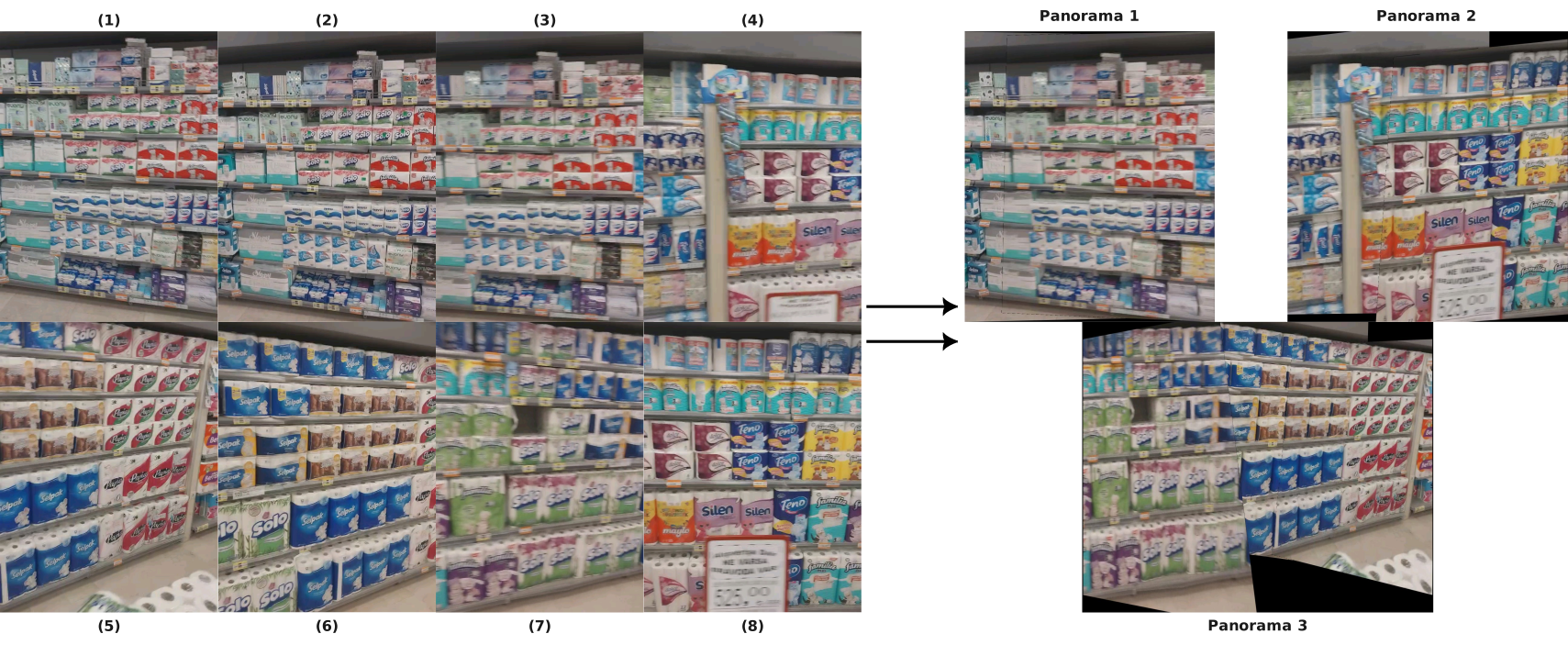
Figure 3. Multi-panorama generation via graph partitioning. Given a challenging 8-frame sequence with insufficient overlap, our pipeline naturally divides the sequence into three geometrically consistent sub-panoramas.
All datasets are publicly available on the Hugging Face Hub.
Raw shelf sequence images used for end-to-end stitching evaluation:
🤗 RemRetail100_v2 · 1,223 images · 250 sequences
# Populate data/benchmark/images/ for run_benchmark.py
uv run python scripts/download_benchmark_dataset.py
Or load directly in Python:
from datasets import load_dataset
ds = load_dataset("arda92/RemRetail100_v2", split="train")
ds[0]["image"]        # PIL.Image
ds[0]["sequence_id"]  # "seq001"
ds[0]["frame_index"]  # 1
Three sibling datasets, one per DINOv3 backbone, each containing shelf images together with pre-computed DINOv3 embeddings and ground-truth product correspondences. Each repository has two configs:
frames — one row per annotated frame with image, product_ids, bboxes (Nx4), embeddings (NxD).pairs — one row per image pair with image0, image1, matches (Kx2).| Dataset | Backbone | Embedding dim |
|---|---|---|
| RetailGlue-lightglue-dinov3-vits | DINOv3 ViT-S/16 | 384 |
| RetailGlue-lightglue-dinov3-vitb | DINOv3 ViT-B/16 | 768 |
| RetailGlue-lightglue-dinov3-vitl | DINOv3 ViT-L/16 | 1024 |
Download a dataset and re-materialize the on-disk layout expected by the trainer:
uv run python scripts/download_lightglue_dataset.py \
    --repo-id arda92/RetailGlue-lightglue-dinov3-vits \
    --output-dir data/lightglue/lightglue_dinov3_vits
Or stream directly via datasets:
from datasets import load_dataset
frames = load_dataset("arda92/RetailGlue-lightglue-dinov3-vits", "frames", split="train")
pairs  = load_dataset("arda92/RetailGlue-lightglue-dinov3-vits", "pairs",  split="train")
We provide code to fine-tune LightGlue on product-level correspondences. The training dataset ships with pre-computed DINOv3 embeddings — no embedding extraction is needed.
After running download_lightglue_dataset.py, the directory layout matches the on-disk format the trainer expects:
data/lightglue/lightglue_dinov3_vits/
├── images/
│   ├── seq001_01.jpg
│   └── ...
├── annotations/
│   ├── seq001_01.json      # {"products": [{"product_id": 0, "bbox": [x1,y1,x2,y2], "embedding": [...]}]}
│   └── ...
└── matches.json            # {"pairs": [{"image0": "seq001_01", "image1": "seq001_02", "matches": [[0,0], [2,1]]}]}
# DINOv3 ViT-S (384-dim, default)
uv run python train_lightglue.py \
    --data_dir data/lightglue/lightglue_dinov3_vits \
    --input_dim 384

# DINOv3 ViT-B (768-dim)
uv run python train_lightglue.py \
    --data_dir data/lightglue/lightglue_dinov3_vitb \
    --input_dim 768

# DINOv3 ViT-L (1024-dim)
uv run python train_lightglue.py \
    --data_dir data/lightglue/lightglue_dinov3_vitl \
    --input_dim 1024
Checkpoints are saved to outputs/lightglue/ (configurable via --output_dir). The best model is saved as lightglue_best.tar.
Project Page • REM People • CVPR 2026
Project Page | Paper | Quick Start
Arda Öztüner • Ayberk Çelik • İbrahim Şamil Yalçıner • Server Calap
REM People
CVPR 2026 — Image Matching: Local Features & Beyond Workshop
This repository contains the official PyTorch implementation for the paper "RetailGlue: Semantic Product-Level Image Stitching for Retail Shelf Panoramas" that will presented at CVPR IMW 2026.
Figure 1. RetailGlue replaces ambiguous low-level feature matching with semantic product correspondences for robust retail shelf stitching.
Panoramic shelf images are fundamental to retail analytics, yet constructing them remains a persistent challenge due to repetitive product patterns that confound stitching methods based on local feature matches. We propose a product-level image stitching pipeline that replaces ambiguous low-level feature matching with semantic product correspondences.
RetailGlue is a semantic product-level image stitching pipeline for retail shelves. Instead of relying on local features (SIFT, ORB, SuperPoint), it leverages:
This approach achieves a 20x runtime speedup over dense matchers and 7x over sparse baselines while delivering higher F1 scores (88.4% with ViT-B/16).
retailglue/
├── entities.py              # Core data types (Point, Polygon, BoundingBox, Detection)
├── config.py                # YAML configuration loader
├── io.py                    # Image I/O utilities
├── detector.py              # SKU YOLO product detector
├── embeddings.py            # DINOv3 embedding extraction
├── visualization.py         # Drawing and visualization
├── matchers/
│   ├── __init__.py          # Matcher factory
│   ├── lightglue.py         # Product-level LightGlue (core contribution)
│   ├── lightgluestick.py    # LightGlueStick baseline
│   ├── gluestick.py         # GlueStick baseline
│   ├── roma.py              # RoMa v2 baseline
│   └── hf_model.py          # HuggingFace models (SuperGlue, SP+LG, DISK, ELoFTR, MINIMA)
├── stitching/
│   ├── stitcher.py          # Core stitching engine (graph-based multi-panorama)
│   ├── blender.py           # Adaptive distance-transform blending
│   └── transforms.py        # Homography-based detection transformation
├── training/
│   ├── __init__.py           # Training module
│   ├── dataset.py            # Product pairs dataset with train/val/test splits
│   ├── losses.py             # NLL loss with focal weighting
│   ├── metrics.py            # Matching recall, precision, AP
│   └── trainer.py            # Training loop with mixed precision & checkpointing
└── benchmark/
    ├── runner.py             # Benchmark orchestrator
    ├── evaluation.py         # IOU matching, Hungarian assignment
    ├── stats.py              # Precision, Recall, F1 computation
    └── drawer.py             # Result visualization
# Using uv
uv sync

# With all extras (RoMa, HuggingFace models, dev tools):
uv sync --all-extras
uv run python run_interface.py
Opens a Gradio web interface where you can upload shelf images and select stitching models.
# Run all model combinations
uv run python run_benchmark.py

# Run a specific model
uv run python run_benchmark.py --model lightglue_dinov3_vits --device cuda
| Model | Descriptor | Dim | Description |
|---|---|---|---|
lightglue_dinov3_vits | DINOv3 ViT-S/16 | 384 | Default, fastest |
lightglue_dinov3_vitb | DINOv3 ViT-B/16 | 768 | Best F1 (88.4%) |
lightglue_dinov3_vitl | DINOv3 ViT-L/16 | 1024 | Largest variant |
lightglue_dinov2_vits | DINOv2 ViT-S/14 | 384 | DINOv2 baseline |
| Model | Type |
|---|---|
lightgluestick | SuperPoint + LSD line segments |
gluestick | SuperPoint + line matching |
roma_v2 | Dense (RoMa v2) |
superglue | SuperPoint + SuperGlue (HF) |
lightglue_superpoint | SuperPoint + LightGlue (HF) |
lightglue_disk | DISK + LightGlue (HF) |
lightglue_minima | MINIMA + LightGlue (HF) |
eloftr | EfficientLoFTR (HF) |
SKU-YOLO and fine-tuned LightGlue weights are hosted on Hugging Face: RetailGlue Model Weights
# Download SKU-YOLO and LightGlue weights
git lfs install
git clone https://huggingface.co/arda92/retailglue-model-weights weights
DINO backbone weights are not included — place them in weights/dino/ manually.
Expected structure:
weights/
├── sku_yolo/
│   └── best_sku110k.pt              # YOLOv11l trained on SKU-110K
├── dino/
│   ├── dinov3_vits16_pretrain.pth   # DINOv3 ViT-S/16
│   ├── dinov3_vitb16_pretrain.pth   # DINOv3 ViT-B/16
│   ├── dinov3_vitl16_pretrain.pth   # DINOv3 ViT-L/16
│   └── dinov2_vits14_pretrain.pth   # DINOv2 ViT-S/14
└── lightglue/
    ├── lightglue_dinov3_vits.pth    # Fine-tuned for DINOv3 ViT-S
    ├── lightglue_dinov3_vitb.pth    # Fine-tuned for DINOv3 ViT-B
    ├── lightglue_dinov3_vitl.pth    # Fine-tuned for DINOv3 ViT-L
    └── lightglue_dinov2_vits.pth    # Fine-tuned for DINOv2 ViT-S
All paths are relative to the repository root and configured in config.yaml.
Figure 2. In a densely packed, highly repetitive scene, the local feature matcher (DISK + LightGlue) fails due to structural ambiguity, while RetailGlue successfully resolves identical products for a perfectly aligned panorama.
Figure 3. Multi-panorama generation via graph partitioning. Given a challenging 8-frame sequence with insufficient overlap, our pipeline naturally divides the sequence into three geometrically consistent sub-panoramas.
All datasets are publicly available on the Hugging Face Hub.
Raw shelf sequence images used for end-to-end stitching evaluation:
🤗 RemRetail100_v2 · 1,223 images · 250 sequences
# Populate data/benchmark/images/ for run_benchmark.py
uv run python scripts/download_benchmark_dataset.py
Or load directly in Python:
from datasets import load_dataset
ds = load_dataset("arda92/RemRetail100_v2", split="train")
ds[0]["image"]        # PIL.Image
ds[0]["sequence_id"]  # "seq001"
ds[0]["frame_index"]  # 1
Three sibling datasets, one per DINOv3 backbone, each containing shelf images together with pre-computed DINOv3 embeddings and ground-truth product correspondences. Each repository has two configs:
frames — one row per annotated frame with image, product_ids, bboxes (Nx4), embeddings (NxD).pairs — one row per image pair with image0, image1, matches (Kx2).| Dataset | Backbone | Embedding dim |
|---|---|---|
| RetailGlue-lightglue-dinov3-vits | DINOv3 ViT-S/16 | 384 |
| RetailGlue-lightglue-dinov3-vitb | DINOv3 ViT-B/16 | 768 |
| RetailGlue-lightglue-dinov3-vitl | DINOv3 ViT-L/16 | 1024 |
Download a dataset and re-materialize the on-disk layout expected by the trainer:
uv run python scripts/download_lightglue_dataset.py \
    --repo-id arda92/RetailGlue-lightglue-dinov3-vits \
    --output-dir data/lightglue/lightglue_dinov3_vits
Or stream directly via datasets:
from datasets import load_dataset
frames = load_dataset("arda92/RetailGlue-lightglue-dinov3-vits", "frames", split="train")
pairs  = load_dataset("arda92/RetailGlue-lightglue-dinov3-vits", "pairs",  split="train")
We provide code to fine-tune LightGlue on product-level correspondences. The training dataset ships with pre-computed DINOv3 embeddings — no embedding extraction is needed.
After running download_lightglue_dataset.py, the directory layout matches the on-disk format the trainer expects:
data/lightglue/lightglue_dinov3_vits/
├── images/
│   ├── seq001_01.jpg
│   └── ...
├── annotations/
│   ├── seq001_01.json      # {"products": [{"product_id": 0, "bbox": [x1,y1,x2,y2], "embedding": [...]}]}
│   └── ...
└── matches.json            # {"pairs": [{"image0": "seq001_01", "image1": "seq001_02", "matches": [[0,0], [2,1]]}]}
# DINOv3 ViT-S (384-dim, default)
uv run python train_lightglue.py \
    --data_dir data/lightglue/lightglue_dinov3_vits \
    --input_dim 384

# DINOv3 ViT-B (768-dim)
uv run python train_lightglue.py \
    --data_dir data/lightglue/lightglue_dinov3_vitb \
    --input_dim 768

# DINOv3 ViT-L (1024-dim)
uv run python train_lightglue.py \
    --data_dir data/lightglue/lightglue_dinov3_vitl \
    --input_dim 1024
Checkpoints are saved to outputs/lightglue/ (configurable via --output_dir). The best model is saved as lightglue_best.tar.
Project Page • REM People • CVPR 2026