ComfyUI nodes: Qwen-Image-2.1 on Qwen3.5-0.8B + the zen-image-edit text adapter (no 17.5 GB encoder)
See the codeComfyUI nodes that run Qwen-Image-2.1 on a Qwen3.5-0.8B text encoder plus the zen-image-edit text adapter, instead of the native 17.5 GB Qwen3-VL-8B. One node covers text-to-image and editing (up to 16 reference images); the DiT, VAE, sampler and the prefix KV cache stay stock ComfyUI.
| text encoder | Qwen3.5-0.8B (1.7 GB, fetched by id) + adapter (0.6 GB) |
| conditioning | cos 1.0000 against the diffusers build of the same folder; 0.95 (text) / 0.97 (vision, edit prompts) against the native Qwen3-VL-8B |
| DiT / VAE | stock Qwen-Image-2.1, no patching |
| limitations | English only; numerals on signage can be wrong |
Update ComfyUI — it needs Qwen-Image-2.1 support (comfy/ldm/qwen_image21/model.py must exist).
Copy this folder into ComfyUI/custom_nodes/zen-image-edit-comfyui/ (or git clone it there).
Download adapter_v12.safetensors (0.64 GB) into ComfyUI/models/:
curl -L -o ComfyUI/models/adapter_v12.safetensors \
  https://github.com/recoilme/zen-image-edit-comfyui/releases/download/v2/adapter_v12.safetensors
v12 is the current revision: its attention-branch position table covers 2304 slots and it was
fine-tuned at the real 1024 px edit geometry, so long reference sequences no longer lose their
positions (vision cosine against the native encoder 0.93 → 0.97). adapter_v11.safetensors stays
on the v1 release and still
loads — the node reads the architecture, including the table width, from the file metadata.
Put the stock model files into place, from Comfy-Org/Qwen-Image-2.1:
qwen_image_2.1_bf16.safetensors → models/diffusion_models/,
qwen_image_2.1_vae_bf16.safetensors → models/vae/.
Download the text encoder (1.7 GB) — the shipped workflow points at that folder:
hf download Qwen/Qwen3.5-0.8B --local-dir ComfyUI/models/text_encoders/qwen3.5_0.8b
Restart ComfyUI. Needs transformers >= 5.17 (Qwen3.5 support) — ComfyUI ships a compatible one.
Two character references in, three scenes out — all from this node, in ComfyUI, 768×1280:
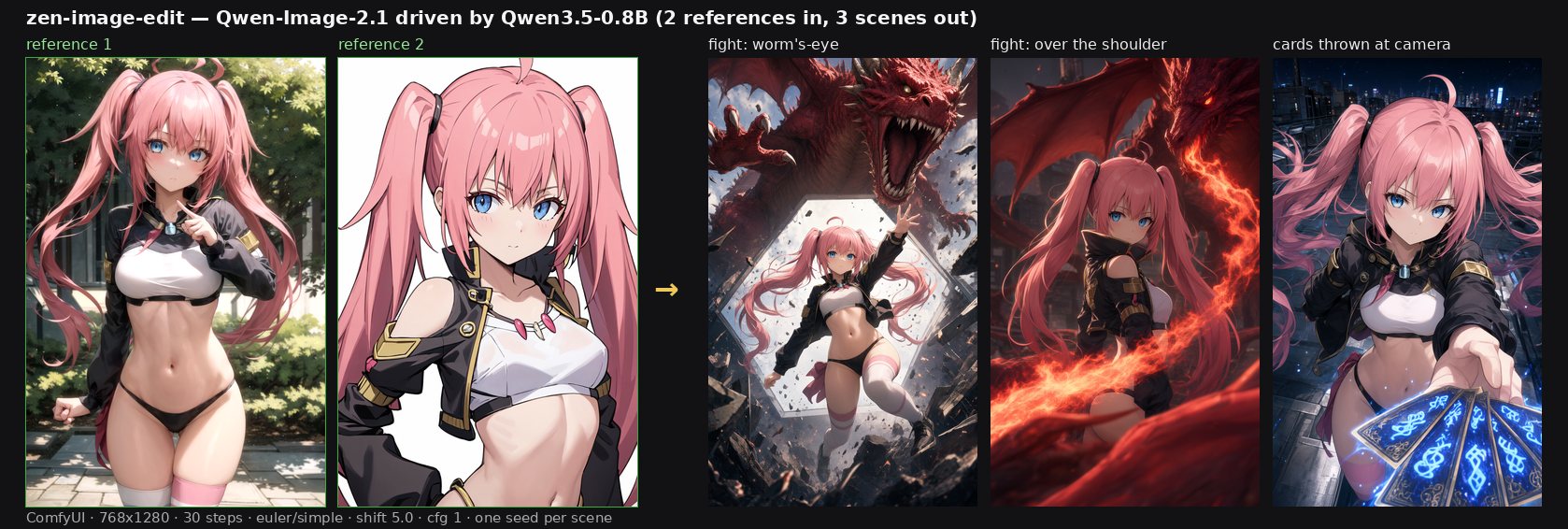
The reference images are the model author's own character; each scene used the same two references
with a different prompt and seed. examples/t2i_api.json and examples/edit_api.json are the graphs
themselves (API format, both verified end-to-end).
Zen Image Edit — Adapter Loader — loads the encoder and the adapter once.
| input | meaning |
|---|---|
adapter_file | path to adapter_v12.safetensors (architecture, including the position-table width, is in its metadata) |
text_encoder | encoder id or path, default Qwen/Qwen3.5-0.8B |
model_folder | optional: a zen-image-edit checkout, then the encoder and adapter come from there |
dtype | bf16 (matches the DiT) or fp16 (reproduces the diffusers build) |
Zen Image Edit — Text Encode — adapter, prompt, negative_prompt, vae (optional),
resolution, image_1 … image_16. Outputs positive, negative and an empty latent.
Same inputs and outputs as the stock TextEncodeQwenImage21, so it replaces it one-to-one.
UNETLoader qwen_image_2.1_bf16.safetensors ─→ ModelSamplingAuraFlow shift=5.0 ─┐
VAELoader   qwen_image_2.1_vae_bf16.safetensors ───────────────────────────────┤
ZenImage21AdapterLoader ─→ ZenImage21TextEncode ── positive/negative/latent ──→ KSampler
                                                                                │
                                        VAEDecode (vae) ←───────────────────────┘
                                             │
                                          SaveImage
Ready-made graphs, both verified end-to-end through the ComfyUI API:
examples/t2i_api.json, examples/edit_api.json.
Text to image — leave image_* empty, cfg = 1, euler, 25–40 steps.
Editing — connect vae to the text encode node, wire image_1 (the edit target) and
image_2 … (references), and mention them in the prompt as <image1>, <image2>. The VAE is
required: the DiT splices the references in as latents.
Order matters, and it flips between runtimes. Here — as in the stock TextEncodeQwenImage21 —
the target is image_1 and the canvas is taken from it. The diffusers pipeline of this model takes
the target from the last image. Reuse a prompt from the other side without swapping the pictures
and you get a hybrid instead of a swap: the source image becomes the canvas and the model only mixes
the face in (the usual "it does not replace anything" symptom).
ComfyUI's own shift for 2.1 is 0.69 (its mu at 1024²). The diffusers build of this model ships a
plain static shift of 5.0, which the model's author found clearly better — insert
ModelSamplingAuraFlow with shift = 5.0 to match it (that is what the example graphs do).
Node code: Apache-2.0. The adapter weights and anything derived from Qwen-Image-2.1 fall under the Qwen Research License — see the NOTICE in AiArtLab/zen-image-edit. Qwen3.5-0.8B is Apache-2.0.
ComfyUI nodes: Qwen-Image-2.1 on Qwen3.5-0.8B + the zen-image-edit text adapter (no 17.5 GB encoder)
See the codeComfyUI nodes that run Qwen-Image-2.1 on a Qwen3.5-0.8B text encoder plus the zen-image-edit text adapter, instead of the native 17.5 GB Qwen3-VL-8B. One node covers text-to-image and editing (up to 16 reference images); the DiT, VAE, sampler and the prefix KV cache stay stock ComfyUI.
| text encoder | Qwen3.5-0.8B (1.7 GB, fetched by id) + adapter (0.6 GB) |
| conditioning | cos 1.0000 against the diffusers build of the same folder; 0.95 (text) / 0.97 (vision, edit prompts) against the native Qwen3-VL-8B |
| DiT / VAE | stock Qwen-Image-2.1, no patching |
| limitations | English only; numerals on signage can be wrong |
Update ComfyUI — it needs Qwen-Image-2.1 support (comfy/ldm/qwen_image21/model.py must exist).
Copy this folder into ComfyUI/custom_nodes/zen-image-edit-comfyui/ (or git clone it there).
Download adapter_v12.safetensors (0.64 GB) into ComfyUI/models/:
curl -L -o ComfyUI/models/adapter_v12.safetensors \
  https://github.com/recoilme/zen-image-edit-comfyui/releases/download/v2/adapter_v12.safetensors
v12 is the current revision: its attention-branch position table covers 2304 slots and it was
fine-tuned at the real 1024 px edit geometry, so long reference sequences no longer lose their
positions (vision cosine against the native encoder 0.93 → 0.97). adapter_v11.safetensors stays
on the v1 release and still
loads — the node reads the architecture, including the table width, from the file metadata.
Put the stock model files into place, from Comfy-Org/Qwen-Image-2.1:
qwen_image_2.1_bf16.safetensors → models/diffusion_models/,
qwen_image_2.1_vae_bf16.safetensors → models/vae/.
Download the text encoder (1.7 GB) — the shipped workflow points at that folder:
hf download Qwen/Qwen3.5-0.8B --local-dir ComfyUI/models/text_encoders/qwen3.5_0.8b
Restart ComfyUI. Needs transformers >= 5.17 (Qwen3.5 support) — ComfyUI ships a compatible one.
Two character references in, three scenes out — all from this node, in ComfyUI, 768×1280:
The reference images are the model author's own character; each scene used the same two references
with a different prompt and seed. examples/t2i_api.json and examples/edit_api.json are the graphs
themselves (API format, both verified end-to-end).
Zen Image Edit — Adapter Loader — loads the encoder and the adapter once.
| input | meaning |
|---|---|
adapter_file | path to adapter_v12.safetensors (architecture, including the position-table width, is in its metadata) |
text_encoder | encoder id or path, default Qwen/Qwen3.5-0.8B |
model_folder | optional: a zen-image-edit checkout, then the encoder and adapter come from there |
dtype | bf16 (matches the DiT) or fp16 (reproduces the diffusers build) |
Zen Image Edit — Text Encode — adapter, prompt, negative_prompt, vae (optional),
resolution, image_1 … image_16. Outputs positive, negative and an empty latent.
Same inputs and outputs as the stock TextEncodeQwenImage21, so it replaces it one-to-one.
UNETLoader qwen_image_2.1_bf16.safetensors ─→ ModelSamplingAuraFlow shift=5.0 ─┐
VAELoader   qwen_image_2.1_vae_bf16.safetensors ───────────────────────────────┤
ZenImage21AdapterLoader ─→ ZenImage21TextEncode ── positive/negative/latent ──→ KSampler
                                                                                │
                                        VAEDecode (vae) ←───────────────────────┘
                                             │
                                          SaveImage
Ready-made graphs, both verified end-to-end through the ComfyUI API:
examples/t2i_api.json, examples/edit_api.json.
Text to image — leave image_* empty, cfg = 1, euler, 25–40 steps.
Editing — connect vae to the text encode node, wire image_1 (the edit target) and
image_2 … (references), and mention them in the prompt as <image1>, <image2>. The VAE is
required: the DiT splices the references in as latents.
Order matters, and it flips between runtimes. Here — as in the stock TextEncodeQwenImage21 —
the target is image_1 and the canvas is taken from it. The diffusers pipeline of this model takes
the target from the last image. Reuse a prompt from the other side without swapping the pictures
and you get a hybrid instead of a swap: the source image becomes the canvas and the model only mixes
the face in (the usual "it does not replace anything" symptom).
ComfyUI's own shift for 2.1 is 0.69 (its mu at 1024²). The diffusers build of this model ships a
plain static shift of 5.0, which the model's author found clearly better — insert
ModelSamplingAuraFlow with shift = 5.0 to match it (that is what the example graphs do).
Node code: Apache-2.0. The adapter weights and anything derived from Qwen-Image-2.1 fall under the Qwen Research License — see the NOTICE in AiArtLab/zen-image-edit. Qwen3.5-0.8B is Apache-2.0.