Long-term memory for AI agents: facts with dates and sources, history kept, honest "I don't know". REST API, MCP server, TS/Python SDKs. Self-hostable. Website: https://recallmem.dev
See the code
Website · Docs · Evals · Guides · Get an API key



Your agents forget. Recall doesn't. Recall is long-term memory for AI agents that talk to the same people again. Send it the conversation; in the background it works out what is true about each person, keeps a dated, cited record of it, and retires facts that stop being true (when Alice moves from Amsterdam to Utrecht, the old address is closed, not contradicted). Ask it a question and it answers from that record in a single model call, with its sources, or hands you the context to put in your own prompt. Use the hosted API at recallmem.dev (hosted in Frankfurt), or run the server in this repository yourself.

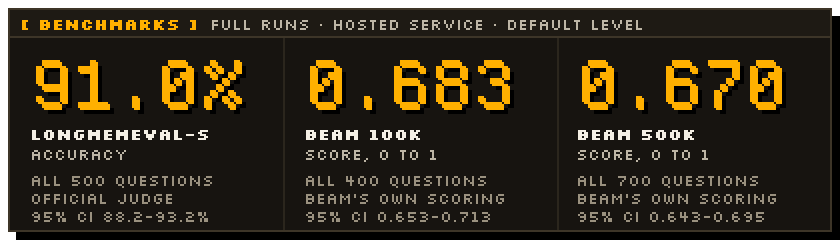
Full runs, every question of each benchmark, on the hosted service at the default reasoning level,
graded the way each benchmark grades itself. The method, the per-ability scores, what failed and
how other systems compare are on recallmem.dev/evals. The
harness that produced them is in evals/, so you can run it against your own deployment.
| Benchmark | Result | 95% interval | Questions | Graded by |
|---|---|---|---|---|
| LongMemEval-S | 91.0% accuracy | 88.2-93.2% | all 500 questions | official judge |
| BEAM 100K | 0.683 score, 0 to 1 | 0.653-0.713 | all 400 questions | BEAM's own scoring |
| BEAM 500K | 0.670 score, 0 to 1 | 0.643-0.695 | all 700 questions | BEAM's own scoring |
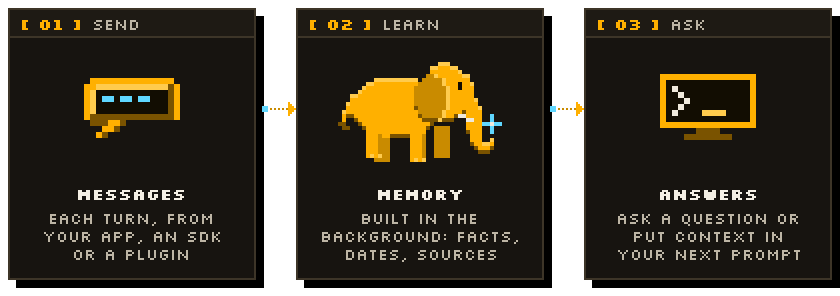
peer.chat("...") answers with citations, a confidence and an
explicit "I don't know" when memory has no answer. session.context() returns recent messages,
the summary and what is known about the person, trimmed to your token budget and ready for
OpenAI or Anthropic message formats.Search, MCP tools, webhooks, scopes (groups of sessions), per-peer deletion and data export are in the docs.
Sign in at app.recallmem.dev with your email, create an API key under API keys, and export it. New accounts start with free credit.
export RECALL_API_KEY=pk_live_...
TypeScript (npm install @recall-memory/sdk, Node 20+, no dependencies)
import { Recall } from "@recall-memory/sdk";

const recall = new Recall({ apiKey: process.env.RECALL_API_KEY });
const alice = recall.peer("alice"); // lazy: no request is made
const bot = recall.peer("bot");
const session = recall.session("chat-1");

// One round trip per agent turn: store the message, get the next prompt's context back.
const { context } = await session.turn([alice.message("I moved to Utrecht last month.")], {
  peerTarget: alice,
  tokens: 4000,
});
const messages = context.toOpenAI(bot); // or context.toAnthropicParams(bot)

await recall.waitForIdle(); // background reasoning has caught up
console.log(await alice.chat("Where do I live?")); // "Utrecht"
Python (pip install recall-mem, imported as recall_memory, Python 3.10+)
from recall_memory import Recall

recall = Recall(workspace_id="my-app")  # reads RECALL_API_KEY; no network call yet

alice = recall.peer("alice")  # handles are lazy: no network call
bot = recall.peer("bot")
session = recall.session("chat-1")

session.add_peers([alice, bot])
session.add_messages(
    [
        alice.message("I moved to Utrecht last month and I love cycling."),
        bot.message("Utrecht is great for cycling!"),
    ]
)

recall.wait_for_idle()  # block until reasoning has finished

print(alice.chat("Where does Alice live?"))  # -> "Alice lives in Utrecht."

# Build the next prompt: recent messages + what is known about Alice, in OpenAI or Anthropic shape.
ctx = session.context(peer_target=alice, tokens=4000)
messages = ctx.to_openai(assistant=bot)  # or ctx.to_anthropic(assistant=bot)
curl
export RECALL_URL=https://api.recallmem.dev

curl $RECALL_URL/v3/workspaces/my-app/sessions/chat-1/messages \
  -H "Authorization: Bearer $RECALL_API_KEY" \
  -H "Content-Type: application/json" \
  -d '{"messages":[
        {"peer_id":"alice","content":"I moved to Utrecht last month and I am vegetarian now."},
        {"peer_id":"assistant","content":"Noted! Utrecht has great veggie food."}
      ]}'

# Learning runs in the background and usually takes about 20 seconds: new messages are read in
# batches. GET /v3/workspaces/my-app/queue/status?wait_ms=30000 waits until it is done. Then:
curl $RECALL_URL/v3/workspaces/my-app/peers/alice/chat \
  -H "Authorization: Bearer $RECALL_API_KEY" \
  -H "Content-Type: application/json" \
  -d '{"query":"What should I cook for Alice?","reasoning_level":"low"}'
The answer carries content, citations, a confidence and abstained. The SDK READMEs
(TypeScript, Python) and the
docs cover streaming, structured answers, search, scopes and
webhooks.
Give an agent you already use a memory, without writing code. Each integration's README has the install steps, its settings and a way to check that it works.
| Agent | How | Where |
|---|---|---|
| Claude Code | Plugin: recalls what it knows about you when a session starts, records each turn, adds the MCP tools. /plugin marketplace add recallmem/recall-plugin, then /plugin install recall-memory@recall | integrations/claude-code |
| Codex | Plugin or installer with the same hooks and tools. codex plugin marketplace add recallmem/recall-plugin, then codex plugin add recall-memory@recall | integrations/codex |
| Claude.ai (web, desktop, mobile) | Custom connector: Settings, Connectors, Add custom connector, URL https://api.recallmem.dev/mcp, then sign in | docs |
| ChatGPT | Connector in developer mode with the same URL and OAuth sign-in | docs |
| Any MCP client (Cursor, VS Code, ...) | Remote MCP server at https://api.recallmem.dev/mcp: OAuth sign-in, or an API key in a header. Eight memory tools by default, all 40 with ?profile=full | docs |
| OpenClaw | Native plugin: memory added to each turn, conversations recorded, recall_* tools | integrations/openclaw |
| Hermes Agent | Memory provider (memory.provider: recall) with prefetch, turn sync and tools | integrations/hermes |
| Any agent with Agent Skills | A SKILL.md that teaches when and how to recall and record, with a helper script | integrations/agent-skill |
Building on an agent framework? These packages add Recall in a few lines:
| Framework | Package | What you get |
|---|---|---|
| Vercel AI SDK | @recall-memory/ai-sdk | Middleware that adds memory to each request and stores every turn, and memory tools (guide) |
| LangChain.js | @recall-memory/langchain | A chat message history in Recall sessions, a retriever and memory tools (guide) |
| Mastra | @recall-memory/mastra | A processor that adds memory to each run and stores every turn, and memory tools (guide) |
There is also a command-line client, recall (recall init, recall peer chat "Where do I live?",
recall doctor). It comes with the server rather than from npm: it is on the PATH in the Docker image
and at packages/server/dist/cli.js in a build of this repository; see the docs.
Yes, you can run Recall yourself. The server in packages/server is
source-available (see Licence) and is the one the hosted service runs: REST API,
background worker and MCP endpoint in one Node process (plus the recall CLI), with Postgres and
pgvector as its only dependency. Run it for your own products and company with your own model
provider keys, which you pay the providers for directly; the server meters every call so you can
see what each workspace costs. The hosted API at recallmem.dev is the
easiest path if you would rather operate nothing.
With Docker Compose (Postgres 17 with pgvector, and Recall on port 8000):
git clone https://github.com/recallmem/recall && cd recall
cp .env.example .env        # add at least one model provider key; every setting is documented there
docker compose up --build
curl localhost:8000/health
One container, with an embedded Postgres (PGlite) kept in the /data volume: good for a laptop,
a demo or a small agent.
docker build -t recall-server .
docker run -p 8000:8000 -v recall-data:/data -e OPENAI_API_KEY=... recall-server
From source (Node 22, pnpm 10): pnpm install, then pnpm dev (the server with reload on
port 8000), or pnpm --filter @recall-memory/server build and node packages/server/dist/main.js.
With no database URL it uses the embedded Postgres in ./.recall; any Postgres 16+ with pgvector
works through RECALL_DATABASE_URL.
Point the SDKs at your server with RECALL_URL=http://localhost:8000 (or baseURL / base_url).
Before anyone else can reach it, turn authentication on: RECALL_AUTH_ENABLED=true and a long
random RECALL_AUTH_SECRET, then mint a scoped token with the CLI:
docker compose exec recall recall token --workspace my-app, or from a build,
node packages/server/dist/cli.js token --workspace my-app. A self-hosted server has no sign-in,
dashboard or billing (those are the hosted service's multi-tenant mode); the
docs list the other differences.
Models. With no provider key at all, Recall runs on a deterministic offline mock: the pipeline, storage, retrieval and metering are real, the answers are canned. That is for trying the API and for tests. For real answers set one or more provider keys:
| Provider | Key | Model reference |
|---|---|---|
| OpenAI | OPENAI_API_KEY | openai/<model> |
| Anthropic | ANTHROPIC_API_KEY | anthropic/<model> |
| Gemini | GEMINI_API_KEY | gemini/<model> |
| OpenRouter | OPENROUTER_API_KEY | openrouter/<vendor>/<model> |
| Groq | GROQ_API_KEY | groq/<model> |
| xAI | XAI_API_KEY | xai/<model> |
| DeepSeek | DEEPSEEK_API_KEY | deepseek/<model> |
| Together | TOGETHER_API_KEY | together/<model> |
| Fireworks | FIREWORKS_API_KEY | fireworks/accounts/<account>/models/<model> |
| Any OpenAI-compatible server (Ollama, vLLM, LM Studio, llama.cpp) | RECALL_COMPAT_BASE_URL, RECALL_COMPAT_API_KEY | compat/<model> |
Every task can use a different model, from any provider:
| Variable | Task |
|---|---|
RECALL_MODEL_REASONER | Learning: extracting facts from new messages (most of the background cost) |
RECALL_MODEL_SUMMARY, RECALL_MODEL_CARD, RECALL_MODEL_DREAM | Session summaries, peer cards, the night shift |
RECALL_MODEL_CHAT_MINIMAL ... RECALL_MODEL_CHAT_MAX | The answering model for each reasoning level |
RECALL_EMBEDDING_MODEL, RECALL_EMBEDDING_DIMENSIONS | Embeddings (keep them fixed for the life of a database) |
RECALL_DEFAULT_PROVIDER | The provider for every task you have not set |
A task you leave unset gets the cheapest suitable model among the providers that have a key;
recall doctor prints the model each task will use. For example, a small model for the background
work and a local model for quick answers:
GEMINI_API_KEY=... RECALL_MODEL_REASONER=gemini/gemini-2.5-flash-lite \
RECALL_COMPAT_BASE_URL=http://localhost:11434/v1 RECALL_MODEL_CHAT_LOW=compat/qwen3:8b \
node packages/server/dist/main.js
Answers and memory quality depend on the models you choose: the benchmark figures above were
measured on the hosted service with its own model configuration, and evals/ lets you measure
yours. Costs are recorded per workspace, task and model at GET /v3/workspaces/{id}/usage.
The server is licensed under the Functional Source License: you can self-host it for any purpose, including in production and inside commercial products, except offering it to others as a competing memory service. See Licence.
| Path | What | Licence |
|---|---|---|
packages/server | The server: REST API, background worker (reasoning, summaries, the night shift), hybrid search and answers, MCP, CLI, dashboard | FSL-1.1-ALv2 |
packages/sdk | TypeScript SDK, @recall-memory/sdk | MIT |
sdks/python | Python SDK, recall-mem (import recall_memory) | MIT |
packages/ai-sdk, packages/langchain, packages/mastra | Framework integrations: @recall-memory/ai-sdk, @recall-memory/langchain, @recall-memory/mastra | MIT |
integrations | Claude Code and Codex plugins, OpenClaw, Hermes, Agent Skill, MCP registry and connector manifests | MIT |
examples | The code of every guide, in TypeScript and Python (TypeScript only for the TypeScript frameworks), run against a real server in CI | MIT |
evals | The benchmark harness: LongMemEval-S, BEAM and LoCoMo against any compatible URL, with metered cost and latency | MIT |
docs | Architecture and releasing the SDKs | MIT |
Develop with pnpm install, pnpm dev (server with reload on port 8000) and
pnpm lint && pnpm typecheck && pnpm test; tests run offline against an in-memory Postgres and
the mock model. CONTRIBUTING.md has the details.
packages/server/) is under the Functional Source License 1.1, Apache 2.0
future licence. Use, copy, modify and self-host it for anything
except a Competing Use: making it available to others as a commercial product or service that
substitutes for Recall or offers substantially the same functionality. Each version becomes
Apache 2.0 two years after it is released.LICENSE.md explains the split in full. Copyright (c) 2026 Smidt Beheer.
Website ·
Docs ·
Evals ·
Security ·
Privacy ·
Terms
Recall is made by Smidt Beheer in the Netherlands.
Long-term memory for AI agents: facts with dates and sources, history kept, honest "I don't know". REST API, MCP server, TS/Python SDKs. Self-hostable. Website: https://recallmem.dev
See the code
Website · Docs · Evals · Guides · Get an API key
Your agents forget. Recall doesn't. Recall is long-term memory for AI agents that talk to the same people again. Send it the conversation; in the background it works out what is true about each person, keeps a dated, cited record of it, and retires facts that stop being true (when Alice moves from Amsterdam to Utrecht, the old address is closed, not contradicted). Ask it a question and it answers from that record in a single model call, with its sources, or hands you the context to put in your own prompt. Use the hosted API at recallmem.dev (hosted in Frankfurt), or run the server in this repository yourself.
Full runs, every question of each benchmark, on the hosted service at the default reasoning level,
graded the way each benchmark grades itself. The method, the per-ability scores, what failed and
how other systems compare are on recallmem.dev/evals. The
harness that produced them is in evals/, so you can run it against your own deployment.
| Benchmark | Result | 95% interval | Questions | Graded by |
|---|---|---|---|---|
| LongMemEval-S | 91.0% accuracy | 88.2-93.2% | all 500 questions | official judge |
| BEAM 100K | 0.683 score, 0 to 1 | 0.653-0.713 | all 400 questions | BEAM's own scoring |
| BEAM 500K | 0.670 score, 0 to 1 | 0.643-0.695 | all 700 questions | BEAM's own scoring |
peer.chat("...") answers with citations, a confidence and an
explicit "I don't know" when memory has no answer. session.context() returns recent messages,
the summary and what is known about the person, trimmed to your token budget and ready for
OpenAI or Anthropic message formats.Search, MCP tools, webhooks, scopes (groups of sessions), per-peer deletion and data export are in the docs.
Sign in at app.recallmem.dev with your email, create an API key under API keys, and export it. New accounts start with free credit.
export RECALL_API_KEY=pk_live_...
TypeScript (npm install @recall-memory/sdk, Node 20+, no dependencies)
import { Recall } from "@recall-memory/sdk";

const recall = new Recall({ apiKey: process.env.RECALL_API_KEY });
const alice = recall.peer("alice"); // lazy: no request is made
const bot = recall.peer("bot");
const session = recall.session("chat-1");

// One round trip per agent turn: store the message, get the next prompt's context back.
const { context } = await session.turn([alice.message("I moved to Utrecht last month.")], {
  peerTarget: alice,
  tokens: 4000,
});
const messages = context.toOpenAI(bot); // or context.toAnthropicParams(bot)

await recall.waitForIdle(); // background reasoning has caught up
console.log(await alice.chat("Where do I live?")); // "Utrecht"
Python (pip install recall-mem, imported as recall_memory, Python 3.10+)
from recall_memory import Recall

recall = Recall(workspace_id="my-app")  # reads RECALL_API_KEY; no network call yet

alice = recall.peer("alice")  # handles are lazy: no network call
bot = recall.peer("bot")
session = recall.session("chat-1")

session.add_peers([alice, bot])
session.add_messages(
    [
        alice.message("I moved to Utrecht last month and I love cycling."),
        bot.message("Utrecht is great for cycling!"),
    ]
)

recall.wait_for_idle()  # block until reasoning has finished

print(alice.chat("Where does Alice live?"))  # -> "Alice lives in Utrecht."

# Build the next prompt: recent messages + what is known about Alice, in OpenAI or Anthropic shape.
ctx = session.context(peer_target=alice, tokens=4000)
messages = ctx.to_openai(assistant=bot)  # or ctx.to_anthropic(assistant=bot)
curl
export RECALL_URL=https://api.recallmem.dev

curl $RECALL_URL/v3/workspaces/my-app/sessions/chat-1/messages \
  -H "Authorization: Bearer $RECALL_API_KEY" \
  -H "Content-Type: application/json" \
  -d '{"messages":[
        {"peer_id":"alice","content":"I moved to Utrecht last month and I am vegetarian now."},
        {"peer_id":"assistant","content":"Noted! Utrecht has great veggie food."}
      ]}'

# Learning runs in the background and usually takes about 20 seconds: new messages are read in
# batches. GET /v3/workspaces/my-app/queue/status?wait_ms=30000 waits until it is done. Then:
curl $RECALL_URL/v3/workspaces/my-app/peers/alice/chat \
  -H "Authorization: Bearer $RECALL_API_KEY" \
  -H "Content-Type: application/json" \
  -d '{"query":"What should I cook for Alice?","reasoning_level":"low"}'
The answer carries content, citations, a confidence and abstained. The SDK READMEs
(TypeScript, Python) and the
docs cover streaming, structured answers, search, scopes and
webhooks.
Give an agent you already use a memory, without writing code. Each integration's README has the install steps, its settings and a way to check that it works.
| Agent | How | Where |
|---|---|---|
| Claude Code | Plugin: recalls what it knows about you when a session starts, records each turn, adds the MCP tools. /plugin marketplace add recallmem/recall-plugin, then /plugin install recall-memory@recall | integrations/claude-code |
| Codex | Plugin or installer with the same hooks and tools. codex plugin marketplace add recallmem/recall-plugin, then codex plugin add recall-memory@recall | integrations/codex |
| Claude.ai (web, desktop, mobile) | Custom connector: Settings, Connectors, Add custom connector, URL https://api.recallmem.dev/mcp, then sign in | docs |
| ChatGPT | Connector in developer mode with the same URL and OAuth sign-in | docs |
| Any MCP client (Cursor, VS Code, ...) | Remote MCP server at https://api.recallmem.dev/mcp: OAuth sign-in, or an API key in a header. Eight memory tools by default, all 40 with ?profile=full | docs |
| OpenClaw | Native plugin: memory added to each turn, conversations recorded, recall_* tools | integrations/openclaw |
| Hermes Agent | Memory provider (memory.provider: recall) with prefetch, turn sync and tools | integrations/hermes |
| Any agent with Agent Skills | A SKILL.md that teaches when and how to recall and record, with a helper script | integrations/agent-skill |
Building on an agent framework? These packages add Recall in a few lines:
| Framework | Package | What you get |
|---|---|---|
| Vercel AI SDK | @recall-memory/ai-sdk | Middleware that adds memory to each request and stores every turn, and memory tools (guide) |
| LangChain.js | @recall-memory/langchain | A chat message history in Recall sessions, a retriever and memory tools (guide) |
| Mastra | @recall-memory/mastra | A processor that adds memory to each run and stores every turn, and memory tools (guide) |
There is also a command-line client, recall (recall init, recall peer chat "Where do I live?",
recall doctor). It comes with the server rather than from npm: it is on the PATH in the Docker image
and at packages/server/dist/cli.js in a build of this repository; see the docs.
Yes, you can run Recall yourself. The server in packages/server is
source-available (see Licence) and is the one the hosted service runs: REST API,
background worker and MCP endpoint in one Node process (plus the recall CLI), with Postgres and
pgvector as its only dependency. Run it for your own products and company with your own model
provider keys, which you pay the providers for directly; the server meters every call so you can
see what each workspace costs. The hosted API at recallmem.dev is the
easiest path if you would rather operate nothing.
With Docker Compose (Postgres 17 with pgvector, and Recall on port 8000):
git clone https://github.com/recallmem/recall && cd recall
cp .env.example .env        # add at least one model provider key; every setting is documented there
docker compose up --build
curl localhost:8000/health
One container, with an embedded Postgres (PGlite) kept in the /data volume: good for a laptop,
a demo or a small agent.
docker build -t recall-server .
docker run -p 8000:8000 -v recall-data:/data -e OPENAI_API_KEY=... recall-server
From source (Node 22, pnpm 10): pnpm install, then pnpm dev (the server with reload on
port 8000), or pnpm --filter @recall-memory/server build and node packages/server/dist/main.js.
With no database URL it uses the embedded Postgres in ./.recall; any Postgres 16+ with pgvector
works through RECALL_DATABASE_URL.
Point the SDKs at your server with RECALL_URL=http://localhost:8000 (or baseURL / base_url).
Before anyone else can reach it, turn authentication on: RECALL_AUTH_ENABLED=true and a long
random RECALL_AUTH_SECRET, then mint a scoped token with the CLI:
docker compose exec recall recall token --workspace my-app, or from a build,
node packages/server/dist/cli.js token --workspace my-app. A self-hosted server has no sign-in,
dashboard or billing (those are the hosted service's multi-tenant mode); the
docs list the other differences.
Models. With no provider key at all, Recall runs on a deterministic offline mock: the pipeline, storage, retrieval and metering are real, the answers are canned. That is for trying the API and for tests. For real answers set one or more provider keys:
| Provider | Key | Model reference |
|---|---|---|
| OpenAI | OPENAI_API_KEY | openai/<model> |
| Anthropic | ANTHROPIC_API_KEY | anthropic/<model> |
| Gemini | GEMINI_API_KEY | gemini/<model> |
| OpenRouter | OPENROUTER_API_KEY | openrouter/<vendor>/<model> |
| Groq | GROQ_API_KEY | groq/<model> |
| xAI | XAI_API_KEY | xai/<model> |
| DeepSeek | DEEPSEEK_API_KEY | deepseek/<model> |
| Together | TOGETHER_API_KEY | together/<model> |
| Fireworks | FIREWORKS_API_KEY | fireworks/accounts/<account>/models/<model> |
| Any OpenAI-compatible server (Ollama, vLLM, LM Studio, llama.cpp) | RECALL_COMPAT_BASE_URL, RECALL_COMPAT_API_KEY | compat/<model> |
Every task can use a different model, from any provider:
| Variable | Task |
|---|---|
RECALL_MODEL_REASONER | Learning: extracting facts from new messages (most of the background cost) |
RECALL_MODEL_SUMMARY, RECALL_MODEL_CARD, RECALL_MODEL_DREAM | Session summaries, peer cards, the night shift |
RECALL_MODEL_CHAT_MINIMAL ... RECALL_MODEL_CHAT_MAX | The answering model for each reasoning level |
RECALL_EMBEDDING_MODEL, RECALL_EMBEDDING_DIMENSIONS | Embeddings (keep them fixed for the life of a database) |
RECALL_DEFAULT_PROVIDER | The provider for every task you have not set |
A task you leave unset gets the cheapest suitable model among the providers that have a key;
recall doctor prints the model each task will use. For example, a small model for the background
work and a local model for quick answers:
GEMINI_API_KEY=... RECALL_MODEL_REASONER=gemini/gemini-2.5-flash-lite \
RECALL_COMPAT_BASE_URL=http://localhost:11434/v1 RECALL_MODEL_CHAT_LOW=compat/qwen3:8b \
node packages/server/dist/main.js
Answers and memory quality depend on the models you choose: the benchmark figures above were
measured on the hosted service with its own model configuration, and evals/ lets you measure
yours. Costs are recorded per workspace, task and model at GET /v3/workspaces/{id}/usage.
The server is licensed under the Functional Source License: you can self-host it for any purpose, including in production and inside commercial products, except offering it to others as a competing memory service. See Licence.
| Path | What | Licence |
|---|---|---|
packages/server | The server: REST API, background worker (reasoning, summaries, the night shift), hybrid search and answers, MCP, CLI, dashboard | FSL-1.1-ALv2 |
packages/sdk | TypeScript SDK, @recall-memory/sdk | MIT |
sdks/python | Python SDK, recall-mem (import recall_memory) | MIT |
packages/ai-sdk, packages/langchain, packages/mastra | Framework integrations: @recall-memory/ai-sdk, @recall-memory/langchain, @recall-memory/mastra | MIT |
integrations | Claude Code and Codex plugins, OpenClaw, Hermes, Agent Skill, MCP registry and connector manifests | MIT |
examples | The code of every guide, in TypeScript and Python (TypeScript only for the TypeScript frameworks), run against a real server in CI | MIT |
evals | The benchmark harness: LongMemEval-S, BEAM and LoCoMo against any compatible URL, with metered cost and latency | MIT |
docs | Architecture and releasing the SDKs | MIT |
Develop with pnpm install, pnpm dev (server with reload on port 8000) and
pnpm lint && pnpm typecheck && pnpm test; tests run offline against an in-memory Postgres and
the mock model. CONTRIBUTING.md has the details.
packages/server/) is under the Functional Source License 1.1, Apache 2.0
future licence. Use, copy, modify and self-host it for anything
except a Competing Use: making it available to others as a commercial product or service that
substitutes for Recall or offers substantially the same functionality. Each version becomes
Apache 2.0 two years after it is released.LICENSE.md explains the split in full. Copyright (c) 2026 Smidt Beheer.
Website ·
Docs ·
Evals ·
Security ·
Privacy ·
Terms
Recall is made by Smidt Beheer in the Netherlands.



