Use ChatGPT Developer Mode as a local coding agent for your repo through MCP.
See the code

Give ChatGPT local coding tools for repos you explicitly allow.




CodexPro is a local MCP server. It connects your ChatGPT session to your machine and repos you allow.
ChatGPT can read, search, edit, review, verify, import attachments, and write handoff plans. It stays inside those roots.
It is not a hosted SaaS product, model proxy, quota bypass, account pool, or remote shell service.
Needs:
npm install -g codexpro
cd /path/to/your/repo
codexpro setup
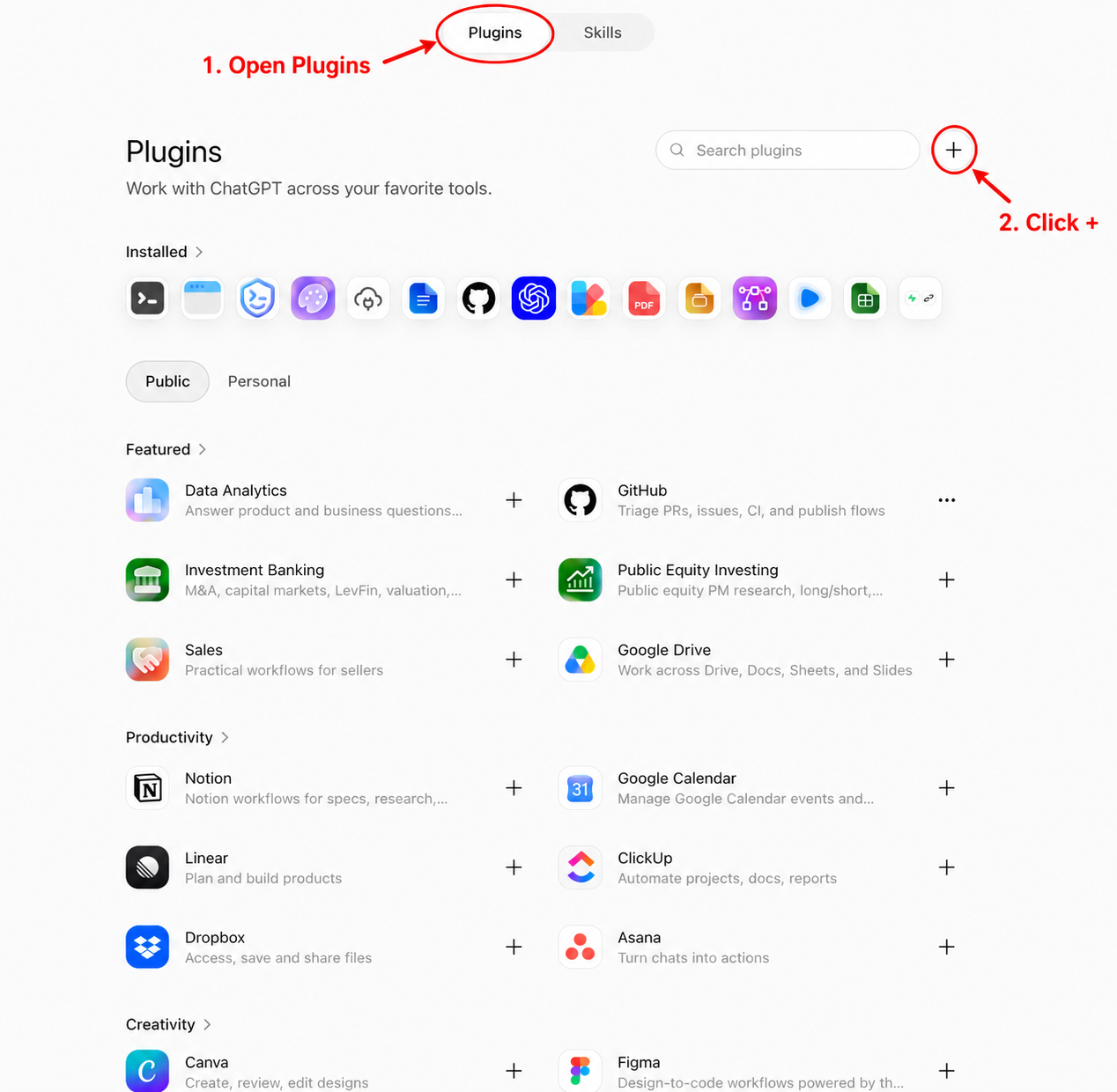
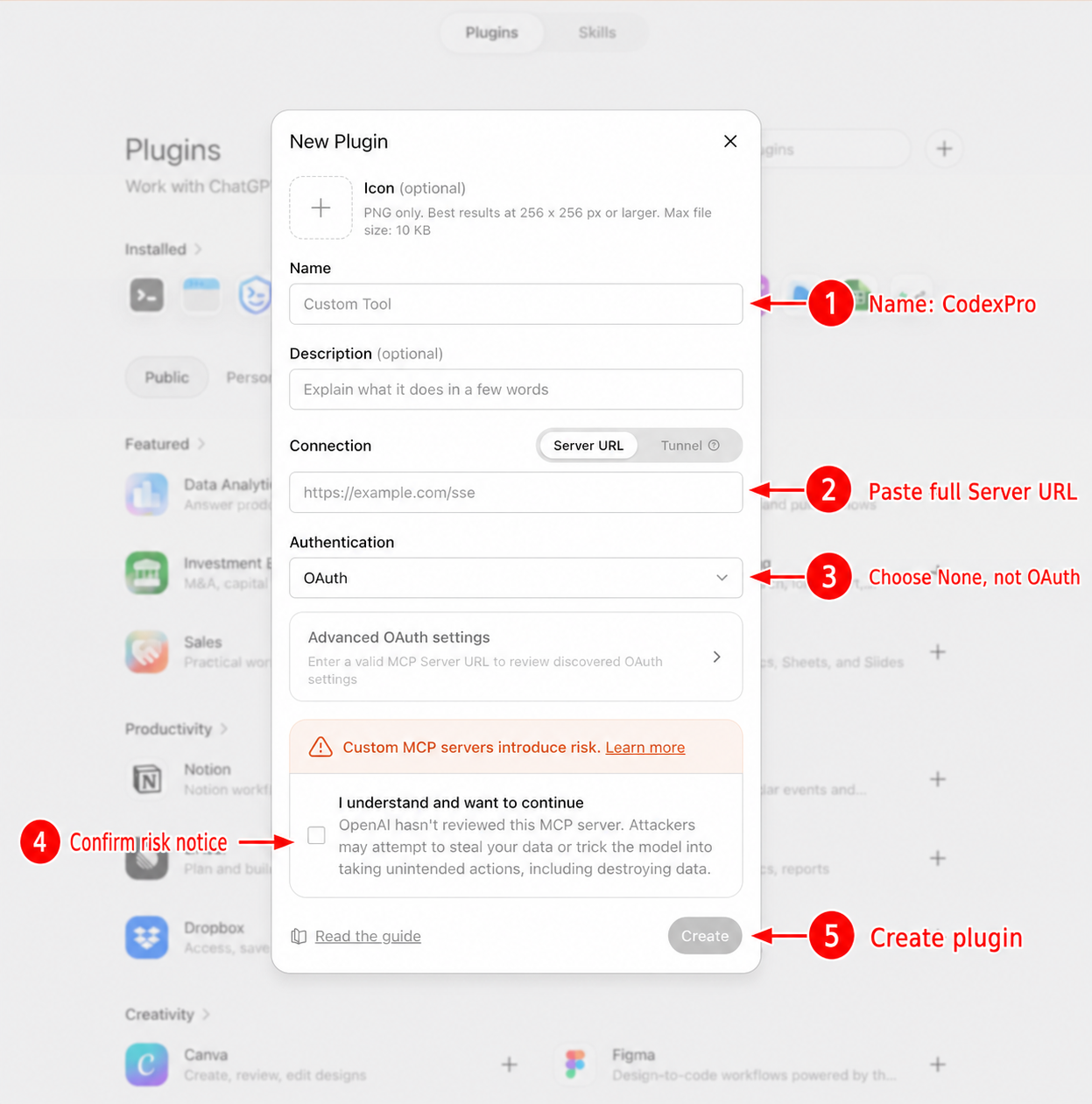
Settings -> Security and login → turn Developer mode on (keep CSP enforcement on).Settings -> Plugins → Plugins tab → + beside Search plugins.CodexPro.CodexPro auth is the token already in that URL. Do not share the URL.
Open Plugins and click + | Complete the New Plugin form |
|---|---|
 |  |
Daily use from the same repo:
codexpro start
If plugin creation fails, run codexpro connection-test and check whether ChatGPT requests reach the local server.
With workspace write mode (the normal agent setup):
write, edit, or guarded apply_patchimport_filebashshow_changes.ai-bridgeCodexPro does more than raw file search:
inspect_workspace maps languages, project types, entrypoints, areas, symbols, and internal relationships.search supports targeted symbol, references, and impact intents as well as ordinary text and regex search.show_changes identifies affected areas, likely dependents, related tests, risk signals, and relevant verification commands.Analysis is local, bounded, and cached by a workspace fingerprint. It needs no model API key, language-server daemon, embedding service, or vector database. Coverage and inference strength are reported instead of presented as certainty.
CodexPro is optimized for a narrow loop: connect ChatGPT to explicitly allowed local repositories, make a reviewable change, verify it, and preserve a handoff record. The project prioritizes:
See the roadmap for the next reliability, code-navigation, and workflow improvements.
One CodexPro process can allow more than one repo:
codexpro settings set --project ~/code/web --project ~/code/api
codexpro settings show
codexpro start
Ask ChatGPT to open_workspace on an allowed project. open_current_workspace returns to the launch repo.
For two ChatGPT accounts or hard isolation, run two CodexPro processes on different ports and Server URLs.
codexpro setup
codexpro start
codexpro start --root /path/to/repo
codexpro doctor
codexpro connection-test
codexpro settings
codexpro inspect
codexpro review
Useful modes:
codexpro start --no-bash
codexpro start --tool-mode minimal
codexpro start --tool-mode full
codexpro start --mode handoff
codexpro start --mode pro
codexpro start --headless
Opt-in tool cards:
CODEXPRO_TOOL_CARDS=1 codexpro start
ChatGPT web needs HTTPS:
codexpro start --tunnel cloudflare          # quick demo URL (changes)
codexpro ngrok --hostname your.ngrok-free.dev
codexpro stable --hostname codexpro.example.com --tunnel-name codexpro
codexpro tailscale --hostname your-device.your-tailnet.ts.net
codexpro start --tunnel none                # local only
Keep a stable token for stable hostnames:
mkdir -p ~/.codexpro
openssl rand -hex 32 > ~/.codexpro/http-token
chmod 600 ~/.codexpro/http-token
Prefer Authorization: Bearer <token> when the client supports headers. The ?codexpro_token= query form is a personal compatibility fallback.
workspace.env, keys, .git, build caches, and similarRead SECURITY.md before exposing a tunnel.
npm install -g codexpro@latest
codexpro --version
Restart codexpro start after updating. Saved profiles under ~/.codexpro stay in place.
npm install
npm run build
npm run smoke
npm run stress
npm run package:smoke
npm run release:check
Publish only from the CodexPro root:
cd /path/to/codexpro
npm run release:publish
39 followers · starred Sep 2026
4,603 followers · starred Jul 2026
792 followers · starred Aug 2026
187 followers · starred Jul 2026
Use ChatGPT Developer Mode as a local coding agent for your repo through MCP.
See the code
Give ChatGPT local coding tools for repos you explicitly allow.
CodexPro is a local MCP server. It connects your ChatGPT session to your machine and repos you allow.
ChatGPT can read, search, edit, review, verify, import attachments, and write handoff plans. It stays inside those roots.
It is not a hosted SaaS product, model proxy, quota bypass, account pool, or remote shell service.
Needs:
npm install -g codexpro
cd /path/to/your/repo
codexpro setup
Settings -> Security and login → turn Developer mode on (keep CSP enforcement on).Settings -> Plugins → Plugins tab → + beside Search plugins.CodexPro.CodexPro auth is the token already in that URL. Do not share the URL.
Open Plugins and click + | Complete the New Plugin form |
|---|---|
| |
Daily use from the same repo:
codexpro start
If plugin creation fails, run codexpro connection-test and check whether ChatGPT requests reach the local server.
With workspace write mode (the normal agent setup):
write, edit, or guarded apply_patchimport_filebashshow_changes.ai-bridgeCodexPro does more than raw file search:
inspect_workspace maps languages, project types, entrypoints, areas, symbols, and internal relationships.search supports targeted symbol, references, and impact intents as well as ordinary text and regex search.show_changes identifies affected areas, likely dependents, related tests, risk signals, and relevant verification commands.Analysis is local, bounded, and cached by a workspace fingerprint. It needs no model API key, language-server daemon, embedding service, or vector database. Coverage and inference strength are reported instead of presented as certainty.
CodexPro is optimized for a narrow loop: connect ChatGPT to explicitly allowed local repositories, make a reviewable change, verify it, and preserve a handoff record. The project prioritizes:
See the roadmap for the next reliability, code-navigation, and workflow improvements.
One CodexPro process can allow more than one repo:
codexpro settings set --project ~/code/web --project ~/code/api
codexpro settings show
codexpro start
Ask ChatGPT to open_workspace on an allowed project. open_current_workspace returns to the launch repo.
For two ChatGPT accounts or hard isolation, run two CodexPro processes on different ports and Server URLs.
codexpro setup
codexpro start
codexpro start --root /path/to/repo
codexpro doctor
codexpro connection-test
codexpro settings
codexpro inspect
codexpro review
Useful modes:
codexpro start --no-bash
codexpro start --tool-mode minimal
codexpro start --tool-mode full
codexpro start --mode handoff
codexpro start --mode pro
codexpro start --headless
Opt-in tool cards:
CODEXPRO_TOOL_CARDS=1 codexpro start
ChatGPT web needs HTTPS:
codexpro start --tunnel cloudflare          # quick demo URL (changes)
codexpro ngrok --hostname your.ngrok-free.dev
codexpro stable --hostname codexpro.example.com --tunnel-name codexpro
codexpro tailscale --hostname your-device.your-tailnet.ts.net
codexpro start --tunnel none                # local only
Keep a stable token for stable hostnames:
mkdir -p ~/.codexpro
openssl rand -hex 32 > ~/.codexpro/http-token
chmod 600 ~/.codexpro/http-token
Prefer Authorization: Bearer <token> when the client supports headers. The ?codexpro_token= query form is a personal compatibility fallback.
workspace.env, keys, .git, build caches, and similarRead SECURITY.md before exposing a tunnel.
npm install -g codexpro@latest
codexpro --version
Restart codexpro start after updating. Saved profiles under ~/.codexpro stay in place.
npm install
npm run build
npm run smoke
npm run stress
npm run package:smoke
npm run release:check
Publish only from the CodexPro root:
cd /path/to/codexpro
npm run release:publish
39 followers · starred Sep 2026
4,603 followers · starred Jul 2026
792 followers · starred Aug 2026
187 followers · starred Jul 2026