Run Fish Audio Drama 3 locally on AMD GPUs (ROCm). 16 GB VRAM is enough, the MoE experts live in RAM. Community project, not affiliated with Fish Audio.
Python
7
5 commits
updated Oct 17, 2026
Run Fish Audio Drama 3 locally on an AMD GPU.
Officially Drama 3 needs an NVIDIA card with at least 48 GB of VRAM. ROCm isn't supported. I have an RX 9070 with 16 GB and wanted to use it anyway, so here we are. It runs the original FP8 model, not a cut-down version.
The trick is that the model is a 35B MoE, but only about 3B parameters are active per token. So the experts (around 32 GB) stay in system RAM, and only the ones that are needed get moved to the GPU. Everything else fits in VRAM.
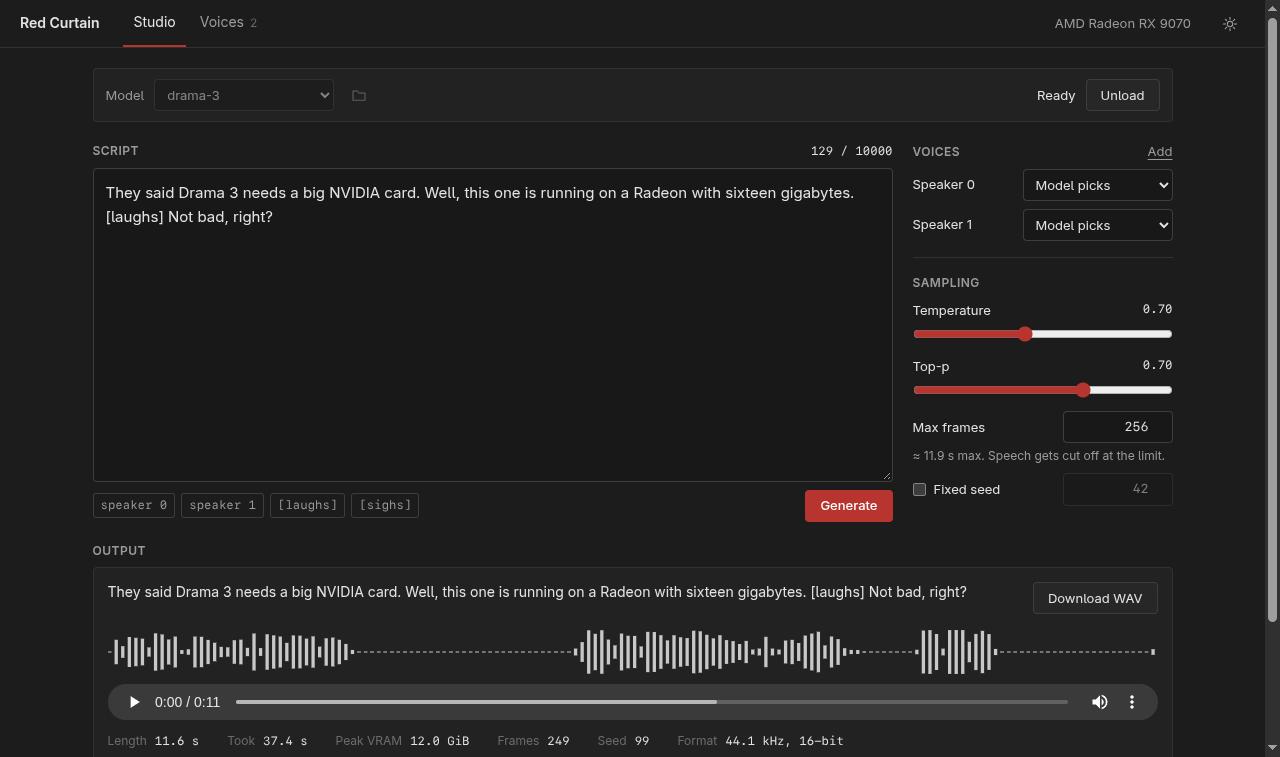
Here's what it sounds like (sound on), generated on the RX 9070 with the default settings:
https://github.com/user-attachments/assets/82e8f553-65aa-48cf-87d5-8a30a9dd00f2
Built with Fish Audio. This is a community project and has nothing to do with Fish Audio officially.
torch.version.hip set, GPU visible)Tested only on an RX 9070 (gfx1201) with ROCm 7.2 and PyTorch 2.14. Other RDNA3/RDNA4 cards should work as long as ROCm supports them and there's enough VRAM, but I couldn't test them. If you try it on another card, please open an issue and tell me how it went.
git clone https://github.com/re133/red-curtain
cd red-curtain
./setup.sh
./start.sh
setup.sh creates a .venv that reuses your system PyTorch (it never installs torch, drivers or anything system-wide), installs the Python deps and builds the UI.
Then open http://127.0.0.1:7860.
The weights are not in this repo. Either click Settings → Download Drama 3 in the UI or run:
.venv/bin/python scripts/download_model.py --plan
.venv/bin/python scripts/download_model.py --confirm-download
That pulls about 41.5 GB from Hugging Face into models/drama-3. Downloading means you accept the Fish Audio Community License. INT4 doesn't work here, because it depends on NVIDIA's GPTQ-Marlin kernels.
After that everything runs offline.
Load the model (takes ~17 seconds), write some text, hit Generate.
Multiple speakers and emotions work the same way as in the original:
<|speaker:0|> Did you hear that?
<|speaker:1|> Relax. [sighing] It's just the GPU fans again.
The tags button under the text field has the same tags Fish Audio's own editor offers. Don't put a sound tag right at the start of a line, the model then often says the first word and goes silent. After the first few words it works fine.
You can also add reference voices (WAV or FLAC, up to 15 seconds, with an exact transcript) and assign them to speaker 0 or 1. Only use recordings of people who agreed to it. The Fish license is very clear about that, see below.
There's also a CLI:
.venv/bin/python generate.py \
  --model models/drama-3 \
  --text "Hello from an AMD card." \
  --output outputs/hello.wav
Add --reference-audio ref.wav --reference-text "exact transcript" for voice cloning.
Honestly, not realtime. On my RX 9070 + Ryzen 9 5900XT + 128 GB DDR4:
| Model load | ~17 s |
| 3.3 s of speech | ~13 s |
| 11.6 s of speech | ~37 s |
| VRAM peak | ~11–12 GB |
| Process RAM | ~35 GB |
A lot of the time probably goes into moving experts over PCIe, so a card with more VRAM (bigger expert cache) should be faster. I haven't measured that though.
The model code itself is Fish Audio's code from fish-speech, basically unchanged. The DAC codec comes from vLLM-Omni.
Long text gets split into parts of about 300 characters, the same way fish-speech does it. Each part can be at most about 47 seconds (1024 frames).
Sometimes a take just stops after the first sentence and the rest is silence. That's a known thing with Drama 3 (the vLLM recipe and other ports mention it too, and Fish regenerates silent takes themselves), not the AMD port: I compared it step by step against Fish's own reference code running on the CPU and the probabilities match. What helps, all already set as default:
Two things you can do yourself: give every speaker a reference voice (with one, 8 of 8 test takes came out complete), and don't start a line with a sound tag. If it still happens, try another seed; the UI warns you when it detects a long silent tail.
MIOPEN_FIND_MODE=FAST is set by start.sh. Without it, MIOpen searches kernels for ages every time the audio length changes.
Only one job runs at a time
.venv/bin/python -m pytest -q
./start.sh --probe        # checks the GPU ops the model needs
My own code is MIT. But this repo also contains code from Fish Audio, so not everything is MIT:
red_curtain/fish_omni/, errors.py, sampling.py: Fish Audio Community License v1.0red_curtain/codec/: Apache-2.0 (with MIT parts from Descript)Details are in LICENSE and NOTICE.
Short version of what the Fish license means for you: personal use, research and testing are free. Commercial use is OK as long as your company makes less than USD 500k a year. Running it as a hosted TTS service for other people needs a separate license from Fish Audio.
And these rules apply to everyone who uses it (section IV(b) of the license):
Run Fish Audio Drama 3 locally on AMD GPUs (ROCm). 16 GB VRAM is enough, the MoE experts live in RAM. Community project, not affiliated with Fish Audio.
Python
7
5 commits
updated Oct 17, 2026
Run Fish Audio Drama 3 locally on an AMD GPU.
Officially Drama 3 needs an NVIDIA card with at least 48 GB of VRAM. ROCm isn't supported. I have an RX 9070 with 16 GB and wanted to use it anyway, so here we are. It runs the original FP8 model, not a cut-down version.
The trick is that the model is a 35B MoE, but only about 3B parameters are active per token. So the experts (around 32 GB) stay in system RAM, and only the ones that are needed get moved to the GPU. Everything else fits in VRAM.
Here's what it sounds like (sound on), generated on the RX 9070 with the default settings:
https://github.com/user-attachments/assets/82e8f553-65aa-48cf-87d5-8a30a9dd00f2
Built with Fish Audio. This is a community project and has nothing to do with Fish Audio officially.
torch.version.hip set, GPU visible)Tested only on an RX 9070 (gfx1201) with ROCm 7.2 and PyTorch 2.14. Other RDNA3/RDNA4 cards should work as long as ROCm supports them and there's enough VRAM, but I couldn't test them. If you try it on another card, please open an issue and tell me how it went.
git clone https://github.com/re133/red-curtain
cd red-curtain
./setup.sh
./start.sh
setup.sh creates a .venv that reuses your system PyTorch (it never installs torch, drivers or anything system-wide), installs the Python deps and builds the UI.
Then open http://127.0.0.1:7860.
The weights are not in this repo. Either click Settings → Download Drama 3 in the UI or run:
.venv/bin/python scripts/download_model.py --plan
.venv/bin/python scripts/download_model.py --confirm-download
That pulls about 41.5 GB from Hugging Face into models/drama-3. Downloading means you accept the Fish Audio Community License. INT4 doesn't work here, because it depends on NVIDIA's GPTQ-Marlin kernels.
After that everything runs offline.
Load the model (takes ~17 seconds), write some text, hit Generate.
Multiple speakers and emotions work the same way as in the original:
<|speaker:0|> Did you hear that?
<|speaker:1|> Relax. [sighing] It's just the GPU fans again.
The tags button under the text field has the same tags Fish Audio's own editor offers. Don't put a sound tag right at the start of a line, the model then often says the first word and goes silent. After the first few words it works fine.
You can also add reference voices (WAV or FLAC, up to 15 seconds, with an exact transcript) and assign them to speaker 0 or 1. Only use recordings of people who agreed to it. The Fish license is very clear about that, see below.
There's also a CLI:
.venv/bin/python generate.py \
  --model models/drama-3 \
  --text "Hello from an AMD card." \
  --output outputs/hello.wav
Add --reference-audio ref.wav --reference-text "exact transcript" for voice cloning.
Honestly, not realtime. On my RX 9070 + Ryzen 9 5900XT + 128 GB DDR4:
| Model load | ~17 s |
| 3.3 s of speech | ~13 s |
| 11.6 s of speech | ~37 s |
| VRAM peak | ~11–12 GB |
| Process RAM | ~35 GB |
A lot of the time probably goes into moving experts over PCIe, so a card with more VRAM (bigger expert cache) should be faster. I haven't measured that though.
The model code itself is Fish Audio's code from fish-speech, basically unchanged. The DAC codec comes from vLLM-Omni.
Long text gets split into parts of about 300 characters, the same way fish-speech does it. Each part can be at most about 47 seconds (1024 frames).
Sometimes a take just stops after the first sentence and the rest is silence. That's a known thing with Drama 3 (the vLLM recipe and other ports mention it too, and Fish regenerates silent takes themselves), not the AMD port: I compared it step by step against Fish's own reference code running on the CPU and the probabilities match. What helps, all already set as default:
Two things you can do yourself: give every speaker a reference voice (with one, 8 of 8 test takes came out complete), and don't start a line with a sound tag. If it still happens, try another seed; the UI warns you when it detects a long silent tail.
MIOPEN_FIND_MODE=FAST is set by start.sh. Without it, MIOpen searches kernels for ages every time the audio length changes.
Only one job runs at a time
.venv/bin/python -m pytest -q
./start.sh --probe        # checks the GPU ops the model needs
My own code is MIT. But this repo also contains code from Fish Audio, so not everything is MIT:
red_curtain/fish_omni/, errors.py, sampling.py: Fish Audio Community License v1.0red_curtain/codec/: Apache-2.0 (with MIT parts from Descript)Details are in LICENSE and NOTICE.
Short version of what the Fish license means for you: personal use, research and testing are free. Commercial use is OK as long as your company makes less than USD 500k a year. Running it as a hosted TTS service for other people needs a separate license from Fish Audio.
And these rules apply to everyone who uses it (section IV(b) of the license):



