A mobile-first responsive Web UI for the RaspiBlitz
TypeScript
70
1,768 commits
updated Oct 15, 2026
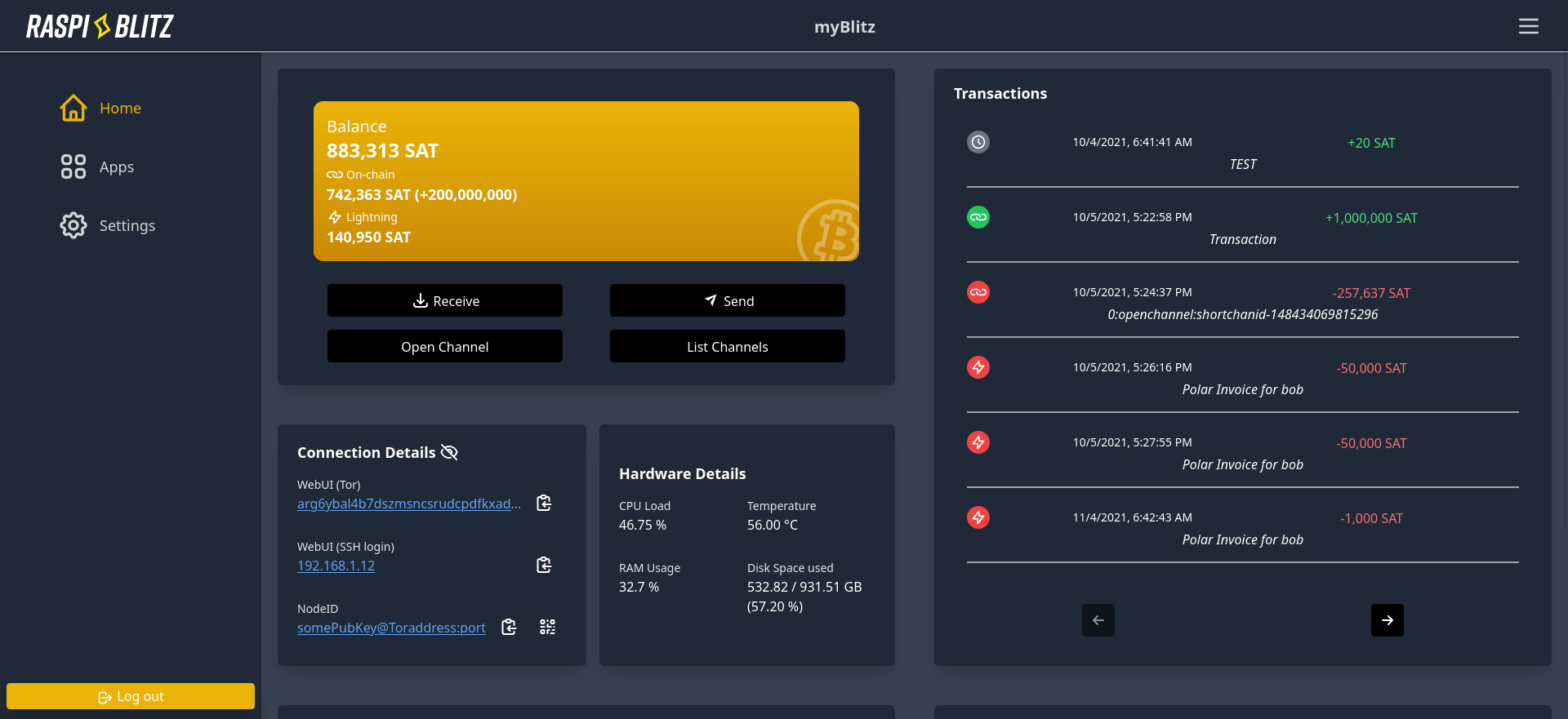
In collaboration with Bitcoin Design.
Images of the WebUI can be found at raspiblitz-web-progress
Built with React & Tailwind CSS.
If you want to bring the Raspiblitz WebUI to other languages, please help us translate it via Weblate :)
Big thanks to our translators, which you can find in this README.
npm update
This project supports devenv.sh, a developer environment tool built on Nix.
devenv shell to enter the development environmentjavascript.npm.install.enable = true; to false and run npm install after entering the shell.npm install
cd backend-mock
npm install
cd ..
npm run dev:local
The npm run dev:local command starts the frontend and the backend mock server.
The backend mock server restarts automatically when you change a file in the backend-mock folder.
npm install
npm run start
For the backend, there currently exist three options:
Open another terminal
cd backend-mock
npm install
npm run start
Then go to http://localhost:3000 and use the password password.
Production builds omit source maps by default. To include source maps for
investigating a diagnostic report, run BUILD_SOURCEMAP=true npm run build.
Keep the generated maps with the matching build; deploying them also makes
the original source code available to browsers. Diagnostic reports still
include JavaScript and component stacks without source maps.
npm test
Install both sets of locked dependencies with npm ci and
npm ci --prefix backend-mock, then install Chromium with
npx playwright install chromium.
Run the mock's WebSocket protocol tests with npm run test:mock.
These also exercise app installation, failure, retry, and uninstall over HTTP and
WebSocket. The mock emits app_manage_message events for the requested app and
retains installed state for reconnect warmup. Set MOCK_APP_FAILURE_ONCE=mempool
to make its first operation fail with a structured error; later attempts succeed.
The Playwright mock config enables this scenario for the installation browser test.
Run browser tests headless with npm run test:e2e. Playwright starts a dedicated
mock API on port 8100 and Vite on port 3100, including a test that uses native
WebSockets to verify dashboard snapshots and wallet state updates. These tests
always use the mock, regardless of BACKEND_SERVER, and refuse to reuse servers
already occupying their ports. Normal development servers on ports 3000 and 8000
can keep running.
CI runs lint, types, unit tests, mock tests, and builds on Node.js 22 and 24. A separate Node.js 24 job runs Chromium E2E tests and retains the HTML report for seven days.
Run test with UI:
npx playwright test --ui
This guide uses Polar for easier development, but you can also use a real lightning node.
blitz_api to work..env file (see .env_sample in blitz_api) and copy the bitcoin and ln info into it.
shell_script_path you need to define a directory where a folder called config.scripts and a file called blitz.debug.sh reside in. Otherwise blitz_api may not work (used on the RaspiBlitz for logging)/ws endpoint.BACKEND_SERVER to the API base URL. For a directly running API, for example:BACKEND_SERVER=http://localhost:8000 npm run start
The frontend always requests /api; Vite replaces this prefix with the path in
BACKEND_SERVER. The default is http://localhost:8000/api for the mock backend.
This setting applies to development only; production uses /api on the current origin.
Install dependencies with npm ci, then point the development proxy to the node's
API base URL, including /api when connecting through nginx:
BACKEND_SERVER=https://raspiblitz.local/api npm run start
For a directly reachable API without nginx, use its base URL without /api, for
example BACKEND_SERVER=http://raspiblitz.local:11111.
The optional live test verifies login, initial snapshots, dashboard rendering, session restoration after reload, reconnection, and logout after the real API rejects an invalid token. It does not change node settings or initiate wallet operations. The regular E2E suite always excludes it; the separate live command requires both environment variables below. Live tests disable traces, screenshots, and video to avoid retaining credentials.
Playwright starts its own frontend on port 3100 with the selected backend and refuses to reuse an existing server on that port. In Bash, read the password without putting it in shell history:
export BACKEND_SERVER=https://raspiblitz.local/api
read -r -s -p 'Password A: ' BLITZ_API_PASSWORD
export BLITZ_API_PASSWORD
npm run test:e2e:live
unset BLITZ_API_PASSWORD
The reverse proxy must forward WebSocket upgrades for /api/ws. A login can succeed
while WebSocket requests return HTTP 404 if nginx strips the upgrade headers. Add
these directives to the existing /api/ location in the deployment's nginx config:
proxy_http_version 1.1;
proxy_set_header Upgrade $http_upgrade;
proxy_set_header Connection "upgrade";
Keep the existing API upstream and timeouts. Validate the config with nginx -t
before reloading nginx. See nginx WebSocket proxying.
8 followers · starred Apr 2026
A mobile-first responsive Web UI for the RaspiBlitz
TypeScript
70
1,768 commits
updated Oct 15, 2026
In collaboration with Bitcoin Design.
Images of the WebUI can be found at raspiblitz-web-progress
Built with React & Tailwind CSS.
If you want to bring the Raspiblitz WebUI to other languages, please help us translate it via Weblate :)
Big thanks to our translators, which you can find in this README.
npm update
This project supports devenv.sh, a developer environment tool built on Nix.
devenv shell to enter the development environmentjavascript.npm.install.enable = true; to false and run npm install after entering the shell.npm install
cd backend-mock
npm install
cd ..
npm run dev:local
The npm run dev:local command starts the frontend and the backend mock server.
The backend mock server restarts automatically when you change a file in the backend-mock folder.
npm install
npm run start
For the backend, there currently exist three options:
Open another terminal
cd backend-mock
npm install
npm run start
Then go to http://localhost:3000 and use the password password.
Production builds omit source maps by default. To include source maps for
investigating a diagnostic report, run BUILD_SOURCEMAP=true npm run build.
Keep the generated maps with the matching build; deploying them also makes
the original source code available to browsers. Diagnostic reports still
include JavaScript and component stacks without source maps.
npm test
Install both sets of locked dependencies with npm ci and
npm ci --prefix backend-mock, then install Chromium with
npx playwright install chromium.
Run the mock's WebSocket protocol tests with npm run test:mock.
These also exercise app installation, failure, retry, and uninstall over HTTP and
WebSocket. The mock emits app_manage_message events for the requested app and
retains installed state for reconnect warmup. Set MOCK_APP_FAILURE_ONCE=mempool
to make its first operation fail with a structured error; later attempts succeed.
The Playwright mock config enables this scenario for the installation browser test.
Run browser tests headless with npm run test:e2e. Playwright starts a dedicated
mock API on port 8100 and Vite on port 3100, including a test that uses native
WebSockets to verify dashboard snapshots and wallet state updates. These tests
always use the mock, regardless of BACKEND_SERVER, and refuse to reuse servers
already occupying their ports. Normal development servers on ports 3000 and 8000
can keep running.
CI runs lint, types, unit tests, mock tests, and builds on Node.js 22 and 24. A separate Node.js 24 job runs Chromium E2E tests and retains the HTML report for seven days.
Run test with UI:
npx playwright test --ui
This guide uses Polar for easier development, but you can also use a real lightning node.
blitz_api to work..env file (see .env_sample in blitz_api) and copy the bitcoin and ln info into it.
shell_script_path you need to define a directory where a folder called config.scripts and a file called blitz.debug.sh reside in. Otherwise blitz_api may not work (used on the RaspiBlitz for logging)/ws endpoint.BACKEND_SERVER to the API base URL. For a directly running API, for example:BACKEND_SERVER=http://localhost:8000 npm run start
The frontend always requests /api; Vite replaces this prefix with the path in
BACKEND_SERVER. The default is http://localhost:8000/api for the mock backend.
This setting applies to development only; production uses /api on the current origin.
Install dependencies with npm ci, then point the development proxy to the node's
API base URL, including /api when connecting through nginx:
BACKEND_SERVER=https://raspiblitz.local/api npm run start
For a directly reachable API without nginx, use its base URL without /api, for
example BACKEND_SERVER=http://raspiblitz.local:11111.
The optional live test verifies login, initial snapshots, dashboard rendering, session restoration after reload, reconnection, and logout after the real API rejects an invalid token. It does not change node settings or initiate wallet operations. The regular E2E suite always excludes it; the separate live command requires both environment variables below. Live tests disable traces, screenshots, and video to avoid retaining credentials.
Playwright starts its own frontend on port 3100 with the selected backend and refuses to reuse an existing server on that port. In Bash, read the password without putting it in shell history:
export BACKEND_SERVER=https://raspiblitz.local/api
read -r -s -p 'Password A: ' BLITZ_API_PASSWORD
export BLITZ_API_PASSWORD
npm run test:e2e:live
unset BLITZ_API_PASSWORD
The reverse proxy must forward WebSocket upgrades for /api/ws. A login can succeed
while WebSocket requests return HTTP 404 if nginx strips the upgrade headers. Add
these directives to the existing /api/ location in the deployment's nginx config:
proxy_http_version 1.1;
proxy_set_header Upgrade $http_upgrade;
proxy_set_header Connection "upgrade";
Keep the existing API upstream and timeouts. Validate the config with nginx -t
before reloading nginx. See nginx WebSocket proxying.
8 followers · starred Apr 2026



