
A color picker component for Cycle.js
See the codeREADME
Cycle Color Picker
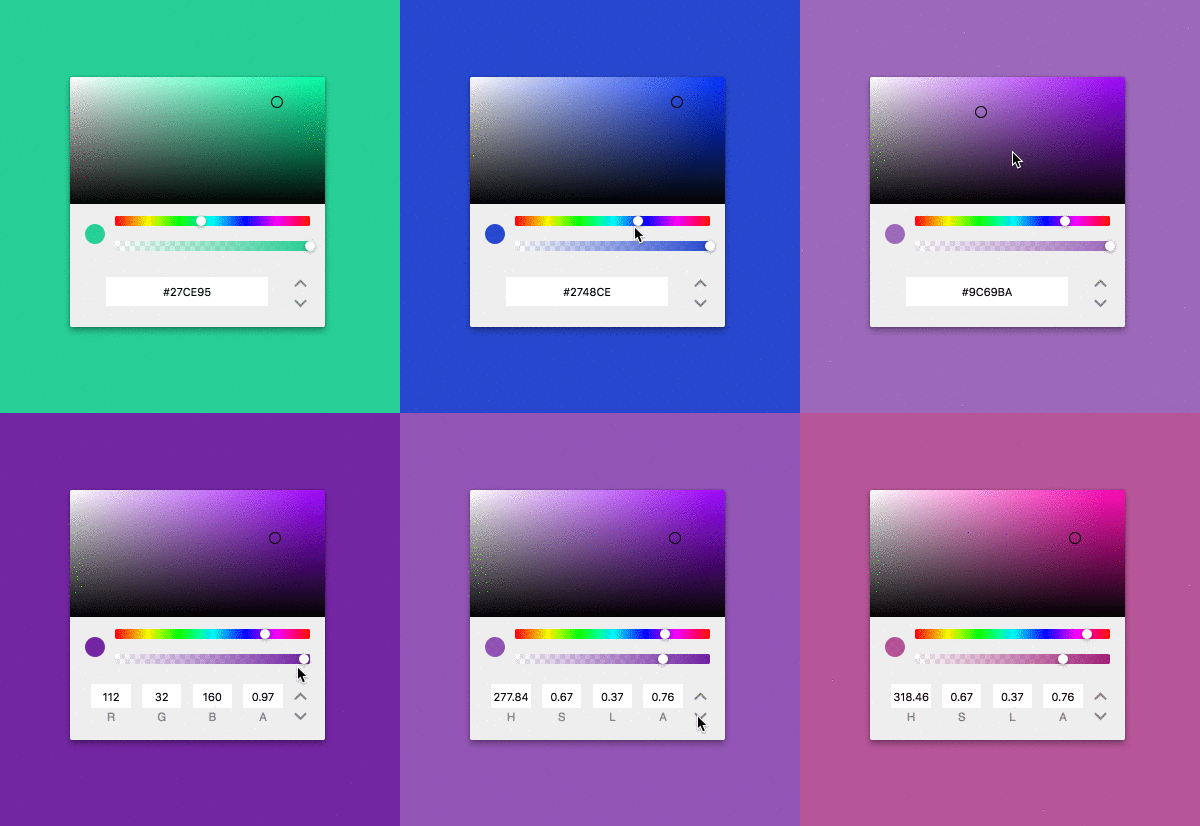
A color picker component for Cycle.js. Cycle Color Picker is developed for usage within Cycle applications using xstream.
Installation
$ npm install --save cycle-color-picker
Usage
Import Cycle Color Picker into your project. Cycle Color Picker takes in a stream of colors, and returns a stream of colors based on the user's input.
// index.js
import ColorPicker from 'cycle-color-picker';
Create a Color Picker component, passing it a stream of colors, as well as the DOM driver and Mouse driver.
You can pass colors to Cycle Color Picker as hex, rgb(a), hsl(a), or a named color (e.g. aliceblue). If no color is passed to Cycle Color Picker, the initial color will default to white. You'll also need to pass in a DOM driver.
const props$ = xs.of({color: '#C3209f'});
const colorPicker = ColorPicker({DOM, props$});
Cycle Color Picker returns DOM, and color$, which you can access in your app. To display Cycle Color Picker, pass its DOM into your view function.
Here's a simple example of a Color Picker that changes the background color of the app. To see how to use Cycle Color Picker with Cycle's isolate function, check out the example.
import xs from 'xstream';
import {run} from '@cycle/xstream-run';
import {div, makeDOMDriver} from '@cycle/dom';
import ColorPicker from 'cycle-color-picker';

const drivers = {
  DOM: makeDOMDriver('.app'),
};

function view (state) {
  const containerStyle = {background: state.color};

  return (
    div('.container', {style: containerStyle}, [state.vtree])
  );
}

function main ({DOM}) {
  const props$ = xs.of({color: '#C3209F'});
  const colorPicker = ColorPicker({DOM, props$});

  const state$ = xs.combine(
    colorPicker.DOM,
    colorPicker.color$
  );

  return {
    DOM: state$.map(([vtree, color]) => view({vtree, color}))
  };
}

run(main, drivers);
FAQ
Can I use multiple color pickers within my app?
Yes! Cycle Color Picker can be used with Cycle's isolate(). Read the documentation for isolate(), and check out the example.
Can I use this with RxJs?
Not yet! I'm hoping to work towards stream library diversity soon.
Thanks
- To Nick Johnstone for help and advice, particularly with architecture concerns 😇👏
- To React Color for heaps of inspiration, and for saving me from doing some maths 🎨👏
- To TinyColor for being such a great library for converting colors ✨👏
Contributors



Similar repos


Languages
JavaScript
94.1%
CSS
3.8%
HTML
2.2%
A color picker component for Cycle.js
See the codeREADME
Cycle Color Picker
A color picker component for Cycle.js. Cycle Color Picker is developed for usage within Cycle applications using xstream.
Installation
$ npm install --save cycle-color-picker
Usage
Import Cycle Color Picker into your project. Cycle Color Picker takes in a stream of colors, and returns a stream of colors based on the user's input.
// index.js
import ColorPicker from 'cycle-color-picker';
Create a Color Picker component, passing it a stream of colors, as well as the DOM driver and Mouse driver.
You can pass colors to Cycle Color Picker as hex, rgb(a), hsl(a), or a named color (e.g. aliceblue). If no color is passed to Cycle Color Picker, the initial color will default to white. You'll also need to pass in a DOM driver.
const props$ = xs.of({color: '#C3209f'});
const colorPicker = ColorPicker({DOM, props$});
Cycle Color Picker returns DOM, and color$, which you can access in your app. To display Cycle Color Picker, pass its DOM into your view function.
Here's a simple example of a Color Picker that changes the background color of the app. To see how to use Cycle Color Picker with Cycle's isolate function, check out the example.
import xs from 'xstream';
import {run} from '@cycle/xstream-run';
import {div, makeDOMDriver} from '@cycle/dom';
import ColorPicker from 'cycle-color-picker';

const drivers = {
  DOM: makeDOMDriver('.app'),
};

function view (state) {
  const containerStyle = {background: state.color};

  return (
    div('.container', {style: containerStyle}, [state.vtree])
  );
}

function main ({DOM}) {
  const props$ = xs.of({color: '#C3209F'});
  const colorPicker = ColorPicker({DOM, props$});

  const state$ = xs.combine(
    colorPicker.DOM,
    colorPicker.color$
  );

  return {
    DOM: state$.map(([vtree, color]) => view({vtree, color}))
  };
}

run(main, drivers);
FAQ
Can I use multiple color pickers within my app?
Yes! Cycle Color Picker can be used with Cycle's isolate(). Read the documentation for isolate(), and check out the example.
Can I use this with RxJs?
Not yet! I'm hoping to work towards stream library diversity soon.
Thanks
- To Nick Johnstone for help and advice, particularly with architecture concerns 😇👏
- To React Color for heaps of inspiration, and for saving me from doing some maths 🎨👏
- To TinyColor for being such a great library for converting colors ✨👏
Similar repos
Contributors
Languages
JavaScript
94.1%
CSS
3.8%
HTML
2.2%