
Voice as an MCP server for macOS: local STT/TTS with voice cloning, floating avatar, tray. Whisper Turbo on Metal + Qwen3-TTS.
Rust
3
28 commits
updated Sep 6, 2026
README
Diana Voice

Hold a key, speak, and the text lands in the app you are already typing in. Speech recognition and synthesis run on the Mac itself. If you want, the same app is also an MCP server, so an agent can speak and listen through it.
The (Russian-language) design document is BRIEF.md.
Dictate anywhere
Hold Fn, speak, release. The transcript is pasted into the field that had focus — editor, browser, chat, terminal, anything. No per-app setup.
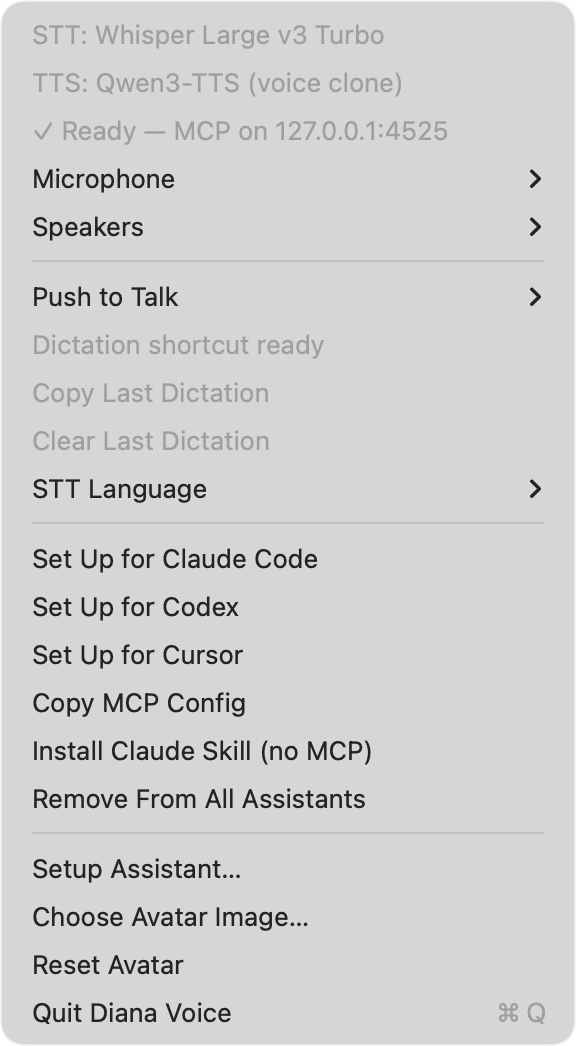
The menu bar icon is the control surface: engine lines, a health line naming the first thing that is broken, input/output device pickers, the push-to-talk key, dictation state, STT language, and the agent-integration actions.
The key is chosen under Push to Talk: Hold Fn (default), Option+Space, or Off. Fn starts recording after a quarter-second hold, so a normal Fn tap still does its usual job.
Push-to-talk needs the Accessibility permission (System Settings → Privacy & Security → Accessibility): macOS requires it both to watch the Fn key globally and to paste into the frontmost app. The tray line under Push to Talk shows whether the shortcut is actually registered. After granting Accessibility, switch back to your app or reopen the tray menu — no restart. After granting microphone access, press the key again to record.
Delivery rules, all visible in the tray:
- Each dictation remembers the app where recording began. Text is pasted only while that app is still active; Diana Voice never moves focus. Switch away and the result waits under Copy Last Dictation, with a short reminder.
- The last nonempty transcript stays in memory until you pick Clear Last Dictation or quit. A failed or empty recognition does not erase it. Nothing is written to disk, and transcripts are not shown in the avatar bubble.
- Automatic paste borrows the clipboard and restores every original format afterwards. If you copy something during insertion, the paste is abandoned rather than overwriting your copy — use Copy Last Dictation instead.
- Rapid successive dictations are delivered in recording order.
Recognition language is STT Language in the tray: Auto (RU + EN), Russian, or English. Microphone and Speakers switch the system default device. The menu bar glyph turns red while the microphone is live.
Speech recognition is Whisper Large v3 Turbo (Q8_0 GGUF) on Metal, with a patched encoder window sized to the actual audio instead of Whisper's fixed 30-second one: 3.0x faster on short utterances at no measured accuracy cost, ~240 ms median transcription latency.
Local and private
No audio, text, or telemetry leaves the machine. Recognition and synthesis both run in-process on this Mac. Network access is used for two things only: downloading model weights on first run, and — when enabled — checking for and downloading app updates from GitHub.
Speech synthesis is Qwen3-TTS with voice cloning. Diana's voice ships with the app and is active out of the box; in setup you can record one short phrase and have it speak with your voice instead. Synthesis is streamed: playback starts on the first chunk (~800 ms of audio) rather than after the whole utterance is generated.
The avatar
A floating avatar shows what the app is doing. Its ring changes between idle,
listening, processing, and speaking, and a speech bubble types out what is
being said — or, via ui_bubble_show, text that is displayed without being
spoken.
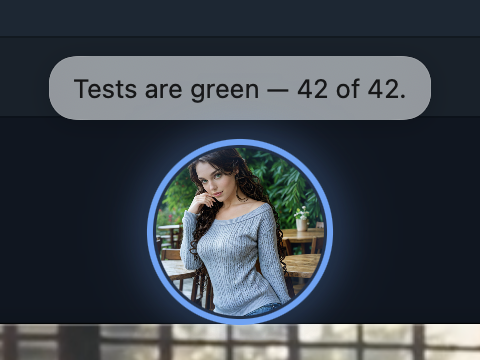
The avatar with a speech bubble: this is what an agent's voice_speak or
ui_bubble_show looks like on screen. The picture can be replaced from the tray
(Choose Avatar Image…).
Also an MCP server for your agent
The same app exposes four MCP tools over localhost, so an agent can speak, listen, transcribe files, and put text on screen. This is optional — dictation works without configuring any of it.
The tray has one-click actions: Set Up for Claude Code, Set Up for Codex, Set Up for Cursor, Copy MCP Config, and Remove From All Assistants. The equivalents by hand:
Claude Code
claude mcp add diana-voice -- "/Applications/Diana Voice.app/Contents/MacOS/diana-voice-mcp"
Cursor
Add to ~/.cursor/mcp.json:
{
  "mcpServers": {
    "diana-voice": {
      "command": "/Applications/Diana Voice.app/Contents/MacOS/diana-voice-mcp"
    }
  }
}
Codex
Add to ~/.codex/config.toml:
[mcp_servers.diana-voice]
command = "/Applications/Diana Voice.app/Contents/MacOS/diana-voice-mcp"
Any other MCP client
- stdio: run
/Applications/Diana Voice.app/Contents/MacOS/diana-voice-mcpas the server command. The proxy bridges stdio to the app's HTTP server and auto-launches the app if it isn't running yet. - HTTP (direct):
POST http://127.0.0.1:4525/mcp(Streamable HTTP; the port can be overridden withDIANA_VOICE_PORT).
Tools
| Tool | What it does | Arguments |
|---|---|---|
voice_speak | Speaks text aloud with the local voice-cloned TTS (Qwen3-TTS). Plain text in; prosody is automatic. | text (required) |
voice_listen | Records from the microphone and returns the transcript. Stops on 800 ms of silence after speech, or at the timeout. Interrupts ongoing speech. | timeout_sec (default 30, max 120) |
voice_transcribe | Transcribes an audio file (WAV, any sample rate) with the local Whisper engine — meetings, voice messages, recordings. | path (required, absolute), language hint |
ui_bubble_show | Shows text in the avatar's speech bubble without speaking it — a visual whisper for statuses and short answers. | text (required), duration_sec (max 60) |
Responses are MCP-style content blocks; failures set "isError": true and the
text says what to fix.
No MCP allowed? (corporate policy)
Two things still work with zero MCP registration:
-
Dictation is a plain app feature, described above. No agent config at all.
-
Sessionless REST: every tool is also exposed as
POST http://127.0.0.1:4525/tools/<name>with the arguments as the JSON body — any agent with shell access can use voice viacurl:curl -s -X POST http://127.0.0.1:4525/tools/voice_speak \ -H 'Content-Type: application/json' -d '{"text": "Build is green."}' curl -s -X POST http://127.0.0.1:4525/tools/voice_listen \ -H 'Content-Type: application/json' -d '{"timeout_sec": 20}'The same endpoints answer GET with query parameters, for agents whose only HTTP primitive is a URL fetch.
Install Claude Skill (no MCP) in the tray writes a skill describing these
endpoints into ~/.claude/skills/diana-voice/ and ~/.agents/skills/diana-voice/,
so the agent learns about them without any server registration.
Install
Apple Silicon, macOS 13 or later. The app is signed with a Developer ID and notarized.
Homebrew:
brew install --cask random1st/diana-voice/diana-voice
(If Homebrew asks you to trust the tap first: brew trust random1st/diana-voice.
The cask currently declares macOS 14 or later.)
Or manually:
- Download the latest
.dmgfrom GitHub Releases. - Open it and drag Diana Voice to
/Applications. - Launch it once so the first-run setup can complete (see below).
Diana Voice is deliberately not on the Mac App Store: the App Store sandbox forbids the global hotkey and the cross-app paste that dictation is built on.
First run
On first launch the app walks you through:
- Microphone permission — required for dictation and
voice_listen. - Voice — Diana's voice works immediately; optionally record one short phrase and Qwen3-TTS will clone yours instead.
- Model download — the Whisper Large v3 Turbo GGUF (~845 MB) and the Qwen3-TTS weights are downloaded on first run rather than bundled. After that, speech recognition and synthesis work offline.
Setup is reopenable any time from the tray (Setup Assistant…), which is also how you re-record or reset the voice reference.
Privacy and consent
Speech recognition is powered by OpenAI's Whisper. Per the Whisper model card:
- Do not transcribe recordings of people without their consent.
- Do not use transcriptions for high-risk decisions (e.g. subjective classification of individuals or decision-making contexts).
Diana Voice processes audio and transcripts on-device. Voice recordings and dictated text are never sent to an update server. Automatic update checks can be turned off in the menu bar.
Updates
Packaged builds use Sparkle to check for signed updates. Choose Check for Updates… in the menu bar to check manually, or toggle Automatically Check for Updates. Installing an update requires confirmation. Your models, voice reference, and settings stay in Application Support across updates.
Versions through 0.1.5 need one more manual DMG installation to receive the updater. Release preparation and verification are documented in Auto-updates.
Build from source
The Rust toolchain is pinned in rust-toolchain.toml (rustup picks it up
automatically). Apple Silicon only.
export CMAKE_POLICY_VERSION_MINIMUM=3.5   # scripts set this themselves too
scripts/regen-ffi.sh   # build the voice-ffi Swift xcframework
scripts/dev-run.sh     # build and run the app
scripts/dev-run.sh is the canonical dev entry point — it rebuilds the FFI
xcframework when missing and applies the required build workarounds.
License
Apache-2.0. Third-party components are listed in THIRD-PARTY-NOTICES.md.
Contributors

28 commits
Similar repos


Languages
Rust
72.6%
Swift
17.5%
Python
4.8%
Shell
4.4%
Voice as an MCP server for macOS: local STT/TTS with voice cloning, floating avatar, tray. Whisper Turbo on Metal + Qwen3-TTS.
Rust
3
28 commits
updated Sep 6, 2026
README
Diana Voice
Hold a key, speak, and the text lands in the app you are already typing in. Speech recognition and synthesis run on the Mac itself. If you want, the same app is also an MCP server, so an agent can speak and listen through it.
The (Russian-language) design document is BRIEF.md.
Dictate anywhere
Hold Fn, speak, release. The transcript is pasted into the field that had focus — editor, browser, chat, terminal, anything. No per-app setup.
The menu bar icon is the control surface: engine lines, a health line naming the first thing that is broken, input/output device pickers, the push-to-talk key, dictation state, STT language, and the agent-integration actions.
The key is chosen under Push to Talk: Hold Fn (default), Option+Space, or Off. Fn starts recording after a quarter-second hold, so a normal Fn tap still does its usual job.
Push-to-talk needs the Accessibility permission (System Settings → Privacy & Security → Accessibility): macOS requires it both to watch the Fn key globally and to paste into the frontmost app. The tray line under Push to Talk shows whether the shortcut is actually registered. After granting Accessibility, switch back to your app or reopen the tray menu — no restart. After granting microphone access, press the key again to record.
Delivery rules, all visible in the tray:
- Each dictation remembers the app where recording began. Text is pasted only while that app is still active; Diana Voice never moves focus. Switch away and the result waits under Copy Last Dictation, with a short reminder.
- The last nonempty transcript stays in memory until you pick Clear Last Dictation or quit. A failed or empty recognition does not erase it. Nothing is written to disk, and transcripts are not shown in the avatar bubble.
- Automatic paste borrows the clipboard and restores every original format afterwards. If you copy something during insertion, the paste is abandoned rather than overwriting your copy — use Copy Last Dictation instead.
- Rapid successive dictations are delivered in recording order.
Recognition language is STT Language in the tray: Auto (RU + EN), Russian, or English. Microphone and Speakers switch the system default device. The menu bar glyph turns red while the microphone is live.
Speech recognition is Whisper Large v3 Turbo (Q8_0 GGUF) on Metal, with a patched encoder window sized to the actual audio instead of Whisper's fixed 30-second one: 3.0x faster on short utterances at no measured accuracy cost, ~240 ms median transcription latency.
Local and private
No audio, text, or telemetry leaves the machine. Recognition and synthesis both run in-process on this Mac. Network access is used for two things only: downloading model weights on first run, and — when enabled — checking for and downloading app updates from GitHub.
Speech synthesis is Qwen3-TTS with voice cloning. Diana's voice ships with the app and is active out of the box; in setup you can record one short phrase and have it speak with your voice instead. Synthesis is streamed: playback starts on the first chunk (~800 ms of audio) rather than after the whole utterance is generated.
The avatar
A floating avatar shows what the app is doing. Its ring changes between idle,
listening, processing, and speaking, and a speech bubble types out what is
being said — or, via ui_bubble_show, text that is displayed without being
spoken.
The avatar with a speech bubble: this is what an agent's voice_speak or
ui_bubble_show looks like on screen. The picture can be replaced from the tray
(Choose Avatar Image…).
Also an MCP server for your agent
The same app exposes four MCP tools over localhost, so an agent can speak, listen, transcribe files, and put text on screen. This is optional — dictation works without configuring any of it.
The tray has one-click actions: Set Up for Claude Code, Set Up for Codex, Set Up for Cursor, Copy MCP Config, and Remove From All Assistants. The equivalents by hand:
Claude Code
claude mcp add diana-voice -- "/Applications/Diana Voice.app/Contents/MacOS/diana-voice-mcp"
Cursor
Add to ~/.cursor/mcp.json:
{
  "mcpServers": {
    "diana-voice": {
      "command": "/Applications/Diana Voice.app/Contents/MacOS/diana-voice-mcp"
    }
  }
}
Codex
Add to ~/.codex/config.toml:
[mcp_servers.diana-voice]
command = "/Applications/Diana Voice.app/Contents/MacOS/diana-voice-mcp"
Any other MCP client
- stdio: run
/Applications/Diana Voice.app/Contents/MacOS/diana-voice-mcpas the server command. The proxy bridges stdio to the app's HTTP server and auto-launches the app if it isn't running yet. - HTTP (direct):
POST http://127.0.0.1:4525/mcp(Streamable HTTP; the port can be overridden withDIANA_VOICE_PORT).
Tools
| Tool | What it does | Arguments |
|---|---|---|
voice_speak | Speaks text aloud with the local voice-cloned TTS (Qwen3-TTS). Plain text in; prosody is automatic. | text (required) |
voice_listen | Records from the microphone and returns the transcript. Stops on 800 ms of silence after speech, or at the timeout. Interrupts ongoing speech. | timeout_sec (default 30, max 120) |
voice_transcribe | Transcribes an audio file (WAV, any sample rate) with the local Whisper engine — meetings, voice messages, recordings. | path (required, absolute), language hint |
ui_bubble_show | Shows text in the avatar's speech bubble without speaking it — a visual whisper for statuses and short answers. | text (required), duration_sec (max 60) |
Responses are MCP-style content blocks; failures set "isError": true and the
text says what to fix.
No MCP allowed? (corporate policy)
Two things still work with zero MCP registration:
-
Dictation is a plain app feature, described above. No agent config at all.
-
Sessionless REST: every tool is also exposed as
POST http://127.0.0.1:4525/tools/<name>with the arguments as the JSON body — any agent with shell access can use voice viacurl:curl -s -X POST http://127.0.0.1:4525/tools/voice_speak \ -H 'Content-Type: application/json' -d '{"text": "Build is green."}' curl -s -X POST http://127.0.0.1:4525/tools/voice_listen \ -H 'Content-Type: application/json' -d '{"timeout_sec": 20}'The same endpoints answer GET with query parameters, for agents whose only HTTP primitive is a URL fetch.
Install Claude Skill (no MCP) in the tray writes a skill describing these
endpoints into ~/.claude/skills/diana-voice/ and ~/.agents/skills/diana-voice/,
so the agent learns about them without any server registration.
Install
Apple Silicon, macOS 13 or later. The app is signed with a Developer ID and notarized.
Homebrew:
brew install --cask random1st/diana-voice/diana-voice
(If Homebrew asks you to trust the tap first: brew trust random1st/diana-voice.
The cask currently declares macOS 14 or later.)
Or manually:
- Download the latest
.dmgfrom GitHub Releases. - Open it and drag Diana Voice to
/Applications. - Launch it once so the first-run setup can complete (see below).
Diana Voice is deliberately not on the Mac App Store: the App Store sandbox forbids the global hotkey and the cross-app paste that dictation is built on.
First run
On first launch the app walks you through:
- Microphone permission — required for dictation and
voice_listen. - Voice — Diana's voice works immediately; optionally record one short phrase and Qwen3-TTS will clone yours instead.
- Model download — the Whisper Large v3 Turbo GGUF (~845 MB) and the Qwen3-TTS weights are downloaded on first run rather than bundled. After that, speech recognition and synthesis work offline.
Setup is reopenable any time from the tray (Setup Assistant…), which is also how you re-record or reset the voice reference.
Privacy and consent
Speech recognition is powered by OpenAI's Whisper. Per the Whisper model card:
- Do not transcribe recordings of people without their consent.
- Do not use transcriptions for high-risk decisions (e.g. subjective classification of individuals or decision-making contexts).
Diana Voice processes audio and transcripts on-device. Voice recordings and dictated text are never sent to an update server. Automatic update checks can be turned off in the menu bar.
Updates
Packaged builds use Sparkle to check for signed updates. Choose Check for Updates… in the menu bar to check manually, or toggle Automatically Check for Updates. Installing an update requires confirmation. Your models, voice reference, and settings stay in Application Support across updates.
Versions through 0.1.5 need one more manual DMG installation to receive the updater. Release preparation and verification are documented in Auto-updates.
Build from source
The Rust toolchain is pinned in rust-toolchain.toml (rustup picks it up
automatically). Apple Silicon only.
export CMAKE_POLICY_VERSION_MINIMUM=3.5   # scripts set this themselves too
scripts/regen-ffi.sh   # build the voice-ffi Swift xcframework
scripts/dev-run.sh     # build and run the app
scripts/dev-run.sh is the canonical dev entry point — it rebuilds the FFI
xcframework when missing and applies the required build workarounds.
License
Apache-2.0. Third-party components are listed in THIRD-PARTY-NOTICES.md.
Similar repos
Contributors
28 commits
Languages
Rust
72.6%
Swift
17.5%
Python
4.8%
Shell
4.4%