
no-code & real-time markdown editor, synchronized preview, and a virtual workspace. Built with a 3-pane layout, customizable block kits, and an extensive badge library to make README writing fast and interactive.
0
stars
5
commits
TypeScript
primary language
Aug 8, 2026
updated
README
README.md Creator
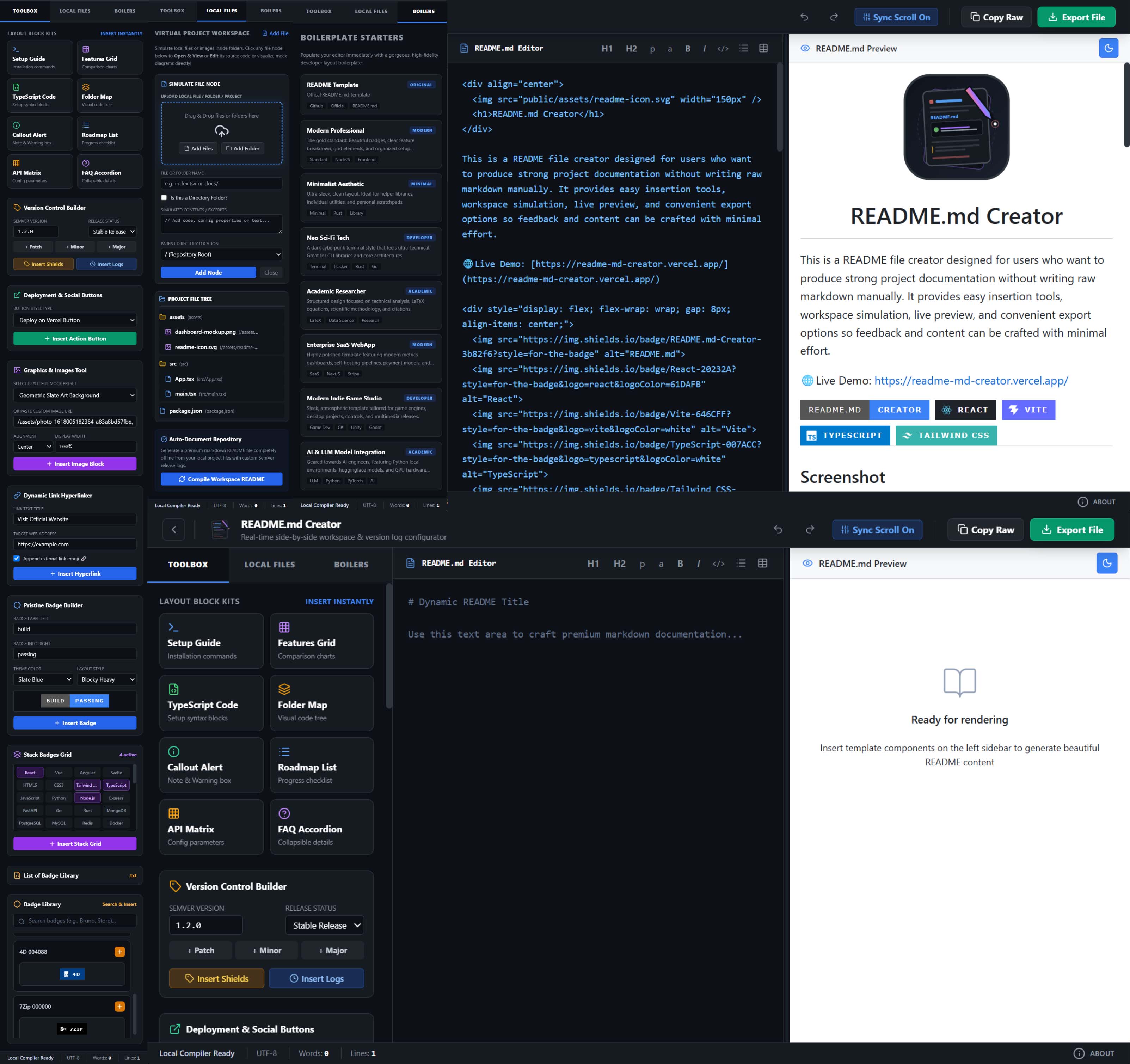
This is a README file creator designed for users who want to produce strong project documentation without writing raw markdown manually. It provides easy insertion tools, workspace simulation, live preview, and convenient export options so feedback and content can be crafted with minimal effort.
🌐Live Demo: https://readme-md-creator.vercel.app/






Screenshot
🧑🏻💻 Tech Used
- React
- TypeScript
- Vite
- Tailwind-style CSS classes
react-markdownremark-gfmrehype-raw
📂 System Project Structure
Here is a visual map of the files in this simulated repository:
my-awesome-project/
├── src/
│   ├── data/
│   │   ├── badges.ts
│   │   └── templates.ts
│   ├── App.tsx
│   ├── index.css
│   ├── main.tsx
│   └── types.ts
├── public/
│   ├── assets/
│   │   ├── favicon.png
│   │   ├── horizontal-bar.svg
│   │   ├── List_of_Badge_Library.txt
│   │   ├── readme-icon-nobg.svg
│   │   └── readme-icon.svg
│   └── favicon.png
├── .dockerignore
├── docker-compose.yml
├── Dockerfile
├── index.html
├── metadata.json
├── package.json
├── README.md
├── server.ts
├── tsconfig.json
└── vite.config.ts
🛠️ Installation
- Clone the repository:
git clone https://github.com/rajprajapati2001/README.md-Creator.git
cd README.md-Creator
- Install dependencies:
npm install
- Start the development server:
npm run dev
- Open the app in your browser at the address
localhost:3000.
🐳 Docker Setup
Using Docker Compose, includes a docker-compose.yml file, you can spin up the entire stack with a single command.
- Start the containers:
docker compose up
- Stop and remove the containers:
docker compose down
- Remove Images:
docker images -a
docker rmi <image-ID>
📜 License & Citation
This project is available under the MIT License.
ℹ️ About
Dev: Raj Prajapati + Devendra Chauhan on 24th June 2026
Contributors

4 commits

1 commits
Similar repos


Languages
TypeScript
97.6%
CSS
1.8%
no-code & real-time markdown editor, synchronized preview, and a virtual workspace. Built with a 3-pane layout, customizable block kits, and an extensive badge library to make README writing fast and interactive.
0
stars
5
commits
TypeScript
primary language
Aug 8, 2026
updated
README
README.md Creator
This is a README file creator designed for users who want to produce strong project documentation without writing raw markdown manually. It provides easy insertion tools, workspace simulation, live preview, and convenient export options so feedback and content can be crafted with minimal effort.
🌐Live Demo: https://readme-md-creator.vercel.app/
Screenshot
🧑🏻💻 Tech Used
- React
- TypeScript
- Vite
- Tailwind-style CSS classes
react-markdownremark-gfmrehype-raw
📂 System Project Structure
Here is a visual map of the files in this simulated repository:
my-awesome-project/
├── src/
│   ├── data/
│   │   ├── badges.ts
│   │   └── templates.ts
│   ├── App.tsx
│   ├── index.css
│   ├── main.tsx
│   └── types.ts
├── public/
│   ├── assets/
│   │   ├── favicon.png
│   │   ├── horizontal-bar.svg
│   │   ├── List_of_Badge_Library.txt
│   │   ├── readme-icon-nobg.svg
│   │   └── readme-icon.svg
│   └── favicon.png
├── .dockerignore
├── docker-compose.yml
├── Dockerfile
├── index.html
├── metadata.json
├── package.json
├── README.md
├── server.ts
├── tsconfig.json
└── vite.config.ts
🛠️ Installation
- Clone the repository:
git clone https://github.com/rajprajapati2001/README.md-Creator.git
cd README.md-Creator
- Install dependencies:
npm install
- Start the development server:
npm run dev
- Open the app in your browser at the address
localhost:3000.
🐳 Docker Setup
Using Docker Compose, includes a docker-compose.yml file, you can spin up the entire stack with a single command.
- Start the containers:
docker compose up
- Stop and remove the containers:
docker compose down
- Remove Images:
docker images -a
docker rmi <image-ID>
📜 License & Citation
This project is available under the MIT License.
ℹ️ About
Dev: Raj Prajapati + Devendra Chauhan on 24th June 2026
Similar repos
Contributors
4 commits
1 commits
Languages
TypeScript
97.6%
CSS
1.8%