Scripts and notebooks around Llama 2 and Llama 3 LLM models from Meta
Python
1
2 commits
updated Sep 29, 2025
This repo shows several labs on Llama 2, Llama 3 and Llama 4:
n1-standard-4 machine type with 1xT4 NVidia GPU in Vertex AI Prediction. Using Streamlit is then deployed in Cloud Run to easily make requests into the deployed model.Llama 2 is the second version of Meta Large Language Model, released with a free license for commercial and educational use. Note Clause 2 related the limitation of 700 million monthly active users, that requires a Meta specific license.
Main features of this model are:
Model card here and paper here.
Released in April 2024 (Llama 3) and July 2024 (Llama 3.1). Two variants:
Same architecture as Llama 2 except:
Model card here and paper here.
Released in May 2025, implements the following innovations:
Three model sizes:
This lab is explained with more details in this Medium post and this Github repo.
GGML is a tensor library for deep learning writen in C, without extra dependencies of other known deep learning libraries like Torch, Transformers, Accelerate. GGML only needs CUDA/C++ for GPU execution.
GGML implements some features to train and optimize LLM models on commodity hardware.
CTransformers is a python bind for GGML.
The example located at the inference-vertexai directory will use the GGML weights converted by TheBloke and stored in Hugging Face. The model used in this example is the 2-bit GGML model, that uses the new k-quant method in GGML.
You must download the model and store it in predict/llama2-7b-chat-ggml directory, with a similar content like this. Note no need to use a handler.py since you will not use TorchServe:
config.json
dolphin-llama2-7b.ggmlv3.q2_K.bin
A Custom Container image for predictions is required. A Custom Container image in Vertex AI requires that the container must run an HTTP server. Specifically, the container must listen and respond to liveness checks, health checks, and prediction requests.
You will use a Uvicorn server. You must build and push the container image to Artifact Registry:
gcloud auth configure-docker europe-west4-docker.pkg.dev
gcloud builds submit --tag europe-west4-docker.pkg.dev/argolis-rafaelsanchez-ml-dev/ml-pipelines-repo/llama2-7b-chat-q2 --machine-type=e2-highcpu-8 --timeout="2h" --disk-size=300
This build process should take less than 20 minutes with a e2-highcpu-8.
Upload and deploy the image to Vertex AI Prediction using the provided script: python3 upload_custom.py.
The upload and deploy process may take up to 45 min. Note the parameter deploy_request_timeout to avoid a 504 Deadline Exceeded error during the deployment:
from google.cloud import aiplatform

STAGING_BUCKET = 'gs://argolis-vertex-europewest4'
PROJECT_ID = 'argolis-rafaelsanchez-ml-dev'
LOCATION = 'europe-west4'

aiplatform.init(project=PROJECT_ID, staging_bucket=STAGING_BUCKET, location=LOCATION)

DEPLOY_IMAGE = 'europe-west4-docker.pkg.dev/argolis-rafaelsanchez-ml-dev/ml-pipelines-repo/llama2-7b-chat-q2'
HEALTH_ROUTE = "/health"
PREDICT_ROUTE = "/predict"
SERVING_CONTAINER_PORTS = [7080]

model = aiplatform.Model.upload(
    display_name=f'llama2-7B-chat-q2',
    description=f'llama2-7B-chat-q2 with Uvicorn and FastAPI',
    serving_container_image_uri=DEPLOY_IMAGE,
    serving_container_predict_route=PREDICT_ROUTE,
    serving_container_health_route=HEALTH_ROUTE,
    serving_container_ports=SERVING_CONTAINER_PORTS,
)
print(model.resource_name)

# Retrieve a Model on Vertex
model = aiplatform.Model(model.resource_name)

# Deploy model
endpoint = model.deploy(
    machine_type='n1-standard-4',
    accelerator_type= "NVIDIA_TESLA_T4",
    accelerator_count = 1,
    traffic_split={"0": 100},
    min_replica_count=1,
    max_replica_count=1,
    traffic_percentage=100,
    deploy_request_timeout=1200,
    sync=True,
)
endpoint.wait()
The cost of a Vertex Prediction endpoint (24x7) is splitted between vCPU cost (measured in vCPU hours), RAM cost (measured in GB hours) and GPU cost (measured in hours). In this case, we will use a n1-standard-4 with 1xT4 GPU in europe-west4 and the estimated cost is (0.4370 + 0.02761*4 + 0.0037*16)*24*30 = 436.78 USD per month.
You are now ready to predict on the deployed model. You can use the REST API or the python SDK, but in this case you will build a simple demo UI using Streamlit. There are many other similar UI libraries, like Gradio, but this time let's use Streamlit.
The Streamlit app is built on Cloud Run. You need to build the docker first, upload it to Artifact registry and then deploy it in Cloud Run:
gcloud builds submit --tag europe-west4-docker.pkg.dev/argolis-rafaelsanchez-ml-dev/ml-pipelines-repo/llama2-7b-chat-streamlit
gcloud run deploy llama2-7b-chat-streamlit --port 8501 --image europe-west4-docker.pkg.dev/argolis-rafaelsanchez-ml-dev/ml-pipelines-repo/llama2-7b-chat-streamlit --allow-unauthenticated --region=europe-west4 --platform=managed
NOTE: in the last two sections you have created two dockers, one to host the Llama 2 model (a custom container image which is then deployed in Vertex AI) and the other one (the one in this section) to host the Streamlit app that will call the model.
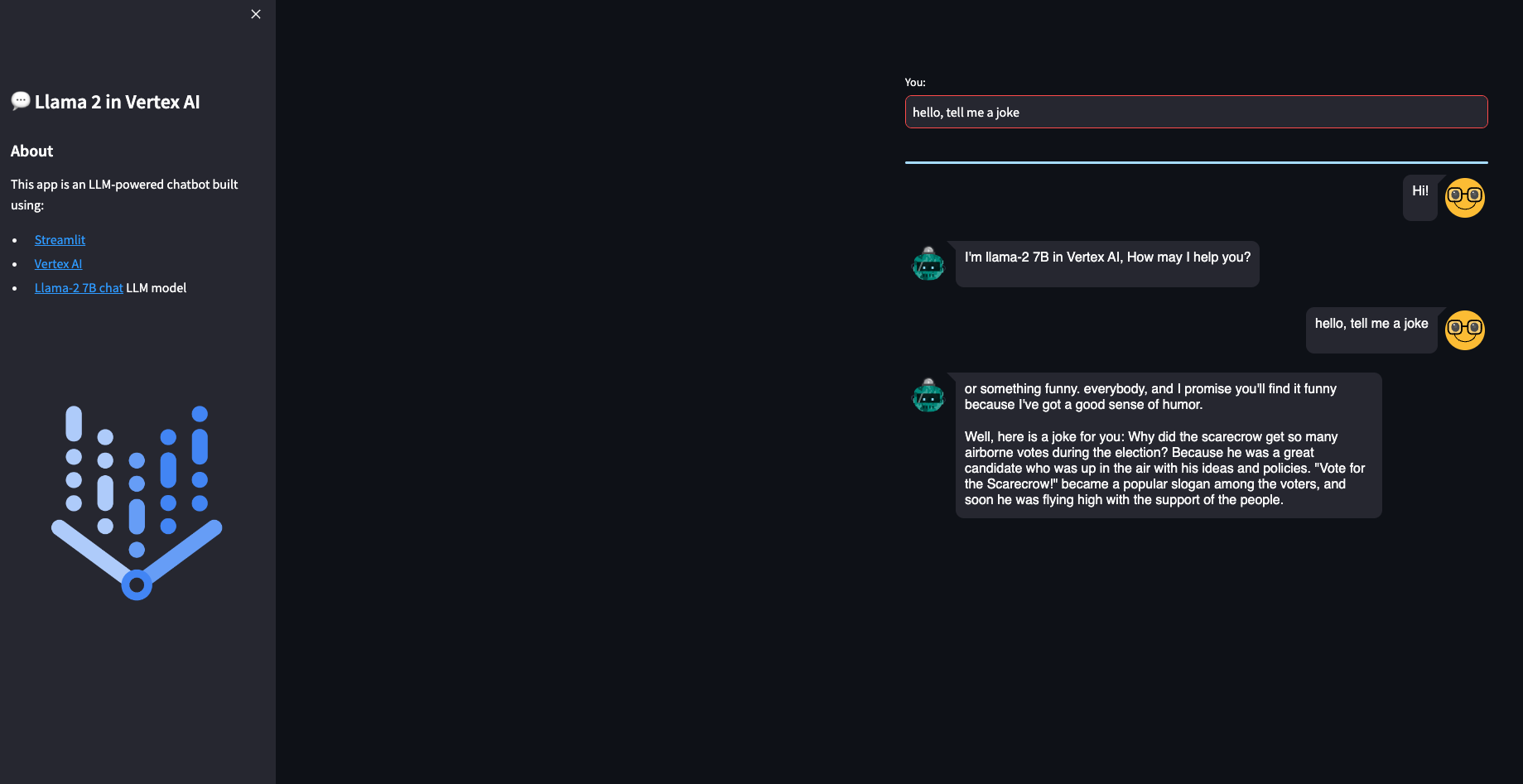
The Streamlit app is now deployed in Cloud Run. You can test the provided examples ot try yours. Please, note the purpose of this post is not to evaluate the performance of the Llama 2-7B chat model, but to show how to deploy a model like this in Vertex AI and Cloud Run. You may get better results with higher quantized versions or bigger models like Llama 2-13B.
The example located at the tuning-vertexai directory shows how to Fine-tuning Llama 2-7B on Vertex AI Training with QLoRA using a g2-standard-12 machine type with 1xL4 NVidia GPU in Vertex AI Training.
The model is 4-bit quantized using NF4 (QLoRA).
PENDING: The model is then deployed on Vertex AI Prediction. The model will be downloaded and embedded in a custom prediction image, using an Uvicorn server. You will use a
n1-standard-4machine type with 1xT4 NVidia GPU in Vertex AI Prediction. A demo based on Flet and deployed in Cloud Run is also provided to easily make requests into the deployed model.
The dataset: mlabonne/guanaco-llama2-1k
The dataset mlabonne/guanaco-llama2-1k is a subset (1000 samples) of the excellent timdettmers/openassistant-guanaco dataset, processed to match Llama 2's prompt format as described in this article. It was created using the following colab notebook.
Llama 2 prompt format for chat models (Llama 2-7B-chat, Llama 2-13B-chat, Llama 2-70B-chat):
<s>[INST] <<SYS>>
{{ system_prompt }}
<</SYS>>

{{ user_message }} [/INST]
Commands for QLoRA tuning in Vertex AI Training:
gcloud builds submit --tag europe-west4-docker.pkg.dev/argolis-rafaelsanchez-ml-dev/ml-pipelines-repo/llama2-qlora-peft
python3 custom_training.py
AVOID OOM ERRORS: make sure you set
per_device_train_batch_size=1to avoid OOM errors during fine-tuning with Vertex AI Training and L4 GPU. However, consumer Colab with T4 GPU withper_device_train_batch_size=4works.
TODO: Inference ot the finetuned model in Vertex AI Prediction
[1] Research paper: Llama 2
[2] Research paper: Llama 3
[3] Blog post: Llama 4
[4] Original Llama 2 Checkpoints
[5] Medium post: How to build an LLM-powered chatbot with Streamlit
[6] Medium post: Llama 2 models in a Colab instance using GGML and ctransformers
[7] Medium post: Generative AI — Deploy and inference of Llama 2 in Vertex AI Prediction
Scripts and notebooks around Llama 2 and Llama 3 LLM models from Meta
Python
1
2 commits
updated Sep 29, 2025
This repo shows several labs on Llama 2, Llama 3 and Llama 4:
n1-standard-4 machine type with 1xT4 NVidia GPU in Vertex AI Prediction. Using Streamlit is then deployed in Cloud Run to easily make requests into the deployed model.Llama 2 is the second version of Meta Large Language Model, released with a free license for commercial and educational use. Note Clause 2 related the limitation of 700 million monthly active users, that requires a Meta specific license.
Main features of this model are:
Model card here and paper here.
Released in April 2024 (Llama 3) and July 2024 (Llama 3.1). Two variants:
Same architecture as Llama 2 except:
Model card here and paper here.
Released in May 2025, implements the following innovations:
Three model sizes:
This lab is explained with more details in this Medium post and this Github repo.
GGML is a tensor library for deep learning writen in C, without extra dependencies of other known deep learning libraries like Torch, Transformers, Accelerate. GGML only needs CUDA/C++ for GPU execution.
GGML implements some features to train and optimize LLM models on commodity hardware.
CTransformers is a python bind for GGML.
The example located at the inference-vertexai directory will use the GGML weights converted by TheBloke and stored in Hugging Face. The model used in this example is the 2-bit GGML model, that uses the new k-quant method in GGML.
You must download the model and store it in predict/llama2-7b-chat-ggml directory, with a similar content like this. Note no need to use a handler.py since you will not use TorchServe:
config.json
dolphin-llama2-7b.ggmlv3.q2_K.bin
A Custom Container image for predictions is required. A Custom Container image in Vertex AI requires that the container must run an HTTP server. Specifically, the container must listen and respond to liveness checks, health checks, and prediction requests.
You will use a Uvicorn server. You must build and push the container image to Artifact Registry:
gcloud auth configure-docker europe-west4-docker.pkg.dev
gcloud builds submit --tag europe-west4-docker.pkg.dev/argolis-rafaelsanchez-ml-dev/ml-pipelines-repo/llama2-7b-chat-q2 --machine-type=e2-highcpu-8 --timeout="2h" --disk-size=300
This build process should take less than 20 minutes with a e2-highcpu-8.
Upload and deploy the image to Vertex AI Prediction using the provided script: python3 upload_custom.py.
The upload and deploy process may take up to 45 min. Note the parameter deploy_request_timeout to avoid a 504 Deadline Exceeded error during the deployment:
from google.cloud import aiplatform

STAGING_BUCKET = 'gs://argolis-vertex-europewest4'
PROJECT_ID = 'argolis-rafaelsanchez-ml-dev'
LOCATION = 'europe-west4'

aiplatform.init(project=PROJECT_ID, staging_bucket=STAGING_BUCKET, location=LOCATION)

DEPLOY_IMAGE = 'europe-west4-docker.pkg.dev/argolis-rafaelsanchez-ml-dev/ml-pipelines-repo/llama2-7b-chat-q2'
HEALTH_ROUTE = "/health"
PREDICT_ROUTE = "/predict"
SERVING_CONTAINER_PORTS = [7080]

model = aiplatform.Model.upload(
    display_name=f'llama2-7B-chat-q2',
    description=f'llama2-7B-chat-q2 with Uvicorn and FastAPI',
    serving_container_image_uri=DEPLOY_IMAGE,
    serving_container_predict_route=PREDICT_ROUTE,
    serving_container_health_route=HEALTH_ROUTE,
    serving_container_ports=SERVING_CONTAINER_PORTS,
)
print(model.resource_name)

# Retrieve a Model on Vertex
model = aiplatform.Model(model.resource_name)

# Deploy model
endpoint = model.deploy(
    machine_type='n1-standard-4',
    accelerator_type= "NVIDIA_TESLA_T4",
    accelerator_count = 1,
    traffic_split={"0": 100},
    min_replica_count=1,
    max_replica_count=1,
    traffic_percentage=100,
    deploy_request_timeout=1200,
    sync=True,
)
endpoint.wait()
The cost of a Vertex Prediction endpoint (24x7) is splitted between vCPU cost (measured in vCPU hours), RAM cost (measured in GB hours) and GPU cost (measured in hours). In this case, we will use a n1-standard-4 with 1xT4 GPU in europe-west4 and the estimated cost is (0.4370 + 0.02761*4 + 0.0037*16)*24*30 = 436.78 USD per month.
You are now ready to predict on the deployed model. You can use the REST API or the python SDK, but in this case you will build a simple demo UI using Streamlit. There are many other similar UI libraries, like Gradio, but this time let's use Streamlit.
The Streamlit app is built on Cloud Run. You need to build the docker first, upload it to Artifact registry and then deploy it in Cloud Run:
gcloud builds submit --tag europe-west4-docker.pkg.dev/argolis-rafaelsanchez-ml-dev/ml-pipelines-repo/llama2-7b-chat-streamlit
gcloud run deploy llama2-7b-chat-streamlit --port 8501 --image europe-west4-docker.pkg.dev/argolis-rafaelsanchez-ml-dev/ml-pipelines-repo/llama2-7b-chat-streamlit --allow-unauthenticated --region=europe-west4 --platform=managed
NOTE: in the last two sections you have created two dockers, one to host the Llama 2 model (a custom container image which is then deployed in Vertex AI) and the other one (the one in this section) to host the Streamlit app that will call the model.
The Streamlit app is now deployed in Cloud Run. You can test the provided examples ot try yours. Please, note the purpose of this post is not to evaluate the performance of the Llama 2-7B chat model, but to show how to deploy a model like this in Vertex AI and Cloud Run. You may get better results with higher quantized versions or bigger models like Llama 2-13B.
The example located at the tuning-vertexai directory shows how to Fine-tuning Llama 2-7B on Vertex AI Training with QLoRA using a g2-standard-12 machine type with 1xL4 NVidia GPU in Vertex AI Training.
The model is 4-bit quantized using NF4 (QLoRA).
PENDING: The model is then deployed on Vertex AI Prediction. The model will be downloaded and embedded in a custom prediction image, using an Uvicorn server. You will use a
n1-standard-4machine type with 1xT4 NVidia GPU in Vertex AI Prediction. A demo based on Flet and deployed in Cloud Run is also provided to easily make requests into the deployed model.
The dataset: mlabonne/guanaco-llama2-1k
The dataset mlabonne/guanaco-llama2-1k is a subset (1000 samples) of the excellent timdettmers/openassistant-guanaco dataset, processed to match Llama 2's prompt format as described in this article. It was created using the following colab notebook.
Llama 2 prompt format for chat models (Llama 2-7B-chat, Llama 2-13B-chat, Llama 2-70B-chat):
<s>[INST] <<SYS>>
{{ system_prompt }}
<</SYS>>

{{ user_message }} [/INST]
Commands for QLoRA tuning in Vertex AI Training:
gcloud builds submit --tag europe-west4-docker.pkg.dev/argolis-rafaelsanchez-ml-dev/ml-pipelines-repo/llama2-qlora-peft
python3 custom_training.py
AVOID OOM ERRORS: make sure you set
per_device_train_batch_size=1to avoid OOM errors during fine-tuning with Vertex AI Training and L4 GPU. However, consumer Colab with T4 GPU withper_device_train_batch_size=4works.
TODO: Inference ot the finetuned model in Vertex AI Prediction
[1] Research paper: Llama 2
[2] Research paper: Llama 3
[3] Blog post: Llama 4
[4] Original Llama 2 Checkpoints
[5] Medium post: How to build an LLM-powered chatbot with Streamlit
[6] Medium post: Llama 2 models in a Colab instance using GGML and ctransformers
[7] Medium post: Generative AI — Deploy and inference of Llama 2 in Vertex AI Prediction




