
A split keyboard layout, optimized for Portuguese, English, working with numbers and software programming with VIM plugins.
Shell
490
2,184 commits
updated Sep 22, 2026
README
rafaelromao's keyboard layout
Overview
A split keyboard layout optimized for Portuguese, English, working with numbers and software programming with VIM plugins.
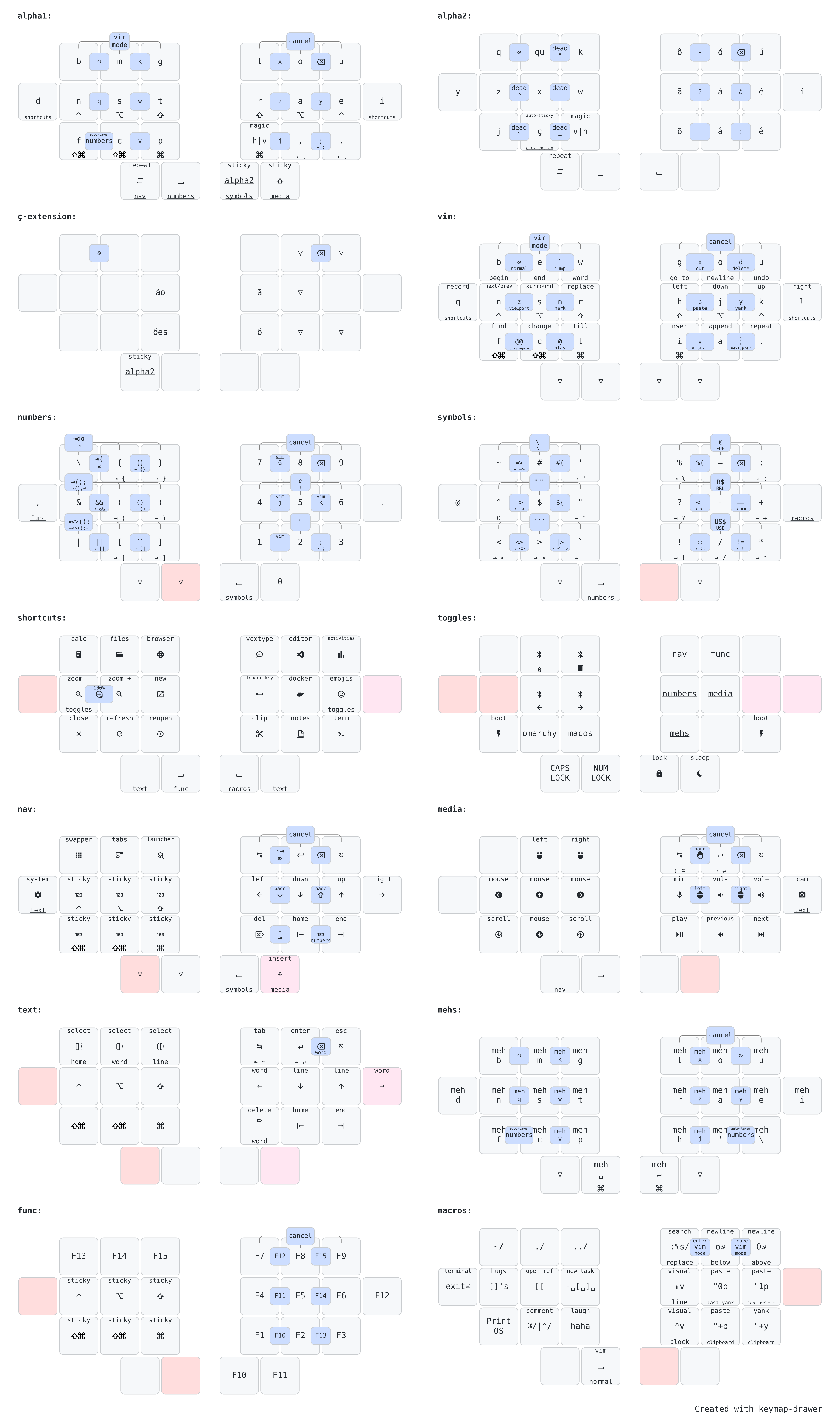
The image above shows just the most relevant layers. You can see the full diagram here.
How this layout works?
The ratiaonale behind the decisions that led to this keymap can be found in this page, but here is a summary:
Directives
What are the directives that drive most of my decisions?
- Ergonomics: Split and Columnar Stagger.
- Finger Effort: No lateral movements or uncomfortable stretches.
- Easy of Use: If it is frequent, it should be easy.
- Handness: Trackball in the left hand, heavy load in the right hand.
- Workflows: English, but also Portuguese, plus VIM and Spreadsheets.
Workflows
What are the workflows that I need to execute with my keyboards?
- Typing: The most basic and essential workflow.
- Numbers: How this keymap makes it easy to work with numbers.
- Shortcut: How to work with so many shortcuts in such minimal keyboards.
- Navigation: Navigating in text, presentations, window management and mouse emulation.
- Programming: Optimizations to make programming easier.
My Keyboards


ZMK
This keymap is implemented using ZMK, with the following external modules:
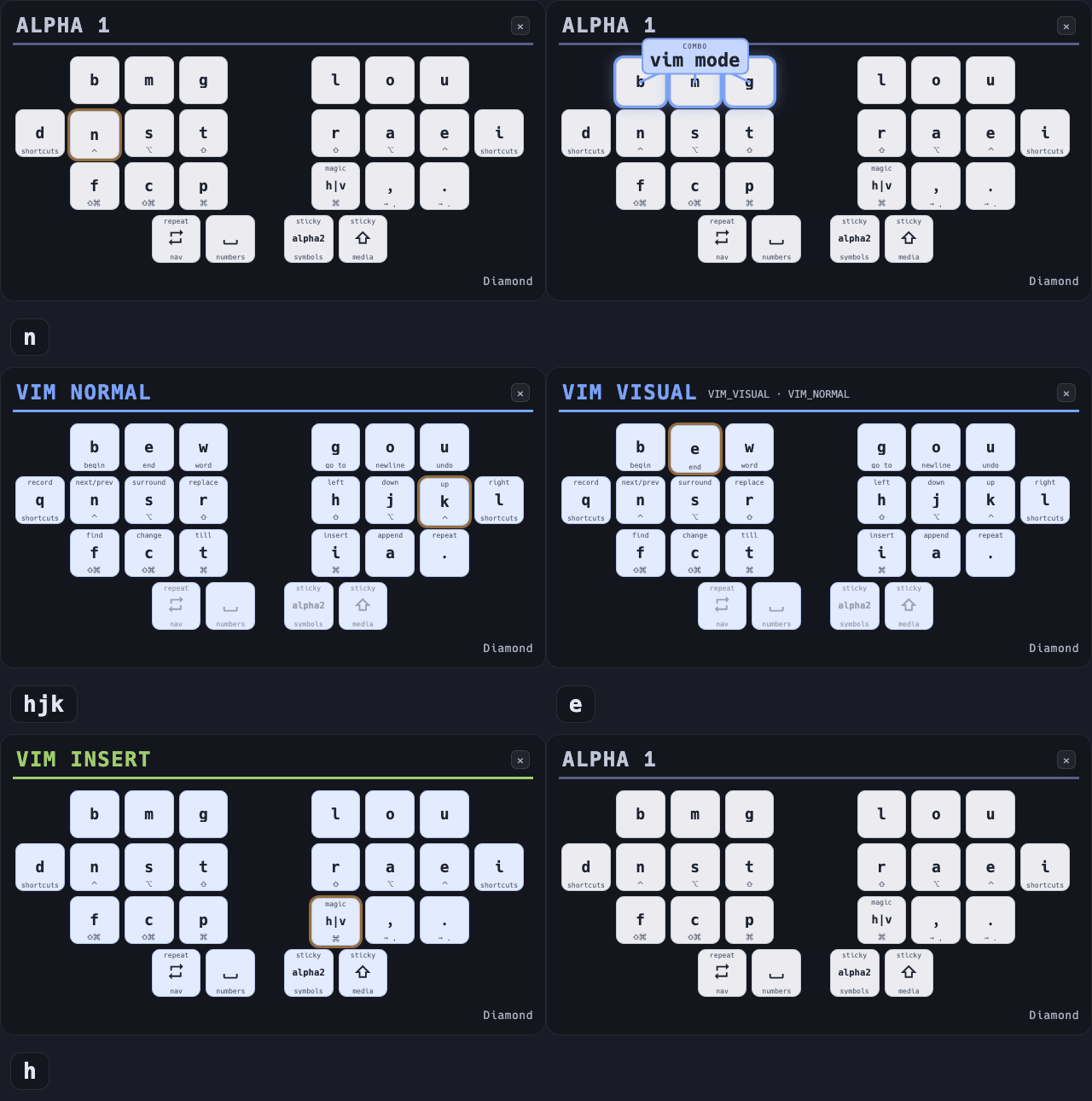
Vim Mode is my own project, and it has three parts: a ZMK module that keeps the vim layers in sync with the editor, a daemon that runs on the host, and a NeoVim plugin. The editor state travels to the keyboard as a small number encoded in the HID LED indicator report. See VIM Mode for the details.
Local Build
Unlike most ZMK users, I don't use GitHub Actions to build the firmware for my keyboards, and since I come from a legacy repo structure, from the time I used QMK and when they didn't even support external userspaces, I use git submodules to import ZMK and everything else I need into my repo, then I build the firmware using a custom script.
To make the local build setup easier, I have a Containerfile that installs all the toolchain into a Ubuntu container. The init script is then used to run this container.
Into the container, I can use my custom build script to build the firmware for all my keyboards.
Here are some usage examples:
# Builds the central left side shield of the Rommana, assuming nice_nano_v2 as board
build mabroum/rommana cl

# Builds the left side shield of the Wired Diamond, specifying the board to be used instead of the default
build rafaelromao/wired_diamond l -b xiao_rp2040//zmk

# Builds the central dongle shield of the Choc Diamond, specifying an extra shield and an external module to handle the display
build rafaelromao/choc_diamond cd -e dongle_display -m englmaxi/zmk-dongle-display
To make it even simpler, I have a b script that can be used to build the central sides using default configurations.
Example:
b wd # builds the left side of the wired diamond keyboard, equivalent to the command below

build rafaelromao/wired_diamond l -b xiao_rp2040//zmk
Editors
The MEHS layer emits Meh (Ctrl+Alt+Shift) and Hyper (Ctrl+Alt+Shift+Gui) chords whose meanings are IDE actions: go to symbol, toggle breakpoint, find usages. The firmware only sends the chords; something on the host has to bind them.
That is editors/, with one install script per editor:
cd editors
./vscode/install.sh
./intellij/install.sh
./nvim/install.sh
They symlink out of the repo, so editing a keymap here takes effect without reinstalling, and they work on macOS and Linux. editors/README.md has the full mapping, the default shortcuts it takes over, and the places where VSCode has no equivalent.
Diagram
The diagrams for my keymap were created using Keymap Drawer.
Here are some examples of the commands I use to draw the svg files and convert them to png:
keymap -c keymap-drawer-config.yaml draw keymap-drawer.yaml > overview.svg
inkscape --export-type png --export-filename overview.png --export-dpi 300 --export-background=white overview.svg
References
Most features implemented here were based on the work referenced below.
Layouts
- Romak
- Colemak
- BEAKL
- Hands Down
- Engram
- Miryoku
- Seniply
- Thinqu
- Suraj Kurapati
- bmijanovich
- DreymaR
- Ben Vallack
- Magic Sturdy
- Unity
- Nordrassil
- Sartak
QMK
ZMK
3D Printing and Handwiring
Resources
Contributors

2,184 commits
Similar repos


Languages
Shell
62.1%
C
19.7%
Dockerfile
9.9%
Lua
8.2%
A split keyboard layout, optimized for Portuguese, English, working with numbers and software programming with VIM plugins.
Shell
490
2,184 commits
updated Sep 22, 2026
README
rafaelromao's keyboard layout
Overview
A split keyboard layout optimized for Portuguese, English, working with numbers and software programming with VIM plugins.
The image above shows just the most relevant layers. You can see the full diagram here.
How this layout works?
The ratiaonale behind the decisions that led to this keymap can be found in this page, but here is a summary:
Directives
What are the directives that drive most of my decisions?
- Ergonomics: Split and Columnar Stagger.
- Finger Effort: No lateral movements or uncomfortable stretches.
- Easy of Use: If it is frequent, it should be easy.
- Handness: Trackball in the left hand, heavy load in the right hand.
- Workflows: English, but also Portuguese, plus VIM and Spreadsheets.
Workflows
What are the workflows that I need to execute with my keyboards?
- Typing: The most basic and essential workflow.
- Numbers: How this keymap makes it easy to work with numbers.
- Shortcut: How to work with so many shortcuts in such minimal keyboards.
- Navigation: Navigating in text, presentations, window management and mouse emulation.
- Programming: Optimizations to make programming easier.
My Keyboards
ZMK
This keymap is implemented using ZMK, with the following external modules:
Vim Mode is my own project, and it has three parts: a ZMK module that keeps the vim layers in sync with the editor, a daemon that runs on the host, and a NeoVim plugin. The editor state travels to the keyboard as a small number encoded in the HID LED indicator report. See VIM Mode for the details.
Local Build
Unlike most ZMK users, I don't use GitHub Actions to build the firmware for my keyboards, and since I come from a legacy repo structure, from the time I used QMK and when they didn't even support external userspaces, I use git submodules to import ZMK and everything else I need into my repo, then I build the firmware using a custom script.
To make the local build setup easier, I have a Containerfile that installs all the toolchain into a Ubuntu container. The init script is then used to run this container.
Into the container, I can use my custom build script to build the firmware for all my keyboards.
Here are some usage examples:
# Builds the central left side shield of the Rommana, assuming nice_nano_v2 as board
build mabroum/rommana cl

# Builds the left side shield of the Wired Diamond, specifying the board to be used instead of the default
build rafaelromao/wired_diamond l -b xiao_rp2040//zmk

# Builds the central dongle shield of the Choc Diamond, specifying an extra shield and an external module to handle the display
build rafaelromao/choc_diamond cd -e dongle_display -m englmaxi/zmk-dongle-display
To make it even simpler, I have a b script that can be used to build the central sides using default configurations.
Example:
b wd # builds the left side of the wired diamond keyboard, equivalent to the command below

build rafaelromao/wired_diamond l -b xiao_rp2040//zmk
Editors
The MEHS layer emits Meh (Ctrl+Alt+Shift) and Hyper (Ctrl+Alt+Shift+Gui) chords whose meanings are IDE actions: go to symbol, toggle breakpoint, find usages. The firmware only sends the chords; something on the host has to bind them.
That is editors/, with one install script per editor:
cd editors
./vscode/install.sh
./intellij/install.sh
./nvim/install.sh
They symlink out of the repo, so editing a keymap here takes effect without reinstalling, and they work on macOS and Linux. editors/README.md has the full mapping, the default shortcuts it takes over, and the places where VSCode has no equivalent.
Diagram
The diagrams for my keymap were created using Keymap Drawer.
Here are some examples of the commands I use to draw the svg files and convert them to png:
keymap -c keymap-drawer-config.yaml draw keymap-drawer.yaml > overview.svg
inkscape --export-type png --export-filename overview.png --export-dpi 300 --export-background=white overview.svg
References
Most features implemented here were based on the work referenced below.
Layouts
- Romak
- Colemak
- BEAKL
- Hands Down
- Engram
- Miryoku
- Seniply
- Thinqu
- Suraj Kurapati
- bmijanovich
- DreymaR
- Ben Vallack
- Magic Sturdy
- Unity
- Nordrassil
- Sartak
QMK
ZMK
3D Printing and Handwiring
Resources
Similar repos
Contributors
2,184 commits
Languages
Shell
62.1%
C
19.7%
Dockerfile
9.9%
Lua
8.2%