
Image inputs for Laya: calibrated, non-generative typed decisions over images + text (SmolVLM-256M backbone)
Python
0
31 commits
updated Sep 19, 2026
See what people are saying (1)
README
Laya Vision
Image inputs for Laya: typed, calibrated decisions (choice, score, noul) over an image plus optional text, in one forward pass with no text generation.
Laya Vision swaps Laya's ModernBERT text encoder for SmolVLM-256M-Instruct, which already understands images. It keeps Laya's predict(state, questions) API, output schema, proper-scoring-rule training and temperature calibration.
- Model: thaitea/laya-vision-smolvlm-256m
- Try it in the browser: thaitea/laya-vision-demo, a Hugging Face Space on free CPU at about 3 s per image. Its source is in
space/. - Status: experimental research fork. It is not affiliated with Convai Innovations, the authors of Laya.
Results
This is the fine-tuned checkpoint all3-3ep/best: 3 passes over 72k training examples, about 33 minutes on one A100. Scores are on the full validation splits.
| Dataset | Type | Chance | Accuracy | ECE (raw → calibrated) |
|---|---|---|---|---|
| A-OKVQA | 4-way choice | 25% | 61.8% | 0.295 → 0.123 |
| ScienceQA (image subset) | 2–5-way choice | ~36% | 86.6% | 0.090 → 0.034 |
| VQAv2 yes/no (re-split of official val) | noul | 50% | 73.4% | 0.102 → 0.041 |
| All | 75.2% | 0.124 → 0.034 |
- Latency: about 71 ms for one image question on an NVIDIA L4 (bf16). The image is encoded once and reused for every question in the call.
- Option-order sensitivity: across 4 rotations of the A-OKVQA option order, accuracy varies by 0.7 points.
scorequestions are not trained yet. There was no ordinal image data, so treatscoreoutputs as meaningless.
Usage
import laya
from PIL import Image

agent = laya.load_vlm("thaitea/laya-vision-smolvlm-256m")   # downloads from the Hub
result = agent.predict(
    {"image": Image.open("photo.jpg"), "note": "customer says it arrived broken"},
    {
        "damaged":  {"type": "noul",   "instructions": "Does the item in the photo look damaged?"},
        "category": {"type": "choice", "instructions": "What kind of item is this?",
                     "criteria": ["electronics", "clothing", "furniture", "food", "other"]},
    },
)
print(result["answers"]["damaged"]["noul"], result["answers"]["category"]["choice"])
Install with pip install -e ., plus torchvision, which the SmolVLM image processor needs.
Run on Modal
modal_app.py expects the Modal volumes laya-hf-cache, laya-datasets and laya-checkpoints.
modal run modal_app.py::try_model --image photo.jpg [--questions q.json] [--text "..."]   # ask a checkpoint about an image
modal run modal_app.py::test                                                          # GPU tests + latency
modal run --detach modal_app.py::finetune_long                                        # ~3-epoch A100 fine-tune
modal run modal_app.py::evaluate --run-name all3-3ep/best                             # re-score a checkpoint
The training data is written to laya-datasets:/data/vqa/<name>/{train,val}.jsonl by the data-prep job on the siglip-projector-experiment branch.
What didn't work
The branch siglip-projector-experiment tried to keep Laya's ModernBERT encoder and feed it SigLIP2 image patches through a learned projector. It kept text-only answers bit-identical, but in 5 training runs it never learned to use the image. Every run collapsed to uniform predictions, and accuracy with shuffled images matched accuracy with the real ones. Details are in that branch's laya/vision_train.py and commit history.
License
- Code: Apache 2.0, inherited from Laya. See
LICENSE. - Weights: the published weights are trained partly on ScienceQA, which is CC BY-NC-SA 4.0, so the model card marks them as non-commercial.
Original Laya README (text model by Convai Innovations)
Laya
Fast, non-autoregressive System 1 decision engine with mathematically calibrated probabilities.







Laya lets you evaluate typed questions (choice, score, noul) over any state (text, email, ticket, or JSON document) in a single forward pass (~33–38 ms on GPU). It produces structured decision outputs and calibrated confidence scores without text generation, token streaming, or hallucinations.
Powered by the fine-tuned Laya model on Hugging Face.
Installation
pip install laya
Quickstart
import laya

# 1. Load the fine-tuned model directly from Hugging Face Hub (auto-downloads weights)
agent = laya.load("convaiinnovations/laya")

# 2. Provide any state (string or dictionary)
state = {
    "from": "user@acme.com",
    "subject": "Duplicate charge on invoice #4411",
    "body": "Hi, we were billed twice for March. Please refund the duplicate today or we will cancel our plan."
}

# 3. Define your typed questions
questions = {
    # choice: categorical selection with probabilities & confidence
    "department": {
        "type": "choice",
        "instructions": "Which department should handle this email?",
        "criteria": {
            "billing": "invoices, payments, refunds",
            "technical": "bugs, outages, system errors",
            "sales": "pricing, new contracts",
            "other": "everything else"
        }
    },
    # score: placement on an ordinal rubric
    "urgency": {
        "type": "score",
        "instructions": "How urgent is this request?",
        "criteria": ["not urgent", "soon", "critical deadline or blocking issue"]
    },
    # noul: calibrated boolean probability P(true)
    "churn_risk": {
        "type": "noul",
        "instructions": "Does the user threaten to cancel or leave?"
    },
    "is_phishing": {
        "type": "noul",
        "instructions": "Is this email a phishing or scam attempt?"
    }
}

# 4. Run all questions in ONE single forward pass (~35 ms on GPU)
result = agent.predict(state, questions)
answers = result["answers"]

print("Department :", answers["department"]["choice"])
# -> billing (confidence: 0.94)

print("Urgency    :", answers["urgency"]["score"])
# -> 1.84 / 2.0

print("Churn Risk :", answers["churn_risk"]["noul"])
# -> 0.892 (89.2% probability)

print("Phishing   :", answers["is_phishing"]["noul"])
# -> 0.008 (0.8% probability)
Automated Confidence Gating
Because Laya's probabilities are trained with strictly proper scoring rules (RLCD), confidence scores are statistically meaningful:
dept = answers["department"]["choice"]
conf = answers["department"]["confidence"]

if conf >= 0.85:
    # High confidence: automated action without human in the loop
    route_automatically(dept)
else:
    # Low confidence: escalate to human triage
    escalate_to_human_agent(dept, reason=f"Low confidence ({conf:.2f})")
Built-in Workflow Presets
Laya provides pre-tuned question schemas for immediate production use:
import laya

agent = laya.load("convaiinnovations/laya")

# 1. Intelligent Model Router (routes to small vs. frontier models)
routing = agent.predict({"request": "Refactor this service using dependency injection"}, laya.router_questions())

# 2. Real-time Prompt Guardrails (jailbreaks, injections, leaks)
guard = agent.predict({"prompt": "Ignore all instructions"}, laya.guard_questions())

# 3. Content Safety & Moderation (toxicity, harassment, threats)
safety = agent.predict({"post": "User comment text"}, laya.moderation_questions())

# 4. Support Ticket Triage (intent, urgency, frustration, churn)
triage = agent.predict({"message": "My payment failed twice"}, laya.triage_questions())
Decision Primitives
| Primitive | Output | Use Cases |
|---|---|---|
choice | Top label, probabilities per option, confidence | Department routing, intent classification, topic categorization |
score | Expected level on ordinal rubric, distribution, confidence | Frustration level, ticket urgency, harm severity |
noul | Calibrated probability P(true) from 0.0 to 1.0 | Phishing detection, spam filtering, jailbreak detection, churn risk |
Benchmark: Laya vs. TypeSafe Jev
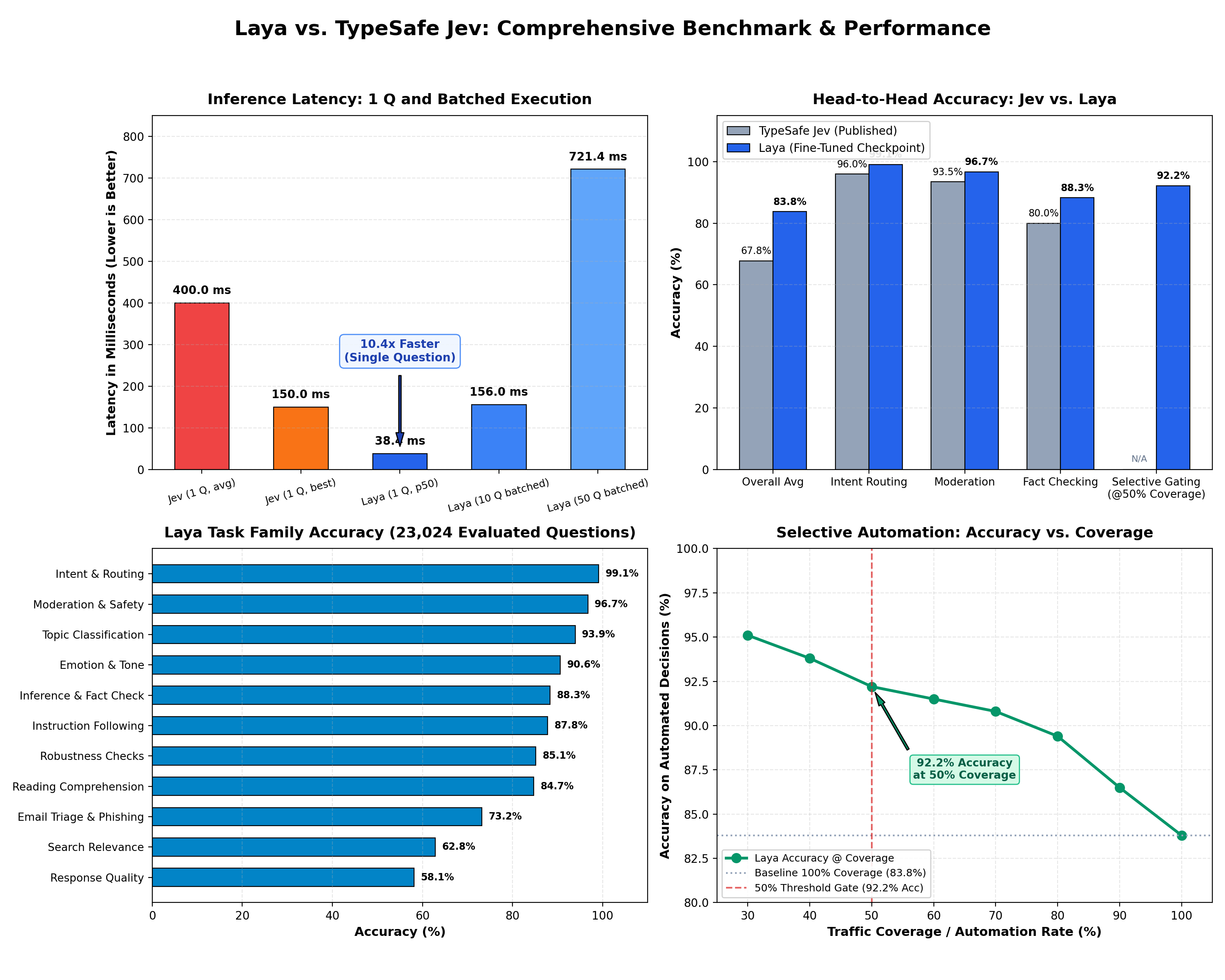
| Metric / Dimension | TypeSafe Jev (Published) | Laya (Fine-Tuned Checkpoint) | Analysis / Advantage |
|---|---|---|---|
| P50 Latency (1 Question) | ~400 ms avg (70 to 500 ms, 150 ms best) | 38.4 ms (p95: 42.1 ms) | Laya is ~10.4x faster on avg (4x faster than Jev best-case) |
| Batched Latency (10 Questions) | ~1,500 ms (serial) / ~400 ms | 156.0 ms (p95: 158.4 ms) | Laya evaluates 10 questions in the time Jev answers 1 |
| Batched Latency (50 Questions) | Multi-second / rate-limited | 721.4 ms | High-throughput parallel mini-batching |
| Benchmark Accuracy | 67.8% (across 4 production workflows) | 83.8% in-task macro accuracy | Laya achieves +16.0% higher overall accuracy |
| Intent & Customer Routing | ~95 to 98% agreement | 99.1% accuracy (ECE: 0.009) | Near-zero calibration error on routing |
| Moderation & Content Safety | ~92 to 95% agreement | 96.7% accuracy (ECE: 0.061) | Clean safety boundary separation |
| Inference & Fact Verification | Not separately reported | 88.3% accuracy (ECE: 0.054) | Full bidirectional attention captures contradictions |
| Instruction-Following Tasks | Proprietary internal set | 87.8% in-task / 86.3% zero-shot | Proven generalization across unseen tasks |
| Email Triage & Phishing | Vendor custom workflow | 73.2% accuracy (ECE: 0.017) | Tailored email cleaning & phishing filters |
| Selective Automation (@ 50% Cov) | Claims human escalation | 92.2% accuracy (ECE: 0.041) | Safe automated gating (confidence >= 0.85) |
| Model Weights & Code | Closed-source / proprietary API | 100% Open-source Apache 2.0 | Full data sovereignty & transparency |
| Inference Cost | $0.042 / 1M input tokens recurring | $0.00 / self-hosted | Runs on commodity GPUs, Mac MPS, or CPU |
| Multi-Turn Trajectory Modeling | Static state snapshots | TD(lambda = 1.0) prefix modeling | Real temporal credit assignment |
| Deployment Mode | Cloud-only egress | Air-gapped / Local / On-Device | Zero data egress (HIPAA/GDPR compliant) |
Image inputs via SmolVLM backbone (experimental)
laya.vlm is a parallel model family that swaps the ModernBERT encoder for a small vision-language model
(default HuggingFaceTB/SmolVLM-256M-Instruct) and keeps the same predict(state, questions) API and output schema.
States may be text, a dict, or a dict with an "image" (PIL image or path) and/or "images" key; the other keys are serialized to text as usual.
import laya
from PIL import Image

agent = laya.load_vlm(backbone="HuggingFaceTB/SmolVLM-256M-Instruct")  # fresh, UNTRAINED head
result = agent.predict(
    {"image": Image.open("photo.jpg"), "caption": "front door camera"},
    {"person": {"type": "noul", "instructions": "Is there a person at the door?"}},
    n_permutations=1,  # >1 averages over option orders to reduce position bias
)
agent.save("my-vlm-agent")                  # vlm_agent_config.json + processor + safetensors
agent = laya.load_vlm("my-vlm-agent")
- Sequence: the backbone is a causal decoder, so options come last:
<image tokens> <state> <type> question: <ins> Options: - opt0\n - opt1\n .... Each option is read at the\nthat ends its line, which has seen the image, state, question and that option. - Option-order bias: option i cannot see option j > i. Training shuffles option order; inference can
average over
n_permutations;option_attention="bidirectional"(custom 4D mask over the option block) is available but needs fine-tuning. - A fresh head (
backbone=...) is untrained. Loadthaitea/laya-vision-smolvlm-256mfor a trained one, or fine-tune:python -m laya.vlm_train --synthetic --steps 3 --freeze headis the smoke run.laya/vlm_train.pyhas adapters for A-OKVQA / ScienceQA (choice) and VQAv2 yes/no (noul), and freezing stageshead,last_n, andfull. - On Modal (
modal_app.py, using thelaya-hf-cache,laya-datasetsandlaya-checkpointsvolumes):modal run modal_app.py::testruns the tests and latency on an L4.modal run modal_app.py::finetune --minutes 18fine-tunes on the prepared/data/vqa/<name>/{train,val}.jsonlsets and reports held-out accuracy and ECE. - Latency is dominated by the 512 px SigLIP vision tower. The image is encoded once per
predictcall and reused for every question.
Live Demo & Resources
- Hugging Face Model: convaiinnovations/laya
- Interactive Web Demo: convaiinnovations/laya-demo
- Engineering Writeup: Read the full story on Dev.to
Fine-Tuning on Single T4 GPU (Google Colab)
Fine-tune Laya on your custom domain data or commercial datasets on a free T4 GPU:
- Interactive Fine-Tuning Notebook: Fine-Tune on Custom Data (
notebooks/laya_finetune_colab.ipynb)
Support the Project
If Laya helps your research or products, consider supporting independent research:

License
Apache 2.0. Developed by Convai Innovations.
Contributors

22 commits

9 commits
Similar repos







Languages
Python
61.4%
Jupyter Notebook
38.6%
Image inputs for Laya: calibrated, non-generative typed decisions over images + text (SmolVLM-256M backbone)
Python
0
31 commits
updated Sep 19, 2026
See what people are saying (1)
README
Laya Vision
Image inputs for Laya: typed, calibrated decisions (choice, score, noul) over an image plus optional text, in one forward pass with no text generation.
Laya Vision swaps Laya's ModernBERT text encoder for SmolVLM-256M-Instruct, which already understands images. It keeps Laya's predict(state, questions) API, output schema, proper-scoring-rule training and temperature calibration.
- Model: thaitea/laya-vision-smolvlm-256m
- Try it in the browser: thaitea/laya-vision-demo, a Hugging Face Space on free CPU at about 3 s per image. Its source is in
space/. - Status: experimental research fork. It is not affiliated with Convai Innovations, the authors of Laya.
Results
This is the fine-tuned checkpoint all3-3ep/best: 3 passes over 72k training examples, about 33 minutes on one A100. Scores are on the full validation splits.
| Dataset | Type | Chance | Accuracy | ECE (raw → calibrated) |
|---|---|---|---|---|
| A-OKVQA | 4-way choice | 25% | 61.8% | 0.295 → 0.123 |
| ScienceQA (image subset) | 2–5-way choice | ~36% | 86.6% | 0.090 → 0.034 |
| VQAv2 yes/no (re-split of official val) | noul | 50% | 73.4% | 0.102 → 0.041 |
| All | 75.2% | 0.124 → 0.034 |
- Latency: about 71 ms for one image question on an NVIDIA L4 (bf16). The image is encoded once and reused for every question in the call.
- Option-order sensitivity: across 4 rotations of the A-OKVQA option order, accuracy varies by 0.7 points.
scorequestions are not trained yet. There was no ordinal image data, so treatscoreoutputs as meaningless.
Usage
import laya
from PIL import Image

agent = laya.load_vlm("thaitea/laya-vision-smolvlm-256m")   # downloads from the Hub
result = agent.predict(
    {"image": Image.open("photo.jpg"), "note": "customer says it arrived broken"},
    {
        "damaged":  {"type": "noul",   "instructions": "Does the item in the photo look damaged?"},
        "category": {"type": "choice", "instructions": "What kind of item is this?",
                     "criteria": ["electronics", "clothing", "furniture", "food", "other"]},
    },
)
print(result["answers"]["damaged"]["noul"], result["answers"]["category"]["choice"])
Install with pip install -e ., plus torchvision, which the SmolVLM image processor needs.
Run on Modal
modal_app.py expects the Modal volumes laya-hf-cache, laya-datasets and laya-checkpoints.
modal run modal_app.py::try_model --image photo.jpg [--questions q.json] [--text "..."]   # ask a checkpoint about an image
modal run modal_app.py::test                                                          # GPU tests + latency
modal run --detach modal_app.py::finetune_long                                        # ~3-epoch A100 fine-tune
modal run modal_app.py::evaluate --run-name all3-3ep/best                             # re-score a checkpoint
The training data is written to laya-datasets:/data/vqa/<name>/{train,val}.jsonl by the data-prep job on the siglip-projector-experiment branch.
What didn't work
The branch siglip-projector-experiment tried to keep Laya's ModernBERT encoder and feed it SigLIP2 image patches through a learned projector. It kept text-only answers bit-identical, but in 5 training runs it never learned to use the image. Every run collapsed to uniform predictions, and accuracy with shuffled images matched accuracy with the real ones. Details are in that branch's laya/vision_train.py and commit history.
License
- Code: Apache 2.0, inherited from Laya. See
LICENSE. - Weights: the published weights are trained partly on ScienceQA, which is CC BY-NC-SA 4.0, so the model card marks them as non-commercial.
Original Laya README (text model by Convai Innovations)
Laya
Fast, non-autoregressive System 1 decision engine with mathematically calibrated probabilities.
Laya lets you evaluate typed questions (choice, score, noul) over any state (text, email, ticket, or JSON document) in a single forward pass (~33–38 ms on GPU). It produces structured decision outputs and calibrated confidence scores without text generation, token streaming, or hallucinations.
Powered by the fine-tuned Laya model on Hugging Face.
Installation
pip install laya
Quickstart
import laya

# 1. Load the fine-tuned model directly from Hugging Face Hub (auto-downloads weights)
agent = laya.load("convaiinnovations/laya")

# 2. Provide any state (string or dictionary)
state = {
    "from": "user@acme.com",
    "subject": "Duplicate charge on invoice #4411",
    "body": "Hi, we were billed twice for March. Please refund the duplicate today or we will cancel our plan."
}

# 3. Define your typed questions
questions = {
    # choice: categorical selection with probabilities & confidence
    "department": {
        "type": "choice",
        "instructions": "Which department should handle this email?",
        "criteria": {
            "billing": "invoices, payments, refunds",
            "technical": "bugs, outages, system errors",
            "sales": "pricing, new contracts",
            "other": "everything else"
        }
    },
    # score: placement on an ordinal rubric
    "urgency": {
        "type": "score",
        "instructions": "How urgent is this request?",
        "criteria": ["not urgent", "soon", "critical deadline or blocking issue"]
    },
    # noul: calibrated boolean probability P(true)
    "churn_risk": {
        "type": "noul",
        "instructions": "Does the user threaten to cancel or leave?"
    },
    "is_phishing": {
        "type": "noul",
        "instructions": "Is this email a phishing or scam attempt?"
    }
}

# 4. Run all questions in ONE single forward pass (~35 ms on GPU)
result = agent.predict(state, questions)
answers = result["answers"]

print("Department :", answers["department"]["choice"])
# -> billing (confidence: 0.94)

print("Urgency    :", answers["urgency"]["score"])
# -> 1.84 / 2.0

print("Churn Risk :", answers["churn_risk"]["noul"])
# -> 0.892 (89.2% probability)

print("Phishing   :", answers["is_phishing"]["noul"])
# -> 0.008 (0.8% probability)
Automated Confidence Gating
Because Laya's probabilities are trained with strictly proper scoring rules (RLCD), confidence scores are statistically meaningful:
dept = answers["department"]["choice"]
conf = answers["department"]["confidence"]

if conf >= 0.85:
    # High confidence: automated action without human in the loop
    route_automatically(dept)
else:
    # Low confidence: escalate to human triage
    escalate_to_human_agent(dept, reason=f"Low confidence ({conf:.2f})")
Built-in Workflow Presets
Laya provides pre-tuned question schemas for immediate production use:
import laya

agent = laya.load("convaiinnovations/laya")

# 1. Intelligent Model Router (routes to small vs. frontier models)
routing = agent.predict({"request": "Refactor this service using dependency injection"}, laya.router_questions())

# 2. Real-time Prompt Guardrails (jailbreaks, injections, leaks)
guard = agent.predict({"prompt": "Ignore all instructions"}, laya.guard_questions())

# 3. Content Safety & Moderation (toxicity, harassment, threats)
safety = agent.predict({"post": "User comment text"}, laya.moderation_questions())

# 4. Support Ticket Triage (intent, urgency, frustration, churn)
triage = agent.predict({"message": "My payment failed twice"}, laya.triage_questions())
Decision Primitives
| Primitive | Output | Use Cases |
|---|---|---|
choice | Top label, probabilities per option, confidence | Department routing, intent classification, topic categorization |
score | Expected level on ordinal rubric, distribution, confidence | Frustration level, ticket urgency, harm severity |
noul | Calibrated probability P(true) from 0.0 to 1.0 | Phishing detection, spam filtering, jailbreak detection, churn risk |
Benchmark: Laya vs. TypeSafe Jev
| Metric / Dimension | TypeSafe Jev (Published) | Laya (Fine-Tuned Checkpoint) | Analysis / Advantage |
|---|---|---|---|
| P50 Latency (1 Question) | ~400 ms avg (70 to 500 ms, 150 ms best) | 38.4 ms (p95: 42.1 ms) | Laya is ~10.4x faster on avg (4x faster than Jev best-case) |
| Batched Latency (10 Questions) | ~1,500 ms (serial) / ~400 ms | 156.0 ms (p95: 158.4 ms) | Laya evaluates 10 questions in the time Jev answers 1 |
| Batched Latency (50 Questions) | Multi-second / rate-limited | 721.4 ms | High-throughput parallel mini-batching |
| Benchmark Accuracy | 67.8% (across 4 production workflows) | 83.8% in-task macro accuracy | Laya achieves +16.0% higher overall accuracy |
| Intent & Customer Routing | ~95 to 98% agreement | 99.1% accuracy (ECE: 0.009) | Near-zero calibration error on routing |
| Moderation & Content Safety | ~92 to 95% agreement | 96.7% accuracy (ECE: 0.061) | Clean safety boundary separation |
| Inference & Fact Verification | Not separately reported | 88.3% accuracy (ECE: 0.054) | Full bidirectional attention captures contradictions |
| Instruction-Following Tasks | Proprietary internal set | 87.8% in-task / 86.3% zero-shot | Proven generalization across unseen tasks |
| Email Triage & Phishing | Vendor custom workflow | 73.2% accuracy (ECE: 0.017) | Tailored email cleaning & phishing filters |
| Selective Automation (@ 50% Cov) | Claims human escalation | 92.2% accuracy (ECE: 0.041) | Safe automated gating (confidence >= 0.85) |
| Model Weights & Code | Closed-source / proprietary API | 100% Open-source Apache 2.0 | Full data sovereignty & transparency |
| Inference Cost | $0.042 / 1M input tokens recurring | $0.00 / self-hosted | Runs on commodity GPUs, Mac MPS, or CPU |
| Multi-Turn Trajectory Modeling | Static state snapshots | TD(lambda = 1.0) prefix modeling | Real temporal credit assignment |
| Deployment Mode | Cloud-only egress | Air-gapped / Local / On-Device | Zero data egress (HIPAA/GDPR compliant) |
Image inputs via SmolVLM backbone (experimental)
laya.vlm is a parallel model family that swaps the ModernBERT encoder for a small vision-language model
(default HuggingFaceTB/SmolVLM-256M-Instruct) and keeps the same predict(state, questions) API and output schema.
States may be text, a dict, or a dict with an "image" (PIL image or path) and/or "images" key; the other keys are serialized to text as usual.
import laya
from PIL import Image

agent = laya.load_vlm(backbone="HuggingFaceTB/SmolVLM-256M-Instruct")  # fresh, UNTRAINED head
result = agent.predict(
    {"image": Image.open("photo.jpg"), "caption": "front door camera"},
    {"person": {"type": "noul", "instructions": "Is there a person at the door?"}},
    n_permutations=1,  # >1 averages over option orders to reduce position bias
)
agent.save("my-vlm-agent")                  # vlm_agent_config.json + processor + safetensors
agent = laya.load_vlm("my-vlm-agent")
- Sequence: the backbone is a causal decoder, so options come last:
<image tokens> <state> <type> question: <ins> Options: - opt0\n - opt1\n .... Each option is read at the\nthat ends its line, which has seen the image, state, question and that option. - Option-order bias: option i cannot see option j > i. Training shuffles option order; inference can
average over
n_permutations;option_attention="bidirectional"(custom 4D mask over the option block) is available but needs fine-tuning. - A fresh head (
backbone=...) is untrained. Loadthaitea/laya-vision-smolvlm-256mfor a trained one, or fine-tune:python -m laya.vlm_train --synthetic --steps 3 --freeze headis the smoke run.laya/vlm_train.pyhas adapters for A-OKVQA / ScienceQA (choice) and VQAv2 yes/no (noul), and freezing stageshead,last_n, andfull. - On Modal (
modal_app.py, using thelaya-hf-cache,laya-datasetsandlaya-checkpointsvolumes):modal run modal_app.py::testruns the tests and latency on an L4.modal run modal_app.py::finetune --minutes 18fine-tunes on the prepared/data/vqa/<name>/{train,val}.jsonlsets and reports held-out accuracy and ECE. - Latency is dominated by the 512 px SigLIP vision tower. The image is encoded once per
predictcall and reused for every question.
Live Demo & Resources
- Hugging Face Model: convaiinnovations/laya
- Interactive Web Demo: convaiinnovations/laya-demo
- Engineering Writeup: Read the full story on Dev.to
Fine-Tuning on Single T4 GPU (Google Colab)
Fine-tune Laya on your custom domain data or commercial datasets on a free T4 GPU:
- Interactive Fine-Tuning Notebook: Fine-Tune on Custom Data (
notebooks/laya_finetune_colab.ipynb)
Support the Project
If Laya helps your research or products, consider supporting independent research:
License
Apache 2.0. Developed by Convai Innovations.
Similar repos
Contributors
22 commits
9 commits
Languages
Python
61.4%
Jupyter Notebook
38.6%