EchoVerse is an AI-powered English learning app for children aged 6-12, built with Flutter and Firebase. It combines interactive lessons (alphabet, stories, games) with real-time AI conversation features using GPU-accelerated speech recognition, all within a safe environment featuring robust parental controls. 🔗 Admin Dashboard: https://github.com
Dart
4
87 commits
updated Feb 8, 2026

An interactive, AI-powered mobile application for children (ages 6-12) to learn English through conversation, games, and personalized learning paths.




Features • Demo • Installation • Architecture • Documentation
EchoVerse is a comprehensive English language learning platform designed specifically for children aged 6-12. It combines cutting-edge AI technology with engaging educational content to create an immersive learning experience that makes language acquisition fun and effective.
Traditional language learning methods often fail to engage young learners, relying on rote memorization and lacking real-time conversational practice. EchoVerse addresses these challenges by providing:
EchoVerse contributes to the United Nations Sustainable Development Goals:
Real-time voice conversations powered by GPU-accelerated AI:
Three Conversation Modes:
Two AI Providers:
Real-time Features:
Animated Avatars: GIF-based avatars with speaking/idle states synchronized with audio
5-Step Profile Creation:
Parental Dashboard:
| Home Screen | Letter Land | Story Reading |
|---|---|---|
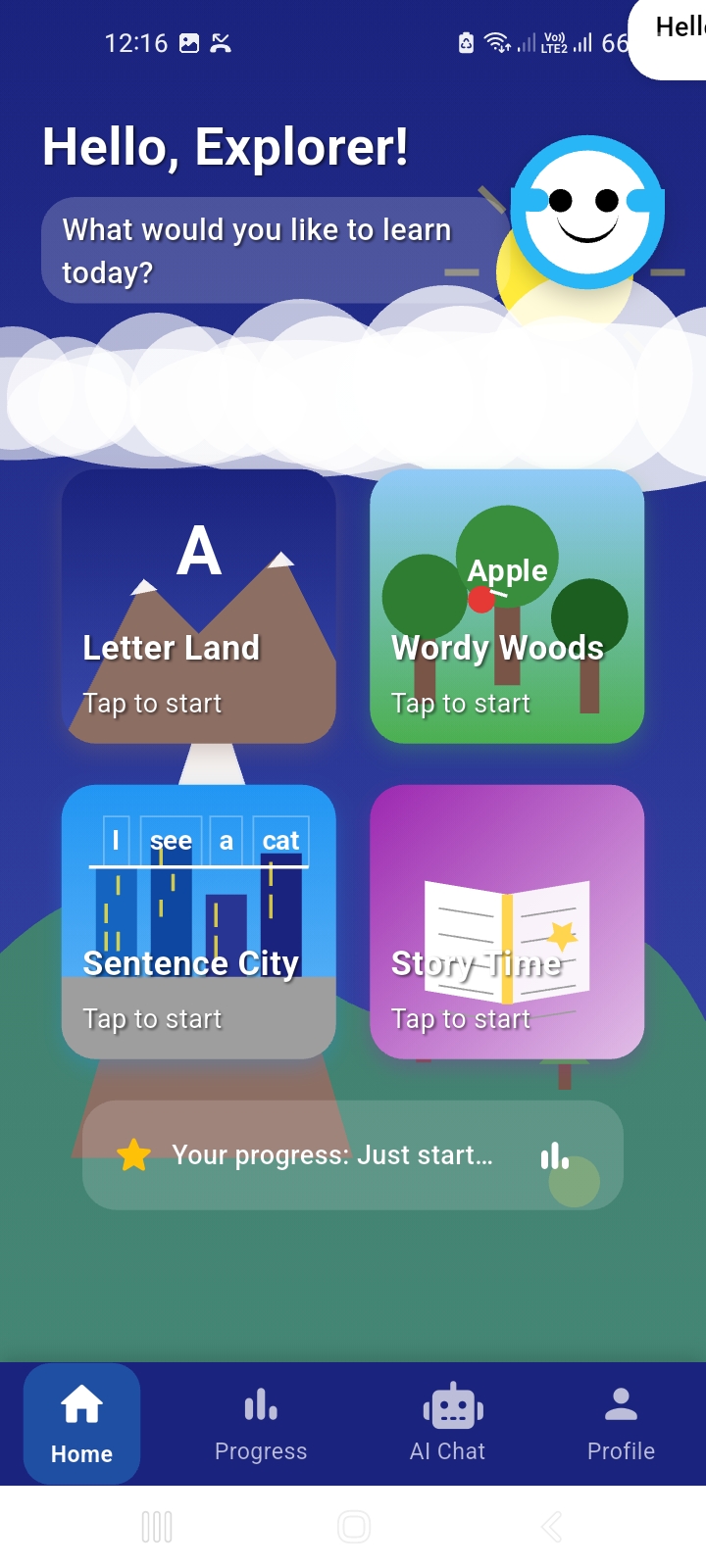 | 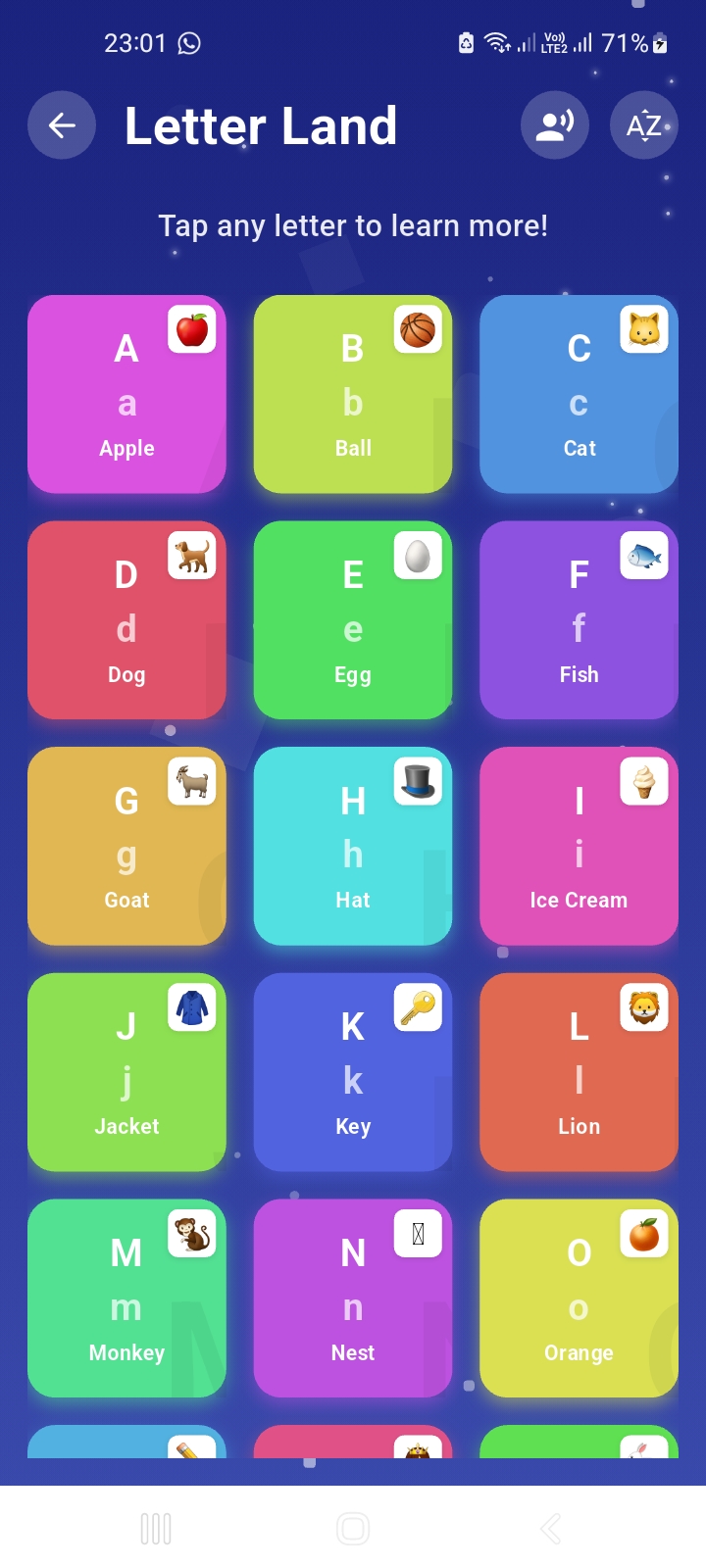 | 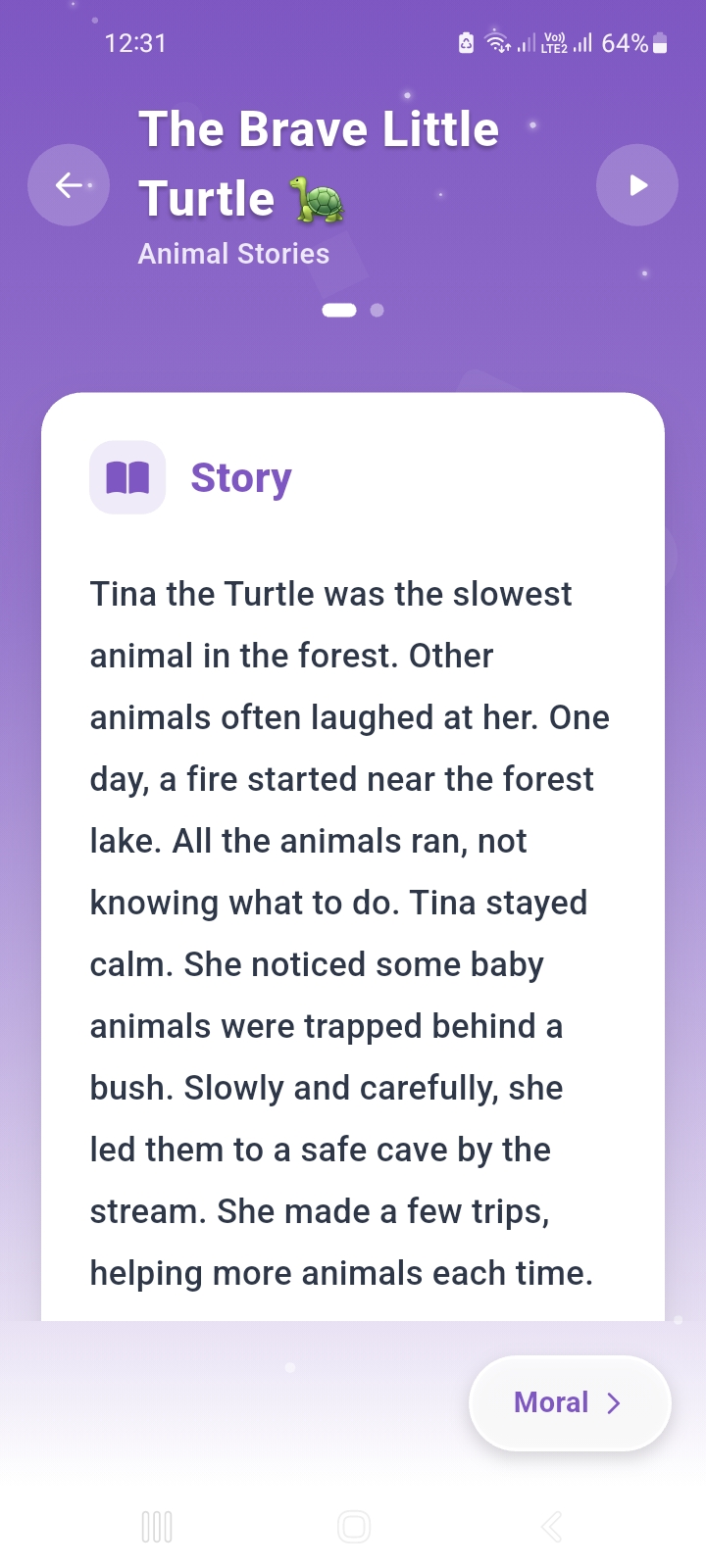 |
| AI TalkMate | Progress Report | Profile Setup |
|---|---|---|
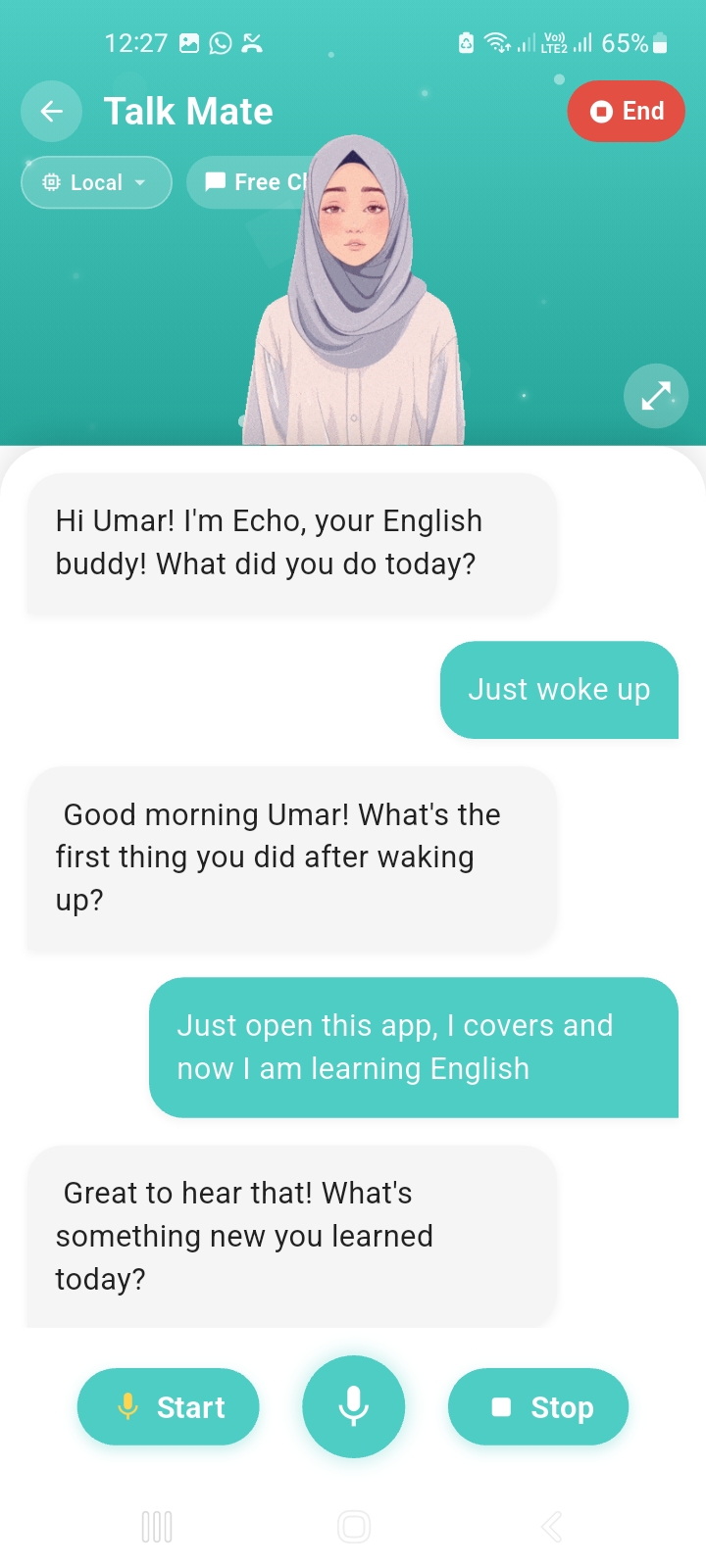 | 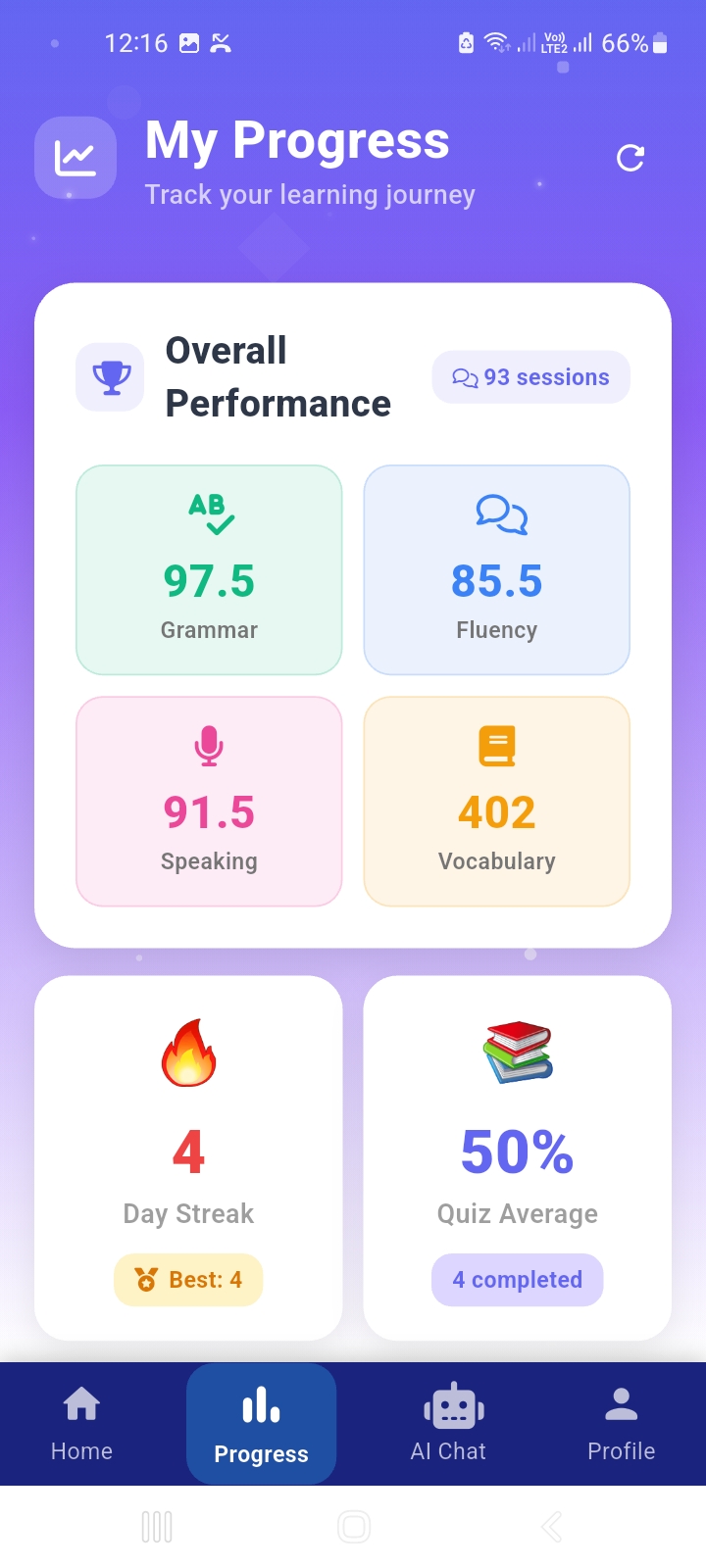 | 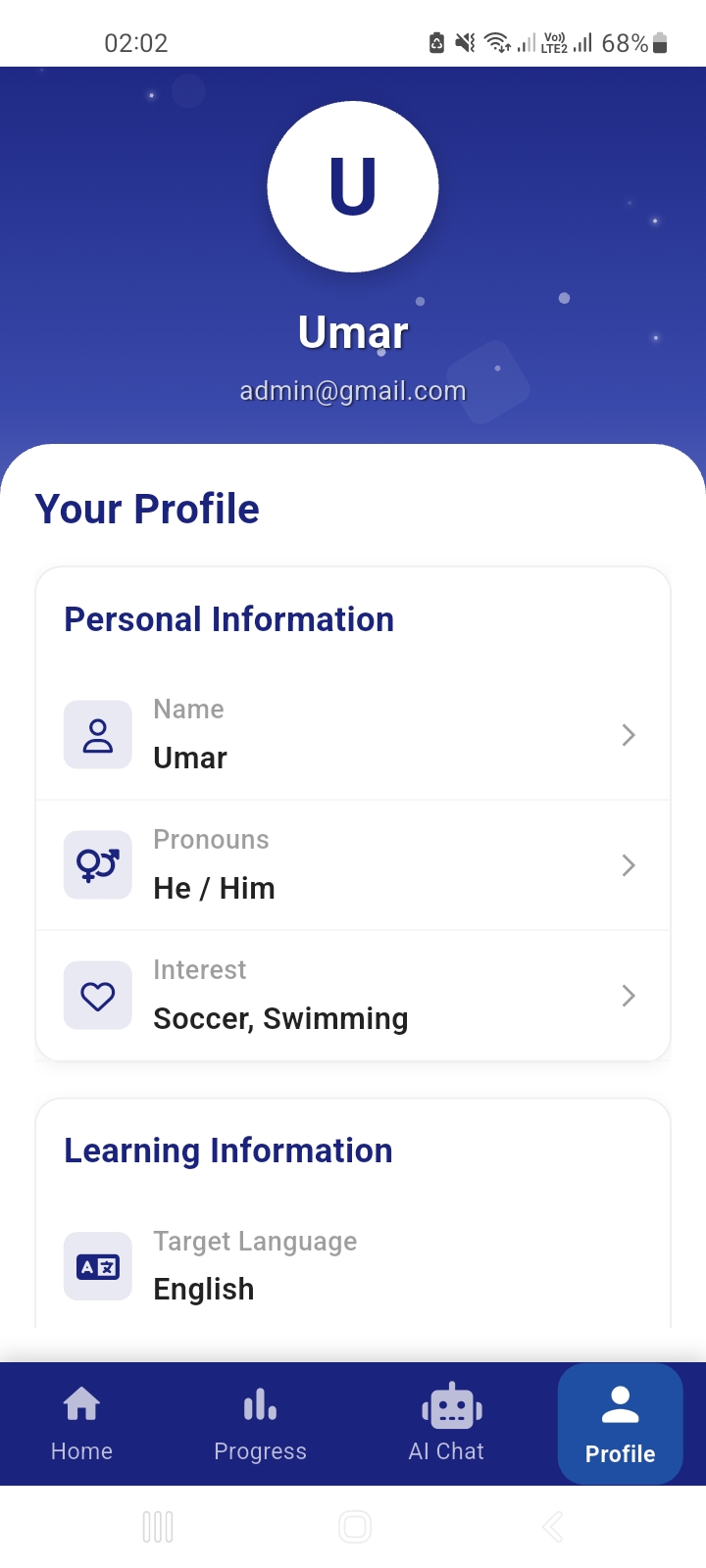 |
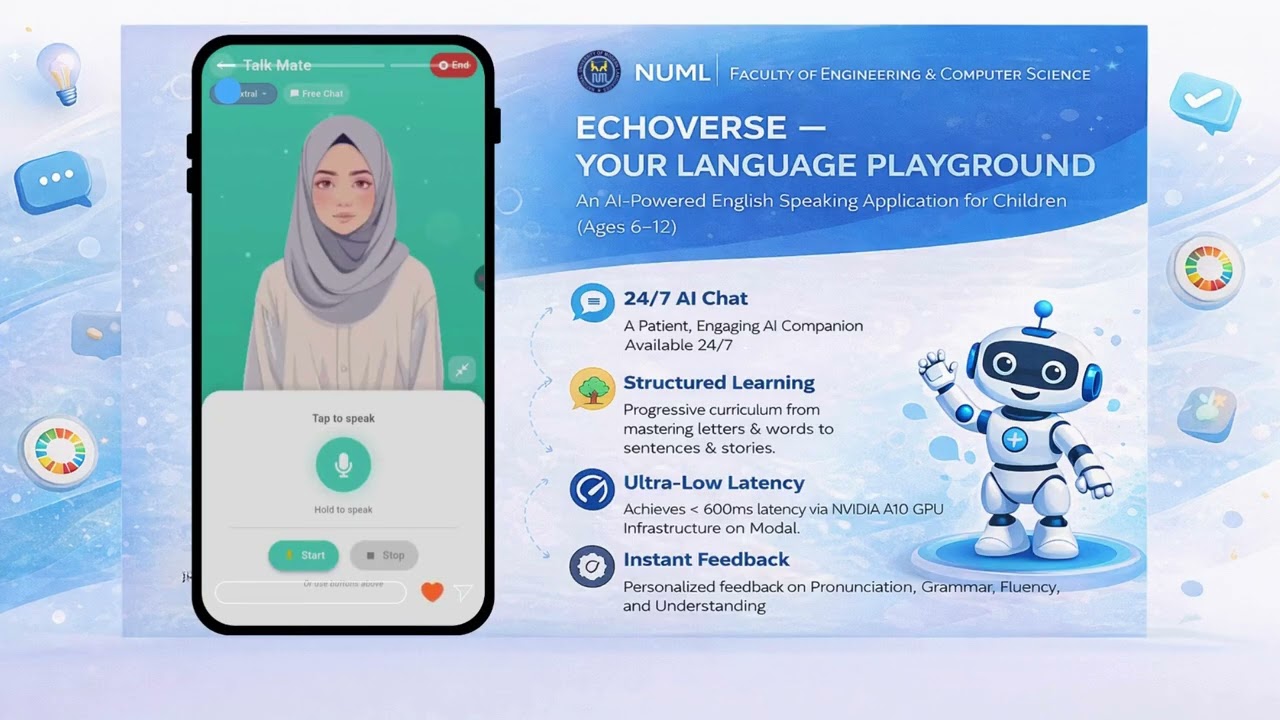
Click the image above to watch the full demo on YouTube
EchoVerse includes a separate Admin Dashboard for managing users, monitoring analytics, and controlling content.
Repository: echoverse_admin_dashboard
Features:
| Technology | Version | Purpose |
|---|---|---|
| Flutter | 3.2.3+ | Cross-platform mobile framework |
| Dart | 3.2.3+ | Programming language |
| Firebase Auth | Latest | User authentication |
| Cloud Firestore | Latest | NoSQL database |
| Firebase Storage | Latest | Media storage |
| Provider | ^6.0.0 | State management |
| flutter_tts | ^3.8.5 | Text-to-speech |
| audioplayers | ^5.2.1 | Audio playback |
| web_socket_channel | ^2.4.0 | Real-time communication |
| record | ^5.0.4 | Audio recording |
| http | ^1.1.2 | HTTP requests |
| Technology | Version | Purpose |
|---|---|---|
| Python | 3.11+ | Backend language |
| FastAPI | Latest | Web framework |
| Modal | Latest | GPU serverless platform |
| Whisper | small | Speech-to-Text |
| Qwen2-1.5B | Q4_K_M | Conversational LLM |
| Mistral API | Latest | Alternative LLM (Voxtral) |
| T5-base | Latest | Grammar correction |
| Piper TTS | Latest | Text-to-Speech |
| Kokoro TTS | Latest | High-quality TTS |
graph TB
    subgraph "Mobile App (Flutter)"
        UI[User Interface]
        SM[State Management<br/>Provider]
        WS[WebSocket Service]
        TTS[TTS Service]
        AR[Audio Recording]
        AP[Audio Player]
    end

    subgraph "Firebase"
        AUTH[Authentication]
        FS[Firestore]
        RT[Realtime DB]
        STOR[Storage]
    end

    subgraph "AI Backend (Modal GPU)"
        API[FastAPI Server]
        STT[Whisper STT]
        LLM[Qwen2 LLM]
        GRAM[T5 Grammar]
        TTS_B[Piper TTS]
        PIPE[Processing Pipeline]
    end

    UI --> SM
    SM --> WS
    SM --> TTS
    SM --> AR
    SM --> AP

    WS <--> API
    AR --> WS
    AP <-- WS

    UI --> AUTH
    SM --> FS
    SM --> RT
    UI --> STOR

    API --> STT
    API --> LLM
    API --> GRAM
    API --> TTS_B
    API --> PIPE
sequenceDiagram
    participant User
    participant Flutter
    participant WebSocket
    participant Backend
    participant AI Models

    User->>Flutter: Speaks into microphone
    Flutter->>WebSocket: Stream audio chunks
    WebSocket->>Backend: Binary audio data
    Backend->>AI Models: Whisper STT
    AI Models-->>Backend: Transcript
    Backend->>WebSocket: Send transcript
    WebSocket->>Flutter: Display user message

    Backend->>AI Models: Qwen2 LLM
    AI Models-->>Backend: Stream response tokens
    Backend->>WebSocket: Stream tokens
    WebSocket->>Flutter: Display AI response

    Backend->>AI Models: Piper TTS
    AI Models-->>Backend: Audio chunks
    Backend->>WebSocket: Binary audio
    WebSocket->>Flutter: Play audio
    Flutter->>User: Hears AI response

    Backend->>AI Models: Grammar analysis
    AI Models-->>Backend: Feedback
    Backend->>WebSocket: Send feedback
    WebSocket->>Flutter: Display metrics
Clone the repository:
git clone https://github.com/r-zeeshan/echoverse-v2.git
cd echoverse-v2
Install Flutter dependencies:
flutter pub get
Configure Firebase:
Create a new Firebase project at Firebase Console
Add Android and iOS apps to your Firebase project
Download google-services.json (Android) and GoogleService-Info.plist (iOS)
Place files in respective directories:
android/app/google-services.jsonios/Runner/GoogleService-Info.plistEnable Firebase services:
Set up Firebase Rules:
FIREBASE_RULES.md for configuration detailsFIREBASE_REALTIME_DATABASE_RULES.jsonRun the app:
# For Android
flutter run -d android

# For iOS
flutter run -d ios

# For Web
flutter run -d chrome
Install Modal CLI:
pip install modal
Authenticate with Modal:
modal token new
Configure environment:
cd speech-module
cp .env.modal.example .env.modal
# Edit .env.modal with your API keys
Deploy to Modal:
modal deploy modal_app.py
Get deployment URL:
modal app list
# Copy the WebSocket URL
Update Flutter app configuration:
lib/config/app_config.dartmodalWebSocketUrl with your Modal deployment URLCost: ~$0.40/hour | Free Credits: $30 (covers 75 hours)
Create virtual environment:
cd speech-module
python -m venv venv

# Windows
venv\Scripts\activate

# macOS/Linux
source venv/bin/activate
Install dependencies:
pip install -r requirements.txt
Download AI models (optional for local testing):
# Models are automatically downloaded on first run
# Or manually download from Hugging Face
Run local server:
uvicorn app.main:app --host 0.0.0.0 --port 9000 --reload
Update Flutter app:
lib/config/app_config.dartuseModalGPU = falsews://localhost:9000/ws/speech-session-streamingNote: Local development runs on CPU (3-4x slower than GPU)
Edit lib/config/app_config.dart:
class AppConfig {
  // Backend Configuration
  static const bool useModalGPU = true;  // true for production, false for local

  // Provider Configuration
  static const String defaultProvider = 'local';  // 'local' or 'voxtral'

  // Modal GPU URLs (Production)
  static const String modalWebSocketUrl = 'wss://YOUR-MODAL-URL/ws/speech-session-streaming';
  static const String modalHttpUrl = 'https://YOUR-MODAL-URL';

  // Local Backend (Development)
  static const String backendHost = 'localhost';
  static const int backendPort = 9000;
}
Edit speech-module/.env.modal:
# Device Configuration
DEVICE=cuda
COMPUTE_TYPE=float16

# Model Configuration
WHISPER_MODEL_SIZE=small
LLM_MODEL_PATH=./models/Llama-3.2-3B-Instruct-Q8_0.gguf
TTS_MODEL_PATH=./models/en_US-amy-medium.onnx

# GPU Settings
GPU_MEMORY_FRACTION=0.8
N_GPU_LAYERS=35

# Mistral API (for Voxtral provider)
MISTRAL_API_KEY=your_mistral_api_key_here
Create Profile: Parents set up child's profile with age, interests, and learning goals
Choose Activity:
Track Progress: View achievements and learning milestones
Run Tests:
flutter test
Build for Production:
# Android
flutter build apk --release

# iOS
flutter build ios --release

# Web
flutter build web --release
Monitor Backend:
# Modal logs
modal app logs echoverse-speech-module --follow

# Check GPU usage
modal profile current
echoverse-v2/
├── android/                    # Android native code
├── ios/                        # iOS native code
├── web/                        # Web deployment files
├── windows/                    # Windows desktop support
├── linux/                      # Linux desktop support
├── macos/                      # macOS desktop support
├── lib/                        # Flutter application code
│   ├── config/                 # App configuration
│   ├── models/                 # Data models
│   │   ├── chat_message.dart
│   │   ├── chat_session.dart
│   │   ├── user_progress.dart
│   │   └── ...
│   ├── providers/              # State management
│   │   └── chat_provider.dart
│   ├── screens/                # UI screens (31 screens)
│   │   ├── home_screen.dart
│   │   ├── letter_detail_screen.dart
│   │   ├── ai_talk_mate_screen_realtime.dart
│   │   ├── story_reading_screen.dart
│   │   └── ...
│   ├── services/               # Business logic (15 services)
│   │   ├── auth_service.dart
│   │   ├── websocket_service.dart
│   │   ├── audio_player_service.dart
│   │   ├── audio_recording_service.dart
│   │   ├── session_storage_service.dart
│   │   └── ...
│   ├── widgets/                # Reusable UI components
│   │   ├── profile_creation/
│   │   └── ...
│   ├── utils/                  # Utility functions
│   └── main.dart               # App entry point
├── assets/                     # Static assets
│   ├── images/                 # Images and icons
│   ├── avatars/                # Avatar GIFs
│   ├── audio/                  # Audio files
│   ├── data/                   # CSV data files
│   ├── alphabet_dataset.csv
│   ├── worldy_words_dataset.csv
│   └── stories/                # Story JSON files
│       ├── islamic_stories.json
│       ├── animal_stories.json
│       ├── fairy_tales.json
│       └── adventure_stories.json
├── speech-module/              # AI Backend
│   ├── app/
│   │   ├── api/                # API endpoints
│   │   │   └── v1/
│   │   │       └── websocket_streaming.py
│   │   ├── services/           # AI services
│   │   │   ├── stt_service.py
│   │   │   ├── tts_service.py
│   │   │   ├── llm_service.py
│   │   │   ├── voxtral_service.py
│   │   │   └── pipeline.py
│   │   └── main.py
│   ├── modal_app.py            # Modal deployment config
│   ├── requirements.txt        # Python dependencies
│   └── README.md               # Backend documentation
├── diagrams/                   # Architecture diagrams
├── pubspec.yaml                # Flutter dependencies
├── analysis_options.yaml       # Dart analyzer configuration
├── .gitignore                  # Git ignore rules
├── .metadata                   # Flutter metadata
├── README.md                   # This file
├── PROJECT_INDEX.md            # Detailed project documentation
├── INITIAL_PROPOSAL.md         # FYP proposal
├── PROGRESS_REPORT.md          # Development progress
├── FIREBASE_RULES.md           # Firebase rules documentation
└── FIREBASE_REALTIME_DATABASE_RULES.json  # Firebase rules config
The AI Speech Module is a GPU-accelerated backend that powers real-time conversations. See speech-module/README.md for detailed documentation.
Speech-to-Text (STT):
Language Model (LLM):
Grammar & Fluency Analysis:
Text-to-Speech (TTS):
WebSocket:
ws://localhost:9000/ws/speech-session-streaming?
  user_id=<user_id>&
  child_name=<name>&
  age=<age>&
  hobbies=<hobbies>&
  mode=<free|topic|roleplay>&
  provider=<local|voxtral>
REST API (Testing):
POST /api/transcribe - Speech-to-TextPOST /api/test/stt - Test STTPOST /api/test/tts - Test TTSWe welcome contributions! Please follow these guidelines:
git checkout -b feature/amazing-featuregit commit -m 'Add amazing feature'git push origin feature/amazing-featureflutter analyzeThis project is licensed under the MIT License - see the LICENSE file for details.
Zeeshan Rajpoot
Umar Faizan
Project Repository: https://github.com/r-zeeshan/echoverse-v2
EchoVerse is an AI-powered English learning app for children aged 6-12, built with Flutter and Firebase. It combines interactive lessons (alphabet, stories, games) with real-time AI conversation features using GPU-accelerated speech recognition, all within a safe environment featuring robust parental controls. 🔗 Admin Dashboard: https://github.com
Dart
4
87 commits
updated Feb 8, 2026
An interactive, AI-powered mobile application for children (ages 6-12) to learn English through conversation, games, and personalized learning paths.
Features • Demo • Installation • Architecture • Documentation
EchoVerse is a comprehensive English language learning platform designed specifically for children aged 6-12. It combines cutting-edge AI technology with engaging educational content to create an immersive learning experience that makes language acquisition fun and effective.
Traditional language learning methods often fail to engage young learners, relying on rote memorization and lacking real-time conversational practice. EchoVerse addresses these challenges by providing:
EchoVerse contributes to the United Nations Sustainable Development Goals:
Real-time voice conversations powered by GPU-accelerated AI:
Three Conversation Modes:
Two AI Providers:
Real-time Features:
Animated Avatars: GIF-based avatars with speaking/idle states synchronized with audio
5-Step Profile Creation:
Parental Dashboard:
| Home Screen | Letter Land | Story Reading |
|---|---|---|
| | |
| AI TalkMate | Progress Report | Profile Setup |
|---|---|---|
| | |
Click the image above to watch the full demo on YouTube
EchoVerse includes a separate Admin Dashboard for managing users, monitoring analytics, and controlling content.
Repository: echoverse_admin_dashboard
Features:
| Technology | Version | Purpose |
|---|---|---|
| Flutter | 3.2.3+ | Cross-platform mobile framework |
| Dart | 3.2.3+ | Programming language |
| Firebase Auth | Latest | User authentication |
| Cloud Firestore | Latest | NoSQL database |
| Firebase Storage | Latest | Media storage |
| Provider | ^6.0.0 | State management |
| flutter_tts | ^3.8.5 | Text-to-speech |
| audioplayers | ^5.2.1 | Audio playback |
| web_socket_channel | ^2.4.0 | Real-time communication |
| record | ^5.0.4 | Audio recording |
| http | ^1.1.2 | HTTP requests |
| Technology | Version | Purpose |
|---|---|---|
| Python | 3.11+ | Backend language |
| FastAPI | Latest | Web framework |
| Modal | Latest | GPU serverless platform |
| Whisper | small | Speech-to-Text |
| Qwen2-1.5B | Q4_K_M | Conversational LLM |
| Mistral API | Latest | Alternative LLM (Voxtral) |
| T5-base | Latest | Grammar correction |
| Piper TTS | Latest | Text-to-Speech |
| Kokoro TTS | Latest | High-quality TTS |
graph TB
    subgraph "Mobile App (Flutter)"
        UI[User Interface]
        SM[State Management<br/>Provider]
        WS[WebSocket Service]
        TTS[TTS Service]
        AR[Audio Recording]
        AP[Audio Player]
    end

    subgraph "Firebase"
        AUTH[Authentication]
        FS[Firestore]
        RT[Realtime DB]
        STOR[Storage]
    end

    subgraph "AI Backend (Modal GPU)"
        API[FastAPI Server]
        STT[Whisper STT]
        LLM[Qwen2 LLM]
        GRAM[T5 Grammar]
        TTS_B[Piper TTS]
        PIPE[Processing Pipeline]
    end

    UI --> SM
    SM --> WS
    SM --> TTS
    SM --> AR
    SM --> AP

    WS <--> API
    AR --> WS
    AP <-- WS

    UI --> AUTH
    SM --> FS
    SM --> RT
    UI --> STOR

    API --> STT
    API --> LLM
    API --> GRAM
    API --> TTS_B
    API --> PIPE
sequenceDiagram
    participant User
    participant Flutter
    participant WebSocket
    participant Backend
    participant AI Models

    User->>Flutter: Speaks into microphone
    Flutter->>WebSocket: Stream audio chunks
    WebSocket->>Backend: Binary audio data
    Backend->>AI Models: Whisper STT
    AI Models-->>Backend: Transcript
    Backend->>WebSocket: Send transcript
    WebSocket->>Flutter: Display user message

    Backend->>AI Models: Qwen2 LLM
    AI Models-->>Backend: Stream response tokens
    Backend->>WebSocket: Stream tokens
    WebSocket->>Flutter: Display AI response

    Backend->>AI Models: Piper TTS
    AI Models-->>Backend: Audio chunks
    Backend->>WebSocket: Binary audio
    WebSocket->>Flutter: Play audio
    Flutter->>User: Hears AI response

    Backend->>AI Models: Grammar analysis
    AI Models-->>Backend: Feedback
    Backend->>WebSocket: Send feedback
    WebSocket->>Flutter: Display metrics
Clone the repository:
git clone https://github.com/r-zeeshan/echoverse-v2.git
cd echoverse-v2
Install Flutter dependencies:
flutter pub get
Configure Firebase:
Create a new Firebase project at Firebase Console
Add Android and iOS apps to your Firebase project
Download google-services.json (Android) and GoogleService-Info.plist (iOS)
Place files in respective directories:
android/app/google-services.jsonios/Runner/GoogleService-Info.plistEnable Firebase services:
Set up Firebase Rules:
FIREBASE_RULES.md for configuration detailsFIREBASE_REALTIME_DATABASE_RULES.jsonRun the app:
# For Android
flutter run -d android

# For iOS
flutter run -d ios

# For Web
flutter run -d chrome
Install Modal CLI:
pip install modal
Authenticate with Modal:
modal token new
Configure environment:
cd speech-module
cp .env.modal.example .env.modal
# Edit .env.modal with your API keys
Deploy to Modal:
modal deploy modal_app.py
Get deployment URL:
modal app list
# Copy the WebSocket URL
Update Flutter app configuration:
lib/config/app_config.dartmodalWebSocketUrl with your Modal deployment URLCost: ~$0.40/hour | Free Credits: $30 (covers 75 hours)
Create virtual environment:
cd speech-module
python -m venv venv

# Windows
venv\Scripts\activate

# macOS/Linux
source venv/bin/activate
Install dependencies:
pip install -r requirements.txt
Download AI models (optional for local testing):
# Models are automatically downloaded on first run
# Or manually download from Hugging Face
Run local server:
uvicorn app.main:app --host 0.0.0.0 --port 9000 --reload
Update Flutter app:
lib/config/app_config.dartuseModalGPU = falsews://localhost:9000/ws/speech-session-streamingNote: Local development runs on CPU (3-4x slower than GPU)
Edit lib/config/app_config.dart:
class AppConfig {
  // Backend Configuration
  static const bool useModalGPU = true;  // true for production, false for local

  // Provider Configuration
  static const String defaultProvider = 'local';  // 'local' or 'voxtral'

  // Modal GPU URLs (Production)
  static const String modalWebSocketUrl = 'wss://YOUR-MODAL-URL/ws/speech-session-streaming';
  static const String modalHttpUrl = 'https://YOUR-MODAL-URL';

  // Local Backend (Development)
  static const String backendHost = 'localhost';
  static const int backendPort = 9000;
}
Edit speech-module/.env.modal:
# Device Configuration
DEVICE=cuda
COMPUTE_TYPE=float16

# Model Configuration
WHISPER_MODEL_SIZE=small
LLM_MODEL_PATH=./models/Llama-3.2-3B-Instruct-Q8_0.gguf
TTS_MODEL_PATH=./models/en_US-amy-medium.onnx

# GPU Settings
GPU_MEMORY_FRACTION=0.8
N_GPU_LAYERS=35

# Mistral API (for Voxtral provider)
MISTRAL_API_KEY=your_mistral_api_key_here
Create Profile: Parents set up child's profile with age, interests, and learning goals
Choose Activity:
Track Progress: View achievements and learning milestones
Run Tests:
flutter test
Build for Production:
# Android
flutter build apk --release

# iOS
flutter build ios --release

# Web
flutter build web --release
Monitor Backend:
# Modal logs
modal app logs echoverse-speech-module --follow

# Check GPU usage
modal profile current
echoverse-v2/
├── android/                    # Android native code
├── ios/                        # iOS native code
├── web/                        # Web deployment files
├── windows/                    # Windows desktop support
├── linux/                      # Linux desktop support
├── macos/                      # macOS desktop support
├── lib/                        # Flutter application code
│   ├── config/                 # App configuration
│   ├── models/                 # Data models
│   │   ├── chat_message.dart
│   │   ├── chat_session.dart
│   │   ├── user_progress.dart
│   │   └── ...
│   ├── providers/              # State management
│   │   └── chat_provider.dart
│   ├── screens/                # UI screens (31 screens)
│   │   ├── home_screen.dart
│   │   ├── letter_detail_screen.dart
│   │   ├── ai_talk_mate_screen_realtime.dart
│   │   ├── story_reading_screen.dart
│   │   └── ...
│   ├── services/               # Business logic (15 services)
│   │   ├── auth_service.dart
│   │   ├── websocket_service.dart
│   │   ├── audio_player_service.dart
│   │   ├── audio_recording_service.dart
│   │   ├── session_storage_service.dart
│   │   └── ...
│   ├── widgets/                # Reusable UI components
│   │   ├── profile_creation/
│   │   └── ...
│   ├── utils/                  # Utility functions
│   └── main.dart               # App entry point
├── assets/                     # Static assets
│   ├── images/                 # Images and icons
│   ├── avatars/                # Avatar GIFs
│   ├── audio/                  # Audio files
│   ├── data/                   # CSV data files
│   ├── alphabet_dataset.csv
│   ├── worldy_words_dataset.csv
│   └── stories/                # Story JSON files
│       ├── islamic_stories.json
│       ├── animal_stories.json
│       ├── fairy_tales.json
│       └── adventure_stories.json
├── speech-module/              # AI Backend
│   ├── app/
│   │   ├── api/                # API endpoints
│   │   │   └── v1/
│   │   │       └── websocket_streaming.py
│   │   ├── services/           # AI services
│   │   │   ├── stt_service.py
│   │   │   ├── tts_service.py
│   │   │   ├── llm_service.py
│   │   │   ├── voxtral_service.py
│   │   │   └── pipeline.py
│   │   └── main.py
│   ├── modal_app.py            # Modal deployment config
│   ├── requirements.txt        # Python dependencies
│   └── README.md               # Backend documentation
├── diagrams/                   # Architecture diagrams
├── pubspec.yaml                # Flutter dependencies
├── analysis_options.yaml       # Dart analyzer configuration
├── .gitignore                  # Git ignore rules
├── .metadata                   # Flutter metadata
├── README.md                   # This file
├── PROJECT_INDEX.md            # Detailed project documentation
├── INITIAL_PROPOSAL.md         # FYP proposal
├── PROGRESS_REPORT.md          # Development progress
├── FIREBASE_RULES.md           # Firebase rules documentation
└── FIREBASE_REALTIME_DATABASE_RULES.json  # Firebase rules config
The AI Speech Module is a GPU-accelerated backend that powers real-time conversations. See speech-module/README.md for detailed documentation.
Speech-to-Text (STT):
Language Model (LLM):
Grammar & Fluency Analysis:
Text-to-Speech (TTS):
WebSocket:
ws://localhost:9000/ws/speech-session-streaming?
  user_id=<user_id>&
  child_name=<name>&
  age=<age>&
  hobbies=<hobbies>&
  mode=<free|topic|roleplay>&
  provider=<local|voxtral>
REST API (Testing):
POST /api/transcribe - Speech-to-TextPOST /api/test/stt - Test STTPOST /api/test/tts - Test TTSWe welcome contributions! Please follow these guidelines:
git checkout -b feature/amazing-featuregit commit -m 'Add amazing feature'git push origin feature/amazing-featureflutter analyzeThis project is licensed under the MIT License - see the LICENSE file for details.
Zeeshan Rajpoot
Umar Faizan
Project Repository: https://github.com/r-zeeshan/echoverse-v2



